mirror VOLVO XC60 2017 Owner´s Manual
[x] Cancel search | Manufacturer: VOLVO, Model Year: 2017, Model line: XC60, Model: VOLVO XC60 2017Pages: 398, PDF Size: 9.17 MB
Page 153 of 398
LOCKS AND ALARM
* Option/accessory, for more information, see Introduction.151
Related information
•Remote key – functions (p. 153)
Key memory
The memory in the remote key makes it possible to store certain personal settings.
The position of the side door mirrors, power driv- er's seat * and the selected instrument panel
theme 1
are stored in the remote keys when the
vehicle is locked . The next time the driver's door
is unlocked with the same remote key and the
door is opened within 2 minutes, the power driv-
er's seat and side door mirrors will automatically move to the position that they were in when thedoors were most recently locked with the sameremote key. If the seat/mirrors have not beenreadjusted since the vehicle was locked, they willalready be in the position stored in that particularremote key and will not move. For more informa-tion on this feature, see Front seats – power seat(p. 82). This feature can be activated or deactivated in the vehicle's menu by pressing MY CAR and
going into
SettingsCar settingsCar key
memory. For a description of the menu system,
see My Car – introduction (p. 77).
NOTE
If the vehicle is locked with the remote key or is left unlocked for more than 30 minutes, thekey memory function will be deactivated. To reactivate the key's memory:
• Press the unlock button on the remote key.
For information regarding vehicles with the optional keyless drive, see Keyless drive
*– lock-
ing/unlocking (p. 159).
Related information
• Locking/unlocking confirmation (p. 152)
1
Optional digital instrument panel only
Page 154 of 398
LOCKS AND ALARM
* Option/accessory, for more information, see Introduction.
152
Locking/unlocking confirmation Settings can be made in the menu system for audible and visual confirmation when the vehiclehas been locked or unlocked. With these func-tions activated, the following will occur when thevehicle is locked/unlocked:
Locking confirmation
• The turn signals flash once, an audible signal sounds and the door mirrors will fold
* in.
Confirmation will only be given when all doors and the tailgate are properly closed and locked.
NOTE
If you do not receive confirmation when lock- ing the vehicle, check whether a door or thetailgate is ajar, or if this feature has beenturned off in the menu.
Unlocking confirmation
• The turn signals will flash twice and the door mirrors will fold
* out.
Making a setting
Different alternatives for locking/unlocking con- firmation can be selected in the menus by press- ing MY CAR on the center console control panel.
• To activate visual confirmation: go to
SettingsCar settingsLight settingsand select Door lock confirmation light
and/or Unlock confirmation light by
pressing OK/MENU .
• To activate audible confirmation: go to
SettingsCar settingsLock settingsand select Audible confirmation by press-
ing OK/MENU .
For a description of the menu system, see My Car – introduction (p. 77).
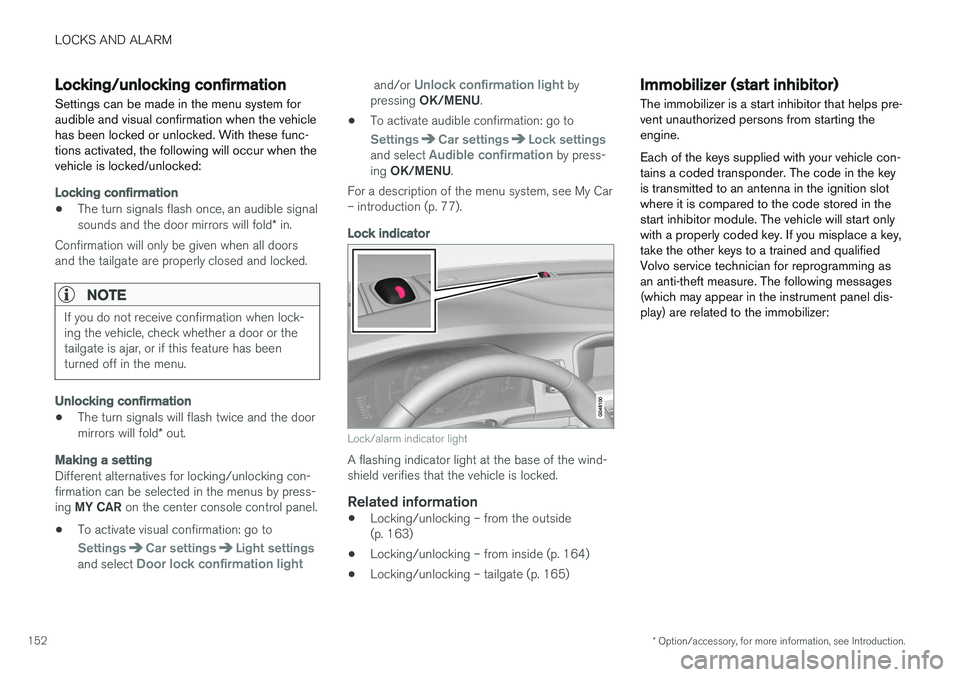
Lock indicator
Lock/alarm indicator light
A flashing indicator light at the base of the wind- shield verifies that the vehicle is locked.
Related information
• Locking/unlocking – from the outside(p. 163)
• Locking/unlocking – from inside (p. 164)
• Locking/unlocking – tailgate (p. 165)
Immobilizer (start inhibitor)
The immobilizer is a start inhibitor that helps pre- vent unauthorized persons from starting theengine. Each of the keys supplied with your vehicle con- tains a coded transponder. The code in the keyis transmitted to an antenna in the ignition slotwhere it is compared to the code stored in thestart inhibitor module. The vehicle will start onlywith a properly coded key. If you misplace a key,take the other keys to a trained and qualifiedVolvo service technician for reprogramming asan anti-theft measure. The following messages(which may appear in the instrument panel dis-play) are related to the immobilizer:
Page 156 of 398
||
LOCKS AND ALARM
* Option/accessory, for more information, see Introduction.
154
Unlock – Press the Unlock button on the
remote once to unlock the driver's door. After a short pause, press the Unlock button a second time within 10 seconds to unlock theother doors and the tailgate. This function can be changed so that all doors unlock at the same time by pressing My Car and
going to
SettingsCar settingsLock
settings
Change doors unlock setting. For
a description of the menu system, see My Car – introduction (p. 77).
Approach lighting – As you approach the
vehicle, press the button on the remote key to light the interior lighting, parking lights, license plate lighting and the lights in the door mirrors *.
These lights will switch off automatically after 30, 60 or 90 seconds. For a description of the menusystem, see My Car – introduction (p. 77).
Unlock tailgate – Press the button twice
within several seconds to disarm the alarm sys- tem (the alarm indicator light on the dashboardwill go out), and unlock only the tailgate. Pressing this button for several seconds also opens the tailgate on models equipped with theoptional power tailgate.
NOTE
As an added safety precaution, the parking lights will come on automatically for a shortperiod when the tailgate has been opened.
After closing, the tailgate will not automatically relock. Press Lock to relock it and rearm thealarm. For information on opening the tailgate from the passenger compartment, see Locking/unlocking– tailgate (p. 165)
Panic alarm – This button can be used to
attract attention during emergency situations. To activate the panic alarm, press and hold this button for at least 3 seconds or press it twicewithin 3 seconds. The turn signals and horn willbe activated. The panic alarm will stop automati-cally after 2 minutes and 45 seconds. To deactivate, wait approximately 5 seconds and press the button again. The Panic alarm button will not unlock the vehi- cle.
Related information
• Locking/unlocking – from inside (p. 164)
• Locking/unlocking – from the outside(p. 163)
• Locking/unlocking confirmation (p. 152)
Remote key – range The remote key has a range of approximately 60 ft. (20 m) from the vehicle.
NOTE
Buildings or other obstacles may interfere with the function of the remote key. The vehi-cle can also be locked or unlocked with thekey blade, see Alarm-related functions(p. 171).
If the remote key is removed from the vehicle while the engine is running or if the ignition is in mode
I or II and all of the doors are closed, a
message will appear in the instrument panel dis- play and there will be an audible signal. When the remote key is returned to the vehicle, the message will be erased and the audible sig-nal will stop after one of the following has beendone:
• The remote key is inserted in the ignition slot
• The vehicle's speed exceeds 20 mph(30 km/h)
• The
OK button on the left steering wheel
lever is pressed
Related information
• Remote key – functions (p. 153)
Page 162 of 398
LOCKS AND ALARM
* Option/accessory, for more information, see Introduction.
160
Keyless drive * – unlocking with key
blade
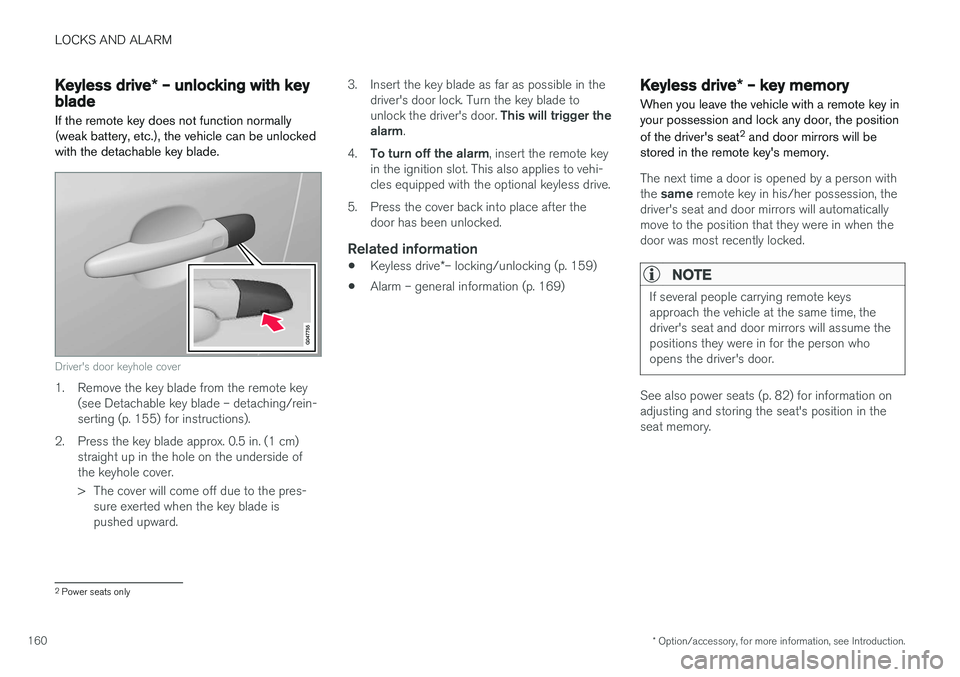
If the remote key does not function normally (weak battery, etc.), the vehicle can be unlockedwith the detachable key blade.
Driver's door keyhole cover
1. Remove the key blade from the remote key (see Detachable key blade – detaching/rein- serting (p. 155) for instructions).
2. Press the key blade approx. 0.5 in. (1 cm) straight up in the hole on the underside ofthe keyhole cover.
> The cover will come off due to the pres-sure exerted when the key blade is pushed upward. 3. Insert the key blade as far as possible in the
driver's door lock. Turn the key blade to unlock the driver's door. This will trigger the
alarm .
4. To turn off the alarm , insert the remote key
in the ignition slot. This also applies to vehi- cles equipped with the optional keyless drive.
5. Press the cover back into place after the door has been unlocked.
Related information
• Keyless drive
*– locking/unlocking (p. 159)
• Alarm – general information (p. 169)
Keyless drive
* – key memory
When you leave the vehicle with a remote key in your possession and lock any door, the position of the driver's seat 2
and door mirrors will be
stored in the remote key's memory.
The next time a door is opened by a person with the same remote key in his/her possession, the
driver's seat and door mirrors will automatically move to the position that they were in when thedoor was most recently locked.
NOTE
If several people carrying remote keys approach the vehicle at the same time, thedriver's seat and door mirrors will assume thepositions they were in for the person whoopens the driver's door.
See also power seats (p. 82) for information on adjusting and storing the seat's position in theseat memory.
2 Power seats only
Page 242 of 398
DRIVER SUPPORT
240
Rear Park Assist Camera (PAC) – guiding and marker lines
Guiding lines
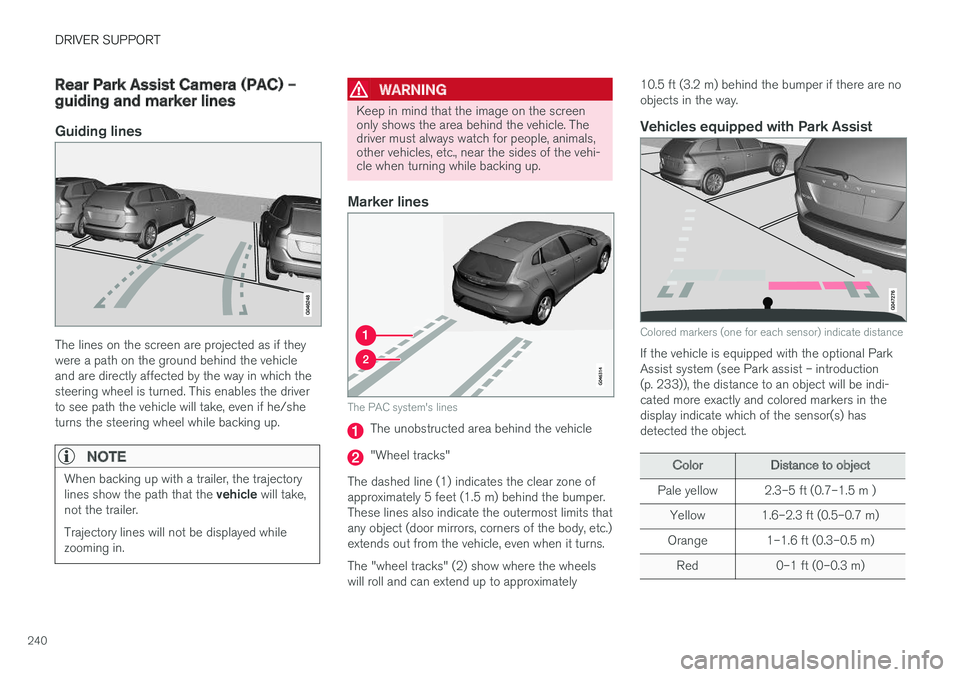
The lines on the screen are projected as if they were a path on the ground behind the vehicleand are directly affected by the way in which thesteering wheel is turned. This enables the driverto see path the vehicle will take, even if he/sheturns the steering wheel while backing up.
NOTE
When backing up with a trailer, the trajectory lines show the path that the vehicle will take,
not the trailer. Trajectory lines will not be displayed while zooming in.
WARNING
Keep in mind that the image on the screen only shows the area behind the vehicle. Thedriver must always watch for people, animals,other vehicles, etc., near the sides of the vehi-cle when turning while backing up.
Marker lines
The PAC system's lines
The unobstructed area behind the vehicle
"Wheel tracks"
The dashed line (1) indicates the clear zone of approximately 5 feet (1.5 m) behind the bumper.These lines also indicate the outermost limits thatany object (door mirrors, corners of the body, etc.)extends out from the vehicle, even when it turns. The "wheel tracks" (2) show where the wheels will roll and can extend up to approximately 10.5 ft (3.2 m) behind the bumper if there are noobjects in the way.
Vehicles equipped with Park Assist
Colored markers (one for each sensor) indicate distance
If the vehicle is equipped with the optional Park Assist system (see Park assist – introduction(p. 233)), the distance to an object will be indi-cated more exactly and colored markers in thedisplay indicate which of the sensor(s) hasdetected the object.
ColorDistance to object
Pale yellow2.3–5 ft (0.7–1.5 m )
Yellow1.6–2.3 ft (0.5–0.7 m)
Orange1–1.6 ft (0.3–0.5 m)
Red0–1 ft (0–0.3 m)
Page 244 of 398
||
DRIVER SUPPORT
* Option/accessory, for more information, see Introduction.
242
NOTE
The door panel indicator light illuminates on the side of the vehicle where the system hasdetected another vehicle. If your vehicle ispassed on both sides at the same time, bothlights will illuminate.
The system helps provide information about:
• Other vehicles in your door mirrors' "blind area"
• Vehicles that are about to pass your vehiclein the left and/or right lanes
• Cross Traffic Alert (CTA) is a supplemen-tary BLIS function
intended to detect vehi-
cles crossing behind your vehicle while youare backing up.
WARNING
• BLIS and CTA are information systems, NOT warning or safety systems and donot function in all situations.
• BLIS and CTA do not eliminate the needfor you to visually confirm the conditionsaround you, and the need for you to turnyour head and shoulders to make surethat you can safely change lanes or backup.
• As the driver, you have full responsibilityfor changing lanes/backing up in a safemanner.
Radar sensor type approval
USA FCC ID: L2C0055TR Canada IC: 3432A-0055TR This device complies with Part 15 of the FCC Rules and with Industry Canada license-exemptRSS standard(s). Operation is subject to the fol-lowing two conditions: (1) This device may notcause harmful interference, and (2) This devicemust accept any interference received, includinginterference that may cause undesired operation. The term “IC:” before the radio certification num- ber only signifies that Industry Canada technicalspecifications were met.
WARNING
Changes or modifications not expressively approved by the party responsible for compli-ance could void the user's authority to oper-ate the equipment.
Related information
•
BLIS
* – function (p. 242)
• BLIS
* – operation (p. 243)
• BLIS
* – Cross Traffic Alert (CTA) (p. 244)
• BLIS
* – limitations (p. 245)
• BLIS
* – messages (p. 246)
BLIS * – function
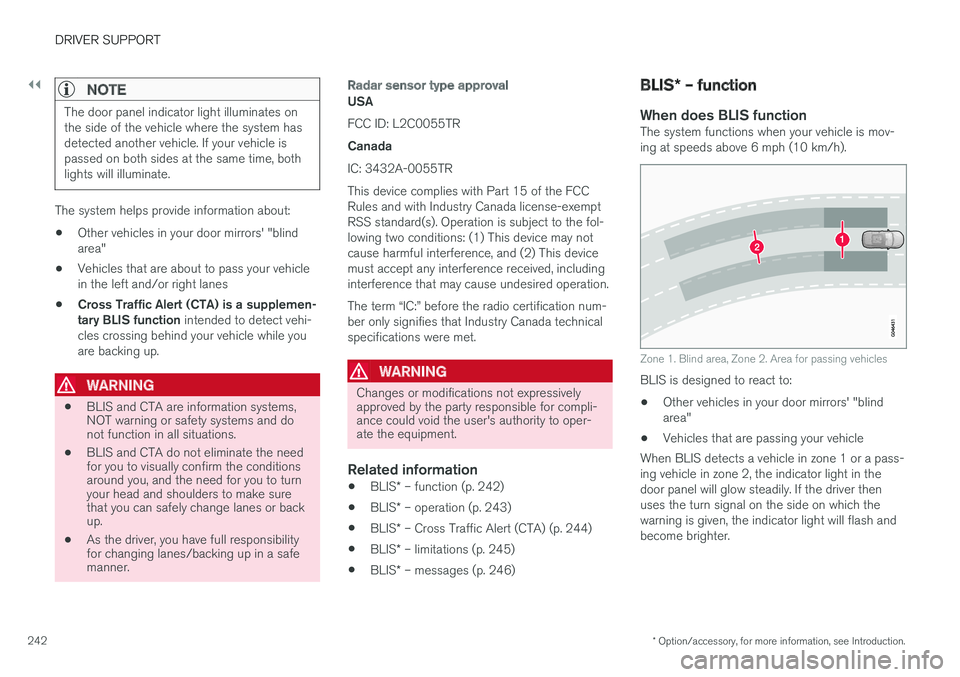
When does BLIS functionThe system functions when your vehicle is mov- ing at speeds above 6 mph (10 km/h).
Zone 1. Blind area, Zone 2. Area for passing vehicles
BLIS is designed to react to: • Other vehicles in your door mirrors' "blind area"
• Vehicles that are passing your vehicle
When BLIS detects a vehicle in zone 1 or a pass-ing vehicle in zone 2, the indicator light in thedoor panel will glow steadily. If the driver thenuses the turn signal on the side on which thewarning is given, the indicator light will flash andbecome brighter.
Page 250 of 398
STARTING AND DRIVING
* Option/accessory, for more information, see Introduction.
248
Starting the engine
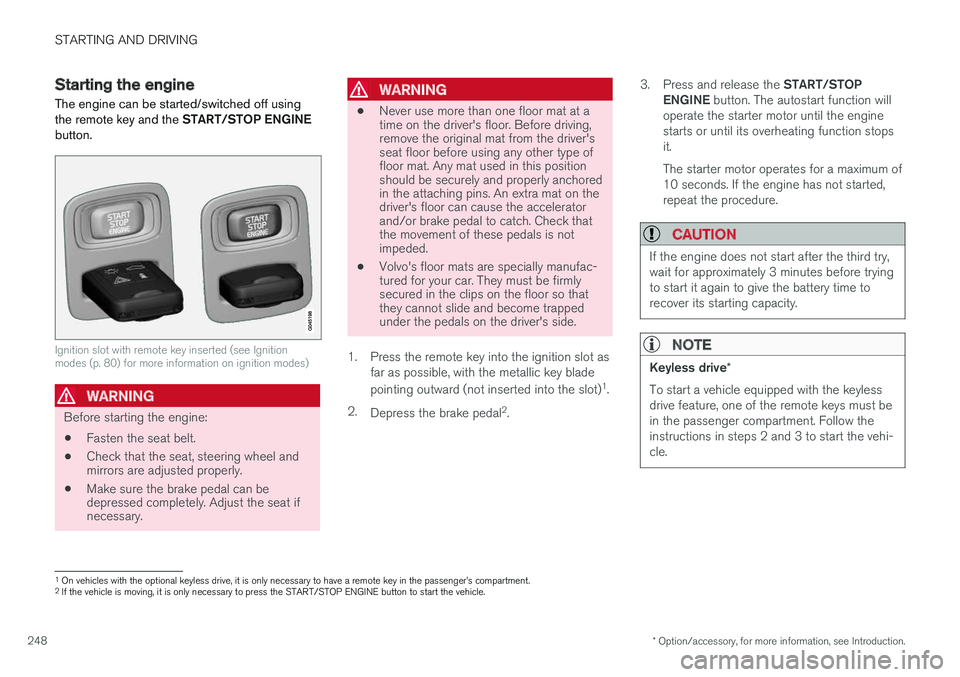
The engine can be started/switched off using the remote key and the START/STOP ENGINE
button.
Ignition slot with remote key inserted (see Ignition modes (p. 80) for more information on ignition modes)
WARNING
Before starting the engine:
• Fasten the seat belt.
• Check that the seat, steering wheel and mirrors are adjusted properly.
• Make sure the brake pedal can bedepressed completely. Adjust the seat ifnecessary.
WARNING
•Never use more than one floor mat at a time on the driver's floor. Before driving,remove the original mat from the driver'sseat floor before using any other type offloor mat. Any mat used in this positionshould be securely and properly anchoredin the attaching pins. An extra mat on thedriver's floor can cause the acceleratorand/or brake pedal to catch. Check thatthe movement of these pedals is notimpeded.
• Volvo's floor mats are specially manufac-tured for your car. They must be firmlysecured in the clips on the floor so thatthey cannot slide and become trappedunder the pedals on the driver's side.
1. Press the remote key into the ignition slot as far as possible, with the metallic key blade pointing outward (not inserted into the slot) 1
.
2. Depress the brake pedal 2
. 3.
Press and release the START/STOP
ENGINE button. The autostart function will
operate the starter motor until the engine starts or until its overheating function stopsit. The starter motor operates for a maximum of 10 seconds. If the engine has not started,repeat the procedure.
CAUTION
If the engine does not start after the third try, wait for approximately 3 minutes before tryingto start it again to give the battery time torecover its starting capacity.
NOTE
Keyless drive *
To start a vehicle equipped with the keyless drive feature, one of the remote keys must bein the passenger compartment. Follow theinstructions in steps 2 and 3 to start the vehi-cle.
1 On vehicles with the optional keyless drive, it is only necessary to have a remote key in the passenger
Page 336 of 398
MAINTENANCE AND SERVICING
334
CAUTION
Keep the area around the power steering fluid reservoir clean when checking.
Bulbs – introduction
Certain bulbs can be replaced by the vehicle's owner. However, the bulbs on the following listshould only be replaced by a trained and quali-fied Volvo service technician.
All bulb specifications are listed in Bulbs – speci-
fications (p. 341).
• Active Bending Lights
• Daytime running lights, front parking lights
• Front side marker lights
• Turn signals in the door mirrors
• Approach lighting in the door mirrors
• Interior lighting (except for the front footwelllighting)
• Rear parking lights
• Rear side marker lights
• Rear turn signals
• LED bulbs
NOTE
•
For information regarding any bulbs not mentioned in this section, please contactyour Volvo retailer or a trained andauthorized Volvo service technician.
• Always switch off the ignition before star-ting to replace a bulb.
• If an error message remains in the dis-play after a faulty bulb has been replaced,contact an authorized Volvo workshop.
• Condensation may form temporarily onthe inside of the lenses of exterior lightssuch as headlights, fog lights, or taillights.This is normal and the lights aredesigned to withstand moisture. Normally,condensation will dissipate after thelights have been on for a short time.
• The optional Active Bending Light bulbscontain trace amounts of mercury. Thesebulbs should always be disposed of by atrained and qualified Volvo service techni-cian.
CAUTION
Never touch the glass of bulbs with your fin- gers. Grease and oils from your fingers vapor-ize in the heat and will leave a deposit on thereflector, which will damage it.
Page 337 of 398
MAINTENANCE AND SERVICING
}}
* Option/accessory, for more information, see Introduction.335
WARNING
•The engine should not be running when changing bulbs.
• If the engine has been running just priorto replacing bulbs in the headlight hous-ing, please keep in mind that componentsin the engine compartment will be hot.
WARNING
•
Active Bending Lights
* – due to the high
voltage used by these headlights, these bulbs should only be replaced by atrained and qualified Volvo service techni-cian.
• Turn off the lights and remove the remotekey from the ignition before changing anybulbs.
Related information
•Bulbs – headlight housing (p. 335)
• Bulbs – vanity mirror lighting (p. 341)
• Bulbs – cargo area lighting (p. 340)
• Bulbs – license plate lighting (p. 340)
Bulbs – headlight housing
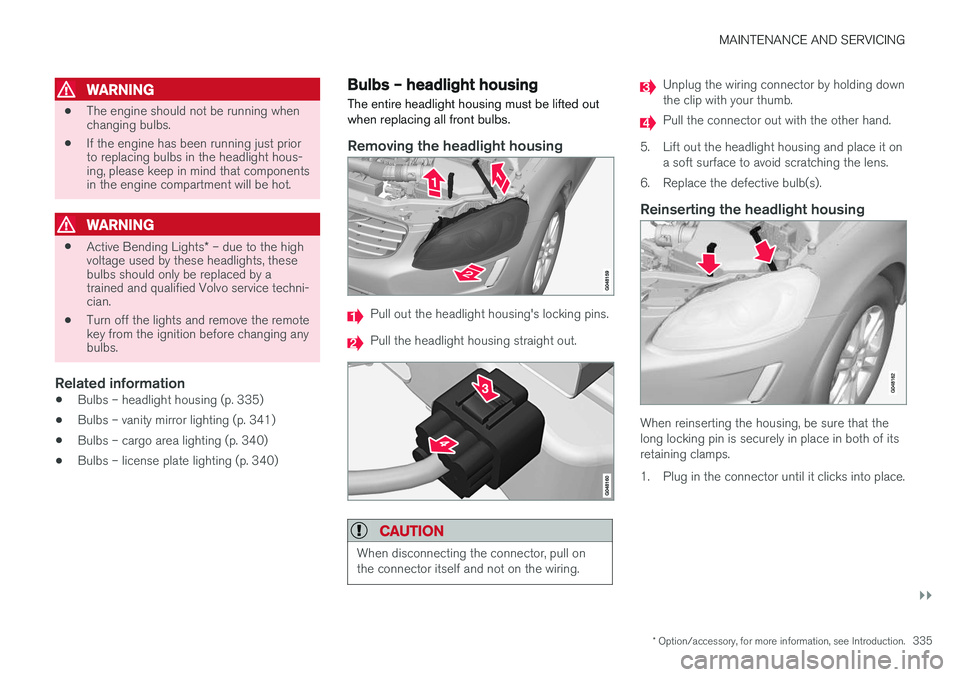
The entire headlight housing must be lifted out when replacing all front bulbs.
Removing the headlight housing
Pull out the headlight housing's locking pins.
Pull the headlight housing straight out.
CAUTION
When disconnecting the connector, pull on the connector itself and not on the wiring.
Unplug the wiring connector by holding down the clip with your thumb.
Pull the connector out with the other hand.
5. Lift out the headlight housing and place it on a soft surface to avoid scratching the lens.
6. Replace the defective bulb(s).
Reinserting the headlight housing
When reinserting the housing, be sure that the long locking pin is securely in place in both of itsretaining clamps.
1. Plug in the connector until it clicks into place.
Page 343 of 398
MAINTENANCE AND SERVICING
* Option/accessory, for more information, see Introduction.341
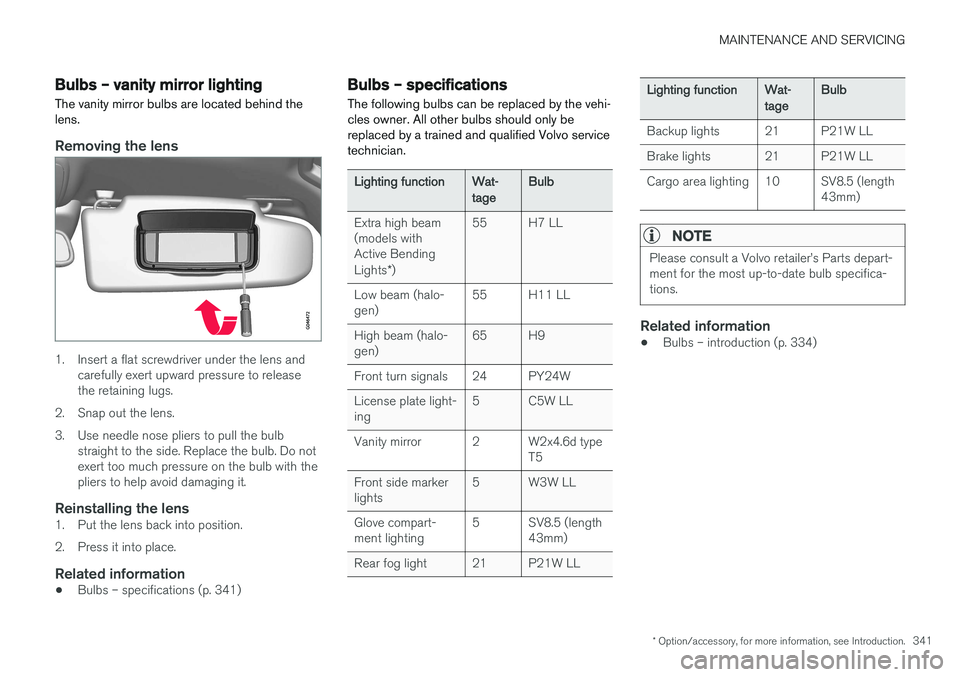
Bulbs – vanity mirror lighting
The vanity mirror bulbs are located behind the lens.
Removing the lens
1. Insert a flat screwdriver under the lens and carefully exert upward pressure to release the retaining lugs.
2. Snap out the lens.
3. Use needle nose pliers to pull the bulb straight to the side. Replace the bulb. Do not exert too much pressure on the bulb with thepliers to help avoid damaging it.
Reinstalling the lens1. Put the lens back into position.
2. Press it into place.
Related information
• Bulbs – specifications (p. 341)
Bulbs – specifications The following bulbs can be replaced by the vehi- cles owner. All other bulbs should only bereplaced by a trained and qualified Volvo servicetechnician.
Lighting functionWat- tageBulb
Extra high beam (models withActive Bending Lights
*)55H7 LL
Low beam (halo- gen)55H11 LL
High beam (halo- gen)65H9
Front turn signals24PY24W
License plate light- ing5C5W LL
Vanity mirror2W2x4.6d type T5
Front side marker lights5W3W LL
Glove compart- ment lighting5SV8.5 (length 43mm)
Rear fog light21P21W LL
Lighting functionWat- tageBulb
Backup lights21P21W LL
Brake lights21P21W LL
Cargo area lighting10SV8.5 (length 43mm)
NOTE
Please consult a Volvo retailer