turn signal VOLVO XC60 2017 Owner´s Manual
[x] Cancel search | Manufacturer: VOLVO, Model Year: 2017, Model line: XC60, Model: VOLVO XC60 2017Pages: 398, PDF Size: 9.17 MB
Page 192 of 398
||
DRIVER SUPPORT
190
WARNING
The vehicle may accelerate quickly after has been pressed if its current speed is con- siderably lower than the set speed.
Standby mode due to action by the driver
ACC is temporarily deactivated and put in standby mode:• if the brakes are applied
• if the gear selector is moved to
N
• if the driver drives faster than the set speed for more than
1 minute.
In this happens, the driver will have to regulate
the vehicle's speed.
NOTE
If the accelerator pedal is only depressed for a short time, such as when passing anothervehicle, ACC is deactivated temporarily and isreactivated when the pedal is released.
Automatic standby modeACC is linked to other systems such as the sta- bility system. If this system is not functioningproperly, ACC will switch off automatically. In the event of automatic deactivation, an audible signal will sound and the message
Cruise control Cancelled
is shown in the instrument
panel. The driver must then intervene and adapt the vehicle's speed to the surrounding traffic andregulate the distance to the vehicle ahead. An automatic switch to standby mode may be caused if:
• engine speed (rpm) is too high/low
• The driver's door is opened
• The driver unbuckles his/her seat belt
• the vehicle's speed goes below 18 mph(30 km/h)
• the wheels lose traction
• brake temperature is high
• the radar sensor is obstructed by, for exam-ple, wet snow or rain.
Resuming the set speedIf ACC is in standby mode, it can be reactivated by pressing the
button on the steering wheel
keypad. The vehicle will return to the most recently set speed.
WARNING
The vehicle may accelerate quickly after has been pressed if its current speed is con- siderably lower than the set speed.
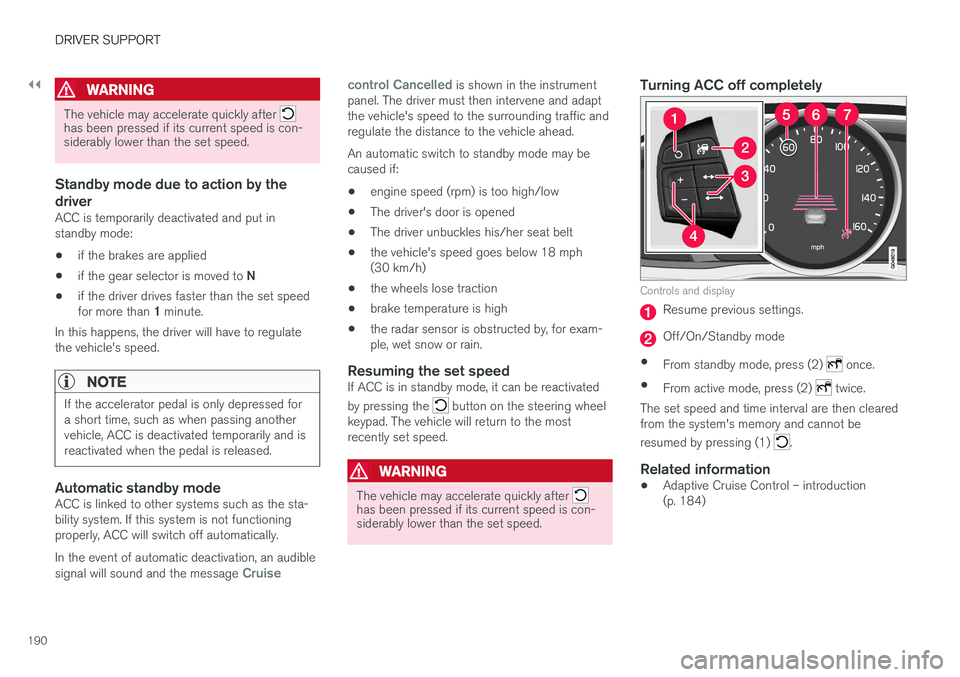
Turning ACC off completely
Controls and display
Resume previous settings.
Off/On/Standby mode
• From standby mode, press (2)
once.
• From active mode, press (2)
twice.
The set speed and time interval are then cleared from the system's memory and cannot be resumed by pressing (1)
.
Related information
• Adaptive Cruise Control – introduction (p. 184)
Page 198 of 398
DRIVER SUPPORT
196
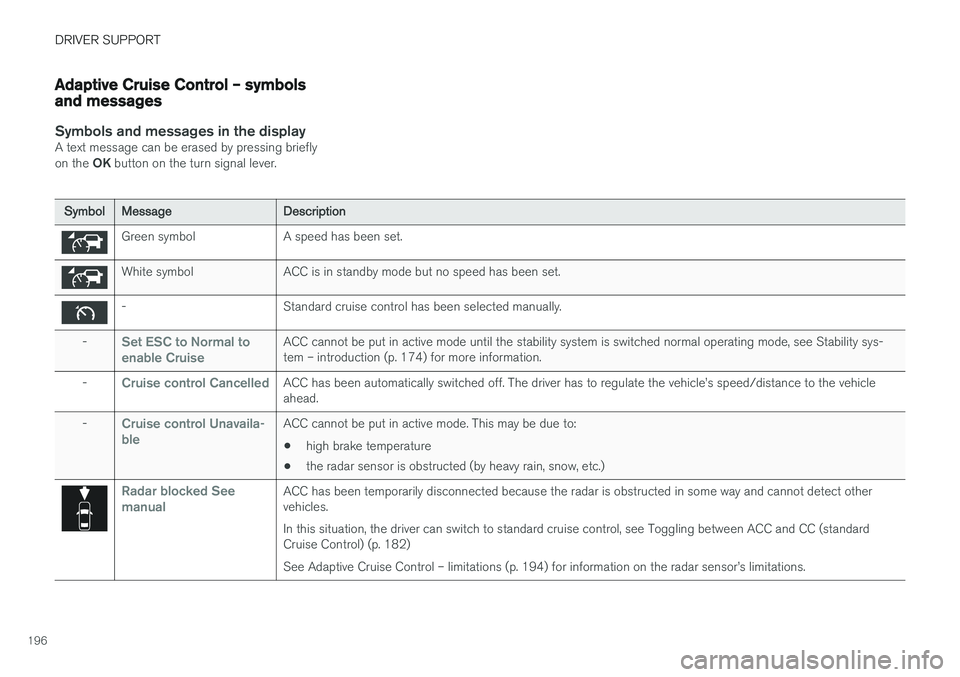
Adaptive Cruise Control – symbols and messages
Symbols and messages in the displayA text message can be erased by pressing briefly on the OK button on the turn signal lever.
SymbolMessageDescription
Green symbolA speed has been set.
White symbolACC is in standby mode but no speed has been set.
-Standard cruise control has been selected manually.
-Set ESC to Normal to enable CruiseACC cannot be put in active mode until the stability system is switched normal operating mode, see Stability sys- tem – introduction (p. 174) for more information.
-Cruise control CancelledACC has been automatically switched off. The driver has to regulate the vehicle
Page 200 of 398
DRIVER SUPPORT
198
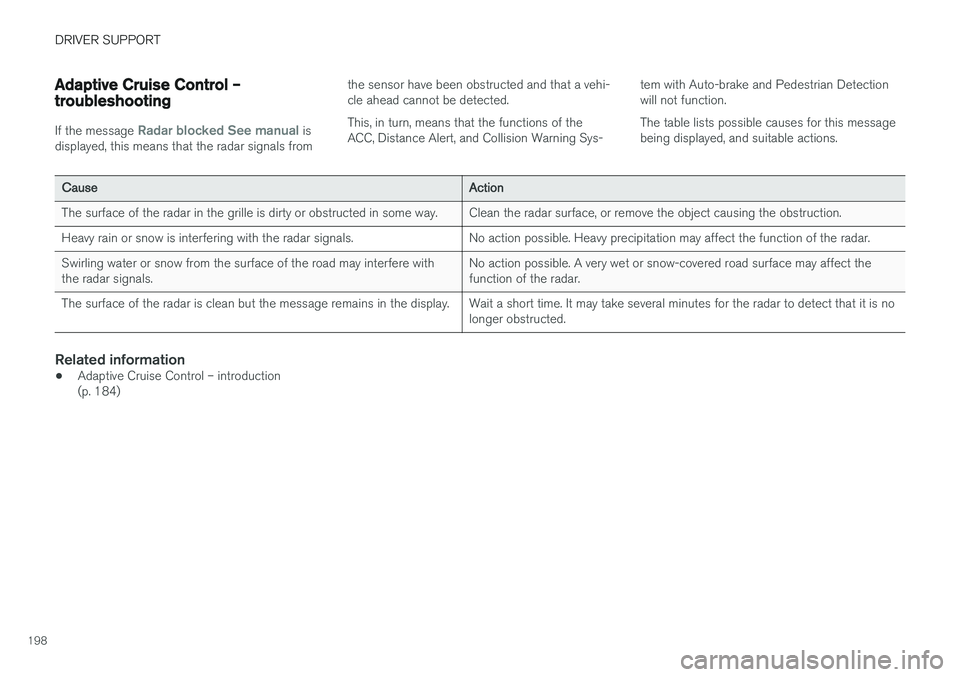
Adaptive Cruise Control – troubleshooting
If the message Radar blocked See manual is
displayed, this means that the radar signals from the sensor have been obstructed and that a vehi- cle ahead cannot be detected. This, in turn, means that the functions of the ACC, Distance Alert, and Collision Warning Sys-
tem with Auto-brake and Pedestrian Detectionwill not function. The table lists possible causes for this message being displayed, and suitable actions.
CauseAction
The surface of the radar in the grille is dirty or obstructed in some way.Clean the radar surface, or remove the object causing the obstruction.
Heavy rain or snow is interfering with the radar signals.No action possible. Heavy precipitation may affect the function of the radar.
Swirling water or snow from the surface of the road may interfere with the radar signals.No action possible. A very wet or snow-covered road surface may affect the function of the radar.
The surface of the radar is clean but the message remains in the display.Wait a short time. It may take several minutes for the radar to detect that it is no longer obstructed.
Related information
•
Adaptive Cruise Control – introduction (p. 184)
Page 204 of 398
DRIVER SUPPORT
202
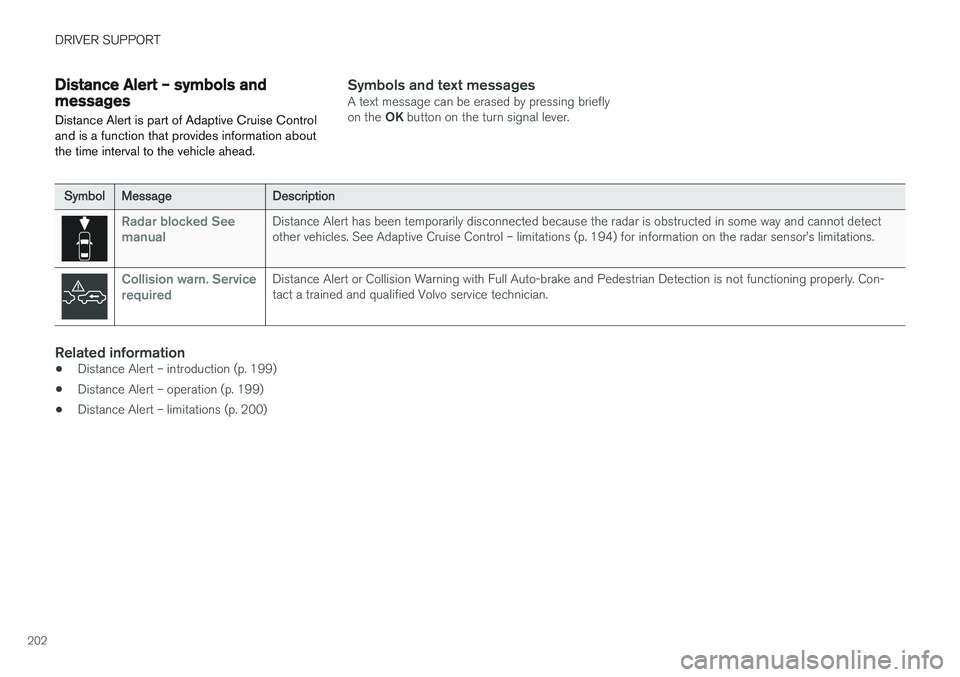
Distance Alert – symbols and messagesDistance Alert is part of Adaptive Cruise Control and is a function that provides information aboutthe time interval to the vehicle ahead.Symbols and text messagesA text message can be erased by pressing briefly on the OK button on the turn signal lever.
SymbolMessageDescription
Radar blocked See manualDistance Alert has been temporarily disconnected because the radar is obstructed in some way and cannot detect other vehicles. See Adaptive Cruise Control – limitations (p. 194) for information on the radar sensor
Page 210 of 398
DRIVER SUPPORT
208
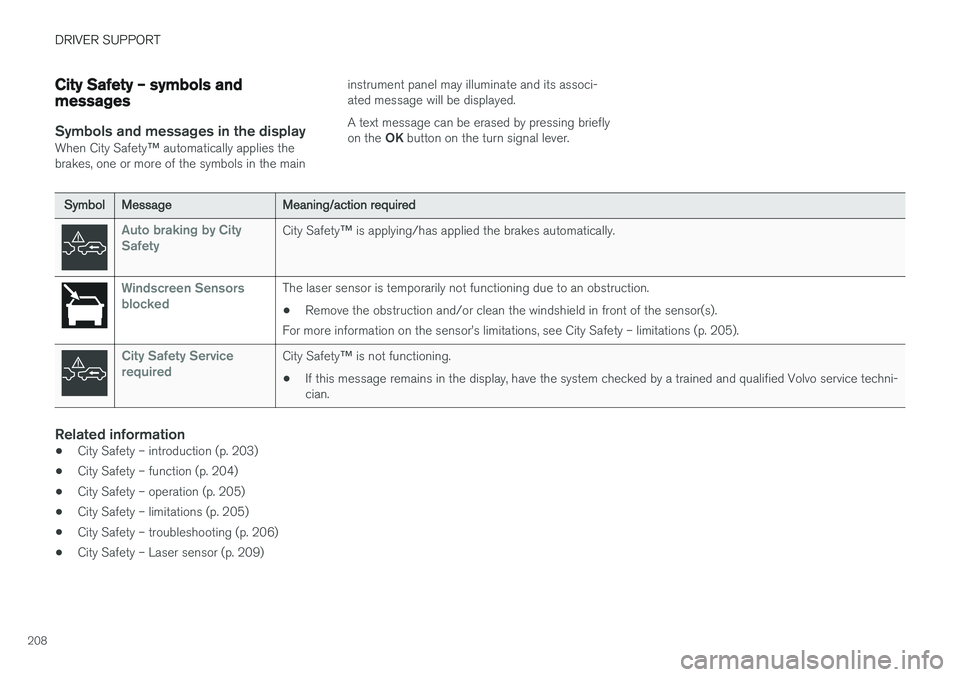
City Safety – symbols and messages
Symbols and messages in the display
When City Safety™ automatically applies the
brakes, one or more of the symbols in the main instrument panel may illuminate and its associ- ated message will be displayed. A text message can be erased by pressing briefly on the
OK button on the turn signal lever.
SymbolMessageMeaning/action required
Auto braking by City SafetyCity Safety ™ is applying/has applied the brakes automatically.
Windscreen Sensors blockedThe laser sensor is temporarily not functioning due to an obstruction.
• Remove the obstruction and/or clean the windshield in front of the sensor(s).
For more information on the sensor
Page 223 of 398
DRIVER SUPPORT
}}
221
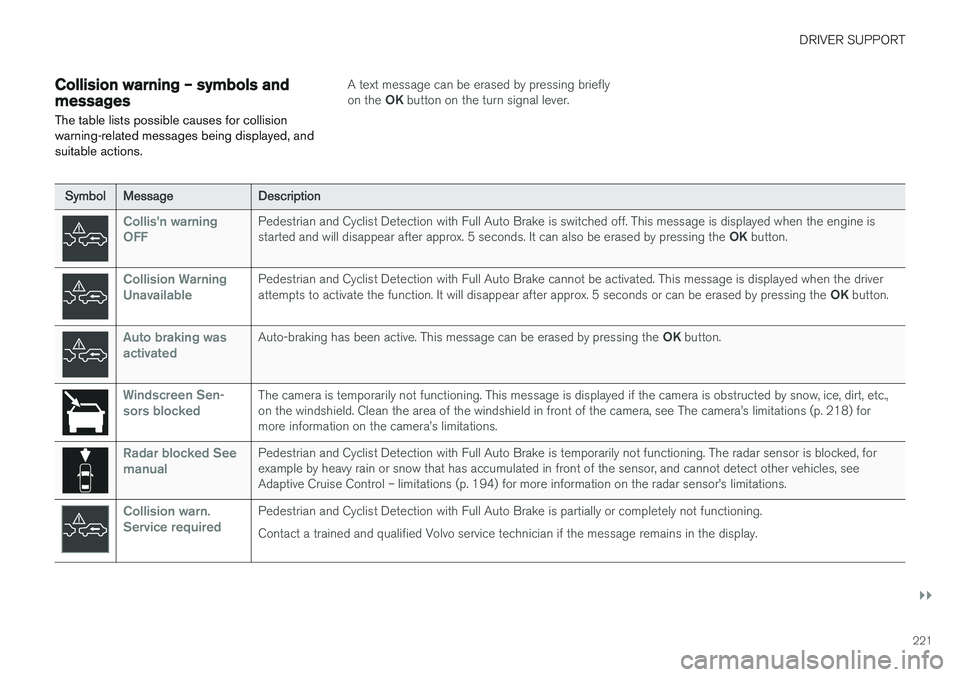
Collision warning – symbols and messages
The table lists possible causes for collision warning-related messages being displayed, andsuitable actions.A text message can be erased by pressing briefly on the OK button on the turn signal lever.
SymbolMessageDescription
Collis'n warning OFFPedestrian and Cyclist Detection with Full Auto Brake is switched off. This message is displayed when the engine is started and will disappear after approx. 5 seconds. It can also be erased by pressing the OK button.
Collision Warning UnavailablePedestrian and Cyclist Detection with Full Auto Brake cannot be activated. This message is displayed when the driver attempts to activate the function. It will disappear after approx. 5 seconds or can be erased by pressing the OK button.
Auto braking was activatedAuto-braking has been active. This message can be erased by pressing the OK button.
Windscreen Sen- sors blockedThe camera is temporarily not functioning. This message is displayed if the camera is obstructed by snow, ice, dirt, etc., on the windshield. Clean the area of the windshield in front of the camera, see The camera
Page 233 of 398
DRIVER SUPPORT
}}
231
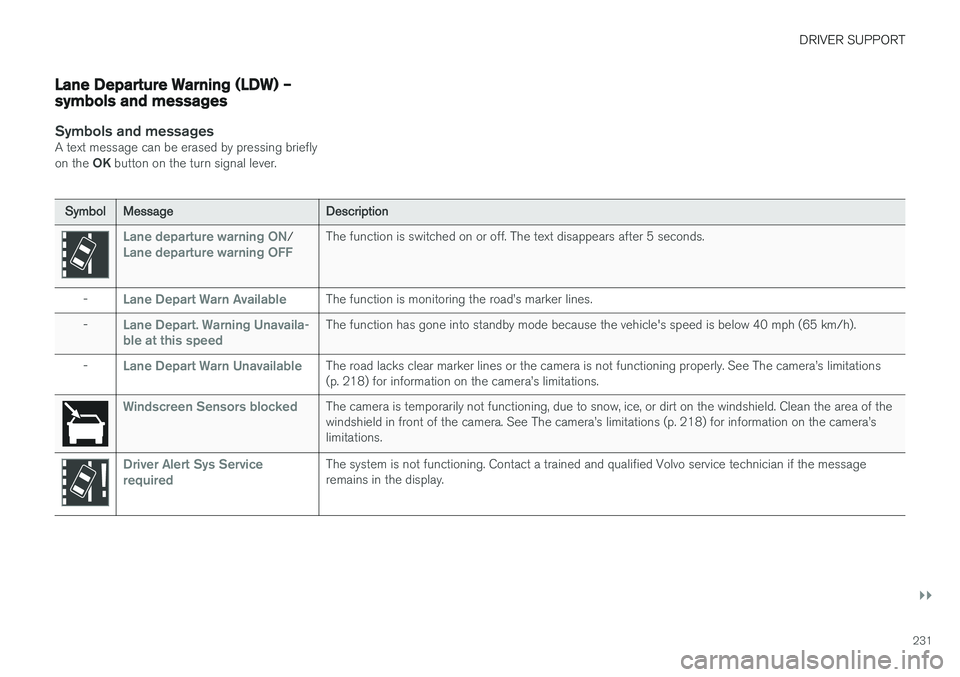
Lane Departure Warning (LDW) – symbols and messages
Symbols and messagesA text message can be erased by pressing briefly on the OK button on the turn signal lever.
SymbolMessageDescription
Lane departure warning ON/Lane departure warning OFFThe function is switched on or off. The text disappears after 5 seconds.
-Lane Depart Warn AvailableThe function is monitoring the road
Page 244 of 398
||
DRIVER SUPPORT
* Option/accessory, for more information, see Introduction.
242
NOTE
The door panel indicator light illuminates on the side of the vehicle where the system hasdetected another vehicle. If your vehicle ispassed on both sides at the same time, bothlights will illuminate.
The system helps provide information about:
• Other vehicles in your door mirrors' "blind area"
• Vehicles that are about to pass your vehiclein the left and/or right lanes
• Cross Traffic Alert (CTA) is a supplemen-tary BLIS function
intended to detect vehi-
cles crossing behind your vehicle while youare backing up.
WARNING
• BLIS and CTA are information systems, NOT warning or safety systems and donot function in all situations.
• BLIS and CTA do not eliminate the needfor you to visually confirm the conditionsaround you, and the need for you to turnyour head and shoulders to make surethat you can safely change lanes or backup.
• As the driver, you have full responsibilityfor changing lanes/backing up in a safemanner.
Radar sensor type approval
USA FCC ID: L2C0055TR Canada IC: 3432A-0055TR This device complies with Part 15 of the FCC Rules and with Industry Canada license-exemptRSS standard(s). Operation is subject to the fol-lowing two conditions: (1) This device may notcause harmful interference, and (2) This devicemust accept any interference received, includinginterference that may cause undesired operation. The term “IC:” before the radio certification num- ber only signifies that Industry Canada technicalspecifications were met.
WARNING
Changes or modifications not expressively approved by the party responsible for compli-ance could void the user's authority to oper-ate the equipment.
Related information
•
BLIS
* – function (p. 242)
• BLIS
* – operation (p. 243)
• BLIS
* – Cross Traffic Alert (CTA) (p. 244)
• BLIS
* – limitations (p. 245)
• BLIS
* – messages (p. 246)
BLIS * – function
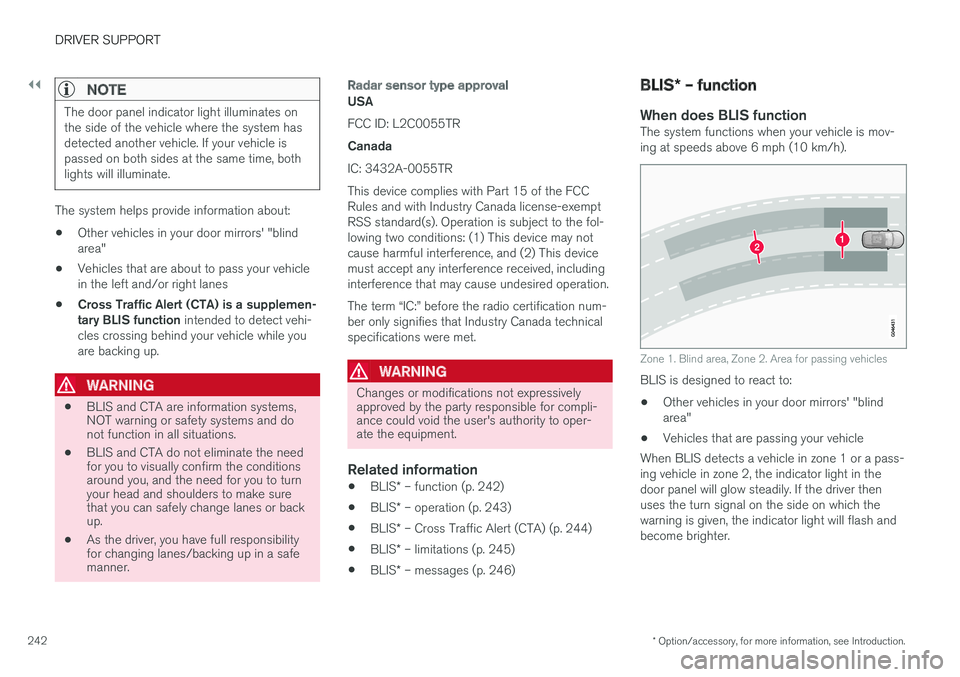
When does BLIS functionThe system functions when your vehicle is mov- ing at speeds above 6 mph (10 km/h).
Zone 1. Blind area, Zone 2. Area for passing vehicles
BLIS is designed to react to: • Other vehicles in your door mirrors' "blind area"
• Vehicles that are passing your vehicle
When BLIS detects a vehicle in zone 1 or a pass-ing vehicle in zone 2, the indicator light in thedoor panel will glow steadily. If the driver thenuses the turn signal on the side on which thewarning is given, the indicator light will flash andbecome brighter.
Page 246 of 398
DRIVER SUPPORT
* Option/accessory, for more information, see Introduction.
244
BLIS * – Cross Traffic Alert (CTA)
Cross Traffic Alert (CTA) is a supplementary BLIS 12
function intended to detect vehicles
crossing behind your vehicle while you are back- ing up.
Park assist/CTA button
On vehicles equipped with the optional Park assist system (p. 233), Cross Traffic Alert (CTA)can be deactivated/reactivated by pressing thePark assist button on the center console. TheBLIS indicator lights on the front doors will flashwhen CTA is reactivated by pressing the button.
WARNING
• BLIS and CTA are information systems, NOT warning or safety systems and donot function in all situations.
• BLIS and CTA do not eliminate the needfor you to visually confirm the conditionsaround you, and the need for you to turnyour head and shoulders to make surethat you can safely change lanes or backup.
• As the driver, you have full responsibilityfor changing lanes/backing up in a safemanner.
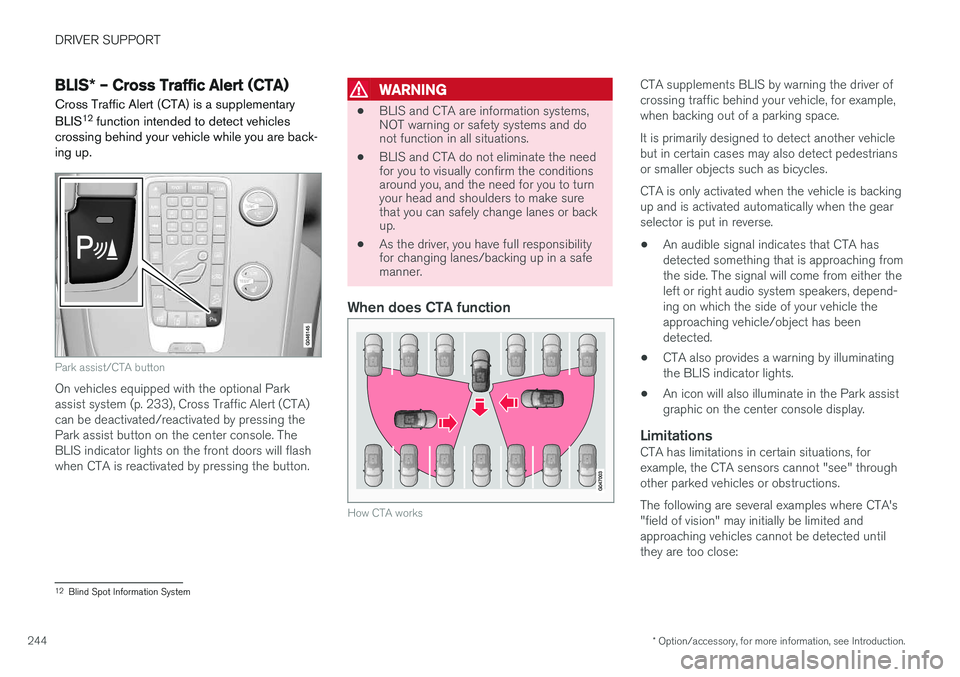
When does CTA function
How CTA works
CTA supplements BLIS by warning the driver of crossing traffic behind your vehicle, for example,when backing out of a parking space. It is primarily designed to detect another vehicle but in certain cases may also detect pedestriansor smaller objects such as bicycles. CTA is only activated when the vehicle is backing up and is activated automatically when the gearselector is put in reverse.
• An audible signal indicates that CTA hasdetected something that is approaching fromthe side. The signal will come from either theleft or right audio system speakers, depend-ing on which the side of your vehicle theapproaching vehicle/object has beendetected.
• CTA also provides a warning by illuminatingthe BLIS indicator lights.
• An icon will also illuminate in the Park assistgraphic on the center console display.
LimitationsCTA has limitations in certain situations, forexample, the CTA sensors cannot "see" throughother parked vehicles or obstructions. The following are several examples where CTA's "field of vision" may initially be limited andapproaching vehicles cannot be detected untilthey are too close:
12
Blind Spot Information System
Page 253 of 398
STARTING AND DRIVING
}}
* Option/accessory, for more information, see Introduction.251
1. The turn signals will flash several times.
2. The engine will start.
3. The turn signals will illuminate for 3 seconds
to indicate that the engine has started.
After the engine has started, the vehicle remains locked but the alarm is disarmed.
Active functions
When the engine is started with ERS, the follow- ing functions are activated: • The climate control system
• The infotainment system.
• Approach lighting
Deactivated functions
When the engine is started with ERS, the follow- ing functions are deactivated: •
Headlights
• Parking lights
• License plate lights
• Windshield wipers
Related information
•
Engine Remote Start (ERS)
* – switching off
the engine (p. 251)
• Engine Remote Start (ERS)
* – introduction
(p. 250)
Engine Remote Start (ERS) * –
switching off the engine
Any of the following will switch off the engine if it has been started with ERS: • Pressing the lock button (1) or the unlock button (2) on the remote key
• Unlocking the vehicle
• Opening a door
• Depressing the accelerator or brake pedal
• Moving the gear selector from the
P position
• If there are less than approx. 2.5 gallons(10 liters) of fuel in the tank
• More than 15 minutes have elapsed.
If the engine has been started with ERS andswitches off, the turn signals will illuminate for3 seconds.
Message in the instrument panel display
If ERS is interrupted, a text message will be dis- played in the instrument panel.
Related information
• Engine Remote Start (ERS)
* – introduction
(p. 250)
• Engine Remote Start (ERS)
* – starting the
engine (p. 250)
Jump starting
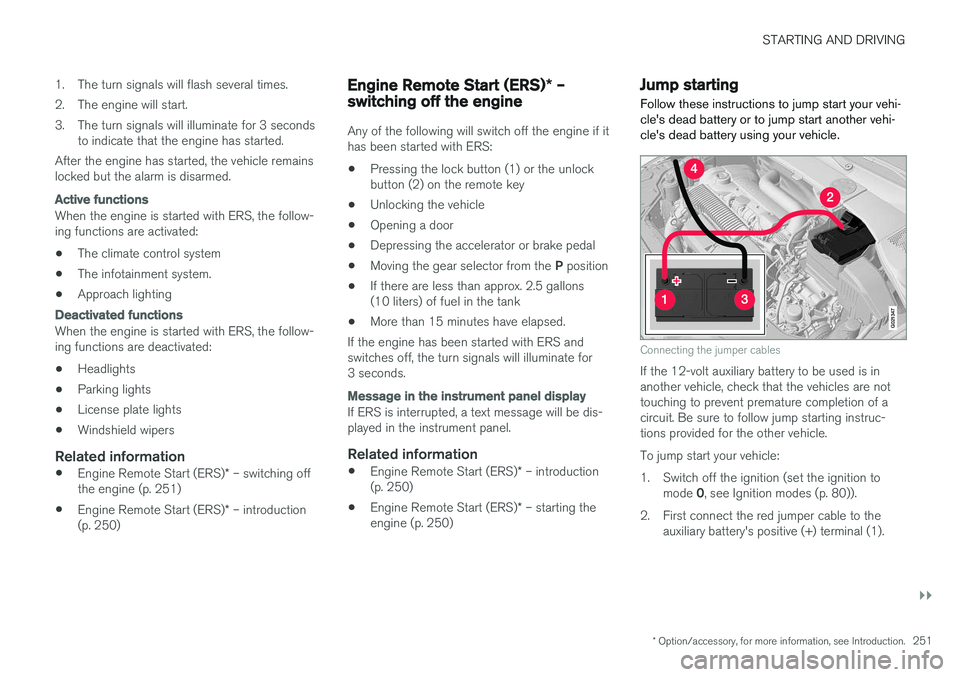
Follow these instructions to jump start your vehi- cle's dead battery or to jump start another vehi-cle's dead battery using your vehicle.
G021347
Connecting the jumper cables
If the 12-volt auxiliary battery to be used is in another vehicle, check that the vehicles are nottouching to prevent premature completion of acircuit. Be sure to follow jump starting instruc-tions provided for the other vehicle. To jump start your vehicle:
1. Switch off the ignition (set the ignition to mode 0, see Ignition modes (p. 80)).
2. First connect the red jumper cable to the auxiliary battery's positive (+) terminal (1).