steering VOLVO XC60 2017 Owner´s Manual
[x] Cancel search | Manufacturer: VOLVO, Model Year: 2017, Model line: XC60, Model: VOLVO XC60 2017Pages: 398, PDF Size: 9.17 MB
Page 242 of 398
DRIVER SUPPORT
240
Rear Park Assist Camera (PAC) – guiding and marker lines
Guiding lines
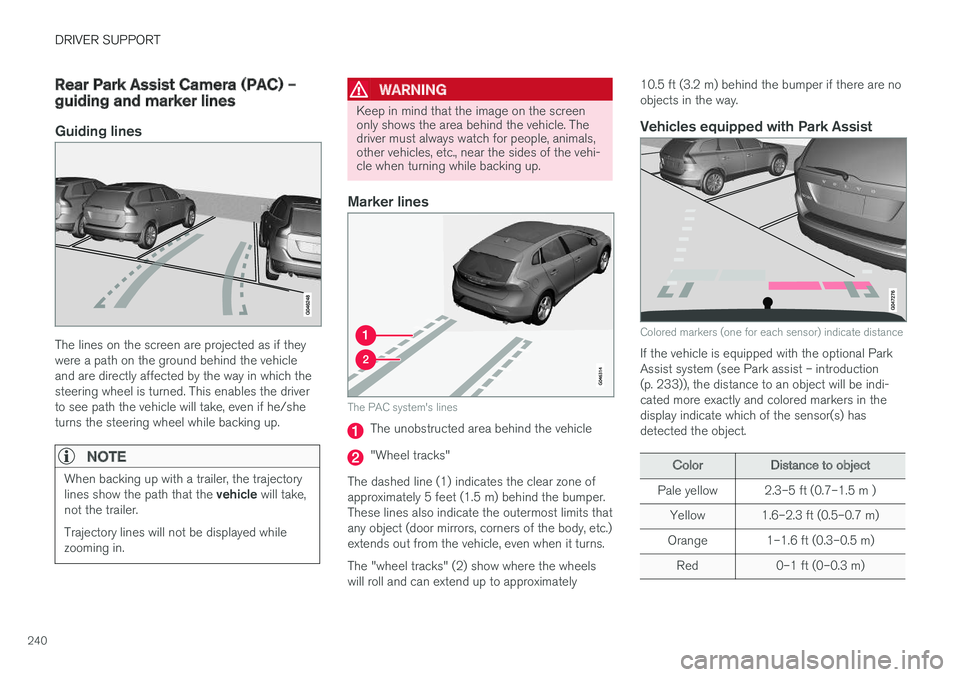
The lines on the screen are projected as if they were a path on the ground behind the vehicleand are directly affected by the way in which thesteering wheel is turned. This enables the driverto see path the vehicle will take, even if he/sheturns the steering wheel while backing up.
NOTE
When backing up with a trailer, the trajectory lines show the path that the vehicle will take,
not the trailer. Trajectory lines will not be displayed while zooming in.
WARNING
Keep in mind that the image on the screen only shows the area behind the vehicle. Thedriver must always watch for people, animals,other vehicles, etc., near the sides of the vehi-cle when turning while backing up.
Marker lines
The PAC system's lines
The unobstructed area behind the vehicle
"Wheel tracks"
The dashed line (1) indicates the clear zone of approximately 5 feet (1.5 m) behind the bumper.These lines also indicate the outermost limits thatany object (door mirrors, corners of the body, etc.)extends out from the vehicle, even when it turns. The "wheel tracks" (2) show where the wheels will roll and can extend up to approximately 10.5 ft (3.2 m) behind the bumper if there are noobjects in the way.
Vehicles equipped with Park Assist
Colored markers (one for each sensor) indicate distance
If the vehicle is equipped with the optional Park Assist system (see Park assist – introduction(p. 233)), the distance to an object will be indi-cated more exactly and colored markers in thedisplay indicate which of the sensor(s) hasdetected the object.
ColorDistance to object
Pale yellow2.3–5 ft (0.7–1.5 m )
Yellow1.6–2.3 ft (0.5–0.7 m)
Orange1–1.6 ft (0.3–0.5 m)
Red0–1 ft (0–0.3 m)
Page 245 of 398
DRIVER SUPPORT
* Option/accessory, for more information, see Introduction.243
WARNING
•BLIS does not function in sharp curves.
• BLIS does not function when your vehicle is backing up.
Related information
•
BLIS
* – introduction (p. 241)
• BLIS
* – operation (p. 243)
• BLIS
* – Cross Traffic Alert (CTA) (p. 244)
• BLIS
* – limitations (p. 245)
• BLIS
* – messages (p. 246)
BLIS * – operation
Activating/deactivating BLIS
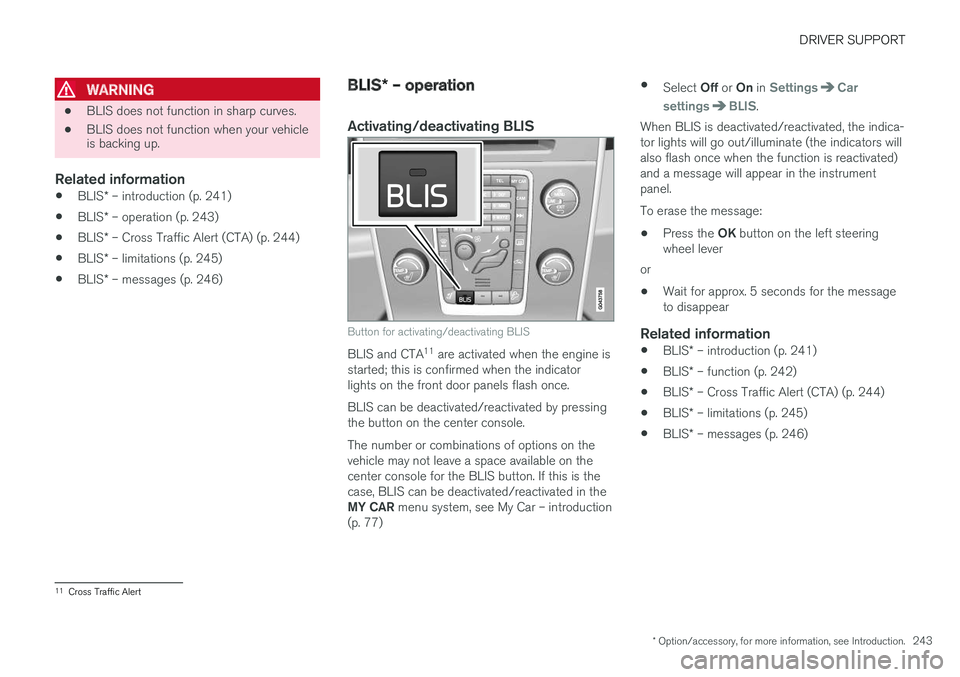
Button for activating/deactivating BLIS
BLIS and CTA 11
are activated when the engine is
started; this is confirmed when the indicator lights on the front door panels flash once. BLIS can be deactivated/reactivated by pressing the button on the center console. The number or combinations of options on the vehicle may not leave a space available on thecenter console for the BLIS button. If this is thecase, BLIS can be deactivated/reactivated in the MY CAR menu system, see My Car – introduction
(p. 77) •
Select Off or On in
SettingsCar
settings
BLIS.
When BLIS is deactivated/reactivated, the indica- tor lights will go out/illuminate (the indicators willalso flash once when the function is reactivated)and a message will appear in the instrumentpanel. To erase the message:
• Press the
OK button on the left steering
wheel lever
or
• Wait for approx. 5 seconds for the message to disappear
Related information
•
BLIS
* – introduction (p. 241)
• BLIS
* – function (p. 242)
• BLIS
* – Cross Traffic Alert (CTA) (p. 244)
• BLIS
* – limitations (p. 245)
• BLIS
* – messages (p. 246)
11
Cross Traffic Alert
Page 248 of 398
||
DRIVER SUPPORT
* Option/accessory, for more information, see Introduction.
246 The BLIS/CTA
13
sensors are located on the
inside of the rear fenders/bumper. The surfaces in front of the sensors must be kept clean for the system to function optimally.
CAUTION
Repairs to the BLIS/CTA systems and/or repainting the rear bumper should only bedone by a trained and qualified Volvo servicetechnician.
Related information
• BLIS
* – introduction (p. 241)
• BLIS
* – function (p. 242)
• BLIS
* – operation (p. 243)
• BLIS
* – Cross Traffic Alert (CTA) (p. 244)
• BLIS
* – messages (p. 246)
BLIS * – messages
If BLIS/CTA 14
are not functioning normally, a
symbol will illuminate in the instrument panel and a text message will be displayed. Follow anyinstructions that may be provided. These messages include:
MessageSystem status
CTA OFFCTA has been switched off manually. BLIS remains active.
BLIS and CTA OFFTrailerattachedBLIS and CTA are temporarily deactivated because a trailer'swiring has been connected tothe vehicle's electrical system.
BLIS and CTA ServicerequiredBLIS and CTA are not func- tioning normally.
• If this message recurs,the systems should beinspected by a trainedand qualified Volvo serv-ice technician.
Messages can be erased by pressing the
OK
button on the left steering wheel lever.
Related information
• BLIS
* – introduction (p. 241)
• BLIS
* – function (p. 242)
• BLIS
* – operation (p. 243)
• BLIS
* – Cross Traffic Alert (CTA) (p. 244)
• BLIS
* – limitations (p. 245)
13
Cross Traffic Alert
14 Cross Traffic Alert
Page 250 of 398
STARTING AND DRIVING
* Option/accessory, for more information, see Introduction.
248
Starting the engine
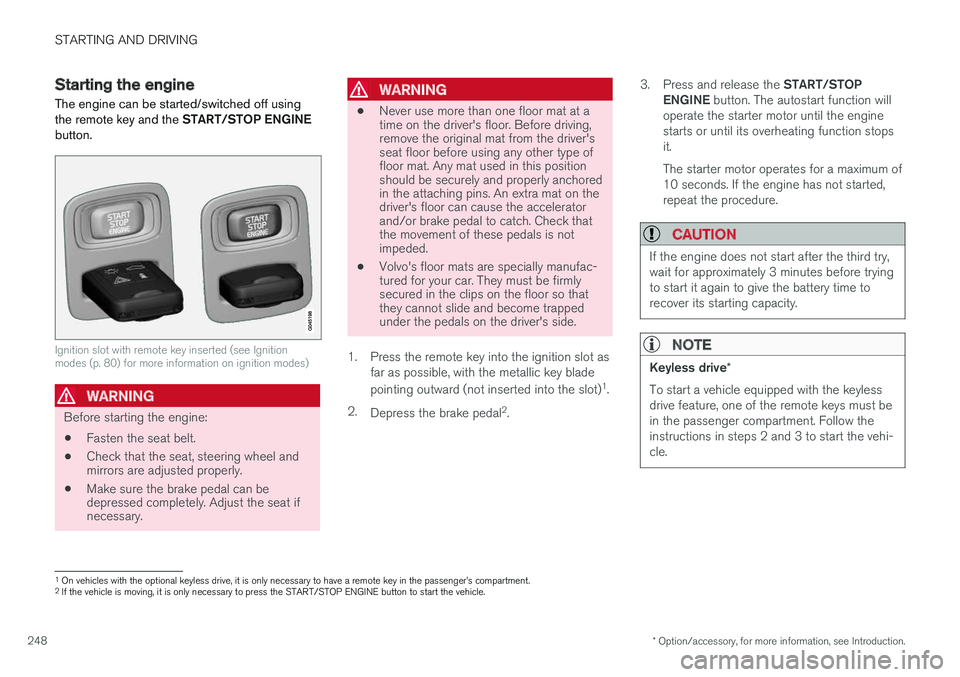
The engine can be started/switched off using the remote key and the START/STOP ENGINE
button.
Ignition slot with remote key inserted (see Ignition modes (p. 80) for more information on ignition modes)
WARNING
Before starting the engine:
• Fasten the seat belt.
• Check that the seat, steering wheel and mirrors are adjusted properly.
• Make sure the brake pedal can bedepressed completely. Adjust the seat ifnecessary.
WARNING
•Never use more than one floor mat at a time on the driver's floor. Before driving,remove the original mat from the driver'sseat floor before using any other type offloor mat. Any mat used in this positionshould be securely and properly anchoredin the attaching pins. An extra mat on thedriver's floor can cause the acceleratorand/or brake pedal to catch. Check thatthe movement of these pedals is notimpeded.
• Volvo's floor mats are specially manufac-tured for your car. They must be firmlysecured in the clips on the floor so thatthey cannot slide and become trappedunder the pedals on the driver's side.
1. Press the remote key into the ignition slot as far as possible, with the metallic key blade pointing outward (not inserted into the slot) 1
.
2. Depress the brake pedal 2
. 3.
Press and release the START/STOP
ENGINE button. The autostart function will
operate the starter motor until the engine starts or until its overheating function stopsit. The starter motor operates for a maximum of 10 seconds. If the engine has not started,repeat the procedure.
CAUTION
If the engine does not start after the third try, wait for approximately 3 minutes before tryingto start it again to give the battery time torecover its starting capacity.
NOTE
Keyless drive *
To start a vehicle equipped with the keyless drive feature, one of the remote keys must bein the passenger compartment. Follow theinstructions in steps 2 and 3 to start the vehi-cle.
1 On vehicles with the optional keyless drive, it is only necessary to have a remote key in the passenger
Page 257 of 398
STARTING AND DRIVING
}}}}
* Option/accessory, for more information, see Introduction.255
While driving
•If you select the manual shifting position while driving, the gear that was being used inthe Drive position will also initially beselected in the manual shifting position.
• Move the gear selector forward (toward
+) to
shift to a higher gear or rearward (toward –)
to shift to a lower gear.
• If you hold the gear selector toward "
–", the
transmission will downshift one gear at atime and will utilize the braking power of theengine. If the current speed is too high forusing a lower gear, the downshift will notoccur until the speed has decreased enoughto allow the lower gear to be used.
• If you slow to a very low speed, the transmis-sion will automatically shift down.
Shiftlock: Neutral (N)
If the gear selector is in the
N position and the
vehicle has been stationary for at least 3 seconds (irrespective of whether the engine is running)then the gear selector is locked. In order to move the gear selector from N to
another gear position, the brake pedal must be depressed and the ignition must be in at least position II, see Ignition modes (p. 80).
Geartronic : steering wheel paddles *
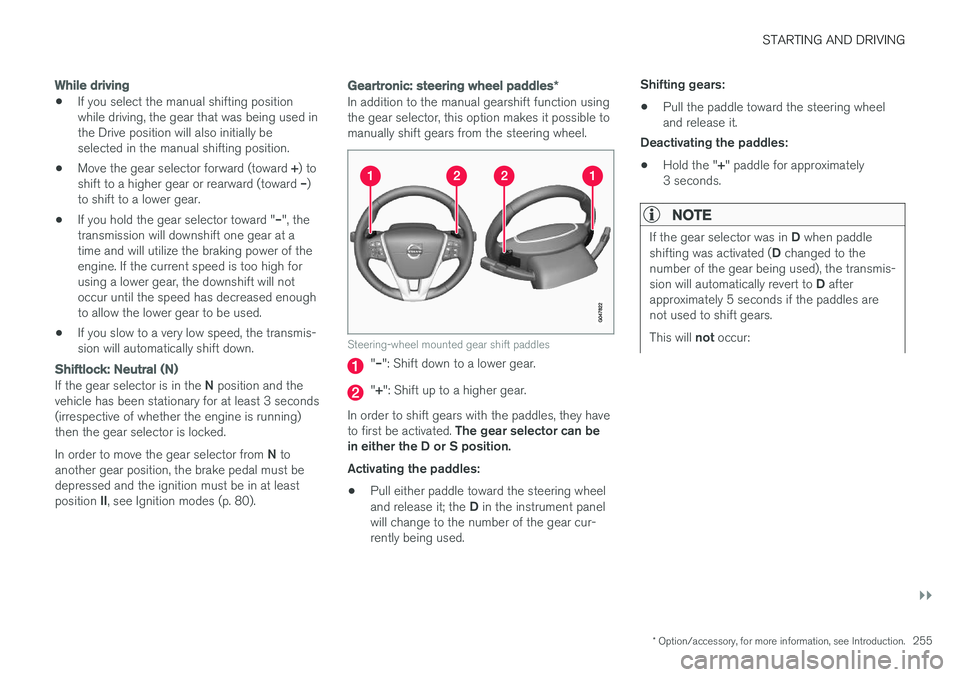
In addition to the manual gearshift function using the gear selector, this option makes it possible tomanually shift gears from the steering wheel.
Steering-wheel mounted gear shift paddles
"– ": Shift down to a lower gear.
"+ ": Shift up to a higher gear.
In order to shift gears with the paddles, they have to first be activated. The gear selector can be
in either the D or S position. Activating the paddles:
• Pull either paddle toward the steering wheel and release it; the
D in the instrument panel
will change to the number of the gear cur- rently being used. Shifting gears:
• Pull the paddle toward the steering wheeland release it.
Deactivating the paddles:
• Hold the "
+" paddle for approximately
3 seconds.
NOTE
If the gear selector was in D when paddle
shifting was activated ( D changed to the
number of the gear being used), the transmis- sion will automatically revert to D after
approximately 5 seconds if the paddles are not used to shift gears. This will not occur:
Page 258 of 398
||
STARTING AND DRIVING
256
•during active driving (e.g., on a winding road, while accelerating, etc)
• if the gear selector was in
S when the
paddles were activated
If the transmission reverts to D, the paddles
will have to be reactivated (pull either paddletoward the steering wheel and release it)before they can be used to shift gears again. The paddles can also be manually deactivated by pulling both paddles toward the steeringwheel and holding them until the gear num-ber shown in the instrument panel changes to D .
Geartronic : Sport mode ( S)7
This transmission mode provides sportier shifting characteristics and enables a more active drivingstyle by making it possible to drive at higher rpmin each gear before shifting up. The engine alsoresponds faster when the accelerator pedal ispressed. To access Sport mode from Drive (
D), move the
gear selector to the left. The transmission will not switch to manual shifting mode until the gearselector is moved forward or rearward toward +or –. Sport mode can be selected any time.
NOTE
• On vehicles equipped with Sport mode, the transmission symbol in the main instrument panel will change from
D to S
when the gear selector is moved to the manual shifting mode. If the gear selectoris moved toward "+" or "-", the number ofthe gear currently being used will be dis-played, see Information displays – intro-duction (p. 69).
• Please be aware that using Sport modemay result in a slight decrease in fuel economy. Driving in
D can help improve
fuel economy.
Geartronic : starting on slippery surfaces
Selecting 3rd gear in Geartronic
Page 261 of 398
STARTING AND DRIVING
* Option/accessory, for more information, see Introduction.259
•
Start/Stop – Hill Start Assist (HSA) (p. 257)
• Start/Stop – symbols and messages (p. 261)
Start/Stop – Auto-stop exceptions
In certain situations or conditions, the engine may not auto-stop
when the vehicle comes to a
standstill, such as if:
Condition/situation
The vehicle's speed has not reached a speed of approx. 6 mph (10 km/h) after the mostrecent auto-start or after the driver has startedthe engine.
The driver unbuckles his/her seat belt.
The main battery's charge is below the mini- mum level.
The engine has not reached its normal operat- ing temperature.
The ambient temperature is below approx. 25°F (-4°C) or above approx. 85°F (30°C).
The windshield's heating function * is activated.
The climate system cannot keep the desired settings in the passenger compartment; theblower will operate at high speed.
The vehicle is backing up.
The main battery's temperature is below freez- ing or too high.
The driver is turning the steering wheel hard.
Condition/situation
The road's incline is very steep.
A trailer's electrical system is connected to the vehicle.
The hood has been opened A
.
The transmission has not reached its normal operating temperature.
Atmospheric pressure is below a level equiva- lent to an altitude of approx. 4,900–8,200 ft(1500–2500 m) above sea level. The actualpressure is also affected by current weatherconditions.
The Adaptive Cruise Control's * Queue Assist
feature is activated.
The gear selector is in the SB
or " +/–" posi-
tion.
A Certain engines only
B Sport mode (where applicable)
Related information
• Start/Stop – introduction (p. 258)
• Start/Stop – function (p. 258)
• Start/Stop – settings (p. 260)
• Start/Stop – Auto-start exceptions (p. 260)
• Start/Stop – Hill Start Assist (HSA) (p. 257)
• Start/Stop – symbols and messages (p. 261)
Page 262 of 398
STARTING AND DRIVING
260
Start/Stop – Auto-start exceptions
In certain situations or conditions, the engine may auto-start even though the driver is still
pressing the brake pedal, such as if:
Condition/situation
Condensation forms on the windows.
The climate system cannot keep the desired settings in the passenger compartment.
Electrical current consumption is temporarily high or the main battery's charge is below theminimum level.
The brake pedal is pumped repeatedly.
The hood has been opened A
.
The driver unbuckles his/her seat belt while the gear selector is in the D or N positions.
The steering wheel is turned.
The gear selector is moved from D to SB
, R or
" +/– ".
The driver's door is opened with the gear selector in D – an audible signal and a text
message will inform the driver that Start/Stop is active.
A Certain engines only
B Sport mode (where applicable)
WARNING
Do not open the hood if the engine has auto- stopped. The engine could suddenly auto-start. Before opening the hood:
• Switch off the ignition using the
START/
STOP ENGINE button.
• Be aware that if the engine has been run- ning, components in the engine compart-ment will be very hot.
If the engine does not auto-start, this could be due to :
• The driver's seat belt is not fastened
• The gear selector is in
P and the driver's
door is opened
In these cases, the driver will have to restart the engine by pressing the START/STOP ENGINE
button.
Related information
• Start/Stop – introduction (p. 258)
• Start/Stop – function (p. 258)
• Start/Stop – settings (p. 260)
• Start/Stop – Auto-stop exceptions (p. 259)
• Start/Stop – Hill Start Assist (HSA) (p. 257)
• Start/Stop – symbols and messages (p. 261)
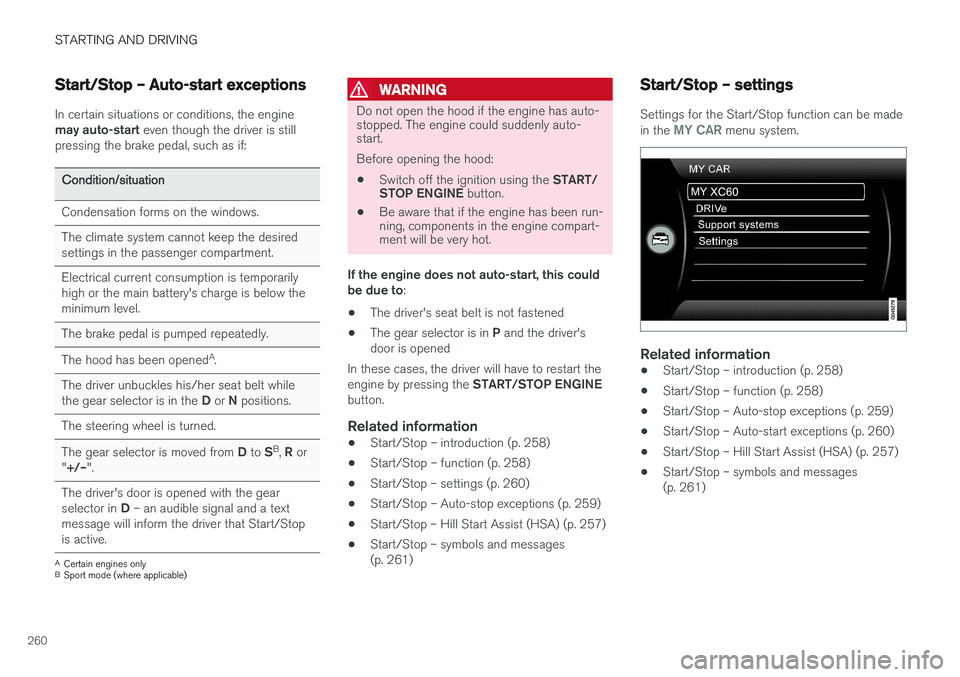
Start/Stop – settings
Settings for the Start/Stop function can be made in the MY CAR menu system.
Related information
• Start/Stop – introduction (p. 258)
• Start/Stop – function (p. 258)
• Start/Stop – Auto-stop exceptions (p. 259)
• Start/Stop – Auto-start exceptions (p. 260)
• Start/Stop – Hill Start Assist (HSA) (p. 257)
• Start/Stop – symbols and messages (p. 261)
Page 268 of 398
STARTING AND DRIVING
266
Anti-lock braking system (ABS) The ABS system helps to improve vehicle con- trol (stopping and steering) during severe brak-ing conditions by limiting brake lockup.
When the system "senses" impending lockup, braking pressure is automatically modulated inorder to help prevent lockup that could lead to askid. The system performs a brief self-diagnostic test when the engine has been started and driverreleases the brake pedal. Another automatic testmay be performed when the vehicle first reachesa speed of approximately 6 mph (10 km/h). Thebrake pedal will pulsate several times and asound may be audible from the ABS controlmodule, which is normal.
Related information
•Parking brake – general information (p. 267)
• Emergency Brake Assistance (EBA) (p. 266)
• Brakes – general (p. 264)
Brake lights The brake lights come on automatically when the brakes are applied.
Adaptive brake lights
The adaptive brake lights activate in the event of sudden braking or if the ABS system is activated.This function causes an additional taillight oneach side of the vehicle to illuminate to help alertvehicles traveling behind. The adaptive brake lights activate if:
• The ABS system activates for more than approximately a half second
• In the event of sudden braking while thevehicle is moving at speeds above approxi-mately 6 mph (10 km/h).
When the vehicle has come to a stop, the brakelights and additional taillights remain on for aslong as the brake pedal is depressed or untilbraking force on the vehicle is reduced.
Related information
• Brakes – general (p. 264)
• Parking brake – general information (p. 267)
Emergency Brake Assistance (EBA)
EBA is designed to provide full brake effect immediately in the event of sudden, hard brak-ing.
Emergency Brake AssistanceThe EBA system is activated by the speed with which the brake pedal is depressed. When the EBA system is activated, the brake pedal will go down and pressure in the brake sys-tem immediately increases to the maximum level.Maintain full pressure on the brake pedal in orderto utilize the system completely. EBA is automati-cally deactivated when the brake pedal isreleased.
Page 281 of 398
STARTING AND DRIVING
}}
279
WARNING
Driving with the tailgate open: Driving with
the tailgate open could lead to poisonous exhaust gases entering the passenger com-partment. If the tailgate must be kept open forany reason, proceed as follows:
• Close the windows
• Set the ventilation system control to airflow to floor, windshield and side windowsand the blower control to its highest set-ting.
Handling and roadholdingAt the specified curb weight your vehicle has a tendency to understeer, which means that thesteering wheel has to be turned more than mightseem appropriate for the curvature of a bend.This ensures good stability and reduces the riskof rear wheel skid. Remember that these proper-ties can alter with the vehicle load. The heavierthe load in the cargo area, the less the tendencyto understeer.
• Vehicle load, tire design and inflation pres-sure all affect vehicle handling. Therefore,check that the tires are inflated to the rec-ommended pressure according to the vehicleload. Loads should be distributed so thatcapacity weight or maximum permissible axleloads are not exceeded.
• At the specified curb weight your vehicle hasa tendency to understeer, which means thatthe steering wheel has to be turned more than might seem appropriate for the curva-ture of a bend. This ensures good stabilityand reduces the risk of rear wheel skid.Remember that these properties can alterwith the vehicle load. The heavier the load inthe cargo compartment, the less the ten-dency to understeer.
Related information
•
Climate – general information (p. 126)
Towing a trailer When towing a trailer, always observe the legal requirements of the state/province.
NOTE
For the maximum trailer and tongue weights recommended by Volvo, see Weights (p. 372)
• All Volvo models are equipped with energy- absorbing shock-mounted bumpers. Trailerhitch installation should not interfere with theproper operation of this bumper system.
Trailer towing does not normally present any par-ticular problems, but take into consideration:
• Increase tire pressure to recommended fullpressure, see the tire inflation decal on thedriver's door opening.
• When your vehicle is new, avoid towing heavytrailers during the first 620 miles (1,000 km).
• Maximum speed when towing a trailer:50 mph (80 km/h).
• Engine and transmission are subject toincreased loads. Therefore, engine coolanttemperature should be closely watched whendriving in hot climates or hilly terrain. Use alower gear and turn off the air conditioner ifthe temperature gauge needle enters the redrange.