steering wheel VOLVO XC60 2017 Owner´s Manual
[x] Cancel search | Manufacturer: VOLVO, Model Year: 2017, Model line: XC60, Model: VOLVO XC60 2017Pages: 398, PDF Size: 9.17 MB
Page 257 of 398
STARTING AND DRIVING
}}}}
* Option/accessory, for more information, see Introduction.255
While driving
•If you select the manual shifting position while driving, the gear that was being used inthe Drive position will also initially beselected in the manual shifting position.
• Move the gear selector forward (toward
+) to
shift to a higher gear or rearward (toward –)
to shift to a lower gear.
• If you hold the gear selector toward "
–", the
transmission will downshift one gear at atime and will utilize the braking power of theengine. If the current speed is too high forusing a lower gear, the downshift will notoccur until the speed has decreased enoughto allow the lower gear to be used.
• If you slow to a very low speed, the transmis-sion will automatically shift down.
Shiftlock: Neutral (N)
If the gear selector is in the
N position and the
vehicle has been stationary for at least 3 seconds (irrespective of whether the engine is running)then the gear selector is locked. In order to move the gear selector from N to
another gear position, the brake pedal must be depressed and the ignition must be in at least position II, see Ignition modes (p. 80).
Geartronic : steering wheel paddles *
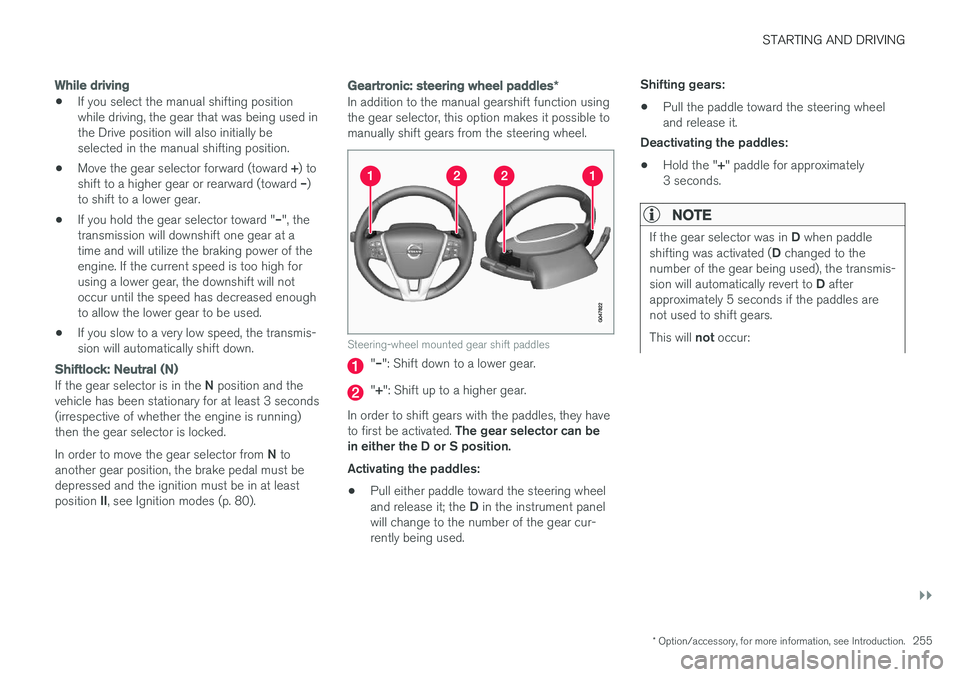
In addition to the manual gearshift function using the gear selector, this option makes it possible tomanually shift gears from the steering wheel.
Steering-wheel mounted gear shift paddles
"– ": Shift down to a lower gear.
"+ ": Shift up to a higher gear.
In order to shift gears with the paddles, they have to first be activated. The gear selector can be
in either the D or S position. Activating the paddles:
• Pull either paddle toward the steering wheel and release it; the
D in the instrument panel
will change to the number of the gear cur- rently being used. Shifting gears:
• Pull the paddle toward the steering wheeland release it.
Deactivating the paddles:
• Hold the "
+" paddle for approximately
3 seconds.
NOTE
If the gear selector was in D when paddle
shifting was activated ( D changed to the
number of the gear being used), the transmis- sion will automatically revert to D after
approximately 5 seconds if the paddles are not used to shift gears. This will not occur:
Page 258 of 398
||
STARTING AND DRIVING
256
•during active driving (e.g., on a winding road, while accelerating, etc)
• if the gear selector was in
S when the
paddles were activated
If the transmission reverts to D, the paddles
will have to be reactivated (pull either paddletoward the steering wheel and release it)before they can be used to shift gears again. The paddles can also be manually deactivated by pulling both paddles toward the steeringwheel and holding them until the gear num-ber shown in the instrument panel changes to D .
Geartronic : Sport mode ( S)7
This transmission mode provides sportier shifting characteristics and enables a more active drivingstyle by making it possible to drive at higher rpmin each gear before shifting up. The engine alsoresponds faster when the accelerator pedal ispressed. To access Sport mode from Drive (
D), move the
gear selector to the left. The transmission will not switch to manual shifting mode until the gearselector is moved forward or rearward toward +or –. Sport mode can be selected any time.
NOTE
• On vehicles equipped with Sport mode, the transmission symbol in the main instrument panel will change from
D to S
when the gear selector is moved to the manual shifting mode. If the gear selectoris moved toward "+" or "-", the number ofthe gear currently being used will be dis-played, see Information displays – intro-duction (p. 69).
• Please be aware that using Sport modemay result in a slight decrease in fuel economy. Driving in
D can help improve
fuel economy.
Geartronic : starting on slippery surfaces
Selecting 3rd gear in Geartronic
Page 261 of 398
STARTING AND DRIVING
* Option/accessory, for more information, see Introduction.259
•
Start/Stop – Hill Start Assist (HSA) (p. 257)
• Start/Stop – symbols and messages (p. 261)
Start/Stop – Auto-stop exceptions
In certain situations or conditions, the engine may not auto-stop
when the vehicle comes to a
standstill, such as if:
Condition/situation
The vehicle's speed has not reached a speed of approx. 6 mph (10 km/h) after the mostrecent auto-start or after the driver has startedthe engine.
The driver unbuckles his/her seat belt.
The main battery's charge is below the mini- mum level.
The engine has not reached its normal operat- ing temperature.
The ambient temperature is below approx. 25°F (-4°C) or above approx. 85°F (30°C).
The windshield's heating function * is activated.
The climate system cannot keep the desired settings in the passenger compartment; theblower will operate at high speed.
The vehicle is backing up.
The main battery's temperature is below freez- ing or too high.
The driver is turning the steering wheel hard.
Condition/situation
The road's incline is very steep.
A trailer's electrical system is connected to the vehicle.
The hood has been opened A
.
The transmission has not reached its normal operating temperature.
Atmospheric pressure is below a level equiva- lent to an altitude of approx. 4,900–8,200 ft(1500–2500 m) above sea level. The actualpressure is also affected by current weatherconditions.
The Adaptive Cruise Control's * Queue Assist
feature is activated.
The gear selector is in the SB
or " +/–" posi-
tion.
A Certain engines only
B Sport mode (where applicable)
Related information
• Start/Stop – introduction (p. 258)
• Start/Stop – function (p. 258)
• Start/Stop – settings (p. 260)
• Start/Stop – Auto-start exceptions (p. 260)
• Start/Stop – Hill Start Assist (HSA) (p. 257)
• Start/Stop – symbols and messages (p. 261)
Page 262 of 398
STARTING AND DRIVING
260
Start/Stop – Auto-start exceptions
In certain situations or conditions, the engine may auto-start even though the driver is still
pressing the brake pedal, such as if:
Condition/situation
Condensation forms on the windows.
The climate system cannot keep the desired settings in the passenger compartment.
Electrical current consumption is temporarily high or the main battery's charge is below theminimum level.
The brake pedal is pumped repeatedly.
The hood has been opened A
.
The driver unbuckles his/her seat belt while the gear selector is in the D or N positions.
The steering wheel is turned.
The gear selector is moved from D to SB
, R or
" +/– ".
The driver's door is opened with the gear selector in D – an audible signal and a text
message will inform the driver that Start/Stop is active.
A Certain engines only
B Sport mode (where applicable)
WARNING
Do not open the hood if the engine has auto- stopped. The engine could suddenly auto-start. Before opening the hood:
• Switch off the ignition using the
START/
STOP ENGINE button.
• Be aware that if the engine has been run- ning, components in the engine compart-ment will be very hot.
If the engine does not auto-start, this could be due to :
• The driver's seat belt is not fastened
• The gear selector is in
P and the driver's
door is opened
In these cases, the driver will have to restart the engine by pressing the START/STOP ENGINE
button.
Related information
• Start/Stop – introduction (p. 258)
• Start/Stop – function (p. 258)
• Start/Stop – settings (p. 260)
• Start/Stop – Auto-stop exceptions (p. 259)
• Start/Stop – Hill Start Assist (HSA) (p. 257)
• Start/Stop – symbols and messages (p. 261)
Start/Stop – settings
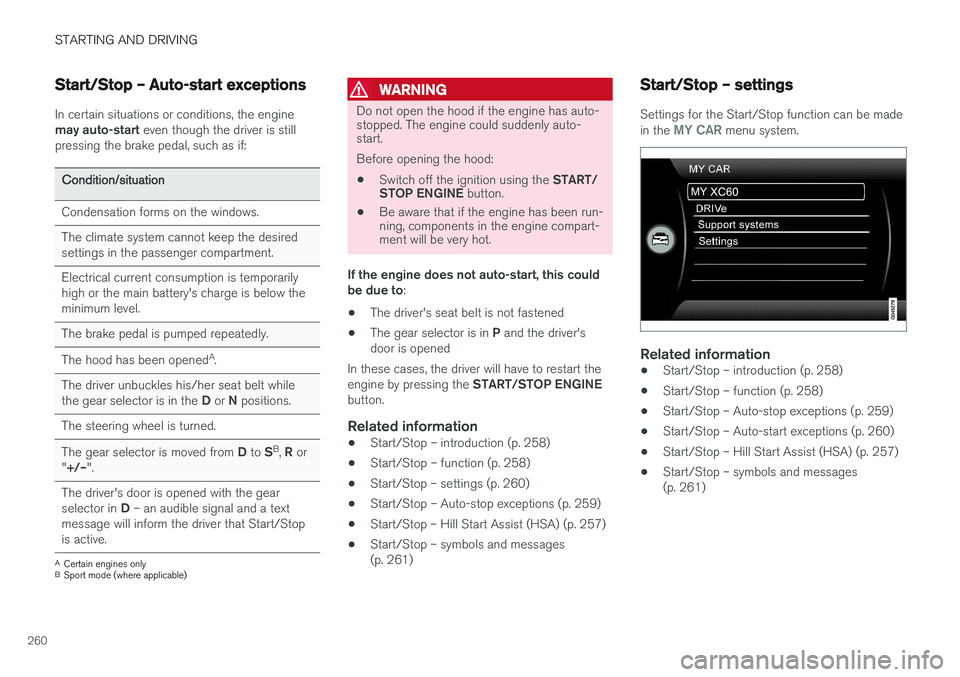
Settings for the Start/Stop function can be made in the MY CAR menu system.
Related information
• Start/Stop – introduction (p. 258)
• Start/Stop – function (p. 258)
• Start/Stop – Auto-stop exceptions (p. 259)
• Start/Stop – Auto-start exceptions (p. 260)
• Start/Stop – Hill Start Assist (HSA) (p. 257)
• Start/Stop – symbols and messages (p. 261)
Page 281 of 398
STARTING AND DRIVING
}}
279
WARNING
Driving with the tailgate open: Driving with
the tailgate open could lead to poisonous exhaust gases entering the passenger com-partment. If the tailgate must be kept open forany reason, proceed as follows:
• Close the windows
• Set the ventilation system control to airflow to floor, windshield and side windowsand the blower control to its highest set-ting.
Handling and roadholdingAt the specified curb weight your vehicle has a tendency to understeer, which means that thesteering wheel has to be turned more than mightseem appropriate for the curvature of a bend.This ensures good stability and reduces the riskof rear wheel skid. Remember that these proper-ties can alter with the vehicle load. The heavierthe load in the cargo area, the less the tendencyto understeer.
• Vehicle load, tire design and inflation pres-sure all affect vehicle handling. Therefore,check that the tires are inflated to the rec-ommended pressure according to the vehicleload. Loads should be distributed so thatcapacity weight or maximum permissible axleloads are not exceeded.
• At the specified curb weight your vehicle hasa tendency to understeer, which means thatthe steering wheel has to be turned more than might seem appropriate for the curva-ture of a bend. This ensures good stabilityand reduces the risk of rear wheel skid.Remember that these properties can alterwith the vehicle load. The heavier the load inthe cargo compartment, the less the ten-dency to understeer.
Related information
•
Climate – general information (p. 126)
Towing a trailer When towing a trailer, always observe the legal requirements of the state/province.
NOTE
For the maximum trailer and tongue weights recommended by Volvo, see Weights (p. 372)
• All Volvo models are equipped with energy- absorbing shock-mounted bumpers. Trailerhitch installation should not interfere with theproper operation of this bumper system.
Trailer towing does not normally present any par-ticular problems, but take into consideration:
• Increase tire pressure to recommended fullpressure, see the tire inflation decal on thedriver's door opening.
• When your vehicle is new, avoid towing heavytrailers during the first 620 miles (1,000 km).
• Maximum speed when towing a trailer:50 mph (80 km/h).
• Engine and transmission are subject toincreased loads. Therefore, engine coolanttemperature should be closely watched whendriving in hot climates or hilly terrain. Use alower gear and turn off the air conditioner ifthe temperature gauge needle enters the redrange.
Page 284 of 398
STARTING AND DRIVING
282
Trailer Stability Assist (TSA)
Trailer Stability Assist is a system designed to help stabilize a vehicle that is towing a trailerwhen the vehicle and trailer have begun to swayand is part of the stability system. For informationon the stability system, see Stability system –introduction (p. 174)
FunctionA vehicle towing a trailer may begin to sway for various reasons. Normally this only occurs at highspeeds but, for example, if the trailer is overloa-ded or if the load is unevenly distributed in thetrailer, there is risk of swaying at speeds betweenapproximately 45-55 mph (70-90 km/h). Swaying may be caused by factors such as:
• The vehicle and trailer are hit by a sudden, strong crosswind
• The vehicle and trailer are traveling on anuneven road surface or drive over a bump
• Sudden movements of the steering wheel
Facts about TSA
• TSA intervenes at speeds above approxi-mately 40 mph (60 km/h)
• The stability system symbol in the instrumentpanel will flash when TSA is working
• If the driver switches off the stability system'sSpin Control function, TSA will also beswitched off (but will be on again the nexttime the engine is started) •
TSA may not intervene when the vehicle andtrailer begin to sway if the driver tries to com-pensate for the swaying motion by movingthe steering wheel rapidly
How TSA worksOnce swaying has begun, it can be very difficultto stop, which makes it difficult to control thevehicle and trailer. The TSA system continuously monitors the vehi- cle's movements, particularly lateral movement. Ifthe system detects a tendency to sway, thebrakes are applied individually on the frontwheels, which has a stabilizing effect on the vehi-cle and trailer. This is often enough to enable thedriver to regain control of the vehicle. If this is not adequate to stop the swaying motion, the brakes are applied to all of the wheels on thevehicle and on the trailer if it is equipped withbrakes, and engine power is temporarily reduced.As the swaying motion begins to decrease andthe vehicle-trailer have once again become sta-ble, TSA will now stop regulating the brakes/engine power and the driver regains control ofthe vehicle.
Related information
•
Towing a trailer (p. 279)
• Loading – general (p. 144)
Towing the vehicle Always check with state and local authorities before attempting to tow another vehiclebecause this type of towing is subject to regula-tions regarding maximum towing speed, lengthand type of towing device, lighting, etc.
Page 286 of 398
||
STARTING AND DRIVING
284
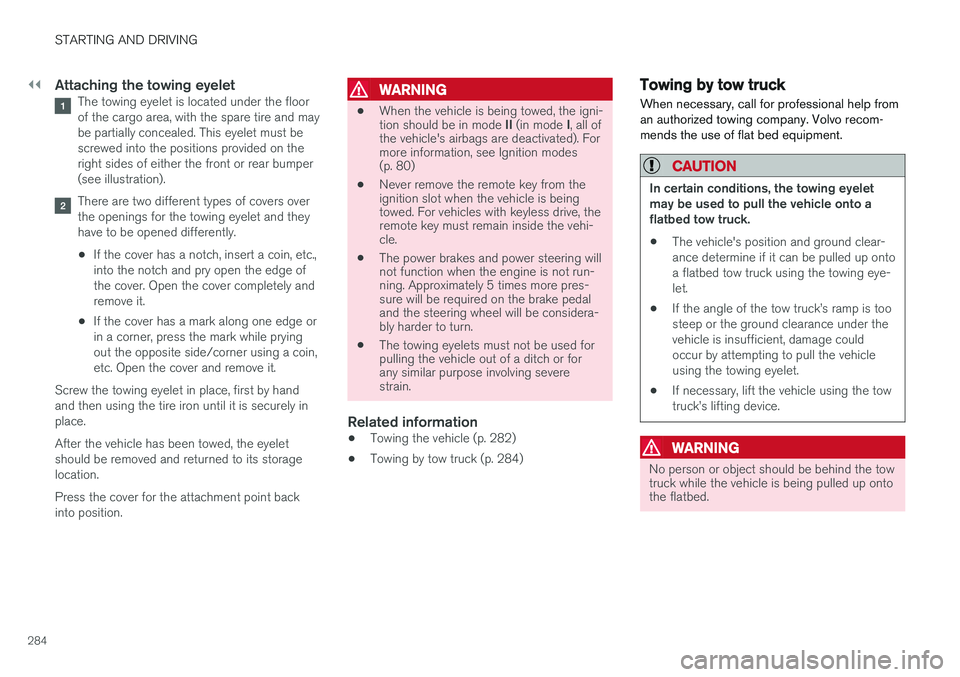
Attaching the towing eyeletThe towing eyelet is located under the floor of the cargo area, with the spare tire and maybe partially concealed. This eyelet must bescrewed into the positions provided on theright sides of either the front or rear bumper(see illustration).
There are two different types of covers over the openings for the towing eyelet and theyhave to be opened differently.
• If the cover has a notch, insert a coin, etc.,into the notch and pry open the edge ofthe cover. Open the cover completely andremove it.
• If the cover has a mark along one edge orin a corner, press the mark while pryingout the opposite side/corner using a coin,etc. Open the cover and remove it.
Screw the towing eyelet in place, first by handand then using the tire iron until it is securely inplace. After the vehicle has been towed, the eyelet should be removed and returned to its storagelocation. Press the cover for the attachment point back into position.
WARNING
• When the vehicle is being towed, the igni- tion should be in mode
II (in mode I, all of
the vehicle's airbags are deactivated). For more information, see Ignition modes(p. 80)
• Never remove the remote key from theignition slot when the vehicle is beingtowed. For vehicles with keyless drive, theremote key must remain inside the vehi-cle.
• The power brakes and power steering willnot function when the engine is not run-ning. Approximately 5 times more pres-sure will be required on the brake pedaland the steering wheel will be considera-bly harder to turn.
• The towing eyelets must not be used forpulling the vehicle out of a ditch or forany similar purpose involving severestrain.
Related information
•Towing the vehicle (p. 282)
• Towing by tow truck (p. 284)
Towing by tow truck
When necessary, call for professional help from an authorized towing company. Volvo recom-mends the use of flat bed equipment.
CAUTION
In certain conditions, the towing eyelet may be used to pull the vehicle onto aflatbed tow truck.
• The vehicle's position and ground clear-ance determine if it can be pulled up ontoa flatbed tow truck using the towing eye-let.
• If the angle of the tow truck
Page 315 of 398
WHEELS AND TIRES
* Option/accessory, for more information, see Introduction.313
WARNING
•After using the tire sealing system, the vehicle should not be driven farther thanapproximately 120 miles (200 km).
• Have the tire inspected by a trained andqualified Volvo service technician as soonas possible to determine if it can be per-manently repaired or must be replaced.
• The vehicle should not be driven fasterthan 50 mph (80 km/h) while using a tirethat has been temporarily repaired withthe tire sealing system.
• After using the tire sealing system, drivecarefully and avoid abrupt steeringmaneuvers and sudden stops.
Tire sealing system–temporarily repairing a flat tire
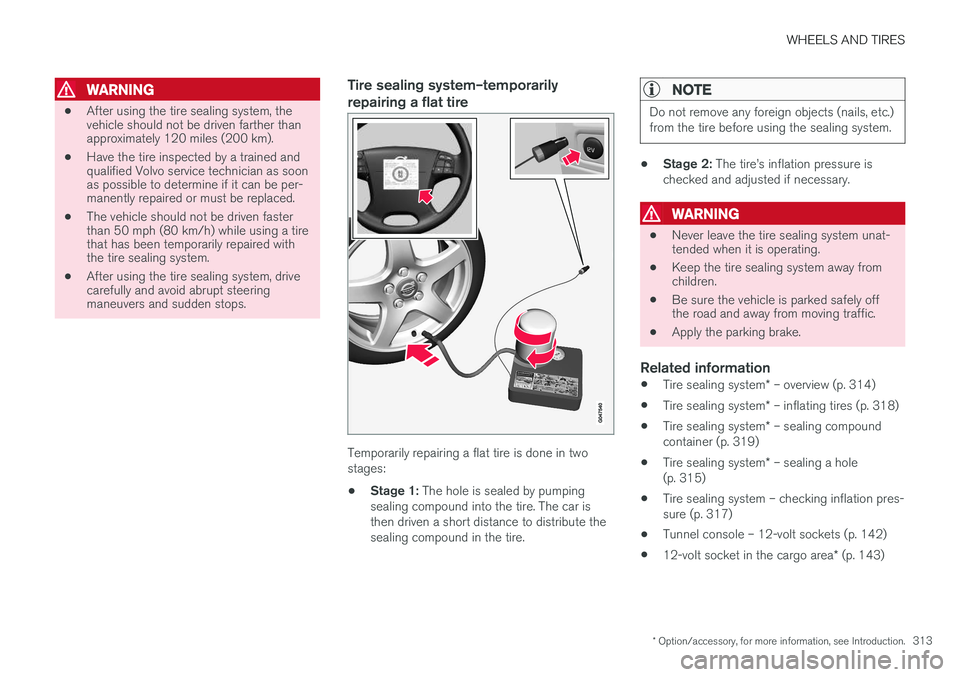
Temporarily repairing a flat tire is done in two stages:
• Stage 1:
The hole is sealed by pumping
sealing compound into the tire. The car isthen driven a short distance to distribute thesealing compound in the tire.
NOTE
Do not remove any foreign objects (nails, etc.) from the tire before using the sealing system.
• Stage 2:
The tire
Page 317 of 398
WHEELS AND TIRES
}}
* Option/accessory, for more information, see Introduction.315
•Ingestion: Do
NOT induce vomiting
unless directed to do so by medical per- sonnel. Get medical attention.
• Disposal: Dispose of this material and itscontainer to a hazardous or special wastecollection point.
NOTE
Do not break the seal on the bottle. This occurs automatically when the bottle isscrewed into the holder.
Related information
•
Tire sealing system
* – general information
(p. 312)
• Tire sealing system
* – inflating tires (p. 318)
• Tire sealing system – checking inflation pres- sure (p. 317)
• Tire sealing system
* – sealing a hole
(p. 315)
• Tire sealing system
* – sealing compound
container (p. 319)
Tire sealing system * – sealing a
hole The tire sealing system can be used to tempo- rarily seal a hole in the tread surface of a tire.
Stage 1: Sealing the hole1. Peel off the speed limit sticker and affix it to the steering wheel hub where it will be clearly visible to the driver.
2. Ensure that the on/off switch is in position 0
(the 0 side of the switch should be pressed
down).
WARNING
Contact with the sealing compound may cause skin irritation. If contact occurs, washthe affected area immediately with soap andwater.
3. Unscrew the orange cover over the bottle holder on the compressor and unscrew the cap on the bottle of sealing compound.
NOTE
Do not break the seal on the bottle. This occurs automatically when the bottle isscrewed into the holder.
4. Screw the bottle into the bottle holder as far as possible.
WARNING
The bottle is equipped with a catch to keep it securely in place and help prevent sealingcompound leakage. Once in place, the bottlecannot be unscrewed. This must be done by atrained and qualified Volvo service technician.
5. Remove the valve cap from the tire
Page 332 of 398
||
MAINTENANCE AND SERVICING
* Option/accessory, for more information, see Introduction.
330
G021737
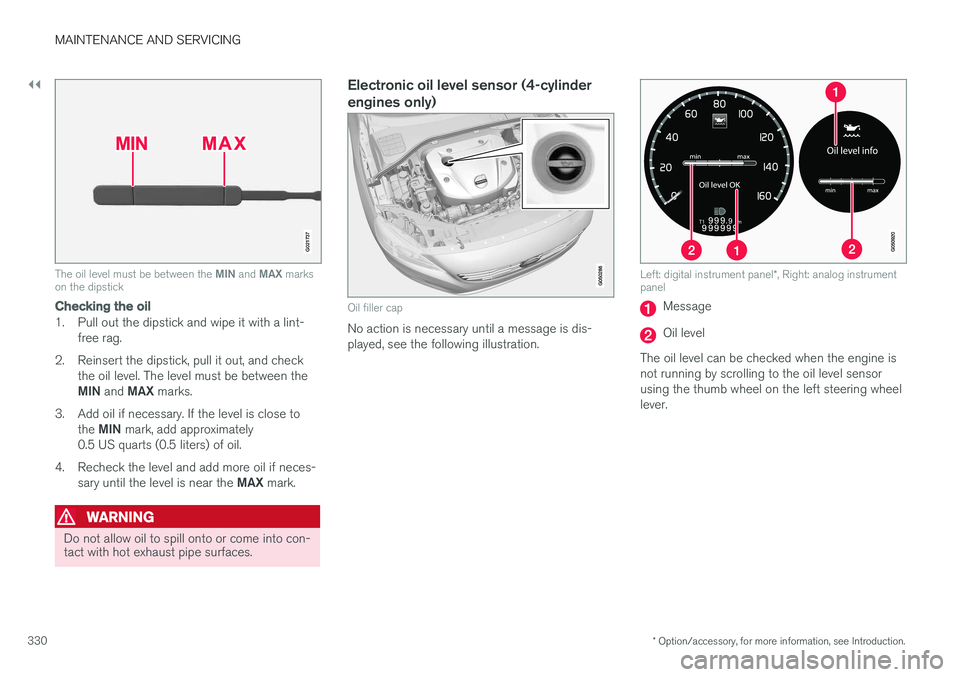
The oil level must be between the MIN and MAX marks
on the dipstick
Checking the oil
1. Pull out the dipstick and wipe it with a lint-
free rag.
2. Reinsert the dipstick, pull it out, and check the oil level. The level must be between the MIN and MAX marks.
3. Add oil if necessary. If the level is close to the MIN mark, add approximately
0.5 US quarts (0.5 liters) of oil.
4. Recheck the level and add more oil if neces- sary until the level is near the MAX mark.
WARNING
Do not allow oil to spill onto or come into con- tact with hot exhaust pipe surfaces.
Electronic oil level sensor (4-cylinder engines only)
Oil filler cap
No action is necessary until a message is dis- played, see the following illustration.
Left: digital instrument panel *, Right: analog instrument
panel
Message
Oil level
The oil level can be checked when the engine is not running by scrolling to the oil level sensorusing the thumb wheel on the left steering wheellever.