warning VOLVO XC60 2017 Owner´s Manual
[x] Cancel search | Manufacturer: VOLVO, Model Year: 2017, Model line: XC60, Model: VOLVO XC60 2017Pages: 398, PDF Size: 9.17 MB
Page 88 of 398
||
INSTRUMENTS AND CONTROLS
86
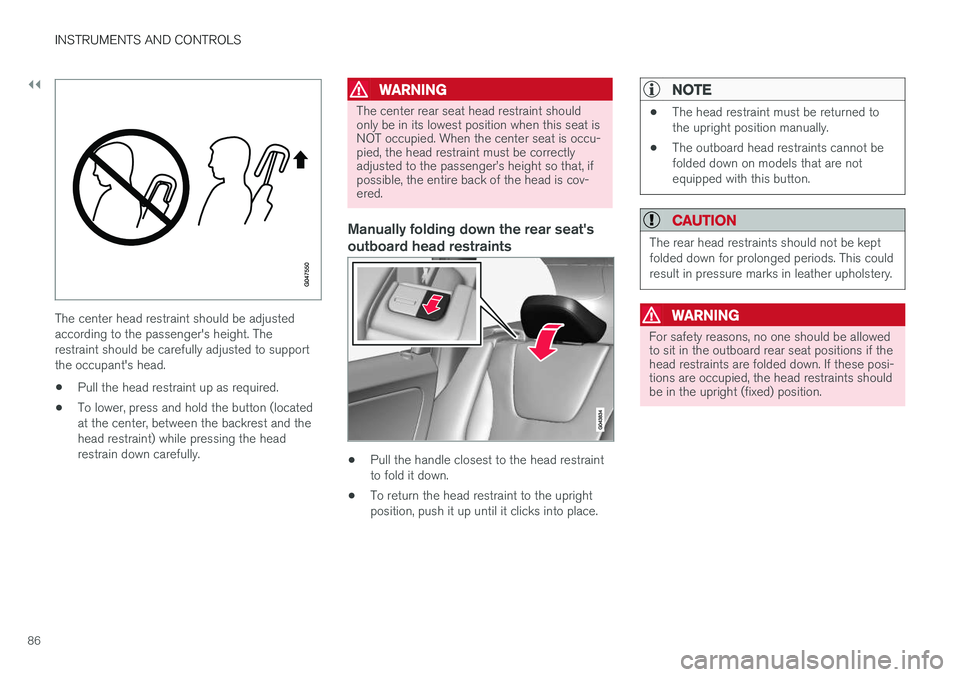
The center head restraint should be adjusted according to the passenger's height. Therestraint should be carefully adjusted to supportthe occupant's head.
• Pull the head restraint up as required.
• To lower, press and hold the button (locatedat the center, between the backrest and thehead restraint) while pressing the headrestrain down carefully.
WARNING
The center rear seat head restraint should only be in its lowest position when this seat isNOT occupied. When the center seat is occu-pied, the head restraint must be correctlyadjusted to the passenger
Page 90 of 398
||
INSTRUMENTS AND CONTROLS
88
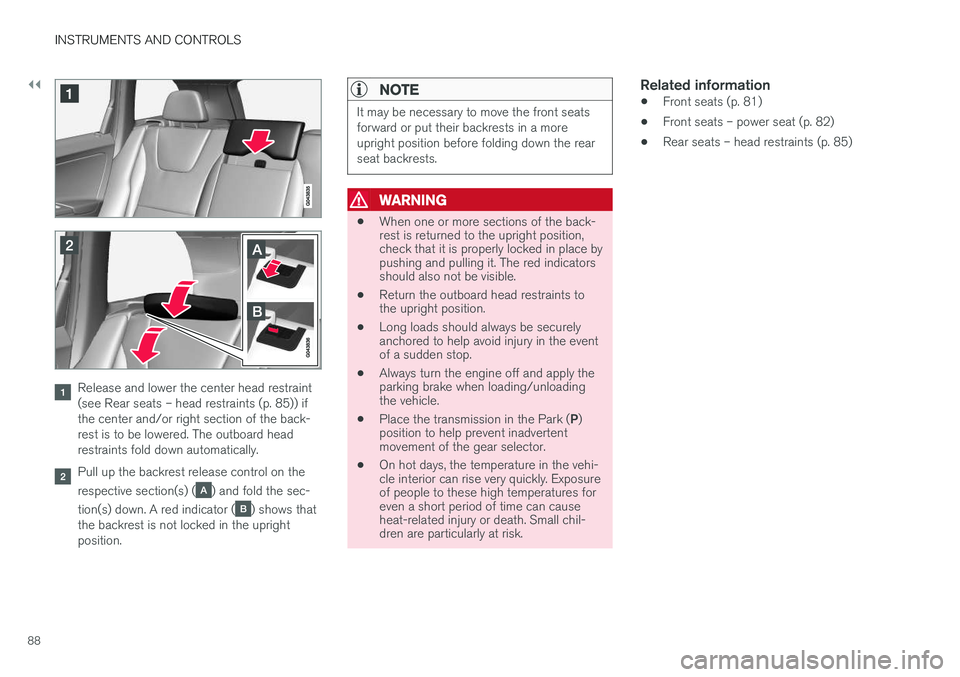
Release and lower the center head restraint (see Rear seats – head restraints (p. 85)) ifthe center and/or right section of the back-rest is to be lowered. The outboard headrestraints fold down automatically.
Pull up the backrest release control on the respective section(s) (
) and fold the sec-
tion(s) down. A red indicator (
) shows that
the backrest is not locked in the upright position.
NOTE
It may be necessary to move the front seats forward or put their backrests in a moreupright position before folding down the rearseat backrests.
WARNING
• When one or more sections of the back- rest is returned to the upright position,check that it is properly locked in place bypushing and pulling it. The red indicatorsshould also not be visible.
• Return the outboard head restraints tothe upright position.
• Long loads should always be securelyanchored to help avoid injury in the eventof a sudden stop.
• Always turn the engine off and apply theparking brake when loading/unloadingthe vehicle.
• Place the transmission in the Park (
P)
position to help prevent inadvertentmovement of the gear selector.
• On hot days, the temperature in the vehi-cle interior can rise very quickly. Exposureof people to these high temperatures foreven a short period of time can causeheat-related injury or death. Small chil-dren are particularly at risk.
Related information
• Front seats (p. 81)
• Front seats – power seat (p. 82)
• Rear seats – head restraints (p. 85)
Page 91 of 398
INSTRUMENTS AND CONTROLS
* Option/accessory, for more information, see Introduction.89
Steering wheel The steering wheel can be adjusted to various positions and has controls for the horn, cruise control*, menus, the infotainment system and
Bluetooth ®
-connected cell phone.
Adjusting
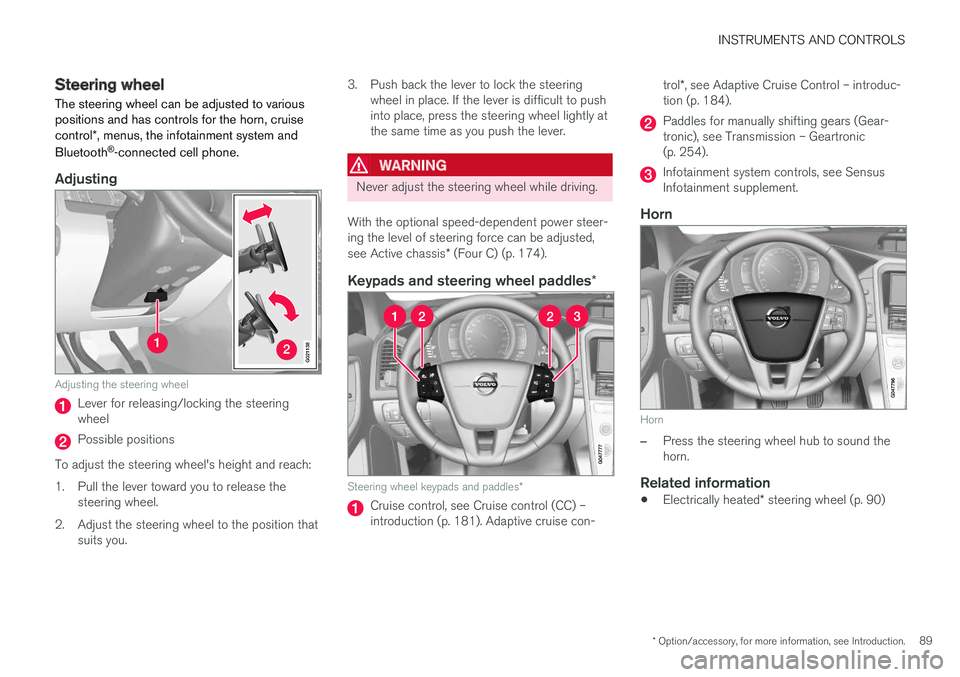
G021138
Adjusting the steering wheel
Lever for releasing/locking the steering wheel
Possible positions
To adjust the steering wheel's height and reach:
1. Pull the lever toward you to release the steering wheel.
2. Adjust the steering wheel to the position that suits you. 3. Push back the lever to lock the steering
wheel in place. If the lever is difficult to push into place, press the steering wheel lightly atthe same time as you push the lever.
WARNING
Never adjust the steering wheel while driving.
With the optional speed-dependent power steer- ing the level of steering force can be adjusted, see Active chassis * (Four C) (p. 174).
Keypads and steering wheel paddles *
Steering wheel keypads and paddles*
Cruise control, see Cruise control (CC) – introduction (p. 181). Adaptive cruise con- trol
*, see Adaptive Cruise Control – introduc-
tion (p. 184).
Paddles for manually shifting gears (Gear- tronic), see Transmission – Geartronic(p. 254).
Infotainment system controls, see Sensus Infotainment supplement.
Horn
Horn
–Press the steering wheel hub to sound the horn.
Related information
• Electrically heated
* steering wheel (p. 90)
Page 98 of 398
||
INSTRUMENTS AND CONTROLS
96
NOTE
•The rear fog lights are considerably brighter than the normal taillights andshould be used only when conditionssuch as fog, rain, snow, smoke or dustreduce visibility for other vehicles to lessthan 500 ft. (150 meters).
• Condensation may form temporarily onthe inside of the lenses of exterior lightssuch as headlights, fog lights, or taillights.This is normal and the lights aredesigned to withstand moisture. Normally,condensation will dissipate after thelights have been on for a short time.
Related information
•Lighting panel (p. 90)
Hazard warning flashers
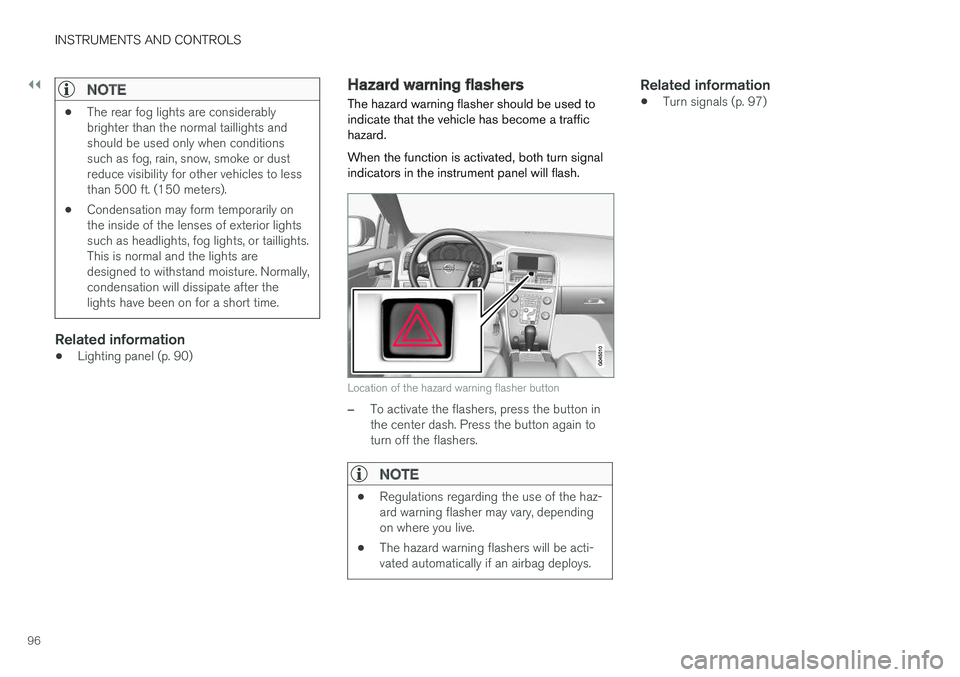
The hazard warning flasher should be used to indicate that the vehicle has become a traffichazard. When the function is activated, both turn signal indicators in the instrument panel will flash.
Location of the hazard warning flasher button
–To activate the flashers, press the button in the center dash. Press the button again toturn off the flashers.
NOTE
• Regulations regarding the use of the haz- ard warning flasher may vary, dependingon where you live.
• The hazard warning flashers will be acti-vated automatically if an airbag deploys.
Related information
• Turn signals (p. 97)
Page 99 of 398
INSTRUMENTS AND CONTROLS
}}
97
Turn signals
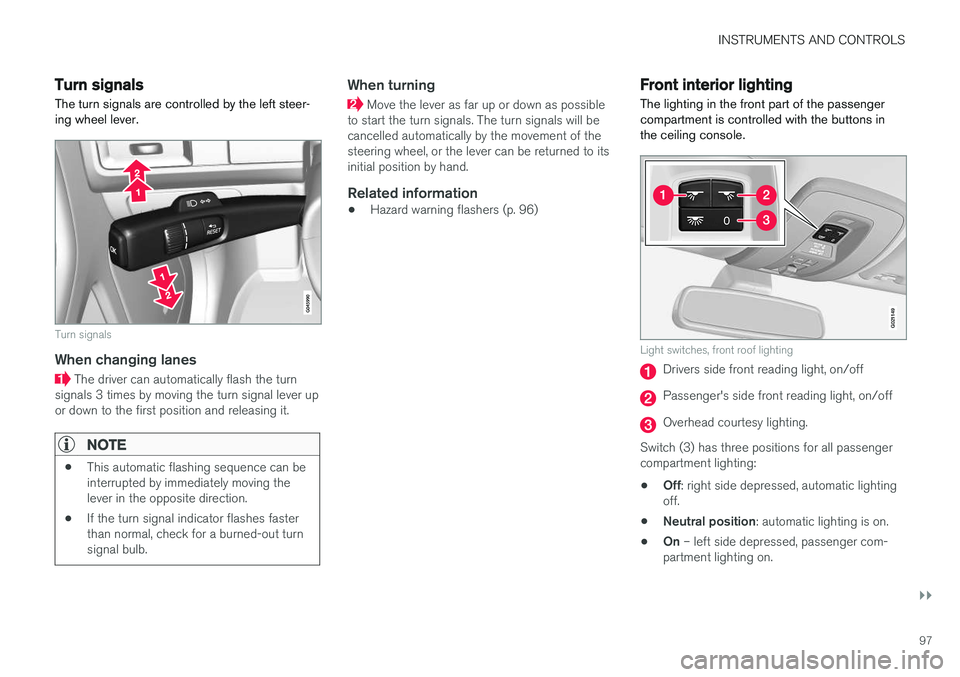
The turn signals are controlled by the left steer- ing wheel lever.
Turn signals
When changing lanes
The driver can automatically flash the turn
signals 3 times by moving the turn signal lever up or down to the first position and releasing it.
NOTE
• This automatic flashing sequence can be interrupted by immediately moving thelever in the opposite direction.
• If the turn signal indicator flashes fasterthan normal, check for a burned-out turnsignal bulb.
When turning
Move the lever as far up or down as possible
to start the turn signals. The turn signals will be cancelled automatically by the movement of thesteering wheel, or the lever can be returned to itsinitial position by hand.
Related information
• Hazard warning flashers (p. 96)
Front interior lighting
The lighting in the front part of the passenger compartment is controlled with the buttons inthe ceiling console.
G021149
Light switches, front roof lighting
Drivers side front reading light, on/off
Passenger's side front reading light, on/off
Overhead courtesy lighting.
Switch (3) has three positions for all passenger compartment lighting: • Off
: right side depressed, automatic lighting
off.
• Neutral position
: automatic lighting is on.
• On
– left side depressed, passenger com-
partment lighting on.
Page 105 of 398
INSTRUMENTS AND CONTROLS
* Option/accessory, for more information, see Introduction.103
WARNING
•Always remove the ignition key when the vehicle is unattended to put the ignition in mode
0 (see Ignition modes (p. 80) for
information about the ignition modes).
• Never leave children unattended in the vehicle.
• Make sure that the windows are com-pletely unobstructed before they areoperated.
Operating
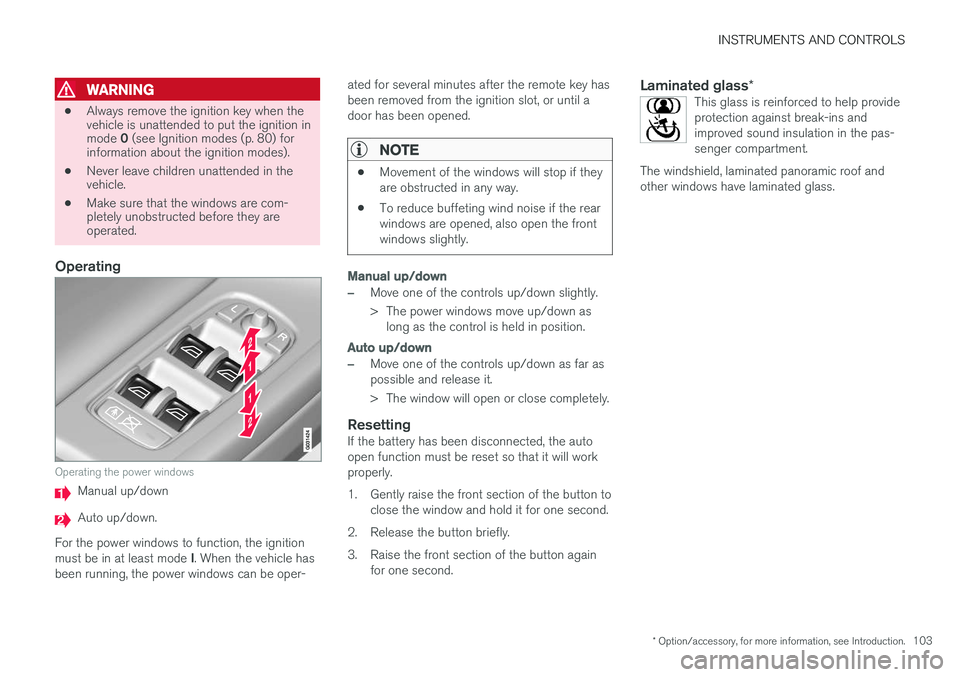
Operating the power windows
Manual up/down
Auto up/down.
For the power windows to function, the ignition must be in at least mode I. When the vehicle has
been running, the power windows can be oper- ated for several minutes after the remote key has been removed from the ignition slot, or until adoor has been opened.
NOTE
•
Movement of the windows will stop if they are obstructed in any way.
• To reduce buffeting wind noise if the rearwindows are opened, also open the frontwindows slightly.
Manual up/down
–Move one of the controls up/down slightly.
> The power windows move up/down as
long as the control is held in position.
Auto up/down
–Move one of the controls up/down as far as possible and release it.
> The window will open or close completely.
ResettingIf the battery has been disconnected, the auto open function must be reset so that it will workproperly.
1. Gently raise the front section of the button to close the window and hold it for one second.
2. Release the button briefly.
3. Raise the front section of the button again for one second.
Laminated glass *This glass is reinforced to help provide protection against break-ins andimproved sound insulation in the pas-senger compartment.
The windshield, laminated panoramic roof andother windows have laminated glass.
Page 106 of 398
INSTRUMENTS AND CONTROLS
* Option/accessory, for more information, see Introduction.
104
Power door mirrors
The control on the driver's door is used to adjust the position of the door mirrors.
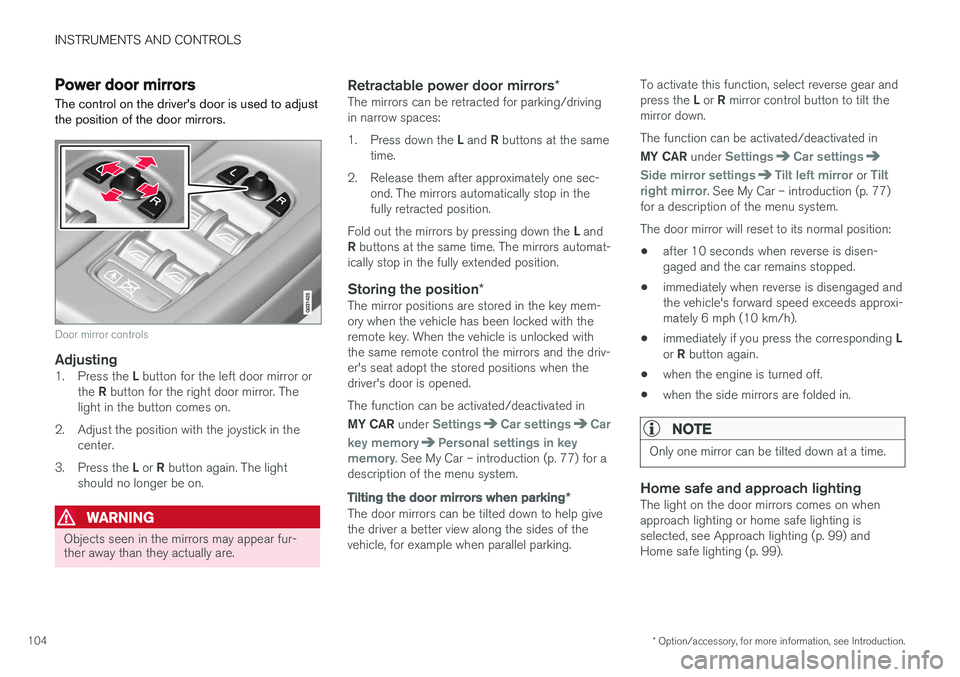
Door mirror controls
Adjusting1. Press the L button for the left door mirror or
the R button for the right door mirror. The
light in the button comes on.
2. Adjust the position with the joystick in the center.
3. Press the L or R button again. The light
should no longer be on.
WARNING
Objects seen in the mirrors may appear fur- ther away than they actually are.
Retractable power door mirrors *The mirrors can be retracted for parking/driving in narrow spaces: 1.
Press down the L and R buttons at the same
time.
2. Release them after approximately one sec- ond. The mirrors automatically stop in the fully retracted position.
Fold out the mirrors by pressing down the L and
R buttons at the same time. The mirrors automat-
ically stop in the fully extended position.
Storing the position *The mirror positions are stored in the key mem-ory when the vehicle has been locked with theremote key. When the vehicle is unlocked withthe same remote control the mirrors and the driv-er's seat adopt the stored positions when thedriver's door is opened. The function can be activated/deactivated in MY CAR under
SettingsCar settingsCar
key memory
Personal settings in key
memory. See My Car – introduction (p. 77) for a
description of the menu system.
Tilting the door mirrors when parking *
The door mirrors can be tilted down to help give the driver a better view along the sides of thevehicle, for example when parallel parking. To activate this function, select reverse gear and press the
L or R mirror control button to tilt the
mirror down. The function can be activated/deactivated in MY CAR under
SettingsCar settings
Side mirror settingsTilt left mirror or Tilt
right mirror. See My Car – introduction (p. 77)
for a description of the menu system. The door mirror will reset to its normal position:
• after 10 seconds when reverse is disen- gaged and the car remains stopped.
• immediately when reverse is disengaged andthe vehicle's forward speed exceeds approxi-mately 6 mph (10 km/h).
• immediately if you press the corresponding
L
or R button again.
• when the engine is turned off.
• when the side mirrors are folded in.
NOTE
Only one mirror can be tilted down at a time.
Home safe and approach lightingThe light on the door mirrors comes on when approach lighting or home safe lighting isselected, see Approach lighting (p. 99) andHome safe lighting (p. 99).
Page 111 of 398
INSTRUMENTS AND CONTROLS
}}
* Option/accessory, for more information, see Introduction.109
Panoramic roof* – operation
The laminated panoramic roof is divided into two sections. The rear glass section is fixed in placeand cannot be moved but the front glass sectioncan be slid horizontally to the open or closedpositions or its rear edge can be raised and low-ered to allow ventilation.
Operation
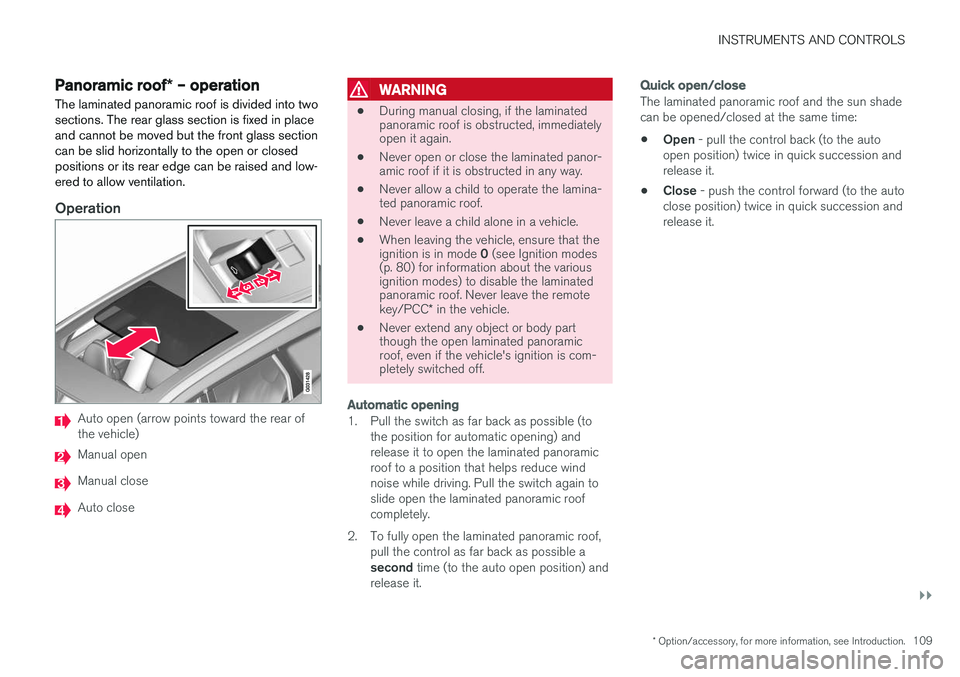
Auto open (arrow points toward the rear of the vehicle)
Manual open
Manual close
Auto close
WARNING
• During manual closing, if the laminated panoramic roof is obstructed, immediatelyopen it again.
• Never open or close the laminated panor-amic roof if it is obstructed in any way.
• Never allow a child to operate the lamina-ted panoramic roof.
• Never leave a child alone in a vehicle.
• When leaving the vehicle, ensure that the ignition is in mode
0 (see Ignition modes
(p. 80) for information about the various ignition modes) to disable the laminatedpanoramic roof. Never leave the remote key/PCC * in the vehicle.
• Never extend any object or body part though the open laminated panoramicroof, even if the vehicle's ignition is com-pletely switched off.
Automatic opening
1. Pull the switch as far back as possible (to
the position for automatic opening) and release it to open the laminated panoramicroof to a position that helps reduce windnoise while driving. Pull the switch again toslide open the laminated panoramic roofcompletely.
2. To fully open the laminated panoramic roof, pull the control as far back as possible a second time (to the auto open position) and
release it.
Quick open/close
The laminated panoramic roof and the sun shade can be opened/closed at the same time: • Open
- pull the control back (to the auto
open position) twice in quick succession and release it.
• Close
- push the control forward (to the auto
close position) twice in quick succession andrelease it.
Page 113 of 398
INSTRUMENTS AND CONTROLS
* Option/accessory, for more information, see Introduction.111
HomeLink®
Wireless Control
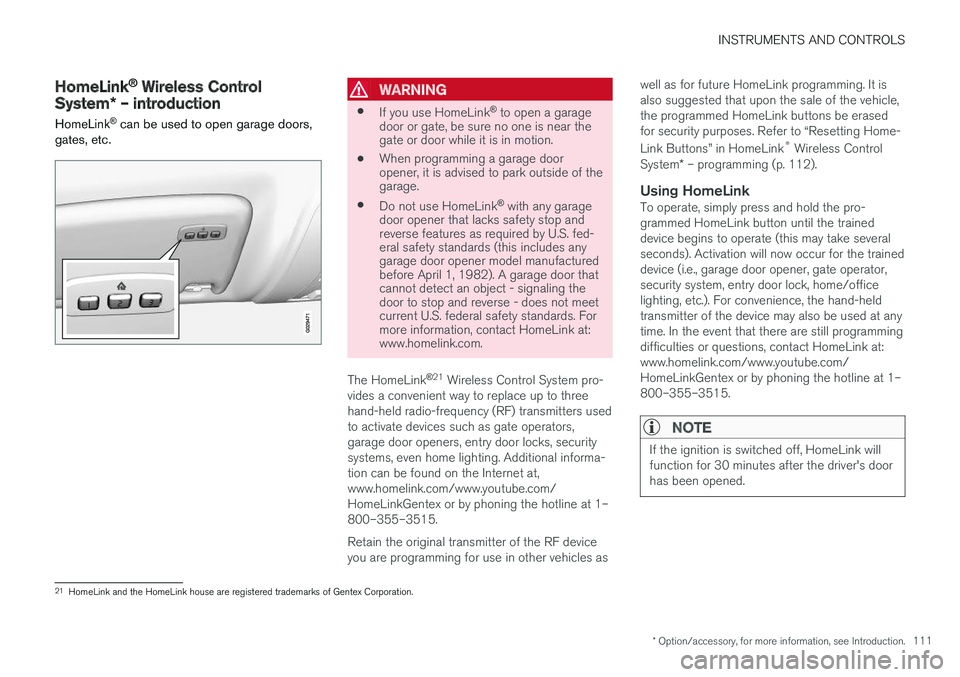
System * – introduction
HomeLink ®
can be used to open garage doors,
gates, etc.WARNING
• If you use HomeLink ®
to open a garage
door or gate, be sure no one is near the gate or door while it is in motion.
• When programming a garage dooropener, it is advised to park outside of thegarage.
• Do not use HomeLink ®
with any garage
door opener that lacks safety stop andreverse features as required by U.S. fed-eral safety standards (this includes anygarage door opener model manufacturedbefore April 1, 1982). A garage door thatcannot detect an object - signaling thedoor to stop and reverse - does not meetcurrent U.S. federal safety standards. Formore information, contact HomeLink at:www.homelink.com.
The HomeLink ®
21
Wireless Control System pro-
vides a convenient way to replace up to three hand-held radio-frequency (RF) transmitters usedto activate devices such as gate operators,garage door openers, entry door locks, securitysystems, even home lighting. Additional informa-tion can be found on the Internet at,www.homelink.com/www.youtube.com/HomeLinkGentex or by phoning the hotline at 1–800–355–3515. Retain the original transmitter of the RF device you are programming for use in other vehicles as well as for future HomeLink programming. It isalso suggested that upon the sale of the vehicle,the programmed HomeLink buttons be erasedfor security purposes. Refer to “Resetting Home- Link Buttons” in HomeLink
®
Wireless Control
System * – programming (p. 112).
Using HomeLinkTo operate, simply press and hold the pro- grammed HomeLink button until the traineddevice begins to operate (this may take severalseconds). Activation will now occur for the traineddevice (i.e., garage door opener, gate operator,security system, entry door lock, home/officelighting, etc.). For convenience, the hand-heldtransmitter of the device may also be used at anytime. In the event that there are still programmingdifficulties or questions, contact HomeLink at:www.homelink.com/www.youtube.com/HomeLinkGentex or by phoning the hotline at 1–800–355–3515.
NOTE
If the ignition is switched off, HomeLink will function for 30 minutes after the driver's doorhas been opened.
21
HomeLink and the HomeLink house are registered trademarks of Gentex Corporation.
Page 118 of 398
INSTRUMENTS AND CONTROLS
116
Information display – messagesThe controls on the left steering wheel lever are used to scroll among messages displayed in theinstrument panel and to confirm selections. When information, indicator or warning symbols illuminate, an explanatory message will be dis-played in the instrument panel.
When a warning (p. 75), information (p. 73) or indicator symbol (p. 73) comes on, a correspond-ing message appears in the information panel. Anerror message is stored in a memory list until thefault is rectified. Press OK to acknowledge and scroll among the
messages.
NOTE
If a warning message appears while you are using the trip computer, the message must be read and confirmed by pressing OK before
the previous activity can be resumed.
MessageDescription
Stop engineAStop and switch off the engine as soon as possible.Serious risk of damage. Con-tact an authorized Volvoworkshop.
Stop safelyAStop and switch off the engine. Serious risk of dam-age. Contact an authorizedVolvo workshop.
Service urgentAHave the vehicle checked by an authorized Volvo work-shop immediately.
Service requiredAHave the vehicle checked by an authorized Volvo work-shop as soon as possible.
See manualARead the owner's manual.
Book time for mainte-nanceTime to book service at an authorized Volvo retailer.
Time for reg- ular mainte-nanceTime for regular service at an authorized Volvo workshop.The timing is determined bythe number of miles driven,number of months since thelast service, engine runningtime.
MessageDescription
Maintenance overdueIf the service intervals are not followed, the warranty doesnot cover any damaged parts.Contact an authorized Volvoworkshop for service.
Temporarily OFFAA function has been tempo- rarily switched off and isreset automatically while driv-ing or after starting again.
Low battery Power savemodeThe audio system is switched off to save current. Chargethe battery.
A There will also be a system-specific part of this message
Related information
• Information displays – introduction (p. 69)
• Information display – menu overview (p. 115)
• Information display – menu controls (p. 115)