buttons VOLVO XC60 2017 Owner´s Manual
[x] Cancel search | Manufacturer: VOLVO, Model Year: 2017, Model line: XC60, Model: VOLVO XC60 2017Pages: 398, PDF Size: 9.17 MB
Page 68 of 398
INSTRUMENTS AND CONTROLS
66
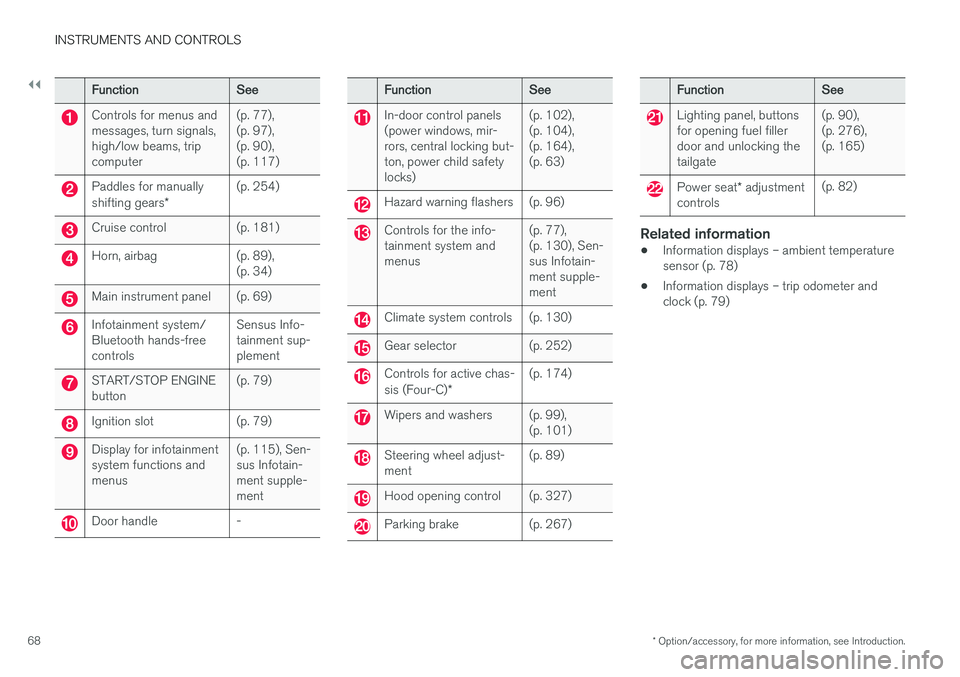
Instrument overview This overview shows the location of the instru- ment panel and center console displays, andcontrols/buttons/switches.
Page 70 of 398
||
INSTRUMENTS AND CONTROLS
* Option/accessory, for more information, see Introduction.
68
FunctionSee
Controls for menus and messages, turn signals,high/low beams, tripcomputer(p. 77), (p. 97),(p. 90),(p. 117)
Paddles for manually shifting gears *(p. 254)
Cruise control(p. 181)
Horn, airbag(p. 89), (p. 34)
Main instrument panel(p. 69)
Infotainment system/ Bluetooth hands-freecontrolsSensus Info- tainment sup-plement
START/STOP ENGINE button(p. 79)
Ignition slot(p. 79)
Display for infotainment system functions andmenus(p. 115), Sen- sus Infotain-ment supple-ment
Door handle-
FunctionSee
In-door control panels (power windows, mir-rors, central locking but-ton, power child safetylocks)(p. 102), (p. 104),(p. 164),(p. 63)
Hazard warning flashers(p. 96)
Controls for the info- tainment system andmenus(p. 77), (p. 130), Sen-sus Infotain-ment supple-ment
Climate system controls(p. 130)
Gear selector(p. 252)
Controls for active chas- sis (Four-C)*(p. 174)
Wipers and washers(p. 99), (p. 101)
Steering wheel adjust- ment(p. 89)
Hood opening control(p. 327)
Parking brake(p. 267)
FunctionSee
Lighting panel, buttons for opening fuel fillerdoor and unlocking thetailgate(p. 90), (p. 276),(p. 165)
Power seat* adjustment
controls(p. 82)
Related information
• Information displays – ambient temperature sensor (p. 78)
• Information displays – trip odometer andclock (p. 79)
Page 79 of 398
INSTRUMENTS AND CONTROLS
}}
77
Reminder – doors not closed
If one of the doors is not closed properly, the
information or warning symbol illuminates
(depending on the vehicle's speed), a graphic will be displayed in instrument panel and an explana- tory text message 3
will also be displayed in the
instrument panel. Stop the vehicle in a safe place as soon as possible and close the door.
If the vehicle is driven at a speed lowerthan approximately 5 mph (7 km/h),the information symbol illuminates.
If the vehicle is driven at a speed higher than approximately 5 mph(7 km/h), the warning symbol illumi-
nates.
If the hood is not closed properly, the warning
symbol illuminates, a graphic will be displayed in instrument panel and an explanatory text mes- sage 3
will also be displayed in the instrument
panel. Stop the vehicle in a safe place as soon as possible and close the hood. If the tailgate is not closed properly, the infor-
mation symbol illuminates and a graphic will be
displayed in instrument panel. Stop the vehicle in a safe place as soon as possible and close thetailgate.
Related information
• Information displays – introduction (p. 69)
• Information displays – indicator symbols(p. 73)
My Car – introduction
The MY CAR menu system provides access to menus for operating many of the vehicle's func-tions, such as setting the clock, door mirrors,lock and alarm settings, etc.
Some of the features or functions are standard; others are optional and vary according to model/market.
OperationUse the buttons on the center console or thesteering wheel keypad to navigate in the menus.
3 Text message applies only to models with the optional digital instrument panel
Page 80 of 398
||
INSTRUMENTS AND CONTROLS
* Option/accessory, for more information, see Introduction.
78
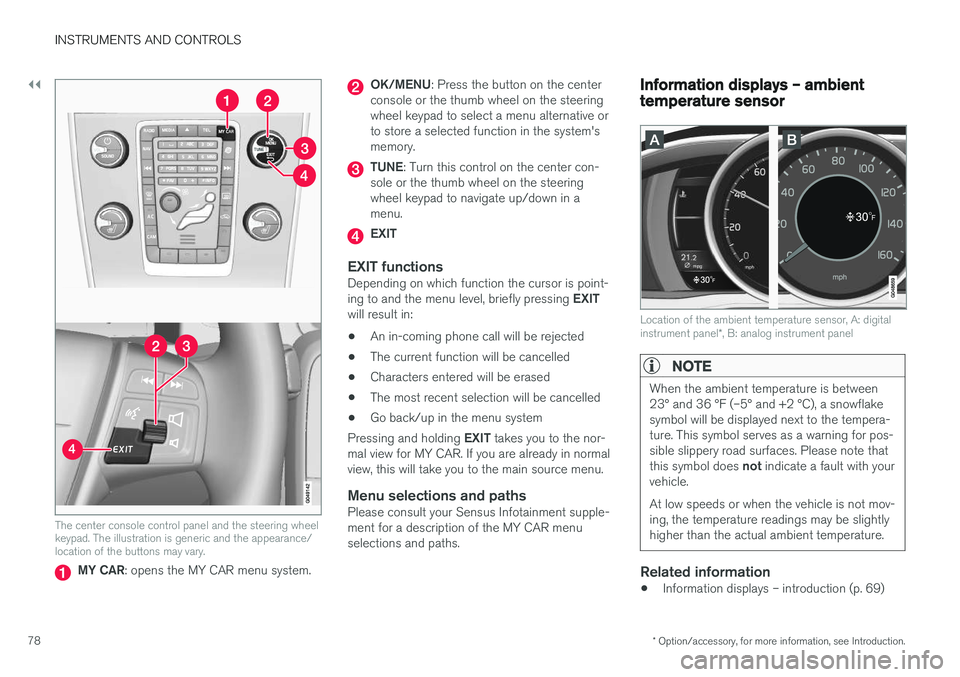
The center console control panel and the steering wheel keypad. The illustration is generic and the appearance/location of the buttons may vary.
MY CAR : opens the MY CAR menu system.
OK/MENU : Press the button on the center
console or the thumb wheel on the steering wheel keypad to select a menu alternative orto store a selected function in the system'smemory.
TUNE : Turn this control on the center con-
sole or the thumb wheel on the steering wheel keypad to navigate up/down in amenu.
EXIT
EXIT functionsDepending on which function the cursor is point- ing to and the menu level, briefly pressing EXIT
will result in:
• An in-coming phone call will be rejected
• The current function will be cancelled
• Characters entered will be erased
• The most recent selection will be cancelled
• Go back/up in the menu system
Pressing and holding EXIT takes you to the nor-
mal view for MY CAR. If you are already in normal view, this will take you to the main source menu.
Menu selections and pathsPlease consult your Sensus Infotainment supple-ment for a description of the MY CAR menuselections and paths.
Information displays – ambient temperature sensor
Location of the ambient temperature sensor, A: digital instrument panel *, B: analog instrument panel
NOTE
When the ambient temperature is between 23° and 36 °F (–5° and +2 °C), a snowflakesymbol will be displayed next to the tempera-ture. This symbol serves as a warning for pos-sible slippery road surfaces. Please note that this symbol does not indicate a fault with your
vehicle. At low speeds or when the vehicle is not mov- ing, the temperature readings may be slightlyhigher than the actual ambient temperature.
Related information
• Information displays – introduction (p. 69)
Page 85 of 398
INSTRUMENTS AND CONTROLS
* Option/accessory, for more information, see Introduction.83
Operation
NOTE
•Only one of the power seat's controls can be used at the same time.
• The power seats have an overload pro-tector that activates if a seat is blockedby any object. If this occurs, switch off the ignition (key in position
0) and wait for a
short period before operating the seat again.
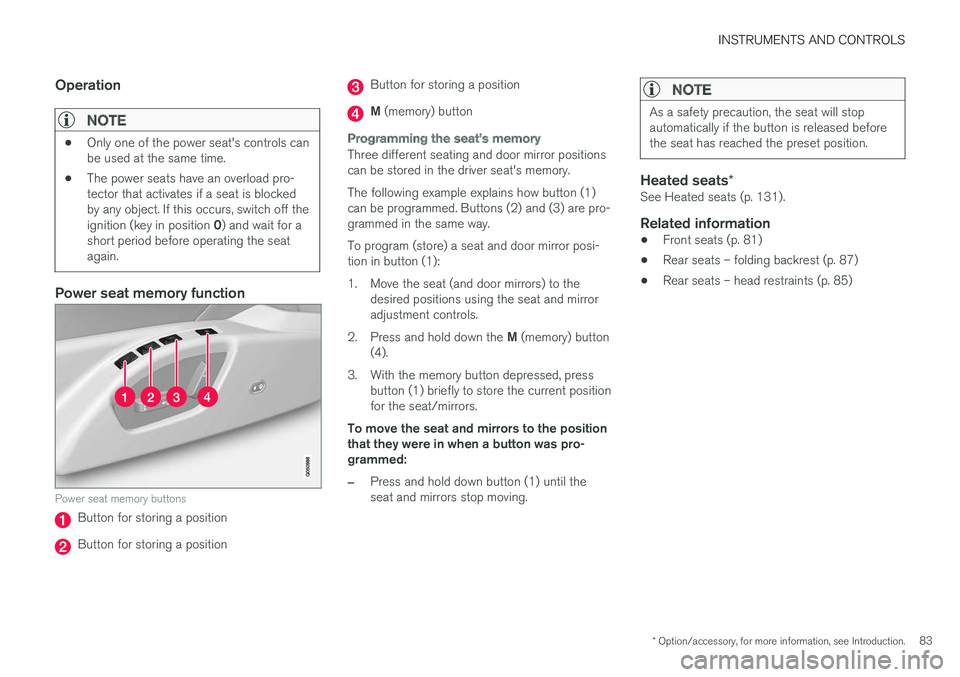
Power seat memory function
Power seat memory buttons
Button for storing a position
Button for storing a position
Button for storing a position
M (memory) button
Programming the seat's memory
Three different seating and door mirror positions can be stored in the driver seat's memory. The following example explains how button (1) can be programmed. Buttons (2) and (3) are pro-grammed in the same way. To program (store) a seat and door mirror posi- tion in button (1):
1. Move the seat (and door mirrors) to the
desired positions using the seat and mirror adjustment controls.
2. Press and hold down the M (memory) button
(4).
3. With the memory button depressed, press button (1) briefly to store the current positionfor the seat/mirrors.
To move the seat and mirrors to the positionthat they were in when a button was pro-grammed:
–Press and hold down button (1) until the seat and mirrors stop moving.
NOTE
As a safety precaution, the seat will stop automatically if the button is released beforethe seat has reached the preset position.
Heated seats *See Heated seats (p. 131).
Related information
•Front seats (p. 81)
• Rear seats – folding backrest (p. 87)
• Rear seats – head restraints (p. 85)
Page 86 of 398
INSTRUMENTS AND CONTROLS
* Option/accessory, for more information, see Introduction.
84
Key memory – power driver's seat *
and door mirrors
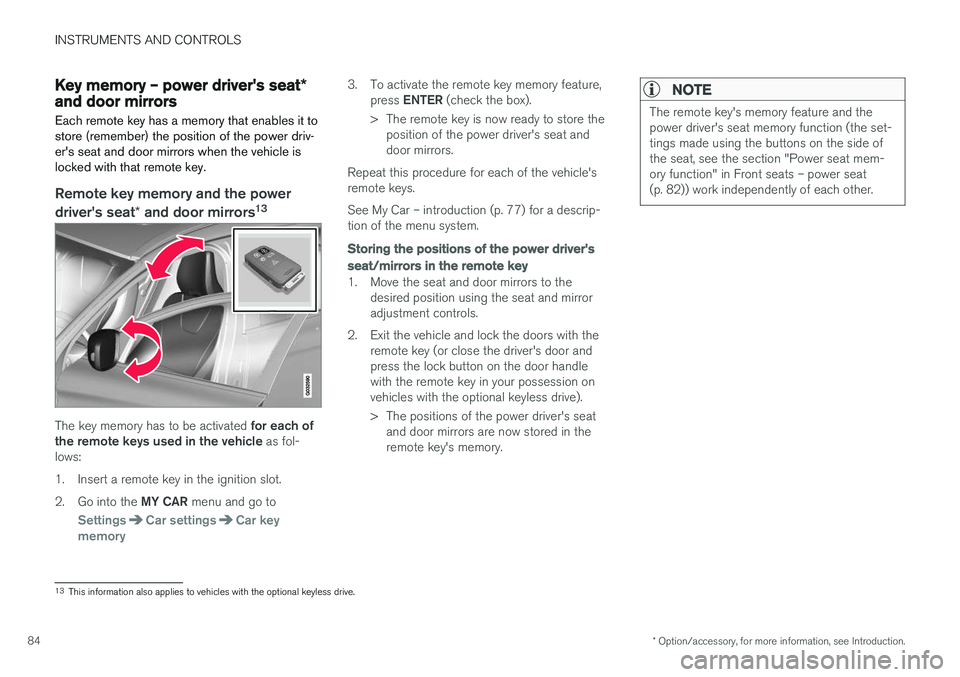
Each remote key has a memory that enables it to store (remember) the position of the power driv-er's seat and door mirrors when the vehicle islocked with that remote key.
Remote key memory and the power
driver's seat * and door mirrors 13
The key memory has to be activated
for each of
the remote keys used in the vehicle as fol-
lows:
1. Insert a remote key in the ignition slot.2. Go into the MY CAR menu and go to
SettingsCar settingsCar key
memory
3. To activate the remote key memory feature, press ENTER (check the box).
> The remote key is now ready to store the position of the power driver's seat and door mirrors.
Repeat this procedure for each of the vehicle'sremote keys. See My Car – introduction (p. 77) for a descrip- tion of the menu system.
Storing the positions of the power driver's seat/mirrors in the remote key
1. Move the seat and door mirrors to the desired position using the seat and mirror adjustment controls.
2. Exit the vehicle and lock the doors with the remote key (or close the driver's door andpress the lock button on the door handlewith the remote key in your possession onvehicles with the optional keyless drive).
> The positions of the power driver's seatand door mirrors are now stored in the remote key's memory.
NOTE
The remote key's memory feature and the power driver's seat memory function (the set-tings made using the buttons on the side ofthe seat, see the section "Power seat mem-ory function" in Front seats – power seat(p. 82)) work independently of each other.
13This information also applies to vehicles with the optional keyless drive.
Page 99 of 398
INSTRUMENTS AND CONTROLS
}}
97
Turn signals
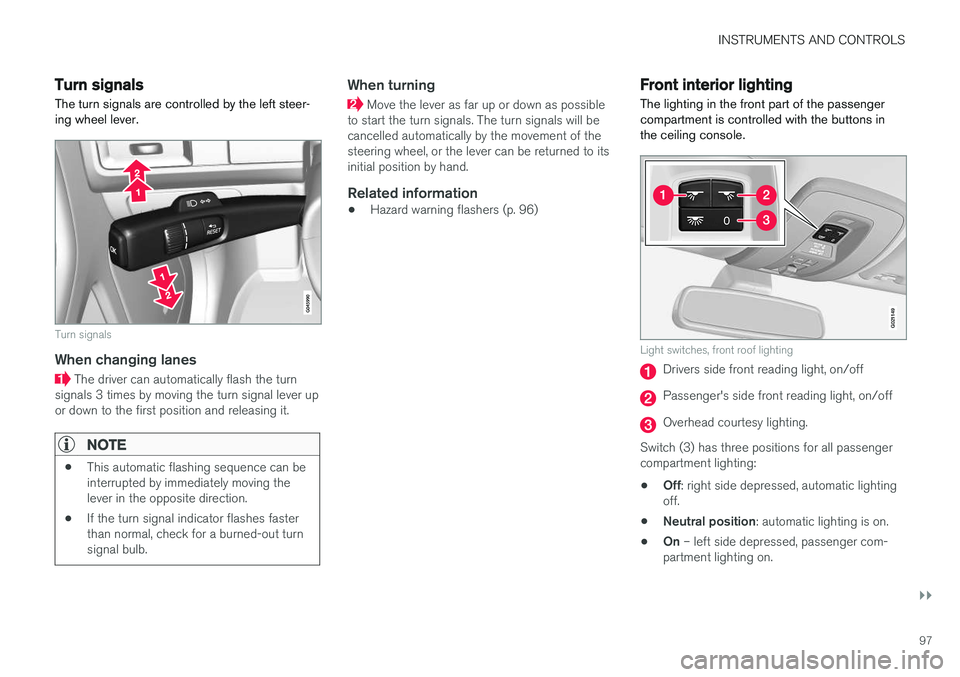
The turn signals are controlled by the left steer- ing wheel lever.
Turn signals
When changing lanes
The driver can automatically flash the turn
signals 3 times by moving the turn signal lever up or down to the first position and releasing it.
NOTE
• This automatic flashing sequence can be interrupted by immediately moving thelever in the opposite direction.
• If the turn signal indicator flashes fasterthan normal, check for a burned-out turnsignal bulb.
When turning
Move the lever as far up or down as possible
to start the turn signals. The turn signals will be cancelled automatically by the movement of thesteering wheel, or the lever can be returned to itsinitial position by hand.
Related information
• Hazard warning flashers (p. 96)
Front interior lighting
The lighting in the front part of the passenger compartment is controlled with the buttons inthe ceiling console.
G021149
Light switches, front roof lighting
Drivers side front reading light, on/off
Passenger's side front reading light, on/off
Overhead courtesy lighting.
Switch (3) has three positions for all passenger compartment lighting: • Off
: right side depressed, automatic lighting
off.
• Neutral position
: automatic lighting is on.
• On
– left side depressed, passenger com-
partment lighting on.
Page 104 of 398
INSTRUMENTS AND CONTROLS
* Option/accessory, for more information, see Introduction.
102
Tailgate wiper/washer
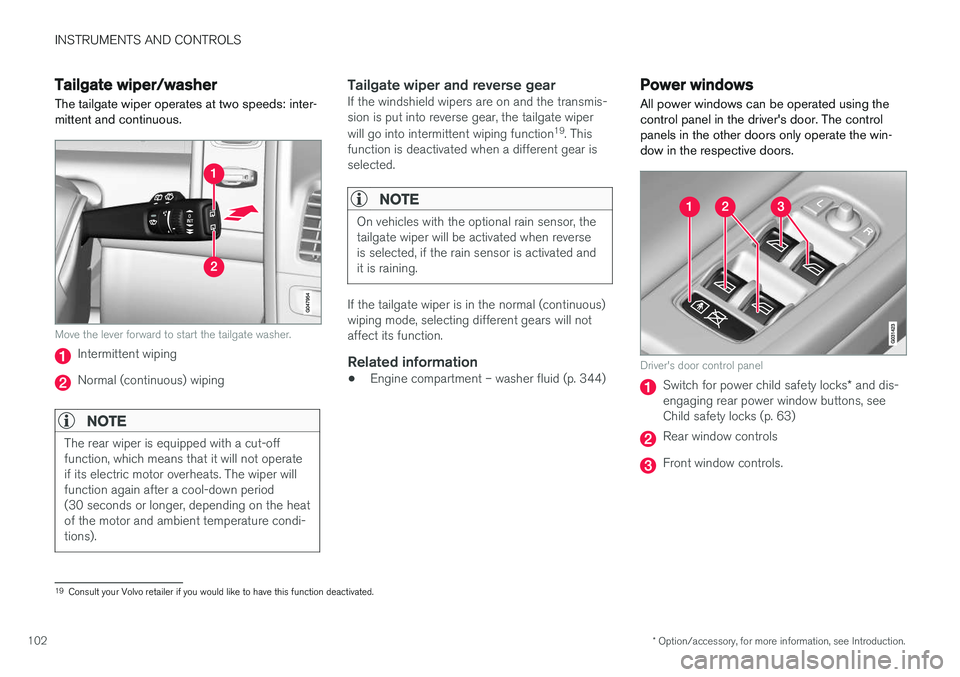
The tailgate wiper operates at two speeds: inter- mittent and continuous.
Move the lever forward to start the tailgate washer.
Intermittent wiping
Normal (continuous) wiping
NOTE
The rear wiper is equipped with a cut-off function, which means that it will not operateif its electric motor overheats. The wiper willfunction again after a cool-down period(30 seconds or longer, depending on the heatof the motor and ambient temperature condi-tions).
Tailgate wiper and reverse gearIf the windshield wipers are on and the transmis- sion is put into reverse gear, the tailgate wiper will go into intermittent wiping function 19
. This
function is deactivated when a different gear is selected.
NOTE
On vehicles with the optional rain sensor, the tailgate wiper will be activated when reverseis selected, if the rain sensor is activated andit is raining.
If the tailgate wiper is in the normal (continuous) wiping mode, selecting different gears will notaffect its function.
Related information
• Engine compartment – washer fluid (p. 344)
Power windows
All power windows can be operated using the control panel in the driver's door. The controlpanels in the other doors only operate the win-dow in the respective doors.
Driver's door control panel
Switch for power child safety locks * and dis-
engaging rear power window buttons, see Child safety locks (p. 63)
Rear window controls
Front window controls.
19 Consult your Volvo retailer if you would like to have this function deactivated.
Page 106 of 398
INSTRUMENTS AND CONTROLS
* Option/accessory, for more information, see Introduction.
104
Power door mirrors
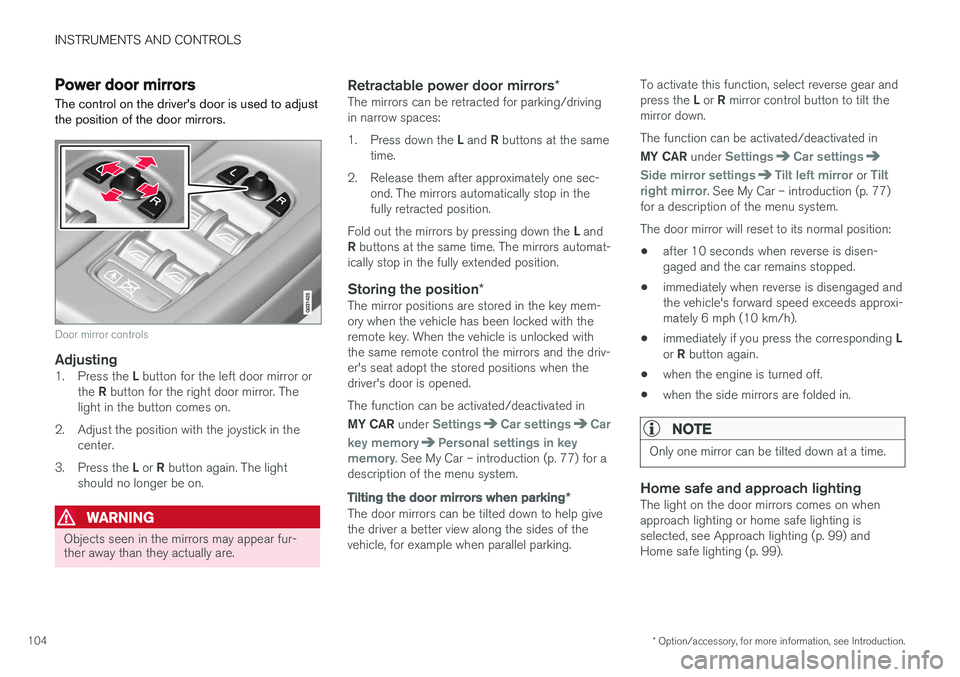
The control on the driver's door is used to adjust the position of the door mirrors.
Door mirror controls
Adjusting1. Press the L button for the left door mirror or
the R button for the right door mirror. The
light in the button comes on.
2. Adjust the position with the joystick in the center.
3. Press the L or R button again. The light
should no longer be on.
WARNING
Objects seen in the mirrors may appear fur- ther away than they actually are.
Retractable power door mirrors *The mirrors can be retracted for parking/driving in narrow spaces: 1.
Press down the L and R buttons at the same
time.
2. Release them after approximately one sec- ond. The mirrors automatically stop in the fully retracted position.
Fold out the mirrors by pressing down the L and
R buttons at the same time. The mirrors automat-
ically stop in the fully extended position.
Storing the position *The mirror positions are stored in the key mem-ory when the vehicle has been locked with theremote key. When the vehicle is unlocked withthe same remote control the mirrors and the driv-er's seat adopt the stored positions when thedriver's door is opened. The function can be activated/deactivated in MY CAR under
SettingsCar settingsCar
key memory
Personal settings in key
memory. See My Car – introduction (p. 77) for a
description of the menu system.
Tilting the door mirrors when parking *
The door mirrors can be tilted down to help give the driver a better view along the sides of thevehicle, for example when parallel parking. To activate this function, select reverse gear and press the
L or R mirror control button to tilt the
mirror down. The function can be activated/deactivated in MY CAR under
SettingsCar settings
Side mirror settingsTilt left mirror or Tilt
right mirror. See My Car – introduction (p. 77)
for a description of the menu system. The door mirror will reset to its normal position:
• after 10 seconds when reverse is disen- gaged and the car remains stopped.
• immediately when reverse is disengaged andthe vehicle's forward speed exceeds approxi-mately 6 mph (10 km/h).
• immediately if you press the corresponding
L
or R button again.
• when the engine is turned off.
• when the side mirrors are folded in.
NOTE
Only one mirror can be tilted down at a time.
Home safe and approach lightingThe light on the door mirrors comes on when approach lighting or home safe lighting isselected, see Approach lighting (p. 99) andHome safe lighting (p. 99).
Page 107 of 398
INSTRUMENTS AND CONTROLS
* Option/accessory, for more information, see Introduction.105
Related information
•Interior rearview mirror (p. 106)
• Heated windshield
*, rear window and door
mirror defrosters (p. 106)
• Power door mirrors – automatic tilting/ retraction (p. 105)
Power door mirrors – automatic tilting/retraction
The control on the driver's door is used to adjust the position of the door mirrors.
Automatically tilting the door mirrors
when parking
The door mirrors can tilt down automatically to help give the driver a better view along the sidesof the vehicle, for example when parallel parking.When the transmission is no longer in reverse,the mirrors will automatically return to their origi-nal position. This function can be activated/deactivated in MY
CAR under
SettingsCar settingsSide
mirror settings
In reverse gear tilt left
mirror or In reverse gear tilt right mirror. See
My Car – introduction (p. 77) for information about the MY CAR menu system.
Automatic retraction when lockingWhen the vehicle is locked/unlocked with the remote key the door mirrors are automaticallyretracted/extended. The function can be activated/deactivated in MY CAR under
SettingsCar settings
Side mirror settingsRetract side mirrors
when locking. See My Car – introduction (p. 77)
for a description of the menu system.
Resetting to neutralMirrors that have been moved out of position by an external force must be electrically reset to theneutral position for electric retracting/extendingto work. • Retract the mirrors with the
L and R buttons.
• Fold them out again with the
L and R but-
tons.
The mirrors are now reset in neutral position.
Related information
• Interior rearview mirror (p. 106)
• Heated windshield
*, rear window and door
mirror defrosters (p. 106)