On Call VOLVO XC60 2018 Owner´s Manual
[x] Cancel search | Manufacturer: VOLVO, Model Year: 2018, Model line: XC60, Model: VOLVO XC60 2018Pages: 660, PDF Size: 11.77 MB
Page 245 of 660
KEY, LOCKS AND ALARM
}}
243
Locking and unlocking withdetachable key blade
The detachable key blade can be used to unlock the vehicle from the outside, e.g. if the battery inthe remote key is discharged.
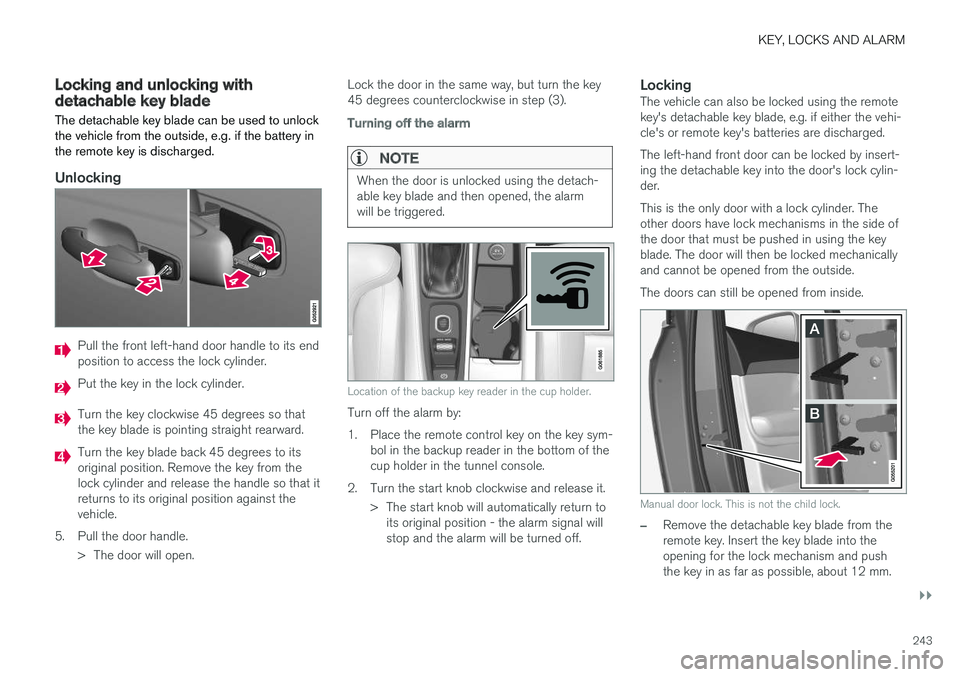
Unlocking
Pull the front left-hand door handle to its end position to access the lock cylinder.
Put the key in the lock cylinder.
Turn the key clockwise 45 degrees so that the key blade is pointing straight rearward.
Turn the key blade back 45 degrees to its original position. Remove the key from thelock cylinder and release the handle so that itreturns to its original position against thevehicle.
5. Pull the door handle. > The door will open. Lock the door in the same way, but turn the key45 degrees counterclockwise in step (3).
Turning off the alarm
NOTE
When the door is unlocked using the detach- able key blade and then opened, the alarmwill be triggered.
Location of the backup key reader in the cup holder.
Turn off the alarm by:
1. Place the remote control key on the key sym-
bol in the backup reader in the bottom of the cup holder in the tunnel console.
2. Turn the start knob clockwise and release it. > The start knob will automatically return toits original position - the alarm signal willstop and the alarm will be turned off.
LockingThe vehicle can also be locked using the remotekey's detachable key blade, e.g. if either the vehi-cle's or remote key's batteries are discharged. The left-hand front door can be locked by insert- ing the detachable key into the door's lock cylin-der. This is the only door with a lock cylinder. The other doors have lock mechanisms in the side ofthe door that must be pushed in using the keyblade. The door will then be locked mechanicallyand cannot be opened from the outside. The doors can still be opened from inside.
Manual door lock. This is not the child lock.
–Remove the detachable key blade from the remote key. Insert the key blade into theopening for the lock mechanism and pushthe key in as far as possible, about 12 mm.
Page 249 of 660
KEY, LOCKS AND ALARM
* Option/accessory.247
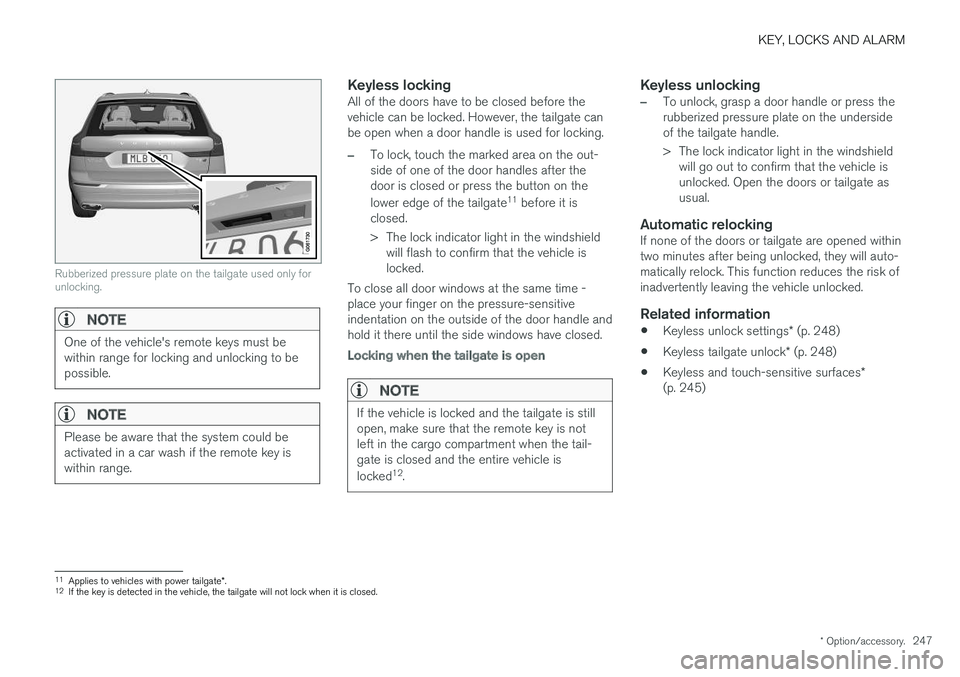
Rubberized pressure plate on the tailgate used only for unlocking.
NOTE
One of the vehicle's remote keys must be within range for locking and unlocking to bepossible.
NOTE
Please be aware that the system could be activated in a car wash if the remote key iswithin range.
Keyless lockingAll of the doors have to be closed before the vehicle can be locked. However, the tailgate canbe open when a door handle is used for locking.
–To lock, touch the marked area on the out- side of one of the door handles after thedoor is closed or press the button on the lower edge of the tailgate 11
before it is
closed.
> The lock indicator light in the windshield will flash to confirm that the vehicle is locked.
To close all door windows at the same time -place your finger on the pressure-sensitiveindentation on the outside of the door handle andhold it there until the side windows have closed.
Locking when the tailgate is open
NOTE
If the vehicle is locked and the tailgate is still open, make sure that the remote key is notleft in the cargo compartment when the tail-gate is closed and the entire vehicle is locked 12
.
Keyless unlocking
–To unlock, grasp a door handle or press the rubberized pressure plate on the undersideof the tailgate handle.
> The lock indicator light in the windshield
will go out to confirm that the vehicle is unlocked. Open the doors or tailgate asusual.
Automatic relockingIf none of the doors or tailgate are opened withintwo minutes after being unlocked, they will auto-matically relock. This function reduces the risk ofinadvertently leaving the vehicle unlocked.
Related information
• Keyless unlock settings
* (p. 248)
• Keyless tailgate unlock
* (p. 248)
• Keyless and touch-sensitive surfaces
*
(p. 245)
11 Applies to vehicles with power tailgate *.
12 If the key is detected in the vehicle, the tailgate will not lock when it is closed.
Page 255 of 660
KEY, LOCKS AND ALARM
}}
* Option/accessory.253
Automatic locking when driving
The doors and tailgate will automatically lock when the vehicle begins to move.
Related information
• Locking and unlocking from inside the vehi- cle (p. 249)
Opening and closing the power
tailgate
*
The tailgate can be opened and closed automat- ically with the optional power tailgate.
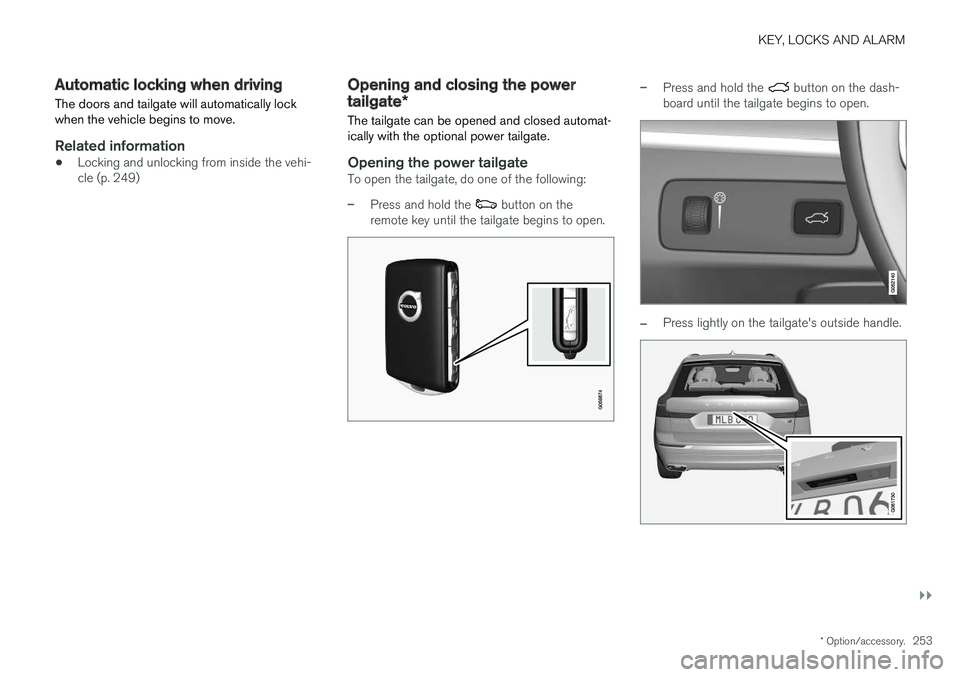
Opening the power tailgateTo open the tailgate, do one of the following:
–Press and hold the button on the
remote key until the tailgate begins to open.
–Press and hold the button on the dash-
board until the tailgate begins to open.
–Press lightly on the tailgate's outside handle.
Page 256 of 660
||
KEY, LOCKS AND ALARM
* Option/accessory.
254
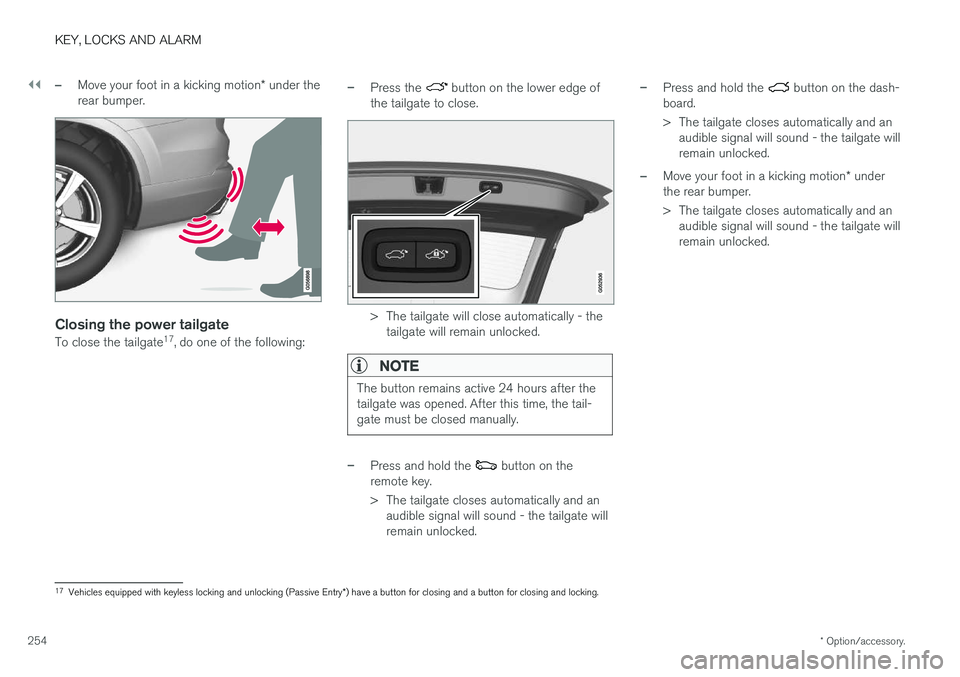
–Move your foot in a kicking motion * under the
rear bumper.
Closing the power tailgate
To close the tailgate 17
, do one of the following:
–Press the button on the lower edge of
the tailgate to close.
> The tailgate will close automatically - the tailgate will remain unlocked.
NOTE
The button remains active 24 hours after the tailgate was opened. After this time, the tail-gate must be closed manually.
–Press and hold the button on the
remote key.
> The tailgate closes automatically and an audible signal will sound - the tailgate will remain unlocked.
–Press and hold the button on the dash-
board.
> The tailgate closes automatically and an audible signal will sound - the tailgate will remain unlocked.
–Move your foot in a kicking motion * under
the rear bumper.
> The tailgate closes automatically and an audible signal will sound - the tailgate will remain unlocked.
17Vehicles equipped with keyless locking and unlocking (Passive Entry *) have a button for closing and a button for closing and locking.
Page 257 of 660
KEY, LOCKS AND ALARM
}}
* Option/accessory.255
Closing and locking 17
the power
tailgate
–Press the button on the lower edge of
the tailgate to close and simultaneously lock the tailgate and doors (all doors must beclosed in order to lock).
> The tailgate closes automatically - the tail-
gate and doors lock, and the alarm * is
activated.
NOTE
• One of the vehicle's remote keys must be within range for locking and unlocking tobe possible.
• When the keyless locking or closing
* func-
tions are used, three audible signals willsound if the key is not detected closeenough to the tailgate.
CAUTION
When operating the tailgate manually, open and close it slowly. If you encounter resis-tance, do not use force. This could lead todamage and loss of function.
Interrupting opening or closingInterrupt opening or closing by doing one of the following:
• Press the button on the dashboard.
• Press the button on the remote key.
• Press the close button on the underside ofthe tailgate.
• Press the rubberized pressure plate on theunderside of the tailgate's outer handle.
• Using a foot movement
*.
Tailgate movement is interrupted and stops. Thetrunk lid can then be opened or closed manually.
Pinch protectionIf anything obstructs the tailgate with enoughforce to prevent it from opening or closing, pinchprotection will be activated.
• When opening - the tailgate will stop movingand an audible signal will sound.
• When closing - the tailgate will stop, a longaudible signal will sound and the tailgate willreturn to the programmed maximum openingposition.
WARNING
Be aware of the risk of serious injury when operating the tailgate. Before opening/clos-ing, make sure that no one is in the path ofthe tailgate who could be injured by its move-ment. Always operate the tailgate with caution.
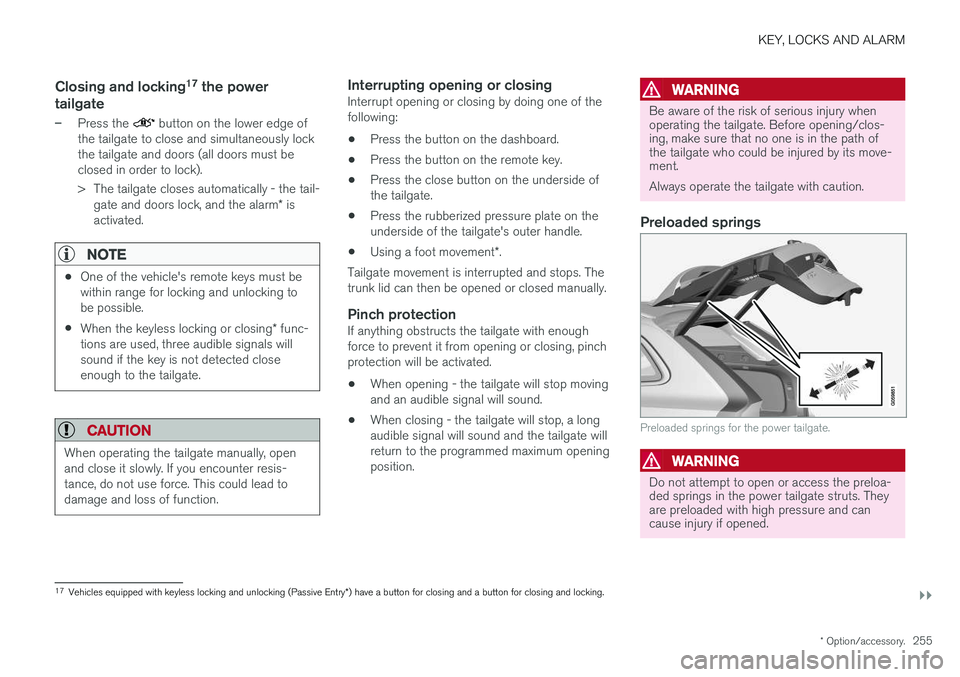
Preloaded springs
Preloaded springs for the power tailgate.
WARNING
Do not attempt to open or access the preloa- ded springs in the power tailgate struts. Theyare preloaded with high pressure and cancause injury if opened.
17
Vehicles equipped with keyless locking and unlocking (Passive Entry *) have a button for closing and a button for closing and locking.
Page 261 of 660
KEY, LOCKS AND ALARM
}}
* Option/accessory.259
Activating and deactivating privatelocking
Private locking is activated using the function button in the center display and a PIN code.
NOTE
For the valet lock function to be activated the car must be in at least ignition mode I.
Entering security code before initial useThe first time the function is used, a security code must be selected. This code can then beused to deactivate private locking if the selectedPIN code has been lost or forgotten. The securitycode functions as a PUK (security) code for allPIN codes used for private locking. Save the security code in a safe place.To create a security code:
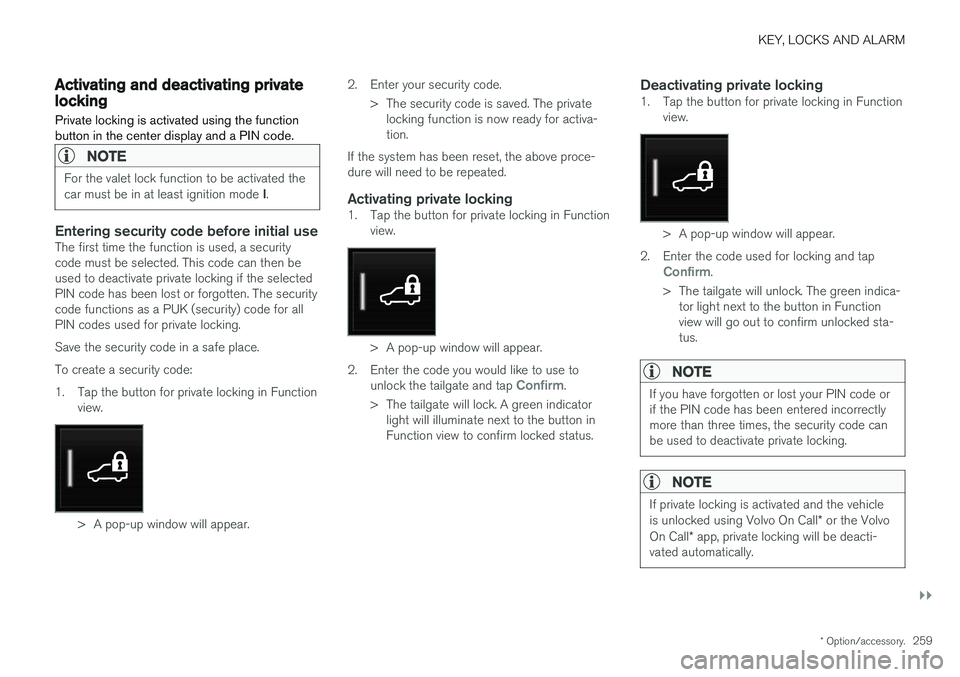
1. Tap the button for private locking in Function
view.
> A pop-up window will appear. 2. Enter your security code.
> The security code is saved. The privatelocking function is now ready for activa- tion.
If the system has been reset, the above proce-dure will need to be repeated.
Activating private locking1. Tap the button for private locking in Function view.
> A pop-up window will appear.
2. Enter the code you would like to use to unlock the tailgate and tap
Confirm.
> The tailgate will lock. A green indicator light will illuminate next to the button in Function view to confirm locked status.
Deactivating private locking1. Tap the button for private locking in Function view.
> A pop-up window will appear.
2. Enter the code used for locking and tap
Confirm.
> The tailgate will unlock. The green indica- tor light next to the button in Function view will go out to confirm unlocked sta-tus.
NOTE
If you have forgotten or lost your PIN code or if the PIN code has been entered incorrectlymore than three times, the security code canbe used to deactivate private locking.
NOTE
If private locking is activated and the vehicle is unlocked using Volvo On Call * or the Volvo
On Call * app, private locking will be deacti-
vated automatically.
Page 264 of 660
||
KEY, LOCKS AND ALARM
* Option/accessory.
262
Disarming the alarm without a functioning
remote key
The vehicle can be unlocked and disarmed even if the remote key is not functioning, e.g. if thebattery is discharged.
1. Open the driver's door using the detachable
key blade.
> This will trigger the alarm.
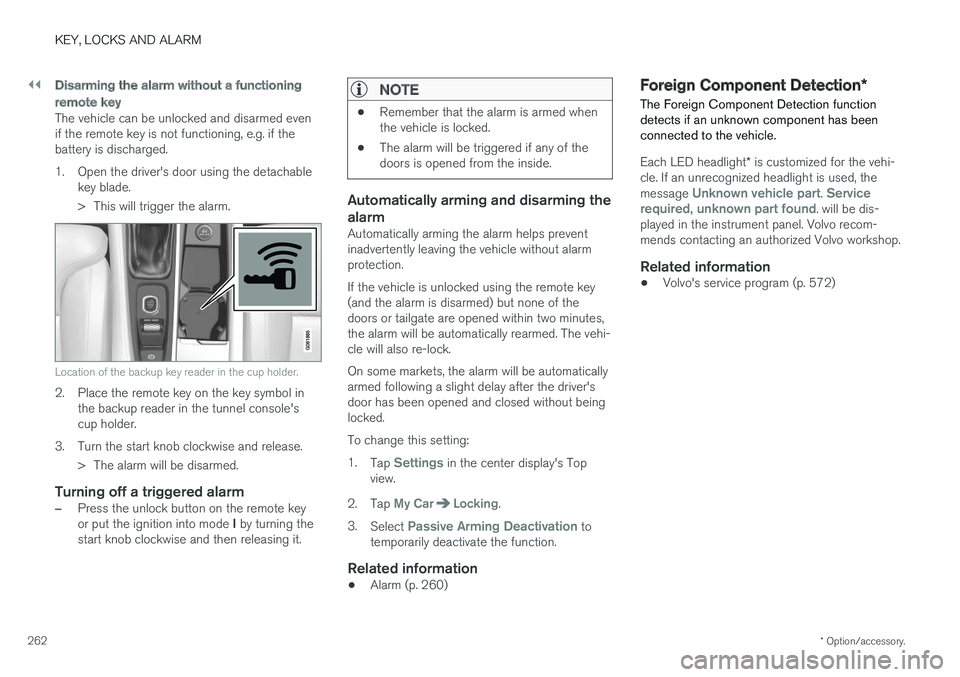
Location of the backup key reader in the cup holder.
2. Place the remote key on the key symbol inthe backup reader in the tunnel console's cup holder.
3. Turn the start knob clockwise and release. > The alarm will be disarmed.
Turning off a triggered alarm
–Press the unlock button on the remote key or put the ignition into mode I by turning the
start knob clockwise and then releasing it.
NOTE
• Remember that the alarm is armed when the vehicle is locked.
• The alarm will be triggered if any of thedoors is opened from the inside.
Automatically arming and disarming the alarm
Automatically arming the alarm helps prevent inadvertently leaving the vehicle without alarmprotection. If the vehicle is unlocked using the remote key (and the alarm is disarmed) but none of thedoors or tailgate are opened within two minutes,the alarm will be automatically rearmed. The vehi-cle will also re-lock. On some markets, the alarm will be automatically armed following a slight delay after the driver'sdoor has been opened and closed without beinglocked. To change this setting:1.
Tap
Settings in the center display's Top
view.
2. Tap
My CarLocking.
3. Select
Passive Arming Deactivation to
temporarily deactivate the function.
Related information
• Alarm (p. 260)
Foreign Component Detection
*
The Foreign Component Detection function detects if an unknown component has beenconnected to the vehicle.
Each LED headlight * is customized for the vehi-
cle. If an unrecognized headlight is used, the message
Unknown vehicle part. Service
required, unknown part found. will be dis-
played in the instrument panel. Volvo recom- mends contacting an authorized Volvo workshop.
Related information
• Volvo's service program (p. 572)
Page 268 of 660
DRIVER SUPPORT
* Option/accessory.
266
Electronic Stability Control
The Electronic Stability Control (ESC 2
) function
helps the driver avoid skidding and improves the vehicle's directional stability.
This symbol will be displayed in the instrument panel when theESC system is intervening. When the ESC has intervened to apply the brakes, a pulsingsound may be heard and the
vehicle may accelerate more slowly than expec-ted when the accelerator pedal is depressed.
The ESC system consists of the following sub- functions: • Stability control 3
• Spin control and active yaw control
• Engine drag control
• Trailer Stability Assist
WARNING
•The Electronic Stability Control system ESC is supplementary driver supportintended to facilitate driving and make itsafer – it cannot handle all situations inall traffic, weather and road conditions.
• ESC is not a substitute for the driver'sattention and judgment. The driver isalways responsible for ensuring the vehi-cle is driven in a safe manner, at theappropriate speed, with an appropriatedistance to other vehicles, and in accord-ance with current traffic rules and regula-tions.
Stability control 3This function helps control the driving and brak-ing force of each individual wheel in an attemptto stabilize the vehicle.
Spin control and active yaw controlThis function is active at low speeds and brakesthe wheels that are spinning to transfer additionalpower from wheels that are not spinning. This function also helps prevent the wheels from spinning while the vehicle is accelerating.
Engine drag control
Engine drag control (EDC
4
) helps prevent inad-
vertent wheel lock, e.g. after downshifting orusing engine braking when driving at low speedson a slippery surface. Inadvertent wheel lock while driving could impair the driver's ability to steer the vehicle.
Trailer Stability Assist *5
Trailer Stability Assist (TSA
6
) is designed to help
stabilize a vehicle that is towing a trailer if thevehicle and trailer have begun to sway. For moreinformation, see "Trailer Stability Assist".
NOTE
The TSA function is deactivated if ESC Sport
Mode is activated.
Related information
• Electronic Stability Control Sport mode (p. 267)
• Activating/deactivating Sport mode in Elec-tronic Stability Control (p. 267)
1
Roll Stability Control
2 Electronic Stability Control
3 Also called traction control.
4 Engine Drag Control
5Trailer Stability Assist is included if the vehicle is equipped with a Volvo original towbar.6
Trailer Stability Assist
Page 271 of 660
DRIVER SUPPORT
269
Electronic Stability Control symbolsand messages
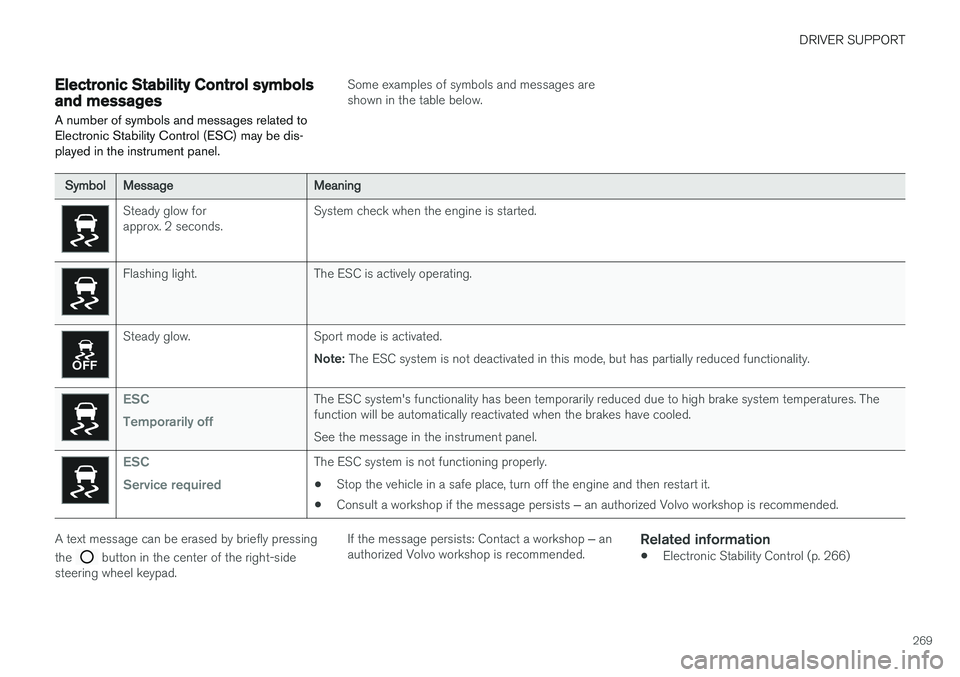
A number of symbols and messages related to Electronic Stability Control (ESC) may be dis-played in the instrument panel.
Some examples of symbols and messages are shown in the table below.
SymbolMessageMeaning
Steady glow for approx. 2 seconds. System check when the engine is started.
Flashing light. The ESC is actively operating.
Steady glow. Sport mode is activated.
Note: The ESC system is not deactivated in this mode, but has partially reduced functionality.
ESC Temporarily offThe ESC system's functionality has been temporarily reduced due to high brake system temperatures. The function will be automatically reactivated when the brakes have cooled. See the message in the instrument panel.
ESC Service requiredThe ESC system is not functioning properly.
• Stop the vehicle in a safe place, turn off the engine and then restart it.
• Consult a workshop if the message persists
‒ an authorized Volvo workshop is recommended.
A text message can be erased by briefly pressing the
button in the center of the right-side
steering wheel keypad. If the message persists: Contact a workshop
‒ an
authorized Volvo workshop is recommended.
Related information
• Electronic Stability Control (p. 266)
Page 274 of 660
||
DRIVER SUPPORT
272
Related information
•Speed limiter (p. 270)
Deactivating and putting SpeedLimiter in standby mode
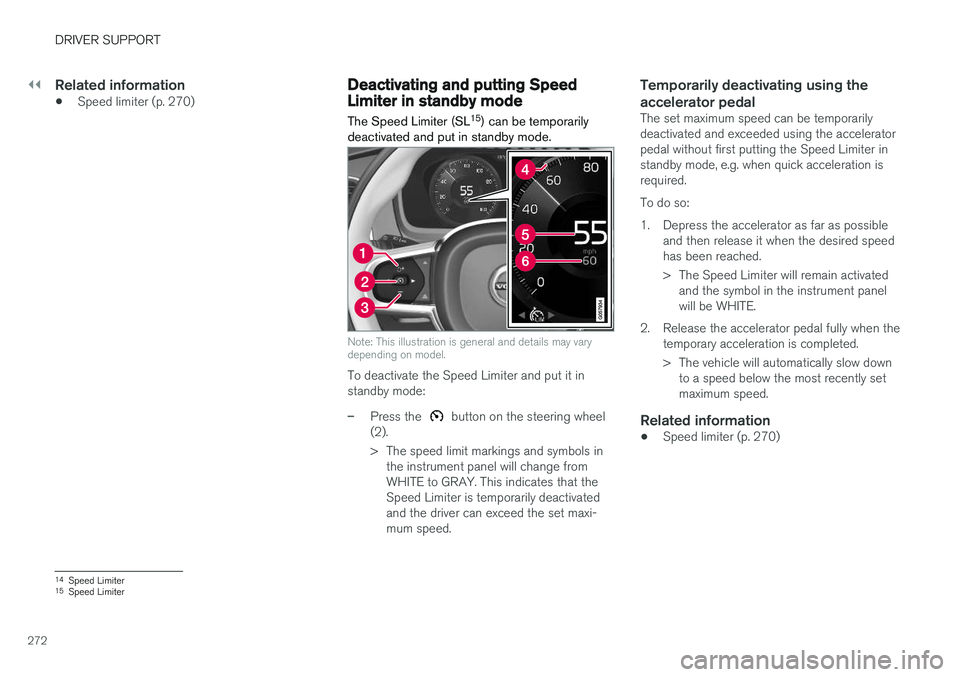
The Speed Limiter (SL 15
) can be temporarily
deactivated and put in standby mode.
Note: This illustration is general and details may vary depending on model.
To deactivate the Speed Limiter and put it in standby mode:
–Press the button on the steering wheel
(2).
> The speed limit markings and symbols in the instrument panel will change from WHITE to GRAY. This indicates that theSpeed Limiter is temporarily deactivatedand the driver can exceed the set maxi-mum speed.
Temporarily deactivating using the accelerator pedal
The set maximum speed can be temporarily deactivated and exceeded using the acceleratorpedal without first putting the Speed Limiter instandby mode, e.g. when quick acceleration isrequired. To do so:
1. Depress the accelerator as far as possible and then release it when the desired speed has been reached.
> The Speed Limiter will remain activatedand the symbol in the instrument panel will be WHITE.
2. Release the accelerator pedal fully when the temporary acceleration is completed.
> The vehicle will automatically slow downto a speed below the most recently set maximum speed.
Related information
• Speed limiter (p. 270)
14
Speed Limiter
15 Speed Limiter