key VOLVO XC60 2018 Owner´s Manual
[x] Cancel search | Manufacturer: VOLVO, Model Year: 2018, Model line: XC60, Model: VOLVO XC60 2018Pages: 660, PDF Size: 11.77 MB
Page 501 of 660
AUDIO, MEDIA AND INTERNET
}}
* Option/accessory.499
Dictating replies in the instrument panel
After the test message has been read aloud, it is possible to answer briefly with dictation if thevehicle has an Internet connection.
–Tap Answer using the steering wheel key-
pad. A dictation dialog will start.
Message notificationNotifications can be activated and deactivated in the text message settings.
Related information
• Phone (p. 492)
• Text message settings (p. 499)
• Phone settings (p. 500)
• Internet-connected vehicle
* (p. 501)
• Voice control for cellular phones (p. 145)
• Entering characters, letters and words byhand in the center display (p. 127)
• Connecting a phone to the car via Bluetoothfor the first time (p. 493)
Text message settings
Settings for handling text messages received through a connected phone can be personal-ized.
1. Tap Settings in the Top view.
2. Tap
CommunicationText Messagesand select settings: •
Notification in center display - display
text message notifications in the center display's status bar.
•
Notification in driver display - displays
notifications in the driver's display and incoming messages can be managedusing the steering wheel's right-hand key-pad.
•
Text message tone - select tone for
incoming text messages.
Related information
• Phone (p. 492)
• Connecting a phone to the car via Bluetooth for the first time (p. 493)
• Handling text messages (p. 498)
• Phone settings (p. 500)
Managing the phone book
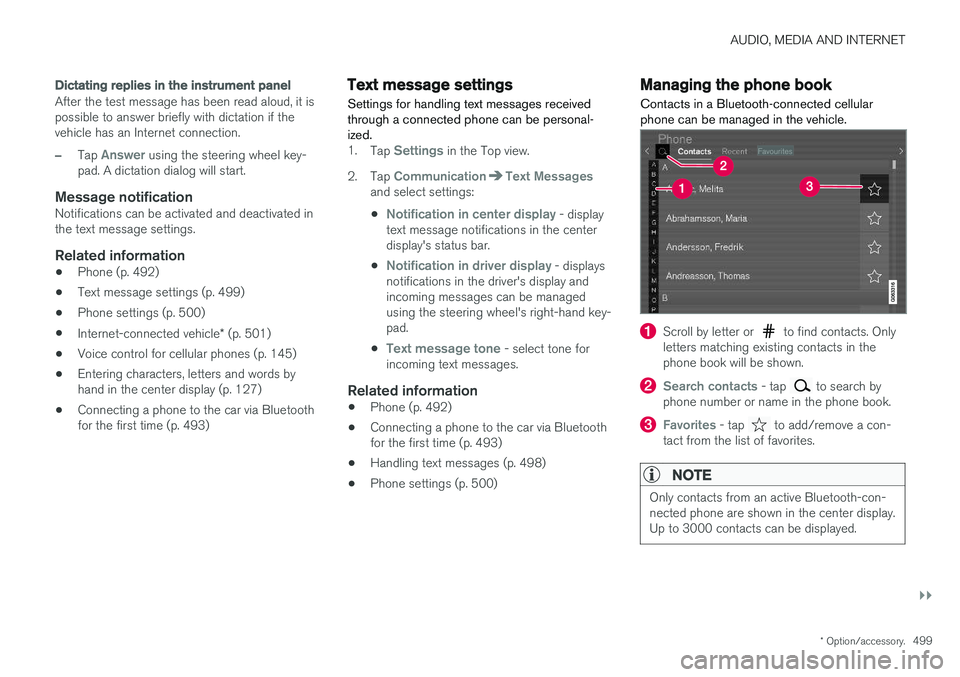
Contacts in a Bluetooth-connected cellular phone can be managed in the vehicle.
Scroll by letter or to find contacts. Only
letters matching existing contacts in the phone book will be shown.
Search contacts - tap to search by
phone number or name in the phone book.
Favorites - tap to add/remove a con-
tact from the list of favorites.
NOTE
Only contacts from an active Bluetooth-con- nected phone are shown in the center display.Up to 3000 contacts can be displayed.
Page 556 of 660
LOADING, STORAGE AND PASSENGER COMPARTMENT
* Option/accessory.
554
Passenger compartment interior
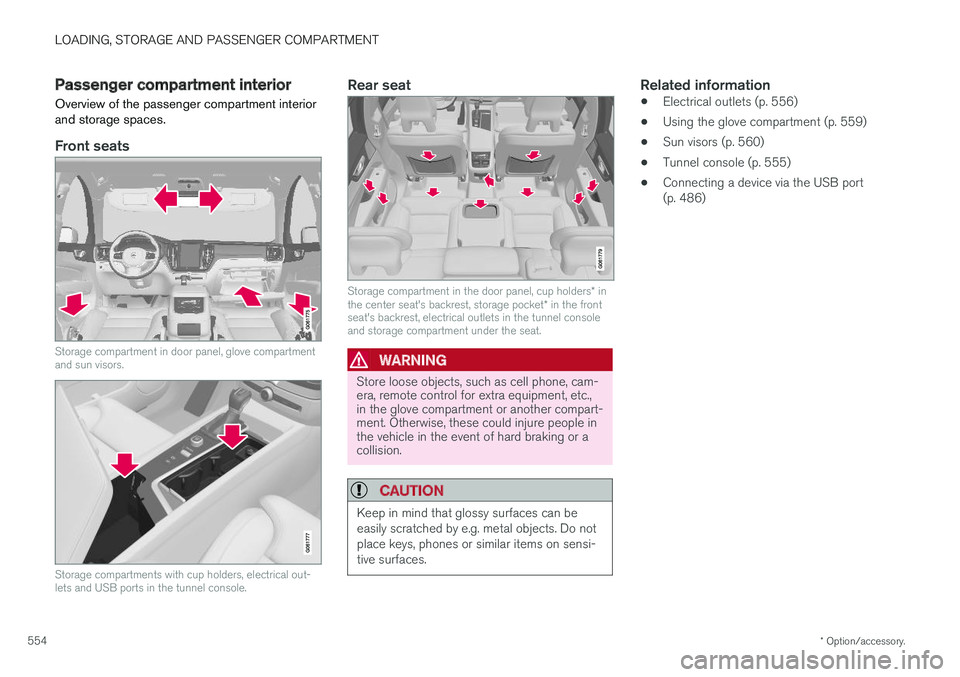
Overview of the passenger compartment interior and storage spaces.
Front seats
Storage compartment in door panel, glove compartment and sun visors.
Storage compartments with cup holders, electrical out- lets and USB ports in the tunnel console.
Rear seat
Storage compartment in the door panel, cup holders * in
the center seat's backrest, storage pocket * in the front
seat's backrest, electrical outlets in the tunnel console and storage compartment under the seat.
WARNING
Store loose objects, such as cell phone, cam- era, remote control for extra equipment, etc.,in the glove compartment or another compart-ment. Otherwise, these could injure people inthe vehicle in the event of hard braking or acollision.
CAUTION
Keep in mind that glossy surfaces can be easily scratched by e.g. metal objects. Do notplace keys, phones or similar items on sensi-tive surfaces.
Related information
• Electrical outlets (p. 556)
• Using the glove compartment (p. 559)
• Sun visors (p. 560)
• Tunnel console (p. 555)
• Connecting a device via the USB port (p. 486)
Page 557 of 660
LOADING, STORAGE AND PASSENGER COMPARTMENT
* Option/accessory.555
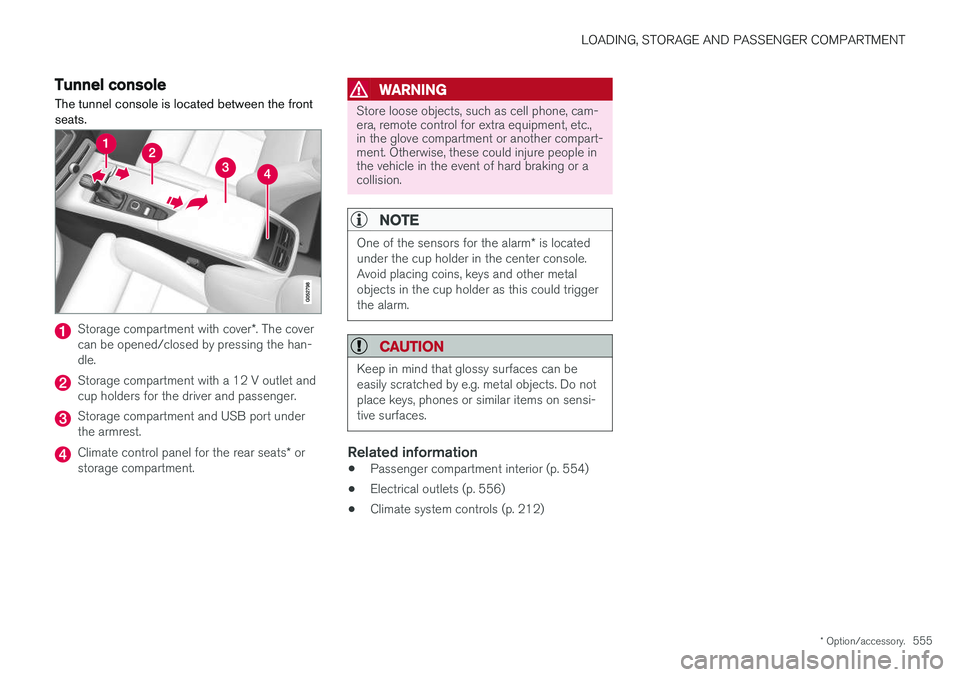
Tunnel console The tunnel console is located between the front seats.
Storage compartment with cover *. The cover
can be opened/closed by pressing the han- dle.
Storage compartment with a 12 V outlet and cup holders for the driver and passenger.
Storage compartment and USB port under the armrest.
Climate control panel for the rear seats * or
storage compartment.
WARNING
Store loose objects, such as cell phone, cam- era, remote control for extra equipment, etc.,in the glove compartment or another compart-ment. Otherwise, these could injure people inthe vehicle in the event of hard braking or acollision.
NOTE
One of the sensors for the alarm * is located
under the cup holder in the center console. Avoid placing coins, keys and other metalobjects in the cup holder as this could triggerthe alarm.
CAUTION
Keep in mind that glossy surfaces can be easily scratched by e.g. metal objects. Do notplace keys, phones or similar items on sensi-tive surfaces.
Related information
• Passenger compartment interior (p. 554)
• Electrical outlets (p. 556)
• Climate system controls (p. 212)
Page 561 of 660
LOADING, STORAGE AND PASSENGER COMPARTMENT
}}
* Option/accessory.559
WARNING
•Only use accessories that are not dam- aged or malfunctioning. The accessoriesmust be designed for 120 V and 60 Hz,with plugs intended for the outlet. Theaccessories must be CE marked, ULmarked or have an equivalent safetymarking.
• New let outlets, plugs or accessoriescome into contact with water or anotherfluid. Do not touch or use the outlet if itappears damaged or has been in contactwith water or another fluid.
• Do not connect power strips, adapters orextension cords to the outlet has thiscould cause the outlet's safety functionsto malfunction.
• The outlet is equipped with a pet guard.Make sure that no one picks at or dam-ages the outlet in such a way that theguard is disabled. Children should not beleft unsupervised in the vehicle when theoutlet is active.
Failure to follow the above could lead to severe or fatal electrical shocks.
Related information
• Electrical outlets (p. 556)
• Passenger compartment interior (p. 554)
Using the glove compartment
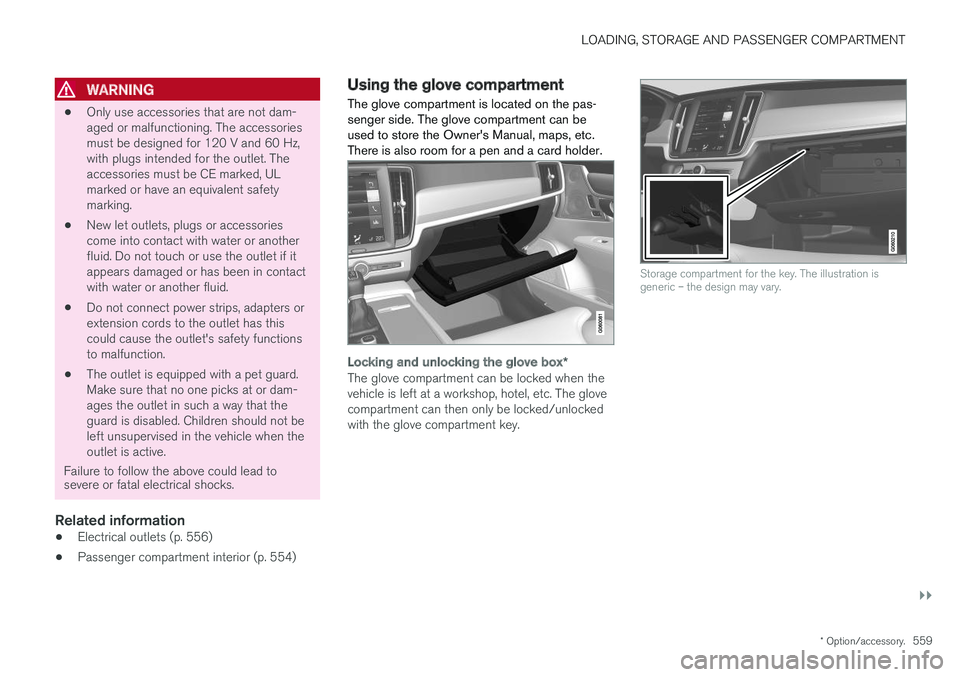
The glove compartment is located on the pas- senger side. The glove compartment can beused to store the Owner's Manual, maps, etc.There is also room for a pen and a card holder.
Locking and unlocking the glove box *
The glove compartment can be locked when the vehicle is left at a workshop, hotel, etc. The glovecompartment can then only be locked/unlockedwith the glove compartment key.
Storage compartment for the key. The illustration is generic – the design may vary.
Page 562 of 660
||
LOADING, STORAGE AND PASSENGER COMPARTMENT
* Option/accessory.
560
The illustration is generic – the design may vary.
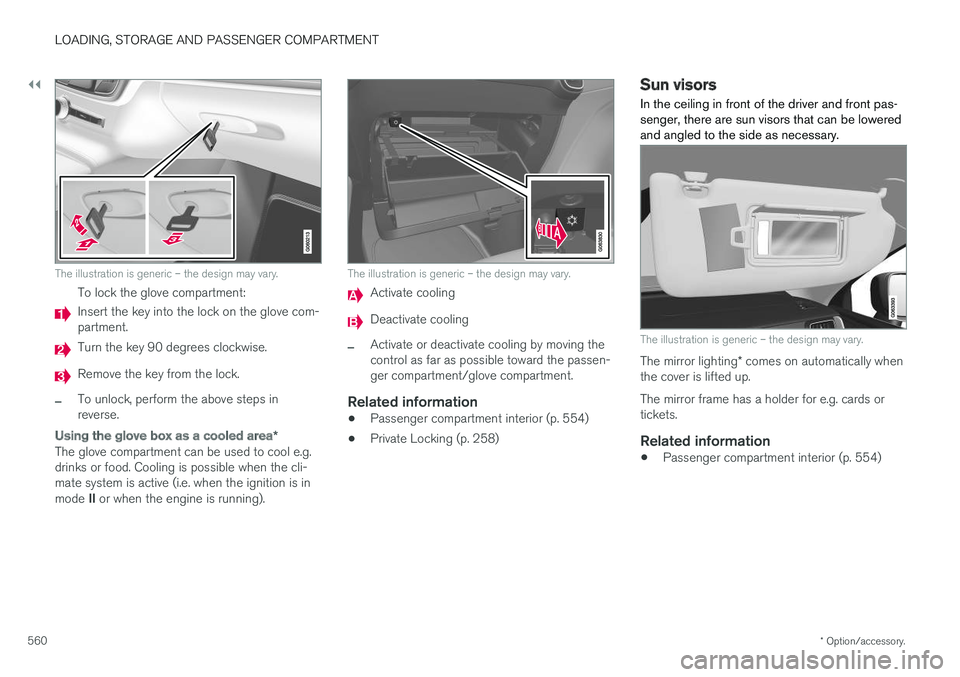
To lock the glove compartment:
Insert the key into the lock on the glove com- partment.
Turn the key 90 degrees clockwise.
Remove the key from the lock.
–To unlock, perform the above steps in reverse.
Using the glove box as a cooled area *
The glove compartment can be used to cool e.g. drinks or food. Cooling is possible when the cli-mate system is active (i.e. when the ignition is in mode II or when the engine is running).
The illustration is generic – the design may vary.
Activate cooling
Deactivate cooling
–Activate or deactivate cooling by moving the control as far as possible toward the passen-ger compartment/glove compartment.
Related information
• Passenger compartment interior (p. 554)
• Private Locking (p. 258)
Sun visors In the ceiling in front of the driver and front pas- senger, there are sun visors that can be loweredand angled to the side as necessary.
The illustration is generic – the design may vary.
The mirror lighting
* comes on automatically when
the cover is lifted up. The mirror frame has a holder for e.g. cards or tickets.
Related information
• Passenger compartment interior (p. 554)
Page 576 of 660
||
MAINTENANCE AND SERVICE
574
Related information
•Vehicle status (p. 576)
• Scheduling service and repairs (p. 576)
• Connecting equipment to the vehicle's data link connector (p. 36)
• Technician certification (p. 37)
• Climate control system service (p. 582)
• Maintenance of the brake system (p. 405)
• Engine compartment overview (p. 583)
Data transfer between vehicle andworkshop over Wi-Fi
Volvo workshops have a designated Wi-Fi net- work for secure data transfer between your vehi-cle and the workshop. Your visit to the workshopwill be easier and more effective when diagnos-tics information and software can be transferredover the workshop's network.
When you arrive at the workshop, your technician can connect your vehicle to the workshop's Wi-Finetwork to perform troubleshooting and down-load software. For this type of communication,the vehicle only connects to the workshop's net-work. The vehicle can only be connected to thedesignated workshop networks, not to any othernetwork, e.g. your home network.
Manual connection to workshop Wi-FiManual connection is usually performed by aservice technician. Because the technician usesthe buttons on your remote key to connect thevehicle, it is important that you bring a key withbuttons when taking the vehicle in to a workshop.Pressing the lock button on the remote key threetimes will connect the vehicle to the workshop'sWi-Fi network. When the car is connected to a Wi-Fi network, the
symbol appears in the center display.
WARNING
The vehicle may not be driven when it is con- nected to the workshop's networks and sys-tems.
Related information
• Handling system updates via Download Cen- ter (p. 575)
• Scheduling service and repairs (p. 576)
Page 605 of 660
MAINTENANCE AND SERVICE
}}
* Option/accessory.603
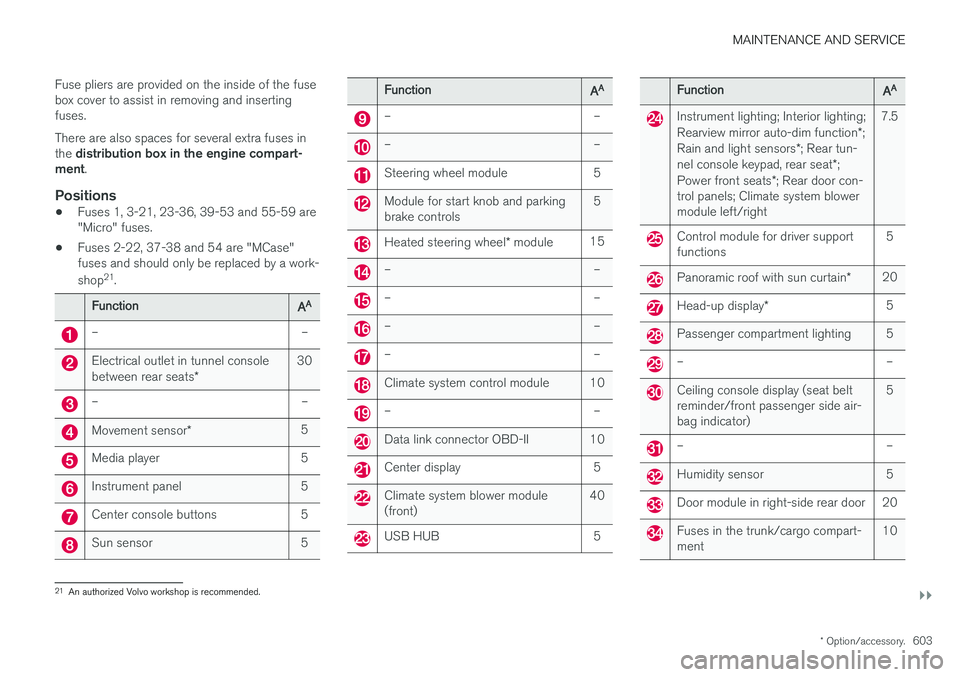
Fuse pliers are provided on the inside of the fuse box cover to assist in removing and insertingfuses. There are also spaces for several extra fuses in the
distribution box in the engine compart-
ment .
Positions
•Fuses 1, 3-21, 23-36, 39-53 and 55-59 are "Micro" fuses.
• Fuses 2-22, 37-38 and 54 are "MCase"fuses and should only be replaced by a work- shop 21
.
FunctionAA
– –
Electrical outlet in tunnel console between rear seats * 30
– –
Movement sensor
* 5
Media player 5
Instrument panel 5
Center console buttons 5
Sun sensor 5
FunctionAA
– –
– –
Steering wheel module 5
Module for start knob and parking brake controls 5
Heated steering wheel
* module 15
– –
– –
– –
– –
Climate system control module 10
– –
Data link connector OBD-II 10
Center display 5
Climate system blower module (front) 40
USB HUB 5
FunctionAA
Instrument lighting; Interior lighting; Rearview mirror auto-dim function
*;
Rain and light sensors *; Rear tun-
nel console keypad, rear seat *;
Power front seats *; Rear door con-
trol panels; Climate system blower module left/right 7.5
Control module for driver support functions
5
Panoramic roof with sun curtain
*20
Head-up display
* 5
Passenger compartment lighting 5
– –
Ceiling console display (seat belt reminder/front passenger side air-bag indicator) 5
– –
Humidity sensor 5
Door module in right-side rear door 20
Fuses in the trunk/cargo compart- ment
10
21
An authorized Volvo workshop is recommended.
Page 646 of 660
INDEX
644
B
Backrestfront seat, adjusting 184, 185, 188, 189 , 190
rear seat, folding 192
Battery jump-start 441
Maintenance 592
start 592
support 595
symbols on the battery 596
warning symbols 596
BLIS 341, 342, 343, 344 Blower adjusting 223, 224
air distribution 206
air vents 207
Bluetooth connect 485
connecting vehicle to Internet 503
phone 492
settings 501
Book service and repair 576
Booster cushions 71Brake assist after collision 411
Brake fluidgrade 639
Brake functions 402
Brake light 159
Brakes 403 anti-lock brakes, ABS 403
automatic when stationary 409
Brake Assist System, BAS 404
brake lights 159
brake system 402
emergency brake lights 159
handbrake 405
Maintenance 405
on salted roads 405
on wet roads 404
brake system fluid 639
C
Camera sensor 337
Camera unit 323
Capacity weight 550, 635
Cargo compartment 561
attachment points 563
cargo net 568
electrical outlet 556, 558
Lighting 162
Cargo compartment cover 564, 566
cargo net 568
Car wash 614, 615, 617, 618, 619, 620
Catalytic converter 439 recovery 447
CD player 483
Cell phone, see Phone 493
Center console 555Center display change appearance 129
cleaning 609
climate controls 212
Function view 120
keyboard 124
messages 138, 139, 140
operation 110, 113, 117, 122
overview 107
settings 130, 131, 132
switch off and change volume 129
symbols in status bar 122
views 113
Central locking 249
Change of owner 132
Changing a wheel 536
Checking engine oil level 585
Page 651 of 660
INDEX
649
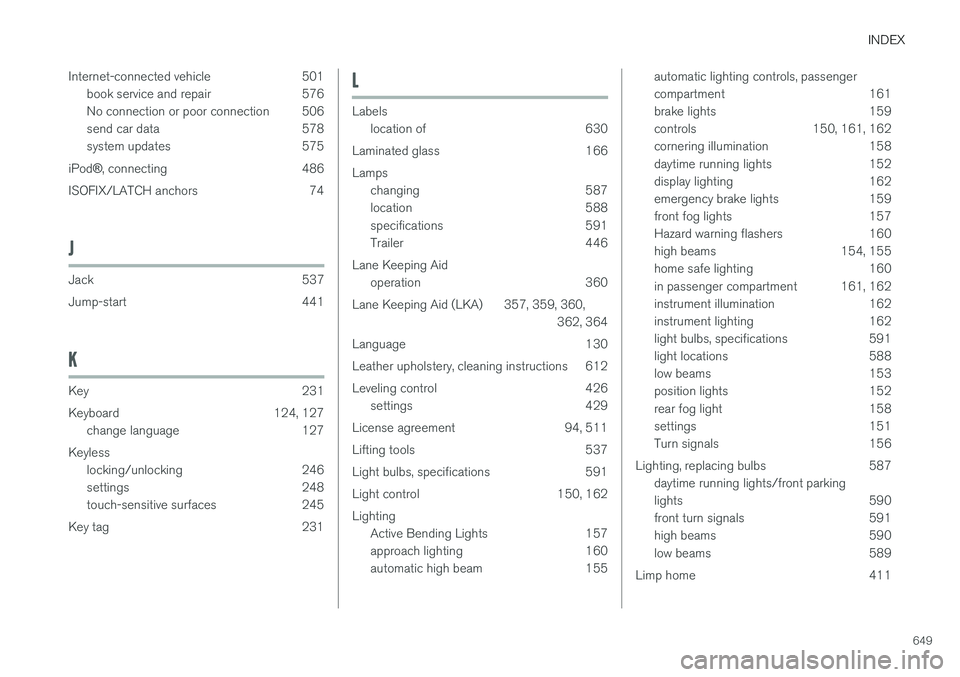
Internet-connected vehicle 501
book service and repair 576
No connection or poor connection 506
send car data 578
system updates 575
iPod ®, connecting 486
ISOFIX/LATCH anchors 74
J
Jack 537
Jump-start 441
K
Key 231
Keyboard 124, 127 change language 127
Keyless locking/unlocking 246
settings 248
touch-sensitive surfaces 245
Key tag 231
L
Labels location of 630
Laminated glass 166 Lamps changing 587
location 588
specifications 591
Trailer 446
Lane Keeping Aid operation 360
Lane Keeping Aid (LKA) 357, 359, 360, 362, 364
Language 130
Leather upholstery, cleaning instructions 612
Leveling control 426 settings 429
License agreement 94, 511
Lifting tools 537
Light bulbs, specifications 591
Light control 150, 162Lighting Active Bending Lights 157
approach lighting 160
automatic high beam 155
automatic lighting controls, passenger
compartment 161
brake lights 159
controls 150, 161, 162
cornering illumination 158
daytime running lights 152
display lighting 162
emergency brake lights 159
front fog lights 157
Hazard warning flashers 160
high beams 154, 155
home safe lighting 160
in passenger compartment 161, 162
instrument illumination 162
instrument lighting 162
light bulbs, specifications 591
light locations 588
low beams 153
position lights 152
rear fog light 158
settings 151
Turn signals 156
Lighting, replacing bulbs 587 daytime running lights/front parking
lights 590
front turn signals 591
high beams 590
low beams 589
Limp home 411
Page 654 of 660

INDEX
652Rain sensor 177, 178
Rain sensor's memory function 178
Raise the rear end 562
Rear camera 379, 380, 381, 383, 384,
386, 387
Rear seat blower 224
climate 212
folding backrest 192
head restraint 195
heating 215
temperature 226
Rear sensors 374, 375, 376, 377, 378 Rearview/door mirrors dimming 170
heating 222
interior 169
Rearview mirror 169 dimming 170
Rear window heating 222
washers 180
wipers 180
Recalls 45
Recommendations when driving 433
Recommendations when loading 561
Recovery 450
Red Key 240 settings 241
Refrigerant 582 climate system 640
Refueling filling 436
fuel filler door, fuel flap 435
Remote immobilizer 244
Remote key 231 battery replacement 236
connecting to driver profile 137
detachable key blade 242
loss 240
Range 235
Remote updates 575
Reporting safety defects 44
Resetting door mirrors 170
Resetting settings 133 change of owner 132
Driver profile 137
Resetting trip odometer 88
Road Sign Information 350, 351, 352 limitations 354
operation 351, 352, 353, 354
Road trip 433
Roll Stability Control 265
Roof load, max. weight 635RSC (Roll Stability Control) 265
Run-off Mitigation 366, 367
S
Safety 42 pregnancy 43
Safety belt, see Seat belt 47
Safety defects, reporting 44
Safety mode 61 starting/moving 62
Sealing compound 545
Seat, see Seats 184
Seat belt reminder 51
Seat belts 47 Automatic locking retractor/Emergency
locking retractor 65
buckling/unbuckling 48
pregnancy 43
seat belt reminder 51
seat belt tensioner 50
securing child restraint systems 67, 69, 71
Seat belt tensioner 50 resetting 51
Seats heating 214, 215
manual front seat 184