intellisafe VOLVO XC60 2018 Owner´s Manual
[x] Cancel search | Manufacturer: VOLVO, Model Year: 2018, Model line: XC60, Model: VOLVO XC60 2018Pages: 660, PDF Size: 11.77 MB
Page 369 of 660
DRIVER SUPPORT
}}
* Option/accessory.367
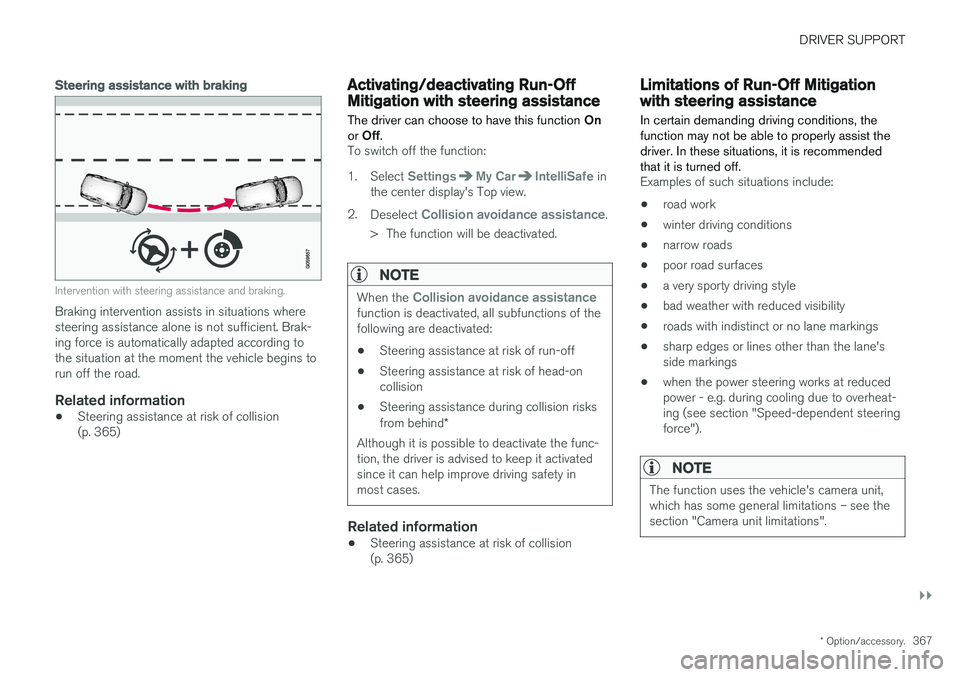
Steering assistance with braking
Intervention with steering assistance and braking.
Braking intervention assists in situations where steering assistance alone is not sufficient. Brak-ing force is automatically adapted according tothe situation at the moment the vehicle begins torun off the road.
Related information
•Steering assistance at risk of collision(p. 365)
Activating/deactivating Run-OffMitigation with steering assistance The driver can choose to have this function
On
or Off .
To switch off the function:
1. Select
SettingsMy CarIntelliSafe in
the center display's Top view.
2. Deselect
Collision avoidance assistance.
> The function will be deactivated.
NOTE
When the Collision avoidance assistancefunction is deactivated, all subfunctions of the following are deactivated: • Steering assistance at risk of run-off
• Steering assistance at risk of head-on collision
• Steering assistance during collision risks from behind
*
Although it is possible to deactivate the func- tion, the driver is advised to keep it activatedsince it can help improve driving safety inmost cases.
Related information
• Steering assistance at risk of collision (p. 365)
Limitations of Run-Off Mitigationwith steering assistance
In certain demanding driving conditions, the function may not be able to properly assist thedriver. In these situations, it is recommendedthat it is turned off.
Examples of such situations include:
• road work
• winter driving conditions
• narrow roads
• poor road surfaces
• a very sporty driving style
• bad weather with reduced visibility
• roads with indistinct or no lane markings
• sharp edges or lines other than the lane's side markings
• when the power steering works at reducedpower - e.g. during cooling due to overheat-ing (see section "Speed-dependent steeringforce").
NOTE
The function uses the vehicle's camera unit, which has some general limitations – see thesection "Camera unit limitations".
Page 371 of 660
DRIVER SUPPORT
}}
* Option/accessory.369
Related information
•Steering assistance at risk of collision (p. 365)
Activating/deactivating Steeringassistance during collision riskswith oncoming vehicles The driver can choose to have this function
On
or Off .
To switch off the function:
1. Select
SettingsMy CarIntelliSafe in
the center display's Top view.
2. Deselect
Collision avoidance assistance.
> The function will be deactivated.
NOTE
When the Collision avoidance assistancefunction is deactivated, all subfunctions of the following are deactivated: • Steering assistance at risk of run-off
• Steering assistance at risk of head-on collision
• Steering assistance during collision risks from behind
*
Although it is possible to deactivate the func- tion, the driver is advised to keep it activatedsince it can help improve driving safety inmost cases.
Related information
• Steering assistance at risk of collision (p. 365)
Limitations of steering assistanceduring collision risks fromoncoming traffic The function may have limited functionality in certain situations and not intervene, e.g.:
•
for smaller vehicles such as motorcycles
• on roads that do not have clear lane mark- ings
• if more than half of your vehicle has movedinto the adjacent lane
• outside the speed range 60-140 km/h(37-87 mph)
• when the power steering works at reducedpower - e.g. during cooling due to overheat-ing (see section "Speed-dependent steeringforce").
Functionality may also be reduced in other situa-tions, such as: • road work
• winter driving conditions
• narrow roads
• poor road surfaces
• a very sporty driving style
• bad weather with reduced visibility.
In these demanding driving conditions, the func-tion may not be able to properly assist the driver.In these situations, it is recommended that it isturned off.
Page 373 of 660
DRIVER SUPPORT
}}
* Option/accessory.371
Related information
•Steering assistance at risk of collision (p. 365)
Activating/deactivating Steeringassistance during collision risks
from behind
*
The driver can choose to have this function On
or Off .
To switch it off:
1. Select
SettingsMy CarIntelliSafe in
the center display's Top view.
2. Deselect
Collision avoidance assistance.
> The function will be deactivated.
NOTE
When the Collision avoidance assistancefunction is deactivated, all subfunctions of the following are deactivated: • Steering assistance at risk of run-off
• Steering assistance at risk of head-on collision
• Steering assistance during collision risks from behind
*
Although it is possible to deactivate the func- tion, the driver is advised to keep it activatedsince it can help improve driving safety inmost cases.
Related information
• Steering assistance at risk of collision (p. 365)
Limitations of steering assistanceduring collision risks from behind The function may have limited functionality in certain situations and not intervene, e.g.:
•
for smaller vehicles such as motorcycles
• if more than half of your vehicle has moved into the adjacent lane
• on roads/lanes with indistinct or no side lanemarkings
• outside the speed range 60-140 km/h(37-87 mph)
• when the power steering works at reducedpower - e.g. during cooling due to overheat-ing (see section "Speed-dependent steeringforce").
Functionality may also be reduced in other situa-tions, such as: • road work
• winter driving conditions
• narrow roads
• poor road surfaces
• a very sporty driving style
• bad weather with reduced visibility.
In these demanding driving conditions, the func-tion may not be able to properly assist the driver.In these situations, it is recommended that it isturned off.
Page 650 of 660
INDEX
648
H
Handbrake 405, 406
Hand wash 615Hard diskspace 510
Hazard warning flashers 160
HDC 431
HD radio 466
Head restraint 195
Head-up display 140 activate and deactivate 142
cleaning 610
replacing windshield 582
settings 142
Heated washer nozzles 177 Heating Seats 214, 215
steering wheel 217, 218
windows 221, 222
Height adjustment 426, 429
high beams 154, 155
High engine temperature 440
Hill Descent Control 430, 431, 432 activate with function button 432
Hill Start Assist 410 Hill Start Assist (HSA) 410
Hoisting the vehicle 579 HomeLink ® 450
programming 451
use 452
HomeLink ® remote control
programmable 450
Home safe lighting 160
Honk 196
Hood, opening 581
Horn 196
I
IAQS (Interior Air Quality System) 204
IC (Inflatable Curtain) 60
ID, Volvo 26
Identification number 38
Ignition mode 401, 402
Immobilizer 244 Electronic immobilizer 244
Indicator symbols 91
Individual drive mode 417
Infant seats 67
Inflatable curtain 60
Inflatable Curtain 60
Inflating tires 549 Inflation pressure adjusting 530
Checking 529
recommended 531
Inflation pressure monitoring 531 action 535
Status 534
Inflation pressure table 641
Information display 80, 84
Infotainment (Audio and media) 458
Instrument cluster 80 settings 84
Instrument illumination 162
Instrument lighting 162 Instrument panel App menu 100, 101
messages 102
Instruments and controls 78 Instruments overview left-hand drive vehicle 78
IntelliSafe driver support 28
Interior Air Quality System 204
Intermittent wiping 176
Internet, see Internet-connected vehicle 501