wheel VOLVO XC60 2018 Owner´s Manual
[x] Cancel search | Manufacturer: VOLVO, Model Year: 2018, Model line: XC60, Model: VOLVO XC60 2018Pages: 660, PDF Size: 11.77 MB
Page 55 of 660

SAFETY
}}
53
Driver/passenger-side airbagsAs a supplement to the seat belts, the vehicle is equipped with driver and passenger side frontairbags.
Driver/passenger side front airbags.
In a frontal collision, the airbags help protect the driver's and passenger's head, face and chestand the driver's knees and legs. A collision of a sufficiently violent force will trig- ger the sensors and one or more airbags willinflate. The airbag helps cushion the initial impactof the collision for the passenger. The airbagdeflates when compressed by the collision. Asmall amount of powder will also be releasedfrom the airbag. This may appear to be smokeand is normal. The entire process, from inflationto deflation of the airbag, occurs within tenths ofa second.
NOTE
The sensors react differently depending on the circumstances of the accident andwhether or not the seat belt is used. Does notapply to all belt positions. In some accident situations, only one (or none) of the airbags will be deployed. Thesensors monitor the impact of the collisionand react accordingly to deploy one, severalor no airbags.
WARNING
The seat belt and the airbag work together. If the seat belt is not used or is used incorrectly,the airbag may not provide the intended pro-tection in a collision. To help prevent injury in the event the airbag is deployed, passengers should sit as uprightas possible, with their feet on the floor andtheir backs against the seat backrest.
WARNING
Volvo recommends contacting an authorized Volvo workshop for repairs. Incorrectly per-formed repairs to the airbag system couldimpair function and lead to serious injury.
The front airbag systemThe front airbag system includes gas generators surrounded by the airbags, and deceleration sen- sors that activate the gas generators, causing theairbags to be inflated with nitrogen gas. As the movement of the seats' occupants com- presses the airbags, some of the gas is expelledat a controlled rate to provide better cushioning.Both seat belt tensioners also deploy, minimizingseat belt slack. The entire process, from inflationto deflation of the airbag, occurs within tenths ofa second. The location of the front airbags is indicated by SRS AIRBAG
embossed on the steering wheel
pad and above the glove compartment, and by decals on both sun visors and on the front andfar right side of the dash. The driver's side front airbag is folded and
located in the steering wheel hub.The knee airbag is folded on the underside of
the dashboard on the driver's side. The text AIRBAG is embossed on the panel.
The passenger's side front airbag is folded
behind a panel located above the glove compart- ment.
Page 56 of 660

||
SAFETY
54
WARNING
•The airbags in the vehicle are designed to be a SUPPLEMENT to-not a replacementfor-the three-point seat belts. For maxi-mum protection, wear seat belts at alltimes. Be aware that no system can pre-vent all possible injuries that may occur inan accident.
• Never drive with your hands on the steer-ing wheel pad/airbag housing.
• The front airbags are designed to helpprevent serious injury. Deployment occursvery quickly and with considerable force.During normal deployment and depend-ing on variables such as seating position,one may experience abrasions, bruises,swellings, or other injuries as a result ofdeployment of one or both of the airbags.
• When installing any accessory equipment,make sure that the front airbag system isnot damaged. Any interference in the sys-tem could cause malfunction.
Front airbag deployment
• The front airbags are designed to deploy dur-ing certain frontal or front-angular collisions,impacts, or decelerations, depending on thecrash severity, angle, speed and objectimpacted. The airbags may also deploy in certain non-frontal collisions where rapiddeceleration occurs.
• The airbag system sensors, which trigger thefront airbags, are designed to react to boththe impact of the collision and the inertialforces generated by it, and to determine ifthe intensity of the collision is sufficient forthe seat belt tensioners and/or airbags to bedeployed.
However, not all frontal collisions activate thefront airbags.
• If the collision involves a nonrigid object (e.g.,a snow drift or bush), or a rigid, fixed objectat a low speed, the front airbags will not nec-essarily deploy.
• Front airbags do not normally deploy in aside impact collision, in a collision from therear or in a rollover situation.
• The amount of damage to the bodyworkdoes not reliably indicate if the airbagsshould have deployed or not.
NOTE
• Deployment of front airbags occurs only one time during an accident. In a collisionwhere deployment occurs, the airbagsand seat belt pretensioners activate.Some noise occurs and a small amountof powder is released. The release of thepowder may appear as smoke-like matter.This is a normal characteristic and doesnot indicate fire.
• Volvo's front airbags use special sensorsthat are integrated into the front seat beltbuckles. The point at which the airbagdeploys is determined by whether or notthe seat belt is being used, as well as theseverity of the collision.
• Collisions can occur where only one ofthe airbags deploys. If the impact is lesssevere, but severe enough to present aclear injury risk, the airbags are triggeredat partial capacity. If the impact is moresevere, the airbags are triggered at fullcapacity.
Page 58 of 660
||
SAFETY
56
WARNING
•No objects or accessory equipment, e.g. dashboard covers, may be placed on,attached to, or installed near the air bagcover (the area above the glove compart-ment) or the area affected by airbagdeployment.
• There should be no loose articles, suchas coffee cups on the floor, seat, or dash-board area.
• Never try to open the airbag cover on thesteering wheel or the passenger's sidedashboard. This should only be done by atrained and qualified Volvo service techni-cian.
• Failure to follow these instructions canresult in injury to the vehicle's occupants.
Related information
• Airbags (p. 52)
• Occupant weight sensor (p. 56)
Occupant weight sensor
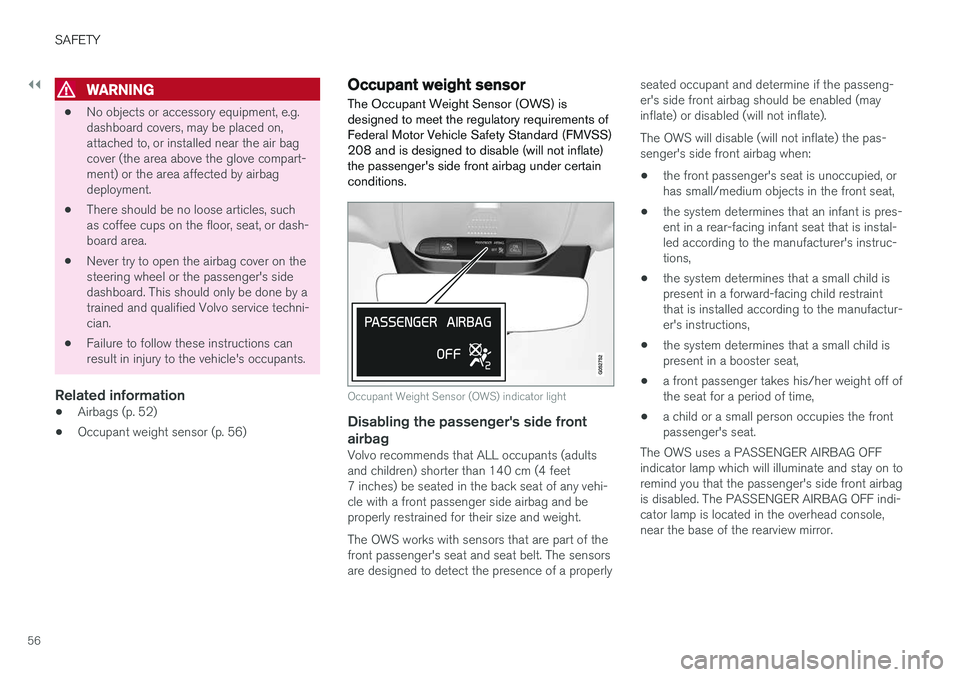
The Occupant Weight Sensor (OWS) is designed to meet the regulatory requirements ofFederal Motor Vehicle Safety Standard (FMVSS)208 and is designed to disable (will not inflate)the passenger's side front airbag under certainconditions.
Occupant Weight Sensor (OWS) indicator light
Disabling the passenger's side front airbag
Volvo recommends that ALL occupants (adults and children) shorter than 140 cm (4 feet7 inches) be seated in the back seat of any vehi-cle with a front passenger side airbag and beproperly restrained for their size and weight. The OWS works with sensors that are part of the front passenger's seat and seat belt. The sensors are designed to detect the presence of a properly seated occupant and determine if the passeng- er's side front airbag should be enabled (mayinflate) or disabled (will not inflate). The OWS will disable (will not inflate) the pas- senger's side front airbag when:
• the front passenger's seat is unoccupied, orhas small/medium objects in the front seat,
• the system determines that an infant is pres-ent in a rear-facing infant seat that is instal-led according to the manufacturer's instruc-tions,
• the system determines that a small child ispresent in a forward-facing child restraintthat is installed according to the manufactur-er's instructions,
• the system determines that a small child ispresent in a booster seat,
• a front passenger takes his/her weight off ofthe seat for a period of time,
• a child or a small person occupies the frontpassenger's seat.
The OWS uses a PASSENGER AIRBAG OFFindicator lamp which will illuminate and stay on toremind you that the passenger's side front airbagis disabled. The PASSENGER AIRBAG OFF indi-cator lamp is located in the overhead console,near the base of the rearview mirror.
Page 80 of 660
DISPLAYS AND VOICE CONTROL
* Option/accessory.
78
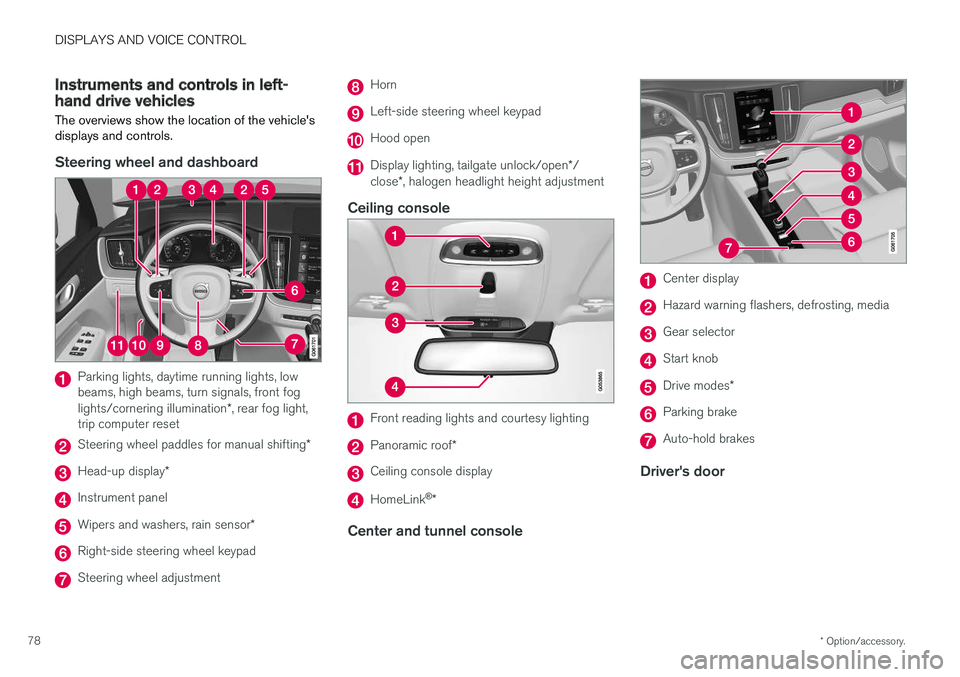
Instruments and controls in left-hand drive vehicles
The overviews show the location of the vehicle's
displays and controls.
Steering wheel and dashboard
Parking lights, daytime running lights, low beams, high beams, turn signals, front fog lights/cornering illumination *, rear fog light,
trip computer reset
Steering wheel paddles for manual shifting *
Head-up display*
Instrument panel
Wipers and washers, rain sensor *
Right-side steering wheel keypad
Steering wheel adjustment
Horn
Left-side steering wheel keypad
Hood open
Display lighting, tailgate unlock/open */
close *, halogen headlight height adjustment
Ceiling console
Front reading lights and courtesy lighting
Panoramic roof *
Ceiling console display
HomeLink®
*
Center and tunnel console
Center display
Hazard warning flashers, defrosting, media
Gear selector
Start knob
Drive modes *
Parking brake
Auto-hold brakes
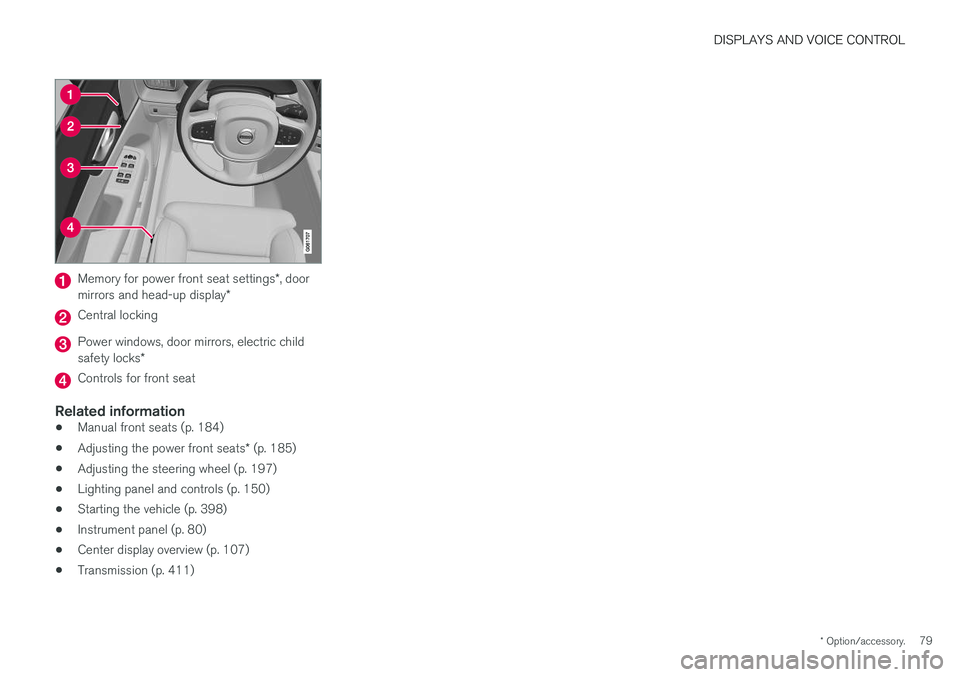
Driver's door
Page 81 of 660
DISPLAYS AND VOICE CONTROL
* Option/accessory.79
Memory for power front seat settings *, door
mirrors and head-up display *
Central locking
Power windows, door mirrors, electric child safety locks*
Controls for front seat
Related information
•Manual front seats (p. 184)
• Adjusting the power front seats
* (p. 185)
• Adjusting the steering wheel (p. 197)
• Lighting panel and controls (p. 150)
• Starting the vehicle (p. 398)
• Instrument panel (p. 80)
• Center display overview (p. 107)
• Transmission (p. 411)
Page 83 of 660
DISPLAYS AND VOICE CONTROL
}}
* Option/accessory.81
Left sideIn the centerRight side
– Navigation system map Current fuel consumption
– PhoneApp menu (activated using steering wheel keypad)
– Voice Control –
– CompassA
–
ADepends on selected drive mode.
B Total distance.
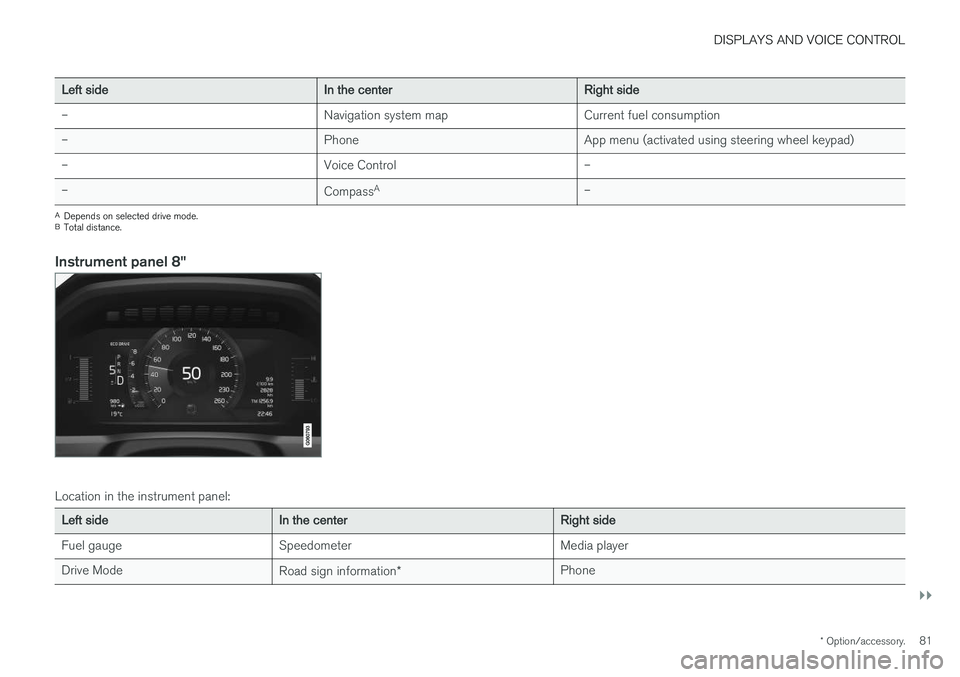
Instrument panel 8"
Location in the instrument panel:
Left sideIn the centerRight side
Fuel gauge Speedometer Media player Drive Mode Road sign information* Phone
Page 84 of 660
||
DISPLAYS AND VOICE CONTROL
82
Left sideIn the centerRight side
Gear indicator Cruise control/speed limiter information Navigation information Tachometer/ECO gauge A
Door and seat belt status Clock
Distance to empty tank Start/Stopp function's status App menu (activated using steering wheel keypad) Ambient temperature sensor – Current fuel consumption
Indicator and warning symbols – OdometerB
– – Trip odometer
– – Indicator and warning symbols
– – Voice Control
– – Engine temperature gauge
– – Message (also graphics in some cases)
– –
CompassA
A
Depends on selected drive mode.
B Total distance.
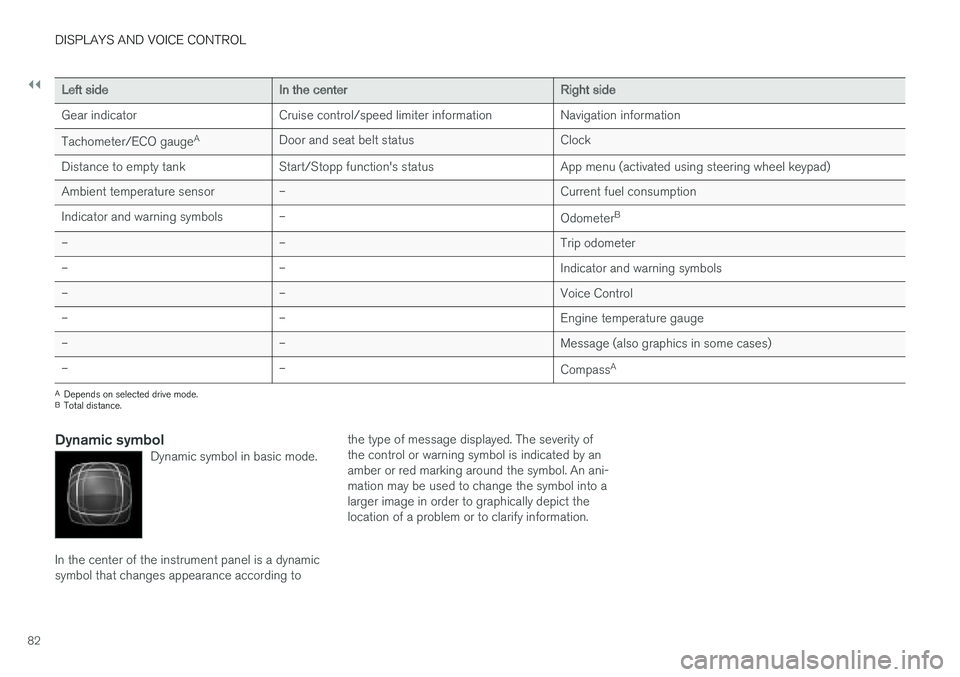
Dynamic symbolDynamic symbol in basic mode.
In the center of the instrument panel is a dynamic symbol that changes appearance according to the type of message displayed. The severity ofthe control or warning symbol is indicated by anamber or red marking around the symbol. An ani-mation may be used to change the symbol into alarger image in order to graphically depict thelocation of a problem or to clarify information.
Page 89 of 660
DISPLAYS AND VOICE CONTROL
}}
87
•
Displaying trip statistics in the center display (p. 88)
• Instrument panel (p. 80)
Displaying trip data in theinstrument panel
Data recorded and calculated by the trip com- puter can be displayed on the instrument panel.
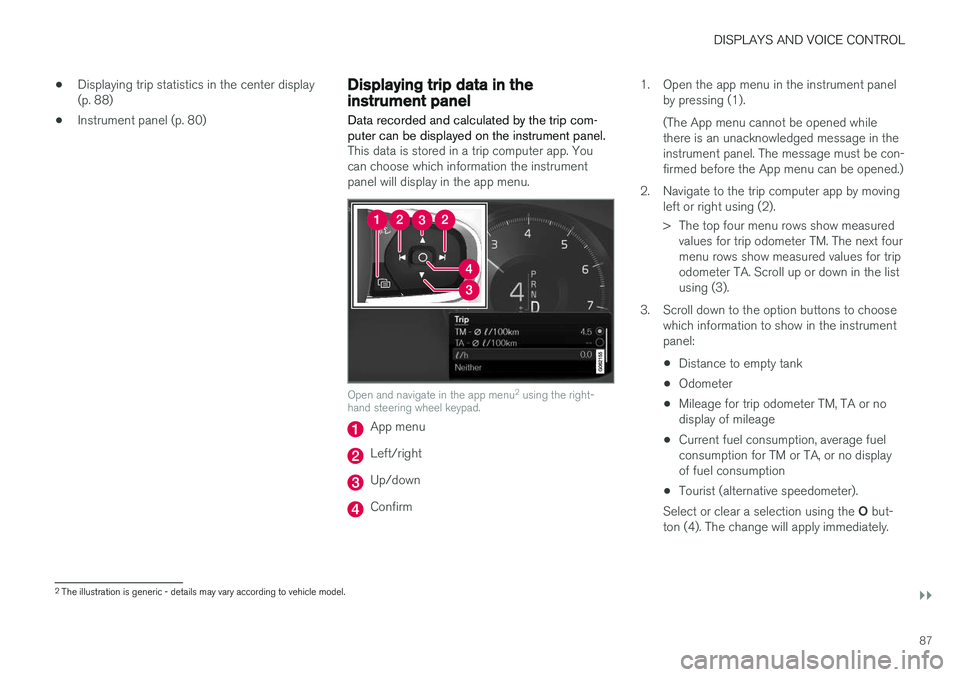
This data is stored in a trip computer app. You can choose which information the instrumentpanel will display in the app menu.
Open and navigate in the app menu 2
using the right-
hand steering wheel keypad.
App menu
Left/right
Up/down
Confirm 1. Open the app menu in the instrument panel
by pressing (1). (The App menu cannot be opened while there is an unacknowledged message in theinstrument panel. The message must be con-firmed before the App menu can be opened.)
2. Navigate to the trip computer app by moving left or right using (2).
> The top four menu rows show measuredvalues for trip odometer TM. The next four menu rows show measured values for tripodometer TA. Scroll up or down in the listusing (3).
3. Scroll down to the option buttons to choose which information to show in the instrumentpanel:
• Distance to empty tank
• Odometer
• Mileage for trip odometer TM, TA or nodisplay of mileage
• Current fuel consumption, average fuelconsumption for TM or TA, or no displayof fuel consumption
• Tourist (alternative speedometer).
Select or clear a selection using the O but-
ton (4). The change will apply immediately.
2 The illustration is generic - details may vary according to vehicle model.
Page 90 of 660
||
DISPLAYS AND VOICE CONTROL
88
Related information
•Trip computer (p. 85)
• Resetting the trip odometer (p. 88)
Resetting the trip odometer
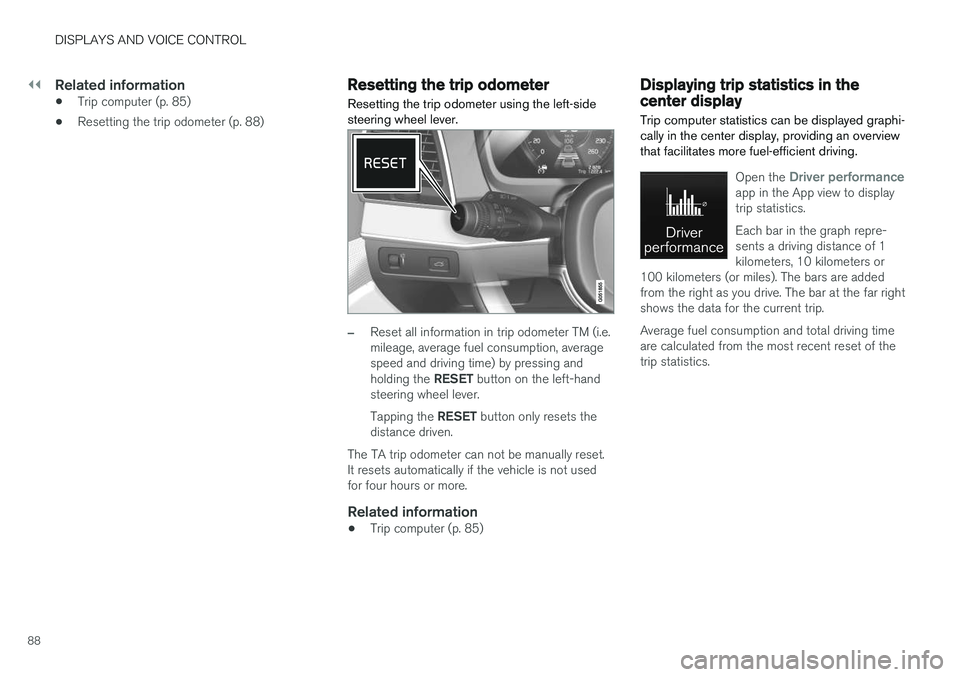
Resetting the trip odometer using the left-side steering wheel lever.
–Reset all information in trip odometer TM (i.e. mileage, average fuel consumption, averagespeed and driving time) by pressing and holding the RESET button on the left-hand
steering wheel lever. Tapping the RESET button only resets the
distance driven.
The TA trip odometer can not be manually reset. It resets automatically if the vehicle is not usedfor four hours or more.
Related information
• Trip computer (p. 85)
Displaying trip statistics in thecenter display
Trip computer statistics can be displayed graphi- cally in the center display, providing an overviewthat facilitates more fuel-efficient driving.
Open the Driver performanceapp in the App view to display trip statistics. Each bar in the graph repre- sents a driving distance of 1kilometers, 10 kilometers or
100 kilometers (or miles). The bars are addedfrom the right as you drive. The bar at the far rightshows the data for the current trip. Average fuel consumption and total driving time are calculated from the most recent reset of thetrip statistics.
Page 95 of 660
DISPLAYS AND VOICE CONTROL
}}
93
SymbolMeaning
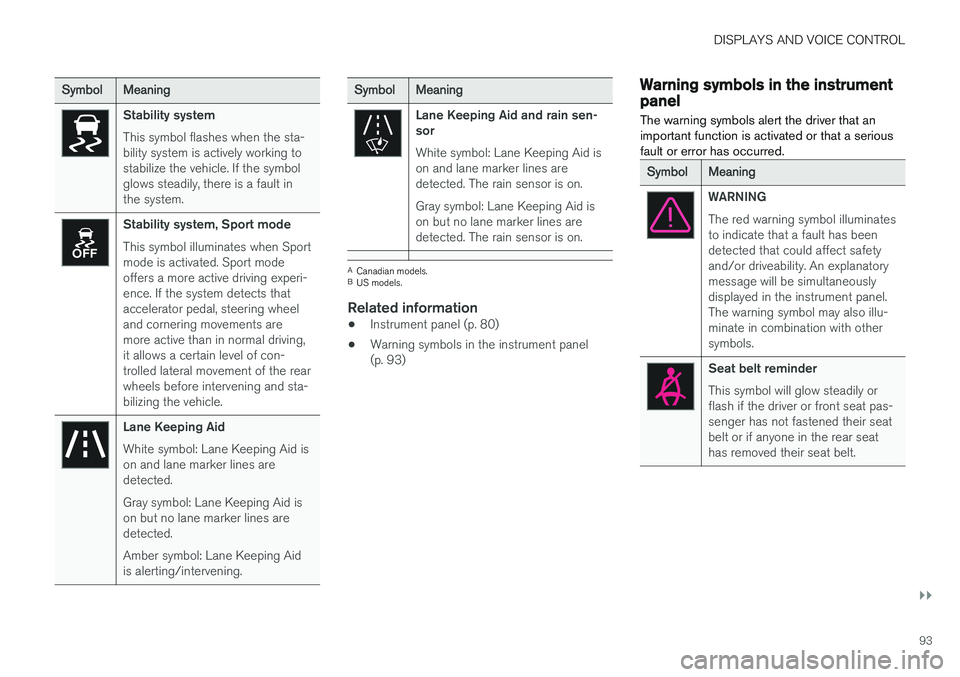
Stability system This symbol flashes when the sta- bility system is actively working tostabilize the vehicle. If the symbolglows steadily, there is a fault inthe system.
Stability system, Sport mode This symbol illuminates when Sport mode is activated. Sport modeoffers a more active driving experi-ence. If the system detects thataccelerator pedal, steering wheeland cornering movements aremore active than in normal driving,it allows a certain level of con-trolled lateral movement of the rearwheels before intervening and sta-bilizing the vehicle.
Lane Keeping Aid White symbol: Lane Keeping Aid is on and lane marker lines aredetected. Gray symbol: Lane Keeping Aid is on but no lane marker lines aredetected. Amber symbol: Lane Keeping Aid is alerting/intervening.
SymbolMeaning
Lane Keeping Aid and rain sen- sor White symbol: Lane Keeping Aid is on and lane marker lines aredetected. The rain sensor is on. Gray symbol: Lane Keeping Aid is on but no lane marker lines aredetected. The rain sensor is on.
ACanadian models.
B US models.
Related information
• Instrument panel (p. 80)
• Warning symbols in the instrument panel (p. 93)
Warning symbols in the instrumentpanel
The warning symbols alert the driver that an important function is activated or that a seriousfault or error has occurred.
SymbolMeaning
WARNING The red warning symbol illuminates to indicate that a fault has beendetected that could affect safetyand/or driveability. An explanatorymessage will be simultaneouslydisplayed in the instrument panel.The warning symbol may also illu-minate in combination with othersymbols.
Seat belt reminder This symbol will glow steadily or flash if the driver or front seat pas-senger has not fastened their seatbelt or if anyone in the rear seathas removed their seat belt.