center console VOLVO XC60 2018 Owner´s Manual
[x] Cancel search | Manufacturer: VOLVO, Model Year: 2018, Model line: XC60, Model: VOLVO XC60 2018Pages: 660, PDF Size: 11.77 MB
Page 434 of 660
STARTING AND DRIVING
* Option/accessory.
432
Activating and deactivating Hill
Descent Control * using the functionbutton
Vehicles that are not equipped with drive mode controls in the tunnel console have a function button for Hill Descent Control with
Hill
Descent Control in the center display's Func-
tion view.
Selecting Hill Descent Control in the center display's Function view
HDC only works at low speeds.
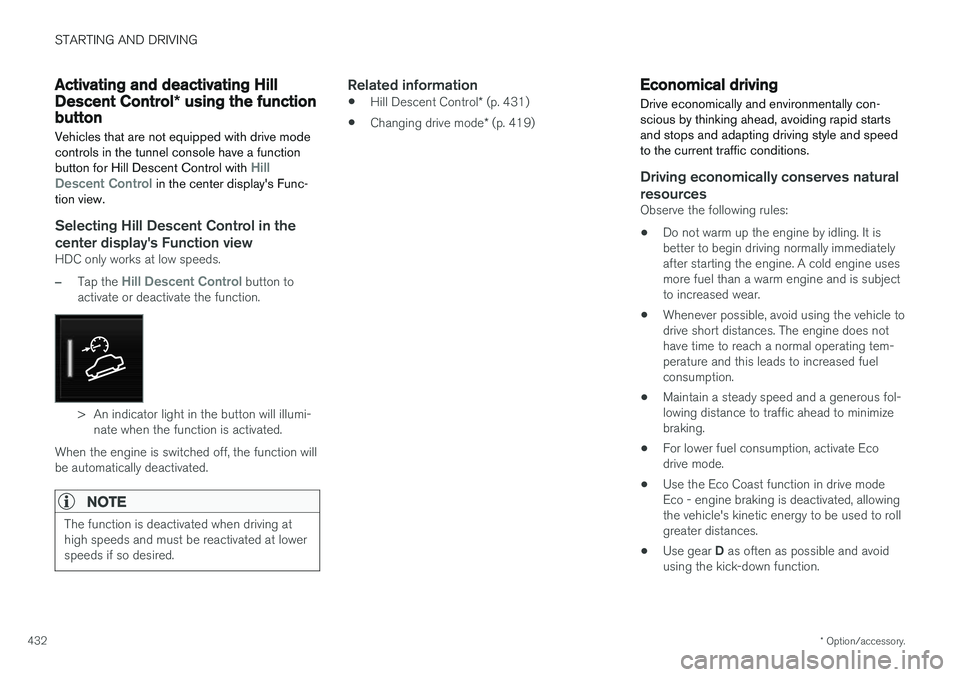
–Tap the Hill Descent Control button to
activate or deactivate the function.
> An indicator light in the button will illumi- nate when the function is activated.
When the engine is switched off, the function will be automatically deactivated.
NOTE
The function is deactivated when driving at high speeds and must be reactivated at lowerspeeds if so desired.
Related information
• Hill Descent Control
* (p. 431)
• Changing drive mode
* (p. 419)
Economical driving
Drive economically and environmentally con- scious by thinking ahead, avoiding rapid startsand stops and adapting driving style and speedto the current traffic conditions.
Driving economically conserves natural resources
Observe the following rules:
• Do not warm up the engine by idling. It is better to begin driving normally immediately after starting the engine. A cold engine uses more fuel than a warm engine and is subject to increased wear.
• Whenever possible, avoid using the vehicle todrive short distances. The engine does nothave time to reach a normal operating tem-perature and this leads to increased fuelconsumption.
• Maintain a steady speed and a generous fol-lowing distance to traffic ahead to minimizebraking.
• For lower fuel consumption, activate Ecodrive mode.
• Use the Eco Coast function in drive mode Eco - engine braking is deactivated, allowing the vehicle's kinetic energy to be used to rollgreater distances.
• Use gear
D as often as possible and avoid
using the kick-down function.
Page 474 of 660
||
AUDIO, MEDIA AND INTERNET
* Option/accessory.
472
iTunes taggingFrom the center display's Top view, tap SiriusXM
Settings. Tap the iTunes Tagging menu. Tap
the iTunes Tagging box to activate/deactivate
this function and tap Close to return to Home
view. Tap Tags List to display a list of all tagged
songs. If the function is activated, the
iTunes tag button
will be displayed in Home view. If a song is played that you would like to buy in the iTunes store, tapthis button while the song is playing to tag it. If a song with
iTunes Tagging information is availa-
ble, the button will be selectable. Tap the button to tag the song. If you would like to buy a taggedsong via iTunes, Tap the iTunes tag button. To buy a song in iTunes, begin by connecting an iPhone/iPod/iPad to the USB port in the tunnelconsole. The iTunes tagging list will automaticallybe transferred to the device and removed fromthe list in the vehicle. If the device is connectedwhen a song is tagged, the data will automaticallybe saved in the device. To purchase the song,consult the iTunes support page.
Related information
• SiriusXM ®
Satellite radio * (p. 470)
• Entering characters, letters and words byhand in the center display (p. 127)
• Settings for SiriusXM ®
Satellite radio *
(p. 472) •
Settings for SiriusXM ®
Satellite radio *
(p. 472)
• Connecting a device via the USB port(p. 486)
Settings for SiriusXM® Satellite
radio
*
There are numerous settings that can be made to enhance your SiriusXM ®
Satellite radio listen-
ing experience.
Settings
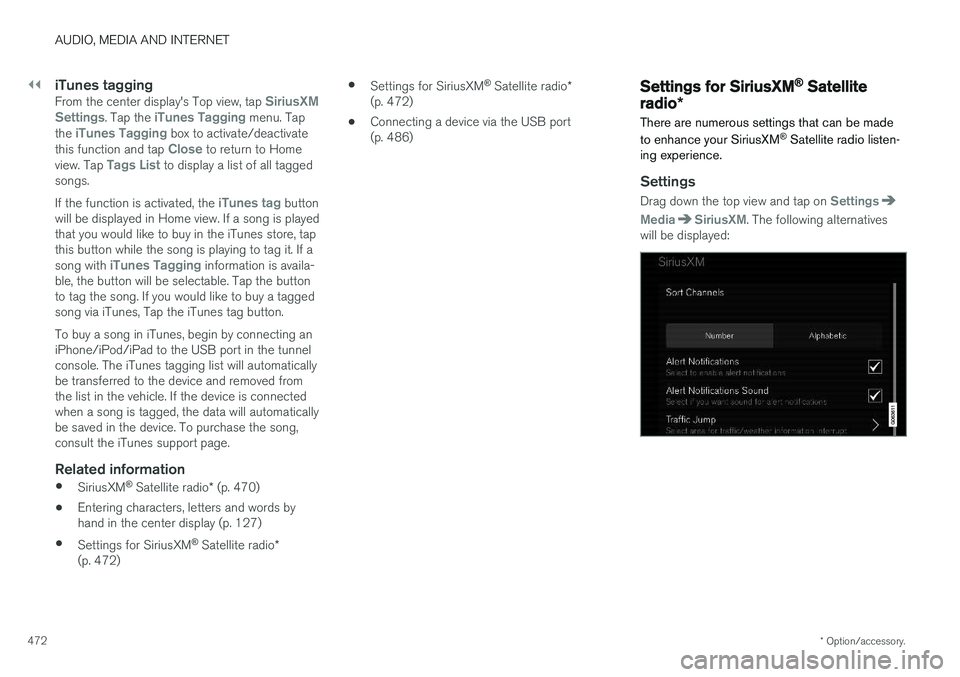
Drag down the top view and tap on Settings
MediaSiriusXM. The following alternatives
will be displayed:
Page 556 of 660
LOADING, STORAGE AND PASSENGER COMPARTMENT
* Option/accessory.
554
Passenger compartment interior
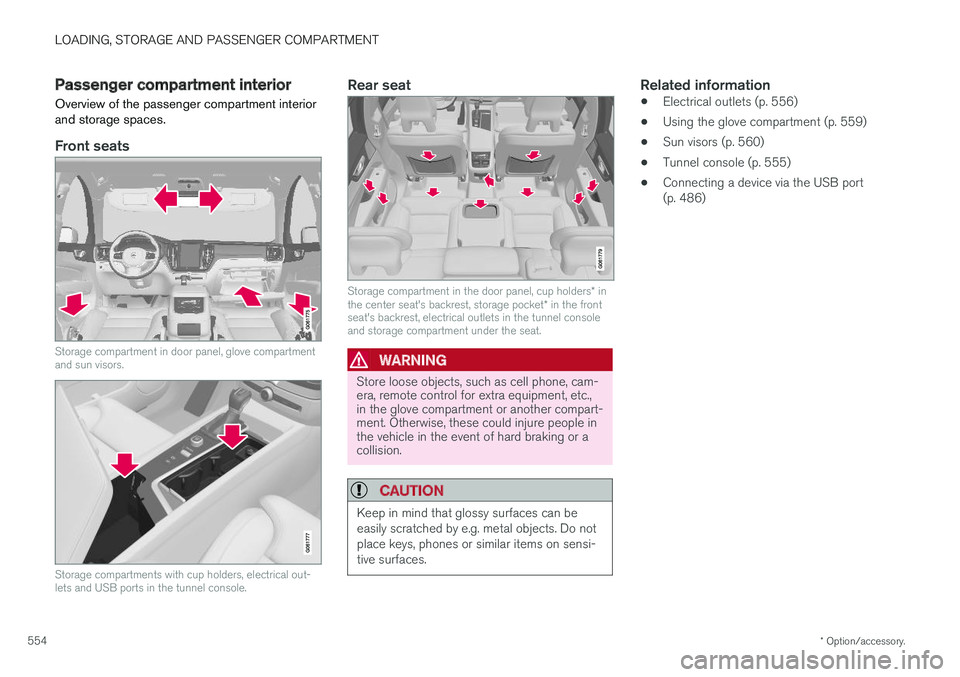
Overview of the passenger compartment interior and storage spaces.
Front seats
Storage compartment in door panel, glove compartment and sun visors.
Storage compartments with cup holders, electrical out- lets and USB ports in the tunnel console.
Rear seat
Storage compartment in the door panel, cup holders * in
the center seat's backrest, storage pocket * in the front
seat's backrest, electrical outlets in the tunnel console and storage compartment under the seat.
WARNING
Store loose objects, such as cell phone, cam- era, remote control for extra equipment, etc.,in the glove compartment or another compart-ment. Otherwise, these could injure people inthe vehicle in the event of hard braking or acollision.
CAUTION
Keep in mind that glossy surfaces can be easily scratched by e.g. metal objects. Do notplace keys, phones or similar items on sensi-tive surfaces.
Related information
• Electrical outlets (p. 556)
• Using the glove compartment (p. 559)
• Sun visors (p. 560)
• Tunnel console (p. 555)
• Connecting a device via the USB port (p. 486)
Page 557 of 660
LOADING, STORAGE AND PASSENGER COMPARTMENT
* Option/accessory.555
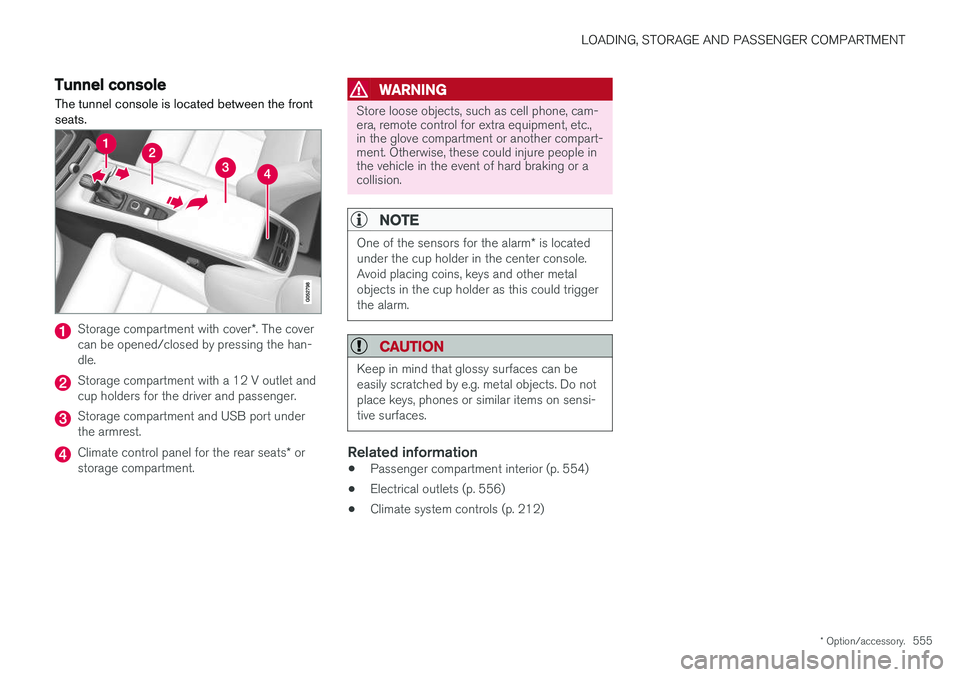
Tunnel console The tunnel console is located between the front seats.
Storage compartment with cover *. The cover
can be opened/closed by pressing the han- dle.
Storage compartment with a 12 V outlet and cup holders for the driver and passenger.
Storage compartment and USB port under the armrest.
Climate control panel for the rear seats * or
storage compartment.
WARNING
Store loose objects, such as cell phone, cam- era, remote control for extra equipment, etc.,in the glove compartment or another compart-ment. Otherwise, these could injure people inthe vehicle in the event of hard braking or acollision.
NOTE
One of the sensors for the alarm * is located
under the cup holder in the center console. Avoid placing coins, keys and other metalobjects in the cup holder as this could triggerthe alarm.
CAUTION
Keep in mind that glossy surfaces can be easily scratched by e.g. metal objects. Do notplace keys, phones or similar items on sensi-tive surfaces.
Related information
• Passenger compartment interior (p. 554)
• Electrical outlets (p. 556)
• Climate system controls (p. 212)
Page 602 of 660
||
MAINTENANCE AND SERVICE
* Option/accessory.
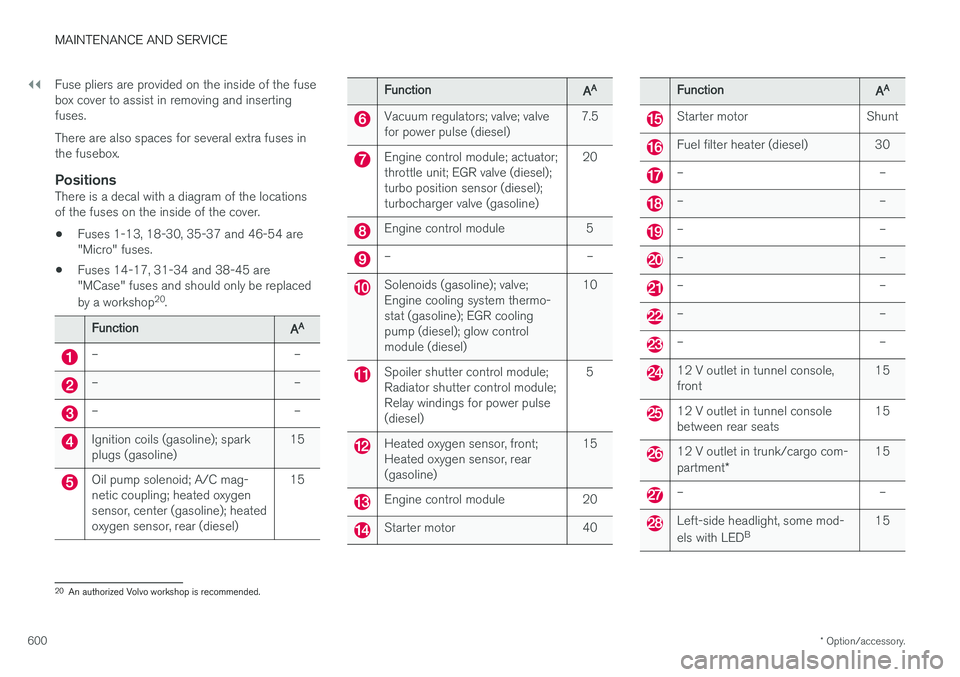
600 Fuse pliers are provided on the inside of the fuse box cover to assist in removing and insertingfuses. There are also spaces for several extra fuses in the fusebox.
PositionsThere is a decal with a diagram of the locationsof the fuses on the inside of the cover.
• Fuses 1-13, 18-30, 35-37 and 46-54 are"Micro" fuses.
• Fuses 14-17, 31-34 and 38-45 are"MCase" fuses and should only be replaced by a workshop 20
.
FunctionAA
– –
– –
– –
Ignition coils (gasoline); spark plugs (gasoline) 15
Oil pump solenoid; A/C mag- netic coupling; heated oxygensensor, center (gasoline); heatedoxygen sensor, rear (diesel)15
FunctionAA
Vacuum regulators; valve; valve for power pulse (diesel)
7.5
Engine control module; actuator; throttle unit; EGR valve (diesel);turbo position sensor (diesel);turbocharger valve (gasoline) 20
Engine control module 5
– –
Solenoids (gasoline); valve; Engine cooling system thermo-stat (gasoline); EGR coolingpump (diesel); glow controlmodule (diesel)10
Spoiler shutter control module; Radiator shutter control module;Relay windings for power pulse(diesel)
5
Heated oxygen sensor, front; Heated oxygen sensor, rear(gasoline)
15
Engine control module 20
Starter motor 40
FunctionAA
Starter motor Shunt
Fuel filter heater (diesel) 30
– –
– –
– –
– –
– –
– –
– –
12 V outlet in tunnel console, front
15
12 V outlet in tunnel console between rear seats15
12 V outlet in trunk/cargo com- partment
* 15
– –
Left-side headlight, some mod- els with LED
B 15
20
An authorized Volvo workshop is recommended.
Page 605 of 660
MAINTENANCE AND SERVICE
}}
* Option/accessory.603
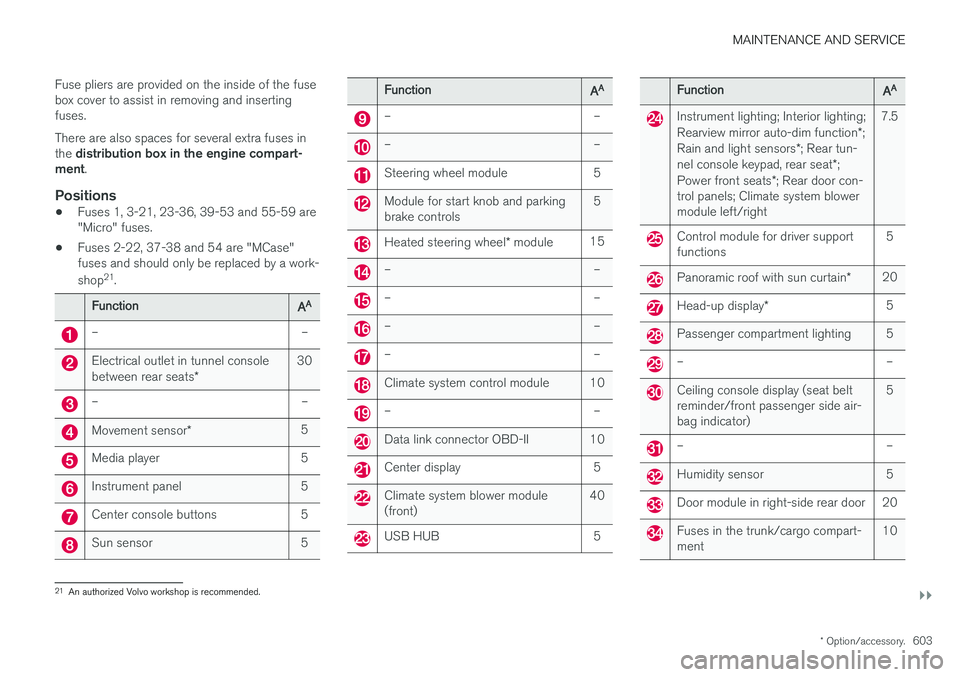
Fuse pliers are provided on the inside of the fuse box cover to assist in removing and insertingfuses. There are also spaces for several extra fuses in the
distribution box in the engine compart-
ment .
Positions
•Fuses 1, 3-21, 23-36, 39-53 and 55-59 are "Micro" fuses.
• Fuses 2-22, 37-38 and 54 are "MCase"fuses and should only be replaced by a work- shop 21
.
FunctionAA
– –
Electrical outlet in tunnel console between rear seats * 30
– –
Movement sensor
* 5
Media player 5
Instrument panel 5
Center console buttons 5
Sun sensor 5
FunctionAA
– –
– –
Steering wheel module 5
Module for start knob and parking brake controls 5
Heated steering wheel
* module 15
– –
– –
– –
– –
Climate system control module 10
– –
Data link connector OBD-II 10
Center display 5
Climate system blower module (front) 40
USB HUB 5
FunctionAA
Instrument lighting; Interior lighting; Rearview mirror auto-dim function
*;
Rain and light sensors *; Rear tun-
nel console keypad, rear seat *;
Power front seats *; Rear door con-
trol panels; Climate system blower module left/right 7.5
Control module for driver support functions
5
Panoramic roof with sun curtain
*20
Head-up display
* 5
Passenger compartment lighting 5
– –
Ceiling console display (seat belt reminder/front passenger side air-bag indicator) 5
– –
Humidity sensor 5
Door module in right-side rear door 20
Fuses in the trunk/cargo compart- ment
10
21
An authorized Volvo workshop is recommended.
Page 619 of 660
MAINTENANCE AND SERVICE
617
Automatic car washes The vehicle should be washed as soon as it becomes dirty. This makes the vehicle easier toclean because dirt does not attach as strongly. Italso reduces the risk of scratches and keeps thevehicle looking new.
Automatic car washesAn automatic car wash is a fast and easy way to keep your vehicle clean, but it does not reach allareas of the vehicle. For best results, Volvo rec-ommends hand washing your vehicle or supple-menting automatic car washes with a hand wash.
NOTE
Volvo recommends not washing the vehicle in an automatic car wash during the first fewmonths; the paintwork on new vehicles takessome time to fully harden.
CAUTION
Before driving the vehicle into a car wash, deactivate the Automatic Braking when Sta-tionary and Automatic Parking Brake Applica-tion functions. If the functions are not deacti-vated, the brake system will seize when thevehicle is stationary and the vehicle will not beable to roll.
CAUTION
For automatic car washes in which the vehicle is pulled forward on rolling wheels:
1. Before washing the vehicle, make surethat the automatic rain sensor is deacti- vated. If it is not deactivated and inadver-tently starts, the wiper arms could bedamaged.
2. To help prevent damage from the auto- matic car wash machinery, make surethat the door mirrors are folded in, anten-nas retracted or removed, and any auxili-ary lights secured.
3. Drive into the automatic car wash.
4. Turn off the "Automatic Braking when Stationary" function using the switch in the tunnel console.
5. Turn off the "Automatic Parking Brake Application" function in the center dis-play's Top view.
6. Turn off the engine by turning the start knob in the tunnel console clockwise.Hold the knob in position for at least2 seconds.
The vehicle is now ready for the automatic carwash.
Related information
• Cleaning the exterior (p. 614)
• Polishing and waxing (p. 615)
• Hand washing (p. 615)
• High-pressure washing (p. 618)
• Cleaning the wiper blades (p. 618)
• Cleaning exterior plastic, rubber and trim components (p. 619)
• Cleaning rims (p. 620)
• Corrosion protection (p. 620)
Page 646 of 660
INDEX
644
B
Backrestfront seat, adjusting 184, 185, 188, 189 , 190
rear seat, folding 192
Battery jump-start 441
Maintenance 592
start 592
support 595
symbols on the battery 596
warning symbols 596
BLIS 341, 342, 343, 344 Blower adjusting 223, 224
air distribution 206
air vents 207
Bluetooth connect 485
connecting vehicle to Internet 503
phone 492
settings 501
Book service and repair 576
Booster cushions 71Brake assist after collision 411
Brake fluidgrade 639
Brake functions 402
Brake light 159
Brakes 403 anti-lock brakes, ABS 403
automatic when stationary 409
Brake Assist System, BAS 404
brake lights 159
brake system 402
emergency brake lights 159
handbrake 405
Maintenance 405
on salted roads 405
on wet roads 404
brake system fluid 639
C
Camera sensor 337
Camera unit 323
Capacity weight 550, 635
Cargo compartment 561
attachment points 563
cargo net 568
electrical outlet 556, 558
Lighting 162
Cargo compartment cover 564, 566
cargo net 568
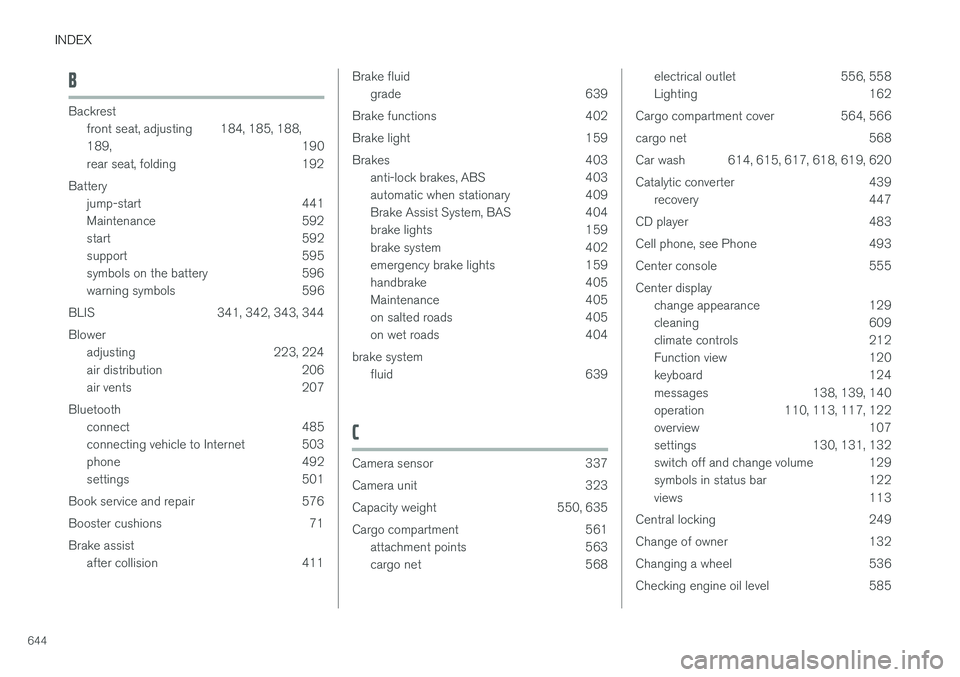
Car wash 614, 615, 617, 618, 619, 620
Catalytic converter 439 recovery 447
CD player 483
Cell phone, see Phone 493
Center console 555Center display change appearance 129
cleaning 609
climate controls 212
Function view 120
keyboard 124
messages 138, 139, 140
operation 110, 113, 117, 122
overview 107
settings 130, 131, 132
switch off and change volume 129
symbols in status bar 122
views 113
Central locking 249
Change of owner 132
Changing a wheel 536
Checking engine oil level 585
Page 653 of 660
INDEX
651
sun shade 172, 175
ventilation position 174
PAP – Park Assist Pilot 388, 389, 392, 393, 395, 396
Park Assist Camera 379, 380, 381, 383, 384, 386, 387
settings 384
Park Assist Camera limitations 384
Park Assist Pilot 388, 389, 392, 393, 395, 396
function 388, 389, 393, 395, 396
limitations 393
operation 389, 392
Symbols and messages 396
Park Assist Pilot – PAP 388, 389, 392, 393, 395, 396
parking on hills 408
Parking Assist 374, 375, 376, 377, 378 function 374, 375, 376
Parking brake 405 activate and deactivate 406
automatic activation 407
Low battery charge level 408
Passenger compartment filter 205
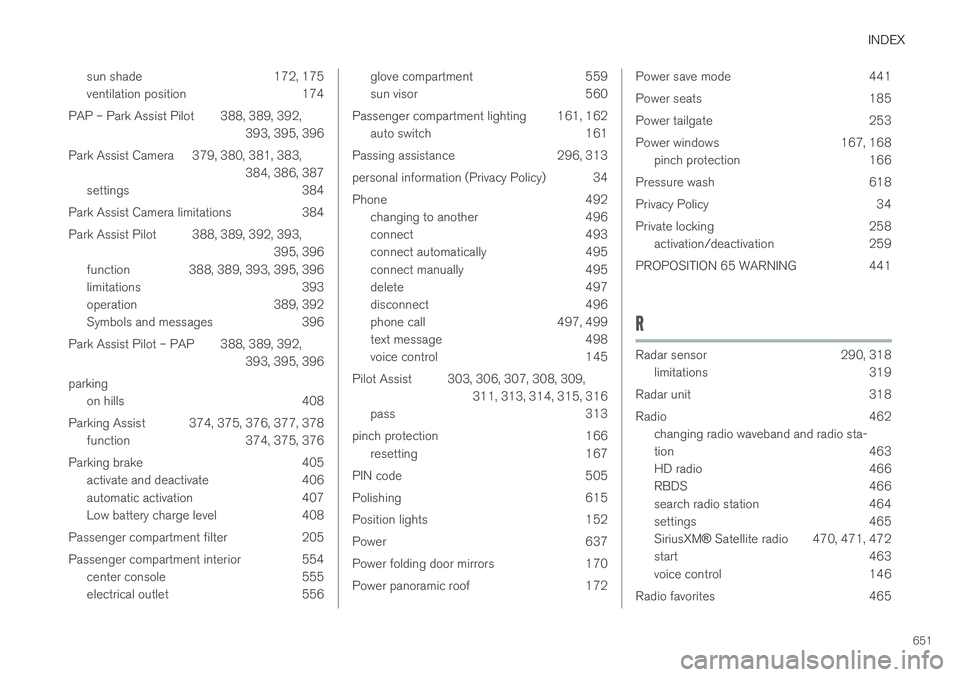
Passenger compartment interior 554 center console 555
electrical outlet 556
glove compartment 559
sun visor 560
Passenger compartment lighting 161, 162 auto switch 161
Passing assistance 296, 313
personal information (Privacy Policy) 34
Phone 492 changing to another 496
connect 493
connect automatically 495
connect manually 495
delete 497
disconnect 496
phone call 497, 499
text message 498
voice control 145
Pilot Assist 303, 306, 307, 308, 309, 311, 313, 314, 315, 316
pass 313
pinch protection 166 resetting 167
PIN code 505
Polishing 615
Position lights 152
Power 637
Power folding door mirrors 170
Power panoramic roof 172Power save mode 441
Power seats 185
Power tailgate 253
Power windows 167, 168 pinch protection 166
Pressure wash 618
Privacy Policy 34
Private locking 258 activation/deactivation 259
PROPOSITION 65 WARNING 441
R
Radar sensor 290, 318 limitations 319
Radar unit 318
Radio 462 changing radio waveband and radio sta-
tion 463
HD radio 466
RBDS 466
search radio station 464
settings 465 SiriusXM ® Satellite radio 470, 471, 472
start 463
voice control 146
Radio favorites 465
Page 656 of 660
INDEX
654Stop/start function 422
Storage compartments 554
center console 555
glove compartment 559
sun visor 560
Sunroof pinch protection 166
Sun shade panoramic roof 172, 175
pinch protection 166
Sun visor 560 mirror lighting 162
Support battery 595 Symbols indicator symbols 91
Symbols and messages Adaptive Cruise Control 301
center display's status bar 122
Collision warner with auto-brake 339
Symbols and messages for Assistance at
risk of collision 373
system updates 575
T
Tailgate locking/unlocking 235, 248
open/close with foot movement 257
power 253
unlocking from inside 251
Technician certification 37 Temperature adjusting 225, 226, 227
perceived 201
Temporary spare spare tire 541
Temporary tire sealing system execution, checking 545
Inflating tires 549
location 545
overview 545
sealing compound 545
Terms and conditions services 34
users 508
Tire dimensions 526, 536
Tire pressure decal 531 Tire pressure monitoring calibrating 533
Tires 522 direction of rotation 524
glossary of terms 525
inflation pressure table 641
mounting 540
pressure 641
removal 538
rotation 523
specifications 526, 641
storage 522
tire pressure monitoring 531
tire sealing 545
Tread depth 543
tread wear indicator 525
winter tires 543, 544
Tire sealing system 545
Tire tread 525
Tools 536Top tether anchors (child restraint sys- tems) 72
Total airing function 231, 249
Towbar 442 removable, attaching, installing, mount-
ing 442
removable, removing, detaching 442
Towing 447
Towing capacity and towball load 636
Towing eyelet 448
TPMS - Tire Pressure Monitoring System 531