ad blue VOLVO XC60 2018 Owner´s Manual
[x] Cancel search | Manufacturer: VOLVO, Model Year: 2018, Model line: XC60, Model: VOLVO XC60 2018Pages: 660, PDF Size: 11.77 MB
Page 505 of 660
AUDIO, MEDIA AND INTERNET
}}
* Option/accessory.503
Connecting the car to the Internetvia a mobile device (Bluetooth)
Establish an Internet connection using Bluetooth and tethering from a phone and get access tomultiple connected services in your vehicle.
The phone and the network service provider must support Internet sharing (tethering) and the sub-scription must include data transfer.
1. To connect the vehicle to the Internet via a Bluetooth-connected phone, the phone must first be paired with the vehicle via Bluetooth.Ensure that the personal hotspot (portable/personal hotspot) is activated in your phone.
2. If the phone has been connected via Blue- tooth previously, tap
Settings in the center
display's Top view.
3. In the center display: Tap
Communication
Bluetooth Devices.
4. Mark the window for
Bluetooth Internet
connection under the heading Internet
connection.
> Your vehicle is now connected to the Internet via your Bluetooth-connected phone.
NOTE
When using Apple CarPlay, it is only possible to connect the vehicle to the Internet usingWi-Fi or the vehicle's modem.
Related information
• Internet-connected vehicle
* (p. 501)
• Connect the car to the Internet via car modem (SIM card) (p. 504)
• Connecting a phone to the car via Bluetoothfor the first time (p. 493)
• Connecting the car to the Internet via amobile device (Wi-Fi) (p. 503)
• Apple ®
CarPlay ®
* (p. 487)
• No or poor Internet connection (p. 506)
• Settings for Bluetooth devices (p. 501)
Connecting the car to the Internetvia a mobile device (Wi-Fi)
Establish an Internet connection via Wi-Fi tether- ing from a phone and get access to multipleconnected services in your vehicle.
The phone and the network service provider must support Internet sharing (tethering) and the sub-scription must include data transfer.
1. Activate Internet sharing (personal hotspot) in the phone.
2. Tap
Settings in the Top view.
3. Proceed to
CommunicationWi-Fi.
4. Activate/deactivate by tapping to check/ uncheck the Wi-Fi box.
5. Tap the name of the network you would like to connect.
6. Enter the network password.
7. If a different connection was used previously, confirm the connection change.
> The vehicle will connect to the network.
Please note that certain cellular phones will disa- ble Internet sharing (tethering) when the connec-
Page 628 of 660
||
MAINTENANCE AND SERVICE
* Option/accessory.
626 The wiper blades will also move out of service position if:
• The windshield wipers are turned on.
• The windshield washers are turned on.
• The rain sensor is activated.
• The vehicle begins moving.
CAUTION
If the wiper arms in service position are raised from the windshield, they must be folded backagainst the windscreen before activating wip-ing, washing or rain sensor as well as beforedeparture. This is to prevent scratching thepaint on the hood.
Related information
• Using the rain sensor (p. 177)
• Using the windshield and headlight washers (p. 179)
• Using automatic rear window wiping whenbacking up (p. 180)
• Heated windshield washer nozzles
* (p. 177)
• Using the rain sensor's memory function(p. 178)
• Using the rear window wiper/washer(p. 180)
• Filling washer fluid (p. 626)
• Replacing windshield wiper blades (p. 624) •
Changing rear window wipers (p. 623)
• Using the windshield wipers (p. 176)
Filling washer fluid
Washer fluid is used to keep the headlights, windshield and rear window clean. Washer fluidcontaining anti-freeze should be used in verycold weather (below-freezing temperatures).
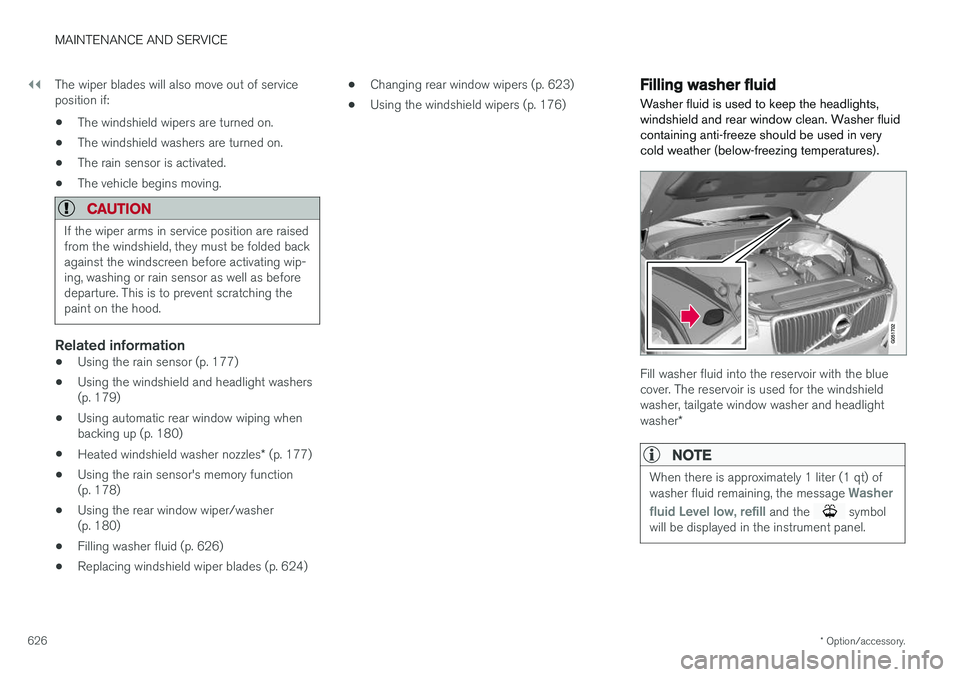
Fill washer fluid into the reservoir with the blue cover. The reservoir is used for the windshieldwasher, tailgate window washer and headlight washer *
NOTE
When there is approximately 1 liter (1 qt) of washer fluid remaining, the message Washer
fluid
Level low, refill and the symbol
will be displayed in the instrument panel.
Page 646 of 660
INDEX
644
B
Backrestfront seat, adjusting 184, 185, 188, 189 , 190
rear seat, folding 192
Battery jump-start 441
Maintenance 592
start 592
support 595
symbols on the battery 596
warning symbols 596
BLIS 341, 342, 343, 344 Blower adjusting 223, 224
air distribution 206
air vents 207
Bluetooth connect 485
connecting vehicle to Internet 503
phone 492
settings 501
Book service and repair 576
Booster cushions 71Brake assist after collision 411
Brake fluidgrade 639
Brake functions 402
Brake light 159
Brakes 403 anti-lock brakes, ABS 403
automatic when stationary 409
Brake Assist System, BAS 404
brake lights 159
brake system 402
emergency brake lights 159
handbrake 405
Maintenance 405
on salted roads 405
on wet roads 404
brake system fluid 639
C
Camera sensor 337
Camera unit 323
Capacity weight 550, 635
Cargo compartment 561
attachment points 563
cargo net 568
electrical outlet 556, 558
Lighting 162
Cargo compartment cover 564, 566
cargo net 568
Car wash 614, 615, 617, 618, 619, 620
Catalytic converter 439 recovery 447
CD player 483
Cell phone, see Phone 493
Center console 555Center display change appearance 129
cleaning 609
climate controls 212
Function view 120
keyboard 124
messages 138, 139, 140
operation 110, 113, 117, 122
overview 107
settings 130, 131, 132
switch off and change volume 129
symbols in status bar 122
views 113
Central locking 249
Change of owner 132
Changing a wheel 536
Checking engine oil level 585
Page 647 of 660

INDEX
645
Child restraints 63, 65
booster cushions 71
convertible seats 69
infant seats 67
ISOFIX/LATCH anchors 74
lower attachment points 73
recalls and registration 65
top tether anchors 72
Child safety 63
Child safety locks 251
City Safety 327, 328, 330, 331, 337, 339
City Safety during evasive maneuver 335
City Safety in crossing traffic 333, 334 City Safety when evasive maneuver preven- ted 336
Cleaning 611, 613, 614 automatic car wash 617
car wash 614, 615, 617, 618, 619, 620
center display 609
Seat belts 611
textile upholstery 609, 611, 612
upholstery 609, 611, 612, 613, 614
wheels 620
Cleaning wheels 620
Cleaning wiper blades 618
Clean Zone 203
Clean Zone Interior Package 204
Climate 200 auto-regulation 218
blower control 223, 224
perceived temperature 201
Sensors 201
temperature control 225, 226, 227
voice control 202
zones 200
Climate controls 212 center display 212
rear seat 212
Climate system 200, 212 Refrigerant 640
repairs 582
Clock, setting 90
Collision 42, 47, 52, 61 Collision warner detection of pedestrians 331
radar sensor 318
Collision warning 327, 340
Color code, paintwork 622
Color codes 622
Compass 454 calibration 454
Condensation in headlights 615, 617, 618, 619Connecting vehicle to InternetNo connection or poor connection 506
via a mobile device (WiFi) 503
via mobile device (Bluetooth) 503
via vehicle's modem 504
Connect phone 493
Contact information 26
Convertible seats 69
coolant 639
Coolant, filling 586 Cooling system overheating 440
Cornering illumination 158
Corner Traction Control 266
Corrosion protection 620Covering cargo compartment 566
Crash, see Collision 42
Crash event data 33
Cross Traffic Alert – CTA 346, 347, 348, 349
Cruise control 278, 279 manage speed 279, 280
temporary deactivation 281, 282
turn off 282
CTA – Cross Traffic Alert 346, 347, 348, 349
Curb weight 635