ignition VOLVO XC60 2018 Owner´s Manual
[x] Cancel search | Manufacturer: VOLVO, Model Year: 2018, Model line: XC60, Model: VOLVO XC60 2018Pages: 660, PDF Size: 11.77 MB
Page 443 of 660
STARTING AND DRIVING
}}
441
Battery drain The electrical functions in the vehicle drain the battery to varying degrees. Avoid using ignitionmode II when the engine is switched off. Use
ignition mode I instead, as this uses less electri-
cal current.
Note that certain accessories may also drain power from the electrical system. Do not usefunctions that use a lot of electrical current whenthe engine is turned off. Examples of such func-tions are:
• blower
• headlights
• windshield wipers
• audio system (especially at high volume).
If the starter battery voltage is low, a message isshown in the driver display. The vehicle's energy-saving function will then turn off or reduce certainfunctions, such as the blower and/or the audio system.
–Charge the battery by starting the engine and let it run for at least 15 minutes (drivingcharges the battery faster than letting theengine idle).
Related information
• Start battery (p. 592)
• Ignition modes (p. 401)
Jump starting using another battery
If the start battery is discharged, current from another battery can be used to start the vehicle.
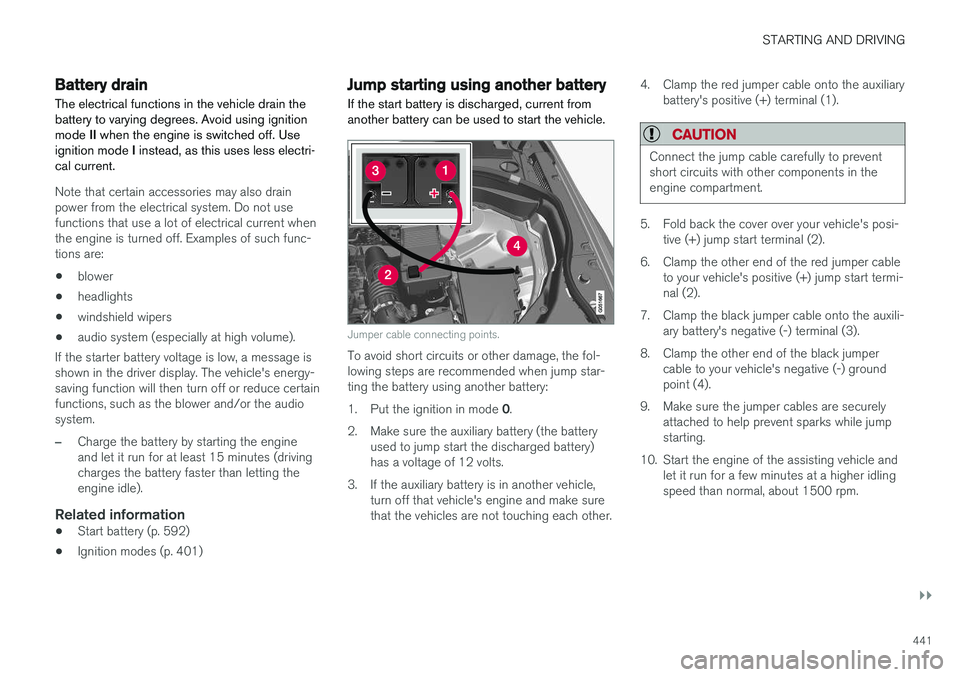
Jumper cable connecting points.
To avoid short circuits or other damage, the fol- lowing steps are recommended when jump star-ting the battery using another battery: 1. Put the ignition in mode 0.
2. Make sure the auxiliary battery (the battery used to jump start the discharged battery) has a voltage of 12 volts.
3. If the auxiliary battery is in another vehicle, turn off that vehicle's engine and make surethat the vehicles are not touching each other. 4. Clamp the red jumper cable onto the auxiliary
battery's positive (+) terminal (1).
CAUTION
Connect the jump cable carefully to prevent short circuits with other components in theengine compartment.
5. Fold back the cover over your vehicle's posi-tive (+) jump start terminal (2).
6. Clamp the other end of the red jumper cable to your vehicle's positive (+) jump start termi- nal (2).
7. Clamp the black jumper cable onto the auxili- ary battery's negative (-) terminal (3).
8. Clamp the other end of the black jumper cable to your vehicle's negative (-) groundpoint (4).
9. Make sure the jumper cables are securely attached to help prevent sparks while jumpstarting.
10. Start the engine of the assisting vehicle and let it run for a few minutes at a higher idlingspeed than normal, about 1500 rpm.
Page 444 of 660
||
STARTING AND DRIVING
* Option/accessory.
442 11. Start the engine of the vehicle with the dead
battery.
CAUTION
Do not touch the connections between the cable and the vehicle during the start attempt.Risk of sparking.
12. Remove the jumper cables in the reverse
order ‒ first the black cables and then the
red cables. Make sure that none of the clamps of the black jumper cables come into contact witheither vehicle's positive (+) jump start termi-nals or either of the red jumper cable's con-nected clamps.
WARNING
PROPOSITION 65 WARNING! Battery posts,
terminals, and related accessories contain lead and lead compounds, chemicals knownto the state of California to cause cancer andreproductive harm. Wash hands after han-dling.
WARNING
• Batteries generate hydrogen gas, which is flammable and explosive.
• Do not connect the jumper cable to anypart of the fuel system or to any movingparts. Avoid touching hot manifolds.
• Battery fluid contains sulfuric acid. Do notallow battery fluid to contact eyes, skin,fabrics or painted surfaces.
• If contact occurs, flush the affected areaimmediately with water. Obtain medicalhelp immediately if eyes are affected.
• Never expose the battery to open flameor electric spark. Do not smoke near thebattery. Failure to follow the instructionsfor jump starting can lead to injury.
Related information
• Starting the vehicle (p. 398)
• Ignition modes (p. 401)
• Adjusting the steering wheel (p. 197)
• Selecting ignition mode (p. 402)
Detachable towbar
*
Volvo recommends the use of Volvo towbars that are specially designed for the vehicle.
NOTE
The optional detachable trailer hitch may not be available in all markets or on all models.Consult your Volvo retailer.
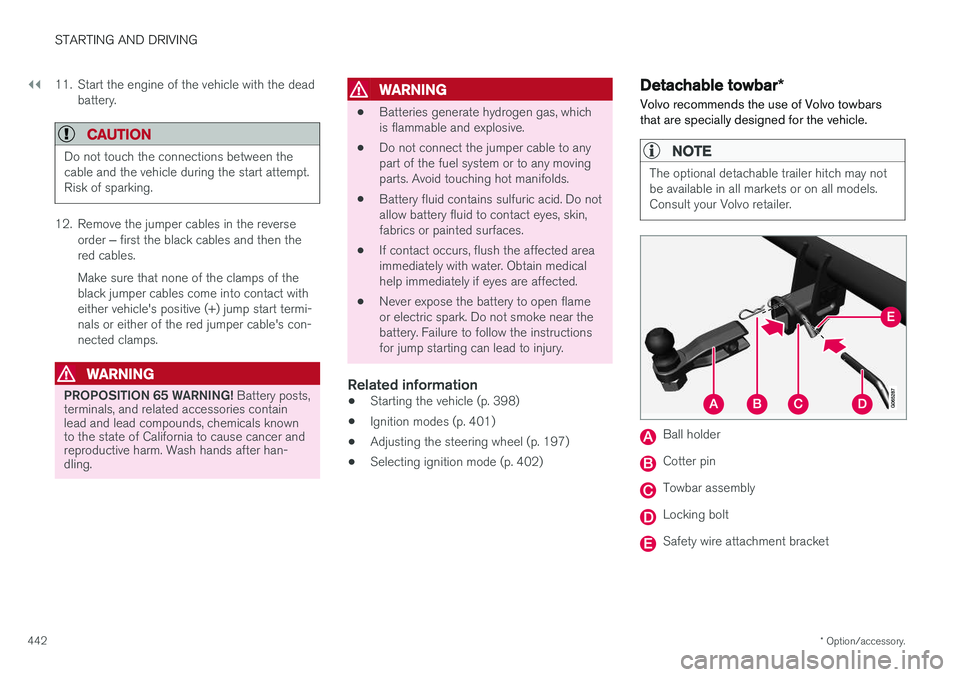
Ball holder
Cotter pin
Towbar assembly
Locking bolt
Safety wire attachment bracket
Page 449 of 660
STARTING AND DRIVING
}}
447
Disabling the automatic check
The automatic light check can be disabled in the center display. 1.Tap
Settings in the Top view.
2. Tap
My CarLights and Lighting.
3. Deselect
Automatic Trailer Lamp Check.
Manual check
If the automatic check has been disabled, the check can be started manually. 1.Tap
Settings in the Top view.
2. Tap
My CarLights and Lighting.
3. Select
Manual Trailer Lamp Check.
> The light check will begin. Get out of the vehicle to perform the check.
Related information
• Driving with a trailer (p. 443)
Towing using a towline
This section refers to one vehicle being towed behind another using a towline.
Before towing another vehicle, check applicable speed limit regulations.
Preparations and towing
CAUTION
Note that the vehicle must always be towed with the wheels rolling forward.
• Do not tow a vehicle with automatictransmission at a speed greater than80 km/h (50 mph) or for a distancegreater than 80 km (50 miles).
WARNING
•
Ignition mode
II must be active – all air-
bags are deactivated in ignition mode I.
• Always have the remote key in the vehicle when it is towed.
WARNING
The brake and steering servos do not work when the engine is off – it takesabout 5 times more pressure on the brakepedal and steering requires much more effortthan normal. 1. Turn on the hazard warning flashers.
2. Attach the towline to the towing eyelet.3.
Put the vehicle in ignition mode II – without
pressing the brake pedal, turn the start knob clockwise and hold it there for about4 seconds. Release the knob, which willautomatically return to its original position.
4. Move the gear selector to neutral ( N) and
release the parking brake. If the battery charge level is too low, it may not be possible to release the parking brake.Connect an auxiliary battery to the vehicle ifthe battery is discharged.
> The towing vehicle can now start driving.
5. Keep the towline taut when the towing vehi- cle slows down by applying light pressure to the brake pedal. This will help avoid jarringmovements.
6. Be prepared to apply the brakes to stop the vehicle.
Jump startingDo not tow the vehicle to start the engine. Use anauxiliary battery if the start battery's charge levelis so low that the engine cannot be started.
Page 450 of 660
||
STARTING AND DRIVING
448
CAUTION
Attempting to tow with the engine running could result in damage to the three-way cata-lytic converter.
Related information
•Attaching and removing the towing eyelet (p. 448)
• Hazard warning flashers (p. 160)
• Recovery (p. 450)
• Jump starting using another battery (p. 441)
• Selecting ignition mode (p. 402)
Attaching and removing the towingeyelet
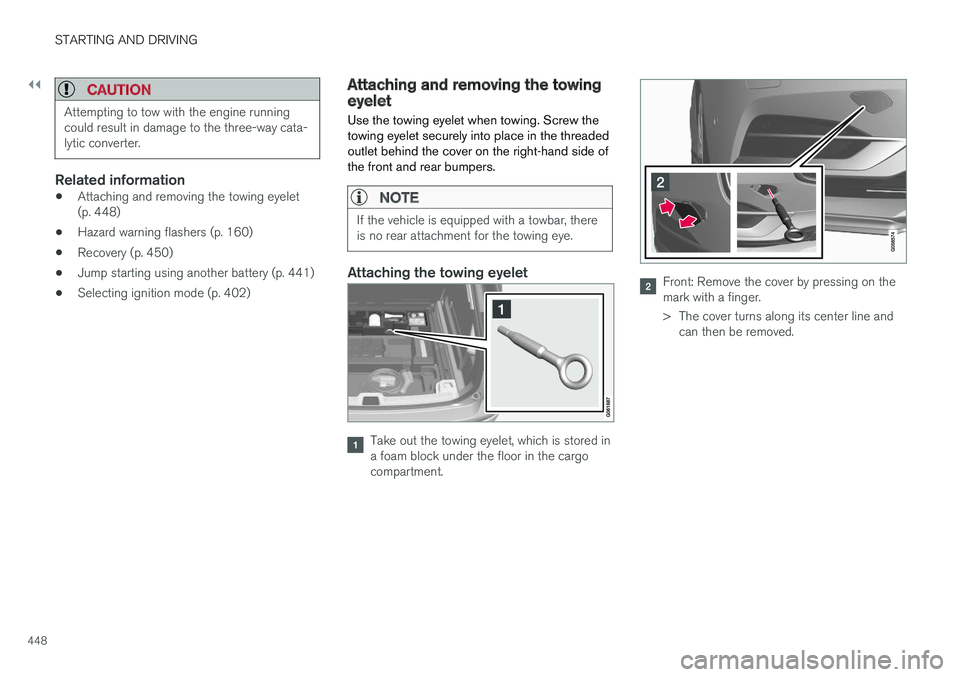
Use the towing eyelet when towing. Screw the towing eyelet securely into place in the threadedoutlet behind the cover on the right-hand side ofthe front and rear bumpers.
NOTE
If the vehicle is equipped with a towbar, there is no rear attachment for the towing eye.
Attaching the towing eyelet
Take out the towing eyelet, which is stored in a foam block under the floor in the cargocompartment.
Front: Remove the cover by pressing on the mark with a finger.
> The cover turns along its center line and can then be removed.
Page 453 of 660
STARTING AND DRIVING
}}
* Option/accessory.451
HomeLink
®
is delivered integrated in the rearview
mirror. The HomeLink ®
panel consists of three
programmable buttons and an indicator light in the mirror. For more information about HomeLink ®
, please
visit www.HomeLink.com, www.youtube.com/ HomeLinkGentex or call 1-800-355-3515. Save the original remote controls for future pro- gramming (e.g. for use in another vehicle). It isalso advisable to delete the button programmingif the vehicle is sold.
Related information
• Using HomeLink (p. 452)
• Programming HomeLink ®
* (p. 451)
• Type approval for HomeLink ®
* (p. 453)
Programming HomeLink®
*13
Follow these instructions to program HomeLink ®
, reset all programming, or program
individual buttons.
NOTE
In some vehicles, the ignition must be on or in the "accessory position" before HomeLink ®
can be programmed or used. It can be a good idea to put new batteries in the remote con- trol being replaced by HomeLink ®
for faster
programming and better radio signal trans-mission. The HomeLink ®
buttons should be
reset before programming.
WARNING
While HomeLink ®
is being programmed, the
garage door or gate being programmed may be activated. Make sure that no one is nearthe door or gate during programming. Whenprogramming a garage door opener, it isadvised to park outside of the garage. 1.
Point the remote control at the HomeLink ®
button to be programmed and hold it about 2-8 cm (1-3 inches) from the button. Do not obstruct the HomeLink ®
indicator light.
Note: Some remote controls are more effec-
tive at programming HomeLink ®
from a dis-
tance of about 15-20 cm (6-12 inches). Try moving the remote control closer or furtheraway if you are experiencing any difficultiesprogramming.
2. Press and hold both the remote control but- ton and the HomeLink ®
button to be pro-
grammed.
3. Do not release the buttons until the indicator light has stopped flashing slowly (about oncea second) and either flashes quickly (about10 times a second) or glows steadily. >Steady glow: Indication that program-
ming is complete. Press the programmed button twice to activate. Flashing quickly: The device being pro-
grammed with HomeLink ®
may have a
security function that requires an extra step. Try pressing the programmed buttontwice to see whether the programmingworks. Otherwise, continue with the fol-lowing steps.
12 HomeLink and the HomeLink house symbol are registered trademarks of Gentex Corporation.
13 Certain markets only.
Page 454 of 660
||
STARTING AND DRIVING
* Option/accessory.
452
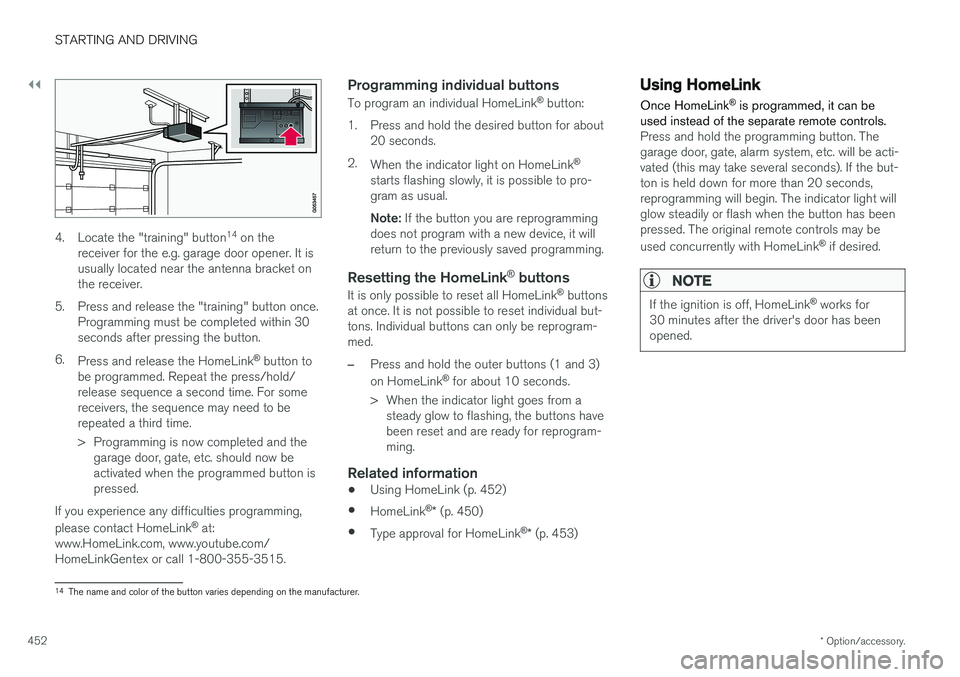
4. Locate the "training" button 14
on the
receiver for the e.g. garage door opener. It is usually located near the antenna bracket onthe receiver.
5. Press and release the "training" button once. Programming must be completed within 30seconds after pressing the button.
6. Press and release the HomeLink ®
button to
be programmed. Repeat the press/hold/release sequence a second time. For somereceivers, the sequence may need to berepeated a third time.
> Programming is now completed and the garage door, gate, etc. should now be activated when the programmed button ispressed.
If you experience any difficulties programming, please contact HomeLink ®
at:
www.HomeLink.com, www.youtube.com/ HomeLinkGentex or call 1-800-355-3515.
Programming individual buttons
To program an individual HomeLink ®
button:
1. Press and hold the desired button for about 20 seconds.
2. When the indicator light on HomeLink ®
starts flashing slowly, it is possible to pro-gram as usual. Note: If the button you are reprogramming
does not program with a new device, it will return to the previously saved programming.
Resetting the HomeLink ®
buttons
It is only possible to reset all HomeLink ®
buttons
at once. It is not possible to reset individual but-tons. Individual buttons can only be reprogram-med.
–Press and hold the outer buttons (1 and 3) on HomeLink ®
for about 10 seconds.
> When the indicator light goes from a steady glow to flashing, the buttons have been reset and are ready for reprogram-ming.
Related information
• Using HomeLink (p. 452)
• HomeLink ®
* (p. 450)
• Type approval for HomeLink ®
* (p. 453)
Using HomeLink
Once HomeLink ®
is programmed, it can be
used instead of the separate remote controls.
Press and hold the programming button. The garage door, gate, alarm system, etc. will be acti-vated (this may take several seconds). If the but-ton is held down for more than 20 seconds,reprogramming will begin. The indicator light willglow steadily or flash when the button has beenpressed. The original remote controls may be used concurrently with HomeLink ®
if desired.
NOTE
If the ignition is off, HomeLink ®
works for
30 minutes after the driver's door has been opened.
14 The name and color of the button varies depending on the manufacturer.
Page 460 of 660
AUDIO, MEDIA AND INTERNET
* Option/accessory.
458
Audio, media and Internet
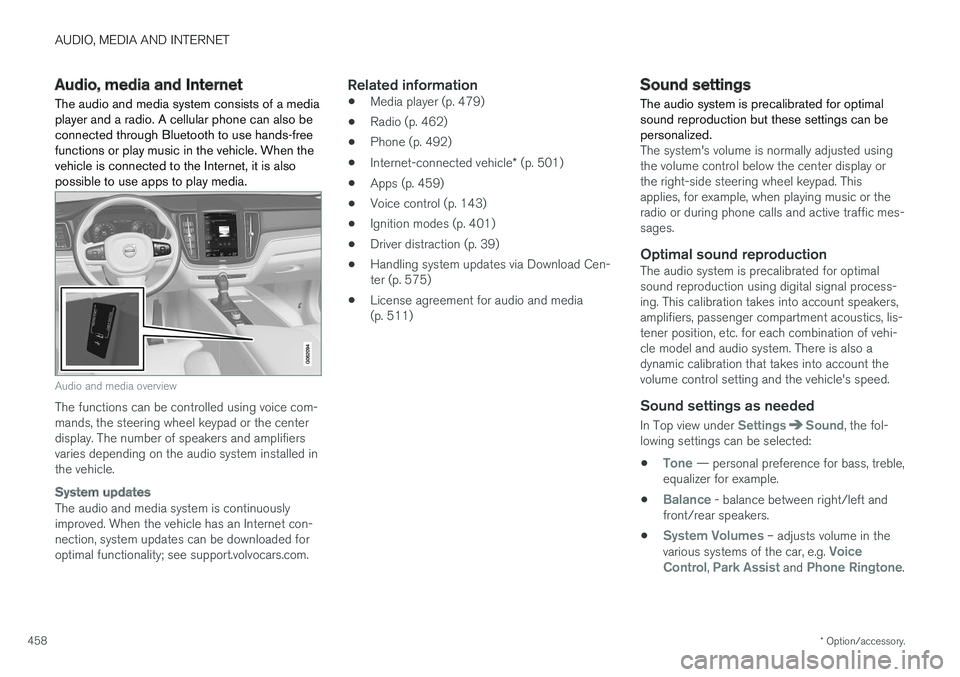
The audio and media system consists of a media player and a radio. A cellular phone can also beconnected through Bluetooth to use hands-freefunctions or play music in the vehicle. When thevehicle is connected to the Internet, it is alsopossible to use apps to play media.
Audio and media overview
The functions can be controlled using voice com- mands, the steering wheel keypad or the centerdisplay. The number of speakers and amplifiersvaries depending on the audio system installed inthe vehicle.
System updates
The audio and media system is continuously improved. When the vehicle has an Internet con-nection, system updates can be downloaded foroptimal functionality; see support.volvocars.com.
Related information
• Media player (p. 479)
• Radio (p. 462)
• Phone (p. 492)
• Internet-connected vehicle
* (p. 501)
• Apps (p. 459)
• Voice control (p. 143)
• Ignition modes (p. 401)
• Driver distraction (p. 39)
• Handling system updates via Download Cen-ter (p. 575)
• License agreement for audio and media(p. 511)
Sound settings
The audio system is precalibrated for optimal sound reproduction but these settings can bepersonalized.
The system's volume is normally adjusted using the volume control below the center display orthe right-side steering wheel keypad. Thisapplies, for example, when playing music or theradio or during phone calls and active traffic mes-sages.
Optimal sound reproductionThe audio system is precalibrated for optimalsound reproduction using digital signal process-ing. This calibration takes into account speakers,amplifiers, passenger compartment acoustics, lis-tener position, etc. for each combination of vehi-cle model and audio system. There is also adynamic calibration that takes into account thevolume control setting and the vehicle's speed.
Sound settings as needed
In Top view under SettingsSound, the fol-
lowing settings can be selected:
•
Tone — personal preference for bass, treble,
equalizer for example.
•
Balance - balance between right/left and
front/rear speakers.
•
System Volumes – adjusts volume in the
various systems of the car, e.g. Voice
Control, Park Assist and Phone Ringtone.
Page 488 of 660
AUDIO, MEDIA AND INTERNET
* Option/accessory.
486
Playing media via the USB port External audio sources, such as an iPod ® or
MP3 player, can be connected to the audio sys- tem via the vehicle's USB port.
Devices with rechargeable batteries can be charged when they are connected via the USB port and the ignition is in mode I, II or the engine
is running. The content on the external source can be read faster if it only contains data of a compatible for-mat. Video files can also be played via the USBport. Some MP3 players have their own file system that the vehicle has support for.
Related information
• Connecting a device via the USB port(p. 486)
• Playing media (p. 480)
• Video (p. 484)
• Ignition modes (p. 401)
• Technical specifications for USB devices(p. 509)
• Apple ®
CarPlay ®
* (p. 487)
• Android Auto
* (p. 490)
Connecting a device via the USBport
External audio sources, such as an iPod ®
or
MP3 player, can be connected to the audio sys- tem via any of the vehicle's USB ports.
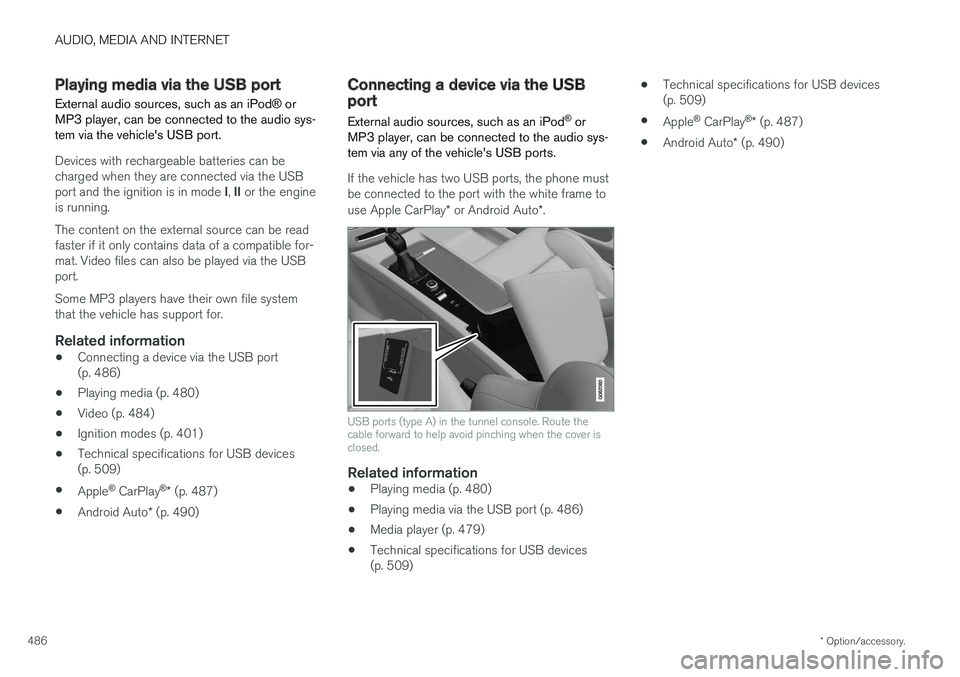
If the vehicle has two USB ports, the phone must be connected to the port with the white frame to use Apple CarPlay * or Android Auto *.
USB ports (type A) in the tunnel console. Route the cable forward to help avoid pinching when the cover isclosed.
Related information
• Playing media (p. 480)
• Playing media via the USB port (p. 486)
• Media player (p. 479)
• Technical specifications for USB devices (p. 509) •
Technical specifications for USB devices(p. 509)
• Apple ®
CarPlay ®
* (p. 487)
• Android Auto
* (p. 490)
Page 497 of 660
AUDIO, MEDIA AND INTERNET
}}
495
Connecting a phone to the car viaBluetooth automatically
A phone can be automatically connected to the vehicle via Bluetooth. The phone must have firstbeen paired with the vehicle.
Only the two most recently connected phones can be connected automatically.
1. Activate Bluetooth in the phone before turn- ing the vehicle's ignition to mode I.
To simultaneously connect the vehicle to the Internet, the phone's personal hotspot mustalso be activated.
2. Turn the ignition to I or higher.
> The phone will be connected.
Related information
• Phone (p. 492)
• Connecting a phone to the car via Bluetoothfor the first time (p. 493)
• Connecting a phone to the car via Bluetoothmanually (p. 495)
• Disconnecting a Bluetooth-connected phone(p. 496)
• Switch between phones connected via Blue-tooth (p. 496)
• Removing a Bluetooth-connected phone(p. 497)
• Settings for Bluetooth devices (p. 501) •
Connecting the car to the Internet via amobile device (Bluetooth) (p. 503)
• Ignition modes (p. 401)
Connecting a phone to the car viaBluetooth manually
A phone can be manually connected to the vehi- cle via Bluetooth. The phone must have firstbeen paired with the vehicle.
1. Activate Bluetooth in the phone.
To simultaneously connect the vehicle to the Internet, the phone's personal hotspot mustalso be activated.
2. Open the phone tile. > A list of available phones will be displayed.
3. Tap the name of the phone you would like to connect.
> The phone will be connected.
Related information
• Phone (p. 492)
• Connecting a phone to the car via Bluetooth for the first time (p. 493)
• Connecting a phone to the car via Bluetoothautomatically (p. 495)
• Disconnecting a Bluetooth-connected phone(p. 496)
• Switch between phones connected via Blue-tooth (p. 496)
• Removing a Bluetooth-connected phone(p. 497)
Page 535 of 660
WHEELS AND TIRES
}}
* Option/accessory.533
Calibrating the tire pressure
monitoring system *
In order for the tire pressure monitoring system, Tyre Pressure Monitoring System (TPMS), tofunction correctly, tire pressure reference valuesmust be set correctly. This must be done eachtime the tires are changed or the tire pressure isadjusted.
For example, when driving with a heavy load or at high speeds (over 160 km/h (100 mph)), tirepressure should be adjusted to the Volvo-recom-mended tire pressure values. The system shouldthen be recalibrated.
1. Switch off the ignition.
2. Inflate the tires to the pressure indicated on the tire pressure placard on the driver's side B pillar.
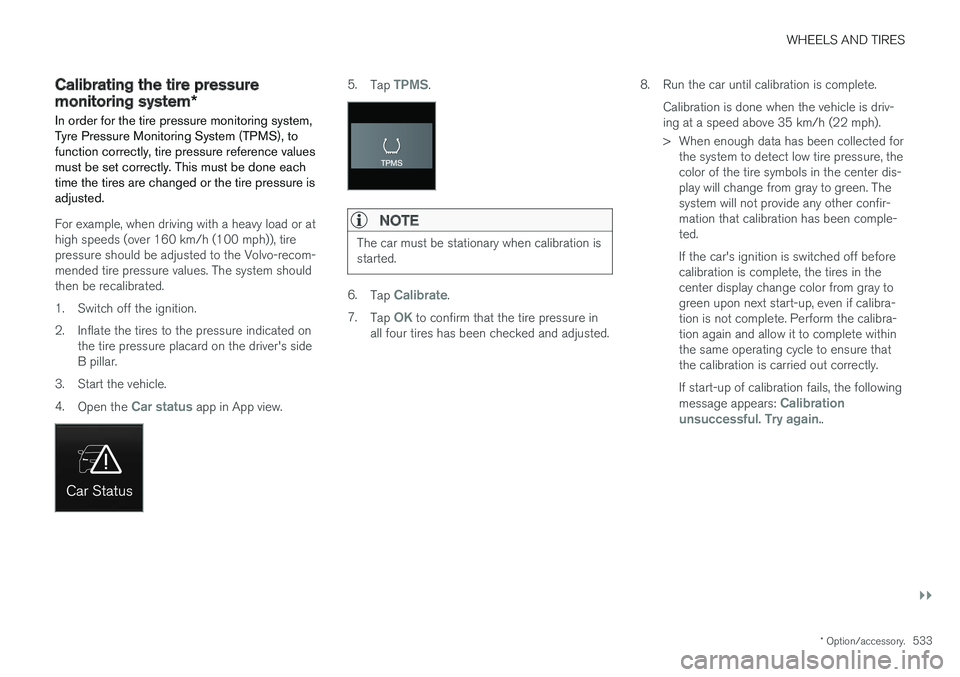
3. Start the vehicle. 4. Open the
Car status app in App view.
5.Tap TPMS.
NOTE
The car must be stationary when calibration is started.
6.Tap Calibrate.
7. Tap
OK to confirm that the tire pressure in
all four tires has been checked and adjusted. 8. Run the car until calibration is complete.
Calibration is done when the vehicle is driv- ing at a speed above 35 km/h (22 mph).
> When enough data has been collected forthe system to detect low tire pressure, the color of the tire symbols in the center dis-play will change from gray to green. Thesystem will not provide any other confir-mation that calibration has been comple-ted. If the car's ignition is switched off before calibration is complete, the tires in thecenter display change color from gray togreen upon next start-up, even if calibra-tion is not complete. Perform the calibra-tion again and allow it to complete withinthe same operating cycle to ensure thatthe calibration is carried out correctly. If start-up of calibration fails, the following message appears:
Calibration
unsuccessful. Try again..