ignition VOLVO XC60 2018 Owner´s Manual
[x] Cancel search | Manufacturer: VOLVO, Model Year: 2018, Model line: XC60, Model: VOLVO XC60 2018Pages: 660, PDF Size: 11.77 MB
Page 401 of 660
STARTING AND DRIVING
}}
399
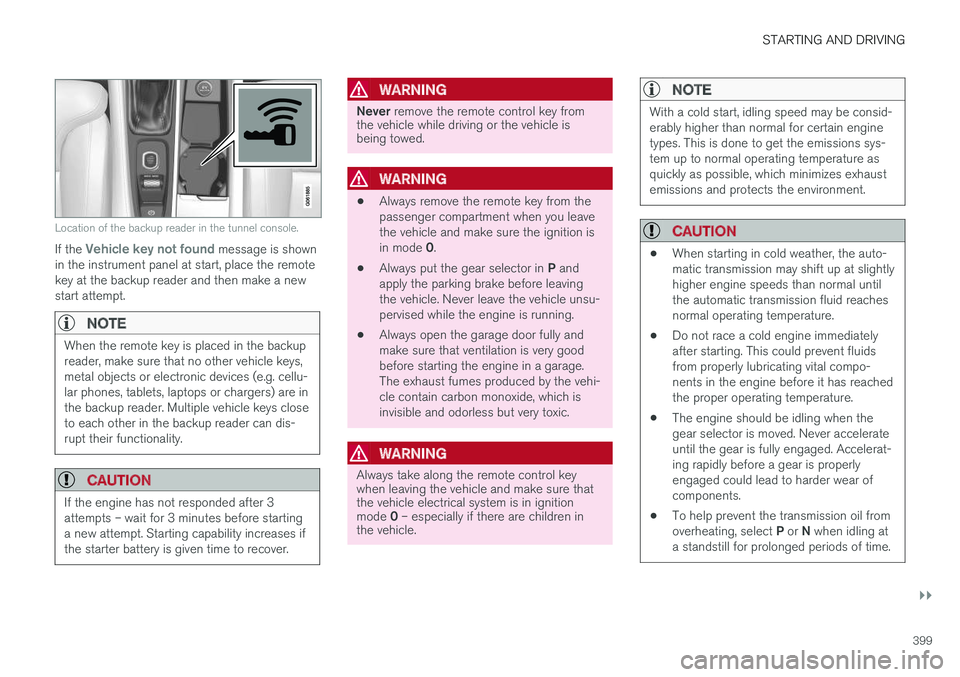
Location of the backup reader in the tunnel console.
If the Vehicle key not found message is shown
in the instrument panel at start, place the remote key at the backup reader and then make a newstart attempt.
NOTE
When the remote key is placed in the backup reader, make sure that no other vehicle keys,metal objects or electronic devices (e.g. cellu-lar phones, tablets, laptops or chargers) are inthe backup reader. Multiple vehicle keys closeto each other in the backup reader can dis-rupt their functionality.
CAUTION
If the engine has not responded after 3 attempts – wait for 3 minutes before startinga new attempt. Starting capability increases ifthe starter battery is given time to recover.
WARNING
Never remove the remote control key from
the vehicle while driving or the vehicle is being towed.
WARNING
• Always remove the remote key from the passenger compartment when you leavethe vehicle and make sure the ignition is in mode
0.
• Always put the gear selector in
P and
apply the parking brake before leaving the vehicle. Never leave the vehicle unsu-pervised while the engine is running.
• Always open the garage door fully andmake sure that ventilation is very goodbefore starting the engine in a garage.The exhaust fumes produced by the vehi-cle contain carbon monoxide, which isinvisible and odorless but very toxic.
WARNING
Always take along the remote control key when leaving the vehicle and make sure thatthe vehicle electrical system is in ignition mode
0 – especially if there are children in
the vehicle.
NOTE
With a cold start, idling speed may be consid- erably higher than normal for certain enginetypes. This is done to get the emissions sys-tem up to normal operating temperature asquickly as possible, which minimizes exhaustemissions and protects the environment.
CAUTION
• When starting in cold weather, the auto- matic transmission may shift up at slightlyhigher engine speeds than normal untilthe automatic transmission fluid reachesnormal operating temperature.
• Do not race a cold engine immediatelyafter starting. This could prevent fluidsfrom properly lubricating vital compo-nents in the engine before it has reachedthe proper operating temperature.
• The engine should be idling when thegear selector is moved. Never accelerateuntil the gear is fully engaged. Accelerat-ing rapidly before a gear is properlyengaged could lead to harder wear ofcomponents.
• To help prevent the transmission oil from overheating, select
P or N when idling at
a standstill for prolonged periods of time.
Page 402 of 660
||
STARTING AND DRIVING
400
Related information
•Switching off the vehicle (p. 400)
• Ignition modes (p. 401)
• Adjusting the steering wheel (p. 197)
• Jump starting using another battery (p. 441)
• Selecting ignition mode (p. 402)
Switching off the vehicle The vehicle can be switched off using the start knob in the tunnel console.
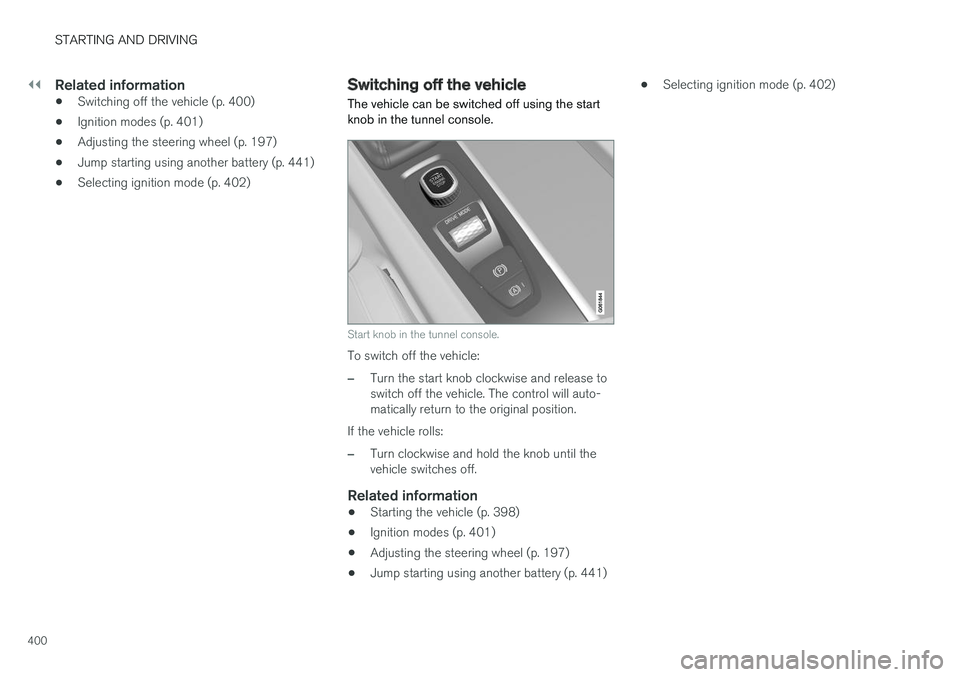
Start knob in the tunnel console.
To switch off the vehicle:
–Turn the start knob clockwise and release to switch off the vehicle. The control will auto-matically return to the original position.
If the vehicle rolls:
–Turn clockwise and hold the knob until the vehicle switches off.
Related information
• Starting the vehicle (p. 398)
• Ignition modes (p. 401)
• Adjusting the steering wheel (p. 197)
• Jump starting using another battery (p. 441) •
Selecting ignition mode (p. 402)
Page 403 of 660
STARTING AND DRIVING
* Option/accessory.401
Ignition modes
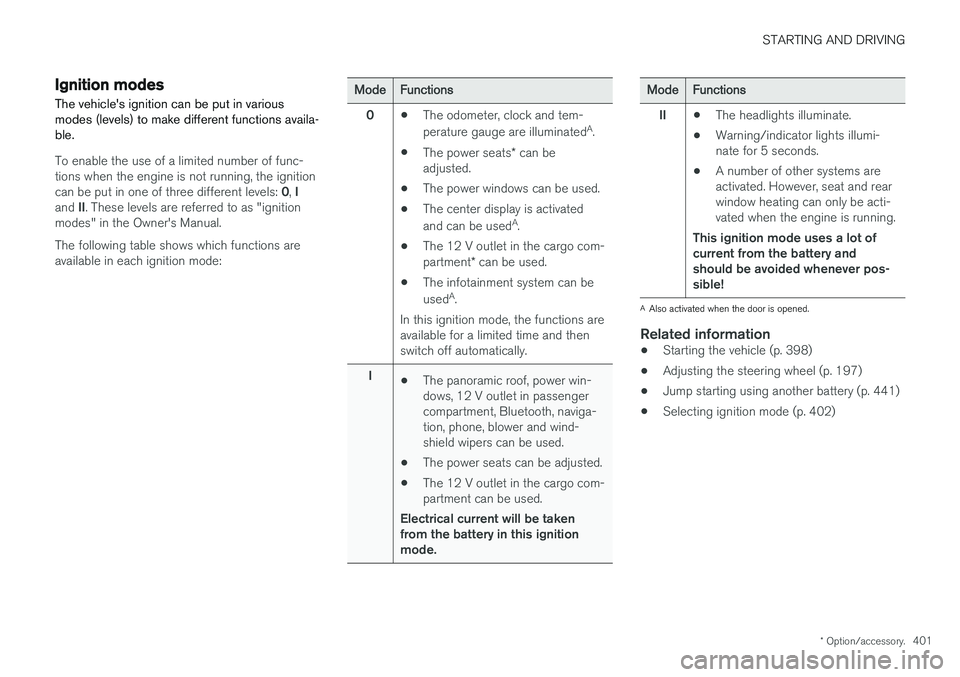
The vehicle's ignition can be put in various modes (levels) to make different functions availa-ble.
To enable the use of a limited number of func- tions when the engine is not running, the ignition can be put in one of three different levels: 0, I
and II. These levels are referred to as "ignition
modes" in the Owner's Manual. The following table shows which functions are available in each ignition mode:
ModeFunctions
0 •The odometer, clock and tem- perature gauge are illuminated A
.
• The power seats
* can be
adjusted.
• The power windows can be used.
• The center display is activatedand can be used A
.
• The 12 V outlet in the cargo com- partment
* can be used.
• The infotainment system can be used A
.
In this ignition mode, the functions are available for a limited time and then switch off automatically.
I •The panoramic roof, power win-dows, 12 V outlet in passengercompartment, Bluetooth, naviga-tion, phone, blower and wind-shield wipers can be used.
• The power seats can be adjusted.
• The 12 V outlet in the cargo com-partment can be used.
Electrical current will be takenfrom the battery in this ignitionmode.ModeFunctions
II •The headlights illuminate.
• Warning/indicator lights illumi- nate for 5 seconds.
• A number of other systems areactivated. However, seat and rearwindow heating can only be acti-vated when the engine is running.
This ignition mode uses a lot ofcurrent from the battery andshould be avoided whenever pos-sible!
A Also activated when the door is opened.
Related information
• Starting the vehicle (p. 398)
• Adjusting the steering wheel (p. 197)
• Jump starting using another battery (p. 441)
• Selecting ignition mode (p. 402)
Page 404 of 660
STARTING AND DRIVING
* Option/accessory.
402
Selecting ignition mode
The vehicle's ignition can be put in various modes (levels) to make different functions availa-ble.
Selecting an ignition mode
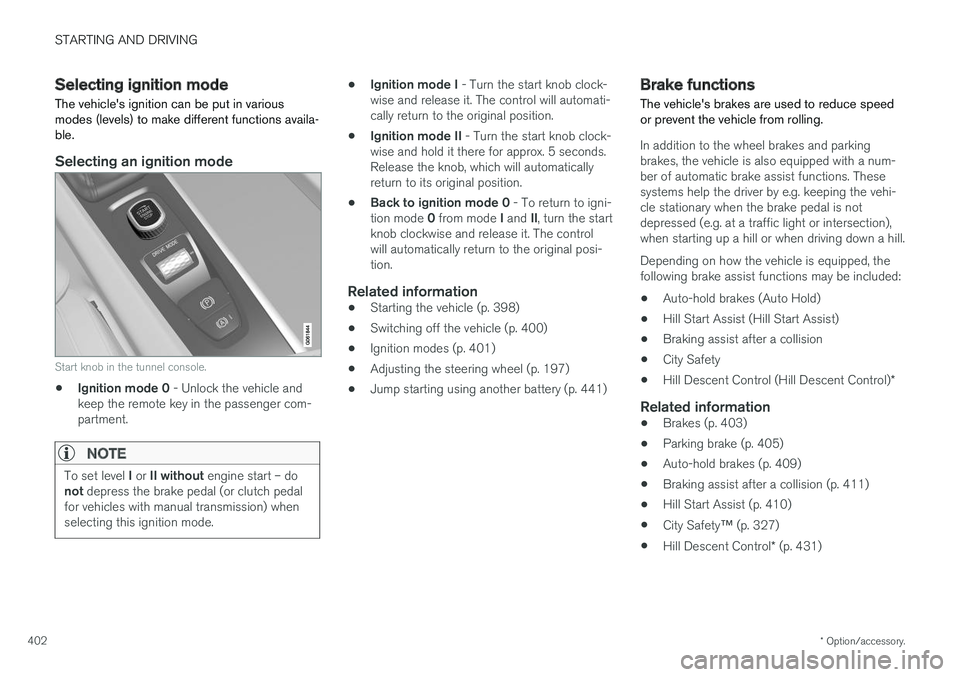
Start knob in the tunnel console.
• Ignition mode 0
- Unlock the vehicle and
keep the remote key in the passenger com- partment.
NOTE
To set level I or II without engine start – do
not depress the brake pedal (or clutch pedal
for vehicles with manual transmission) when selecting this ignition mode.
• Ignition mode I
- Turn the start knob clock-
wise and release it. The control will automati- cally return to the original position.
• Ignition mode II
- Turn the start knob clock-
wise and hold it there for approx. 5 seconds.Release the knob, which will automaticallyreturn to its original position.
• Back to ignition mode 0
- To return to igni-
tion mode 0 from mode I and II, turn the start
knob clockwise and release it. The controlwill automatically return to the original posi-tion.
Related information
• Starting the vehicle (p. 398)
• Switching off the vehicle (p. 400)
• Ignition modes (p. 401)
• Adjusting the steering wheel (p. 197)
• Jump starting using another battery (p. 441)
Brake functions
The vehicle's brakes are used to reduce speed or prevent the vehicle from rolling.
In addition to the wheel brakes and parking brakes, the vehicle is also equipped with a num-ber of automatic brake assist functions. Thesesystems help the driver by e.g. keeping the vehi-cle stationary when the brake pedal is notdepressed (e.g. at a traffic light or intersection),when starting up a hill or when driving down a hill. Depending on how the vehicle is equipped, the following brake assist functions may be included:
• Auto-hold brakes (Auto Hold)
• Hill Start Assist (Hill Start Assist)
• Braking assist after a collision
• City Safety
• Hill Descent Control (Hill Descent Control)
*
Related information
•Brakes (p. 403)
• Parking brake (p. 405)
• Auto-hold brakes (p. 409)
• Braking assist after a collision (p. 411)
• Hill Start Assist (p. 410)
• City Safety
™ (p. 327)
• Hill Descent Control
* (p. 431)
Page 408 of 660
||
STARTING AND DRIVING
406
Related information
•Activating and deactivating the parking brake (p. 406)
• Parking on a hill (p. 408)
• Parking brake malfunction (p. 408)
• Auto-hold brakes (p. 409)
Activating and deactivating theparking brake Use the parking brake to help keep the vehicle stationary when it is parked.
Activating the parking brake
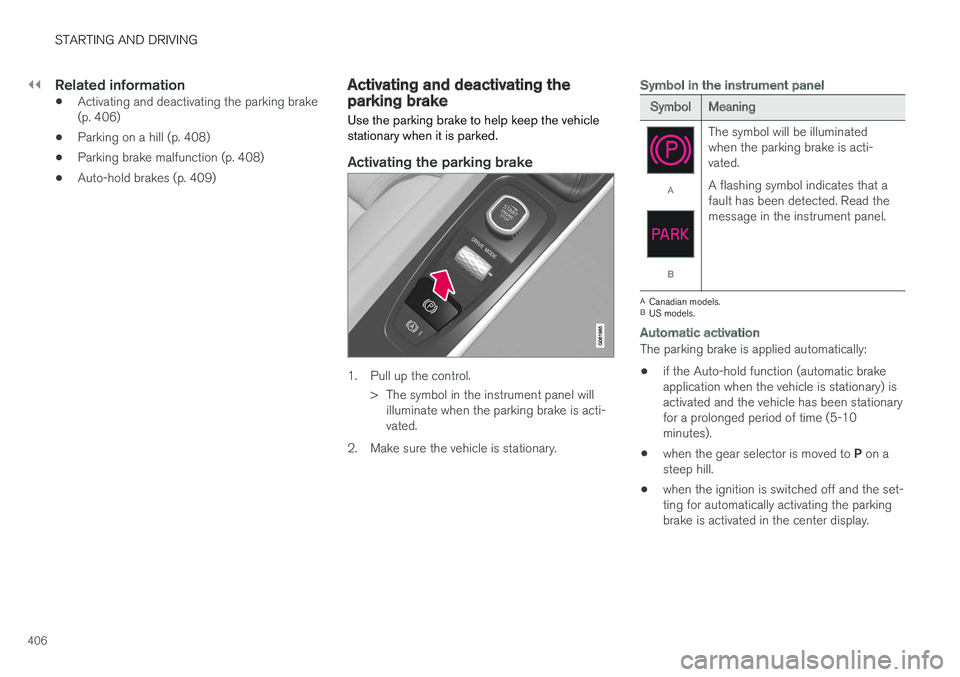
1. Pull up the control.
> The symbol in the instrument panel willilluminate when the parking brake is acti- vated.
2. Make sure the vehicle is stationary.
Symbol in the instrument panel
SymbolMeaning
A
B The symbol will be illuminated when the parking brake is acti-vated. A flashing symbol indicates that a fault has been detected. Read themessage in the instrument panel.
A
Canadian models.
B US models.
Automatic activation
The parking brake is applied automatically:
• if the Auto-hold function (automatic brake application when the vehicle is stationary) isactivated and the vehicle has been stationaryfor a prolonged period of time (5-10minutes).
• when the gear selector is moved to
P on a
steep hill.
• when the ignition is switched off and the set-ting for automatically activating the parkingbrake is activated in the center display.
Page 414 of 660
||
STARTING AND DRIVING
* Option/accessory.
412
SymbolMeaning
Information and messages related to the transmission. Follow the rec-ommendations provided.
Hot or overheated transmission. Follow the recommendations provi-ded.
Reduced performance/Acceler-
ation performance reduced
In the event of a temporary fault in the driveline, the vehicle may gointo a "limp home" mode withreduced power output to help avoiddamage to the driveline.
Related information
• Gear selector positions for automatic trans- missions (p. 412)
• Gear indicator
* (p. 416)
Gear selector positions forautomatic transmissions In vehicles with an automatic transmission, the system selects the optimal gear for the currentdriving conditions. The transmission also has amanual mode.
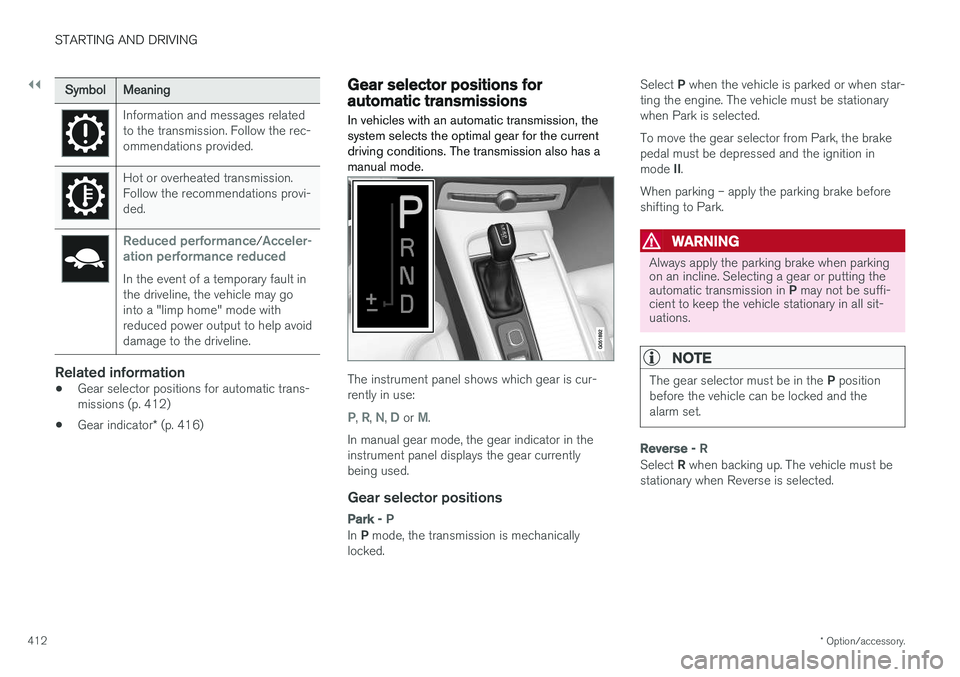
The instrument panel shows which gear is cur- rently in use:
P, R, N, D or M.
In manual gear mode, the gear indicator in the instrument panel displays the gear currentlybeing used.
Gear selector positions
Park - P
In P mode, the transmission is mechanically
locked. Select
P when the vehicle is parked or when star-
ting the engine. The vehicle must be stationary when Park is selected. To move the gear selector from Park, the brake pedal must be depressed and the ignition in mode II.
When parking – apply the parking brake before shifting to Park.
WARNING
Always apply the parking brake when parking on an incline. Selecting a gear or putting the automatic transmission in P may not be suffi-
cient to keep the vehicle stationary in all sit- uations.
NOTE
The gear selector must be in the P position
before the vehicle can be locked and the alarm set.
Reverse - R
Select R when backing up. The vehicle must be
stationary when Reverse is selected.
Page 415 of 660
STARTING AND DRIVING
}}
* Option/accessory.413
Neutral - N
No gear is selected and the engine can be started. Apply the parking brake if the vehicle is stationary with the gear selector in N.
To move the gear selector from Neutral to another gear, the brake pedal must be depressed and the ignition in mode II.
D drive mode
D is the normal driving gear position. The trans-
mission shifts up or down automatically depend- ing on acceleration and speed. The vehicle mustbe stationary when the gear selector is moved from R to D.
Manual shifting mode - M
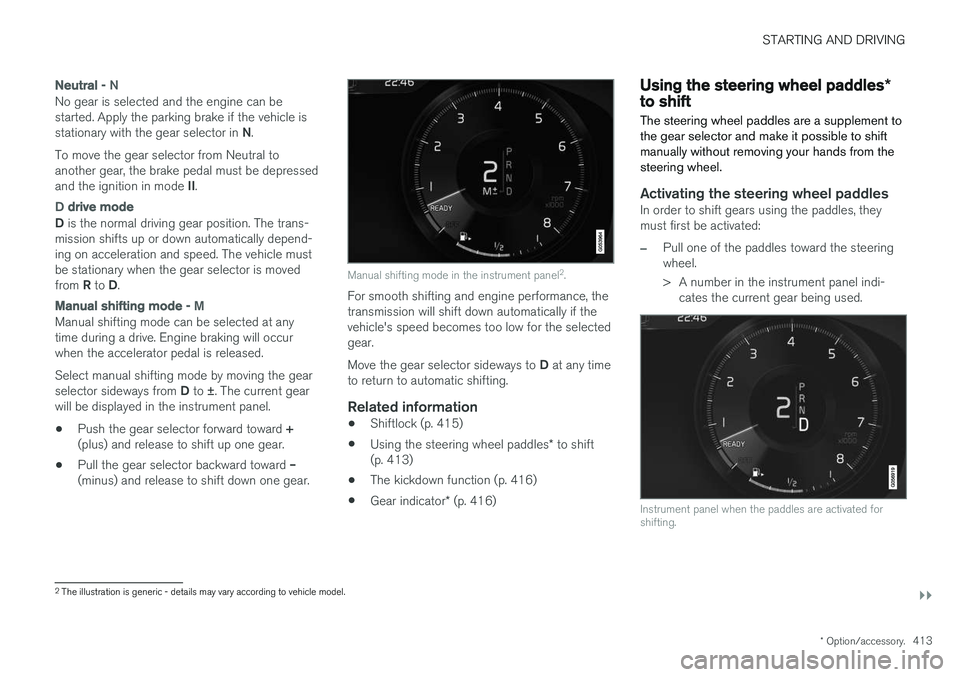
Manual shifting mode can be selected at any time during a drive. Engine braking will occurwhen the accelerator pedal is released. Select manual shifting mode by moving the gear selector sideways from D to ±
. The current gear
will be displayed in the instrument panel.
• Push the gear selector forward toward
+
(plus) and release to shift up one gear.
• Pull the gear selector backward toward
–
(minus) and release to shift down one gear.
Manual shifting mode in the instrument panel 2
.
For smooth shifting and engine performance, the transmission will shift down automatically if thevehicle's speed becomes too low for the selectedgear. Move the gear selector sideways to D at any time
to return to automatic shifting.
Related information
• Shiftlock (p. 415)
• Using the steering wheel paddles
* to shift
(p. 413)
• The kickdown function (p. 416)
• Gear indicator
* (p. 416)
Using the steering wheel paddles *to shift
The steering wheel paddles are a supplement to the gear selector and make it possible to shiftmanually without removing your hands from thesteering wheel.
Activating the steering wheel paddlesIn order to shift gears using the paddles, they must first be activated:
–Pull one of the paddles toward the steering wheel.
> A number in the instrument panel indi- cates the current gear being used.
Instrument panel when the paddles are activated for shifting.
2The illustration is generic - details may vary according to vehicle model.
Page 417 of 660
STARTING AND DRIVING
}}
415
Shiftlock The automatic transmission's shiftlock function helps prevent inadvertently moving the gearselector between different positions.
There are two types of shiftlocks: mechanical and automatic.
Mechanical shiftlock
The gear selector can be moved back and forth between N and D. The other positions have a
shiftlock that is operated using the lock button on the gear selector. Press and hold the shiftlock button and move the gear selector forward or backward between P, R ,
N and D.
Automatic shiftlockThe automatic shiftlock has a separate safety system.
From Park - P
To move the gear selector from the P position,
the brake pedal must be depressed and the igni- tion in mode II.
From Neutral - N
If the gear selector is in N and the vehicle has
been stationary for at least 3 seconds (with or without the engine running), the gear selector willbe locked in that position. To move the gear selector from N to another
gear, the brake pedal must be depressed and the ignition in mode II.
Related information
• Gear selector positions for automatic trans- missions (p. 412)
• Deactivating the automatic shiftlock (p. 415)
Deactivating the automatic shiftlock
The automatic shiftlock can still be disengaged even when there is no electrical current to thevehicle.
Deactivating the automatic shiftlock
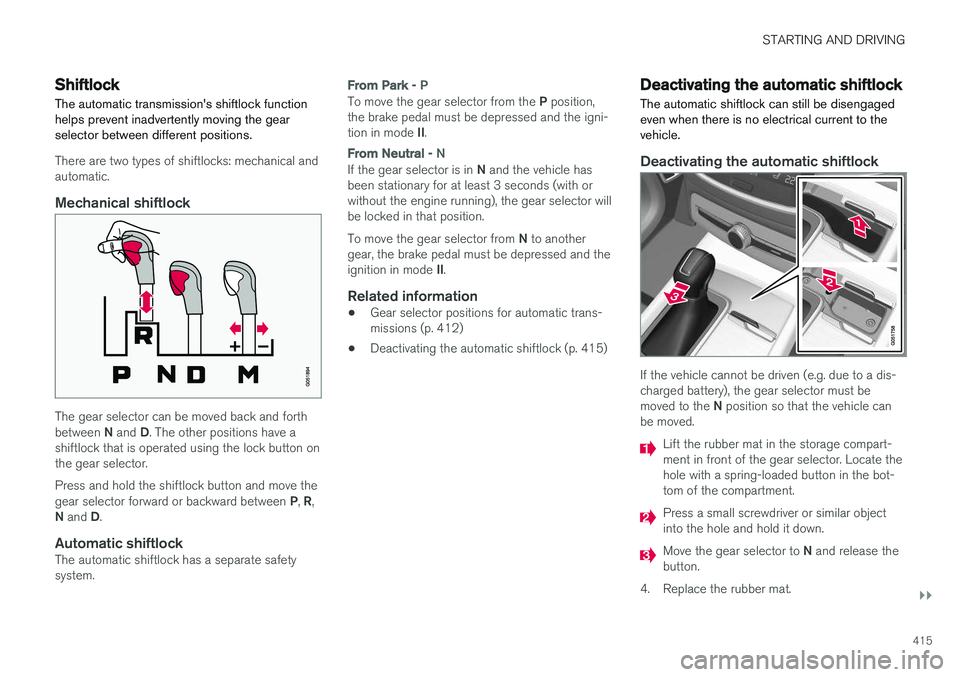
If the vehicle cannot be driven (e.g. due to a dis- charged battery), the gear selector must be moved to the N position so that the vehicle can
be moved.
Lift the rubber mat in the storage compart- ment in front of the gear selector. Locate thehole with a spring-loaded button in the bot-tom of the compartment.
Press a small screwdriver or similar object into the hole and hold it down.
Move the gear selector to N and release the
button.
4. Replace the rubber mat.
Page 427 of 660
STARTING AND DRIVING
425
•
High levels of condensation on the inside of the windows.
• the climate system settings and the actualclimate in the passenger compartment differ.
• Electrical current consumption is temporarilyhigh or the start battery's charge is below theminimum level.
• The brake pedal is pumped repeatedly.
• The hood is open.
• The vehicle begins to roll or increases speedslightly if the engine auto-stopped before thevehicle was at a standstill.
• The driver's seat belt is unbuckled with the gear selector in the
D or N positions.
• The gear selector is moved from
D to R or M
( ± ).
• The driver's door is opened with the gearselector in
D. An audible signal and a text
message informs the driver that the ignition is on.
WARNING
Do not open the hood if the engine has auto- stopped. Turn off the engine by switching offthe ignition before lifting the hood.
Related information
• Start/Stop function (p. 422)
• Driving with the Start/Stop function (p. 422) •
Temporarily deactivating the Start/Stop func- tion (p. 424)
Page 441 of 660
STARTING AND DRIVING
439
WARNING
Carbon monoxide is a poisonous, colorless, and odorless gas. It is present in all exhaustgases. If you ever smell exhaust fumes insidethe vehicle, make sure the passenger com-partment is ventilated, and immediately returnthe vehicle to a trained and qualified Volvoservice technician for correction.
Demanding drivingIn demanding driving conditions, e.g. when driving in a hot climates, driving with a trailer or drivingfor longer periods at higher altitudes (mountainlandscapes) than normal, it is recommended switching to a higher octane fuel than AKI 917
or
changing gasoline brand to take full advantage of your car's engine capacity and obtain the opti-mum driving force.
Related information
• Fuel (p. 436)
• Emission controls (p. 439)
Emission controls
Three-way catalytic converter
•Keep your engine properly tuned. Certain engine malfunctions, particularly involving theelectrical, fuel or distributor ignition systems,may cause unusually high three-way catalyticconverter temperatures. Do not continue tooperate your vehicle if you detect enginemisfire, noticeable loss of power or otherunusual operating conditions, such as engineoverheating or backfiring. A properly tunedengine will help avoid malfunctions thatcould damage the three-way catalytic con-verter.
• Do not park your vehicle over combustiblematerials, such as grass or leaves, which cancome into contact with the hot exhaust sys-tem and cause such materials to ignite undercertain wind and weather conditions.
• Excessive starter cranking (in excess of oneminute), or an intermittently firing or floodedengine can cause three-way catalytic con-verter or exhaust system overheating.
• Remember that tampering or unauthorizedmodifications to the engine, the Engine Con-trol Module, or the vehicle may be illegal andcan cause three-way catalytic converter orexhaust system overheating. This includes:altering fuel injection settings or compo-nents, altering emission system components or location or removing components, and/orrepeated use of leaded fuel.NOTE
Unleaded fuel is required for vehicles with three-way catalytic converters.
Heated oxygen sensorsThe heated oxygen sensors monitor the oxygen content of the exhaust gases. Readings are fedinto a control module that continuously monitorsengine functions and controls fuel injection. Theratio of fuel to air into the engine is continuouslyadjusted for efficient combustion to help reduceharmful emissions.
Related information
•
Octane rating (p. 437)
• Fuel (p. 436)
7
AKI (Anti Knock Index) is an average value of RON (Research Octane Number) and MON (Motor Octane Number) - (RON)+(MON)/2