ECO mode VOLVO XC60 2018 Owner´s Manual
[x] Cancel search | Manufacturer: VOLVO, Model Year: 2018, Model line: XC60, Model: VOLVO XC60 2018Pages: 660, PDF Size: 11.77 MB
Page 420 of 660
||
STARTING AND DRIVING
418
ECO
•Adapt the vehicle for more fuel-efficient and eco-friendly driving with Eco mode.
In this mode, the Start/Stop function is activated,the ground clearance is lower to reduce air resis-tance and certain climate settings are reduced. The instrument panel has an ECO gauge to facili- tate fuel-efficient driving.
OFF ROAD
• Maximizes the vehicle's ability to traverse dif- ficult terrain or poor roads.
In this mode, ground clearance is high, steering islight, and all-wheel drive and Hill Descent Controlare activated. The Start/Stop function is deacti-vated. This mode can only be activated at low speeds. The permitted speed range will be shown in thespeedometer. If this speed is exceeded, Off roadmode will be deactivated and another drive modeactivated. In Off road mode, a compass will be displayed between the speedometer and the tachometer inthe instrument panel.
NOTE
This drive mode is not designed to be used for normal street driving.
NOTE
Due to the increased ground clearance, if the OFF ROAD mode was selected when theengine was switched off, the suspension willlower when the engine is restarted.
CAUTION
Do not use the OFF ROAD drive mode when towing a trailer without an electrical connec-tion. This could result in damage to the pneu-matic suspension system's bellows.
DYNAMIC
• Dynamic mode is designed to provide sport- ier driving characteristics and a faster accel-eration response.
Gear shifting will be faster and more distinct andthe transmission will prioritize gears with a highertraction force. Steering response is faster, suspension is stiffer and ground clearance is lower to help reducebody roll when cornering. The Start/Stop function is deactivated.
INDIVIDUAL
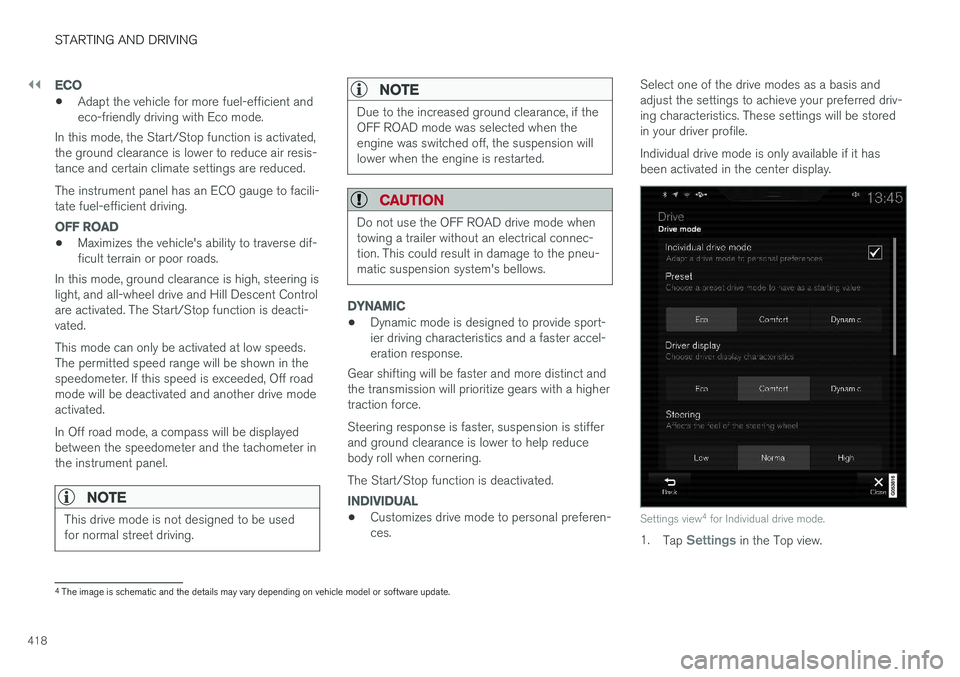
• Customizes drive mode to personal preferen- ces. Select one of the drive modes as a basis andadjust the settings to achieve your preferred driv-ing characteristics. These settings will be storedin your driver profile. Individual drive mode is only available if it has been activated in the center display.Settings view
4
for Individual drive mode.
1. Tap Settings in the Top view.
4
The image is schematic and the details may vary depending on vehicle model or software update.
Page 421 of 660
STARTING AND DRIVING
* Option/accessory.419
2. Tap
My CarIndividual Drive Mode and
select Individual Drive Mode.
3. Under
Presets, select one of the following
drive modes as a basis: Eco, Comfort orDynamic.
The following settings can be modified: •
Driver Display
•Steering force
•Powertrain Characteristics
•Brake Characteristics
•Suspension Control
•ECO Climate
•Start/Stop.
Related information
• Changing drive mode
* (p. 419)
• ECO drive mode (p. 420)
• Economical driving (p. 432)
• Start/Stop function (p. 422)
• Low Speed Control
* (p. 429)
• Hill Descent Control
* (p. 431)
• All Wheel Drive (AWD)
* (p. 417)
Changing drive mode *
The drive mode is changed using the control in the tunnel console.
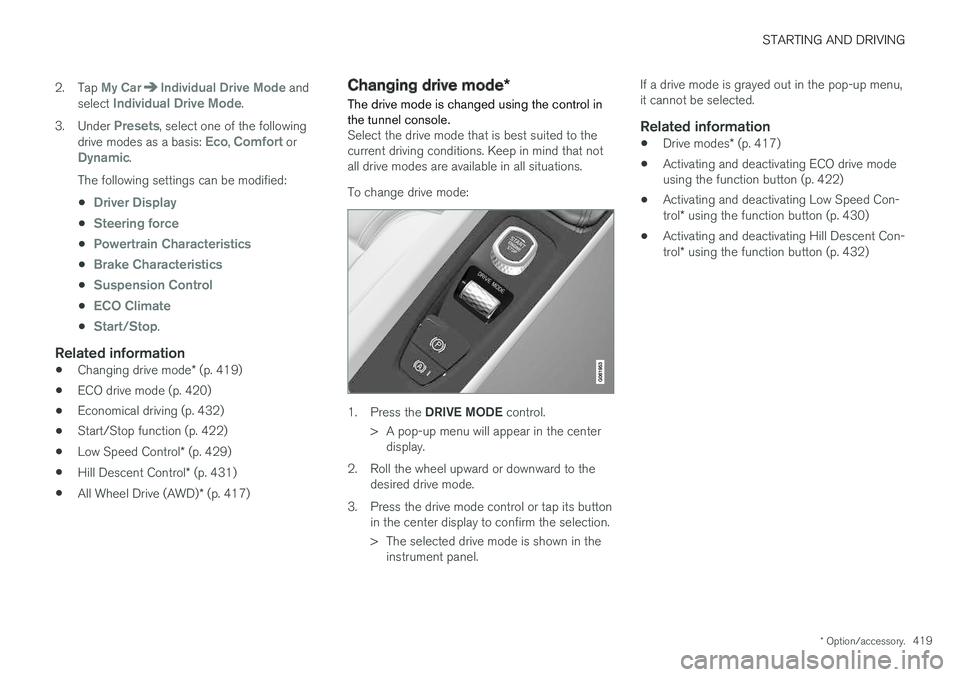
Select the drive mode that is best suited to the current driving conditions. Keep in mind that notall drive modes are available in all situations. To change drive mode:
1. Press the DRIVE MODE control.
> A pop-up menu will appear in the center display.
2. Roll the wheel upward or downward to the desired drive mode.
3. Press the drive mode control or tap its button in the center display to confirm the selection.
> The selected drive mode is shown in theinstrument panel. If a drive mode is grayed out in the pop-up menu, it cannot be selected.
Related information
•
Drive modes
* (p. 417)
• Activating and deactivating ECO drive modeusing the function button (p. 422)
• Activating and deactivating Low Speed Con- trol
* using the function button (p. 430)
• Activating and deactivating Hill Descent Con-trol
* using the function button (p. 432)
Page 422 of 660
STARTING AND DRIVING
* Option/accessory.
420
ECO drive mode
The Eco drive mode optimizes the vehicle's driv- ing characteristics for more fuel-efficient andeco-friendly driving.
Use this mode to save fuel and promote eco- friendly driving. When ECO mode is activated, the following cha- racteristics are modified:
• The automatic transmission's shifting points.
• Engine control and accelerator pedalresponse.
• Eco Coast functionality is activated andengine braking is disabled when the acceler-ator pedal is released at speeds between65 and 140 km/h (40 and 87 mph).
• Some of the climate system settings will bereduced or switched off.
• The suspension's self-leveling function
* will
lower ground clearance to help reduce windresistance.
• Information will be shown in the ECO gaugein the instrument panel to help promotemore eco-friendly and economical driving.
Coast function Eco CoastEco Coast essentially deactivates engine braking,allowing the vehicle's kinetic energy to be usedto roll greater distances. When the driver releasesthe accelerator pedal, the transmission is auto-matically disengaged from the engine. Engine speed is reduced to idling speed to reduce fuelconsumption. This function is most effective in driving situa- tions where the vehicle can roll freely for a longdistance, e.g. on roads with slight downgrades orwhen a decrease in speed is anticipated, such aswhen approaching an area with a lower speedlimit.
Activating Eco Coast
The function is activated when the accelerator pedal is fully released and the following condi-tions are met:
• Eco drive mode is activated.
• The gear selector is in
D.
• The vehicle's speed is approximately65-140 km/h (40-87 mph).
• The gradient of the downgrade is less thanapproximately 6%.
COASTING will be displayed in the instrument
panel when Eco Coast is being used.
Limitations
Eco Coast is not available if:
• The engine and/or transmission are not at normal working temperatures.
• The gear selector is moved from
D to manual
shifting mode.
• The vehicle's speed is not within the65-140 km/h (40-87 mph) range. •
The gradient of the downgrade is more thanapproximately 6%.
• The steering wheel paddles
* are being used
for manual shifting.
Deactivating and turning off Eco Coast
In certain situations, it may be advisable to deac- tivate or turn off Eco Coast so that engine brak-ing can be used. These situations might includedriving down steep hills or before passinganother vehicle to help ensure this can be doneas safely as possible. Deactivate Eco Coast by:
• Pressing the accelerator or brake pedal.
• Moving the gear selector to manual mode.
• Using the steering wheel paddles
* to shift.
Turn off Eco Coast by:
• Switching drive mode
* or switching off drive
mode Eco in Function view.
It is possible to roll short distances even without Eco Coast in order to help conserve fuel. How-ever, for the best fuel economy, Eco Coast shouldbe activated and used to roll longer distances.
Cruise control Eco CruiseWhen cruise control is activated in the Eco drivemode, the vehicle's acceleration and decelerationwill be slower than in other drive modes to helpfurther conserve fuel. Because of this, the vehi-cle's actual speed may be slightly above or belowthe set speed.
Page 423 of 660
STARTING AND DRIVING
* Option/accessory.421
•
On a level road, the vehicle's actual speed may differ from the set speed when cruisecontrol is active and the vehicle is coasting.
• On a steep uphill gradient, the vehicle'sspeed is reduced until the transmissiondownshifts. Reduced acceleration is then ini-tiated in order to reach the set speed.
• On a downhill gradient in which the vehicle iscoasting, the vehicle's actual speed may beslightly above or below the set speed. Thefunction uses engine braking to keep the setspeed. If necessary, the normal brakes arealso applied.
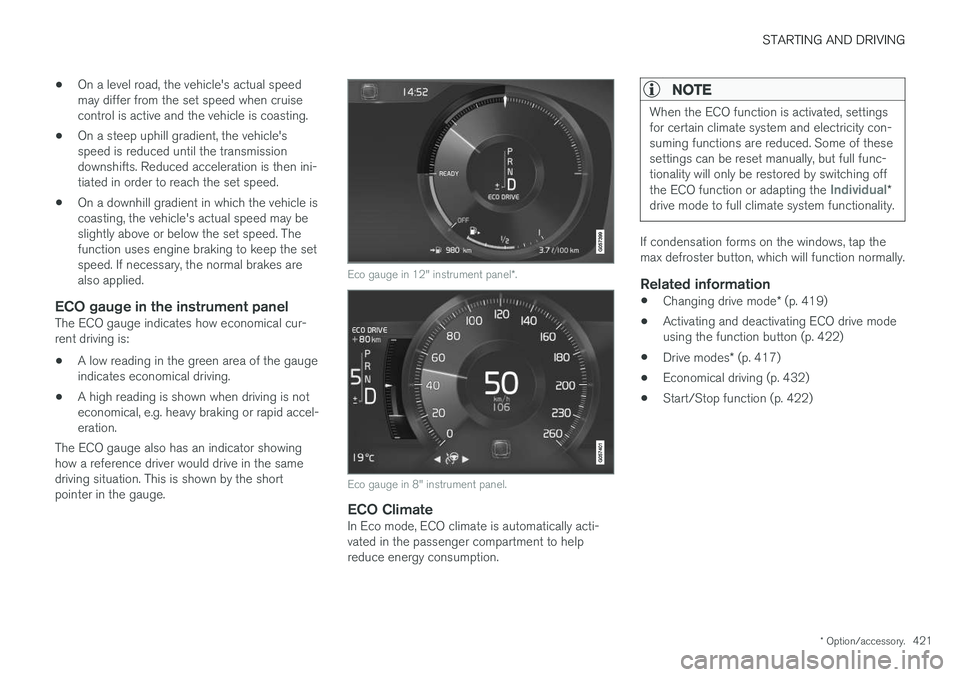
ECO gauge in the instrument panelThe ECO gauge indicates how economical cur-rent driving is:
• A low reading in the green area of the gaugeindicates economical driving.
• A high reading is shown when driving is noteconomical, e.g. heavy braking or rapid accel-eration.
The ECO gauge also has an indicator showinghow a reference driver would drive in the samedriving situation. This is shown by the shortpointer in the gauge.
Eco gauge in 12" instrument panel *.
Eco gauge in 8" instrument panel.
ECO ClimateIn Eco mode, ECO climate is automatically acti- vated in the passenger compartment to helpreduce energy consumption.
NOTE
When the ECO function is activated, settings for certain climate system and electricity con-suming functions are reduced. Some of thesesettings can be reset manually, but full func-tionality will only be restored by switching off the ECO function or adapting the
Individual*
drive mode to full climate system functionality.
If condensation forms on the windows, tap the max defroster button, which will function normally.
Related information
• Changing drive mode
* (p. 419)
• Activating and deactivating ECO drive modeusing the function button (p. 422)
• Drive modes
* (p. 417)
• Economical driving (p. 432)
• Start/Stop function (p. 422)
Page 424 of 660
STARTING AND DRIVING
* Option/accessory.
422
Activating and deactivating ECOdrive mode using the functionbutton
Vehicles equipped with drive mode controls in the tunnel console have a function button forEco drive mode in the center display's Functionview.
When the engine is switched off, ECO mode is deactivated and must therefore be reactivated each time the engine is started. ECO will be dis-
played in the instrument panel when the function is activated.
Selecting Eco drive mode in the center
display's Function view
–Tap the Driving Mode ECO button to acti-
vate or deactivate the function.
> An indicator light in the button will illumi- nate when the function is activated.
Related information
• ECO drive mode (p. 420)
• Changing drive mode
* (p. 419)
• Drive modes
* (p. 417)
Start/Stop function
Start/Stop is a function that temporarily switches off the engine when the vehicle has stopped,e.g. at a traffic light or in heavy traffic, and thenstarts it again automatically when the brakepedal is released.
The Start/Stop function reduces fuel consump- tion, which helps to reduce exhaust emissions. The system makes it possible to drive more eco- nomically and climate-smart by letting the engineauto-stop when appropriate.
Related information
• Driving with the Start/Stop function (p. 422)
• Conditions for the Start/Stop function(p. 424)
• Drive modes
* (p. 417)
Driving with the Start/Stop function
Start/Stop is a function that temporarily turns off the engine when the vehicle is stationary andthen automatically starts it again when the vehi-cle starts moving.
The Start/Stop function is available when the engine is started and can be activated if certainconditions are met. The instrument panel indi-cates if the function is available, active or notavailable. All of the vehicle's ordinary systems, such as lighting, radio, etc. function normally when theengine has been auto-stopped. Certain functionsmay be temporarily reduced, however, such asthe climate system's blower speed or extremelyhigh audio system volume.
Auto-stopTo auto-stop the engine:
• Stop the vehicle by applying the brakes andkeep the brake pedal depressed. The enginewill auto-stop.
In Eco or Comfort 5
drive mode, the engine may
auto-stop before the vehicle has completely stop-ped. With Adaptive Cruise Control or Pilot Assist acti- vated, the engine will auto-stop after approxi-mately three seconds.
5 Normal start mode.
Page 426 of 660
STARTING AND DRIVING
424
Temporarily deactivating the Start/Stop function
In certain situations, it may be advisable to tem- porarily turn the Start/Stop function off.
To turn off Start/Stop, tap theStart/Stop function button in
the center display's Function view. The indicator light in thebutton will go out when thefunction has been turned off.
The function will remain turned off until:
• it is reactivated
• the drive mode is changed to Eco or Comfort
• the engine is restarted.
Related information
•
Driving with the Start/Stop function (p. 422)
• Conditions for the Start/Stop function (p. 424)
Conditions for the Start/Stopfunction Certain conditions must be met for Start/Stop to function.
If any condition is not met, this will be indicated in the instrument panel.
The engine does not auto-stopThe engine will not auto-stop if: •
the vehicle has not reached a speed of ca 10 km/h (6 mph) after starting.
• after several auto-stops, the speed mustagain exceed approximately ca 10 km/h(6 mph) before the next auto-stop.
• the driver's seat belt is unbuckled.
• the start battery's charge is below the mini-mum level.
• the engine is not running at its normal oper-ating temperature.
• the ambient temperature is under approxi-mately -5 °C (23 °F) or over approximately30 °C (86 °F).
• windshield heating is activated.
• the climate system settings and the actualclimate in the passenger compartment differ.
• the vehicle is backing up.
• the start battery's temperature is above orbelow the permitted limits.
• the driver is turning the steering wheel hard. •
the road gradient is very steep.
• the hood is open.
• driving at high altitude and the engine hasnot reached its normal operating tempera-ture.
• ABS has been activated.
• hard braking (even if the ABS system hasnot been activated).
• many starts during a short period of timehave triggered the starter motor's overheat-ing protection.
• a trailer's electrical system is connected tothe vehicle's electrical system.
• the transmission is not running at its normaloperating temperature.
• The gear selector is in mode
M (±).
The engine does not auto-startThe engine will not auto-start after an auto-stopif: • the driver is not wearing a seat belt, the gear selector is in the
P position and the driver's
door is open. The engine must be started normally.
The engine auto-starts while the brake
pedal is depressed
In the following situations, the engine will auto-start even if the brake pedal is depressed:
Page 428 of 660
STARTING AND DRIVING
* Option/accessory.
426
Leveling control * and suspension
The vehicle's leveling control system adjusts the suspension and shock absorbers automaticallyto help provide good comfort and control whiledriving. Leveling can also be controlled manuallyto facilitate loading or getting in and out of thevehicle.
Pneumatic suspension and shock absorbers
The system is adapted to the selected drive mode and vehicle speed. The pneumatic suspen-sion reduces the vehicle's ground clearance athigher speeds to reduce air resistance andincrease stability. The shock absorbers are nor-mally set to provide the best possible comfort and are adjusted continuously according to theroad surface and the vehicle's acceleration, brak-ing and cornering.
The instrument panel indicateswhen the suspension level isbeing adjusted.The level cannot be adjusted when any of the side doors or the tailgate is open.
ParkingWhen parking, make sure that there is adequatespace above and below the vehicle since ground clearance may vary depending on e.g. ambienttemperature, how the vehicle is loaded, if loadingmode is used, which drive mode is selected afterthe engine is started, etc. The level may also be adjusted a period after the vehicle is parked. This is to compensate for anyheight changes that may occur due to tempera-ture changes in the air springs when the vehiclecools.
TransportingWhen transporting the vehicle on a ferry, train ortruck, only secure (lash) the vehicle around thetires, not using any other parts of the chassis.Changes in the pneumatic suspension may occurduring transport, which could adversely affect thelashing and result in damage.
Page 430 of 660
||
STARTING AND DRIVING
* Option/accessory.
428
SymbolMessageMeaning
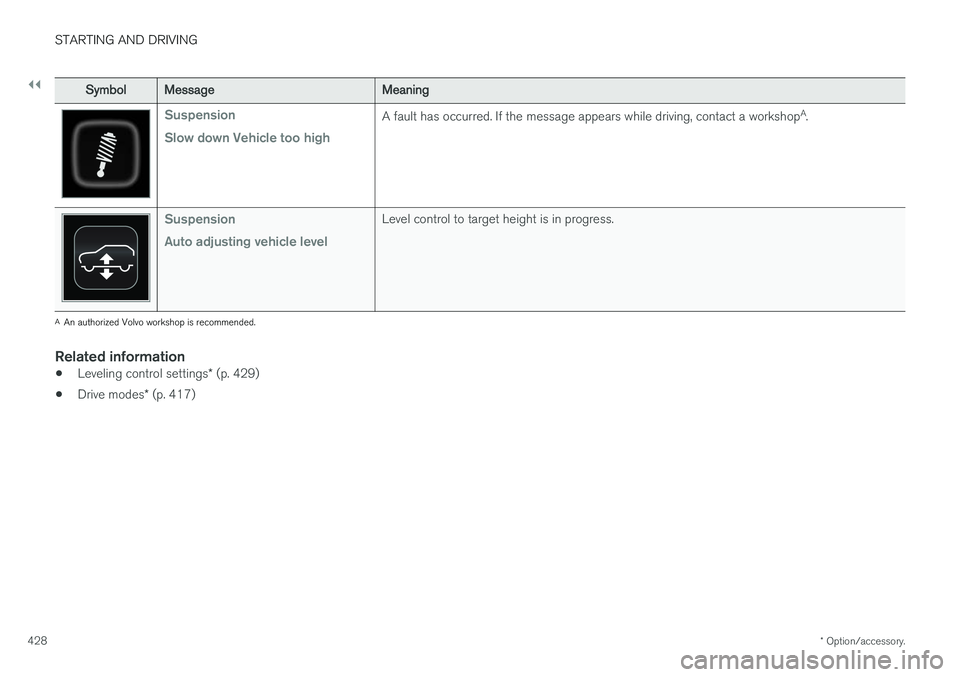
Suspension Slow down Vehicle too highA fault has occurred. If the message appears while driving, contact a workshop A
.
Suspension Auto adjusting vehicle levelLevel control to target height is in progress.
A An authorized Volvo workshop is recommended.
Related information
• Leveling control settings
* (p. 429)
• Drive modes
* (p. 417)
Page 431 of 660
STARTING AND DRIVING
}}
* Option/accessory.429
Leveling control settings *
The vehicle can be lowered or raised to make it easier to load or for passengers to get in andout. Turn off leveling control before lifting the vehicle with a jack to help avoid problems with thepneumatic suspension.
Adjusting loading mode
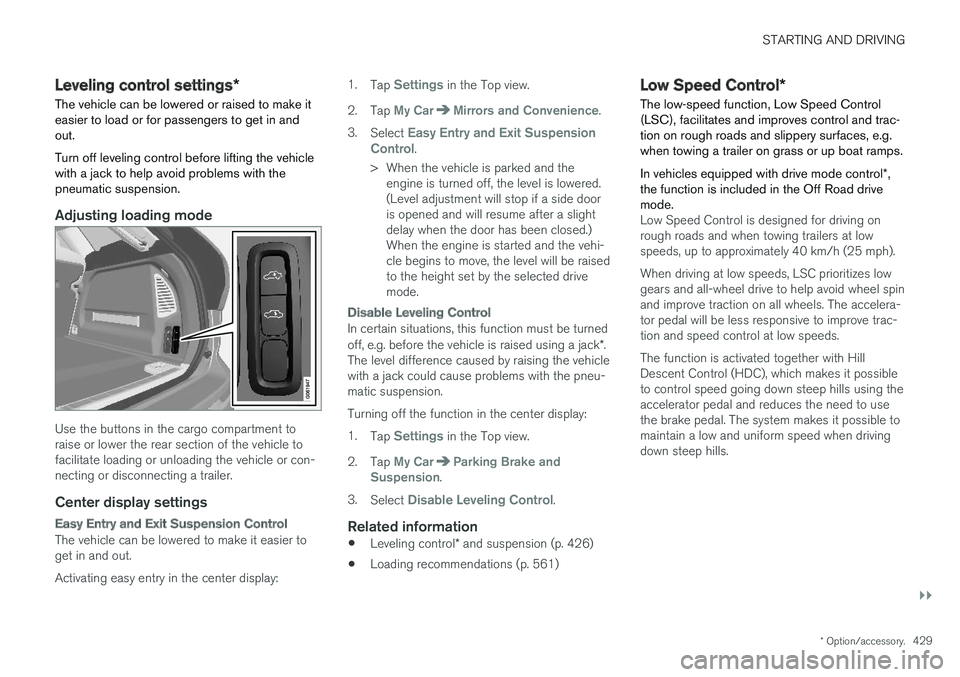
Use the buttons in the cargo compartment to raise or lower the rear section of the vehicle tofacilitate loading or unloading the vehicle or con-necting or disconnecting a trailer.
Center display settings
Easy Entry and Exit Suspension Control
The vehicle can be lowered to make it easier to get in and out. Activating easy entry in the center display: 1.
Tap
Settings in the Top view.
2. Tap
My CarMirrors and Convenience.
3. Select
Easy Entry and Exit Suspension
Control.
> When the vehicle is parked and the engine is turned off, the level is lowered. (Level adjustment will stop if a side dooris opened and will resume after a slightdelay when the door has been closed.)When the engine is started and the vehi-cle begins to move, the level will be raisedto the height set by the selected drivemode.
Disable Leveling Control
In certain situations, this function must be turned off, e.g. before the vehicle is raised using a jack *.
The level difference caused by raising the vehicle with a jack could cause problems with the pneu-matic suspension. Turning off the function in the center display:1. Tap
Settings in the Top view.
2. Tap
My CarParking Brake and
Suspension.
3. Select
Disable Leveling Control.
Related information
• Leveling control
* and suspension (p. 426)
• Loading recommendations (p. 561)
Low Speed Control
*
The low-speed function, Low Speed Control (LSC), facilitates and improves control and trac-tion on rough roads and slippery surfaces, e.g.when towing a trailer on grass or up boat ramps. In vehicles equipped with drive mode control *,
the function is included in the Off Road drive mode.
Low Speed Control is designed for driving on rough roads and when towing trailers at lowspeeds, up to approximately 40 km/h (25 mph). When driving at low speeds, LSC prioritizes low gears and all-wheel drive to help avoid wheel spinand improve traction on all wheels. The accelera-tor pedal will be less responsive to improve trac-tion and speed control at low speeds. The function is activated together with Hill Descent Control (HDC), which makes it possibleto control speed going down steep hills using theaccelerator pedal and reduces the need to usethe brake pedal. The system makes it possible tomaintain a low and uniform speed when drivingdown steep hills.
Page 434 of 660
STARTING AND DRIVING
* Option/accessory.
432
Activating and deactivating Hill
Descent Control * using the functionbutton
Vehicles that are not equipped with drive mode controls in the tunnel console have a function button for Hill Descent Control with
Hill
Descent Control in the center display's Func-
tion view.
Selecting Hill Descent Control in the center display's Function view
HDC only works at low speeds.
–Tap the Hill Descent Control button to
activate or deactivate the function.
> An indicator light in the button will illumi- nate when the function is activated.
When the engine is switched off, the function will be automatically deactivated.
NOTE
The function is deactivated when driving at high speeds and must be reactivated at lowerspeeds if so desired.
Related information
• Hill Descent Control
* (p. 431)
• Changing drive mode
* (p. 419)
Economical driving
Drive economically and environmentally con- scious by thinking ahead, avoiding rapid startsand stops and adapting driving style and speedto the current traffic conditions.
Driving economically conserves natural resources
Observe the following rules:
• Do not warm up the engine by idling. It is better to begin driving normally immediately after starting the engine. A cold engine uses more fuel than a warm engine and is subject to increased wear.
• Whenever possible, avoid using the vehicle todrive short distances. The engine does nothave time to reach a normal operating tem-perature and this leads to increased fuelconsumption.
• Maintain a steady speed and a generous fol-lowing distance to traffic ahead to minimizebraking.
• For lower fuel consumption, activate Ecodrive mode.
• Use the Eco Coast function in drive mode Eco - engine braking is deactivated, allowing the vehicle's kinetic energy to be used to rollgreater distances.
• Use gear
D as often as possible and avoid
using the kick-down function.