warning light VOLVO XC60 2018 Owner´s Manual
[x] Cancel search | Manufacturer: VOLVO, Model Year: 2018, Model line: XC60, Model: VOLVO XC60 2018Pages: 660, PDF Size: 11.77 MB
Page 560 of 660
LOADING, STORAGE AND PASSENGER COMPARTMENT
* Option/accessory.
558
Using the electrical outlets
The 12 V outlet can be used for devices intended for this such as MP3 players, coolersand cellular phones. The high-voltage outlet * can be used for devices
intended for this, such as chargers, laptops, etc.
The ignition must be in at least mode I for the
outlets to supply current. The outlets will then be active as long as there is sufficient charge in thestart battery. If the engine is turned off and the vehicle is locked, the outlets will be deactivated. If theengine is turned off and the vehicle remainsunlocked, the sockets will remain active for up to7 minutes.
NOTE
Bear in mind that using the electrical outlets when the engine is off could cause the starterbattery to have too low of a charge level,which could limit other functionality. Accessories connected to the electrical out- lets can be activated even when the vehicleelectrical system is off or if preconditioning isused. For this reason, disconnect plugs whenthey are not in use to prevent the starter bat-tery from becoming discharged.
WARNING
• Do not use accessories with large or heavy plugs – they could damage the out-let or come loose while you are driving.
• Do not use accessories that could causedisruptions to e.g. the vehicle's radioreceiver or electrical system.
• Position the accessory so that there is norisk of it injuring the driver or passengersin the event of heavy braking or a colli-sion.
• Pay attention to connected accessoriesas they can generate heat that could burnpassengers or the interior.
Using 12 V outlets1. Remove the stopper (tunnel console) or fold
down the cover (trunk/cargo compartment)over the socket and plug in the device.
2. Unplug the device and put the stopper back in (tunnel console) or fold up the cover(trunk/cargo compartment) when the socketis not in use or left unattended.
CAUTION
The maximum power is 120 W (10 A) per outlet.
Using high-voltage outletsThe ignition must be in at least mode I for outlets
to supply current. The outlets will then be active as long as there is sufficient charge in the startbattery. 1. Slide down the cover over the outlet and plug in the device. >
The LED 2
light on the outlet will indicate
its status.
2. The outlet is supplying electrical current when the light is glowing steadily green.
3. Disconnect the device by pulling out the plug (do not pull on the cord). Pull up the cover when the outlet is not in use or is left unattended.
CAUTION
The maximum power is 150 W.
WARNING
Do not attempt to alter or repair the high-volt- age outlet on your own. Volvo recommendscontacting an authorized Volvo workshop.
2LED (Light Emitting Diode)
Page 584 of 660
||
MAINTENANCE AND SERVICE
* Option/accessory.
582
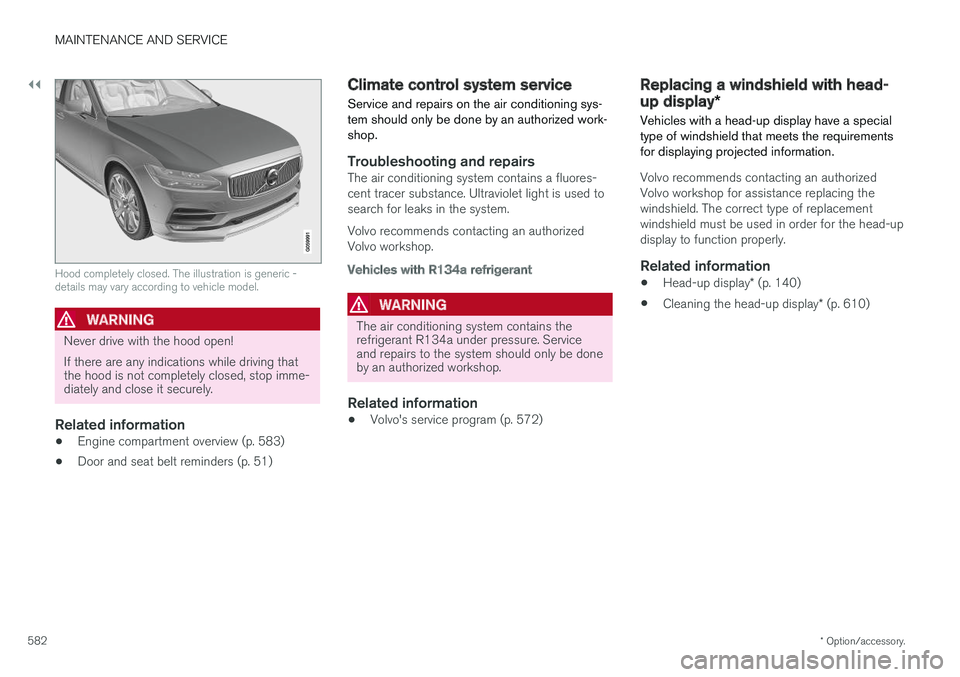
Hood completely closed. The illustration is generic - details may vary according to vehicle model.
WARNING
Never drive with the hood open! If there are any indications while driving that the hood is not completely closed, stop imme-diately and close it securely.
Related information
• Engine compartment overview (p. 583)
• Door and seat belt reminders (p. 51)
Climate control system service Service and repairs on the air conditioning sys- tem should only be done by an authorized work-shop.
Troubleshooting and repairsThe air conditioning system contains a fluores- cent tracer substance. Ultraviolet light is used tosearch for leaks in the system. Volvo recommends contacting an authorized Volvo workshop.
Vehicles with R134a refrigerant
WARNING
The air conditioning system contains the refrigerant R134a under pressure. Serviceand repairs to the system should only be doneby an authorized workshop.
Related information
•Volvo's service program (p. 572)
Replacing a windshield with head-
up display
*
Vehicles with a head-up display have a special type of windshield that meets the requirementsfor displaying projected information.
Volvo recommends contacting an authorized Volvo workshop for assistance replacing thewindshield. The correct type of replacementwindshield must be used in order for the head-updisplay to function properly.
Related information
• Head-up display
* (p. 140)
• Cleaning the head-up display
* (p. 610)
Page 589 of 660
MAINTENANCE AND SERVICE
}}
587
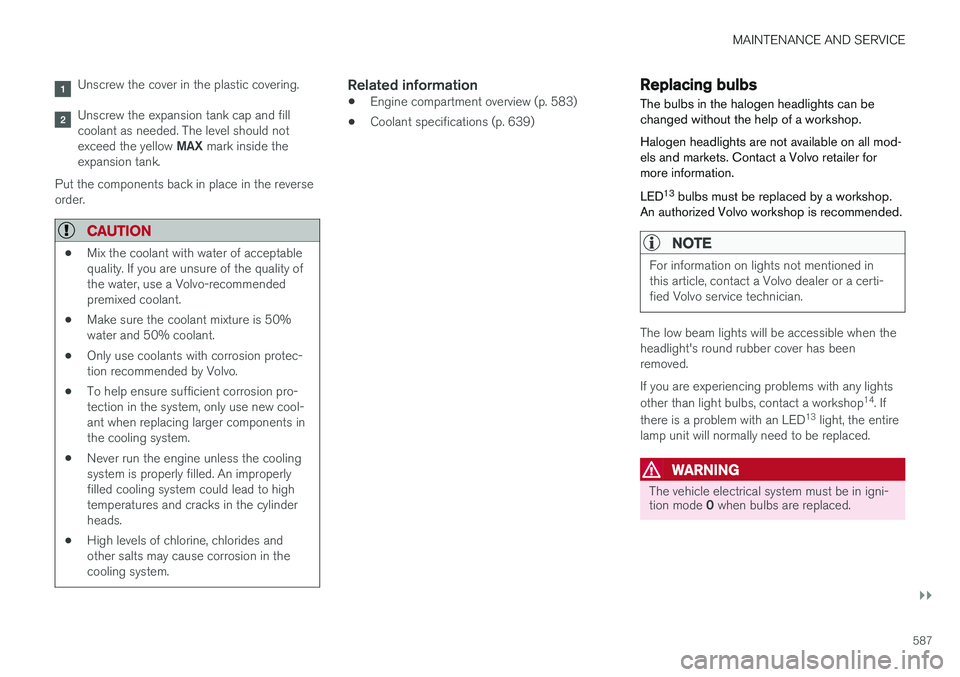
Unscrew the cover in the plastic covering.
Unscrew the expansion tank cap and fill coolant as needed. The level should not exceed the yellow MAX mark inside the
expansion tank.
Put the components back in place in the reverse order.
CAUTION
• Mix the coolant with water of acceptable quality. If you are unsure of the quality ofthe water, use a Volvo-recommendedpremixed coolant.
• Make sure the coolant mixture is 50%water and 50% coolant.
• Only use coolants with corrosion protec-tion recommended by Volvo.
• To help ensure sufficient corrosion pro-tection in the system, only use new cool-ant when replacing larger components inthe cooling system.
• Never run the engine unless the coolingsystem is properly filled. An improperlyfilled cooling system could lead to hightemperatures and cracks in the cylinderheads.
• High levels of chlorine, chlorides andother salts may cause corrosion in thecooling system.
Related information
•Engine compartment overview (p. 583)
• Coolant specifications (p. 639)
Replacing bulbs
The bulbs in the halogen headlights can be changed without the help of a workshop. Halogen headlights are not available on all mod- els and markets. Contact a Volvo retailer formore information. LED 13
bulbs must be replaced by a workshop.
An authorized Volvo workshop is recommended.
NOTE
For information on lights not mentioned in this article, contact a Volvo dealer or a certi-fied Volvo service technician.
The low beam lights will be accessible when the headlight's round rubber cover has beenremoved. If you are experiencing problems with any lights other than light bulbs, contact a workshop 14
. If
there is a problem with an LED 13
light, the entire
lamp unit will normally need to be replaced.
WARNING
The vehicle electrical system must be in igni- tion mode 0 when bulbs are replaced.
Page 614 of 660
||
MAINTENANCE AND SERVICE
* Option/accessory.
612
WARNING
• Never use more than one inlay mat at a time on the driver's floor. If any other typeof floor mat is used, remove the originalmat from the driver's seat floor beforedriving. All types of mats must be securelyanchored in the attachment points in thefloor. Make sure the floor mat does notimpede the movement of the brake pedalor accelerator pedal in any way, as thiscould be a serious safety hazard.
• Volvo's floor mats are specially manufac-tured for your vehicle. They must be prop-erly secured in the attachment points inthe floor to help ensure they cannot slideand become trapped under the pedals.
After vacuuming, a specially designed textilecleaning agent should be used to remove stainson floor mats. Floor mats should be cleaned withproducts recommended by Volvo retailers.
Related information
• Cleaning the interior (p. 609)
• Cleaning the center display (p. 609)
• Cleaning fabric upholstery and ceiling liner(p. 611)
• Cleaning the seat belt (p. 611)
• Cleaning leather upholstery (p. 612) •
Cleaning the leather steering wheel(p. 613)
• Cleaning interior plastic, metal and wood sur-faces (p. 614)
Cleaning leather upholstery
Only use cleaning agents and car care products recommended by Volvo. Clean regularly andtreat stains immediately for best results. It isimportant to vacuum before using a cleaningagent.
Leather upholstery *Volvo's leather upholstery is treated to protect its original appearance. Over time, sunlight, grease,dirt, etc. could break down the protective layer.This could result in scratches and cracking. Leather upholstery is a natural product that changes and acquires a beautiful patina overtime. Regular cleaning and treatments arerequired to preserve the qualities and color of theleather. Volvo offers a comprehensive product,Volvo Leather Care Kit/Wipes, for cleaning andtreating leather upholstery that, when used asdirected, preserves the leather's protective coa-ting. For best results, Volvo recommends cleaning and applying protective cream one to four times ayear (or more as needed). Volvo Leather Care Kit951 0251 and Volvo Leather Softener 9437429 are available for purchase at Volvo retailers.
Page 618 of 660
||
MAINTENANCE AND SERVICE
616•
Wash using a sponge, car washing detergent and plenty of lukewarm water.
• Clean the wiper blades with lukewarm soapsolution or car washing detergent.
• Dry the vehicle using a clean, soft chamois ora squeegee. Try not to let drops of water dryin strong sunlight. This could cause waterdrying stains that may need to be polishedout.
• In areas with heavy industrial emissions,more frequent washing of the vehicle's exte-rior is recommended.
• Tar spots from asphalt may remain even afterwashing. Use a tar remover to remove thesespots after washing the vehicle.
WARNING
Always entrust engine washing to a workshop. If the engine is hot, there is a risk of fire.
CAUTION
Dirty headlights do not work as well. Clean them regularly, e.g. when refueling. Do not use corrosive cleaners. Use water and a non-abrasive sponge.
NOTE
Exterior lighting such as headlights and tail- lights may develop temporary condensationon the inside of the lens. This is normal. Allexterior lighting is designed to resist this.Condensation is normally vented out of thelamp housing once the light has been lit forsome period of time.
CAUTION
• Make sure that the panoramic roof and sun shade are closed before washing thevehicle.
• Never use abrasive polishing agents onthe panoramic roof.
• Never use wax on the rubber sealsaround the panoramic roof.
CAUTION
Remember to remove dirt from the drain holes in the doors and sills after washing thevehicle.
Related information
• Cleaning the exterior (p. 614)
• Polishing and waxing (p. 615)
• Automatic car washes (p. 617)
• High-pressure washing (p. 618) •
Cleaning the wiper blades (p. 618)
• Cleaning exterior plastic, rubber and trim components (p. 619)
• Cleaning rims (p. 620)
• Corrosion protection (p. 620)
Page 645 of 660
INDEX
643
1, 2, 3 ...
4WD 417
A
ABSanti-lock brakes 403
AC (Air conditioning) 227
ACC - Adaptive Cruise Control 287, 290, 291, 292, 293, 294, 296, 297, 298, 299, 301
Accessories and extra equipment 35 installation 36
Accessory installation warning 36
Active Bending Lights 157
Adapting driving characteristics 264, 417
Adaptive Cruise Control 287, 290, 291, 292, 293, 294, 296, 297, 298, 299, 301
change cruise control functionality 299
function 287
manage speed 291, 292
pass 296
radar sensor 318
set time interval 293, 294
troubleshooting 298
Adjusting the steering wheel 197
Airbag 52 activation/deactivation 56
driver's side 53
passenger side 53, 56
Air bag, see Airbag 52
Air conditioning 227Air conditioning, fluid volume and grade 640
Air distribution 206 air vents 206, 207
changing 206
defrosting 220
recirculation 219
table showing options 209
Air quality 203, 204 allergy and asthma 204
passenger compartment filter 205
Air recirculation 219
Alarm 260 deactivating 261
Allergy and asthma-inducing substances 204
All Wheel Drive, AWD 417
All Wheel Drive (AWD) 417
All Wheel Drive (four-wheel drive) 417
Android Auto 490, 492 Antenna location 249Apple CarPlay 487, 489
Approach lighting 160
Apps 459
Assistance at risk of collision 365, 366, 367, 368, 369, 370, 371, 373
Audio and media 458Audio system HD digital radio 469 SiriusXM ® Satellite radio 470, 471, 472
Auto-climate 218
Auto hold 409
Auto-hold brakes 409 activate and deactivate 410
after collision 411
Automatic car wash 617 Automatic engine stop auto-stop 422
Automatic high beam 155
Automatic locking 253
Automatic relocking 233, 246
Automatic Speed Limiter 274, 276, 277
Automatic transmission 412 kickdown 416
oil 639
Trailer 443
INDEX
Page 646 of 660
INDEX
644
B
Backrestfront seat, adjusting 184, 185, 188, 189 , 190
rear seat, folding 192
Battery jump-start 441
Maintenance 592
start 592
support 595
symbols on the battery 596
warning symbols 596
BLIS 341, 342, 343, 344 Blower adjusting 223, 224
air distribution 206
air vents 207
Bluetooth connect 485
connecting vehicle to Internet 503
phone 492
settings 501
Book service and repair 576
Booster cushions 71Brake assist after collision 411
Brake fluidgrade 639
Brake functions 402
Brake light 159
Brakes 403 anti-lock brakes, ABS 403
automatic when stationary 409
Brake Assist System, BAS 404
brake lights 159
brake system 402
emergency brake lights 159
handbrake 405
Maintenance 405
on salted roads 405
on wet roads 404
brake system fluid 639
C
Camera sensor 337
Camera unit 323
Capacity weight 550, 635
Cargo compartment 561
attachment points 563
cargo net 568
electrical outlet 556, 558
Lighting 162
Cargo compartment cover 564, 566
cargo net 568
Car wash 614, 615, 617, 618, 619, 620
Catalytic converter 439 recovery 447
CD player 483
Cell phone, see Phone 493
Center console 555Center display change appearance 129
cleaning 609
climate controls 212
Function view 120
keyboard 124
messages 138, 139, 140
operation 110, 113, 117, 122
overview 107
settings 130, 131, 132
switch off and change volume 129
symbols in status bar 122
views 113
Central locking 249
Change of owner 132
Changing a wheel 536
Checking engine oil level 585
Page 647 of 660

INDEX
645
Child restraints 63, 65
booster cushions 71
convertible seats 69
infant seats 67
ISOFIX/LATCH anchors 74
lower attachment points 73
recalls and registration 65
top tether anchors 72
Child safety 63
Child safety locks 251
City Safety 327, 328, 330, 331, 337, 339
City Safety during evasive maneuver 335
City Safety in crossing traffic 333, 334 City Safety when evasive maneuver preven- ted 336
Cleaning 611, 613, 614 automatic car wash 617
car wash 614, 615, 617, 618, 619, 620
center display 609
Seat belts 611
textile upholstery 609, 611, 612
upholstery 609, 611, 612, 613, 614
wheels 620
Cleaning wheels 620
Cleaning wiper blades 618
Clean Zone 203
Clean Zone Interior Package 204
Climate 200 auto-regulation 218
blower control 223, 224
perceived temperature 201
Sensors 201
temperature control 225, 226, 227
voice control 202
zones 200
Climate controls 212 center display 212
rear seat 212
Climate system 200, 212 Refrigerant 640
repairs 582
Clock, setting 90
Collision 42, 47, 52, 61 Collision warner detection of pedestrians 331
radar sensor 318
Collision warning 327, 340
Color code, paintwork 622
Color codes 622
Compass 454 calibration 454
Condensation in headlights 615, 617, 618, 619Connecting vehicle to InternetNo connection or poor connection 506
via a mobile device (WiFi) 503
via mobile device (Bluetooth) 503
via vehicle's modem 504
Connect phone 493
Contact information 26
Convertible seats 69
coolant 639
Coolant, filling 586 Cooling system overheating 440
Cornering illumination 158
Corner Traction Control 266
Corrosion protection 620Covering cargo compartment 566
Crash, see Collision 42
Crash event data 33
Cross Traffic Alert – CTA 346, 347, 348, 349
Cruise control 278, 279 manage speed 279, 280
temporary deactivation 281, 282
turn off 282
CTA – Cross Traffic Alert 346, 347, 348, 349
Curb weight 635
Page 650 of 660
INDEX
648
H
Handbrake 405, 406
Hand wash 615Hard diskspace 510
Hazard warning flashers 160
HDC 431
HD radio 466
Head restraint 195
Head-up display 140 activate and deactivate 142
cleaning 610
replacing windshield 582
settings 142
Heated washer nozzles 177 Heating Seats 214, 215
steering wheel 217, 218
windows 221, 222
Height adjustment 426, 429
high beams 154, 155
High engine temperature 440
Hill Descent Control 430, 431, 432 activate with function button 432
Hill Start Assist 410 Hill Start Assist (HSA) 410
Hoisting the vehicle 579 HomeLink ® 450
programming 451
use 452
HomeLink ® remote control
programmable 450
Home safe lighting 160
Honk 196
Hood, opening 581
Horn 196
I
IAQS (Interior Air Quality System) 204
IC (Inflatable Curtain) 60
ID, Volvo 26
Identification number 38
Ignition mode 401, 402
Immobilizer 244 Electronic immobilizer 244
Indicator symbols 91
Individual drive mode 417
Infant seats 67
Inflatable curtain 60
Inflatable Curtain 60
Inflating tires 549 Inflation pressure adjusting 530
Checking 529
recommended 531
Inflation pressure monitoring 531 action 535
Status 534
Inflation pressure table 641
Information display 80, 84
Infotainment (Audio and media) 458
Instrument cluster 80 settings 84
Instrument illumination 162
Instrument lighting 162 Instrument panel App menu 100, 101
messages 102
Instruments and controls 78 Instruments overview left-hand drive vehicle 78
IntelliSafe driver support 28
Interior Air Quality System 204
Intermittent wiping 176
Internet, see Internet-connected vehicle 501
Page 651 of 660
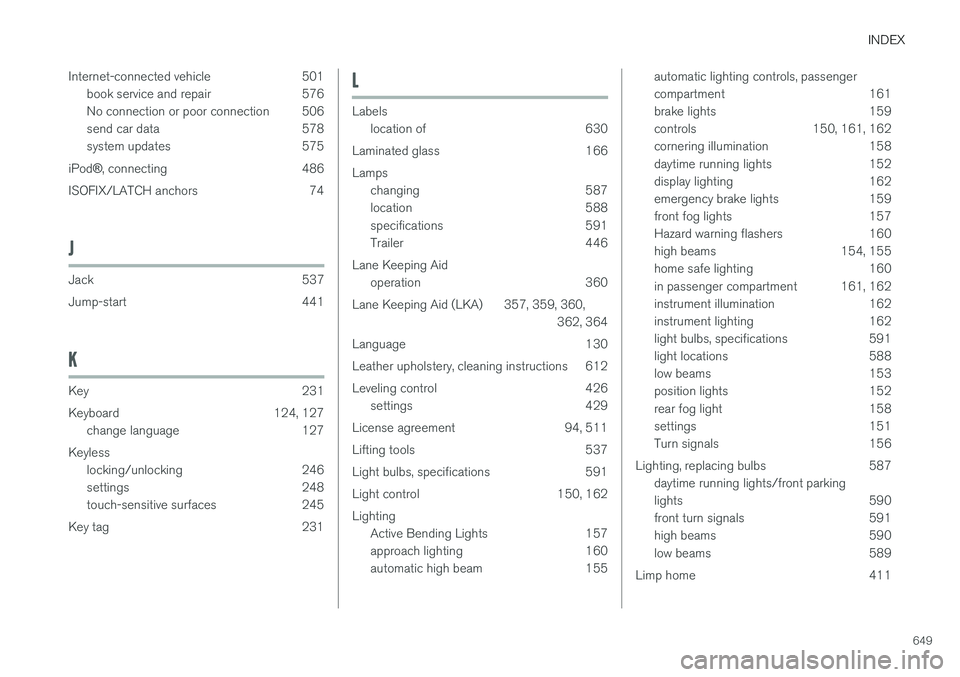
INDEX
649
Internet-connected vehicle 501
book service and repair 576
No connection or poor connection 506
send car data 578
system updates 575
iPod ®, connecting 486
ISOFIX/LATCH anchors 74
J
Jack 537
Jump-start 441
K
Key 231
Keyboard 124, 127 change language 127
Keyless locking/unlocking 246
settings 248
touch-sensitive surfaces 245
Key tag 231
L
Labels location of 630
Laminated glass 166 Lamps changing 587
location 588
specifications 591
Trailer 446
Lane Keeping Aid operation 360
Lane Keeping Aid (LKA) 357, 359, 360, 362, 364
Language 130
Leather upholstery, cleaning instructions 612
Leveling control 426 settings 429
License agreement 94, 511
Lifting tools 537
Light bulbs, specifications 591
Light control 150, 162Lighting Active Bending Lights 157
approach lighting 160
automatic high beam 155
automatic lighting controls, passenger
compartment 161
brake lights 159
controls 150, 161, 162
cornering illumination 158
daytime running lights 152
display lighting 162
emergency brake lights 159
front fog lights 157
Hazard warning flashers 160
high beams 154, 155
home safe lighting 160
in passenger compartment 161, 162
instrument illumination 162
instrument lighting 162
light bulbs, specifications 591
light locations 588
low beams 153
position lights 152
rear fog light 158
settings 151
Turn signals 156
Lighting, replacing bulbs 587 daytime running lights/front parking
lights 590
front turn signals 591
high beams 590
low beams 589
Limp home 411