Auto pilot VOLVO XC60 2018 Owner´s Manual
[x] Cancel search | Manufacturer: VOLVO, Model Year: 2018, Model line: XC60, Model: VOLVO XC60 2018Pages: 660, PDF Size: 11.77 MB
Page 9 of 660
7
Cruise control278
Activating and starting Cruise Control 279
Managing Cruise Control speed 280
Deactivating and putting Cruise Con- trol in standby mode 281
Reactivating Cruise Control fromstandby mode 282
Switching off Cruise Control 282
Distance Alert *
283
Head-up display for Distance Alert 284
Activating/deactivating Distance Alert 285
Setting a time interval for Distance Alert 285
Distance Alert limitations 286
Adaptive Cruise Control *
287
Adaptive Cruise Control and collisionwarning 290
Head-up display for Adaptive CruiseControl with collision warning 290
Activating and starting AdaptiveCruise Control 291
Managing Adaptive Cruise Control speed 292
Setting Adaptive Cruise Control timeintervals 293
Deactivating/reactivating AdaptiveCruise Control 294
Passing assistance with AdaptiveCruise Control 296
Starting passing assistance with Adaptive Cruise Control296
Limitations of passing assistancewith Adaptive Cruise Control 296
Switching target vehicles with Adap-tive Cruise Control 297
Automatic braking with AdaptiveCruise Control 297
Adaptive Cruise Control limitations 298
Switching between Cruise Controland Adaptive Cruise Control 299
Symbols and messages for AdaptiveCruise Control 301
Pilot Assist 303
Pilot Assist and collision warning 306
Head-up display for Pilot Assist dur-ing collision risks 307
Activating and starting Pilot Assist 307
Managing Pilot Assist speed 308
Setting a time interval for Pilot Assist 309
Deactivating/reactivating Pilot Assist 311
Passing assistance with Pilot Assist 313
Starting passing assistance withPilot Assist 313
Passing assistance with Pilot Assistlimitations 313
Switching target vehicles with Pilot Assist 314
Automatic braking with Pilot Assist 314
Pilot Assist limitations315
Pilot Assist * symbols and messages
316
Radar sensor 318
Radar sensor limitations 319
Recommended maintenance for the radar sensor 322
Radar sensor type approval 322
Camera 323
Camera limitations 324
Recommended maintenance for thecamera/radar sensor 327
City Safety ™
327
City Safety parameters and sub-functions 328
Setting a warning distance for City Safety 330
Detecting obstacles with City Safety 331
City Safety in crossing traffic 333
Limitations of City Safety in crossingtraffic 334
City Safety steering assistance forevasive maneuver 335
City Safety steering assistance limi-tations during evasive maneuvers 335
City Safety and delayed evasivemaneuvers 336
City Safety limitations 337
City Safety messages 339
Page 11 of 660
9
Starting the Park Assist Camera384
Park Assist Camera limitations 384
Recommended maintenance of the Park Assist Camera 386
Park Assist Camera symbols andmessages 387
Park Assist Pilot *
388
Types of parking with Park Assist Pilot 388
Parking with Park Assist Pilot 389
Leaving a parking space with ParkAssist Pilot 392
Park Assist Pilot * limitations
393
Recommended maintenance forPark Assist Pilot 395
Park Assist Pilot * messages
396
STARTING AND DRIVING
Starting the vehicle
398
Switching off the vehicle 400
Ignition modes 401
Selecting ignition mode 402
Brake functions 402
Brakes 403
Brake Assist System 404
Braking on wet roads 404
Braking on salted roads 405
Maintenance of the brake system 405
Parking brake 405
Activating and deactivating the park- ing brake 406
Settings for automatically activatingthe parking brake 407
Parking on a hill 408
Parking brake malfunction 408
Auto-hold brakes 409
Activating and deactivating Auto-hold at a standstill 410
Hill Start Assist 410
Braking assist after a collision 411
Transmission 411
Gear selector positions for automatictransmissions 412
Using the steering wheel paddles
* to
shift 413
Shiftlock 415
Deactivating the automatic shiftlock 415
The kickdown function 416
Gear indicator *
416
All Wheel Drive (AWD) *
417
Drive modes *
417
Changing drive mode *
419
ECO drive mode 420
Activating and deactivating ECO drive mode using the function button 422
Start/Stop function 422
Driving with the Start/Stop function 422
Temporarily deactivating the Start/Stop function 424
Conditions for the Start/Stop function 424
Leveling control * and suspension
426
Leveling control settings *
429
Low Speed Control *
429
Activating and deactivating Low Speed Control * using the function button 430
Hill Descent Control *
431
Activating and deactivating HillDescent Control * using the function
button 432
Page 198 of 660
||
SEATS AND STEERING WHEEL
* Option/accessory.
196 Tap the
Headrest Fold button
to activate/deactivate folding.
Manually push the head restraint until it clicks into position.
WARNING
Do not lower the head restraint if there are passengers in any of the rear seats.
WARNING
The head restraint must be locked in the upright position after it has been folded up.
Manually folding down the rear seat's outboard head restraints
For models with electrically folding backrests *,
the outboard head restraints are folded manually using the control on the top of the seat (see illus- tration
). For vehicles without electrically fold-
ing backrests, fold down the outboard head restraints using the inner control on the top of the seat (see illustration
).
Related information
• Folding down the rear seat backrests (p. 192)
Steering wheel controls and horn The steering wheel has a horn and controls for e.g. driver support systems and voice control.
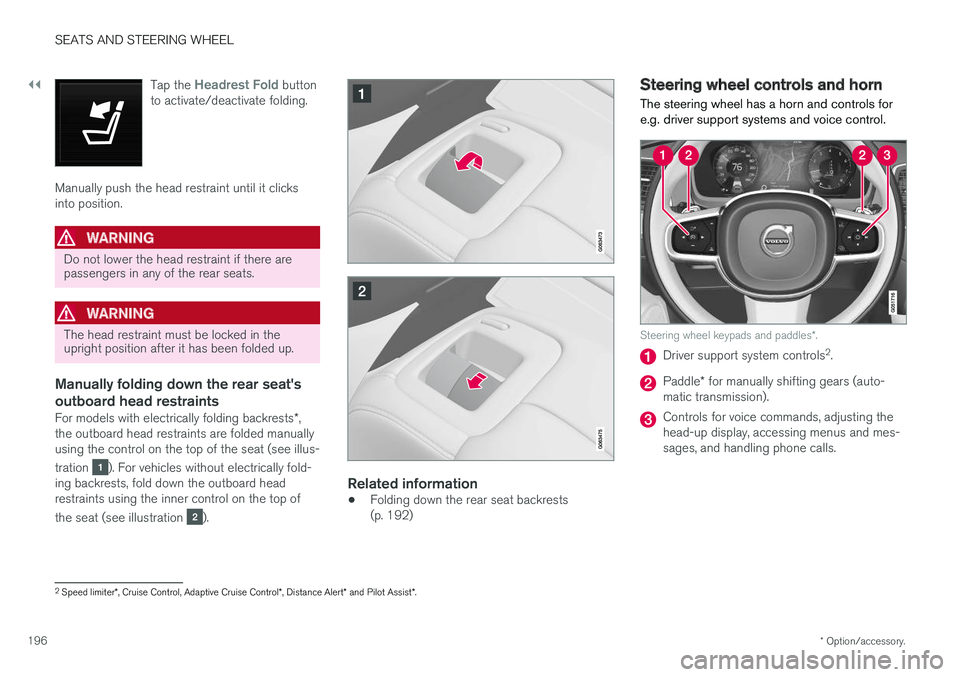
Steering wheel keypads and paddles
*.
Driver support system controls 2
.
Paddle * for manually shifting gears (auto-
matic transmission).
Controls for voice commands, adjusting the head-up display, accessing menus and mes-sages, and handling phone calls.
2 Speed limiter *, Cruise Control, Adaptive Cruise Control *, Distance Alert * and Pilot Assist *.
Page 305 of 660
DRIVER SUPPORT
}}
303
Pilot Assist
Pilot Assist helps the driver keep the vehicle in the current traffic lane by providing steeringassistance and maintaining an even speed and aset time interval to the vehicle ahead.
How Pilot Assist worksThe Pilot Assist function is primarily intended for use on highways and other major roads where itcan help provide a more comfortable and relaxingdriving experience.
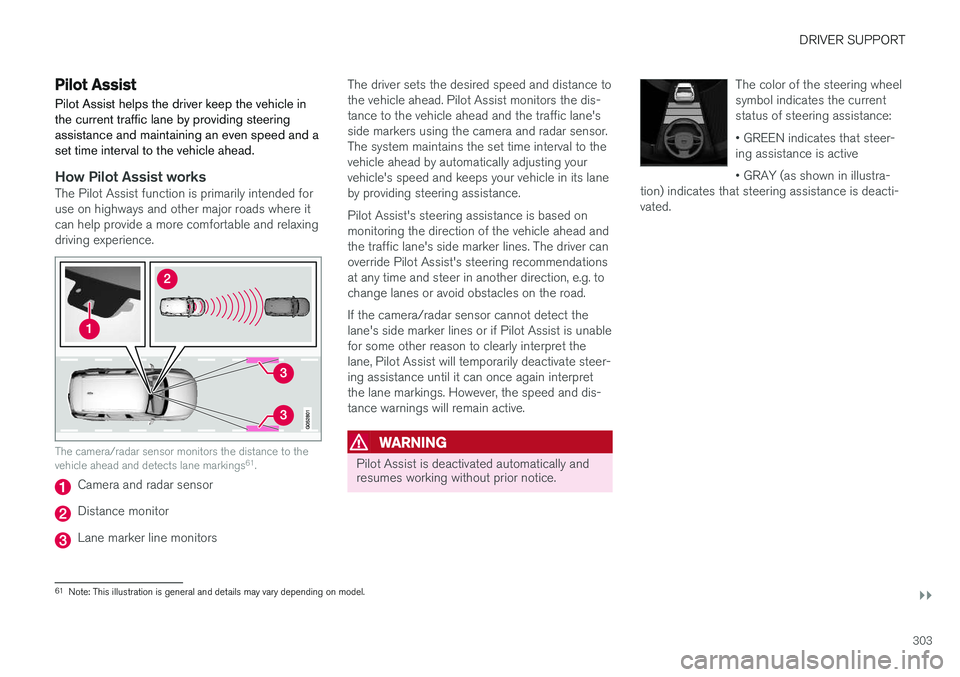
The camera/radar sensor monitors the distance to the vehicle ahead and detects lane markings 61
.
Camera and radar sensor
Distance monitor
Lane marker line monitors The driver sets the desired speed and distance to the vehicle ahead. Pilot Assist monitors the dis-tance to the vehicle ahead and the traffic lane'sside markers using the camera and radar sensor.The system maintains the set time interval to thevehicle ahead by automatically adjusting yourvehicle's speed and keeps your vehicle in its laneby providing steering assistance. Pilot Assist's steering assistance is based on monitoring the direction of the vehicle ahead andthe traffic lane's side marker lines. The driver canoverride Pilot Assist's steering recommendationsat any time and steer in another direction, e.g. tochange lanes or avoid obstacles on the road. If the camera/radar sensor cannot detect the lane's side marker lines or if Pilot Assist is unablefor some other reason to clearly interpret thelane, Pilot Assist will temporarily deactivate steer-ing assistance until it can once again interpretthe lane markings. However, the speed and dis-tance warnings will remain active.
WARNING
Pilot Assist is deactivated automatically and resumes working without prior notice.
The color of the steering wheel symbol indicates the currentstatus of steering assistance: • GREEN indicates that steer- ing assistance is active • GRAY (as shown in illustra-
tion) indicates that steering assistance is deacti- vated.
61 Note: This illustration is general and details may vary depending on model.
Page 308 of 660
||
DRIVER SUPPORT
* Option/accessory.
306
Instrument panel
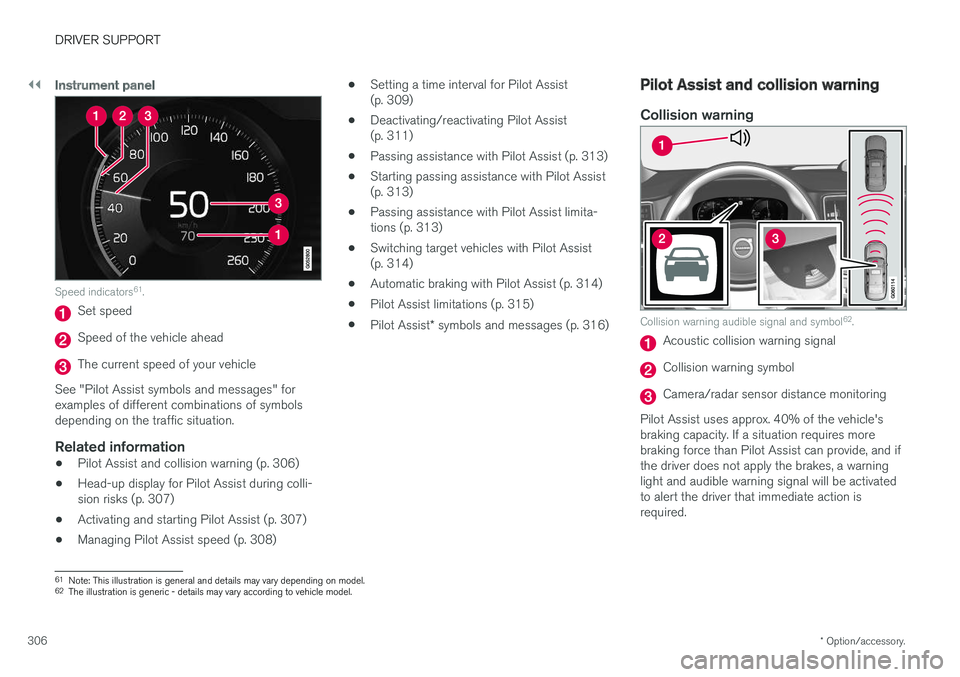
Speed indicators 61
.
Set speed
Speed of the vehicle ahead
The current speed of your vehicle
See "Pilot Assist symbols and messages" for examples of different combinations of symbolsdepending on the traffic situation.
Related information
• Pilot Assist and collision warning (p. 306)
• Head-up display for Pilot Assist during colli-sion risks (p. 307)
• Activating and starting Pilot Assist (p. 307)
• Managing Pilot Assist speed (p. 308) •
Setting a time interval for Pilot Assist(p. 309)
• Deactivating/reactivating Pilot Assist(p. 311)
• Passing assistance with Pilot Assist (p. 313)
• Starting passing assistance with Pilot Assist(p. 313)
• Passing assistance with Pilot Assist limita-tions (p. 313)
• Switching target vehicles with Pilot Assist(p. 314)
• Automatic braking with Pilot Assist (p. 314)
• Pilot Assist limitations (p. 315)
• Pilot Assist
* symbols and messages (p. 316)
Pilot Assist and collision warning
Collision warning
Collision warning audible signal and symbol 62
.
Acoustic collision warning signal
Collision warning symbol
Camera/radar sensor distance monitoring
Pilot Assist uses approx. 40% of the vehicle's braking capacity. If a situation requires morebraking force than Pilot Assist can provide, and ifthe driver does not apply the brakes, a warninglight and audible warning signal will be activatedto alert the driver that immediate action isrequired.
61 Note: This illustration is general and details may vary depending on model.
62 The illustration is generic - details may vary according to vehicle model.
Page 311 of 660
DRIVER SUPPORT
}}
309
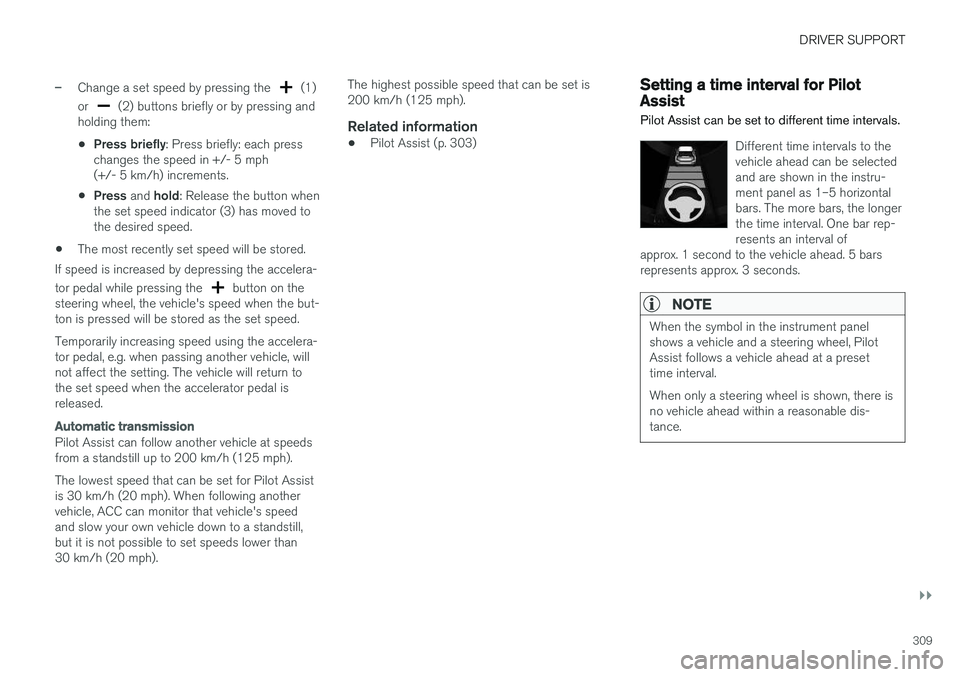
–Change a set speed by pressing the (1)
or
(2) buttons briefly or by pressing and
holding them:
• Press briefly
: Press briefly: each press
changes the speed in +/- 5 mph (+/- 5 km/h) increments.
• Press
and hold: Release the button when
the set speed indicator (3) has moved tothe desired speed.
• The most recently set speed will be stored.
If speed is increased by depressing the accelera- tor pedal while pressing the
button on the
steering wheel, the vehicle's speed when the but- ton is pressed will be stored as the set speed. Temporarily increasing speed using the accelera- tor pedal, e.g. when passing another vehicle, willnot affect the setting. The vehicle will return tothe set speed when the accelerator pedal isreleased.
Automatic transmission
Pilot Assist can follow another vehicle at speeds from a standstill up to 200 km/h (125 mph). The lowest speed that can be set for Pilot Assist is 30 km/h (20 mph). When following anothervehicle, ACC can monitor that vehicle's speedand slow your own vehicle down to a standstill,but it is not possible to set speeds lower than30 km/h (20 mph). The highest possible speed that can be set is200 km/h (125 mph).
Related information
•
Pilot Assist (p. 303)
Setting a time interval for PilotAssist
Pilot Assist can be set to different time intervals.
Different time intervals to the vehicle ahead can be selectedand are shown in the instru-ment panel as 1–5 horizontalbars. The more bars, the longerthe time interval. One bar rep-resents an interval of
approx. 1 second to the vehicle ahead. 5 barsrepresents approx. 3 seconds.
NOTE
When the symbol in the instrument panel shows a vehicle and a steering wheel, PilotAssist follows a vehicle ahead at a presettime interval. When only a steering wheel is shown, there is no vehicle ahead within a reasonable dis-tance.
Page 313 of 660
DRIVER SUPPORT
}}
311
Deactivating/reactivating PilotAssist
Pilot Assist can be temporarily put into standby mode and then reactivated.
Deactivating and putting Pilot Assist in standby mode
Note: This illustration is general and details may vary depending on model.
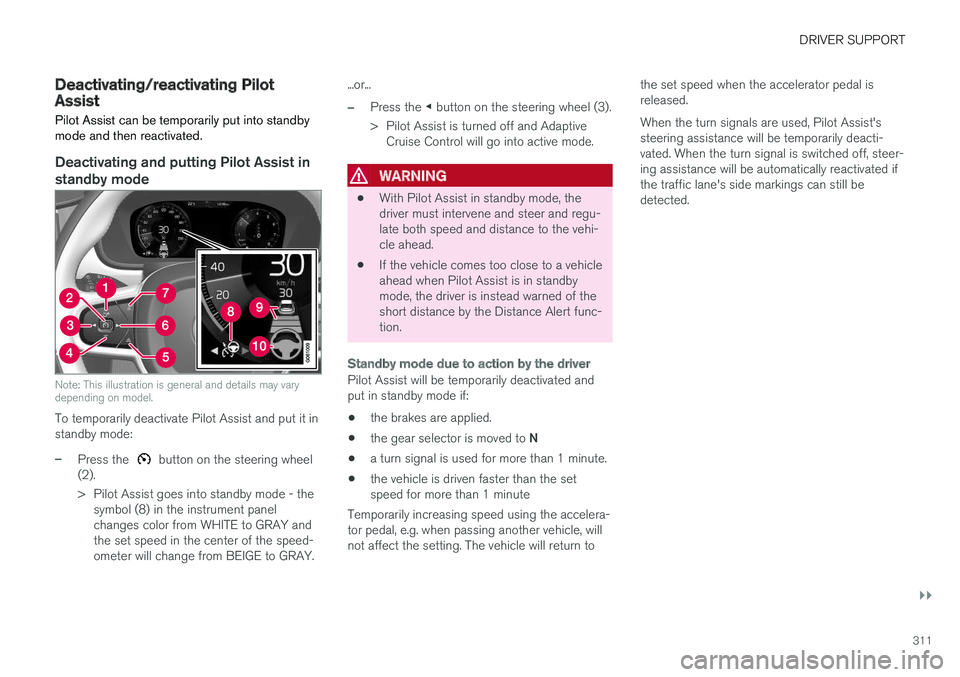
To temporarily deactivate Pilot Assist and put it in standby mode:
–Press the button on the steering wheel
(2).
> Pilot Assist goes into standby mode - the symbol (8) in the instrument panel changes color from WHITE to GRAY andthe set speed in the center of the speed-ometer will change from BEIGE to GRAY. ...or...
–Press the
◀ button on the steering wheel (3).
> Pilot Assist is turned off and Adaptive Cruise Control will go into active mode.
WARNING
• With Pilot Assist in standby mode, the driver must intervene and steer and regu-late both speed and distance to the vehi-cle ahead.
• If the vehicle comes too close to a vehicleahead when Pilot Assist is in standbymode, the driver is instead warned of theshort distance by the Distance Alert func-tion.
Standby mode due to action by the driver
Pilot Assist will be temporarily deactivated and put in standby mode if:
• the brakes are applied.
• the gear selector is moved to
N
• a turn signal is used for more than 1 minute.
• the vehicle is driven faster than the setspeed for more than 1 minute
Temporarily increasing speed using the accelera-tor pedal, e.g. when passing another vehicle, willnot affect the setting. The vehicle will return to the set speed when the accelerator pedal isreleased. When the turn signals are used, Pilot Assist's steering assistance will be temporarily deacti-vated. When the turn signal is switched off, steer-ing assistance will be automatically reactivated ifthe traffic lane's side markings can still bedetected.
Page 314 of 660
||
DRIVER SUPPORT
312
Automatic standby mode
Pilot Assist is dependent on other systems, such as Electronic Stability Control (ESC65
). If any of
these other systems stops working, Pilot Assist will automatically switch off.
WARNING
With automatic standby mode, the driver is warned by an acoustic signal and a messageon the instrument panel. • The driver must then regulate vehicle speed, apply the brakes if necessary, andmaintain a safe distance to other vehicles.
Adaptive Cruise Control may go into standbymode if, e.g.: • the driver opens the door.
• the brake temperature is high.
• the driver's hands are not on the steering wheel.
• the parking brake is applied.
• the engine speed (rpm) is too low/high.
• the driver unbuckles the seat belt.
• one or more of the wheels lose traction.
• the camera/radar sensor is covered by snowor heavy rain (the camera lens/radar wavesare blocked) •
your vehicle's speed goes below 5 km/h(3 mph) and Pilot Assist cannot determine ifthe vehicle ahead is stationary or if it isanother object, e.g. a speed bump.
• your vehicle's speed goes under 5 km/h(3 mph) and the vehicle ahead turns so thatPilot Assist no longer has a vehicle to follow.Reactivating Pilot Assist from standby
mode
Note: This illustration is general and details may vary depending on model.
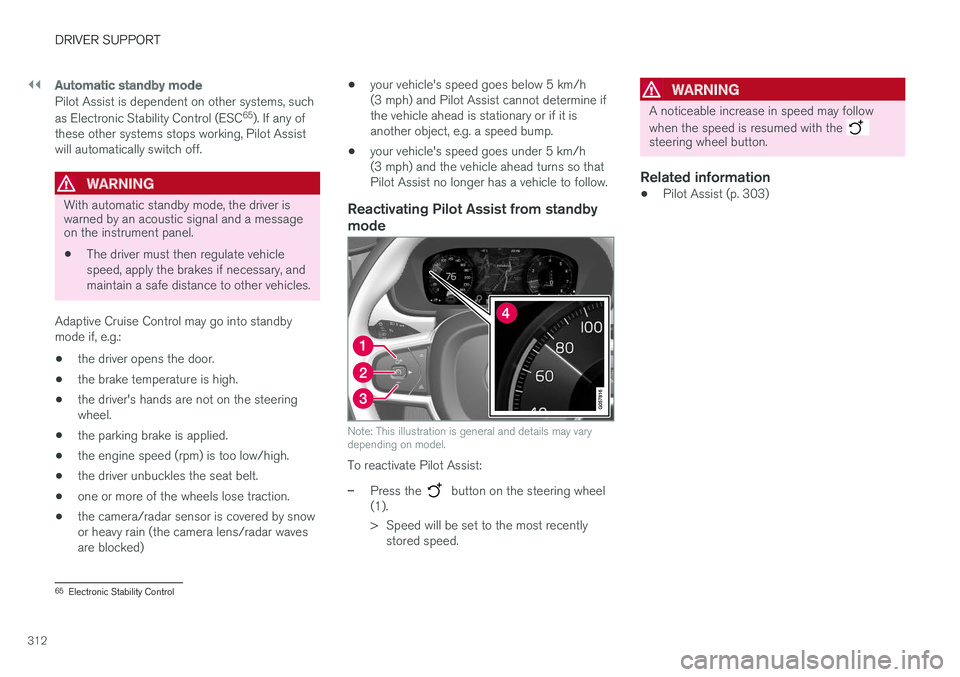
To reactivate Pilot Assist:
–Press the button on the steering wheel
(1).
> Speed will be set to the most recently stored speed.
WARNING
A noticeable increase in speed may follow when the speed is resumed with the
steering wheel button.
Related information
• Pilot Assist (p. 303)
65
Electronic Stability Control
Page 316 of 660
DRIVER SUPPORT
314
Switching target vehicles with PilotAssist
At certain speeds, models with automatic trans-
missions and Pilot Assist can switch target vehi-cles.
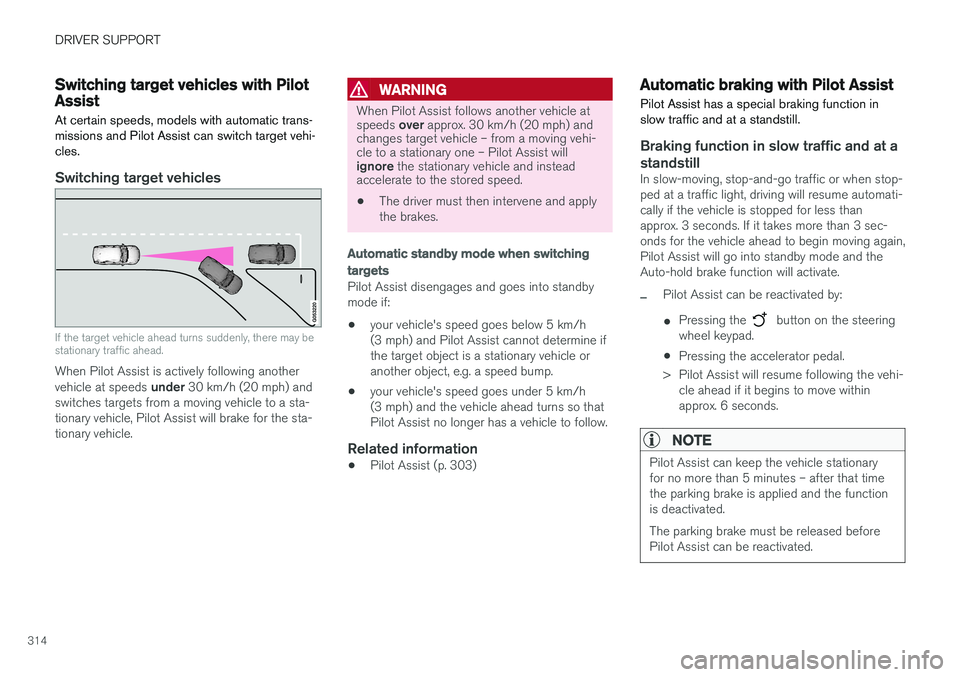
Switching target vehicles
If the target vehicle ahead turns suddenly, there may be stationary traffic ahead.
When Pilot Assist is actively following another vehicle at speeds under 30 km/h (20 mph) and
switches targets from a moving vehicle to a sta-
tionary vehicle, Pilot Assist will brake for the sta-tionary vehicle.
WARNING
When Pilot Assist follows another vehicle at speeds over approx. 30 km/h (20 mph) and
changes target vehicle – from a moving vehi- cle to a stationary one – Pilot Assist will ignore the stationary vehicle and instead
accelerate to the stored speed.
• The driver must then intervene and apply the brakes.
Automatic standby mode when switching
targets
Pilot Assist disengages and goes into standby mode if:
• your vehicle's speed goes below 5 km/h(3 mph) and Pilot Assist cannot determine ifthe target object is a stationary vehicle oranother object, e.g. a speed bump.
• your vehicle's speed goes under 5 km/h(3 mph) and the vehicle ahead turns so thatPilot Assist no longer has a vehicle to follow.
Related information
•Pilot Assist (p. 303)
Automatic braking with Pilot Assist
Pilot Assist has a special braking function in slow traffic and at a standstill.
Braking function in slow traffic and at a standstill
In slow-moving, stop-and-go traffic or when stop- ped at a traffic light, driving will resume automati-cally if the vehicle is stopped for less thanapprox. 3 seconds. If it takes more than 3 sec-onds for the vehicle ahead to begin moving again,Pilot Assist will go into standby mode and theAuto-hold brake function will activate.
–Pilot Assist can be reactivated by:
• Pressing the
button on the steering
wheel keypad.
• Pressing the accelerator pedal.
> Pilot Assist will resume following the vehi- cle ahead if it begins to move within approx. 6 seconds.
NOTE
Pilot Assist can keep the vehicle stationary for no more than 5 minutes – after that timethe parking brake is applied and the functionis deactivated. The parking brake must be released before Pilot Assist can be reactivated.
Page 317 of 660
DRIVER SUPPORT
}}}}
315
Deactivation of the Auto-hold brake function
In certain situations, Auto-hold will be deactivated when the vehicle is at a standstill and Pilot Assistwill go into standby mode. This means that thebrakes will be released and the vehicle couldbegin to roll. The driver must actively apply thebrakes to keep the vehicle stationary. This can occur if:
• the driver depresses the brake pedal
• the parking brake is applied
• the gear selector is moved to the
P, N or R
positions
• the driver puts Pilot Assist in standby mode.
Auto Activate Parking BrakeIn certain situations, the parking brake will be applied to keep the vehicle at a standstill. This occurs if Pilot Assist is keeping the vehicle stationary using the brakes and:
• the driver opens the door or unbuckleshis/her seat belt
• Pilot Assist has kept the vehicle at a stand-still for more than approx. 5 minutes
• the brakes overheat
• the driver switches off the engine manually.
Related information
•Pilot Assist (p. 303)
Pilot Assist limitations
Pilot Assist functionality may be reduced in cer- tain situations.
Pilot Assist is a driver support function designed to simplify driving and assist the driver in manysituations. However, the driver is always responsi-ble for maintaining a suitable distance to vehiclesor objects around it and ensuring that the vehicleis correctly positioned in the traffic lane.
WARNING
In some situations, Pilot Assist may have trou- ble helping the driver properly or may bedeactivated automatically – we advise againstusing Pilot Assist in such cases. Examples ofsuch situations include:
• the lane markings are worn, missing or cross each other.
• lane division is unclear, for example, whenthe lanes divide or merge or at exits orwhen there are multiple sets of markings.
• edges or other lines than lane markingsare present on or near the road, e.g.curbs, joints or repairs to the road sur-face, edges of barriers, roadside edges orstrong shadows.
• the lane is narrow or winding.
• the lane contains ridges or holes.
• weather conditions are poor, e.g. rain,snow or fog or slush or reduced visibilitywith poor light conditions, backlighting,wet road surface, etc.
The driver should also note that Pilot Assist has the following limitations: • High curbs, roadside barriers, temporary obstacles (traffic cones, safety barriers,etc.) are not detected. Alternatively, theymay be detected incorrectly as lane mark-ings, with a subsequent risk of contactbetween the vehicle and such obstacles.