lock VOLVO XC60 T8 2018 Owner´s Manual
[x] Cancel search | Manufacturer: VOLVO, Model Year: 2018, Model line: XC60 T8, Model: VOLVO XC60 T8 2018Pages: 674, PDF Size: 11.93 MB
Page 70 of 674
||
SAFETY
68
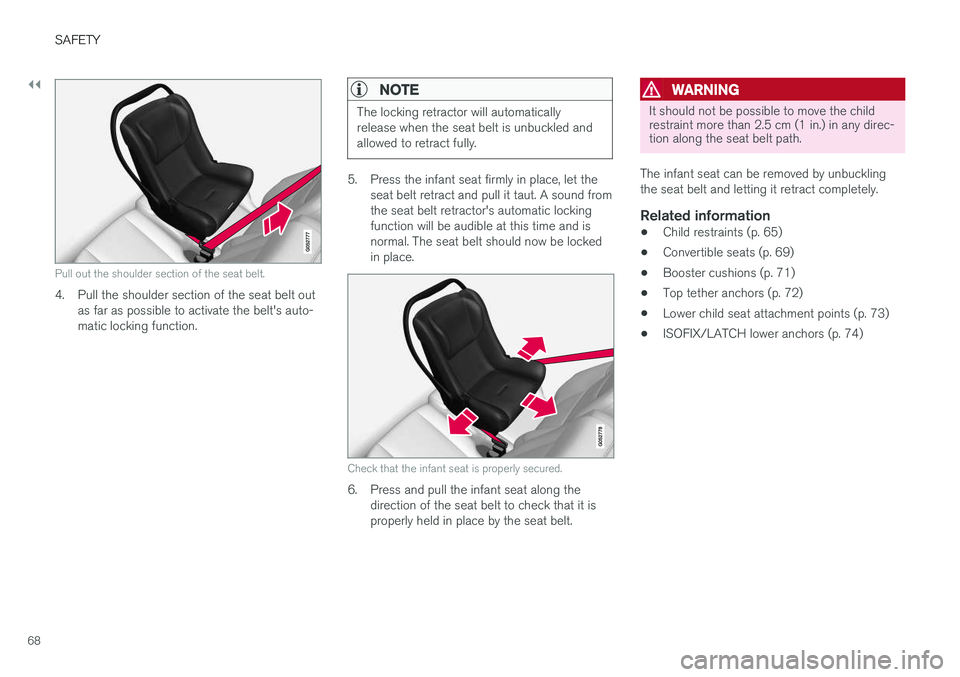
Pull out the shoulder section of the seat belt.
4. Pull the shoulder section of the seat belt outas far as possible to activate the belt's auto- matic locking function.
NOTE
The locking retractor will automatically release when the seat belt is unbuckled andallowed to retract fully.
5. Press the infant seat firmly in place, let theseat belt retract and pull it taut. A sound from the seat belt retractor's automatic lockingfunction will be audible at this time and isnormal. The seat belt should now be lockedin place.
Check that the infant seat is properly secured.
6. Press and pull the infant seat along thedirection of the seat belt to check that it is properly held in place by the seat belt.
WARNING
It should not be possible to move the child restraint more than 2.5 cm (1 in.) in any direc-tion along the seat belt path.
The infant seat can be removed by unbuckling the seat belt and letting it retract completely.
Related information
• Child restraints (p. 65)
• Convertible seats (p. 69)
• Booster cushions (p. 71)
• Top tether anchors (p. 72)
• Lower child seat attachment points (p. 73)
• ISOFIX/LATCH lower anchors (p. 74)
Page 72 of 674
||
SAFETY
70
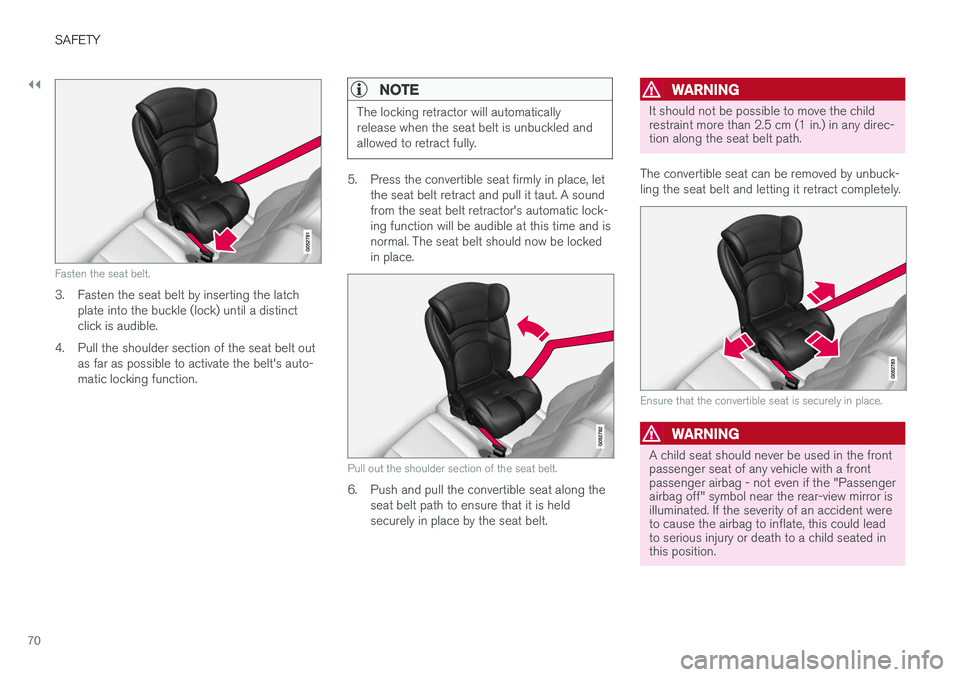
Fasten the seat belt.
3. Fasten the seat belt by inserting the latchplate into the buckle (lock) until a distinct click is audible.
4. Pull the shoulder section of the seat belt out as far as possible to activate the belt's auto-matic locking function.
NOTE
The locking retractor will automatically release when the seat belt is unbuckled andallowed to retract fully.
5. Press the convertible seat firmly in place, letthe seat belt retract and pull it taut. A sound from the seat belt retractor's automatic lock-ing function will be audible at this time and isnormal. The seat belt should now be lockedin place.
Pull out the shoulder section of the seat belt.
6. Push and pull the convertible seat along theseat belt path to ensure that it is held securely in place by the seat belt.
WARNING
It should not be possible to move the child restraint more than 2.5 cm (1 in.) in any direc-tion along the seat belt path.
The convertible seat can be removed by unbuck- ling the seat belt and letting it retract completely.
Ensure that the convertible seat is securely in place.
WARNING
A child seat should never be used in the front passenger seat of any vehicle with a frontpassenger airbag - not even if the "Passengerairbag off" symbol near the rear-view mirror isilluminated. If the severity of an accident wereto cause the airbag to inflate, this could leadto serious injury or death to a child seated inthis position.
Page 73 of 674
SAFETY
}}
71
Related information
•Child restraints (p. 65)
• Infant seats (p. 67)
• Booster cushions (p. 71)
• Top tether anchors (p. 72)
• Lower child seat attachment points (p. 73)
• ISOFIX/LATCH lower anchors (p. 74)
Booster cushions
Suitable child restraints should always be used when children (depending on their age/size) areseated in the vehicle.
Securing a booster cushion
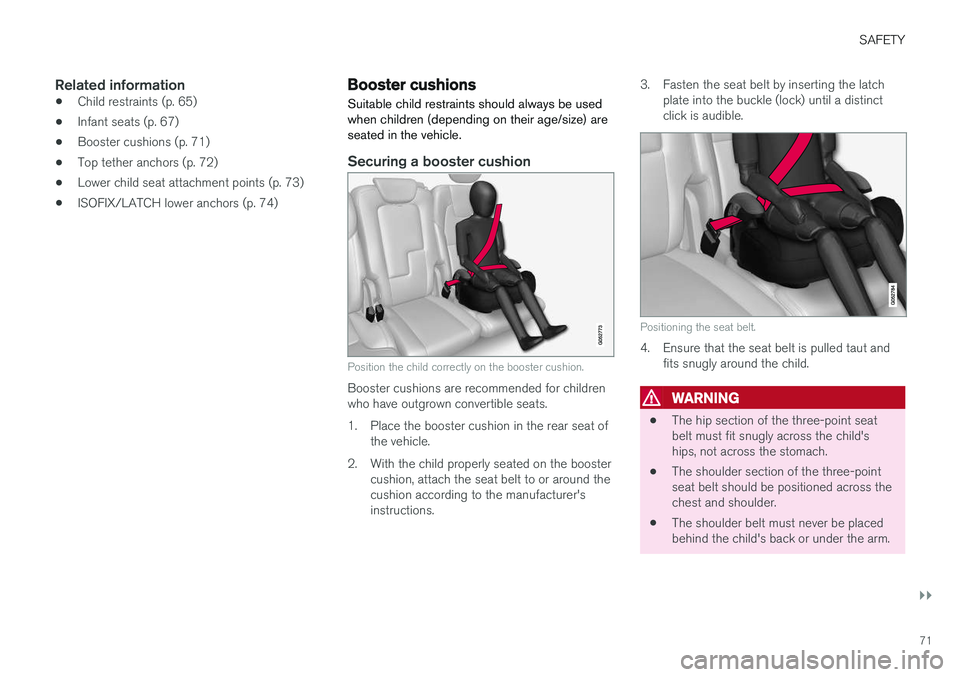
Position the child correctly on the booster cushion.
Booster cushions are recommended for children who have outgrown convertible seats.
1. Place the booster cushion in the rear seat of the vehicle.
2. With the child properly seated on the booster cushion, attach the seat belt to or around the cushion according to the manufacturer'sinstructions. 3. Fasten the seat belt by inserting the latch
plate into the buckle (lock) until a distinctclick is audible.
Positioning the seat belt.
4. Ensure that the seat belt is pulled taut andfits snugly around the child.
WARNING
• The hip section of the three-point seat belt must fit snugly across the child'ships, not across the stomach.
• The shoulder section of the three-pointseat belt should be positioned across thechest and shoulder.
• The shoulder belt must never be placedbehind the child's back or under the arm.
Page 74 of 674
||
SAFETY
72
Related information
•Child restraints (p. 65)
• Convertible seats (p. 69)
• Infant seats (p. 67)
• Top tether anchors (p. 72)
• Lower child seat attachment points (p. 73)
• ISOFIX/LATCH lower anchors (p. 74)
Top tether anchors
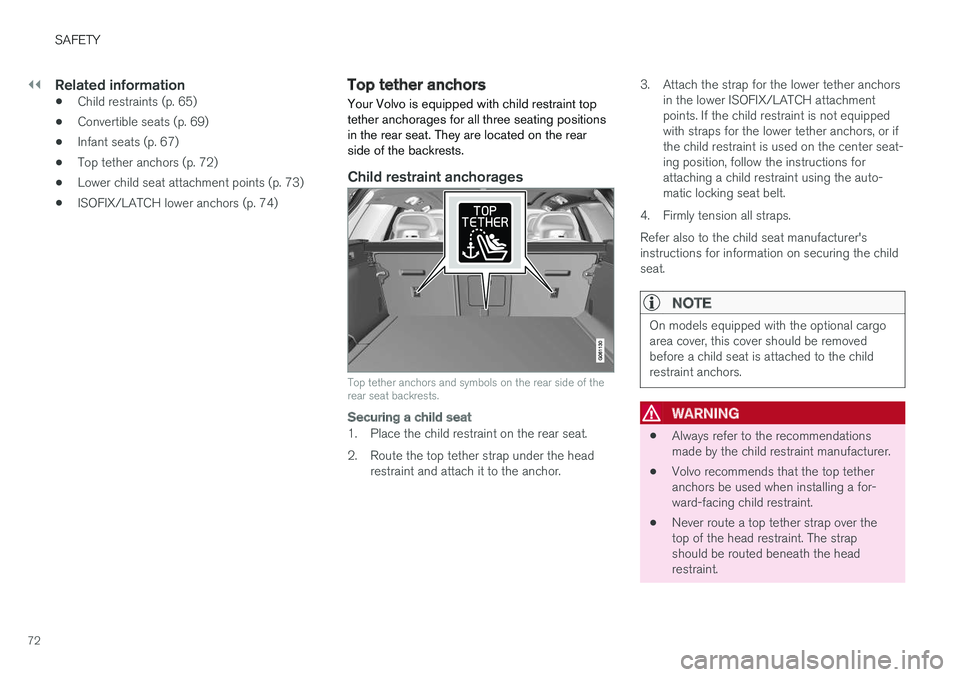
Your Volvo is equipped with child restraint top tether anchorages for all three seating positionsin the rear seat. They are located on the rearside of the backrests.
Child restraint anchorages
Top tether anchors and symbols on the rear side of the rear seat backrests.
Securing a child seat
1. Place the child restraint on the rear seat.
2. Route the top tether strap under the head restraint and attach it to the anchor. 3. Attach the strap for the lower tether anchors
in the lower ISOFIX/LATCH attachment points. If the child restraint is not equippedwith straps for the lower tether anchors, or ifthe child restraint is used on the center seat-ing position, follow the instructions forattaching a child restraint using the auto-matic locking seat belt.
4. Firmly tension all straps. Refer also to the child seat manufacturer's instructions for information on securing the childseat.
NOTE
On models equipped with the optional cargo area cover, this cover should be removedbefore a child seat is attached to the childrestraint anchors.
WARNING
• Always refer to the recommendations made by the child restraint manufacturer.
• Volvo recommends that the top tetheranchors be used when installing a for-ward-facing child restraint.
• Never route a top tether strap over thetop of the head restraint. The strapshould be routed beneath the headrestraint.
Page 80 of 674
DISPLAYS AND VOICE CONTROL
* Option/accessory.
78
Instruments and controls in left-hand drive vehicles
The overviews show the location of the vehicle's
displays and controls.
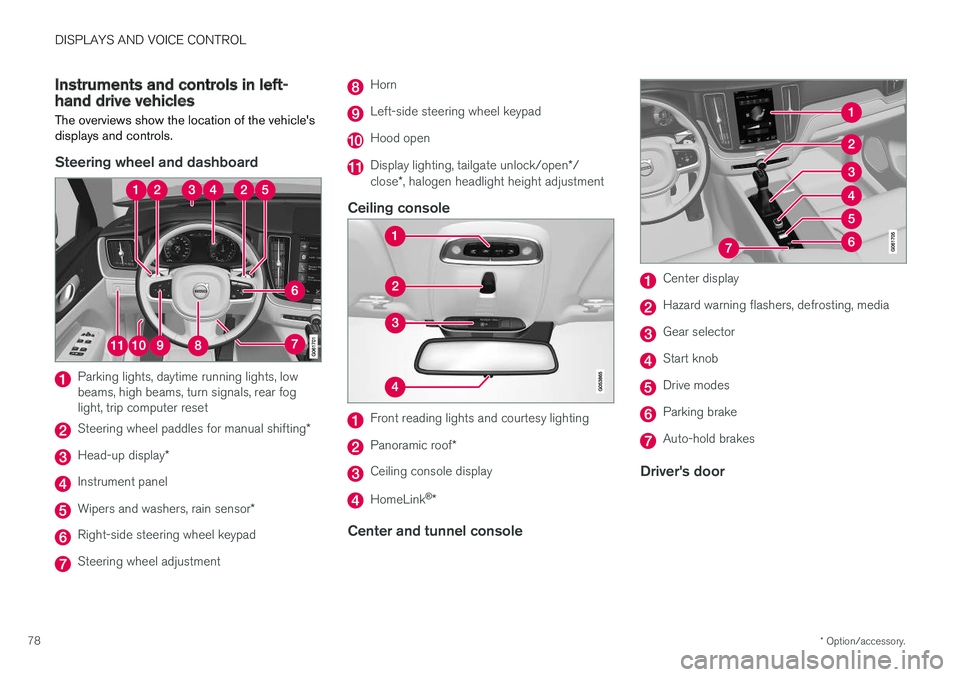
Steering wheel and dashboard
Parking lights, daytime running lights, low beams, high beams, turn signals, rear foglight, trip computer reset
Steering wheel paddles for manual shifting *
Head-up display*
Instrument panel
Wipers and washers, rain sensor *
Right-side steering wheel keypad
Steering wheel adjustment
Horn
Left-side steering wheel keypad
Hood open
Display lighting, tailgate unlock/open */
close *, halogen headlight height adjustment
Ceiling console
Front reading lights and courtesy lighting
Panoramic roof *
Ceiling console display
HomeLink®
*
Center and tunnel console
Center display
Hazard warning flashers, defrosting, media
Gear selector
Start knob
Drive modes
Parking brake
Auto-hold brakes
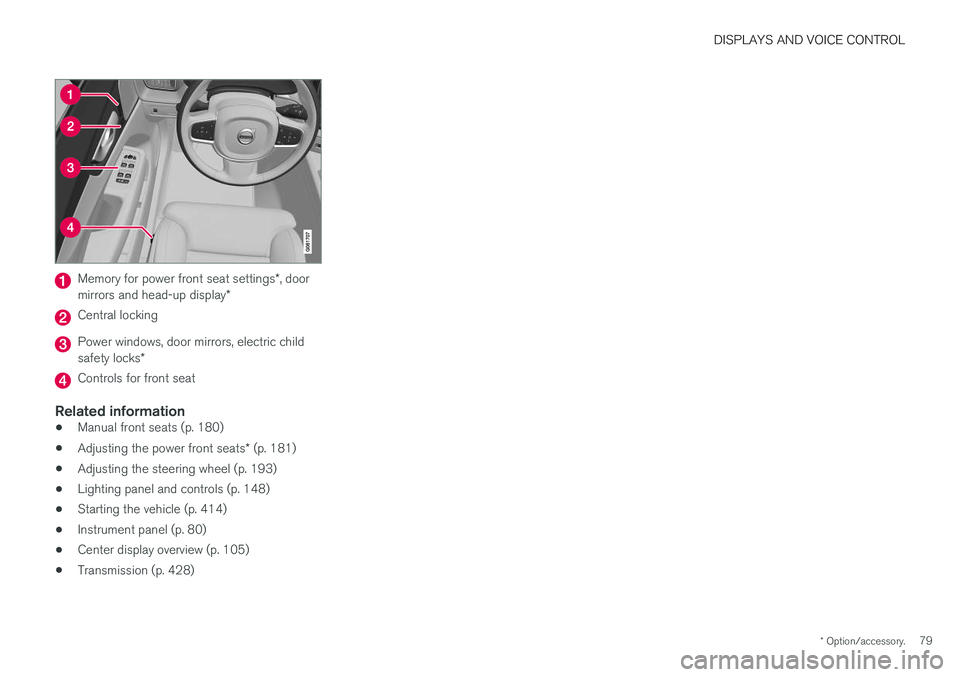
Driver's door
Page 81 of 674
DISPLAYS AND VOICE CONTROL
* Option/accessory.79
Memory for power front seat settings *, door
mirrors and head-up display *
Central locking
Power windows, door mirrors, electric child safety locks*
Controls for front seat
Related information
•Manual front seats (p. 180)
• Adjusting the power front seats
* (p. 181)
• Adjusting the steering wheel (p. 193)
• Lighting panel and controls (p. 148)
• Starting the vehicle (p. 414)
• Instrument panel (p. 80)
• Center display overview (p. 105)
• Transmission (p. 428)
Page 82 of 674
DISPLAYS AND VOICE CONTROL
* Option/accessory.
80
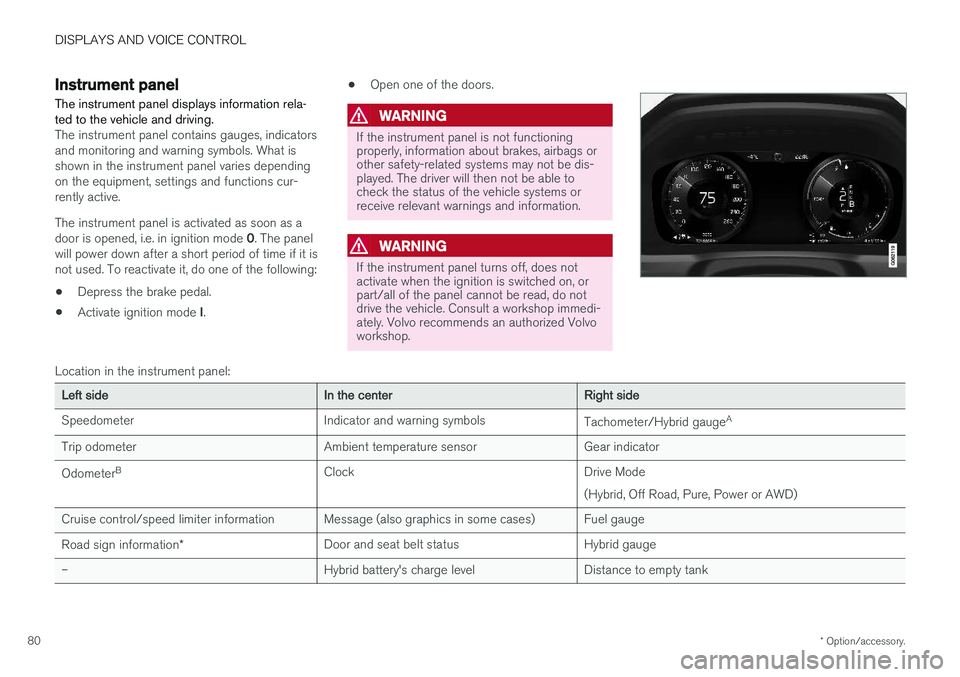
Instrument panel
The instrument panel displays information rela- ted to the vehicle and driving.
The instrument panel contains gauges, indicators and monitoring and warning symbols. What isshown in the instrument panel varies dependingon the equipment, settings and functions cur-rently active. The instrument panel is activated as soon as a door is opened, i.e. in ignition mode 0. The panel
will power down after a short period of time if it is not used. To reactivate it, do one of the following:
• Depress the brake pedal.
• Activate ignition mode
I. •
Open one of the doors.
WARNING
If the instrument panel is not functioning properly, information about brakes, airbags orother safety-related systems may not be dis-played. The driver will then not be able tocheck the status of the vehicle systems orreceive relevant warnings and information.
WARNING
If the instrument panel turns off, does not activate when the ignition is switched on, orpart/all of the panel cannot be read, do notdrive the vehicle. Consult a workshop immedi-ately. Volvo recommends an authorized Volvoworkshop.
Location in the instrument panel:
Left sideIn the centerRight side
Speedometer Indicator and warning symbols Tachometer/Hybrid gaugeA
Trip odometer Ambient temperature sensor Gear indicator Odometer B
Clock Drive Mode
(Hybrid, Off Road, Pure, Power or AWD)
Cruise control/speed limiter information Message (also graphics in some cases) Fuel gauge Road sign information * Door and seat belt status Hybrid gauge
– Hybrid battery's charge level Distance to empty tank
Page 91 of 674
DISPLAYS AND VOICE CONTROL
89
Related information
•Displaying trip statistics in the center display (p. 88)
• Trip computer (p. 85)
• Resetting the trip odometer (p. 87)
Date and time
The clock is displayed in both the instrument panel and the center display.
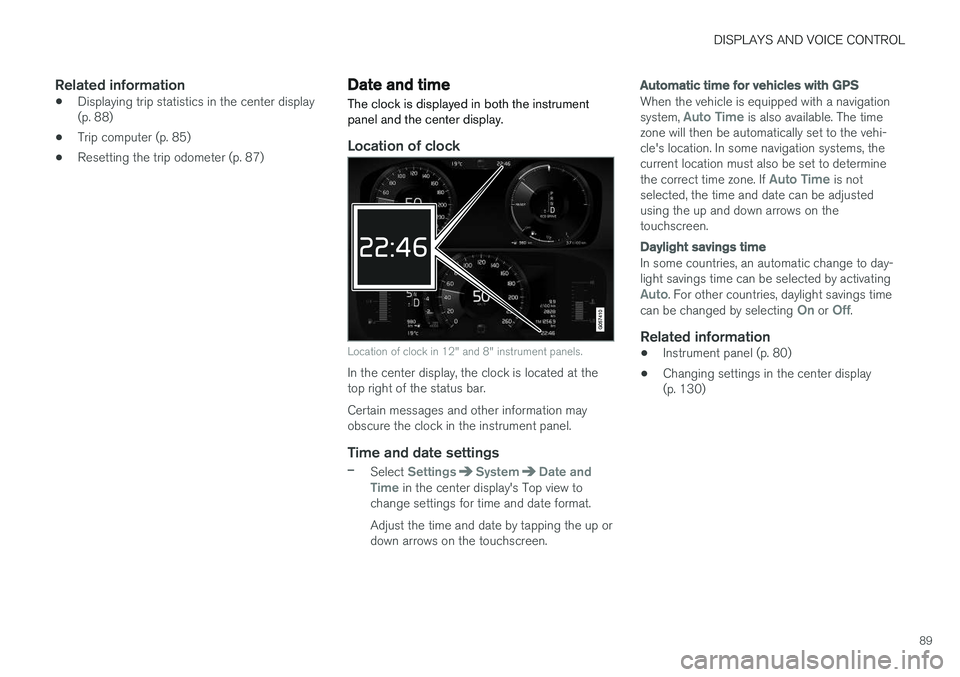
Location of clock
Location of clock in 12" and 8" instrument panels.
In the center display, the clock is located at the top right of the status bar. Certain messages and other information may obscure the clock in the instrument panel.
Time and date settings
–Select SettingsSystemDate and
Time in the center display's Top view to
change settings for time and date format. Adjust the time and date by tapping the up or down arrows on the touchscreen.
Automatic time for vehicles with GPS
When the vehicle is equipped with a navigation system, Auto Time is also available. The time
zone will then be automatically set to the vehi- cle's location. In some navigation systems, thecurrent location must also be set to determine the correct time zone. If
Auto Time is not
selected, the time and date can be adjusted using the up and down arrows on thetouchscreen.
Daylight savings time
In some countries, an automatic change to day- light savings time can be selected by activating
Auto. For other countries, daylight savings time
can be changed by selecting On or Off.
Related information
• Instrument panel (p. 80)
• Changing settings in the center display (p. 130)
Page 94 of 674
||
DISPLAYS AND VOICE CONTROL
92
SymbolMeaning
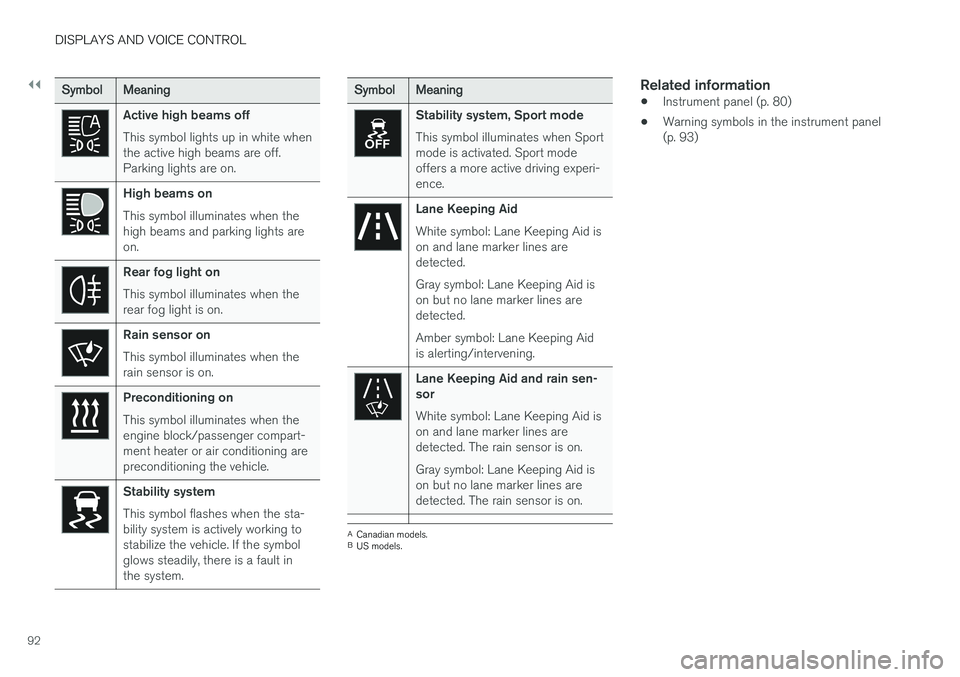
Active high beams off This symbol lights up in white when the active high beams are off.Parking lights are on.
High beams on This symbol illuminates when the high beams and parking lights areon.
Rear fog light on This symbol illuminates when the rear fog light is on.
Rain sensor on This symbol illuminates when the rain sensor is on.
Preconditioning on This symbol illuminates when the engine block/passenger compart-ment heater or air conditioning arepreconditioning the vehicle.
Stability system This symbol flashes when the sta- bility system is actively working tostabilize the vehicle. If the symbolglows steadily, there is a fault inthe system.
SymbolMeaning
Stability system, Sport mode This symbol illuminates when Sport mode is activated. Sport modeoffers a more active driving experi-ence.
Lane Keeping Aid White symbol: Lane Keeping Aid is on and lane marker lines aredetected. Gray symbol: Lane Keeping Aid is on but no lane marker lines aredetected. Amber symbol: Lane Keeping Aid is alerting/intervening.
Lane Keeping Aid and rain sen- sor White symbol: Lane Keeping Aid is on and lane marker lines aredetected. The rain sensor is on. Gray symbol: Lane Keeping Aid is on but no lane marker lines aredetected. The rain sensor is on.
ACanadian models.
B US models.
Related information
• Instrument panel (p. 80)
• Warning symbols in the instrument panel (p. 93)
Page 109 of 674
DISPLAYS AND VOICE CONTROL
* Option/accessory.107
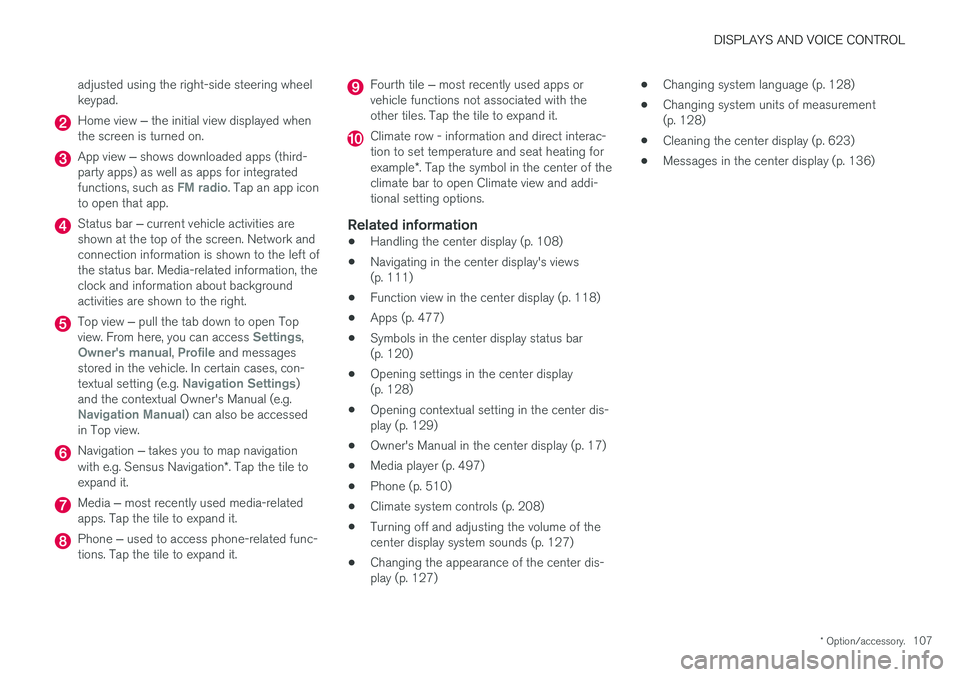
adjusted using the right-side steering wheel keypad.
Home view
‒ the initial view displayed when
the screen is turned on.
App view ‒ shows downloaded apps (third-
party apps) as well as apps for integrated functions, such as
FM radio. Tap an app icon
to open that app.
Status bar ‒ current vehicle activities are
shown at the top of the screen. Network and connection information is shown to the left ofthe status bar. Media-related information, theclock and information about backgroundactivities are shown to the right.
Top view ‒ pull the tab down to open Top
view. From here, you can access Settings,Owner's manual, Profile and messages
stored in the vehicle. In certain cases, con- textual setting (e.g.
Navigation Settings)
and the contextual Owner's Manual (e.g.
Navigation Manual) can also be accessed
in Top view.
Navigation ‒ takes you to map navigation
with e.g. Sensus Navigation *. Tap the tile to
expand it.
Media ‒ most recently used media-related
apps. Tap the tile to expand it.
Phone ‒ used to access phone-related func-
tions. Tap the tile to expand it.
Fourth tile ‒ most recently used apps or
vehicle functions not associated with the other tiles. Tap the tile to expand it.
Climate row - information and direct interac- tion to set temperature and seat heating for example *. Tap the symbol in the center of the
climate bar to open Climate view and addi- tional setting options.
Related information
• Handling the center display (p. 108)
• Navigating in the center display's views(p. 111)
• Function view in the center display (p. 118)
• Apps (p. 477)
• Symbols in the center display status bar(p. 120)
• Opening settings in the center display(p. 128)
• Opening contextual setting in the center dis-play (p. 129)
• Owner's Manual in the center display (p. 17)
• Media player (p. 497)
• Phone (p. 510)
• Climate system controls (p. 208)
• Turning off and adjusting the volume of thecenter display system sounds (p. 127)
• Changing the appearance of the center dis-play (p. 127) •
Changing system language (p. 128)
• Changing system units of measurement(p. 128)
• Cleaning the center display (p. 623)
• Messages in the center display (p. 136)