stop start VOLVO XC60 T8 2018 Owner´s Manual
[x] Cancel search | Manufacturer: VOLVO, Model Year: 2018, Model line: XC60 T8, Model: VOLVO XC60 T8 2018Pages: 674, PDF Size: 11.93 MB
Page 421 of 674
STARTING AND DRIVING
}}
419
Brake functions
The vehicle's brakes are used to reduce speed or prevent the vehicle from rolling.
In addition to the wheel brakes and parking brakes, the vehicle is also equipped with a num-ber of automatic brake assist functions. Thesesystems help the driver by e.g. keeping the vehi-cle stationary when the brake pedal is notdepressed (e.g. at a traffic light or intersection),when starting up a hill or when driving down a hill. Depending on how the vehicle is equipped, the following brake assist functions may be included:
• Auto-hold brakes (Auto Hold)
• Hill Start Assist (Hill Start Assist)
• Braking assist after a collision
• City Safety
• Hill Descent Control (Hill Descent Control)
Related information
•
Brakes (p. 419)
• Parking brake (p. 422)
• Auto-hold brakes (p. 426)
• Braking assist after a collision (p. 427)
• Hill Start Assist (p. 427)
• City Safety
™ (p. 325)
• Hill Descent Control (p. 444)
Brakes The brake pedal is used to apply the vehicle's regular brakes, which are part of the brake sys-tem.
The vehicle is equipped with two brake circuits. If one brake circuit is damaged, the brake pedal willgo down further when depressed. More pressurewill then be required from the driver for normalbraking effect.
WARNING
If the vehicle does not have electrical current and both the electric motor and the gasolineengine are switched off, the brakes cannot beused to stop the vehicle.
In very hilly areas or when driving with a heavy load, gear position B can be used to augment the
brakes with engine braking. Use the Off Road drive mode to increase the engine braking effect when driving on steepdowngrades at low speeds.
Anti-lock brakesThe vehicle is equipped with an Anti-lock BrakingSystem (ABS), which can help prevent thewheels from locking and help maintain steeringcontrol when braking. Vibrations may be felt fromthe brake pedal when ABS is operating, which isnormal. After the vehicle is started, a brief test of the ABS system is automatically performed when the driver releases the brake pedal. An additionalautomatic test of the system may be performedwhen the vehicle is traveling at a low speed. Dur-ing the test, the brake pedal may feel as though itis pulsating.
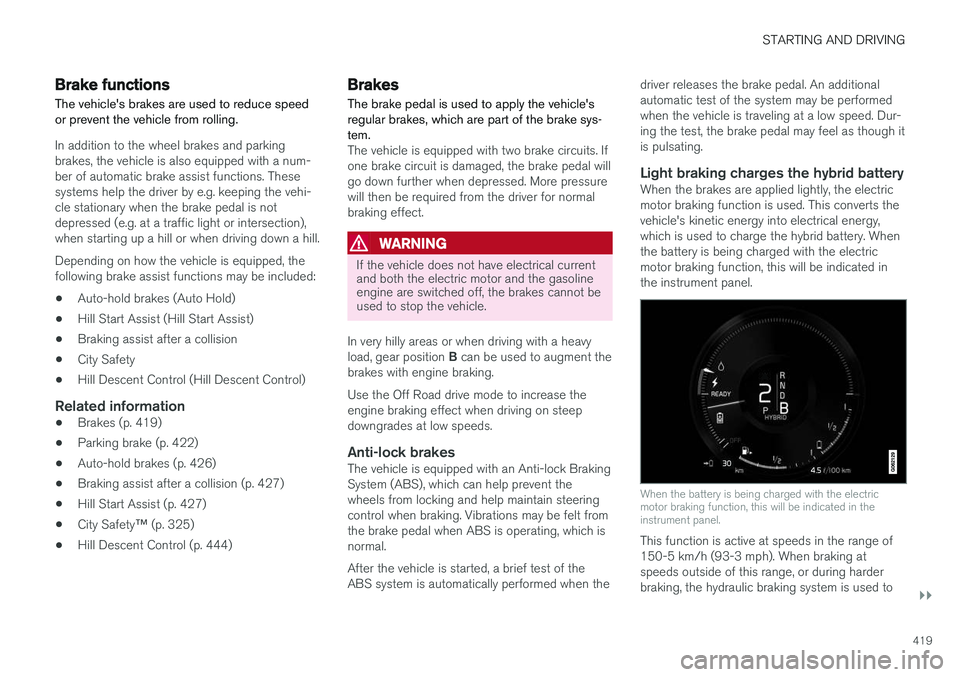
Light braking charges the hybrid batteryWhen the brakes are applied lightly, the electricmotor braking function is used. This converts thevehicle's kinetic energy into electrical energy,which is used to charge the hybrid battery. Whenthe battery is being charged with the electricmotor braking function, this will be indicated inthe instrument panel.
When the battery is being charged with the electric motor braking function, this will be indicated in theinstrument panel.
This function is active at speeds in the range of 150-5 km/h (93-3 mph). When braking atspeeds outside of this range, or during harderbraking, the hydraulic braking system is used to
Page 423 of 674
STARTING AND DRIVING
421
Brake Assist System
The brake enhancing system, Brake Assist
System (BAS), helps increase braking force andthereby reduce braking distance.
The system monitors the driver's braking habits and increases braking force when necessary.Braking force can be increased up to the point atwhich the ABS intervenes. The function is deacti-vated when pressure on the brake pedal isdecreased.
Related information
• Brakes (p. 419)
Braking on wet roads
Prolonged driving in heavy rain without braking may cause braking effect to be slightly delayedthe first time the brakes are applied.
This may also occur after washing the vehicle. It will then be necessary to apply greater pressureto the brake pedal. You should therefore maintaina greater distance to the vehicle ahead. Firmly apply the brakes after washing the vehicle or driving on wet roads. This helps warm up thebrake discs, enabling them to dry more quicklyand protecting them against corrosion. Considerthe current traffic situation when braking.
Related information
• Brakes (p. 419)
• Braking on salted roads (p. 421)
Braking on salted roads When driving on salted roads, a layer of salt may form on the brake discs and brake pads.
This could increase stopping distance. Maintain an extra large safety distance to the vehicleahead. Make sure to also:
• Apply the brakes from time to time to helpremove salt. Make sure braking does notpose a risk to any other road users.
• Gently apply the brakes when you have fin-ished driving and before driving again.
Related information
•Brakes (p. 419)
• Braking on wet roads (p. 421)
Page 424 of 674
STARTING AND DRIVING
422
Maintenance of the brake system
Regularly check the brake system components for wear.
To keep the vehicle as safe and reliable as possi- ble, follow the Volvo service schedule specified inthe Warranty and Maintenance Records Informa-tion booklet. New and replaced brake pads andbrake discs do not provide optimal braking effectuntil they are "broken in" by driving a few hun-dred kilometers (miles). Compensate for thereduced braking effect by applying greater pres-sure to the brake pedal. Volvo recommends onlyusing brake pads approved for your Volvo.
CAUTION
The brake system's components should be regularly checked for wear. Contact a workshop for advice on how to do this or let a workshop perform the inspection- an authorized Volvo workshop is recom-mended.
Related information
• Brakes (p. 419)
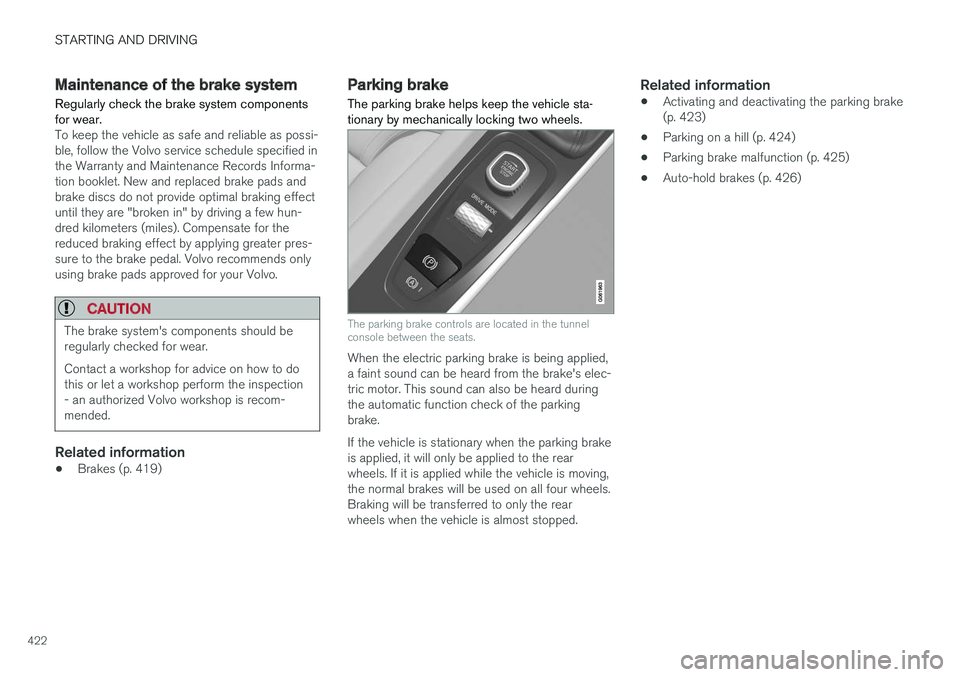
Parking brake The parking brake helps keep the vehicle sta- tionary by mechanically locking two wheels.
The parking brake controls are located in the tunnel console between the seats.
When the electric parking brake is being applied, a faint sound can be heard from the brake's elec-tric motor. This sound can also be heard duringthe automatic function check of the parkingbrake. If the vehicle is stationary when the parking brake is applied, it will only be applied to the rearwheels. If it is applied while the vehicle is moving,the normal brakes will be used on all four wheels.Braking will be transferred to only the rearwheels when the vehicle is almost stopped.
Related information
•Activating and deactivating the parking brake(p. 423)
• Parking on a hill (p. 424)
• Parking brake malfunction (p. 425)
• Auto-hold brakes (p. 426)
Page 428 of 674
STARTING AND DRIVING
426
Auto-hold brakesWith the Auto-hold brake function, the driver can release the brake pedal and the brakes willremain applied, for example, when the vehiclehas stopped at a traffic light or intersection.
When the vehicle stops, the brakes are activated automatically. The function can use either thenormal brakes or the parking brakes to keep thevehicle stationary and works on flat surfaces orhills. When driving off, the brakes will be automat-ically released if the driver's seat belt is buckled.
NOTE
When braking to a stop on an uphill or down- hill gradient, depress the brake pedal withslightly more force than usual before releas-ing to ensure that the vehicle cannot move atall.
The parking brake is activated if: • the vehicle is switched off
• the driver's door is opened
• the driver's seat belt is removed
• the vehicle has been stationary for a pro- longed period of time (5-10 minutes)
Symbols in the instrument panel
SymbolMeaning
This symbol illuminates when the function is using the normal brakesto keep the vehicle stationary.
A
B This symbol illuminates when the function is using the parking braketo keep the vehicle stationary.
A
Canadian models.
B US models.
Related information
• Activating and deactivating Auto-hold at a standstill (p. 426)
• Brakes (p. 419)
• Parking brake (p. 422)
• Hill Start Assist (p. 427)
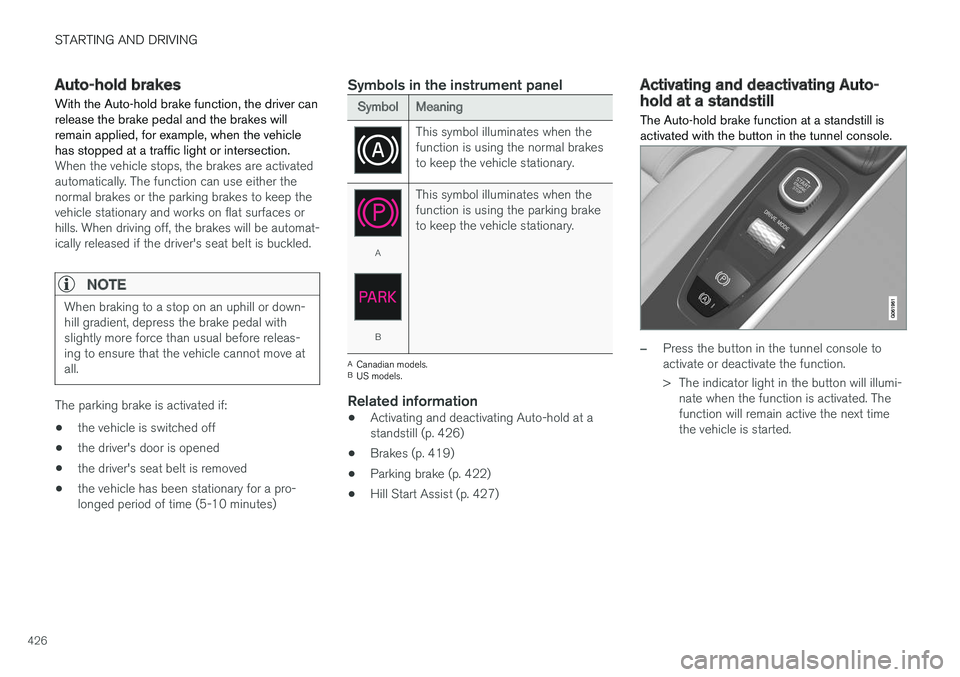
Activating and deactivating Auto-hold at a standstill The Auto-hold brake function at a standstill is activated with the button in the tunnel console.
–Press the button in the tunnel console to activate or deactivate the function.
> The indicator light in the button will illumi-
nate when the function is activated. The function will remain active the next timethe vehicle is started.
Page 429 of 674
STARTING AND DRIVING
}}
427
When shutting offIf the function is active and holding the vehicle stationary using the normalbrakes (A symbol lit), the brake pedalmust be depressed while pressing the
button in order to deactivate Auto-hold.
• The function will remain off until it is reactiva- ted.
• When Auto-hold is switched off, Hill StartAssist (HSA) will remain active to help pre-vent the vehicle from rolling backward whenstarting up a hill.
Related information
•Auto-hold brakes (p. 426)
Hill Start Assist
The function for assisting when starting the vehi- cle on inclines, Hill Start Assist (HSA), helpsprevent the vehicle from rolling backward whenstarting on an uphill gradient. When backing upa hill, HSA helps prevent the vehicle from rollingforward.
The function retains pressure from the brake pedal in the brake system for several secondsafter the brake pedal has been released. This temporary braking effect is released after a few seconds or when the driver begins driving. Hill Start Assist is available even if the Auto-hold brake function is switched off.
Related information
• Auto-hold brakes (p. 426)
• Brakes (p. 419)
Braking assist after a collision In a collision in which the activation level is reached for the pyrotechnic seat belt tensionersor airbags, or if a collision with a large animal isdetected, the vehicle's brakes will be automati-cally activated. This function is intended to helpprevent or reduce the effects of any subsequentcollision.
After a serious collision, it may no longer be pos- sible to control and steer the vehicle. In order toavoid or mitigate a possible further collision witha vehicle or an object in the vehicle's path, thebrake assist system is activated automatically tohelp stop the vehicle safely. The brake lights and hazard warning flashers are activated during braking. When the vehicle has stopped, the hazard warning flashers will con-tinue to flash and the parking brake will beapplied. If braking is not appropriate, e.g. if there is a risk of being hit by passing traffic, the driver can over-ride the system by depressing the acceleratorpedal. This function assumes that the brake system is intact after a collision. Brake assist is part of the Rear Collision Warning and Blind Spot Information safety systems.
Page 433 of 674
STARTING AND DRIVING
* Option/accessory.431
Using the steering wheel paddles *to shift
The steering wheel paddles are a supplement to the gear selector and make it possible to shiftmanually without removing your hands from thesteering wheel.
Activating the steering wheel paddlesIn order to shift gears using the paddles, they must first be activated:
–Pull one of the paddles toward the steering wheel.
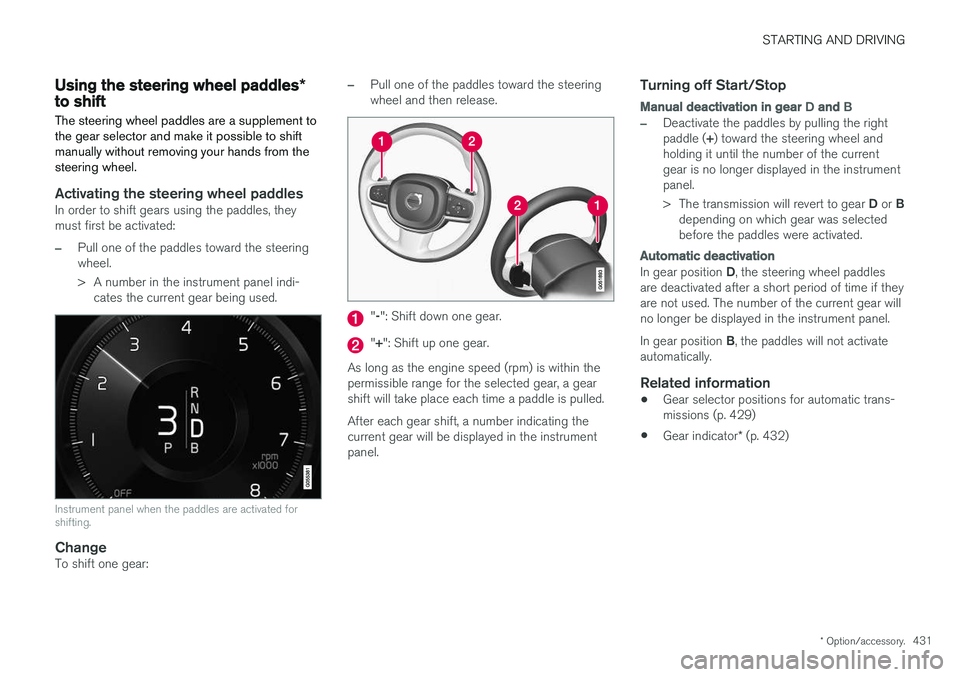
> A number in the instrument panel indi- cates the current gear being used.
Instrument panel when the paddles are activated for shifting.
ChangeTo shift one gear:
–Pull one of the paddles toward the steering wheel and then release.
"-": Shift down one gear.
" + ": Shift up one gear.
As long as the engine speed (rpm) is within the permissible range for the selected gear, a gearshift will take place each time a paddle is pulled. After each gear shift, a number indicating the current gear will be displayed in the instrumentpanel.
Turning off Start/Stop
Manual deactivation in gear D and B
–Deactivate the paddles by pulling the right paddle ( +) toward the steering wheel and
holding it until the number of the current gear is no longer displayed in the instrumentpanel. > The transmission will revert to gear D or B
depending on which gear was selected before the paddles were activated.
Automatic deactivation
In gear position D, the steering wheel paddles
are deactivated after a short period of time if they are not used. The number of the current gear willno longer be displayed in the instrument panel. In gear position B, the paddles will not activate
automatically.
Related information
• Gear selector positions for automatic trans- missions (p. 429)
• Gear indicator
* (p. 432)
Page 436 of 674
||
STARTING AND DRIVING
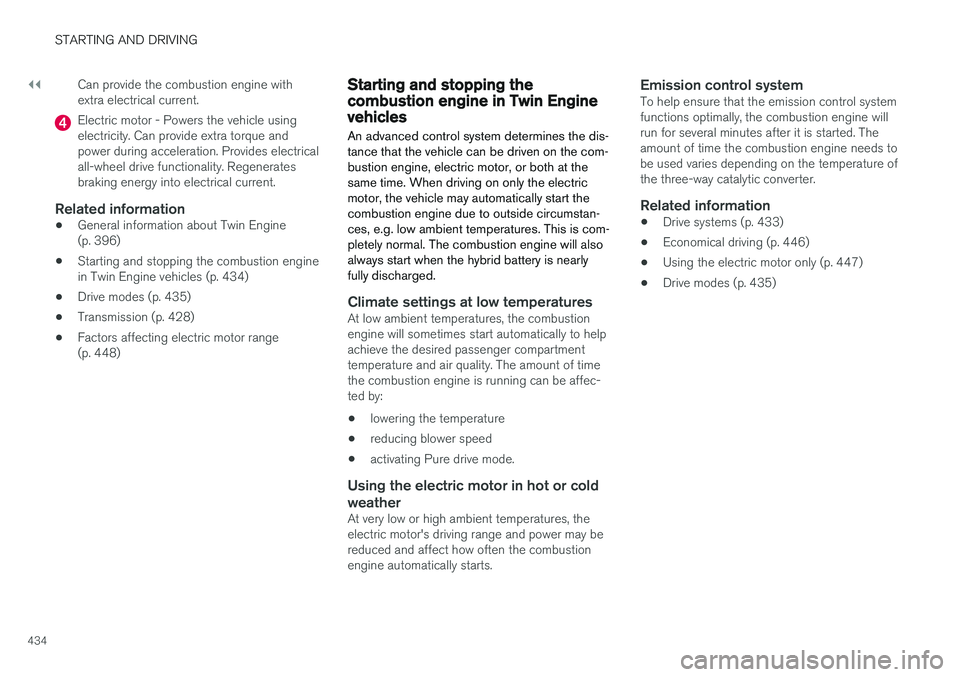
434Can provide the combustion engine with extra electrical current.
Electric motor - Powers the vehicle using electricity. Can provide extra torque andpower during acceleration. Provides electricalall-wheel drive functionality. Regeneratesbraking energy into electrical current.
Related information
•
General information about Twin Engine(p. 396)
• Starting and stopping the combustion enginein Twin Engine vehicles (p. 434)
• Drive modes (p. 435)
• Transmission (p. 428)
• Factors affecting electric motor range(p. 448)
Starting and stopping thecombustion engine in Twin Enginevehicles
An advanced control system determines the dis- tance that the vehicle can be driven on the com-bustion engine, electric motor, or both at thesame time. When driving on only the electricmotor, the vehicle may automatically start thecombustion engine due to outside circumstan-ces, e.g. low ambient temperatures. This is com-pletely normal. The combustion engine will alsoalways start when the hybrid battery is nearlyfully discharged.
Climate settings at low temperaturesAt low ambient temperatures, the combustion engine will sometimes start automatically to helpachieve the desired passenger compartmenttemperature and air quality. The amount of timethe combustion engine is running can be affec-ted by:
• lowering the temperature
• reducing blower speed
• activating Pure drive mode.
Using the electric motor in hot or cold weather
At very low or high ambient temperatures, the electric motor's driving range and power may bereduced and affect how often the combustionengine automatically starts.
Emission control systemTo help ensure that the emission control systemfunctions optimally, the combustion engine willrun for several minutes after it is started. Theamount of time the combustion engine needs tobe used varies depending on the temperature ofthe three-way catalytic converter.
Related information
•
Drive systems (p. 433)
• Economical driving (p. 446)
• Using the electric motor only (p. 447)
• Drive modes (p. 435)
Page 443 of 674
STARTING AND DRIVING
}}
441
Symbols and messages in driver display
SymbolMessageMeaning
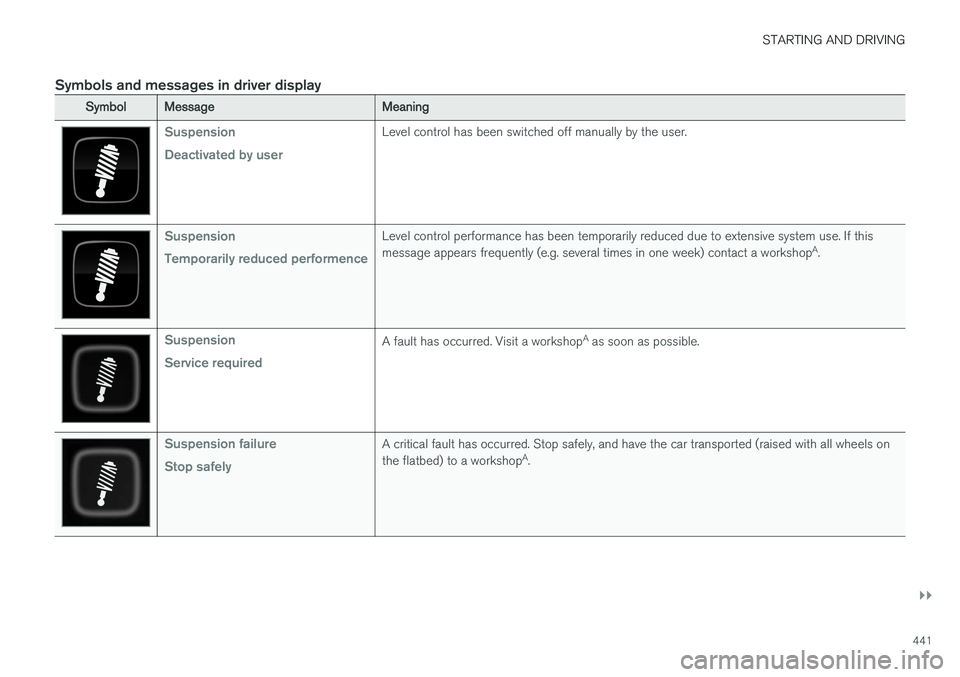
Suspension Deactivated by userLevel control has been switched off manually by the user.
Suspension Temporarily reduced performenceLevel control performance has been temporarily reduced due to extensive system use. If this message appears frequently (e.g. several times in one week) contact a workshopA
.
Suspension Service requiredA fault has occurred. Visit a workshop A
as soon as possible.
Suspension failure Stop safelyA critical fault has occurred. Stop safely, and have the car transported (raised with all wheels on the flatbed) to a workshop A
.
Page 445 of 674
STARTING AND DRIVING
}}
* Option/accessory.443
Leveling control settings *
The vehicle can be lowered or raised to make it easier to load or for passengers to get in andout. Turn off leveling control before lifting the vehicle with a jack to help avoid problems with thepneumatic suspension.
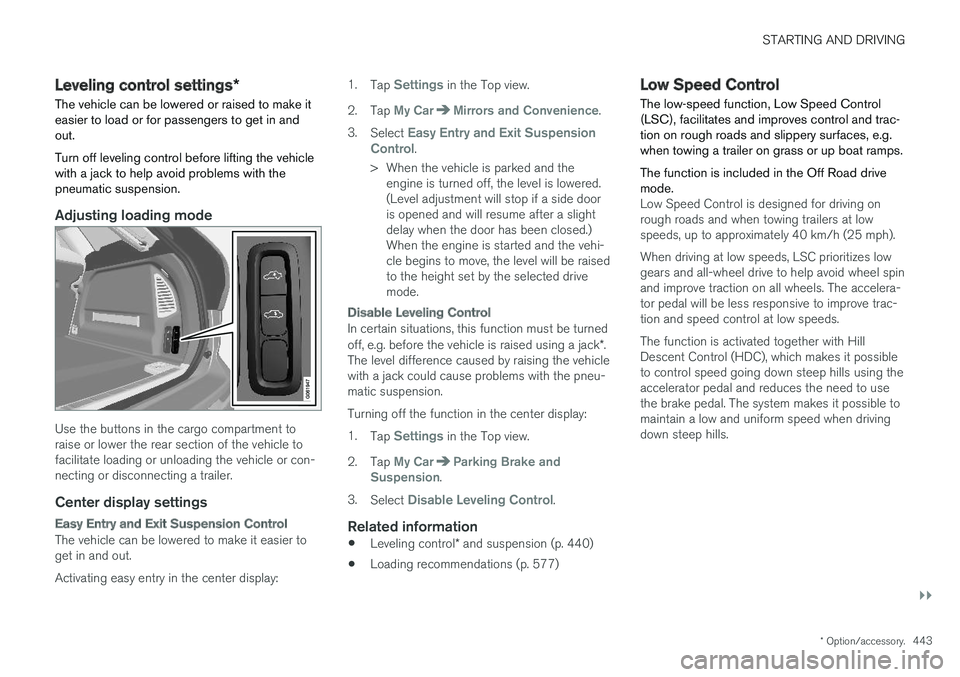
Adjusting loading mode
Use the buttons in the cargo compartment to raise or lower the rear section of the vehicle tofacilitate loading or unloading the vehicle or con-necting or disconnecting a trailer.
Center display settings
Easy Entry and Exit Suspension Control
The vehicle can be lowered to make it easier to get in and out. Activating easy entry in the center display: 1.
Tap
Settings in the Top view.
2. Tap
My CarMirrors and Convenience.
3. Select
Easy Entry and Exit Suspension
Control.
> When the vehicle is parked and the engine is turned off, the level is lowered. (Level adjustment will stop if a side dooris opened and will resume after a slightdelay when the door has been closed.)When the engine is started and the vehi-cle begins to move, the level will be raisedto the height set by the selected drivemode.
Disable Leveling Control
In certain situations, this function must be turned off, e.g. before the vehicle is raised using a jack *.
The level difference caused by raising the vehicle with a jack could cause problems with the pneu-matic suspension. Turning off the function in the center display:1. Tap
Settings in the Top view.
2. Tap
My CarParking Brake and
Suspension.
3. Select
Disable Leveling Control.
Related information
• Leveling control
* and suspension (p. 440)
• Loading recommendations (p. 577)
Low Speed Control The low-speed function, Low Speed Control (LSC), facilitates and improves control and trac-tion on rough roads and slippery surfaces, e.g.when towing a trailer on grass or up boat ramps. The function is included in the Off Road drive mode.
Low Speed Control is designed for driving on rough roads and when towing trailers at lowspeeds, up to approximately 40 km/h (25 mph). When driving at low speeds, LSC prioritizes low gears and all-wheel drive to help avoid wheel spinand improve traction on all wheels. The accelera-tor pedal will be less responsive to improve trac-tion and speed control at low speeds. The function is activated together with Hill Descent Control (HDC), which makes it possibleto control speed going down steep hills using theaccelerator pedal and reduces the need to usethe brake pedal. The system makes it possible tomaintain a low and uniform speed when drivingdown steep hills.
Page 447 of 674
STARTING AND DRIVING
}}
445
the hill is and without the brakes needing to be applied. The brake lights will illuminate when thefunction is activated. The driver can brake to stop or slow the vehicle at any time by depressing the brake pedal. HDC is activated along with Low Speed Control (LSC), which facilitates and improves traction andcontrol on rough and slippery surfaces. The sys-tem is intended to be used at low speeds, up toapproximately 40 km/h (25 mph).
To keep in mind when using HDC
•
If the function is switched off while driving ona steep downhill gradient, braking effect willbe gradually reduced.
• HDC can be used in gear positions
D and R,
and in manual gears 1 or 2.
• It is not possible to manually shift to thirdgear or higher when HDC is active.
NOTE
When LSC with HDC is activated in the OFF ROAD drive mode, the feel of the acceleratorpedal and engine response will change.
NOTE
This drive mode is not designed to be used for normal street driving.
NOTE
The function is deactivated when driving at high speeds and must be reactivated at lowerspeeds if so desired.
Related information
• Activating and deactivating Hill Descent Con- trol using the function button (p. 445)
• Changing drive mode (p. 439)
• Low Speed Control (p. 443)
• All Wheel Drive (AWD) (p. 433)
Activating and deactivating HillDescent Control using the functionbutton
Vehicles that are not equipped with drive mode controls in the tunnel console have a function button for Hill Descent Control with
Hill
Descent Control in the center display's Func-
tion view.
Selecting Hill Descent Control in the center display's Function view
HDC only works at low speeds.
–Tap the Hill Descent Control button to
activate or deactivate the function.
> An indicator light in the button will illumi- nate when the function is activated.
When the engine is switched off, the function will be automatically deactivated.
NOTE
The function is deactivated when driving at high speeds and must be reactivated at lowerspeeds if so desired.