display VOLVO XC60 T8 2018 Owner´s Manual
[x] Cancel search | Manufacturer: VOLVO, Model Year: 2018, Model line: XC60 T8, Model: VOLVO XC60 T8 2018Pages: 674, PDF Size: 11.93 MB
Page 627 of 674
MAINTENANCE AND SERVICE
}}
625
Cleaning fabric upholstery andceiling liner Only use cleaning agents and car care products recommended by Volvo. Clean regularly andtreat stains immediately for best results. It isimportant to vacuum before using a cleaningagent.
Fabric upholstery and ceiling linerNever scrape or rub a stain, as this could damage the upholstery. Never use strong stain removers,as this could change the color of the upholstery. Use soapy water or a similar detergent. For more difficult stains caused by oil, ice cream, shoe pol-ish, etc., use a stain remover. Consult with yourVolvo retailer.
Related information
•Cleaning the interior (p. 623)
• Cleaning the center display (p. 623)
• Cleaning the seat belt (p. 625)
• Cleaning floor mats and inlay mats (p. 625)
• Cleaning leather upholstery (p. 626)
• Cleaning the leather steering wheel(p. 627)
• Cleaning interior plastic, metal and wood sur-faces (p. 628)
Cleaning the seat belt
Only use cleaning agents and car care products recommended by Volvo. Clean regularly andtreat stains immediately for best results. It isimportant to vacuum before using a cleaningagent.
Seat beltsUse water and a synthetic soap solution. Spe- cially designed textile cleaning agents are availa-ble for purchase at Volvo retailers. Make sure thebelt is dry before it is retracted.
Related information
• Cleaning the interior (p. 623)
• Cleaning the center display (p. 623)
• Cleaning fabric upholstery and ceiling liner(p. 625)
• Cleaning floor mats and inlay mats (p. 625)
• Cleaning leather upholstery (p. 626)
• Cleaning the leather steering wheel(p. 627)
• Cleaning interior plastic, metal and wood sur-faces (p. 628)
Cleaning floor mats and inlay mats
Only use cleaning agents and car care products recommended by Volvo. Clean regularly andtreat stains immediately for best results. It isimportant to vacuum before using a cleaningagent.
Inlay mats and floor matsRemove the inlay mats to clean the floor mats and inlay mats separately. Use a vacuum toremove dust and dirt. Each inlay mat is securedinto place with pins. Remove the inlay mat by grasping the inlay mat at each pin and lifting the mat straight up. Put the inlay mat back into place by pressing it in at each pin.
Page 628 of 674
||
MAINTENANCE AND SERVICE
* Option/accessory.
626
WARNING
• Never use more than one inlay mat at a time on the driver's floor. If any other typeof floor mat is used, remove the originalmat from the driver's seat floor beforedriving. All types of mats must be securelyanchored in the attachment points in thefloor. Make sure the floor mat does notimpede the movement of the brake pedalor accelerator pedal in any way, as thiscould be a serious safety hazard.
• Volvo's floor mats are specially manufac-tured for your vehicle. They must be prop-erly secured in the attachment points inthe floor to help ensure they cannot slideand become trapped under the pedals.
After vacuuming, a specially designed textilecleaning agent should be used to remove stainson floor mats. Floor mats should be cleaned withproducts recommended by Volvo retailers.
Related information
• Cleaning the interior (p. 623)
• Cleaning the center display (p. 623)
• Cleaning fabric upholstery and ceiling liner(p. 625)
• Cleaning the seat belt (p. 625)
• Cleaning leather upholstery (p. 626) •
Cleaning the leather steering wheel(p. 627)
• Cleaning interior plastic, metal and wood sur-faces (p. 628)
Cleaning leather upholstery
Only use cleaning agents and car care products recommended by Volvo. Clean regularly andtreat stains immediately for best results. It isimportant to vacuum before using a cleaningagent.
Leather upholstery *Volvo's leather upholstery is treated to protect its original appearance. Over time, sunlight, grease,dirt, etc. could break down the protective layer.This could result in scratches and cracking. Leather upholstery is a natural product that changes and acquires a beautiful patina overtime. Regular cleaning and treatments arerequired to preserve the qualities and color of theleather. Volvo offers a comprehensive product,Volvo Leather Care Kit/Wipes, for cleaning andtreating leather upholstery that, when used asdirected, preserves the leather's protective coa-ting. For best results, Volvo recommends cleaning and applying protective cream one to four times ayear (or more as needed). Volvo Leather Care Kit951 0251 and Volvo Leather Softener 9437429 are available for purchase at Volvo retailers.
Page 629 of 674
MAINTENANCE AND SERVICE
627
Cleaning the leather upholstery
1. Apply the leather cleaner to a damp spongeand squeeze it until the cleaner foams.
2. Move the sponge in circular motions to apply the foam to the stain.
3. Dampen the stain thoroughly with the sponge. Let the sponge absorb the stain and do not rub.
4. Dry the stain using a soft towel and let the leather dry completely.
Protecting the leather upholstery
1. Apply a small amount of leather protector toa cloth and then apply the protector to the leather using light circular movements.
2. Let it dry for approximately 20 minutes. Protecting the leather upholstery makes it better able to withstand sunlight's harmful UV rays.
Related information
• Cleaning the interior (p. 623)
• Cleaning the center display (p. 623)
• Cleaning fabric upholstery and ceiling liner(p. 625)
• Cleaning the seat belt (p. 625)
• Cleaning floor mats and inlay mats (p. 625)
• Cleaning the leather steering wheel(p. 627)
• Cleaning interior plastic, metal and wood sur-faces (p. 628)
Cleaning the leather steering wheel
Only use cleaning agents and car care products recommended by Volvo. Clean regularly andtreat stains immediately for best results. It isimportant to vacuum before using a cleaningagent.
Leather steering wheelLeather needs to breathe. Never cover the leather steering wheel with a plastic protector.Volvo Leather Care Kit 951 0251 and LeatherSoftener 943 7429 are recommended for clean-ing the leather steering wheel. First, remove dirt,dust, etc. with a damp sponge or cloth.
CAUTION
Sharp objects such as rings could damage the leather on the steering wheel.
If there are stains on the steering wheel:
Type 1 (ink, wine, coffee, milk, sweat or blood)
–Use a soft cloth or sponge. Wipe the steering wheel using a solution of 5% ammonia. Forblood stains, mix approximately 2 dl(1 cup) ofwater with 25 g (one ounce) of salt and wipethe stain.
Type 2 (grease, oil, sauces or chocolate)
1. Same procedure as for Type 1 stains.
2. Finish by wiping the wheel with an absorbent paper or towel. Type 3
(dry dirt or dust)
1. Remove the dirt/dust using a soft brush.
2. Same procedure as for Type 1 stains.
Related information
• Cleaning the interior (p. 623)
• Cleaning the center display (p. 623)
• Cleaning fabric upholstery and ceiling liner (p. 625)
• Cleaning the seat belt (p. 625)
• Cleaning floor mats and inlay mats (p. 625)
• Cleaning leather upholstery (p. 626)
• Cleaning interior plastic, metal and wood sur-faces (p. 628)
Page 630 of 674
MAINTENANCE AND SERVICE
628
Cleaning interior plastic, metal andwood surfaces Only use cleaning agents and car care products recommended by Volvo. Clean regularly andtreat stains immediately for best results.
Interior plastic, metal and wood surfaces
A lightly dampened microfiber cloth is recom- mended for cleaning interior details and surfaces.These cloths are available for purchase at Volvoretailers. Never scrape or rub a stain. Never use strong stain removers.
CAUTION
Do not use solvent containing alcohol to clean the instrument panel glass.
CAUTION
Keep in mind that glossy surfaces can be easily scratched. Wipe these surfaces with aclean and dry microfiber cloth using small, cir-cular motions. If necessary, moisten the clothlightly with clean water.
Related information
•Cleaning the interior (p. 623)
• Cleaning the center display (p. 623) •
Cleaning fabric upholstery and ceiling liner (p. 625)
• Cleaning the seat belt (p. 625)
• Cleaning floor mats and inlay mats (p. 625)
• Cleaning leather upholstery (p. 626)
• Cleaning the leather steering wheel (p. 627)
Cleaning the exterior
The vehicle should be washed as soon as it becomes dirty. This makes the vehicle easier toclean because dirt does not attach as strongly. Italso reduces the risk of scratches and keeps thevehicle looking new. Wash the vehicle in a carwash or garage with an oil separator. Use a carwashing detergent.
Related information
• Cleaning the exterior (p. 628)
• Polishing and waxing (p. 629)
• Hand washing (p. 629)
• Automatic car washes (p. 631)
• High-pressure washing (p. 632)
• Cleaning the wiper blades (p. 632)
• Cleaning exterior plastic, rubber and trim components (p. 633)
• Cleaning rims (p. 634)
• Corrosion protection (p. 634)
Page 640 of 674
MAINTENANCE AND SERVICE
* Option/accessory.
638 •
Heated windshield washer nozzles
* (p. 173)
• Using the rain sensor's memory function (p. 174)
• Using the rear window wiper/washer(p. 176)
• Filling washer fluid (p. 640)
• Windshield wipers in the service position(p. 639)
• Replacing windshield wiper blades (p. 638)
• Using the windshield wipers (p. 172)
Replacing windshield wiper blades
The wiper blades help remove water from the windshield and rear window. Along with thewasher fluid, they clean the glass and helpimprove visibility while driving. The windshieldand rear window wiper blades can be replaced.
Replacing wiper blades
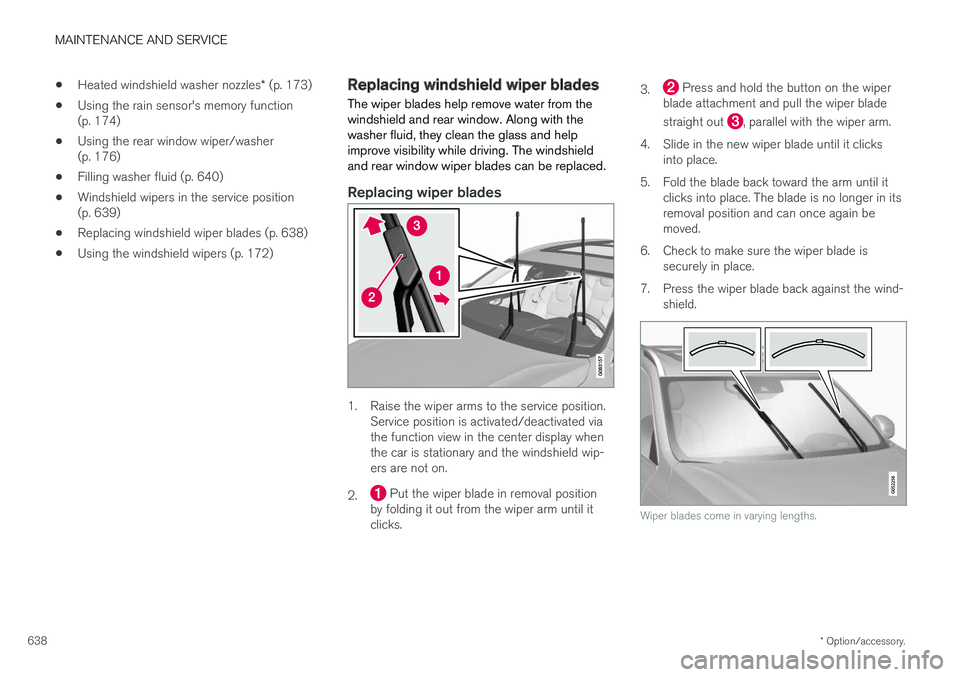
1. Raise the wiper arms to the service position. Service position is activated/deactivated via the function view in the center display whenthe car is stationary and the windshield wip-ers are not on.
2.
Put the wiper blade in removal position
by folding it out from the wiper arm until it clicks. 3.
Press and hold the button on the wiper
blade attachment and pull the wiper blade straight out
, parallel with the wiper arm.
4. Slide in the new wiper blade until it clicks into place.
5. Fold the blade back toward the arm until it clicks into place. The blade is no longer in its removal position and can once again bemoved.
6. Check to make sure the wiper blade is securely in place.
7. Press the wiper blade back against the wind- shield.
Wiper blades come in varying lengths.
Page 641 of 674
MAINTENANCE AND SERVICE
}}
* Option/accessory.639
NOTE
The wiper blades are different lengths. The blade on the driver's side is longer than theone on the passenger side.
Related information
•Using the rain sensor (p. 173)
• Using the windshield and headlight washers (p. 175)
• Using automatic rear window wiping whenbacking up (p. 176)
• Heated windshield washer nozzles
* (p. 173)
• Using the rain sensor's memory function(p. 174)
• Using the rear window wiper/washer(p. 176)
• Filling washer fluid (p. 640)
• Windshield wipers in the service position(p. 639)
• Changing rear window wipers (p. 637)
• Using the windshield wipers (p. 172)
Windshield wipers in the serviceposition
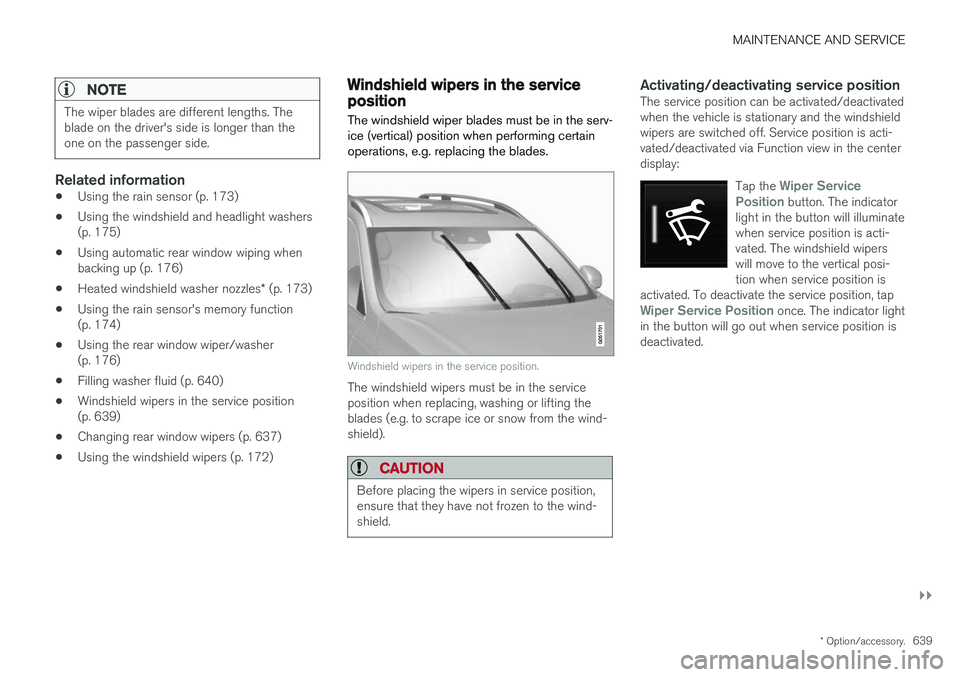
The windshield wiper blades must be in the serv- ice (vertical) position when performing certainoperations, e.g. replacing the blades.
Windshield wipers in the service position.
The windshield wipers must be in the service position when replacing, washing or lifting theblades (e.g. to scrape ice or snow from the wind-shield).
CAUTION
Before placing the wipers in service position, ensure that they have not frozen to the wind-shield.
Activating/deactivating service positionThe service position can be activated/deactivated when the vehicle is stationary and the windshieldwipers are switched off. Service position is acti-vated/deactivated via Function view in the centerdisplay:
Tap the
Wiper Service
Position button. The indicator
light in the button will illuminate when service position is acti-vated. The windshield wiperswill move to the vertical posi-tion when service position is
activated. To deactivate the service position, tap
Wiper Service Position once. The indicator light
in the button will go out when service position is deactivated.
Page 642 of 674
||
MAINTENANCE AND SERVICE
* Option/accessory.
640 The wiper blades will also move out of service position if:
• The windshield wipers are turned on.
• The windshield washers are turned on.
• The rain sensor is activated.
• The vehicle begins moving.
CAUTION
If the wiper arms in service position are raised from the windshield, they must be folded backagainst the windscreen before activating wip-ing, washing or rain sensor as well as beforedeparture. This is to prevent scratching thepaint on the hood.
Related information
• Using the rain sensor (p. 173)
• Using the windshield and headlight washers (p. 175)
• Using automatic rear window wiping whenbacking up (p. 176)
• Heated windshield washer nozzles
* (p. 173)
• Using the rain sensor's memory function(p. 174)
• Using the rear window wiper/washer(p. 176)
• Filling washer fluid (p. 640)
• Replacing windshield wiper blades (p. 638) •
Changing rear window wipers (p. 637)
• Using the windshield wipers (p. 172)
Filling washer fluid
Washer fluid is used to keep the headlights, windshield and rear window clean. Washer fluidcontaining anti-freeze should be used in verycold weather (below-freezing temperatures).
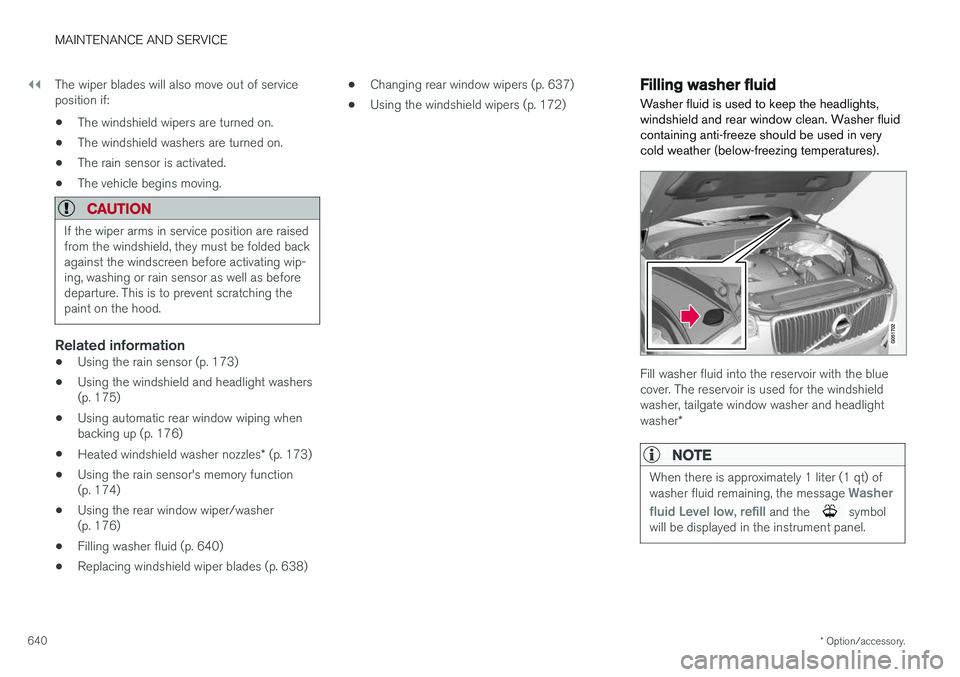
Fill washer fluid into the reservoir with the blue cover. The reservoir is used for the windshieldwasher, tailgate window washer and headlight washer *
NOTE
When there is approximately 1 liter (1 qt) of washer fluid remaining, the message Washer
fluid
Level low, refill and the symbol
will be displayed in the instrument panel.
Page 660 of 674
INDEX
658
B
Backrestfront seat, adjusting 180, 181, 184, 185 , 186
rear seat, folding 188
Battery Hybrid 609
jump-start 459
Maintenance 605
start 605
symbols on the battery 610
warning symbols 610
BLIS 339, 340, 341, 342 Blower adjusting 218
air distribution 202
air vents 203
Bluetooth connect 503
connecting vehicle to Internet 521
phone 510
settings 519
Book service and repair 593
Booster cushions 71Brake assist after collision 427
Brake fluidgrade 653
Brake functions 419
Brake light 156
Brake position 429
Brakes 419 anti-lock brakes, ABS 419
automatic when stationary 426
Brake Assist System, BAS 421
brake lights 156
brake system 419
emergency brake lights 156
handbrake 422
Maintenance 422
on salted roads 421
on wet roads 421
brake system fluid 653
C
Camera sensor 335
Camera unit 321
Capacity weight 568, 649
Cargo compartment 577 attachment points 579
cargo net 584
electrical outlet 572, 574
Lighting 159
Cargo compartment cover 580, 582
cargo net 584
Car wash 628, 629, 631, 632, 633, 634
Catalytic converter 457 recovery 466
CD player 501
Cell phone, see Phone 511
Center console 571Center display change appearance 127
cleaning 623
climate controls 208
Function view 118
keyboard 122
messages 136, 137, 138
operation 108, 111, 115, 120
overview 105
settings 128, 129, 130
switch off and change volume 127
symbols in status bar 120
views 111
Central locking 247
Change of owner 130
Changing a wheel 554
Page 661 of 674
INDEX
659
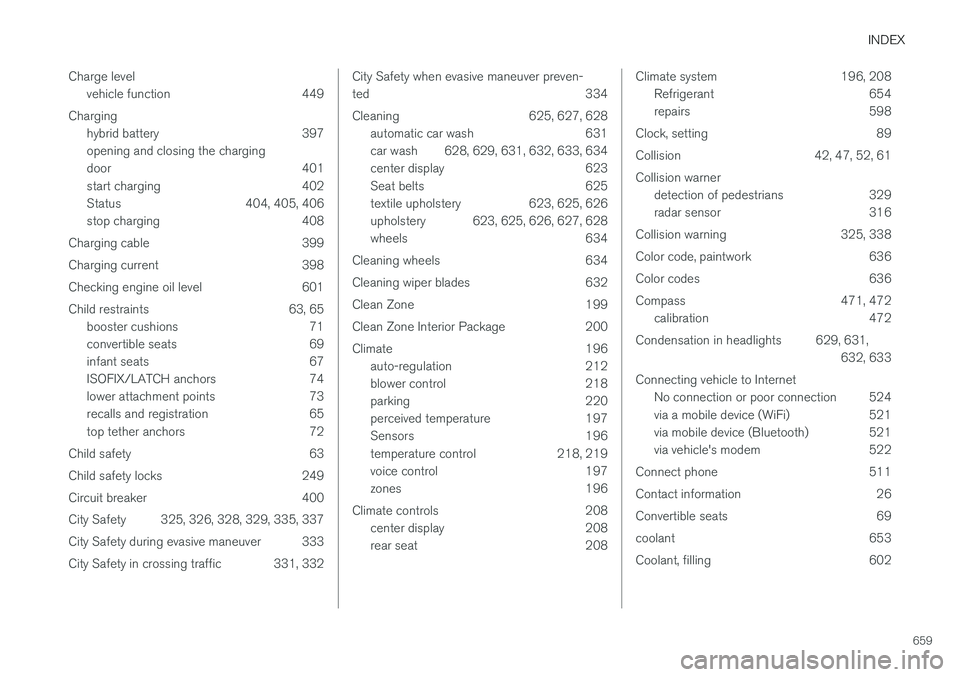
Charge level
vehicle function 449
Charging hybrid battery 397 opening and closing the charging
door 401
start charging 402
Status 404, 405, 406
stop charging 408
Charging cable 399
Charging current 398
Checking engine oil level 601
Child restraints 63, 65 booster cushions 71
convertible seats 69
infant seats 67
ISOFIX/LATCH anchors 74
lower attachment points 73
recalls and registration 65
top tether anchors 72
Child safety 63
Child safety locks 249
Circuit breaker 400
City Safety 325, 326, 328, 329, 335, 337
City Safety during evasive maneuver 333
City Safety in crossing traffic 331, 332
City Safety when evasive maneuver preven- ted 334
Cleaning 625, 627, 628 automatic car wash 631
car wash 628, 629, 631, 632, 633, 634
center display 623
Seat belts 625
textile upholstery 623, 625, 626
upholstery 623, 625, 626, 627, 628
wheels 634
Cleaning wheels 634
Cleaning wiper blades 632
Clean Zone 199
Clean Zone Interior Package 200
Climate 196 auto-regulation 212
blower control 218
parking 220
perceived temperature 197
Sensors 196
temperature control 218, 219
voice control 197
zones 196
Climate controls 208 center display 208
rear seat 208Climate system 196, 208
Refrigerant 654
repairs 598
Clock, setting 89
Collision 42, 47, 52, 61Collision warner detection of pedestrians 329
radar sensor 316
Collision warning 325, 338
Color code, paintwork 636
Color codes 636
Compass 471, 472 calibration 472
Condensation in headlights 629, 631, 632, 633
Connecting vehicle to Internet No connection or poor connection 524
via a mobile device (WiFi) 521
via mobile device (Bluetooth) 521
via vehicle's modem 522
Connect phone 511
Contact information 26
Convertible seats 69
coolant 653
Coolant, filling 602
Page 662 of 674
INDEX
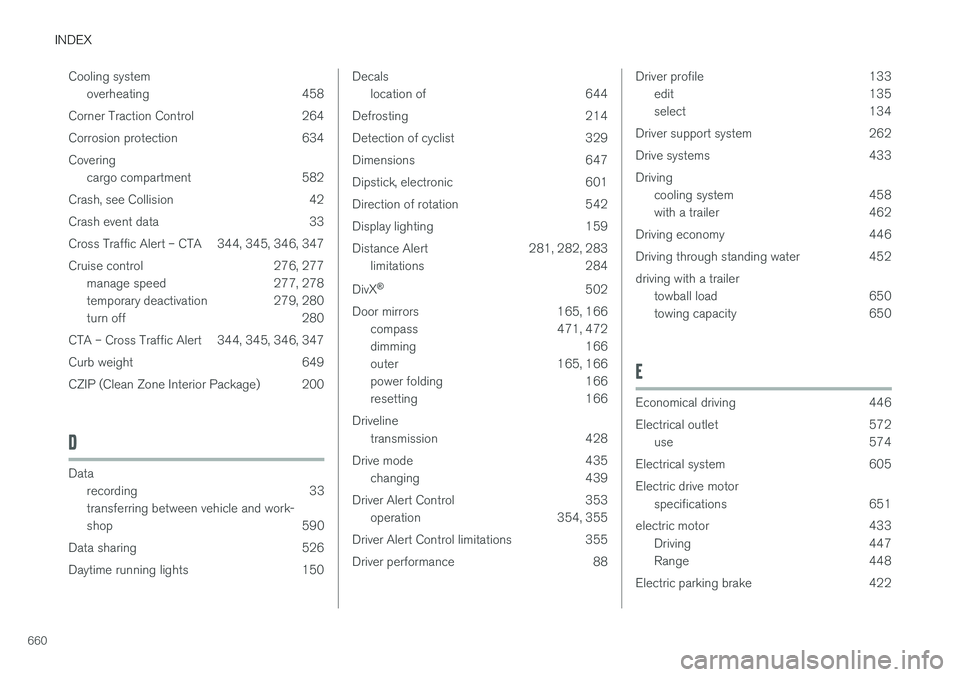
660Cooling system
overheating 458
Corner Traction Control 264
Corrosion protection 634Covering cargo compartment 582
Crash, see Collision 42
Crash event data 33
Cross Traffic Alert – CTA 344, 345, 346, 347
Cruise control 276, 277 manage speed 277, 278
temporary deactivation 279, 280
turn off 280
CTA – Cross Traffic Alert 344, 345, 346, 347
Curb weight 649
CZIP (Clean Zone Interior Package) 200
D
Data recording 33 transferring between vehicle and work-
shop 590
Data sharing 526
Daytime running lights 150
Decals location of 644
Defrosting 214
Detection of cyclist 329
Dimensions 647
Dipstick, electronic 601
Direction of rotation 542
Display lighting 159
Distance Alert 281, 282, 283 limitations 284
DivX ®
502
Door mirrors 165, 166 compass 471, 472
dimming 166
outer 165, 166
power folding 166
resetting 166
Driveline transmission 428
Drive mode 435 changing 439
Driver Alert Control 353 operation 354, 355
Driver Alert Control limitations 355
Driver performance 88Driver profile 133 edit 135
select 134
Driver support system 262
Drive systems 433Driving cooling system 458
with a trailer 462
Driving economy 446
Driving through standing water 452 driving with a trailer towball load 650
towing capacity 650
E
Economical driving 446
Electrical outlet 572
use 574
Electrical system 605 Electric drive motor specifications 651
electric motor 433 Driving 447
Range 448
Electric parking brake 422