brakes VOLVO XC60 T8 2018 Owner´s Manual
[x] Cancel search | Manufacturer: VOLVO, Model Year: 2018, Model line: XC60 T8, Model: VOLVO XC60 T8 2018Pages: 674, PDF Size: 11.93 MB
Page 330 of 674
||
DRIVER SUPPORT
328
3 - Auto-brake
The automatic braking function is activated at the last moment. If the driver has not taken evasive action by this stage and a collision is imminent, the automaticbraking function will be triggered. This occurswhether or not the driver is pressing the brakepedal. Full braking force will be applied to reducethe speed at impact or reduced braking effect willbe applied if this is sufficient to avoid the colli-sion. The seat belt tensioners may be activated along with the automatic braking function. See "Seatbelt tensioners" for more information. In certain situations, auto-braking may begin with a limited braking force before applying full brak- ing force. If City Safety has prevented a collision, the vehi- cle will be kept at a standstill until the drivertakes action. If the vehicle has slowed to avoidcolliding with a slower-moving vehicle ahead, yourspeed will be reduced to that vehicle's speed. Auto-braking can always be cancelled if the driver presses hard on the accelerator pedal.
NOTE
When City Safety activates the brakes, the brake lights come on.
When City Safety applies the brakes, a text mes- sage will appear in the instrument panel to notifythe driver that the function is/was activated.
WARNING
City Safety may not be used to change how the driver operates the vehicle. The drivermust not only rely on City Safety to brake thevehicle.
Related information
•City Safety
™ (p. 325)
Setting a warning distance for CitySafety
City Safety is always active, but the function's warning distance can be adjusted.
NOTE
The City Safety function cannot be deacti- vated. It is activated automatically each timethe engine/electric motor is started.
The alert distance determines the sensitivity of the system and regulates the distance at whichthe light, sound and brake pulsations will be acti-vated. To select warning distance:
1. Select
SettingsMy CarIntelliSafe in
the center display's Top view.
2. Under
City Safety Warning, tap Late,Normal or Early to set the desired warning
distance.
If the driver feels that the
Early setting is giving
too many warnings or finds them irritating, the
Normal or Late warning distance settings can
be selected instead. If the driver feels that the warnings are too fre- quent and distracting, the warning distance canbe reduced. This will reduce the total number ofwarnings, but it will also result in City Safety pro-viding warnings at a later stage.
Page 331 of 674
DRIVER SUPPORT
}}
329
The
Late warning distance setting should there-
fore only be used in exceptional cases, such as when a more dynamic driving style is preferred.
WARNING
• No automatic system can guarantee 100% correct function in all situations.You should therefore never test use ofCity Safety in the direction of people, ani-mals or vehicles – this could lead tosevere damage, serious personal injury oreven death.
• City Safety warns the driver if there is arisk of collision, but the function cannotreduce the driver's reaction time.
• Even if the warning distance has been set to
Early, warnings may be perceived as
late in certain situations – e.g. when there are large speed differences or if the vehi-cle ahead suddenly brakes heavily.
• With the warning distance set to
Early,
warnings come further in advance. This may cause the warnings to come morefrequently than with warning distance
Normal, but is recommended since it can
make City Safety more effective.
NOTE
The warning with direction indicators for Rear Collision Warning is deactivated if the colli-sion warning distance in the City Safety func- tion is set to the lowest level "
Late".
The seat belt tensioning and braking func- tions remain active.
Related information
• City Safety
™ (p. 325)
Detecting obstacles with City Safety City Safety can detect vehicles, cyclists, large animals and pedestrians.
VehiclesCity Safety detects most types of vehicles that are either stationary, moving in the same direc-tion as your vehicle or those described in "CitySafety in crossing traffic". For City Safety to be able to detect a vehicle in the dark, its headlights and taillights must be onand clearly visible.
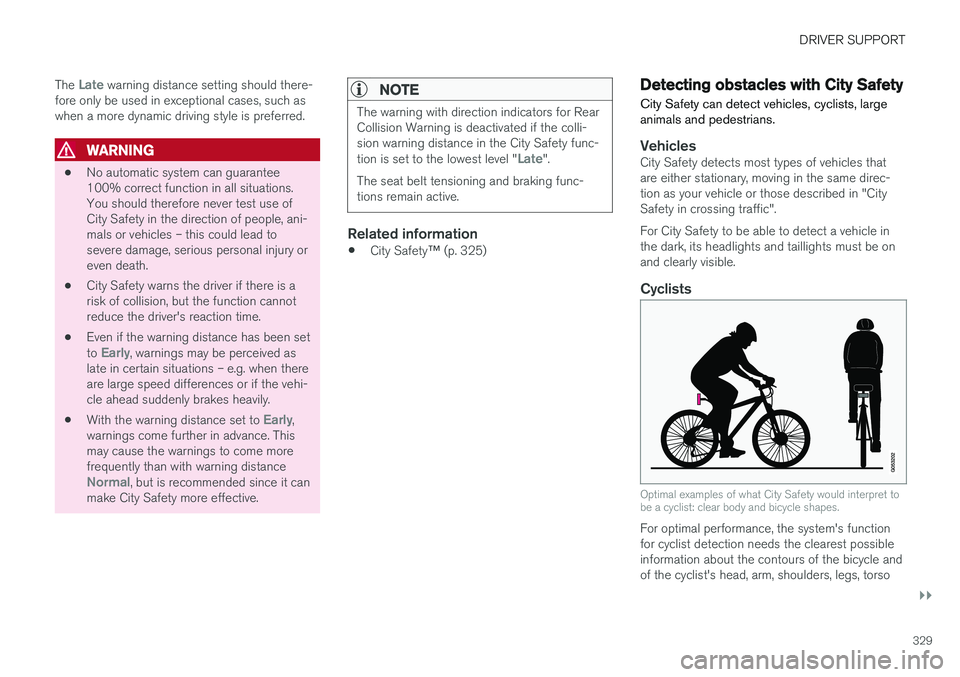
Cyclists
Optimal examples of what City Safety would interpret to be a cyclist: clear body and bicycle shapes.
For optimal performance, the system's function for cyclist detection needs the clearest possibleinformation about the contours of the bicycle andof the cyclist's head, arm, shoulders, legs, torso
Page 336 of 674
DRIVER SUPPORT
334
City Safety and delayed evasivemaneuvers City Safety can assist the driver by automatically braking the vehicle when it is not possible toavoid a collision by steering alone.
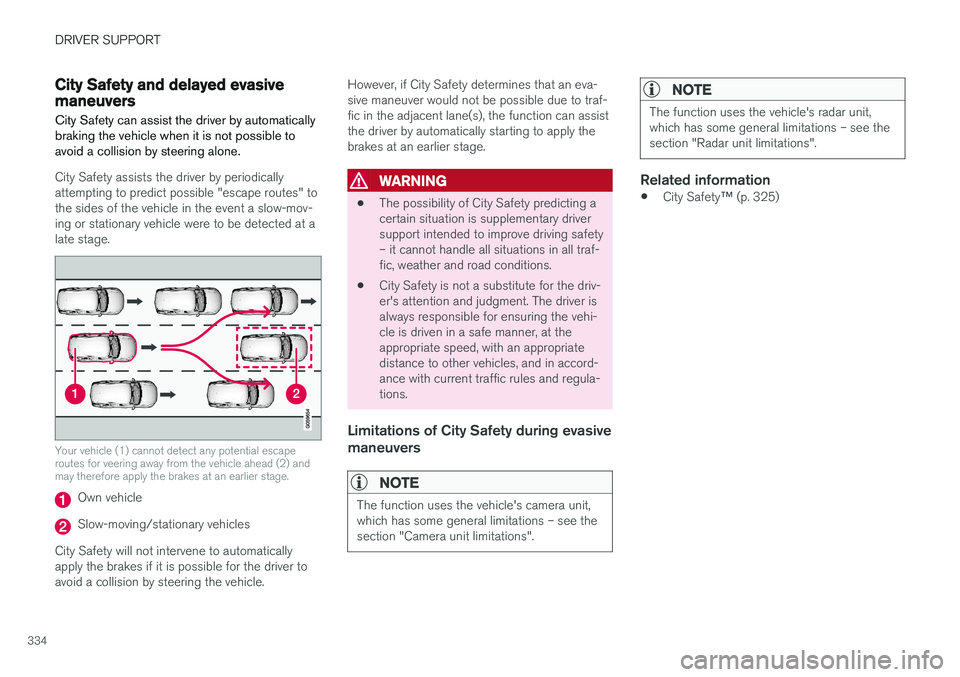
City Safety assists the driver by periodically attempting to predict possible "escape routes" tothe sides of the vehicle in the event a slow-mov-ing or stationary vehicle were to be detected at alate stage.
Your vehicle (1) cannot detect any potential escape routes for veering away from the vehicle ahead (2) andmay therefore apply the brakes at an earlier stage.
Own vehicle
Slow-moving/stationary vehicles
City Safety will not intervene to automatically apply the brakes if it is possible for the driver toavoid a collision by steering the vehicle. However, if City Safety determines that an eva-sive maneuver would not be possible due to traf-fic in the adjacent lane(s), the function can assistthe driver by automatically starting to apply thebrakes at an earlier stage.
WARNING
•
The possibility of City Safety predicting a certain situation is supplementary driversupport intended to improve driving safety– it cannot handle all situations in all traf-fic, weather and road conditions.
• City Safety is not a substitute for the driv-er's attention and judgment. The driver isalways responsible for ensuring the vehi-cle is driven in a safe manner, at theappropriate speed, with an appropriatedistance to other vehicles, and in accord-ance with current traffic rules and regula-tions.
Limitations of City Safety during evasive maneuvers
NOTE
The function uses the vehicle's camera unit, which has some general limitations – see thesection "Camera unit limitations".
NOTE
The function uses the vehicle's radar unit, which has some general limitations – see thesection "Radar unit limitations".
Related information
•
City Safety
™ (p. 325)
Page 340 of 674
DRIVER SUPPORT
338
Rear Collision Warning
The Rear Collision Warning (RCW) function can help the driver avoid rear-end collisions fromvehicles approaching from behind.
RCW is automatically activated each time the engine is started. RCW can warn the driver of a potential collision with vehicles approaching from behind by rapidlyflashing the turn signals. If, at a speed below 30 km/h (20 mph), the RCW function detects that the car is in danger of beinghit from behind, the seatbelt tensioners may ten-sion the front seatbelts and activate the WhiplashProtection System safety system. Immediately before a collision from behind, RCW may also activate the foot brake in order toreduce the forward acceleration of the car duringthe collision. However, the brakes will only beapplied if your vehicle is stationary. The brakeswill be immediately released if the acceleratorpedal is depressed.
Related information
• Rear Collision Warning limitations (p. 338)
• Whiplash Protection System (p. 46)
Rear Collision Warning limitations
In some situations, it may be difficult for RCW to warn the driver of a collision risk.
This may be the case if:
• the vehicle approaching from the rear is detected at a late stage
• the vehicle approaching from the rearchanges lanes at a late stage
• the vehicle approaching from the rear is mov-ing at a speed above 80 km/h (50 mph)
• a trailer, bicycle holder or similar is con-nected to the vehicle's electrical system - theRCW function will then be automaticallydeactivated.
NOTE
In certain markets RCW does
not warn with
the direction indicators due to local traffic regulations – in such cases, that part of thefunction is deactivated.
NOTE
The warning with direction indicators for Rear Collision Warning is deactivated if the colli-sion warning distance in the City Safety func- tion is set to the lowest level "
Late".
The seat belt tensioning and braking func- tions remain active.
Related information
• Rear Collision Warning (p. 338)
Page 366 of 674
DRIVER SUPPORT
364
Run-Off Mitigation with steeringassistance
This sub-function is intended to help reduce the risk of the vehicle inadvertently running off theroad by actively steering the vehicle back ontothe road.
The function is active at speeds between 65-140 km/h (40-87 mph) on roads with clearlyvisible traffic lane markings/lines. The system uses a camera to monitor the edges of the road and the painted side marker lines. Ifthe vehicle is about to cross the edge of the road, the function will attempt to steer the vehicle back onto the road. If this is not sufficient to keep the vehicle on the road, the brakes will also be applied. However, the function will not provide either
steering assistance or braking if the turn signal is used. The function will also not be activated if it detects that the driver is actively operating thevehicle. After the system has automatically intervened, this text message will appear in the instrumentpanel:
•
Collision avoidance assistance –Automatic intervention
WARNING
• The "Steering assistance at risk of run- off" subfunction is supplementary driversupport intended to help improve drivingsafety – it cannot handle all situations inall traffic, weather and road conditions.
• The function cannot detect barriers, railsor similar obstacles at the side of theroad.
• "Steering assistance at risk of run-off" isnot a substitute for the driver's attentionand judgment. The driver is alwaysresponsible for ensuring the vehicle isdriven in a safe manner, at the appropri-ate speed, with an appropriate distance toother vehicles, and in accordance withcurrent traffic rules and regulations.
Related information
•
Steering assistance at risk of collision(p. 363)
Run-Off Mitigation with steeringassistance levels This function has two activation levels for inter- vention:
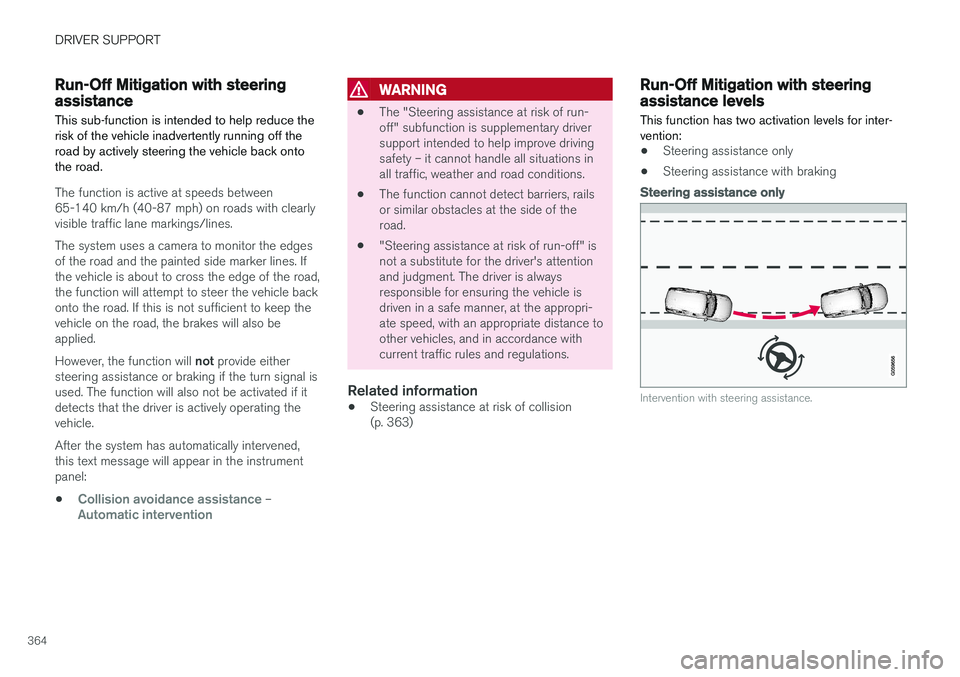
•Steering assistance only
• Steering assistance with braking
Steering assistance only
Intervention with steering assistance.
Page 377 of 674
DRIVER SUPPORT
* Option/accessory.375
CAUTION
Objects such as chains, thin and glossy poles or low obstacles may end up in the "signalshadow" and then go temporarily undetectedby the sensors – the pulsating tone may thenunexpectedly stop instead of becoming aconstant tone as expected. The sensors cannot detect high objects, such as protruding ramps.
• In such situations, pay extra attention andmaneuver/drive the vehicle very slowly orstop the current parking maneuver –there may be a high risk of damage tothe vehicle or other objects since infor-mation from the sensors is not alwaysreliable in such situations.
CAUTION
In some circumstances, the Park Assist Sys- tem may produce false warnings due to exter-nal sound sources with the same ultrasonicfrequencies as those the system works with. Examples of such sources are horns, wet tires on asphalt, pneumatic brakes, exhaust noisefrom motorcycles, etc.
NOTE
When a trailer hitch is configured with the vehicle electrical system, the trailer hitch pro-trusion is included when the function meas-ures the distance to objects behind the vehi-cle.
Related information
•
Park Assist
* (p. 372)
Recommended maintenance forPark Assist
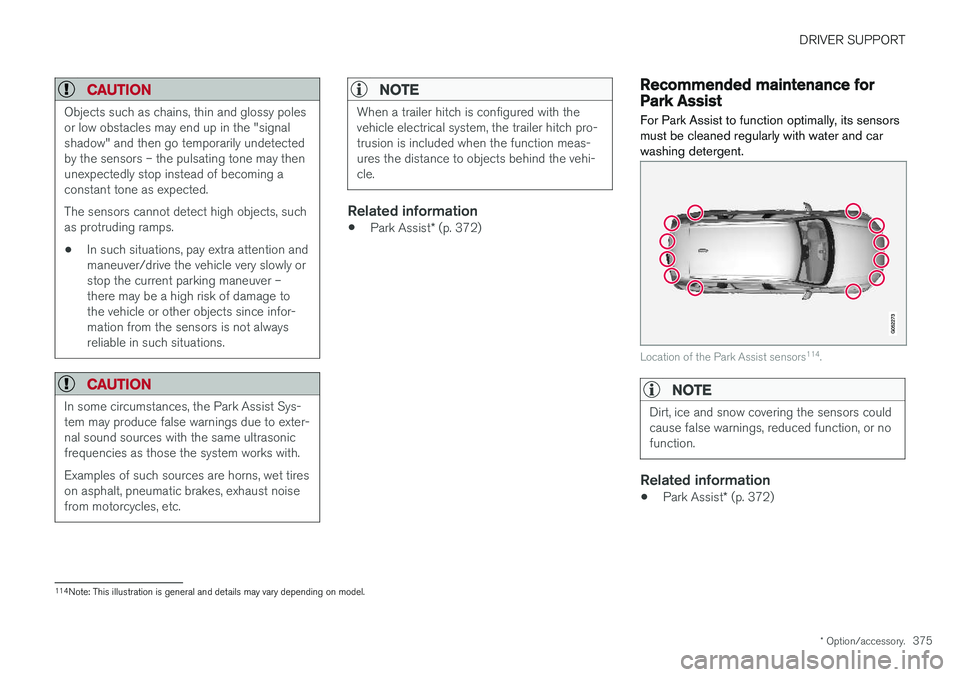
For Park Assist to function optimally, its sensors must be cleaned regularly with water and carwashing detergent.
Location of the Park Assist sensors 114
.
NOTE
Dirt, ice and snow covering the sensors could cause false warnings, reduced function, or nofunction.
Related information
• Park Assist
* (p. 372)
114
Note: This illustration is general and details may vary depending on model.
Page 388 of 674
DRIVER SUPPORT
* Option/accessory.
386
Park Assist Pilot *
Park Assist Pilot (PAP 123
) helps the driver pull
into and out of parking spaces.
PAP first checks whether there is sufficient space and then steers the car into the space. The center display uses symbols, graphics and messages to inform the driver of what steps needto be taken and when.
WARNING
• The PAP function is supplementary driver support intended to facilitate driving andhelp make it safer – it cannot handle allsituations in all traffic, weather and roadconditions.
• Pay particular attention to people andanimals near the vehicle.
• PAP is not a substitute for the driver'sattention and judgment. The driver isalways responsible for ensuring the vehi-cle is driven in a safe manner, at theappropriate speed, with an appropriatedistance to other vehicles, and in accord-ance with current traffic rules and regula-tions.
NOTE
The PAP function measures the space and steers the vehicle – the driver's role is to:
• keep close watch of the area around thevehicle
• follow the instructions on the center dis-play
• change gears (reverse/forward) – a"ping" sound indicates when the drivershould change gears
• regulate and maintain a safe speed
• apply the brakes and stop.
Related information
•Types of parking with Park Assist Pilot (p. 386)
• Parking with Park Assist Pilot (p. 387)
• Leaving a parking space with Park AssistPilot (p. 390)
• Park Assist Pilot
* limitations (p. 391)
• Recommended maintenance for Park AssistPilot (p. 393)
• Park Assist Pilot
* messages (p. 394)
Types of parking with Park AssistPilot
Park Assist Pilot (PAP 124
) can be used for the
following types of parking.
123 Park Assist Pilot
124 Park Assist Pilot
Page 389 of 674
DRIVER SUPPORT
}}
* Option/accessory.387
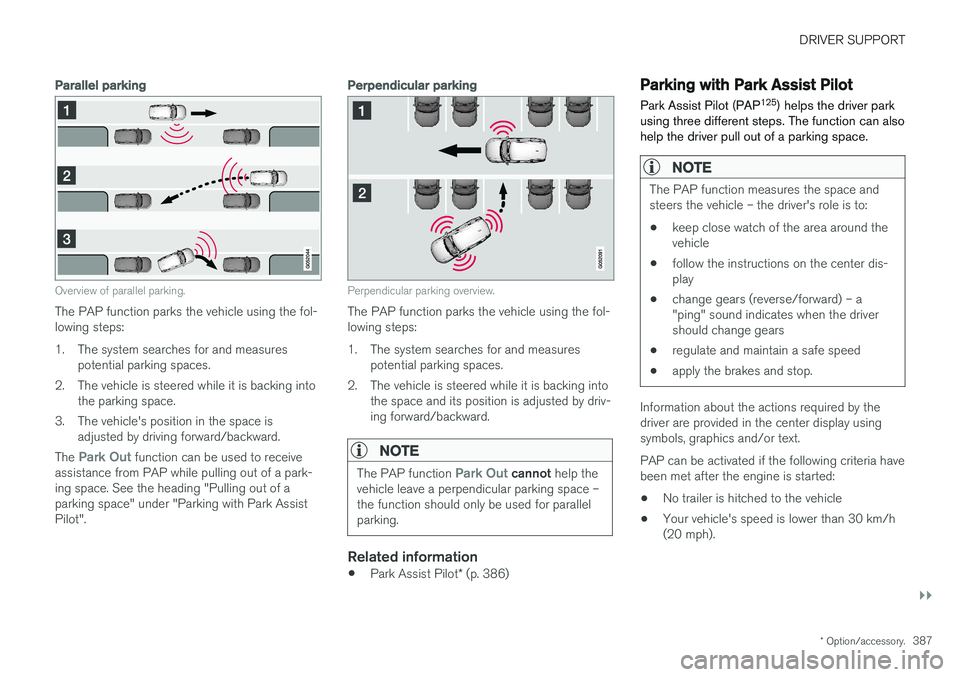
Parallel parking
Overview of parallel parking.
The PAP function parks the vehicle using the fol- lowing steps:
1. The system searches for and measures
potential parking spaces.
2. The vehicle is steered while it is backing into the parking space.
3. The vehicle's position in the space is adjusted by driving forward/backward.
The
Park Out function can be used to receive
assistance from PAP while pulling out of a park- ing space. See the heading "Pulling out of aparking space" under "Parking with Park AssistPilot".
Perpendicular parking
Perpendicular parking overview.
The PAP function parks the vehicle using the fol- lowing steps:
1. The system searches for and measures potential parking spaces.
2. The vehicle is steered while it is backing into the space and its position is adjusted by driv-ing forward/backward.
NOTE
The PAP function Park Out cannot help the
vehicle leave a perpendicular parking space – the function should only be used for parallelparking.
Related information
• Park Assist Pilot
* (p. 386)
Parking with Park Assist Pilot Park Assist Pilot (PAP 125
) helps the driver park
using three different steps. The function can also help the driver pull out of a parking space.
NOTE
The PAP function measures the space and steers the vehicle – the driver's role is to:
• keep close watch of the area around thevehicle
• follow the instructions on the center dis-play
• change gears (reverse/forward) – a"ping" sound indicates when the drivershould change gears
• regulate and maintain a safe speed
• apply the brakes and stop.
Information about the actions required by the driver are provided in the center display usingsymbols, graphics and/or text. PAP can be activated if the following criteria have been met after the engine is started: •
No trailer is hitched to the vehicle
• Your vehicle's speed is lower than 30 km/h (20 mph).
Page 393 of 674
DRIVER SUPPORT
}}
* Option/accessory.391
Park Assist Pilot * limitations
Park Assist Pilot PAP 126
may not be able to
detect all conditions in all situations and func- tionality may therefore be limited.WARNING
• The PAP function is supplementary driver support intended to facilitate driving andhelp make it safer – it cannot handle allsituations in all traffic, weather and roadconditions.
• Pay particular attention to people andanimals near the vehicle.
• Bear in mind that the front end of thevehicle may swing out towards oncomingtraffic during the parking maneuver.
• Objects situated higher than the detec-tion area of the sensors are not includedwhen the parking maneuver is calculated,which could cause PAP to swing into theparking space too early. Such parkingspaces should be avoided for this reason.
• PAP is not a substitute for the driver'sattention and judgment. The driver isalways responsible for ensuring the vehi-cle is driven in a safe manner, at theappropriate speed, with an appropriatedistance to other vehicles, and in accord-ance with current traffic rules and regula-tions.
The driver should be aware of the following limi-tations for Park Assist Pilot:
The parking sequence is cancelledA parking sequence will be cancelled if:
• the driver moves the steering wheel
• the vehicle's speed exceeds 7 km/h (4 mph)
• the driver taps
Cancel in the center display
• when the anti-lock brakes or the Electronic stability control are engaged - e.g. when awheel loses grip on a slippery road
• when the power steering works at reduced power - e.g. during cooling due to overheat- ing (see section "Speed-dependent steeringforce").
A message in the center display will explain whythe parking sequence was cancelled.
CAUTION
Under certain circumstances, PAP may not be able to find parking spaces – one reason maybe that the sensors are disrupted by externalsound sources that emit the same ultrasonicfrequencies that the system works with. Examples of such sources include horns, wet tires on asphalt, pneumatic brakes, exhaustnoise from motorcycles, etc.
126 Park Assist Pilot
Page 398 of 674
HYBRID INFORMATION
396
General information about TwinEngine
Twin Engine vehicles are driven just like any other vehicle, but certain functions differ from avehicle powered exclusively by gasoline. Theelectric motor powers the vehicle primarily at lowspeeds; the gasoline engine is used at higherspeeds or during more active driving.
The instrument panel displays Twin Engine-spe- cific information - charging information, selecteddrive mode, distance to discharged battery andhybrid battery charge level. Different drive modes can be selected while driv- ing, e.g. electric power only or, if more power isneeded, a combination of electric and gasolinepower. The vehicle calculates the optimal combi-nation of driveability, driving experience, environ-mental impact and fuel economy for the selecteddrive mode. In order to function optimally, the hybrid battery (and its electrical drive systems) and the gasolineengine (and its drive systems) must be at thecorrect operating temperature. Battery capacitycan be considerably reduced if the battery is toocold or too hot. Preconditioning prepares thevehicle's drive systems and passenger compart-ment before driving to help reduce both wear andenergy consumption. It also helps increase thehybrid battery's range. The hybrid battery, which powers the electric motor, is recharged using the charging cable. Itcan also be recharged during light braking and through engine braking in gear position
B. The
combustion engine can also help recharge thehybrid battery.
Important
No electrical current
Keep in mind that if there is no electrical current to the vehicle, i.e. the ignition is switched off orthe start battery is discharged, certain functionssuch as brakes, power steering, etc. will not work.
WARNING
If the vehicle does not have electrical current and both the electric motor and the gasolineengine are switched off, the brakes cannot beused to stop the vehicle.
Towing not permitted
Never tow a Twin Engine vehicle behind another vehicle, as this could damage the electric motor.
Exterior engine noise
WARNING
Keep in mind that the vehicle does not emit any engine noise when using the electricmotor and may therefore be difficult to detectfor children, pedestrians, cyclists or animals.This is especially true at low speeds, e.g. inparking lots.
High-voltage electrical current
WARNING
Several components in the vehicle work with high voltage that can be hazardous in case ofan incorrect procedure. These componentsand any orange wiring in the vehicle may onlybe handled by trained and qualified Volvoservice technicians.
Do not touch anything that is not clearly descri- bed in this Owner's Manual.
Related information
• Charging the hybrid battery (p. 397)
• Hybrid gauge (p. 83)
• Drive modes (p. 435)
• Starting and stopping preconditioning(p. 222)
• Hybrid battery (p. 609)
• Factors affecting electric motor range(p. 448)
• Gear selector positions for automatic trans-missions (p. 429)
• Towing using a towline (p. 466)