brakes VOLVO XC60 T8 2018 Owner´s Manual
[x] Cancel search | Manufacturer: VOLVO, Model Year: 2018, Model line: XC60 T8, Model: VOLVO XC60 T8 2018Pages: 674, PDF Size: 11.93 MB
Page 449 of 674
STARTING AND DRIVING
}}
447
Driving
•Choose the Pure drive mode to help mini- mize electric power consumption.
• Maintain a steady speed and a generous fol-lowing distance to traffic ahead to minimizebraking. This drive mode has the lowestpower consumption.
• Balance energy requirements using theaccelerator pedal. Use the indicator on theinstrument panel to see available electricpower and avoid starting the combustionengine unnecessarily. The electric motor ismore effective than the combustion engine,especially at low speeds.
• When braking is necessary, brake gentlyusing the brake pedal. This will recharge thehybrid battery. A regenerative function isintegrated in the brake pedal and can beaugmented by the electric motor's brakingcapacity when the gear selector is in mode B
.
• Higher speeds increase energy consumption - air resistance increases with speed.
• Activate the
Hold function in the Function
view at high speeds when traveling farther than is possible using the hybrid battery'scapacity.
• Whenever possible, avoid using the
Chargefunction to charge the hybrid battery. Charg- ing the battery using the combustion engine increases fuel consumption and carbon diox-ide emissions.
• In a cold climate, reduce heating of the wind-shield/rear window, mirrors, seats and thesteering wheel.
• Maintain the correct pressure in the tires andcheck pressure regularly.
• The type of tires used could affect energyconsumption - consult a retailer for advice onsuitable tires.
• Remove unnecessary items from the vehicle- the heavier the load, the higher the fuelconsumption.
• Roof loads increase air resistance andincrease fuel consumption. Remove roofboxes, ski racks, etc. that are not in use.
• Avoid driving with the windows open.
• Do not keep the vehicle still on an upwardgradient by using the accelerator pedal. Usethe brakes instead.
Related information
•
Drive-E
‒
purer driving pleasure (p. 27)
• Factors affecting electric motor range(p. 448)
• Using the electric motor only (p. 447)
• Hybrid gauge (p. 83)
• Checking tire pressure (p. 547)
Using the electric motor only
When using the electric motor, Volvo Twin Engine provides a combination of good fueleconomy, low emissions and high performance.
For energy-efficient driving:
• Select the Pure drive mode to help maximize driving range using only the electric motor.
• Balance energy requirements using theaccelerator pedal. Use the indicator on theinstrument panel's hybrid gauge to see avail-able electric power and avoid starting thecombustion engine unnecessarily.
• When braking is necessary, brake gentlyusing the brake pedal. This will recharge thehybrid battery.
• Activate the
Hold function in the Function
view at high speeds when traveling farther than is possible using the hybrid battery'scapacity.
• Reduce current consumption in the passen-ger compartment by reducing e.g. fan speed,electric heating, or air conditioning use.
Also follow the general economical driving adviceregarding speed, tires and load to maximizerange.
Related information
• General information about Twin Engine(p. 396)
• Economical driving (p. 446)
Page 454 of 674
STARTING AND DRIVING
452
Driving through standing water
Driving the vehicle through a deep pool of stand- ing water on a water-covered roadway is calledfording. This must be done with great caution.
To prevent damage to the vehicle when driving through water (e.g. on flooded roads): • Do not drive in water higher than the floor of the vehicle. If possible, check the depth ofthe water at its deepest point before drivingthrough it. Be particularly careful when driv-ing through flowing water.
• Always select the
Off Road drive mode
before driving in water to ensure the gasoline engine is running.
• Do not drive faster than walking speed.
• Do not stop the vehicle in the water. Drivecarefully forward or back the vehicle out ofthe water.
• Remember that waves created by passingvehicles could cause the water level to riseabove the vehicle's floor level.
• Avoid driving through salt water to help avoidthe risk of corrosion.
CAUTION
Parts of the vehicle (e.g. engine, transmission, driveline, electrical components, etc.) can bedamaged if the vehicle is driven through waterhigher than its floor level. Damage to anycomponents caused by flooding, vapor lock orinsufficient oil is not covered under warranty. If the engine stalls while the vehicle is in water, do not attempt to restart it. Have thevehicle towed on the bed of a tow truck to aworkshop - an authorized Volvo workshop isrecommended.
When you have passed the water, press lightly on the brake pedal and check that the brakes arefunctioning properly. Water, mud, slush, etc. canmake the brake linings slippery, resulting indelayed braking effect. If the vehicle is equipped with a trailer coupling contact, clean the contact after driving in water ormud.
Related information
•
Recovery (p. 467)
• Low Speed Control (p. 443)
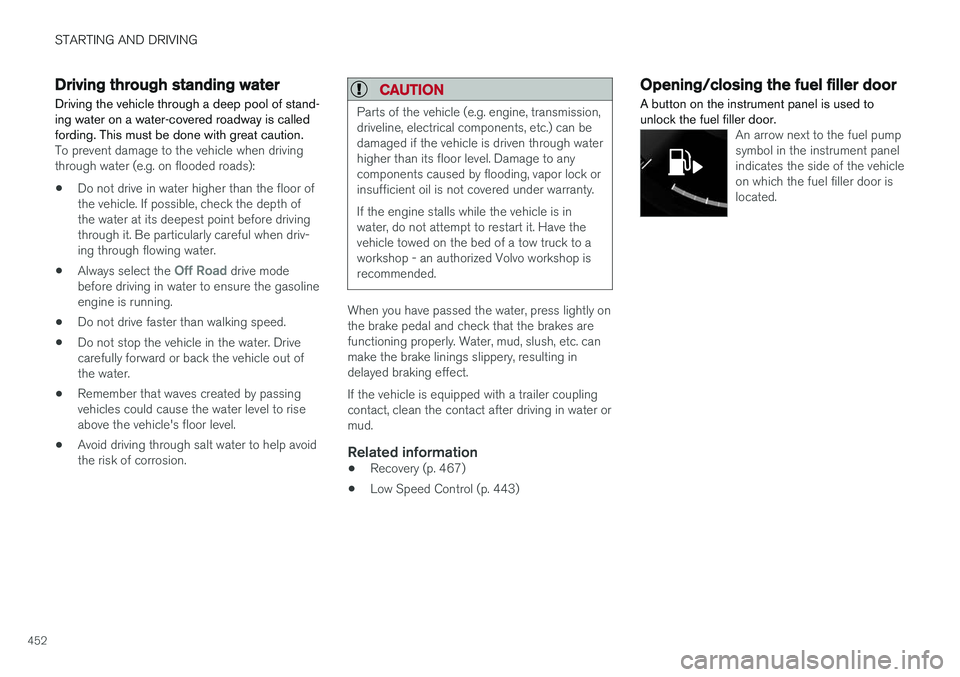
Opening/closing the fuel filler door A button on the instrument panel is used to unlock the fuel filler door.
An arrow next to the fuel pump symbol in the instrument panelindicates the side of the vehicleon which the fuel filler door islocated.
Page 464 of 674
||
STARTING AND DRIVING
462
Stowing the ball holder
WARNING
When not in use, the detachable ball holder should always be properly stowed in the des-ignated location under the floor of the cargocompartment.
Related information
•Driving with a trailer (p. 462)
• Towing capacity and tongue weight (p. 650)
Driving with a trailer
There are a number of things to consider when towing a trailer, such as the towbar, the trailerand how the load is distributed in the trailer.
Load-carrying capacity is determined by the vehi- cle's curb weight. The total weight of all passen-gers and any installed accessories, e.g. towbar,reduces the vehicle's load-carrying capacity bythe corresponding amount. • Towbars used on the vehicle must be approved for the applicable use.
• Distribute the load on the trailer so that theweight on the towbar complies with thespecified maximum towball weight. Thetongue weight is calculated as part of thevehicle's payload.
• Increase the tire pressure to the recom-mended pressure for a full load.
• The engine is subjected to more load thanusual when towing a trailer.
• Towing a trailer affects the vehicle's han-dling, durability and driving economy.
• Do not drive with a heavy trailer when thevehicle is very new. Wait until the mileagehas reached at least 1000 km (620 miles).
• On long and steep downgrades, the vehicle'sbrakes are subjected to much more loadthan usual. When manually shifting, down-shift and adapt speed accordingly. •
Follow applicable regulations regarding per-mitted speed and weight.
• Drive slowly when towing a trailer up a longand steep incline.
• The maximum trailer weights given only applyto altitudes up to 1000 meters (3280 feet)above sea level. At higher altitudes, enginepower (and thus the vehicle's climbing ability)is decreased due to the reduced air density,and the maximum trailer weight must there-fore be reduced. The weight of the vehicleand trailer must be decreased by 10% foreach additional 1000 m (3280 feet) or partthereof.
• Avoid driving with a trailer on inclines of morethan 12%.
• Avoid overloading and other incorrect use.
• The trailer's brakes must be balanced withthe vehicle's brakes to help ensure safestops (follow applicable local regulations).
Page 465 of 674
STARTING AND DRIVING
* Option/accessory.463
CAUTION
•Bumper-attached trailer hitches must not be used on Volvos, nor should safetychains be attached to the bumper.
• Trailer hitches attaching to the vehiclerear axle must not be used.
• Never connect a trailer's hydraulic brakesystem directly to the vehicle brake sys-tem, nor a trailer's lighting system directlyto the vehicle lighting system. Consultyour nearest authorized Volvo retailer forcorrect installation.
• When towing a trailer, the trailer's safetychains or wire must be correctly fastenedto the attachment points provided in thetrailer hitch on the vehicle. The safetychain or wire must never be fastened toor wound around the towing ball.
NOTE
The optional detachable trailer hitch may not be available in all markets or on all models.Consult your Volvo retailer.
NOTE
Extreme weather conditions, towing a trailer, driving at high altitudes and fuel quality arefactors that significantly increase a vehicle'sfuel consumption.
Trailer weights
WARNING
Please adhere to the recommendations provi- ded for trailer weight. If the recommendationsare not followed, the vehicle and trailer maybe difficult to control during evasive maneu-vers and braking.
NOTE
The specified maximum trailer weights are those permitted by Volvo. National vehicleregulations may set additional restrictions ontrailer weight and speed. The trailer hitchesmay be certified for higher towing weightsthan the vehicle is permitted to tow.
Self-leveling suspension
*The vehicle's self-leveling system attempts to keep the vehicle at a constant level, regardless ofload (up to the maximum permitted weight).When the vehicle is stationary, the rear end of thevehicle will be slightly lowered, which is normal.
Driving in hilly terrain or hot weatherIn certain conditions, there is a risk of overheat-ing when driving with a trailer. If overheating ofthe engine and drive system is detected, a warn-ing symbol will illuminate in the instrument panelalong with a message. The automatic transmission selects the optimalgear for the current load and engine speed.
Steep inclines
Do not lock the automatic transmission into a higher gear than what the engine can handle
‒ it
is not always preferable to drive in high gears at low rpm.
Parking on a hill
1. Depress the brake pedal.
2. Apply the parking brake.3. Put the gear selector in P.
4. Release the brake pedal.Put chocks behind the wheels when the vehicle is parked on a hill with a trailer attached.
Starting on a hill
1. Depress the brake pedal. 2. Put the gear selector in D.
3. Release the parking brake.
4. Release the brake pedal and start driving.
Related information
• Trailer Stability Assist
* (p. 464)
• Checking trailer lights (p. 465)
• Towing capacity and tongue weight (p. 650)
• Overheating of engine and transmission (p. 458)
Page 466 of 674
STARTING AND DRIVING
* Option/accessory.
464
Trailer Stability Assist *
Trailer Stability Assist (TSA 8
) is a function
designed to help stabilize a vehicle that is tow- ing a trailer when the vehicle and trailer havebegun to sway. The function is part of the Elec- tronic Stability Control system ESC 9
.
Reasons for swayingA vehicle towing a trailer may begin to sway for various reasons. Normally this only occurs at highspeeds. However, if the trailer is overloaded orunevenly distributed, e.g. too far back, there is arisk of swaying even at low speeds. Swaying may be caused by factors such as:
• The vehicle and trailer are hit by a sudden, strong crosswind.
• The vehicle and trailer are traveling on anuneven road or over a bump.
• Sudden movements of the steering wheel.
Once swaying has begun, it can be difficult orimpossible to stop it. This makes the vehicle andtrailer difficult to control and there is a risk ofswerving into oncoming traffic or driving off theroad.
Trailer Stability Assist functionTrailer Stability Assist continuously monitors thevehicle's movements, particularly lateral move- ments. If swaying is detected, the brakes areapplied individually on the front wheels, which hasa stabilizing effect on the vehicle and trailer. Thisis often enough to enable the driver to regaincontrol of the vehicle. If the Trailer Stability Assist function's first attempt is not adequate to stop the swayingmotion, the brakes are applied on all wheels andengine power is temporarily reduced. As theswaying motion begins to decrease and the vehi-cle and trailer have once again become stable,TSA stops regulating the brakes/engine powerand the driver regains control of the vehicle.
NOTE
Trailer Stability Assist is deactivated if the driver selects the sport mode by deactivating
ESC in the center display's menu system.
Trailer Stability Assist may not intervene if the driver tries to compensate for the swaying motionby moving the steering wheel rapidly, becausethe system will then not be able to determine if itis the trailer or the driver causing the swaying.
When Trailer Stability Assist is activated, the
ESC symbol is
displayed in the instrument panel.
Related information
• Driving with a trailer (p. 462)
• Electronic Stability Control (p. 264)
8
Trailer Stability Assist
9 Electronic Stability Control
Page 564 of 674
||
WHEELS AND TIRES
562
CAUTION
Snow chains can be used on the vehicle, with the following restrictions:• Volvo recommends not using snowchains on wheel dimensions larger than18 inches.
• Always follow the manufacturer's installa-tion instructions carefully. Install chainsas tightly as possible and retighten peri-odically.
• Only put snow chains on the front wheels(also applies to all-wheel drive vehicles).
• If accessory, aftermarket or "custom"tires and wheels with different dimen-sions than the original tires and wheelsare used, snow chains in some casesmay NOT be used. Sufficient distancebetween the chains and brakes, suspen-sion and body components must bemaintained.
• Check local regulations regarding the useof snow chains before installing.
• Never exceed the snow chain manufac-turer's specified maximum speed limit.Under no circumstances should youexceed 50 km/h (30 mph).
• Avoid bumps, holes or sharp turns whendriving with snow chains.
• Avoid driving on surfaces without snow as this wears out both the snow chains andthe tires.
• The handling of the vehicle can beadversely affected when driving withchains. Avoid fast or sharp turns as wellas locked wheel braking.
• Some types of strap-on chains affectbrake components and therefore mustNOT be used.
Consult a Volvo retailer for more information about snow chains.
Related information
•
Winter driving (p. 451)
Tire sealing system12
The temporary tire sealing system can be used to seal a puncture in a tire or to check andadjust the pressure in the tire. Models equipped with a spare wheel 13
do not
have the tire sealing system.
The tire sealing system consists of a compressor and a bottle containing sealing compound. Thesealing functions as a temporary repair.
NOTE
The sealing compound effectively seals tires with punctures in the tread but may not beable to fully seal tires with punctures in thesidewall. Do not use the tire sealing systemon tires with large tears, cracks or similardamage.
NOTE
The compressor is intended for temporary tire sealing and is approved by Volvo.
LocationThe tire sealing system is located in a foam block under the floor of the cargo compartment.
Page 652 of 674
SPECIFICATIONS
* Option/accessory.
650
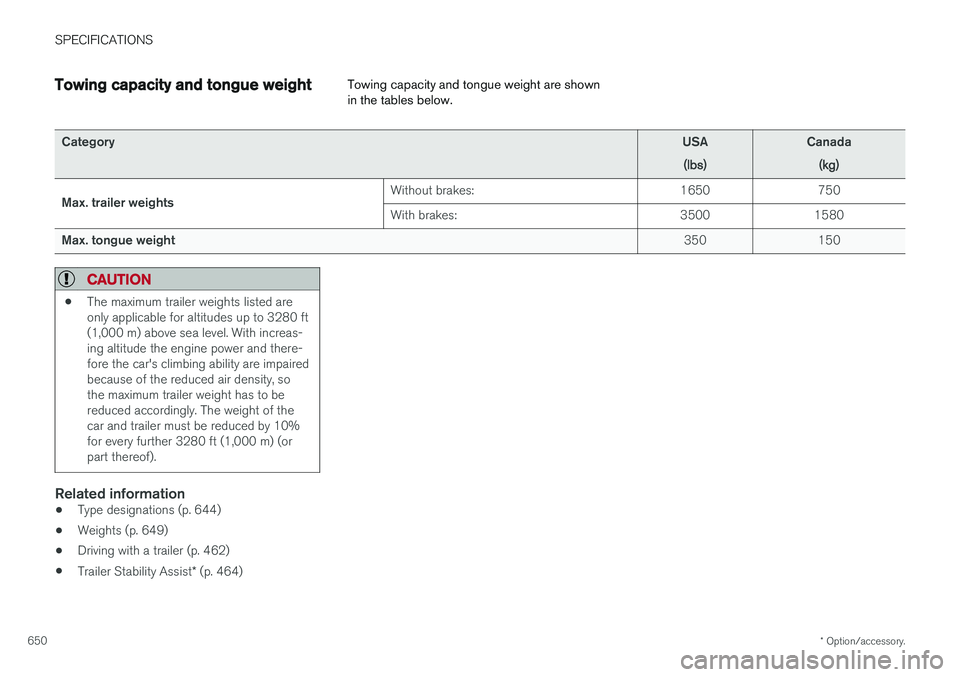
Towing capacity and tongue weight Towing capacity and tongue weight are shown in the tables below.
Category
USA
(lbs)Canada(kg)
Max. trailer weights Without brakes: 1650 750 With brakes:
3500 1580
Max. tongue weight 350 150
CAUTION
•The maximum trailer weights listed are only applicable for altitudes up to 3280 ft(1,000 m) above sea level. With increas-ing altitude the engine power and there-fore the car's climbing ability are impairedbecause of the reduced air density, sothe maximum trailer weight has to bereduced accordingly. The weight of thecar and trailer must be reduced by 10%for every further 3280 ft (1,000 m) (orpart thereof).
Related information
•
Type designations (p. 644)
• Weights (p. 649)
• Driving with a trailer (p. 462)
• Trailer Stability Assist
* (p. 464)
Page 659 of 674
INDEX
657
1, 2, 3 ...
4WD 433
A
ABSanti-lock brakes 419
AC (Air conditioning) 220
ACC - Adaptive Cruise Control 285, 288, 289, 290, 291, 292, 294, 295, 296, 297, 299
Accessories and extra equipment 35 installation 36
Accessory installation warning 36
Active Bending Lights 155
Adapting driving characteristics 262, 435
Adaptive Cruise Control 285, 288, 289, 290, 291, 292, 294, 295, 296, 297, 299
change cruise control functionality 297
function 285
manage speed 289, 290
pass 294
radar sensor 316
set time interval 291, 292
troubleshooting 296
Adjusting the steering wheel 193
Airbag 52 activation/deactivation 56
driver's side 53
passenger side 53, 56
Air bag, see Airbag 52
Air conditioning 220Air conditioning, fluid volume and grade 654
Air distribution 201 air vents 201, 203
changing 202
defrosting 214
recirculation 213
table showing options 205
Air quality 198, 200 allergy and asthma 200
passenger compartment filter 201
Air recirculation 213
Alarm 258 deactivating 259
Allergy and asthma-inducing substances 200
All Wheel Drive, AWD 433
All Wheel Drive (AWD) 433
All Wheel Drive (four-wheel drive) 433
Android Auto 508, 510 Antenna location 247Apple CarPlay 505, 507
Approach lighting 157
Apps 477
Assistance at risk of collision 363, 364, 365, 366, 367, 368, 369, 371
Audio and media 476Audio system HD digital radio 487 SiriusXM ® Satellite radio 488, 489, 490
Auto-climate 212
Auto hold 426
Auto-hold brakes 426 activate and deactivate 426
after collision 427
Automatic car wash 631
Automatic high beam 153
Automatic locking 251
Automatic relocking 231, 244
Automatic Speed Limiter 272, 274, 275
Automatic transmission 429 kickdown 432
oil 653
Trailer 462
INDEX
Page 660 of 674
INDEX
658
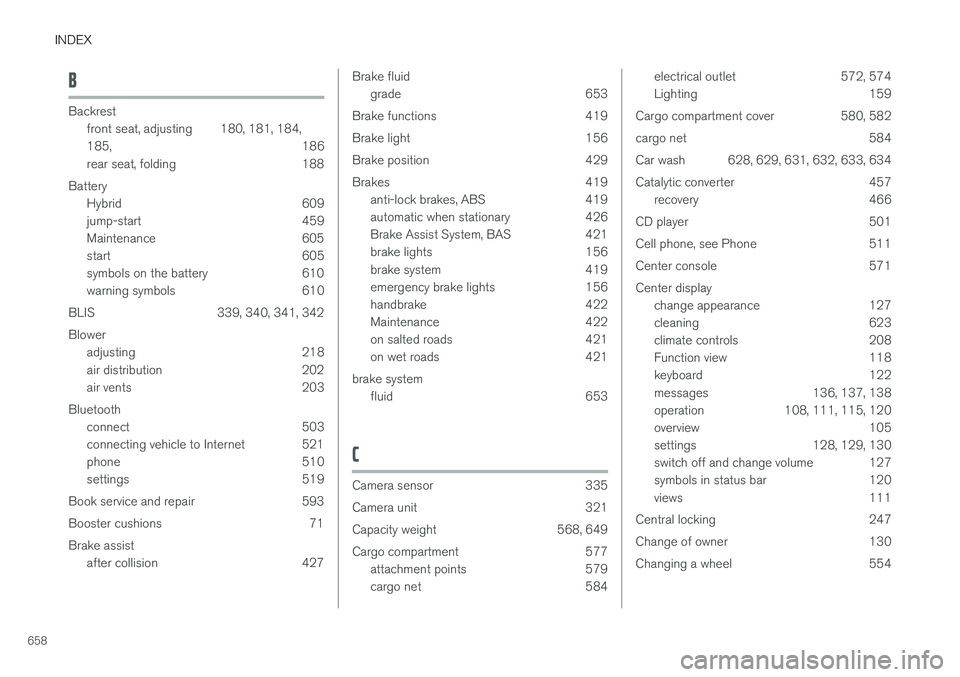
B
Backrestfront seat, adjusting 180, 181, 184, 185 , 186
rear seat, folding 188
Battery Hybrid 609
jump-start 459
Maintenance 605
start 605
symbols on the battery 610
warning symbols 610
BLIS 339, 340, 341, 342 Blower adjusting 218
air distribution 202
air vents 203
Bluetooth connect 503
connecting vehicle to Internet 521
phone 510
settings 519
Book service and repair 593
Booster cushions 71Brake assist after collision 427
Brake fluidgrade 653
Brake functions 419
Brake light 156
Brake position 429
Brakes 419 anti-lock brakes, ABS 419
automatic when stationary 426
Brake Assist System, BAS 421
brake lights 156
brake system 419
emergency brake lights 156
handbrake 422
Maintenance 422
on salted roads 421
on wet roads 421
brake system fluid 653
C
Camera sensor 335
Camera unit 321
Capacity weight 568, 649
Cargo compartment 577 attachment points 579
cargo net 584
electrical outlet 572, 574
Lighting 159
Cargo compartment cover 580, 582
cargo net 584
Car wash 628, 629, 631, 632, 633, 634
Catalytic converter 457 recovery 466
CD player 501
Cell phone, see Phone 511
Center console 571Center display change appearance 127
cleaning 623
climate controls 208
Function view 118
keyboard 122
messages 136, 137, 138
operation 108, 111, 115, 120
overview 105
settings 128, 129, 130
switch off and change volume 127
symbols in status bar 120
views 111
Central locking 247
Change of owner 130
Changing a wheel 554