phone VOLVO XC60 T8 2018 Owner´s Manual
[x] Cancel search | Manufacturer: VOLVO, Model Year: 2018, Model line: XC60 T8, Model: VOLVO XC60 T8 2018Pages: 674, PDF Size: 11.93 MB
Page 574 of 674
LOADING, STORAGE AND PASSENGER COMPARTMENT
* Option/accessory.
572
Electrical outlets
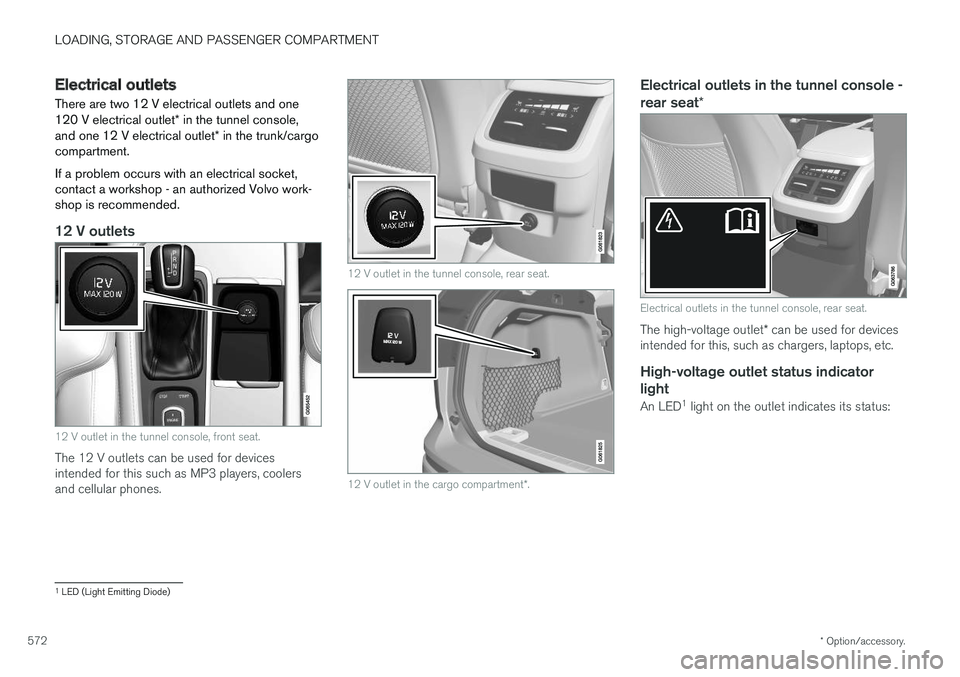
There are two 12 V electrical outlets and one 120 V electrical outlet * in the tunnel console,
and one 12 V electrical outlet * in the trunk/cargo
compartment. If a problem occurs with an electrical socket, contact a workshop - an authorized Volvo work-shop is recommended.
12 V outlets
12 V outlet in the tunnel console, front seat.
The 12 V outlets can be used for devices intended for this such as MP3 players, coolersand cellular phones.
12 V outlet in the tunnel console, rear seat.
12 V outlet in the cargo compartment *.
Electrical outlets in the tunnel console - rear seat *
Electrical outlets in the tunnel console, rear seat.
The high-voltage outlet * can be used for devices
intended for this, such as chargers, laptops, etc.
High-voltage outlet status indicator
light
An LED 1
light on the outlet indicates its status:
1 LED (Light Emitting Diode)
Page 576 of 674
LOADING, STORAGE AND PASSENGER COMPARTMENT
* Option/accessory.
574
Using the electrical outlets
The 12 V outlet can be used for devices intended for this such as MP3 players, coolersand cellular phones. The high-voltage outlet * can be used for devices
intended for this, such as chargers, laptops, etc.
The ignition must be in at least mode I for the
outlets to supply current. The outlets will then be active as long as there is sufficient charge in thestart battery. If the engine is turned off and the vehicle is locked, the outlets will be deactivated. If theengine is turned off and the vehicle remainsunlocked, the sockets will remain active for up to7 minutes.
NOTE
Bear in mind that using the electrical outlets when the engine is off could cause the starterbattery to have too low of a charge level,which could limit other functionality. Accessories connected to the electrical out- lets can be activated even when the vehicleelectrical system is off or if preconditioning isused. For this reason, disconnect plugs whenthey are not in use to prevent the starter bat-tery from becoming discharged.
WARNING
• Do not use accessories with large or heavy plugs – they could damage the out-let or come loose while you are driving.
• Do not use accessories that could causedisruptions to e.g. the vehicle's radioreceiver or electrical system.
• Position the accessory so that there is norisk of it injuring the driver or passengersin the event of heavy braking or a colli-sion.
• Pay attention to connected accessoriesas they can generate heat that could burnpassengers or the interior.
Using 12 V outlets1. Remove the stopper (tunnel console) or fold
down the cover (trunk/cargo compartment)over the socket and plug in the device.
2. Unplug the device and put the stopper back in (tunnel console) or fold up the cover(trunk/cargo compartment) when the socketis not in use or left unattended.
CAUTION
The maximum power is 120 W (10 A) per outlet.
Using high-voltage outletsThe ignition must be in at least mode I for outlets
to supply current. The outlets will then be active as long as there is sufficient charge in the startbattery. 1. Slide down the cover over the outlet and plug in the device. >
The LED 2
light on the outlet will indicate
its status.
2. The outlet is supplying electrical current when the light is glowing steadily green.
3. Disconnect the device by pulling out the plug (do not pull on the cord). Pull up the cover when the outlet is not in use or is left unattended.
CAUTION
The maximum power is 150 W.
WARNING
Do not attempt to alter or repair the high-volt- age outlet on your own. Volvo recommendscontacting an authorized Volvo workshop.
2LED (Light Emitting Diode)
Page 660 of 674
INDEX
658
B
Backrestfront seat, adjusting 180, 181, 184, 185 , 186
rear seat, folding 188
Battery Hybrid 609
jump-start 459
Maintenance 605
start 605
symbols on the battery 610
warning symbols 610
BLIS 339, 340, 341, 342 Blower adjusting 218
air distribution 202
air vents 203
Bluetooth connect 503
connecting vehicle to Internet 521
phone 510
settings 519
Book service and repair 593
Booster cushions 71Brake assist after collision 427
Brake fluidgrade 653
Brake functions 419
Brake light 156
Brake position 429
Brakes 419 anti-lock brakes, ABS 419
automatic when stationary 426
Brake Assist System, BAS 421
brake lights 156
brake system 419
emergency brake lights 156
handbrake 422
Maintenance 422
on salted roads 421
on wet roads 421
brake system fluid 653
C
Camera sensor 335
Camera unit 321
Capacity weight 568, 649
Cargo compartment 577 attachment points 579
cargo net 584
electrical outlet 572, 574
Lighting 159
Cargo compartment cover 580, 582
cargo net 584
Car wash 628, 629, 631, 632, 633, 634
Catalytic converter 457 recovery 466
CD player 501
Cell phone, see Phone 511
Center console 571Center display change appearance 127
cleaning 623
climate controls 208
Function view 118
keyboard 122
messages 136, 137, 138
operation 108, 111, 115, 120
overview 105
settings 128, 129, 130
switch off and change volume 127
symbols in status bar 120
views 111
Central locking 247
Change of owner 130
Changing a wheel 554
Page 661 of 674
INDEX
659
Charge level
vehicle function 449
Charging hybrid battery 397 opening and closing the charging
door 401
start charging 402
Status 404, 405, 406
stop charging 408
Charging cable 399
Charging current 398
Checking engine oil level 601
Child restraints 63, 65 booster cushions 71
convertible seats 69
infant seats 67
ISOFIX/LATCH anchors 74
lower attachment points 73
recalls and registration 65
top tether anchors 72
Child safety 63
Child safety locks 249
Circuit breaker 400
City Safety 325, 326, 328, 329, 335, 337
City Safety during evasive maneuver 333
City Safety in crossing traffic 331, 332
City Safety when evasive maneuver preven- ted 334
Cleaning 625, 627, 628 automatic car wash 631
car wash 628, 629, 631, 632, 633, 634
center display 623
Seat belts 625
textile upholstery 623, 625, 626
upholstery 623, 625, 626, 627, 628
wheels 634
Cleaning wheels 634
Cleaning wiper blades 632
Clean Zone 199
Clean Zone Interior Package 200
Climate 196 auto-regulation 212
blower control 218
parking 220
perceived temperature 197
Sensors 196
temperature control 218, 219
voice control 197
zones 196
Climate controls 208 center display 208
rear seat 208Climate system 196, 208
Refrigerant 654
repairs 598
Clock, setting 89
Collision 42, 47, 52, 61Collision warner detection of pedestrians 329
radar sensor 316
Collision warning 325, 338
Color code, paintwork 636
Color codes 636
Compass 471, 472 calibration 472
Condensation in headlights 629, 631, 632, 633
Connecting vehicle to Internet No connection or poor connection 524
via a mobile device (WiFi) 521
via mobile device (Bluetooth) 521
via vehicle's modem 522
Connect phone 511
Contact information 26
Convertible seats 69
coolant 653
Coolant, filling 602
Page 667 of 674
INDEX
665
in cellular phone 20
in the center display 17, 18
P
Paddle at steering wheel 192 Paint
color code 636
paint damage and touch-up 635, 636
Panoramic roof opening and closing 169
pinch protection 162
sun shade 168, 171
ventilation position 170
PAP – Park Assist Pilot 386, 387, 390, 391, 393, 394
Park Assist Camera 377, 378, 379, 381, 382, 384, 385
settings 382
Park Assist Camera limitations 382
Park Assist Pilot 386, 387, 390, 391, 393, 394
function 386, 387, 391, 393, 394
limitations 391
operation 387, 390
Symbols and messages 394
Park Assist Pilot – PAP 386, 387, 390, 391, 393, 394
parking on hills 424
Parking Assist 372, 373, 374, 375, 376 function 372, 373, 374
Parking brake 422 activate and deactivate 423
automatic activation 424
Low battery charge level 425
Parking climate 220 Symbols and messages 226
Passenger compartment filter 201
Passenger compartment interior 570 center console 571
electrical outlet 572
glove compartment 575
sun visor 576
Passenger compartment lighting 158, 159 auto switch 158
Passing assistance 294, 311
personal information (Privacy Policy) 34
Phone 510 changing to another 514
connect 511
connect automatically 513
connect manually 513
delete 515disconnect 514
phone call 515, 517
text message 516
voice control 143
Pilot Assist 301, 304, 305, 306, 307, 309, 311, 312, 313, 314
pass 311
pinch protection 162 resetting 163
PIN code 523
Polishing 629
Position lights 150
Power 651 electric motor 651
Power folding door mirrors 166
Power panoramic roof 168
Power save mode 459
Power seats 181
Power tailgate 251
Power windows 163, 164 pinch protection 162
Preconditioning 221 start/stop 222
timer 223
Pressure wash 632
Privacy Policy 34
Page 669 of 674
INDEX
667
S
Safety 42pregnancy 43
Safety belt, see Seat belt 47
Safety defects, reporting 44
Safety mode 61 starting/moving 62
Sealing compound 562
Seat, see Seats 180
Seat belt reminder 51
Seat belts 47 Automatic locking retractor/Emergency
locking retractor 65
buckling/unbuckling 48
pregnancy 43
seat belt reminder 51
seat belt tensioner 50
securing child restraint systems 67, 69, 71
Seat belt tensioner 50 resetting 51
Seats heating 209, 210
manual front seat 180
memory function front seat 182, 183
power front seats 181
ventilation 211
whiplash protection 46
Sensors
air quality 201
climate 196
Sensus connection and entertainment 30
Sensus Navigation 350
Service position 639
Service program 588
Set time interval 283
settings 131 Categories 132
contextual 129
resetting 131
settings menu 131
Shiftlock 432
Side airbag 59
Side Impact Protection System 59, 60
SIM card 523
SIPS (Side Impact Protection System) 59, 60Sirius Satellite radio Travel link 492
SiriusXM ®
Satellite radio
traffic information 488, 489, 490
Ski hatch 580
Slippery conditions 451
Slippery road conditions 451Software updates 33
Sound settings 476, 517 phone 518
playing media 498, 499
text message 517
Spare tire 559, 560
Speed camera 352
Speed Limiter 268, 271, 272, 275 getting started 269
shut down 271
temporary deactivation 270
Speed symbols, tires 544
Spin control 264
Stability and traction control system 264, 267 operation 265, 266
Stability system 264
Stains 623, 625, 626, 627, 628 Start and lock system type designations 242
Start battery 459, 605 overload 459
Start engine 414 Starting the engine after a collision 62
Start the vehicle 414
Steel cargo grid 583
Page 672 of 674
INDEX
670Vehicle status 592
inflation pressure 552
Vehicle upholstery 623, 625, 626, 627, 628
Vehicle weight 649
Ventilation 201, 202, 203 Seats 211
Video 502, 504 settings 503
Voice control 141 climate 197
phone 143
radio and media 144
settings 144
VOL mark 540
Volvo ID 26 create and register 27
W
Warning lightAdaptive Cruise Control 288
stability and traction control system 264
Warning lights airbags SRS 93
alternator does not charge 93
brake system error 93
low oil pressure 93
parking brake applied 93
seat belt reminder 93
starter battery not charging 93
WARNING 93
Warning sound parking brake 425
warning symbols 93 Warning symbols safety 42
Warranties 588Washer Headlights 175
rear window 176
washer fluid, filling 640
Windshield 175
Washer fluid 640
Washer nozzles, heated 173
Waxing 629 Weights Curb weight 649
Wheel bolts 555 locking 555
Wheels cleaning 634
mounting 558
removal 556
Snow chains 561Wheels and tires
Load index and speed symbol 544
Whiplash protection 46
Whiplash Protection System 46
WHIPS (Whiplash Protection System) 46Wi-Fi connecting vehicle to Internet 521
delete network 525sharing Internet connection, tethering,
hotspot 523
technology and security 525
Windows and glass 162 Windshield heating 215
projected image 138, 140
Windshield washing 175
Windshield wipers 172 rain sensor 173, 174
Winter driving 451
Winter tires 561
Winter wheels 561 Wiper blade replacing 637, 638
service position 639