climate control VOLVO XC60 T8 2018 Owner´s Manual
[x] Cancel search | Manufacturer: VOLVO, Model Year: 2018, Model line: XC60 T8, Model: VOLVO XC60 T8 2018Pages: 674, PDF Size: 11.93 MB
Page 7 of 674
5
SEATS AND STEERING WHEEL
Manual front seats180
Power front seats *
181
Adjusting the power front seats *
181
Storing memory settings in power front seats * 182
Using stored memory in a powered front seat 183
Front seat massage settings *
184
Adjusting front seat massage settings *
184
Adjusting front seat cushion length 185
Adjusting front seat side bolster settings *
186
Adjusting front seat lumbar support *
186
Adjusting the passenger seat from the driver's seat * 187
Folding down the rear seat backrests 188
Adjusting the rear seat head restraints 191
Steering wheel controls and horn 192
Adjusting the steering wheel 193
CLIMATE CONTROL
Climate196
Climate zones 196
Climate control sensors 196
Perceived temperature 197
Climate control system voice commands 197
Air quality 198
Clean Zone *
199
Clean Zone Interior Package *
200
Interior Air Quality System *
200
Activating and deactivating the air quality sensor * 201
Passenger compartment air filter 201
Air distribution 201
Adjusting air distribution 202
Opening, closing and directing air vents 203
Air distribution options 205
Climate system controls 208
Activating and deactivating powerfront seats * 209
Activating and deactivating theheated front seat * 210
Activating and deactivating theheated rear seats * 210
Activating and deactivating front seatventilation * 211
Activating and deactivating the heated steering wheel
*211
Activating and deactivating automaticsteering wheel heating *212
Activating auto climate control 212
Activating and deactivating recirculation 213
Activating and deactivating the recir- culation timer setting 214
Activating and deactivating max defroster 214
Activating and deactivating the heated windshield * 215
Activating and deactivating automaticwindshield heating * 216
Activating and deactivating the heated rear window and door mirrors 217
Automatically activating and deacti-vating the heated rear window anddoor mirrors 217
Setting the blower speed for thefront seats 218
Setting the temperature for the frontseats 218
Synchronize temperature 219
Activating and deactivating air condi-tioning 220
Parking climate 220
Preconditioning 221
Starting and stopping preconditioning 222
Page 15 of 674
13
LOADING, STORAGE AND
PASSENGER COMPARTMENT
Passenger compartment interior570
Tunnel console 571
Electrical outlets 572
Using the electrical outlets 574
Using the glove compartment 575
Sun visors 576
Cargo compartment 577
Loading recommendations 577
Roof loads and load carriers 578
Grocery bag holders 579
Load anchoring eyelets 579
Rear seat ski hatch 580
Installing and removing the cargo compartment cover * 580
Operating the cargo compartment cover *
582
Installing and removing the steelcargo grid * 583
Installing and removing the cargo net *
584
MAINTENANCE AND SERVICE
Volvo's service program
588
Data transfer between vehicle and workshop over Wi-Fi 590
Download Center 591
Handling system updates via Down-load Center 591
Vehicle status 592
Scheduling service and repairs 593
Sending vehicle information to theworkshop 594
Hoisting the vehicle 595
Opening and closing the hood 597
Climate control system service 598
Replacing a windshield with head-up display * 598
Engine compartment overview 599
Engine oil 600
Checking and filling engine oil 601
Refilling coolant 602
Replacing bulbs 603
Bulb specifications 604
Start battery 605
Hybrid battery 609
Battery symbols 610
Fuses and fuseboxes 610
Replacing fuses 611
Fuses in the engine compartment612
Fuses under the glove compartment 616
Fuses in the cargo compartment 619
Cleaning the interior 623
Cleaning the center display 623
Cleaning the head-up display *
624
Cleaning fabric upholstery and ceil- ing liner 625
Cleaning the seat belt 625
Cleaning floor mats and inlay mats 625
Cleaning leather upholstery 626
Cleaning the leather steering wheel 627
Cleaning interior plastic, metal andwood surfaces 628
Cleaning the exterior 628
Polishing and waxing 629
Hand washing 629
Automatic car washes 631
High-pressure washing 632
Cleaning the wiper blades 632
Cleaning exterior plastic, rubber andtrim components 633
Cleaning rims 634
Corrosion protection 634
Paintwork 635
Page 87 of 674
DISPLAYS AND VOICE CONTROL
}}
85
Trip computer The vehicle's trip computer registers and calcu- lates data while driving such as mileage, fuelconsumption and average speed.
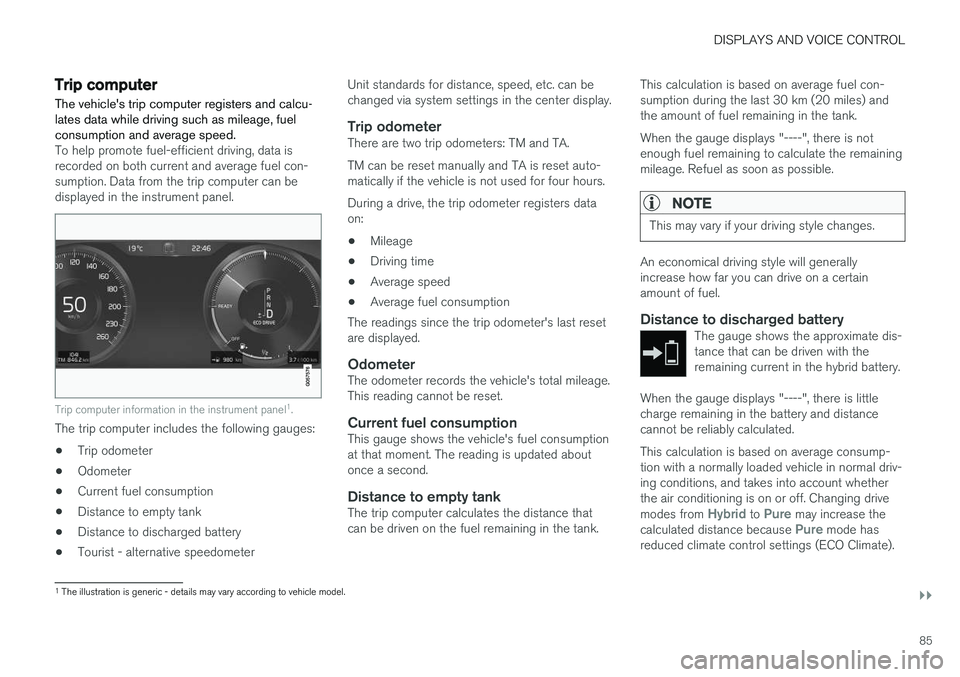
To help promote fuel-efficient driving, data is recorded on both current and average fuel con-sumption. Data from the trip computer can bedisplayed in the instrument panel.
Trip computer information in the instrument panel1
.
The trip computer includes the following gauges:
• Trip odometer
• Odometer
• Current fuel consumption
• Distance to empty tank
• Distance to discharged battery
• Tourist - alternative speedometer Unit standards for distance, speed, etc. can be changed via system settings in the center display.
Trip odometerThere are two trip odometers: TM and TA. TM can be reset manually and TA is reset auto- matically if the vehicle is not used for four hours. During a drive, the trip odometer registers data on:
• Mileage
• Driving time
• Average speed
• Average fuel consumption
The readings since the trip odometer's last resetare displayed.
OdometerThe odometer records the vehicle's total mileage.This reading cannot be reset.
Current fuel consumptionThis gauge shows the vehicle's fuel consumptionat that moment. The reading is updated aboutonce a second.
Distance to empty tankThe trip computer calculates the distance thatcan be driven on the fuel remaining in the tank. This calculation is based on average fuel con-sumption during the last 30 km (20 miles) andthe amount of fuel remaining in the tank. When the gauge displays "----", there is not enough fuel remaining to calculate the remainingmileage. Refuel as soon as possible.
NOTE
This may vary if your driving style changes.
An economical driving style will generally increase how far you can drive on a certainamount of fuel.
Distance to discharged batteryThe gauge shows the approximate dis-tance that can be driven with theremaining current in the hybrid battery.
When the gauge displays "----", there is little charge remaining in the battery and distancecannot be reliably calculated. This calculation is based on average consump- tion with a normally loaded vehicle in normal driv-ing conditions, and takes into account whetherthe air conditioning is on or off. Changing drive modes from
Hybrid to Pure may increase the
calculated distance because Pure mode has
reduced climate control settings (ECO Climate).
1 The illustration is generic - details may vary according to vehicle model.
Page 88 of 674
||
DISPLAYS AND VOICE CONTROL
86
NOTE
This may vary if your driving style changes.
An economical driving style will generally increase how far you can drive on a certainamount of fuel.
Starting values for fully charged hybrid
battery
Because it is difficult to predict driving style and other factors that affect the range of electricmotors, Volvo uses a starting value when thevehicle is fully charged. This starting value pro-vides an "up to" amount instead of a predictionon the range of the electric current in the motor. The difference in starting value between
Hybridand Pure is because the vehicle is permitted to
use more current from the hybrid battery in Puremode, and because the vehicle switches to ECO Climate.
Mileage when using electric motor
To achieve the longest possible mileage when using the electric motor, the driver of an electricvehicle also needs to think about conservingelectricity. The more electricity consumers(stereo, heated windows/mirrors/seats, very coldair from climate control system, etc.) that areactive, the shorter the potential mileage.
NOTE
In addition to high electrical consumption in the passenger compartment, rapid accelera-tion, sudden braking, high speeds, heavyloads, low ambient temperatures and drivingup hills can reduce possible driving distance.
Tourist - alternative speedometerThe alternative digital speedometer makes it eas- ier to drive in countries where speed limit signsare shown in a different measurement unit thanthe one shown in the vehicle's gauges. When used, the digital speed is displayed in the opposite unit to that shown in the analog speed- ometer. If mph is used in the analog speedome-
ter, the equivalent speed in km/h will be shown
in the digital speedometer.
Related information
• Displaying trip data in the instrument panel (p. 86)
• Resetting the trip odometer (p. 87)
• Displaying trip statistics in the center display (p. 88)
• Instrument panel (p. 80)
Displaying trip data in theinstrument panel
Data recorded and calculated by the trip com- puter can be displayed on the instrument panel.
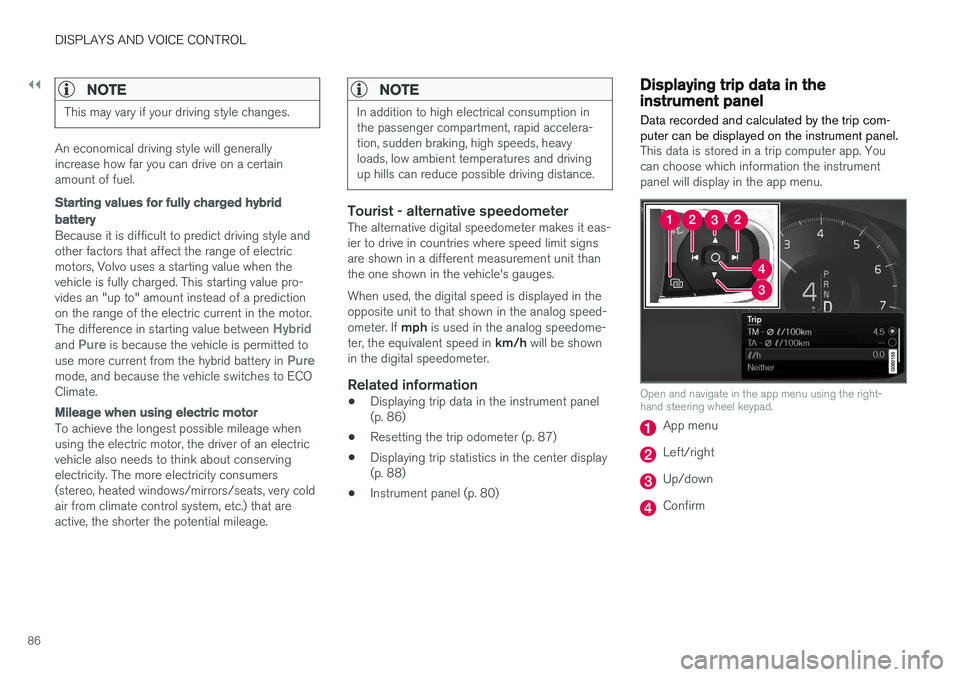
This data is stored in a trip computer app. You can choose which information the instrumentpanel will display in the app menu.
Open and navigate in the app menu using the right- hand steering wheel keypad.
App menu
Left/right
Up/down
Confirm
Page 109 of 674
DISPLAYS AND VOICE CONTROL
* Option/accessory.107
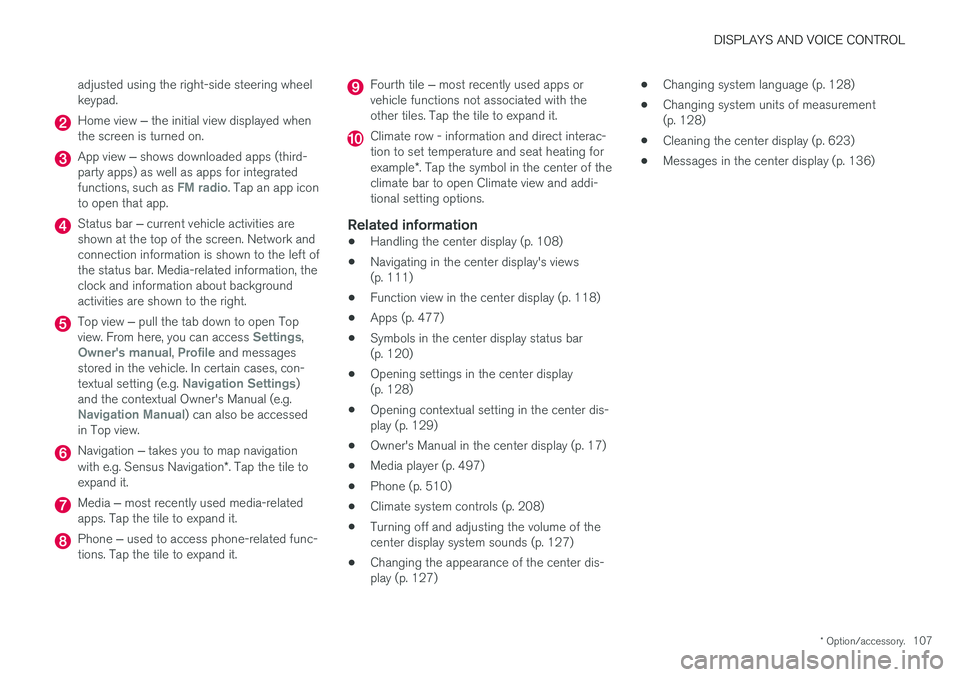
adjusted using the right-side steering wheel keypad.
Home view
‒ the initial view displayed when
the screen is turned on.
App view ‒ shows downloaded apps (third-
party apps) as well as apps for integrated functions, such as
FM radio. Tap an app icon
to open that app.
Status bar ‒ current vehicle activities are
shown at the top of the screen. Network and connection information is shown to the left ofthe status bar. Media-related information, theclock and information about backgroundactivities are shown to the right.
Top view ‒ pull the tab down to open Top
view. From here, you can access Settings,Owner's manual, Profile and messages
stored in the vehicle. In certain cases, con- textual setting (e.g.
Navigation Settings)
and the contextual Owner's Manual (e.g.
Navigation Manual) can also be accessed
in Top view.
Navigation ‒ takes you to map navigation
with e.g. Sensus Navigation *. Tap the tile to
expand it.
Media ‒ most recently used media-related
apps. Tap the tile to expand it.
Phone ‒ used to access phone-related func-
tions. Tap the tile to expand it.
Fourth tile ‒ most recently used apps or
vehicle functions not associated with the other tiles. Tap the tile to expand it.
Climate row - information and direct interac- tion to set temperature and seat heating for example *. Tap the symbol in the center of the
climate bar to open Climate view and addi- tional setting options.
Related information
• Handling the center display (p. 108)
• Navigating in the center display's views(p. 111)
• Function view in the center display (p. 118)
• Apps (p. 477)
• Symbols in the center display status bar(p. 120)
• Opening settings in the center display(p. 128)
• Opening contextual setting in the center dis-play (p. 129)
• Owner's Manual in the center display (p. 17)
• Media player (p. 497)
• Phone (p. 510)
• Climate system controls (p. 208)
• Turning off and adjusting the volume of thecenter display system sounds (p. 127)
• Changing the appearance of the center dis-play (p. 127) •
Changing system language (p. 128)
• Changing system units of measurement(p. 128)
• Cleaning the center display (p. 623)
• Messages in the center display (p. 136)
Page 110 of 674
DISPLAYS AND VOICE CONTROL
* Option/accessory.
108
Handling the center display
Many of the vehicle's functions and features can be controlled and adjusted from the center dis-play. The center display is a touchscreen thatreacts to taps and other gestures.
Using the center display's touchscreenThe touchscreen reacts differently depending on whether the user taps, drags or swipes thescreen. It is possible to e.g. move between differ- ent views, mark objects, scroll in a list and moveapps by touching the screen in various ways. An infrared light curtain just above the surface of the screen enables the screen to detect when afinger is directly in front of the screen. This tech-nology makes it possible to use the screen evenwhile wearing gloves. Two people can interact with the screen at the same time, e.g. to adjust climate system settingsfor both the driver and passenger sides.
CAUTION
Do not use sharp objects on the screen as this could cause scratches.
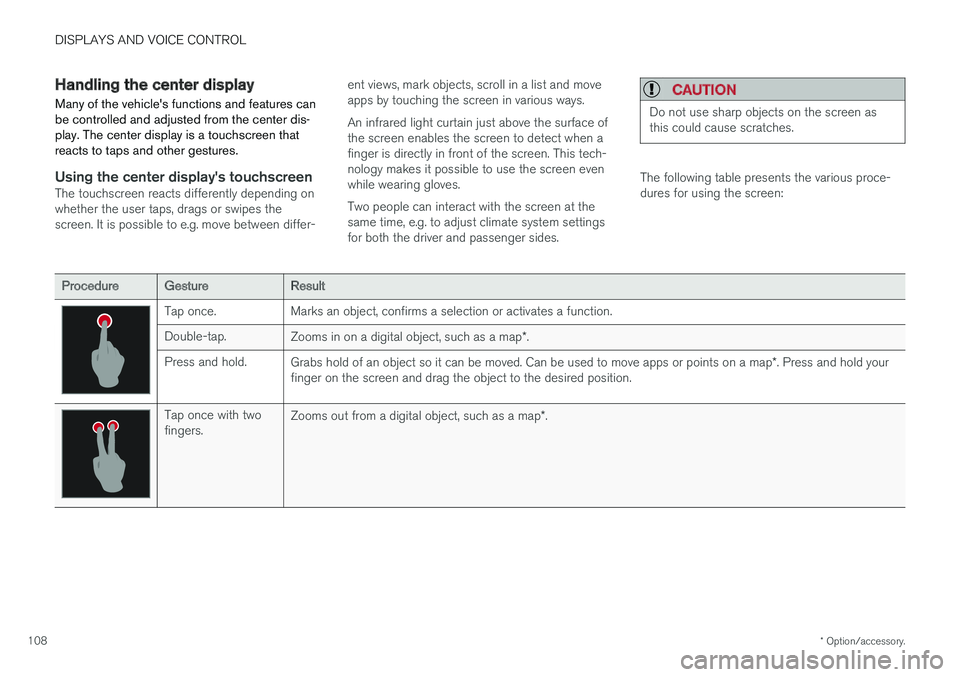
The following table presents the various proce- dures for using the screen:
ProcedureGestureResult
Tap once. Marks an object, confirms a selection or activates a function. Double-tap.
Zooms in on a digital object, such as a map *.
Press and hold. Grabs hold of an object so it can be moved. Can be used to move apps or points on a map *. Press and hold your
finger on the screen and drag the object to the desired position.
Tap once with two fingers. Zooms out from a digital object, such as a map
*.
Page 113 of 674
DISPLAYS AND VOICE CONTROL
}}
* Option/accessory.111
Activating and deactivating thecenter display
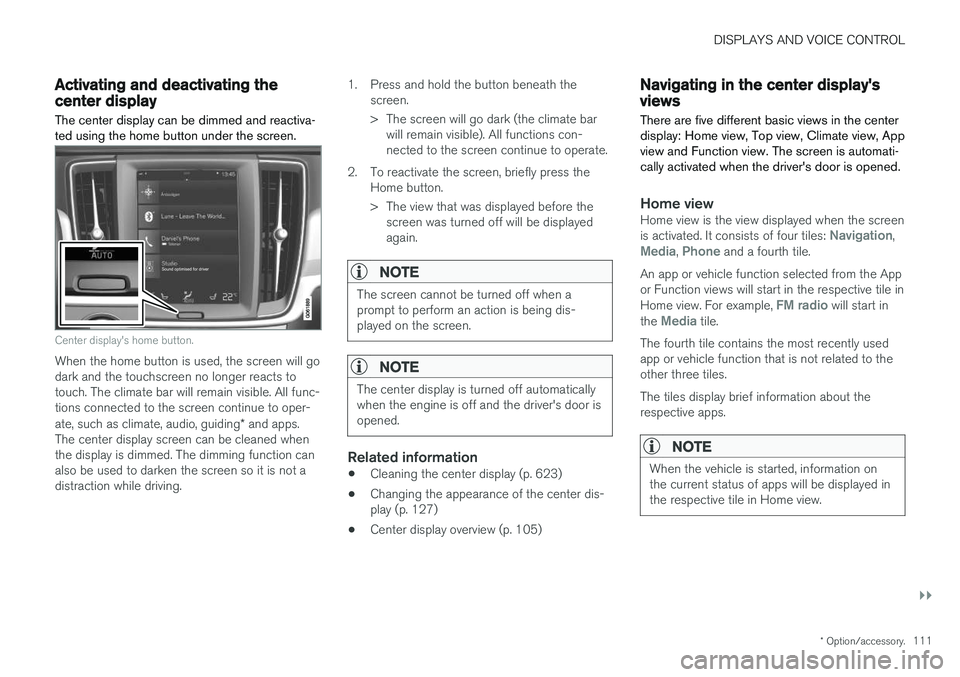
The center display can be dimmed and reactiva- ted using the home button under the screen.
Center display's home button.
When the home button is used, the screen will go dark and the touchscreen no longer reacts totouch. The climate bar will remain visible. All func-tions connected to the screen continue to oper- ate, such as climate, audio, guiding * and apps.
The center display screen can be cleaned when the display is dimmed. The dimming function can also be used to darken the screen so it is not adistraction while driving. 1. Press and hold the button beneath the
screen.
> The screen will go dark (the climate barwill remain visible). All functions con- nected to the screen continue to operate.
2. To reactivate the screen, briefly press the Home button.
> The view that was displayed before thescreen was turned off will be displayed again.
NOTE
The screen cannot be turned off when a prompt to perform an action is being dis-played on the screen.
NOTE
The center display is turned off automatically when the engine is off and the driver's door isopened.
Related information
• Cleaning the center display (p. 623)
• Changing the appearance of the center dis- play (p. 127)
• Center display overview (p. 105)
Navigating in the center display'sviews
There are five different basic views in the center display: Home view, Top view, Climate view, Appview and Function view. The screen is automati-cally activated when the driver's door is opened.
Home viewHome view is the view displayed when the screen is activated. It consists of four tiles: Navigation,Media, Phone and a fourth tile.
An app or vehicle function selected from the App or Function views will start in the respective tile in Home view. For example,
FM radio will start in
the Media tile.
The fourth tile contains the most recently used app or vehicle function that is not related to theother three tiles. The tiles display brief information about the respective apps.
NOTE
When the vehicle is started, information on the current status of apps will be displayed inthe respective tile in Home view.
Page 114 of 674
||
DISPLAYS AND VOICE CONTROL
* Option/accessory.
112
NOTE
In Home view's standard mode – short press on the Home button. An animation describingaccess to the various views is shown on thescreen.
NOTE
When the vehicle is moving:
• Certain functions (e.g. using the center display's keyboard) may be deactivated.
• Certain texts (e.g. those generated byapps) will be shortened to three rows. Tap the
Read out button to have the
entire message read aloud.
• The message will be shortened to one row. Tap the
Read out button to have
the entire message read aloud.
Status barCurrent vehicle activities are shown at the top of the screen in the status bar. Network and con-nection information is shown to the left of thestatus bar. Media-related information, the clockand information about background activities areshown to the right.
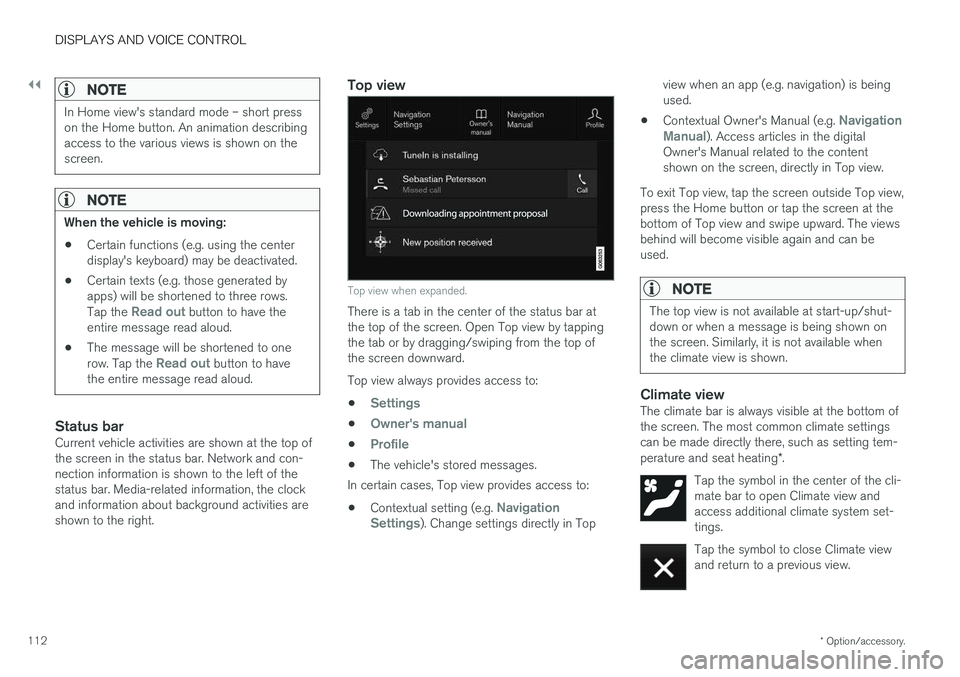
Top view
Top view when expanded.
There is a tab in the center of the status bar at the top of the screen. Open Top view by tappingthe tab or by dragging/swiping from the top ofthe screen downward. Top view always provides access to:
•
Settings
•Owner's manual
•Profile
• The vehicle's stored messages.
In certain cases, Top view provides access to:
• Contextual setting (e.g.
Navigation
Settings). Change settings directly in Top view when an app (e.g. navigation) is being used.
• Contextual Owner's Manual (e.g.
Navigation
Manual). Access articles in the digital
Owner's Manual related to the content shown on the screen, directly in Top view.
To exit Top view, tap the screen outside Top view,press the Home button or tap the screen at thebottom of Top view and swipe upward. The viewsbehind will become visible again and can beused.
NOTE
The top view is not available at start-up/shut- down or when a message is being shown onthe screen. Similarly, it is not available whenthe climate view is shown.
Climate viewThe climate bar is always visible at the bottom of the screen. The most common climate settingscan be made directly there, such as setting tem- perature and seat heating *.
Tap the symbol in the center of the cli- mate bar to open Climate view andaccess additional climate system set-tings.
Tap the symbol to close Climate view and return to a previous view.
Page 116 of 674

||
DISPLAYS AND VOICE CONTROL
114If there are many functions, you can also scroll downward through the view. This is done bysweeping/dragging from the bottom upwards. Unlike in App view, where you tap an app to open it, in Function view, tapping a function activates ordeactivates it. Certain functions (trigger func-tions) open in their own window when tapped. To return to Home view, swipe the screen from right to left
5
or press the Home button.
Related information
• Handling tiles in the center display (p. 115)
• Symbols in the center display status bar (p. 120)
• Opening settings in the center display(p. 128)
• Opening contextual setting in the center dis-play (p. 129)
• Owner's Manual in the center display (p. 17)
• Driver profiles (p. 133)
• Climate system controls (p. 208)
• Apps (p. 477)
• Function view in the center display (p. 118)
• Center display overview (p. 105)
5
Applies for left-hand drive vehicles. For right-hand drive vehicles, swipe in the other direction.
Page 134 of 674
||
DISPLAYS AND VOICE CONTROL
* Option/accessory.
132
Type ofsettingDescription
Slider Select a level for a function by pressing and dragging the slider control, e.g. to set volume level.
Informa-tion dis-play This is not an actual setting, butinstead displays information suchas the vehicle's VIN number.
Related information
•
Center display overview (p. 105)
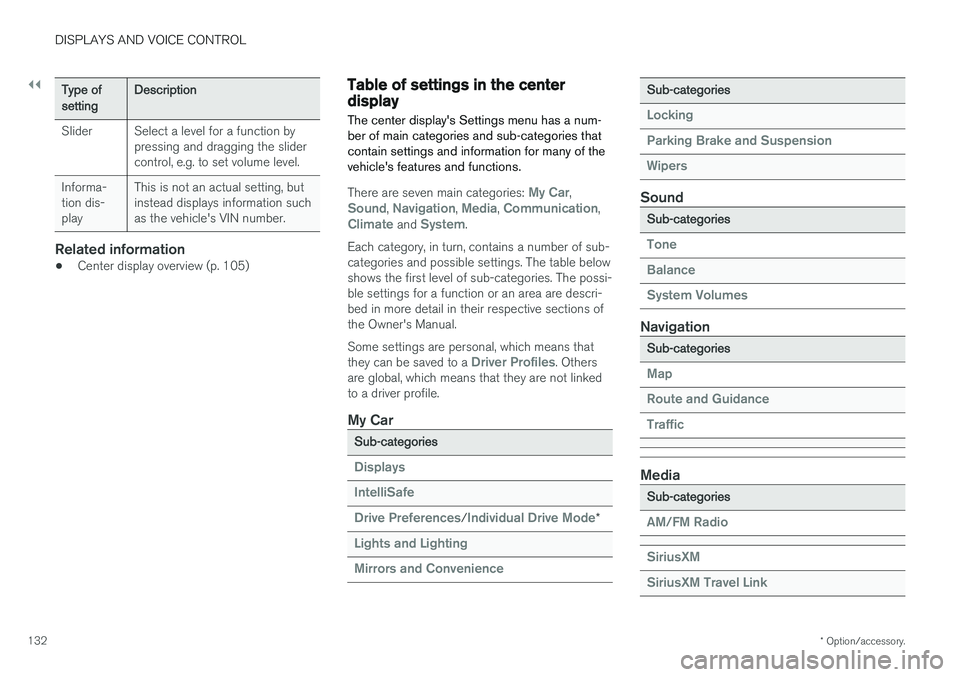
Table of settings in the centerdisplay The center display's Settings menu has a num- ber of main categories and sub-categories thatcontain settings and information for many of thevehicle's features and functions.
There are seven main categories: My Car,Sound, Navigation, Media, Communication,Climate and System.
Each category, in turn, contains a number of sub- categories and possible settings. The table belowshows the first level of sub-categories. The possi-ble settings for a function or an area are descri-bed in more detail in their respective sections ofthe Owner's Manual. Some settings are personal, which means that they can be saved to a
Driver Profiles. Others
are global, which means that they are not linked to a driver profile.
My Car
Sub-categories
Displays IntelliSafe Drive Preferences
/Individual Drive Mode*
Lights and Lighting Mirrors and Convenience
Sub-categories
Locking Parking Brake and SuspensionWipers
Sound
Sub-categories
Tone BalanceSystem Volumes
Navigation
Sub-categories
Map Route and GuidanceTraffic
Media
Sub-categories
AM/FM Radio SiriusXM SiriusXM Travel Link