washer fluid VOLVO XC60 T8 2018 Owner´s Manual
[x] Cancel search | Manufacturer: VOLVO, Model Year: 2018, Model line: XC60 T8, Model: VOLVO XC60 T8 2018Pages: 674, PDF Size: 11.93 MB
Page 16 of 674
14
Touching up minor paint damage635
Color codes 636
Changing rear window wipers 637
Replacing windshield wiper blades 638
Windshield wipers in the service position 639
Filling washer fluid 640
SPECIFICATIONS
Type designations644
Dimensions 647
Weights 649
Towing capacity and tongue weight 650
Engine specifications 651
Engine oil specifications 652
Coolant specifications 653
Transmission fluid specifications 653
Brake fluid specifications 653
Fuel tank volume 654
Air conditioning specifications 654
Approved tire pressure 655
INDEX
Index 657
Page 174 of 674
WINDOWS, GLASS AND MIRRORS
* Option/accessory.
172
Using the windshield wipers
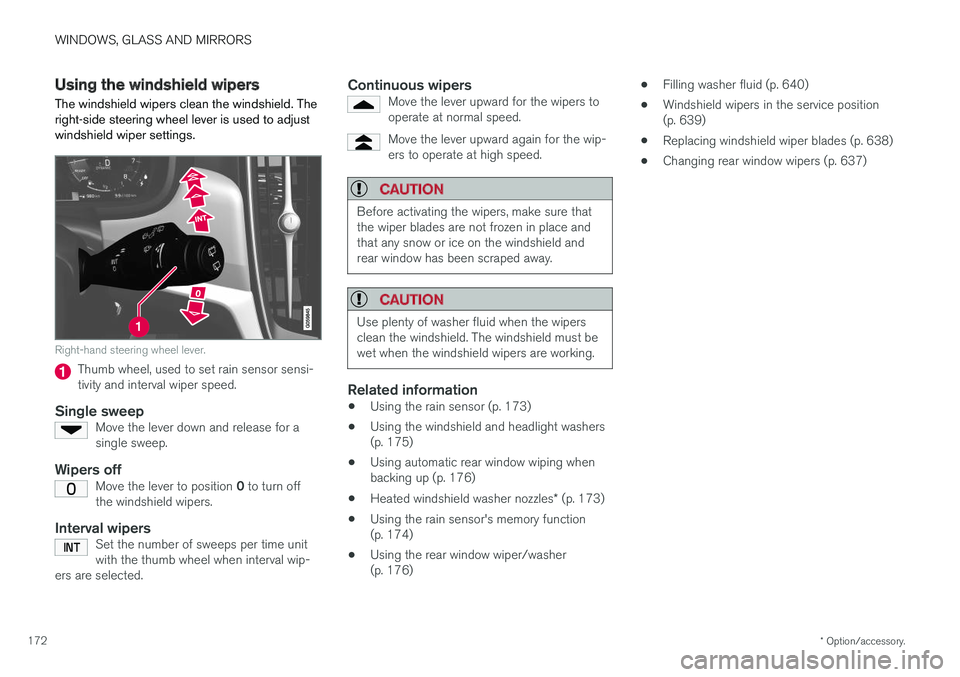
The windshield wipers clean the windshield. The right-side steering wheel lever is used to adjustwindshield wiper settings.
Right-hand steering wheel lever.
Thumb wheel, used to set rain sensor sensi- tivity and interval wiper speed.
Single sweepMove the lever down and release for asingle sweep.
Wipers offMove the lever to position 0 to turn off
the windshield wipers.
Interval wipersSet the number of sweeps per time unit with the thumb wheel when interval wip-
ers are selected.
Continuous wipersMove the lever upward for the wipers to operate at normal speed.
Move the lever upward again for the wip- ers to operate at high speed.
CAUTION
Before activating the wipers, make sure that the wiper blades are not frozen in place andthat any snow or ice on the windshield andrear window has been scraped away.
CAUTION
Use plenty of washer fluid when the wipers clean the windshield. The windshield must bewet when the windshield wipers are working.
Related information
• Using the rain sensor (p. 173)
• Using the windshield and headlight washers (p. 175)
• Using automatic rear window wiping whenbacking up (p. 176)
• Heated windshield washer nozzles
* (p. 173)
• Using the rain sensor's memory function(p. 174)
• Using the rear window wiper/washer(p. 176) •
Filling washer fluid (p. 640)
• Windshield wipers in the service position(p. 639)
• Replacing windshield wiper blades (p. 638)
• Changing rear window wipers (p. 637)
Page 175 of 674
WINDOWS, GLASS AND MIRRORS
}}
* Option/accessory.173
Heated windshield washer nozzles *
The washer nozzles are heated automatically in cold weather to prevent the washer fluid fromfreezing.
Related information
• Using the rain sensor (p. 173)
• Using the windshield and headlight washers (p. 175)
• Using automatic rear window wiping whenbacking up (p. 176)
• Using the rain sensor's memory function(p. 174)
• Using the rear window wiper/washer(p. 176)
• Filling washer fluid (p. 640)
• Windshield wipers in the service position(p. 639)
• Replacing windshield wiper blades (p. 638)
• Changing rear window wipers (p. 637)
• Using the windshield wipers (p. 172)
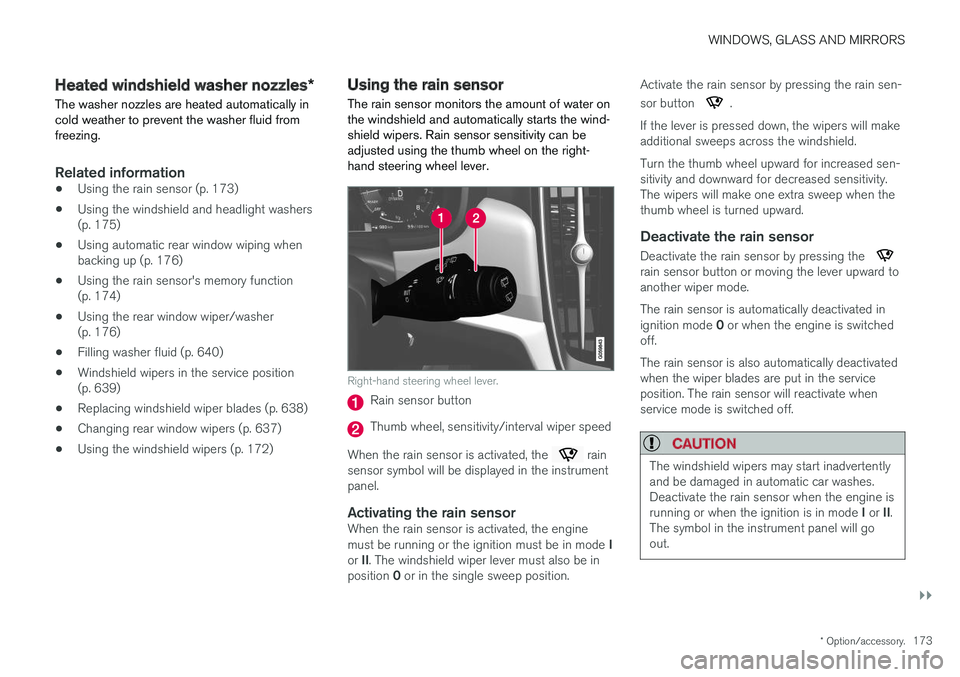
Using the rain sensor The rain sensor monitors the amount of water on the windshield and automatically starts the wind-shield wipers. Rain sensor sensitivity can beadjusted using the thumb wheel on the right-hand steering wheel lever.
Right-hand steering wheel lever.
Rain sensor button
Thumb wheel, sensitivity/interval wiper speed
When the rain sensor is activated, the
rain
sensor symbol will be displayed in the instrument panel.
Activating the rain sensorWhen the rain sensor is activated, the engine must be running or the ignition must be in mode I
or II. The windshield wiper lever must also be in
position 0 or in the single sweep position. Activate the rain sensor by pressing the rain sen- sor button
.
If the lever is pressed down, the wipers will make additional sweeps across the windshield. Turn the thumb wheel upward for increased sen- sitivity and downward for decreased sensitivity.The wipers will make one extra sweep when thethumb wheel is turned upward.
Deactivate the rain sensor
Deactivate the rain sensor by pressing the rain sensor button or moving the lever upward to another wiper mode. The rain sensor is automatically deactivated in ignition mode 0 or when the engine is switched
off. The rain sensor is also automatically deactivated when the wiper blades are put in the serviceposition. The rain sensor will reactivate whenservice mode is switched off.
CAUTION
The windshield wipers may start inadvertently and be damaged in automatic car washes.Deactivate the rain sensor when the engine is running or when the ignition is in mode I or II.
The symbol in the instrument panel will go out.
Page 176 of 674
||
WINDOWS, GLASS AND MIRRORS
* Option/accessory.
174
Related information
• Using the windshield and headlight washers (p. 175)
• Using automatic rear window wiping whenbacking up (p. 176)
• Heated windshield washer nozzles
* (p. 173)
• Using the rain sensor's memory function(p. 174)
• Using the rear window wiper/washer (p. 176)
• Filling washer fluid (p. 640)
• Windshield wipers in the service position (p. 639)
• Replacing windshield wiper blades (p. 638)
• Changing rear window wipers (p. 637)
• Using the windshield wipers (p. 172)
Using the rain sensor's memoryfunction The rain sensor monitors the amount of water on the windshield and automatically starts the wind-shield wipers.
Activating/deactivating memory function
The rain sensor's memory function can be set to activate so that the rain sensor button does notneed to be pressed each time the engine isstarted: 1.
Tap
Settings in the Top view in the center
display.
2. Tap
My CarWipers.
3. Select
Rain Sensor Memory to activate/
deactivate the memory function.
Related information
• Using the rain sensor (p. 173)
• Using the windshield and headlight washers (p. 175)
• Using automatic rear window wiping whenbacking up (p. 176)
• Heated windshield washer nozzles
* (p. 173)
• Using the rear window wiper/washer(p. 176)
• Filling washer fluid (p. 640) •
Windshield wipers in the service position(p. 639)
• Replacing windshield wiper blades (p. 638)
• Changing rear window wipers (p. 637)
• Using the windshield wipers (p. 172)
Page 177 of 674
WINDOWS, GLASS AND MIRRORS
* Option/accessory.175
Using the windshield and headlightwashers
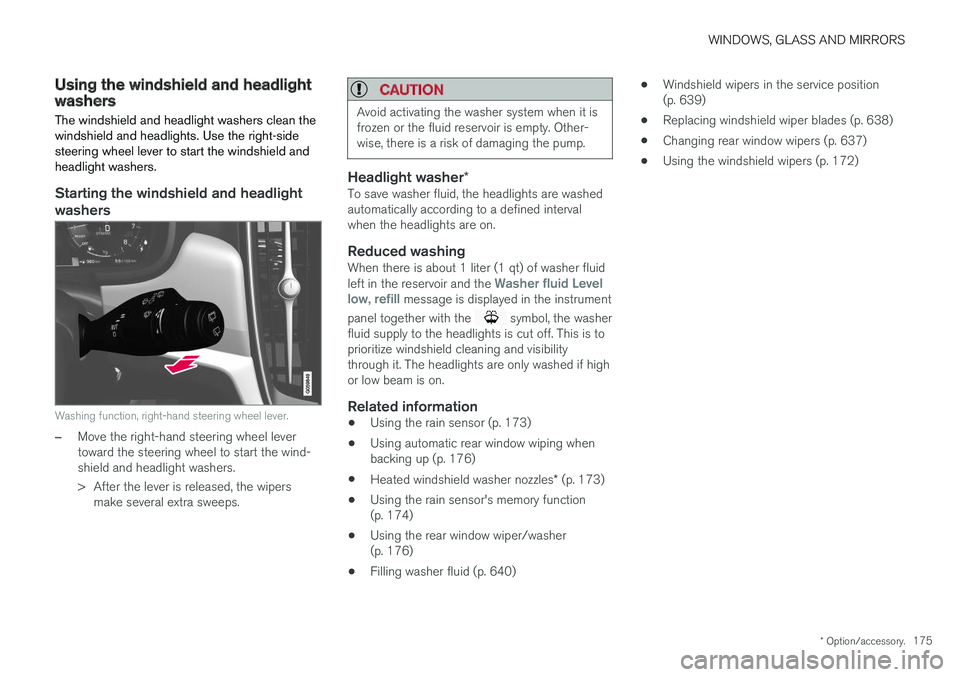
The windshield and headlight washers clean the windshield and headlights. Use the right-sidesteering wheel lever to start the windshield andheadlight washers.
Starting the windshield and headlight washers
Washing function, right-hand steering wheel lever.
–Move the right-hand steering wheel lever toward the steering wheel to start the wind-shield and headlight washers.
> After the lever is released, the wipers make several extra sweeps.
CAUTION
Avoid activating the washer system when it is frozen or the fluid reservoir is empty. Other-wise, there is a risk of damaging the pump.
Headlight washer *To save washer fluid, the headlights are washed automatically according to a defined intervalwhen the headlights are on.
Reduced washingWhen there is about 1 liter (1 qt) of washer fluid left in the reservoir and the Washer fluid Level
low, refill message is displayed in the instrument
panel together with the
symbol, the washer
fluid supply to the headlights is cut off. This is to prioritize windshield cleaning and visibilitythrough it. The headlights are only washed if highor low beam is on.
Related information
• Using the rain sensor (p. 173)
• Using automatic rear window wiping whenbacking up (p. 176)
• Heated windshield washer nozzles
* (p. 173)
• Using the rain sensor's memory function(p. 174)
• Using the rear window wiper/washer(p. 176)
• Filling washer fluid (p. 640) •
Windshield wipers in the service position(p. 639)
• Replacing windshield wiper blades (p. 638)
• Changing rear window wipers (p. 637)
• Using the windshield wipers (p. 172)
Page 178 of 674
WINDOWS, GLASS AND MIRRORS
* Option/accessory.
176
Using the rear window wiper/washer
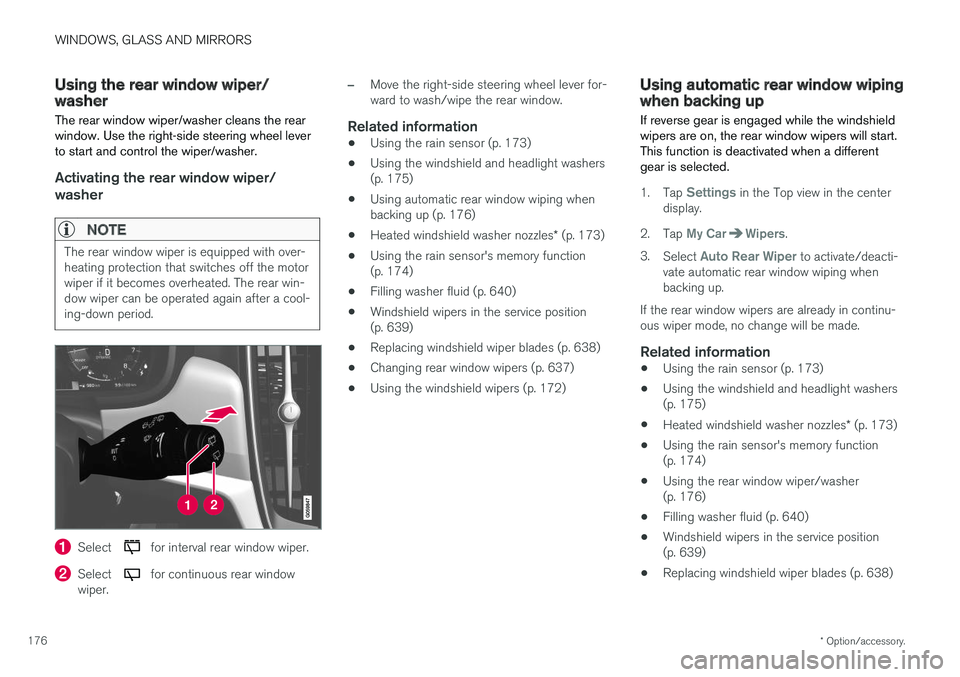
The rear window wiper/washer cleans the rear window. Use the right-side steering wheel leverto start and control the wiper/washer.
Activating the rear window wiper/ washer
NOTE
The rear window wiper is equipped with over- heating protection that switches off the motorwiper if it becomes overheated. The rear win-dow wiper can be operated again after a cool-ing-down period.
Select for interval rear window wiper.
Select for continuous rear window
wiper.
–Move the right-side steering wheel lever for- ward to wash/wipe the rear window.
Related information
• Using the rain sensor (p. 173)
• Using the windshield and headlight washers(p. 175)
• Using automatic rear window wiping whenbacking up (p. 176)
• Heated windshield washer nozzles
* (p. 173)
• Using the rain sensor's memory function(p. 174)
• Filling washer fluid (p. 640)
• Windshield wipers in the service position(p. 639)
• Replacing windshield wiper blades (p. 638)
• Changing rear window wipers (p. 637)
• Using the windshield wipers (p. 172)
Using automatic rear window wipingwhen backing up
If reverse gear is engaged while the windshield wipers are on, the rear window wipers will start.This function is deactivated when a differentgear is selected.
1. Tap Settings in the Top view in the center
display.
2. Tap
My CarWipers.
3. Select
Auto Rear Wiper to activate/deacti-
vate automatic rear window wiping when backing up.
If the rear window wipers are already in continu-ous wiper mode, no change will be made.
Related information
• Using the rain sensor (p. 173)
• Using the windshield and headlight washers(p. 175)
• Heated windshield washer nozzles
* (p. 173)
• Using the rain sensor's memory function(p. 174)
• Using the rear window wiper/washer(p. 176)
• Filling washer fluid (p. 640)
• Windshield wipers in the service position(p. 639)
• Replacing windshield wiper blades (p. 638)
Page 452 of 674
||
STARTING AND DRIVING
450
Charge
Engine charges hybrid battery.
This function charges the hybrid battery with the help ofthe combustion engine forincreased use of the electric
motor at a later time. This function is not availableif the hybrid battery's charge level is already high.
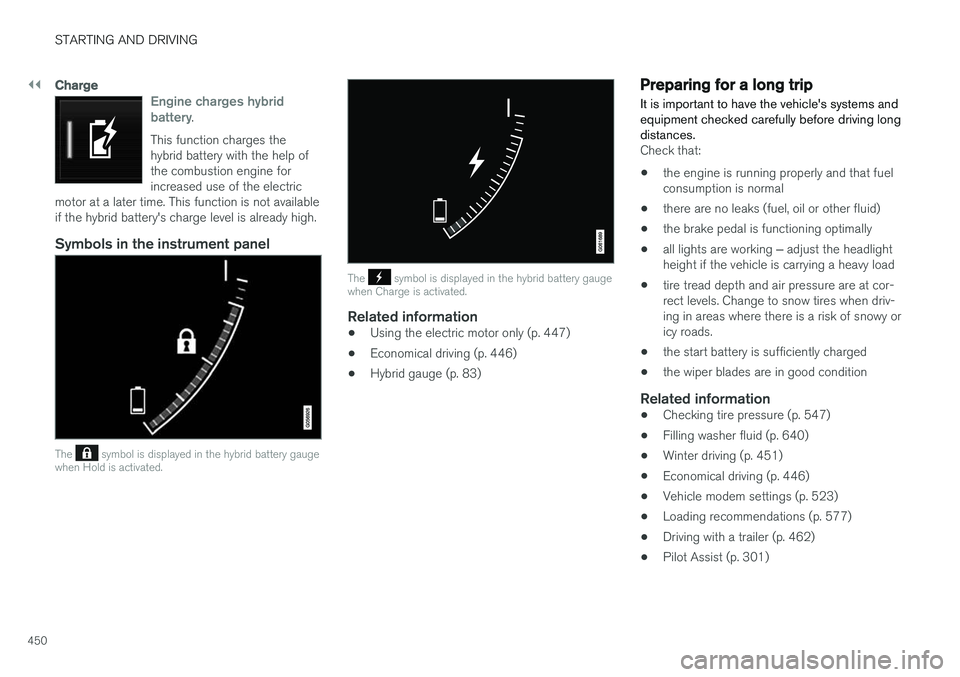
Symbols in the instrument panel
The symbol is displayed in the hybrid battery gauge
when Hold is activated.
The symbol is displayed in the hybrid battery gauge
when Charge is activated.
Related information
• Using the electric motor only (p. 447)
• Economical driving (p. 446)
• Hybrid gauge (p. 83)
Preparing for a long trip
It is important to have the vehicle's systems and equipment checked carefully before driving longdistances.
Check that:
• the engine is running properly and that fuel consumption is normal
• there are no leaks (fuel, oil or other fluid)
• the brake pedal is functioning optimally
• all lights are working
‒ adjust the headlight
height if the vehicle is carrying a heavy load
• tire tread depth and air pressure are at cor-rect levels. Change to snow tires when driv-ing in areas where there is a risk of snowy oricy roads.
• the start battery is sufficiently charged
• the wiper blades are in good condition
Related information
• Checking tire pressure (p. 547)
• Filling washer fluid (p. 640)
• Winter driving (p. 451)
• Economical driving (p. 446)
• Vehicle modem settings (p. 523)
• Loading recommendations (p. 577)
• Driving with a trailer (p. 462)
• Pilot Assist (p. 301)
Page 453 of 674
STARTING AND DRIVING
451
•
Speed limiter (p. 268)
• Tire sealing system (p. 562)
Winter driving
It is important to check the vehicle before driving in cold/snowy conditions to make sure it can bedriven safely.
Before the cold season arrives:
• Make sure the engine coolant contains 50% antifreeze. This mixture helps protect theengine from frost erosion down toapprox. -35 °C (-31 °F). Do not mix differenttypes of antifreeze as this could pose ahealth risk.
• Keep the fuel tank well filled to prevent con-densation from forming.
• Check the viscosity of the engine oil. Oil withlow viscosity (thinner oil) improves cold-weather starting and reduces fuel consump-tion when driving with a cold engine.
CAUTION
Low-viscosity oil should not be used with hard driving or in hot weather.
•
Check the condition and charge level of the start battery. Cold weather places greaterdemands on the start battery and reduces itscapacity.
• Use washer fluid containing antifreeze tohelp prevent ice from forming in the washerfluid reservoir.
Slippery driving conditionsFor optimal traction and roadholding, Volvo rec-ommends using snow tires on all wheels when-ever there is a risk of snow or ice on the road.
NOTE
Certain countries require use of winter tires by law. Not all countries permit the use ofstudded tires.
Practice driving on slippery surfaces under con- trolled conditions to learn how the vehicle reacts.
Related information
•Snow tires (p. 561)
• Snow chains (p. 561)
• Braking on salted roads (p. 421)
• Braking on wet roads (p. 421)
• Filling washer fluid (p. 640)
• Start battery (p. 605)
• Replacing windshield wiper blades (p. 638)
• Changing rear window wipers (p. 637)
• Refilling coolant (p. 602)
Page 601 of 674
MAINTENANCE AND SERVICE
599
Engine compartment overview
This overview shows some service-related com- ponents.
Some of the components included in the vehi- cle's electric drive system are located in theengine compartment. Exercise caution whenaccessing the engine compartment and onlytouch what is required for normal maintenance.
WARNING
Orange wiring may only be handled by quali- fied personnel.
WARNING
Several components in the vehicle work with high voltage that can be hazardous in case ofan incorrect procedure.
• Do not touch anything that is not clearly described in this Owner's Manual.
• Be careful when checking/filling fluids inthe engine compartment.
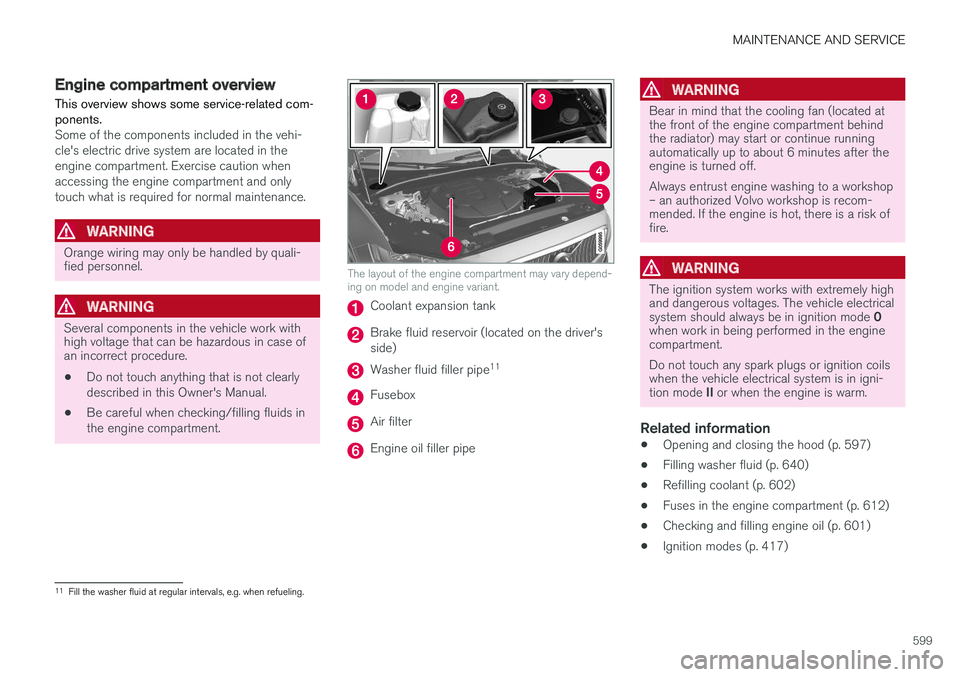
The layout of the engine compartment may vary depend- ing on model and engine variant.
Coolant expansion tank
Brake fluid reservoir (located on the driver's side)
Washer fluid filler pipe 11
Fusebox
Air filter
Engine oil filler pipe
WARNING
Bear in mind that the cooling fan (located at the front of the engine compartment behindthe radiator) may start or continue runningautomatically up to about 6 minutes after theengine is turned off. Always entrust engine washing to a workshop – an authorized Volvo workshop is recom-mended. If the engine is hot, there is a risk offire.
WARNING
The ignition system works with extremely high and dangerous voltages. The vehicle electrical system should always be in ignition mode
0
when work in being performed in the engine compartment. Do not touch any spark plugs or ignition coils when the vehicle electrical system is in igni- tion mode II or when the engine is warm.
Related information
• Opening and closing the hood (p. 597)
• Filling washer fluid (p. 640)
• Refilling coolant (p. 602)
• Fuses in the engine compartment (p. 612)
• Checking and filling engine oil (p. 601)
• Ignition modes (p. 417)
11
Fill the washer fluid at regular intervals, e.g. when refueling.
Page 625 of 674
MAINTENANCE AND SERVICE
}}
623
Cleaning the interiorOnly use cleaning agents and car care products recommended by Volvo. Clean regularly andtreat stains immediately for best results. It isimportant to vacuum before using a cleaningagent.
CAUTION
• Some colored clothing (for example, dark jeans and suede garments) may stain theupholstery. If this occurs, it is important toclean and treat these parts of the uphols-tery as soon as possible.
• Never use strong solvents such aswasher fluid, gasoline, mineral spirit orconcentrated alcohol to clean the interioras this can damage the upholstery aswell as other interior materials.
• Never spray cleaning agent directly ontocomponents that have electrical buttonsand controls. Wipe instead with a dampcloth with cleaning agent.
• Sharp objects and Velcro can damagethe car's textile upholstery.
Related information
• Cleaning the center display (p. 623)
• Cleaning fabric upholstery and ceiling liner (p. 625)
• Cleaning the seat belt (p. 625) •
Cleaning floor mats and inlay mats (p. 625)
• Cleaning leather upholstery (p. 626)
• Cleaning the leather steering wheel(p. 627)
• Cleaning interior plastic, metal and wood sur-faces (p. 628)
Cleaning the center display
Marks, stains, finger smudges etc. on the center display may affect its performance and readabil-ity. Clean the screen regularly with a microfibercloth.
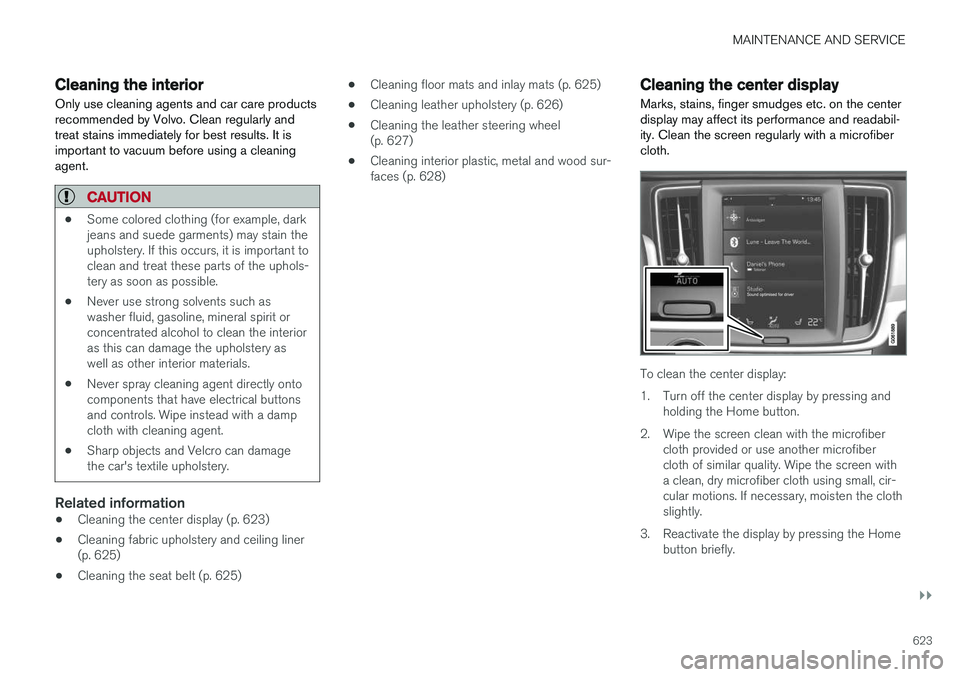
To clean the center display:
1. Turn off the center display by pressing and holding the Home button.
2. Wipe the screen clean with the microfiber cloth provided or use another microfiber cloth of similar quality. Wipe the screen witha clean, dry microfiber cloth using small, cir-cular motions. If necessary, moisten the clothslightly.
3. Reactivate the display by pressing the Home button briefly.