steering VOLVO XC60 TWIN ENGINE 2019 Owners Manual
[x] Cancel search | Manufacturer: VOLVO, Model Year: 2019, Model line: XC60 TWIN ENGINE, Model: VOLVO XC60 TWIN ENGINE 2019Pages: 695, PDF Size: 14.96 MB
Page 333 of 695
DRIVER SUPPORT
* Option/accessory.331
Camera
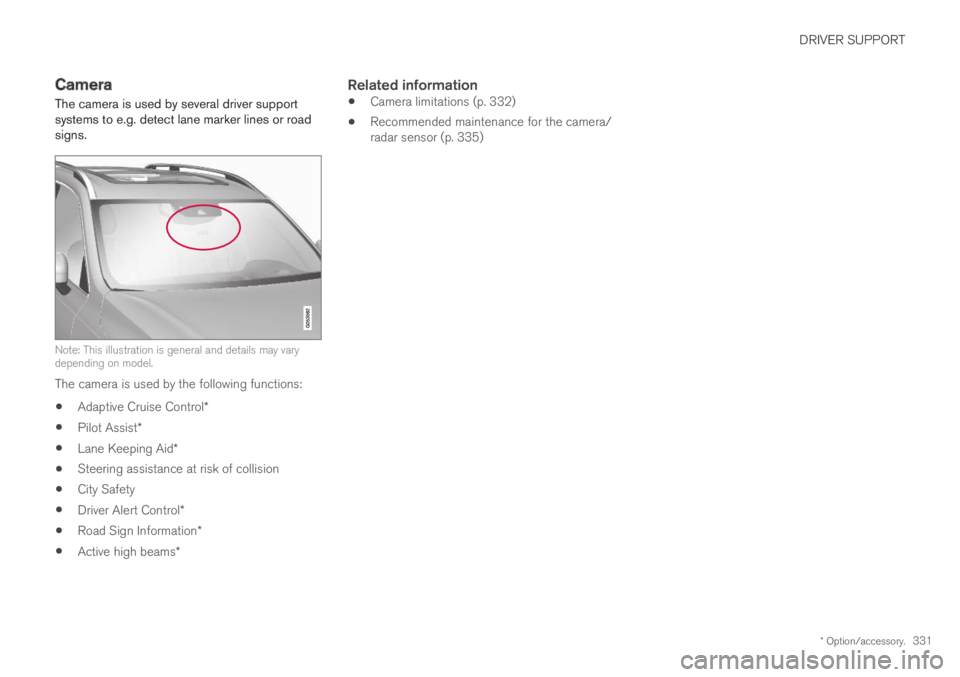
The camera is used by several driver supportsystems to e.g. detect lane marker lines or roadsigns.
Note: This illustration is general and details may varydepending on model.
The camera is used by the following functions:
Adaptive Cruise Control*
Pilot Assist*
Lane Keeping Aid*
Steering assistance at risk of collision
City Safety
Driver Alert Control*
Road Sign Information*
Active high beams*
Related information
Camera limitations (p. 332)
Recommended maintenance for the camera/radar sensor (p. 335)
Page 337 of 695
DRIVER SUPPORT
}}
335
Recommended maintenance for thecamera/radar sensor
In order for the camera/radar sensor to functionproperly, the area of the windshield in front ofthe unit must be kept free of dirt, ice, snow, etc.and should be washed regularly with water andcar washing detergent.
NOTE
Dirt, ice and snow covering the camera andradar unit reduce their function and can makemeasurement impossible.
It could cause functions to be reduced, deac-tivated completely or produce an incorrectfunction response.
Related information
Camera (p. 331)
City Safety™
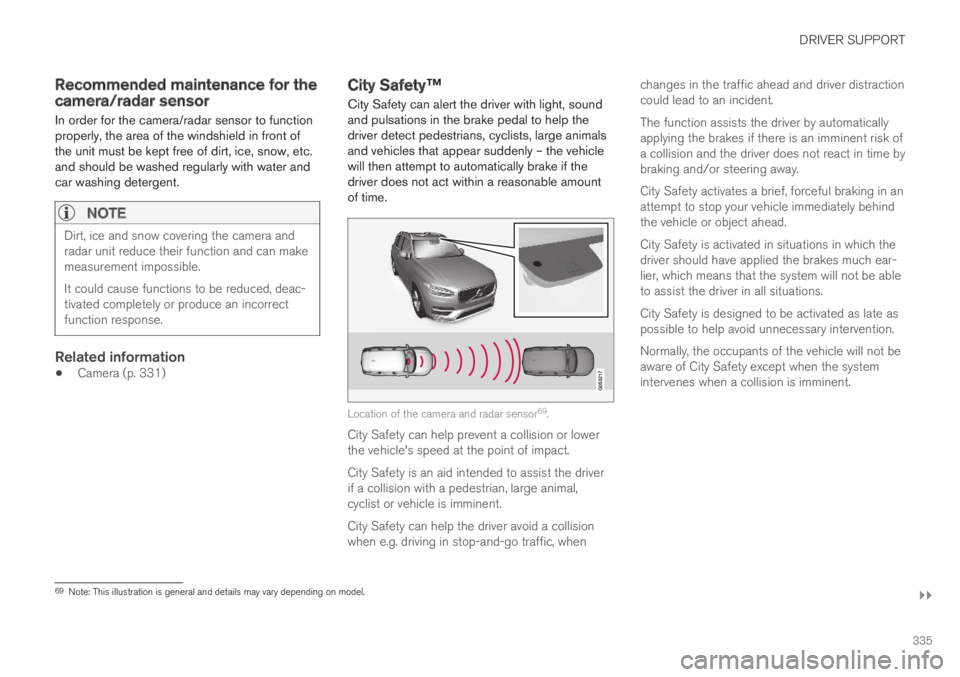
City Safety can alert the driver with light, soundand pulsations in the brake pedal to help thedriver detect pedestrians, cyclists, large animalsand vehicles that appear suddenly – the vehiclewill then attempt to automatically brake if thedriver does not act within a reasonable amountof time.
Location of the camera and radar sensor69.
City Safety can help prevent a collision or lowerthe vehicle's speed at the point of impact.
City Safety is an aid intended to assist the driverif a collision with a pedestrian, large animal,cyclist or vehicle is imminent.
City Safety can help the driver avoid a collisionwhen e.g. driving in stop-and-go traffic, when
changes in the traffic ahead and driver distractioncould lead to an incident.
The function assists the driver by automaticallyapplying the brakes if there is an imminent risk ofa collision and the driver does not react in time bybraking and/or steering away.
City Safety activates a brief, forceful braking in anattempt to stop your vehicle immediately behindthe vehicle or object ahead.
City Safety is activated in situations in which thedriver should have applied the brakes much ear-lier, which means that the system will not be ableto assist the driver in all situations.
City Safety is designed to be activated as late aspossible to help avoid unnecessary intervention.
Normally, the occupants of the vehicle will not beaware of City Safety except when the systemintervenes when a collision is imminent.
69Note: This illustration is general and details may vary depending on model.
Page 338 of 695
||
DRIVER SUPPORT
* Option/accessory.336
WARNING
The City Safety function is supplementarydriver support intended to help improvedriving safety – it cannot handle all situa-tions in all traffic, weather and road condi-tions.
The City Safety auto-brake function canprevent a collision or reduce collisionspeed, but to ensure full brake perform-ance the driver should always depress thebrake pedal – even when the car auto-brakes.
The warning and steering assistance areonly activated if there is a high risk of col-lision – you must therefore never wait forthe collision warning or City Safety tointervene.
Warnings and brake interventions forpedestrians and cyclists are disengagedat vehicle speeds over 80 km/h(50 mph).
City Safety does not activate auto-brakingintervention during heavy acceleration.
City Safety is not a substitute for the driv-er's attention and judgment. The driver isalways responsible for ensuring the vehi-cle is driven in a safe manner, at theappropriate speed, with an appropriatedistance to other vehicles, and in accord-ance with current traffic rules and regula-tions.
The driver is advised to read all sectionsin the Owner's Manual that relate to CitySafety to learn about factors such as itslimitations and what the driver should beaware of before using the system (seethe list of links for all subsections).
Related information
City Safety parameters and sub-functions(p. 336)
Setting a warning distance for City Safety(p. 338)
Detecting obstacles with City Safety (p. 339)
City Safety in crossing traffic (p. 341)
Limitations of City Safety in crossing traffic(p. 342)
City Safety steering assistance for evasivemaneuver (p. 343)
City Safety steering assistance limitationsduring evasive maneuvers (p. 343)
City Safety and delayed evasive maneuvers(p. 344)
City Safety braking for oncoming vehicles*(p. 345)
City Safety limitations (p. 346)
City Safety messages (p. 348)
City Safety parameters and sub-functions
City Safety can help avoid a collision with a vehi-cle, cyclist or large animal ahead by reducing thevehicle's speed using its automatic braking func-tion.
If the difference in speed is greater than thespeeds specified below, the City Safety auto-brake function cannot prevent a collision, but itcan help mitigate its effects.
Vehicles
City Safety can help prevent a collision with avehicle ahead by reducing your vehicle's speedby up to 60 km/h (37 mph).
Cyclists
City Safety can help prevent a collision with acyclist ahead by reducing your vehicle's speed byup to 50 km/h (30 mph).
Pedestrians
City Safety can help prevent a collision with apedestrian ahead by reducing your vehicle'sspeed by up to 45 km/h (28 mph).
Page 345 of 695
DRIVER SUPPORT
343
City Safety steering assistance forevasive maneuver
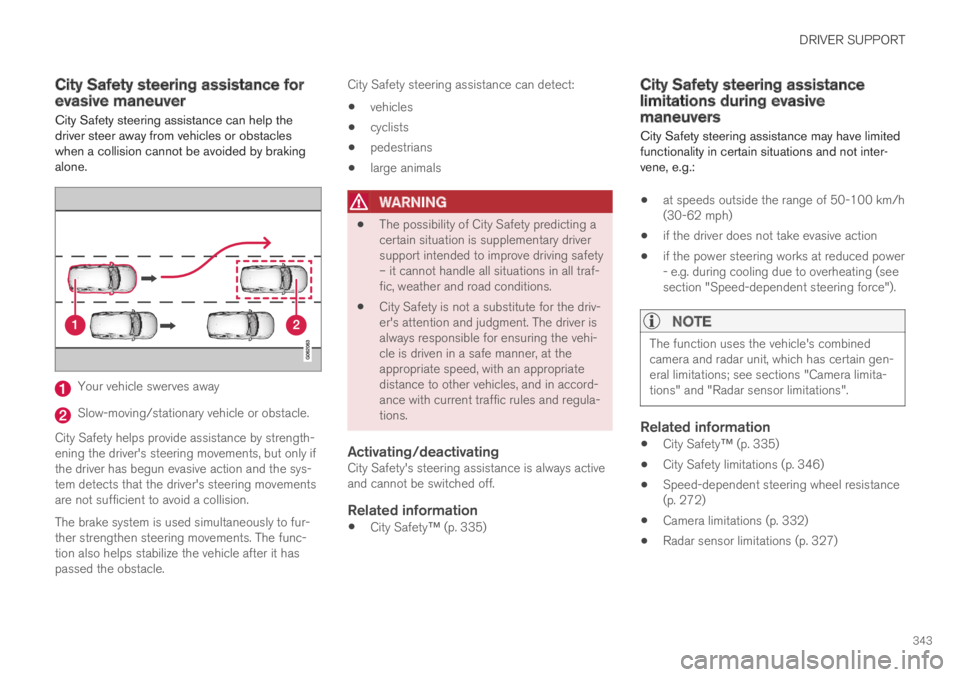
City Safety steering assistance can help thedriver steer away from vehicles or obstacleswhen a collision cannot be avoided by brakingalone.
Your vehicle swerves away
Slow-moving/stationary vehicle or obstacle.
City Safety helps provide assistance by strength-ening the driver's steering movements, but only ifthe driver has begun evasive action and the sys-tem detects that the driver's steering movementsare not sufficient to avoid a collision.
The brake system is used simultaneously to fur-ther strengthen steering movements. The func-tion also helps stabilize the vehicle after it haspassed the obstacle.
City Safety steering assistance can detect:
vehicles
cyclists
pedestrians
large animals
WARNING
The possibility of City Safety predicting acertain situation is supplementary driversupport intended to improve driving safety– it cannot handle all situations in all traf-fic, weather and road conditions.
City Safety is not a substitute for the driv-er's attention and judgment. The driver isalways responsible for ensuring the vehi-cle is driven in a safe manner, at theappropriate speed, with an appropriatedistance to other vehicles, and in accord-ance with current traffic rules and regula-tions.
Activating/deactivating
City Safety's steering assistance is always activeand cannot be switched off.
Related information
City Safety™ (p. 335)
City Safety steering assistancelimitations during evasivemaneuvers
City Safety steering assistance may have limitedfunctionality in certain situations and not inter-vene, e.g.:
at speeds outside the range of 50-100 km/h(30-62 mph)
if the driver does not take evasive action
if the power steering works at reduced power- e.g. during cooling due to overheating (seesection "Speed-dependent steering force").
NOTE
The function uses the vehicle's combinedcamera and radar unit, which has certain gen-eral limitations; see sections "Camera limita-tions" and "Radar sensor limitations".
Related information
City Safety™ (p. 335)
City Safety limitations (p. 346)
Speed-dependent steering wheel resistance(p. 272)
Camera limitations (p. 332)
Radar sensor limitations (p. 327)
Page 346 of 695
DRIVER SUPPORT
344
City Safety and delayed evasivemaneuvers
City Safety can assist the driver by automaticallybraking the vehicle when it is not possible toavoid a collision by steering alone.
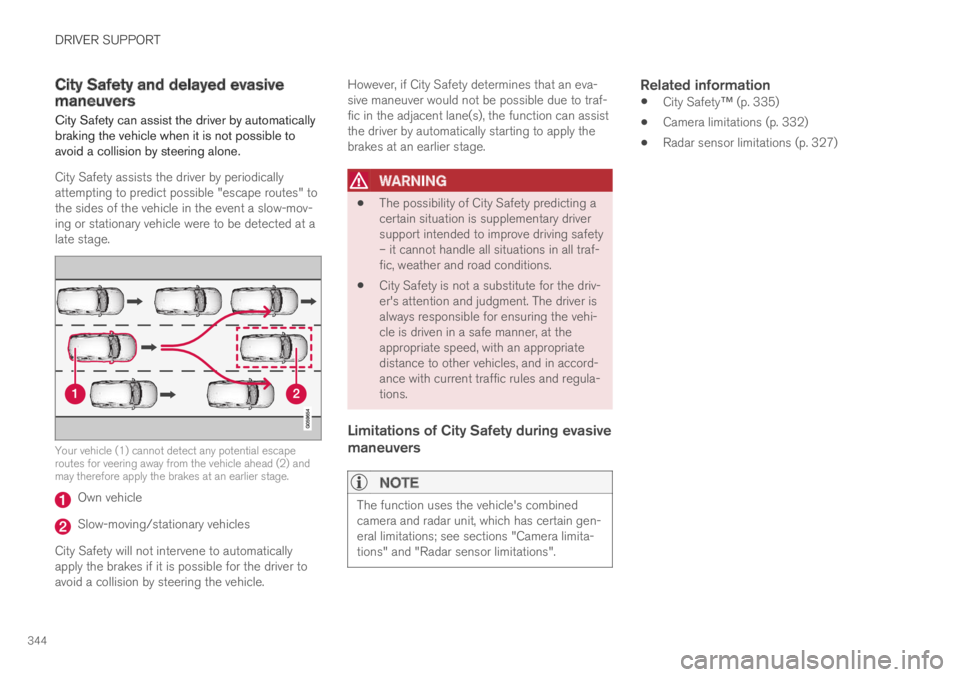
City Safety assists the driver by periodicallyattempting to predict possible "escape routes" tothe sides of the vehicle in the event a slow-mov-ing or stationary vehicle were to be detected at alate stage.
Your vehicle (1) cannot detect any potential escaperoutes for veering away from the vehicle ahead (2) andmay therefore apply the brakes at an earlier stage.
Own vehicle
Slow-moving/stationary vehicles
City Safety will not intervene to automaticallyapply the brakes if it is possible for the driver toavoid a collision by steering the vehicle.
However, if City Safety determines that an eva-sive maneuver would not be possible due to traf-fic in the adjacent lane(s), the function can assistthe driver by automatically starting to apply thebrakes at an earlier stage.
WARNING
The possibility of City Safety predicting acertain situation is supplementary driversupport intended to improve driving safety– it cannot handle all situations in all traf-fic, weather and road conditions.
City Safety is not a substitute for the driv-er's attention and judgment. The driver isalways responsible for ensuring the vehi-cle is driven in a safe manner, at theappropriate speed, with an appropriatedistance to other vehicles, and in accord-ance with current traffic rules and regula-tions.
Limitations of City Safety during evasive
maneuvers
NOTE
The function uses the vehicle's combinedcamera and radar unit, which has certain gen-eral limitations; see sections "Camera limita-tions" and "Radar sensor limitations".
Related information
City Safety™ (p. 335)
Camera limitations (p. 332)
Radar sensor limitations (p. 327)
Page 348 of 695
DRIVER SUPPORT
346
City Safety limitations
City Safety functionality may be reduced in cer-tain situations.
Surroundings
Low objects
Hanging objects, such as flags for overhangingloads or accessories such as auxiliary lights orfront protective grids that extend beyond theheight of the hood, may limit City Safety function-ality.
Slippery road conditions
The extended braking distance on slippery roadsmay reduce City Safety's capacity to help avoid acollision. In these types of situations, the Anti-lock Braking System and Electronic Stability Con-
trol (ESC72) will help provide optimal brakingpower with maintained stability.
Backlighting
The visual warning signal in the windshield maybe difficult to detect in bright sunlight, if there arereflections, or if the driver is wearing sunglassesor not looking straight ahead.
Heat
If the temperature in the passenger compartmentis high due to e.g. bright sunlight, the visual warn-ing signal in the windshield may be temporarilydisabled.
Camera and radar sensor's field of vision
The camera's field of vision is limited and in cer-tain situations, it may be unable to detect pedes-trians, large animals, cyclists or vehicles, or it maydetect them later than expected.
Vehicles that are dirty may be detected later thanclean vehicles, and in dark conditions, motorcy-cles may be detected late or not at all.
If a text message displayed in the instrumentpanel indicates that the camera/radar sensor isobstructed, it may be difficult for City Safety todetect pedestrians, large animals, cyclists, vehi-cles or lane markings in front of the vehicle. CitySafety functionality may therefore be reduced.
Text messages may not be displayed for all situa-tions in which the windshield sensors areblocked. The driver must therefore always keepthe windshield in front of the camera/radar sen-sor clean.
CAUTION
Maintenance and replacement of City Safetycomponents may only be performed by aworkshop – an authorized Volvo workshop isrecommended.
Driver intervention
Backing up
City Safety is temporarily deactivated when thevehicle is backing up.
Low speed
City Safety is not activated at very low speedsunder 4 km/h (3 mph). The system will thereforenot intervene in situations in which your vehicle isapproaching another vehicle very slowly, such aswhen parking.
Active driver
Action by the driver always has priority. CitySafety will therefore not react or will react at alater stage with a warning or intervention in situa-tions in which the driver is clearly steering andoperating the accelerator pedal, even if a collisionis unavoidable.
An active and aware driving style may thereforedelay collision warnings and intervention in orderto minimize unnecessary warnings.
72Electronic Stability Control
Page 350 of 695
DRIVER SUPPORT
348
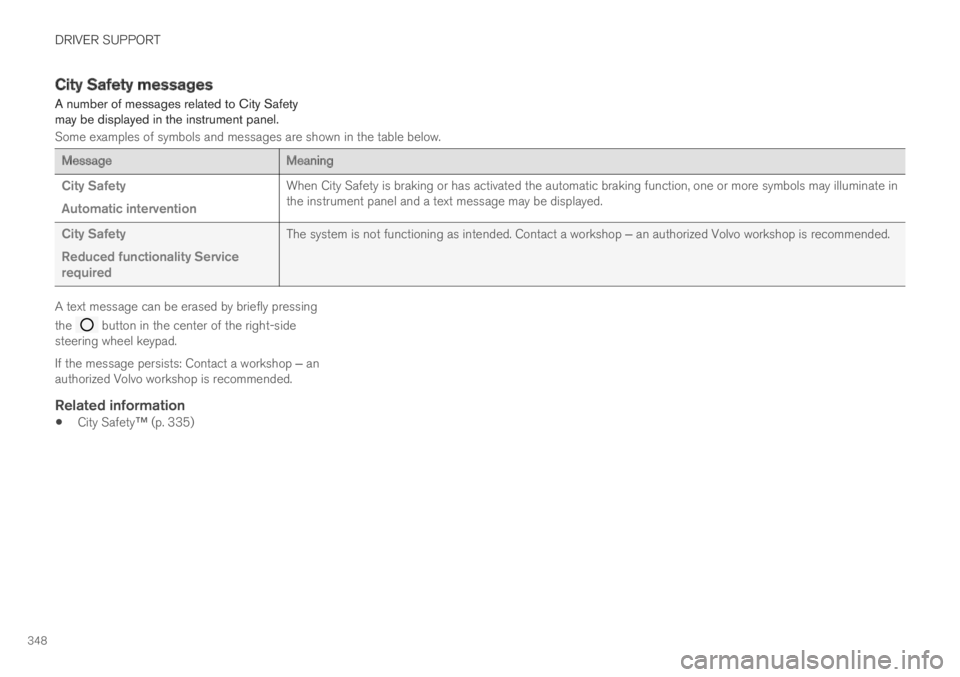
City Safety messages
A number of messages related to City Safetymay be displayed in the instrument panel.
Some examples of symbols and messages are shown in the table below.
MessageMeaning
City Safety
Automatic intervention
When City Safety is braking or has activated the automatic braking function, one or more symbols may illuminate inthe instrument panel and a text message may be displayed.
City Safety
Reduced functionality Servicerequired
The system is not functioning as intended. Contact a workshop ‒ an authorized Volvo workshop is recommended.
A text message can be erased by briefly pressing
the button in the center of the right-sidesteering wheel keypad.
If the message persists: Contact a workshop ‒ anauthorized Volvo workshop is recommended.
Related information
City Safety™ (p. 335)
Page 356 of 695
DRIVER SUPPORT
* Option/accessory.354
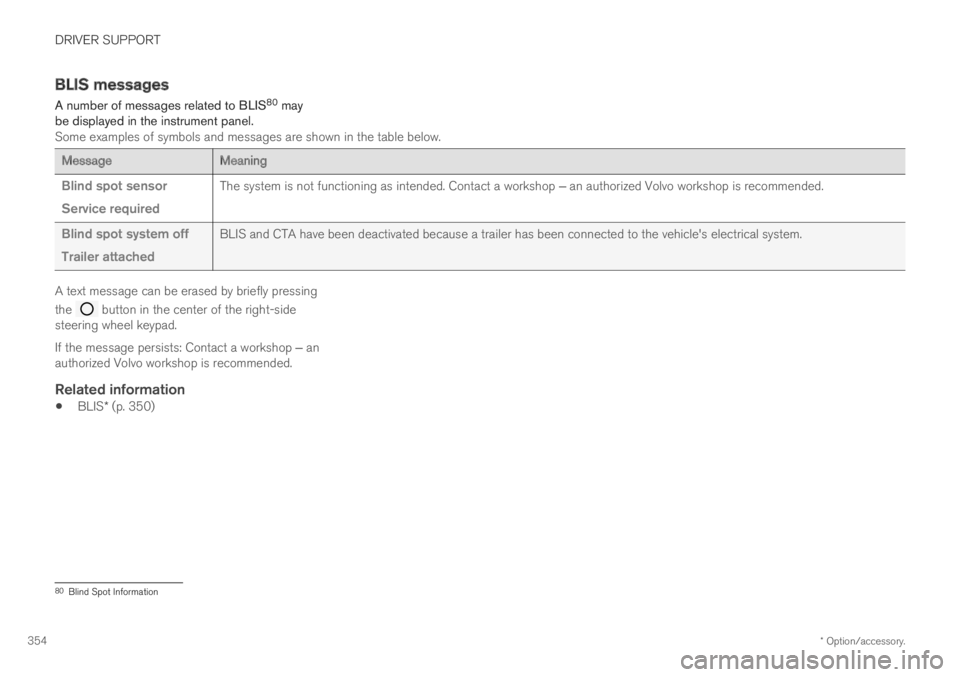
BLIS messages
A number of messages related to BLIS80 maybe displayed in the instrument panel.Some examples of symbols and messages are shown in the table below.
MessageMeaning
Blind spot sensor
Service required
The system is not functioning as intended. Contact a workshop ‒ an authorized Volvo workshop is recommended.
Blind spot system off
Trailer attached
BLIS and CTA have been deactivated because a trailer has been connected to the vehicle's electrical system.
A text message can be erased by briefly pressing
the button in the center of the right-sidesteering wheel keypad.
If the message persists: Contact a workshop ‒ anauthorized Volvo workshop is recommended.
Related information
BLIS* (p. 350)
80Blind Spot Information
Page 360 of 695
DRIVER SUPPORT
* Option/accessory.358
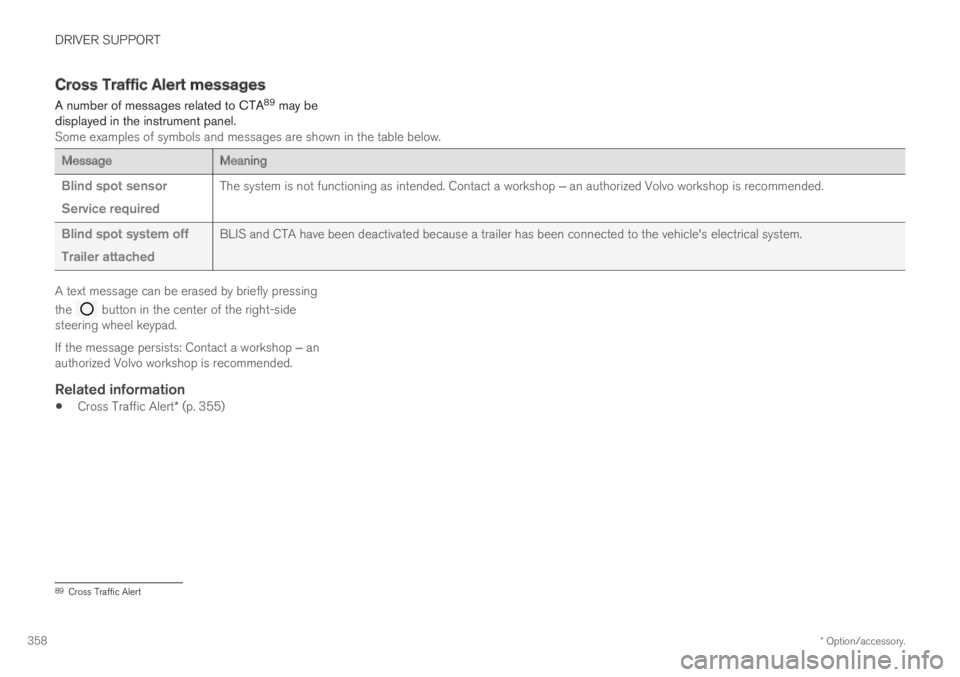
Cross Traffic Alert messages
A number of messages related to CTA89 may bedisplayed in the instrument panel.Some examples of symbols and messages are shown in the table below.
MessageMeaning
Blind spot sensor
Service required
The system is not functioning as intended. Contact a workshop ‒ an authorized Volvo workshop is recommended.
Blind spot system off
Trailer attached
BLIS and CTA have been deactivated because a trailer has been connected to the vehicle's electrical system.
A text message can be erased by briefly pressing
the button in the center of the right-sidesteering wheel keypad.
If the message persists: Contact a workshop ‒ anauthorized Volvo workshop is recommended.
Related information
Cross Traffic Alert* (p. 355)
89Cross Traffic Alert
Page 367 of 695
DRIVER SUPPORT
}}
* Option/accessory.365
NOTE
The function uses the vehicle's camera unit,which has some general limitations – see thesection "Camera unit limitations".
Related information
Road Sign Information* (p. 359)
Camera limitations (p. 332)
Driver Alert Control
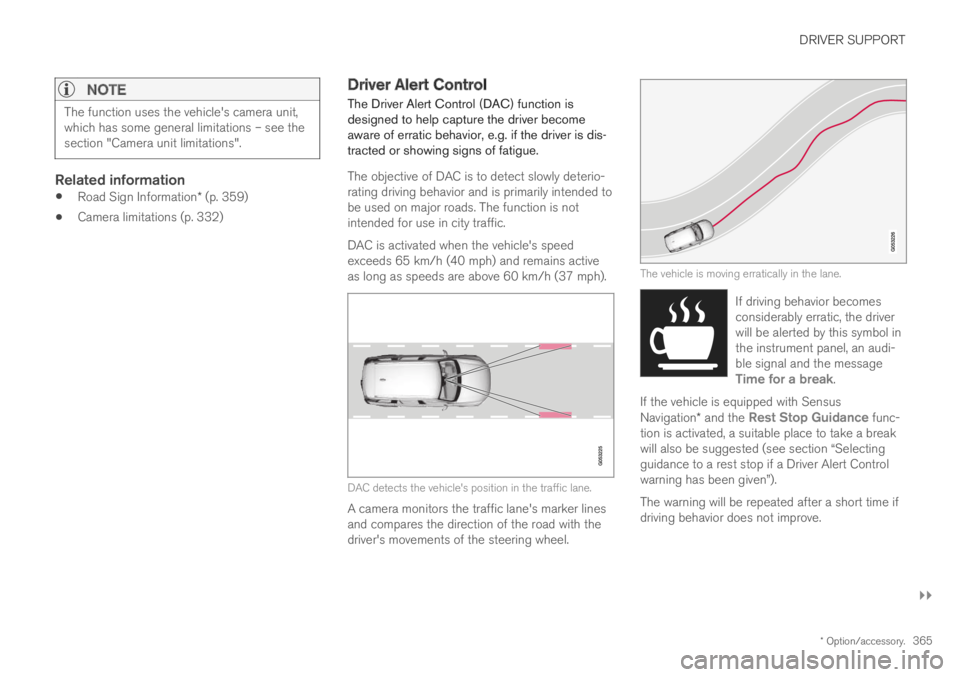
The Driver Alert Control (DAC) function isdesigned to help capture the driver becomeaware of erratic behavior, e.g. if the driver is dis-tracted or showing signs of fatigue.
The objective of DAC is to detect slowly deterio-rating driving behavior and is primarily intended tobe used on major roads. The function is notintended for use in city traffic.
DAC is activated when the vehicle's speedexceeds 65 km/h (40 mph) and remains activeas long as speeds are above 60 km/h (37 mph).
DAC detects the vehicle's position in the traffic lane.
A camera monitors the traffic lane's marker linesand compares the direction of the road with thedriver's movements of the steering wheel.
The vehicle is moving erratically in the lane.
If driving behavior becomesconsiderably erratic, the driverwill be alerted by this symbol inthe instrument panel, an audi-ble signal and the messageTime for a break.
If the vehicle is equipped with SensusNavigation* and the Rest Stop Guidance func-tion is activated, a suitable place to take a breakwill also be suggested (see section “Selectingguidance to a rest stop if a Driver Alert Controlwarning has been given”).
The warning will be repeated after a short time ifdriving behavior does not improve.