steering VOLVO XC60 TWIN ENGINE 2019 Owners Manual
[x] Cancel search | Manufacturer: VOLVO, Model Year: 2019, Model line: XC60 TWIN ENGINE, Model: VOLVO XC60 TWIN ENGINE 2019Pages: 695, PDF Size: 14.96 MB
Page 396 of 695
DRIVER SUPPORT
394
Park Assist Camera trajectory lines
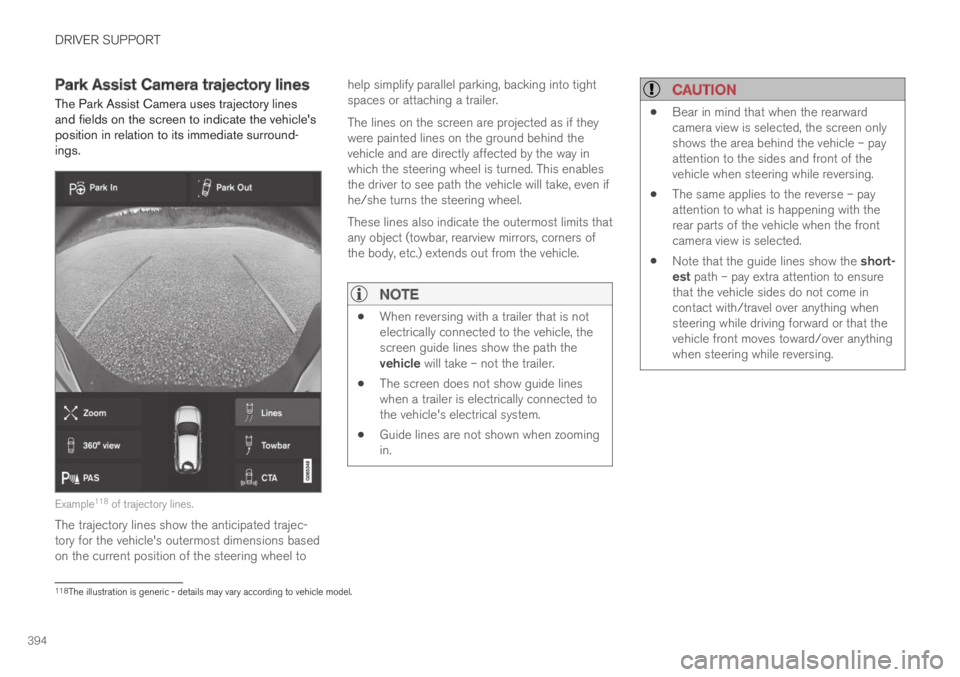
The Park Assist Camera uses trajectory linesand fields on the screen to indicate the vehicle'sposition in relation to its immediate surround-ings.
Example118 of trajectory lines.
The trajectory lines show the anticipated trajec-tory for the vehicle's outermost dimensions basedon the current position of the steering wheel to
help simplify parallel parking, backing into tightspaces or attaching a trailer.
The lines on the screen are projected as if theywere painted lines on the ground behind thevehicle and are directly affected by the way inwhich the steering wheel is turned. This enablesthe driver to see path the vehicle will take, even ifhe/she turns the steering wheel.
These lines also indicate the outermost limits thatany object (towbar, rearview mirrors, corners ofthe body, etc.) extends out from the vehicle.
NOTE
When reversing with a trailer that is notelectrically connected to the vehicle, thescreen guide lines show the path thevehicle will take – not the trailer.
The screen does not show guide lineswhen a trailer is electrically connected tothe vehicle's electrical system.
Guide lines are not shown when zoomingin.
CAUTION
Bear in mind that when the rearwardcamera view is selected, the screen onlyshows the area behind the vehicle – payattention to the sides and front of thevehicle when steering while reversing.
The same applies to the reverse – payattention to what is happening with therear parts of the vehicle when the frontcamera view is selected.
Note that the guide lines show the short-est path – pay extra attention to ensurethat the vehicle sides do not come incontact with/travel over anything whensteering while driving forward or that thevehicle front moves toward/over anythingwhen steering while reversing.
118The illustration is generic - details may vary according to vehicle model.
Page 398 of 695
DRIVER SUPPORT
396
Sensor field from Park Assist forPark Assist Camera
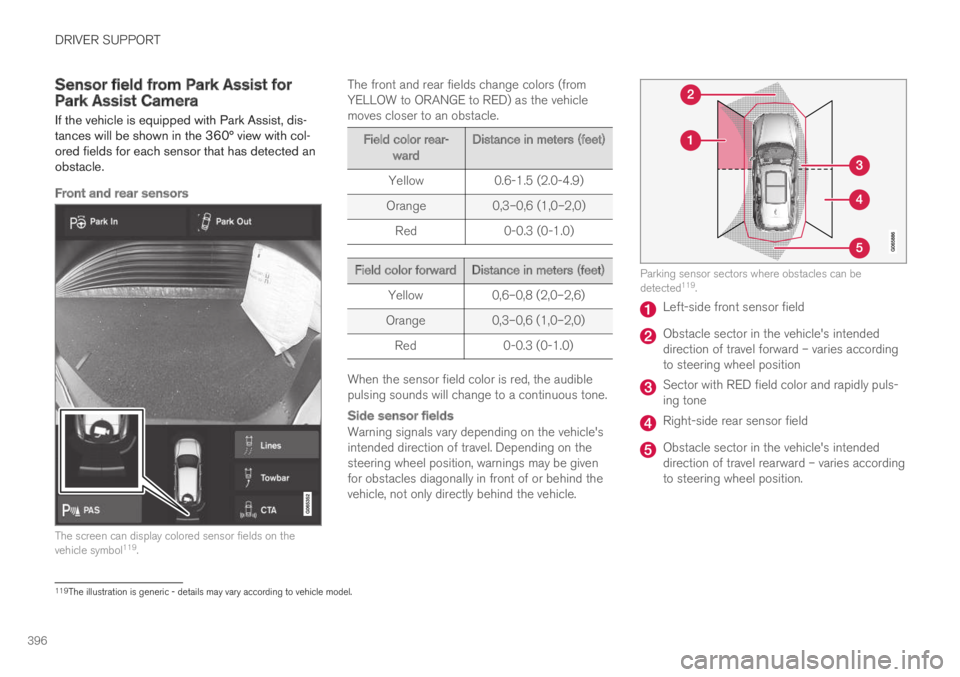
If the vehicle is equipped with Park Assist, dis-tances will be shown in the 360° view with col-ored fields for each sensor that has detected anobstacle.
Front and rear sensors
The screen can display colored sensor fields on thevehicle symbol119.
The front and rear fields change colors (fromYELLOW to ORANGE to RED) as the vehiclemoves closer to an obstacle.
Field color rear-wardDistance in meters (feet)
Yellow0.6-1.5 (2.0-4.9)
Orange0,3–0,6 (1,0–2,0)
Red0-0.3 (0-1.0)
Field color forwardDistance in meters (feet)
Yellow0,6–0,8 (2,0–2,6)
Orange0,3–0,6 (1,0–2,0)
Red0-0.3 (0-1.0)
When the sensor field color is red, the audiblepulsing sounds will change to a continuous tone.
Side sensor fields
Warning signals vary depending on the vehicle'sintended direction of travel. Depending on thesteering wheel position, warnings may be givenfor obstacles diagonally in front of or behind thevehicle, not only directly behind the vehicle.
Parking sensor sectors where obstacles can bedetected119.
Left-side front sensor field
Obstacle sector in the vehicle's intendeddirection of travel forward – varies accordingto steering wheel position
Sector with RED field color and rapidly puls-ing tone
Right-side rear sensor field
Obstacle sector in the vehicle's intendeddirection of travel rearward – varies accordingto steering wheel position.
119The illustration is generic - details may vary according to vehicle model.
Page 402 of 695
DRIVER SUPPORT
* Option/accessory.400
Park Assist Camera symbols andmessages
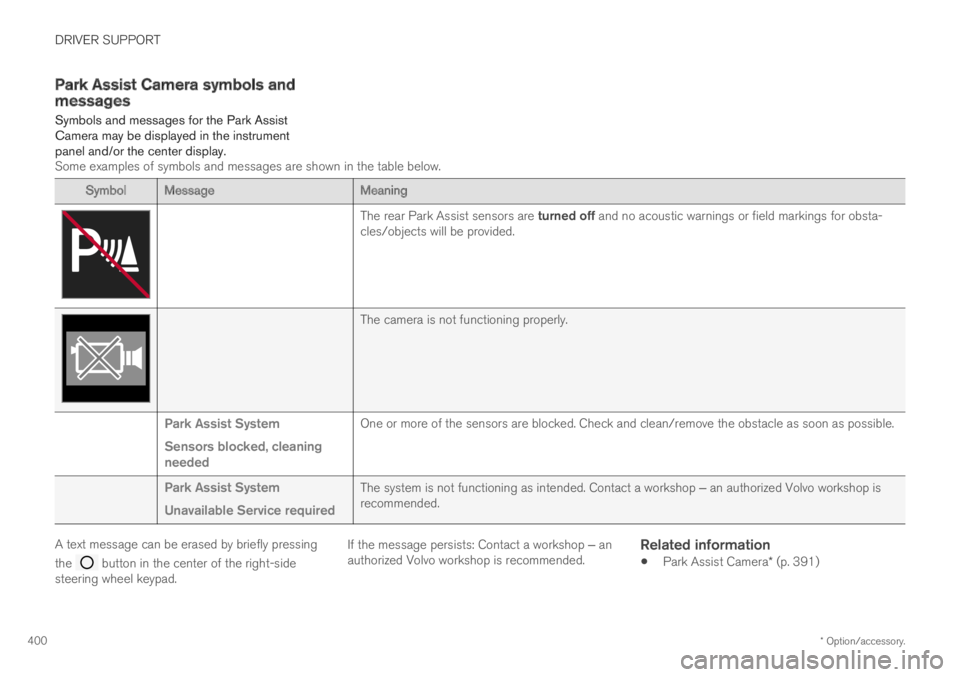
Symbols and messages for the Park AssistCamera may be displayed in the instrumentpanel and/or the center display.Some examples of symbols and messages are shown in the table below.
SymbolMessageMeaning
The rear Park Assist sensors are turned off and no acoustic warnings or field markings for obsta-cles/objects will be provided.
The camera is not functioning properly.
Park Assist System
Sensors blocked, cleaningneeded
One or more of the sensors are blocked. Check and clean/remove the obstacle as soon as possible.
Park Assist System
Unavailable Service required
The system is not functioning as intended. Contact a workshop ‒ an authorized Volvo workshop isrecommended.
A text message can be erased by briefly pressing
the button in the center of the right-sidesteering wheel keypad.
If the message persists: Contact a workshop ‒ anauthorized Volvo workshop is recommended.
Related information
Park Assist Camera* (p. 391)
Page 406 of 695
||
DRIVER SUPPORT
404
1. The vehicle's speed may not exceed30 km/h (20 mph) when parallel parking or20 km/h (12 mph) when perpendicular park-ing.
2.Tap Park In in Function view or in Cameraview.
>PAP will search for a potential parkingspace and measure it to determine if it isbig enough.
3. Be prepared to stop the vehicle when agraphic and message in the center displayindicate that a suitable parking space hasbeen found.
> A pop-up window will appear.
4.Select Parallel parking or Perpendicularparking and engage reverse gear.
NOTE
PAP searches for space for parking, showsinstructions and guides the vehicle on its pas-senger side. But, if so desired the vehicle canbe parked on the driver's side of the street:
Activate the turn signals on the driver'sside – the system will then search forspace to park on that side of the vehicleinstead.
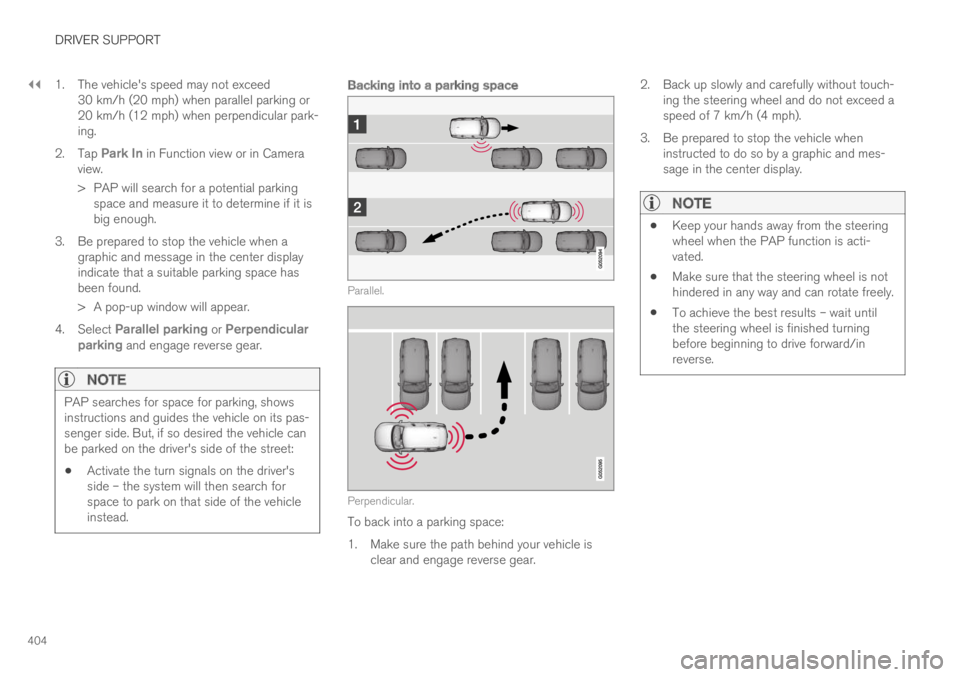
Backing into a parking space
Parallel.
Perpendicular.
To back into a parking space:
1.Make sure the path behind your vehicle isclear and engage reverse gear.
2. Back up slowly and carefully without touch-ing the steering wheel and do not exceed aspeed of 7 km/h (4 mph).
3. Be prepared to stop the vehicle wheninstructed to do so by a graphic and mes-sage in the center display.
NOTE
Keep your hands away from the steeringwheel when the PAP function is acti-vated.
Make sure that the steering wheel is nothindered in any way and can rotate freely.
To achieve the best results – wait untilthe steering wheel is finished turningbefore beginning to drive forward/inreverse.
Page 407 of 695
DRIVER SUPPORT
}}
* Option/accessory.405
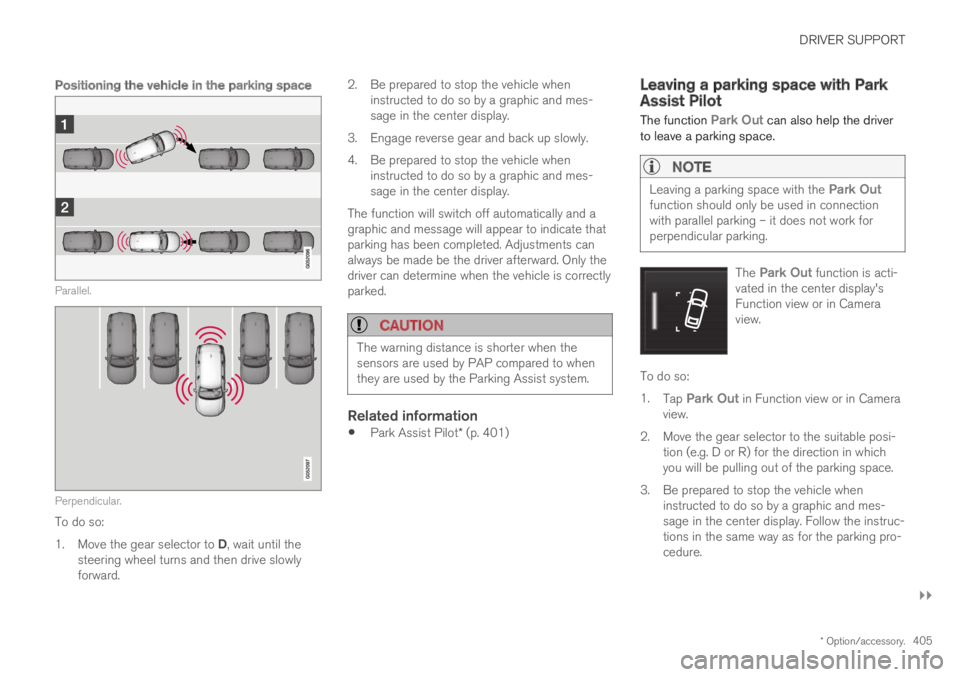
Positioning the vehicle in the parking space
Parallel.
Perpendicular.
To do so:
1.Move the gear selector to D, wait until thesteering wheel turns and then drive slowlyforward.
2.Be prepared to stop the vehicle wheninstructed to do so by a graphic and mes-sage in the center display.
3. Engage reverse gear and back up slowly.
4. Be prepared to stop the vehicle wheninstructed to do so by a graphic and mes-sage in the center display.
The function will switch off automatically and agraphic and message will appear to indicate thatparking has been completed. Adjustments canalways be made be the driver afterward. Only thedriver can determine when the vehicle is correctlyparked.
CAUTION
The warning distance is shorter when thesensors are used by PAP compared to whenthey are used by the Parking Assist system.
Related information
Park Assist Pilot* (p. 401)
Leaving a parking space with ParkAssist Pilot
The function Park Out can also help the driverto leave a parking space.
NOTE
Leaving a parking space with the Park Outfunction should only be used in connectionwith parallel parking – it does not work forperpendicular parking.
The Park Out function is acti-vated in the center display'sFunction view or in Cameraview.
To do so:
1.Tap Park Out in Function view or in Cameraview.
2.Move the gear selector to the suitable posi-tion (e.g. D or R) for the direction in whichyou will be pulling out of the parking space.
3. Be prepared to stop the vehicle wheninstructed to do so by a graphic and mes-sage in the center display. Follow the instruc-tions in the same way as for the parking pro-cedure.
Page 408 of 695
||
DRIVER SUPPORT
* Option/accessory.406
Note that the steering wheel can "spring" backwhen the procedure is completed and the drivermay need to turn the steering wheel back to themaximum position in order to pull out of the park-ing space.
If PAP determines that the driver can pull out ofthe parking space without any extra maneuvers,the function will be deactivated, even if it seemsas though the vehicle is not completely out of theparking space.
Related information
Park Assist Pilot* (p. 401)
Park Assist Pilot* limitations
Park Assist Pilot PAP124 may not be able todetect all conditions in all situations and func-tionality may therefore be limited.
WARNING
The PAP function is supplementary driversupport intended to facilitate driving andhelp make it safer – it cannot handle allsituations in all traffic, weather and roadconditions.
Pay particular attention to people andanimals near the vehicle.
Bear in mind that the front end of thevehicle may swing out towards oncomingtraffic during the parking maneuver.
Objects situated higher than the detec-tion area of the sensors are not includedwhen the parking maneuver is calculated,which could cause PAP to swing into theparking space too early. Such parkingspaces should be avoided for this reason.
PAP is not a substitute for the driver'sattention and judgment. The driver isalways responsible for ensuring the vehi-cle is driven in a safe manner, at theappropriate speed, with an appropriatedistance to other vehicles, and in accord-ance with current traffic rules and regula-tions.
The driver should be aware of the following limi-tations for Park Assist Pilot:
124Park Assist Pilot
Page 409 of 695
DRIVER SUPPORT
}}
407
The parking sequence is cancelled
A parking sequence will be cancelled if:
the driver moves the steering wheel
the vehicle's speed exceeds 7 km/h (4 mph)
the driver taps Cancel in the center display
when the anti-lock brakes or the Electronicstability control are engaged - e.g. when awheel loses grip on a slippery road
when the power steering works at reducedpower - e.g. during cooling due to overheat-ing (see section "Speed-dependent steeringforce").
A message in the center display will explain whythe parking sequence was cancelled.
CAUTION
Under certain circumstances, PAP may not beable to find parking spaces – one reason maybe that the sensors are disrupted by externalsound sources that emit the same ultrasonicfrequencies that the system works with.
Examples of such sources include horns, wettires on asphalt, pneumatic brakes, exhaustnoise from motorcycles, etc.
NOTE
Dirt, ice and snow covering the sensorsreduce their function and can make measure-ment impossible.
Driver responsibility
The driver should keep in mind that PAP is aparking aid ‒ not an infallible fully automatic sys-tem. The driver must always be prepared to takecontrol and cancel a parking sequence if neces-sary.
There are a number of things to keep in mindwhen parking, including:
The driver is always responsible for determin-ing if the space suggested by PAP is suita-ble for parking.
Do not use PAP when using snow chains ora temporary spare tire.
Do not use PAP if there are any objects pro-truding from the vehicle.
Heavy rain or snowfall may inhibit PAP's abil-ity to accurately measure a parking space.
While searching and measuring the parkingspace, PAP may be unable to detect objectslocated far into the space.
PAP may not suggest parking spaces onnarrow streets if it does not detect sufficientspace for maneuvering the vehicle.
Use approved tires125 inflated to the correcttire pressure because this affects PAP's abil-ity to provide parking assistance.
PAP's function is based on the way the vehi-cles are parked behind and in front of yourparking space. If they are, for example,parked too close to the curb, there is a riskthat your vehicle's tires or wheel rims couldbe damaged by the curb during the parkingprocedure.
Perpendicular parking spaces may not bedetected or may be suggested unnecessarilyif a parked vehicle is sticking out more thanother parked vehicles.
PAP is intended to provide parking assis-tance on straight streets, not sections ofstreet with sharp curves or bends. Alwaysmake sure that your vehicle is parallel to rel-evant parking spaces when PAP is measur-ing the parking space.
CAUTION
Switching to another approved wheel and/ortire dimension could change the tire circum-ference, which would then require the PAPsystem to be updated. Consult a workshop –an authorized Volvo workshop is recom-mended.
125"Approved tires" refers to tires of the same type and make as the vehicle's original, factory-installed tires.
Page 410 of 695
||
DRIVER SUPPORT
* Option/accessory.408
Related information
Park Assist Pilot* (p. 401)
Parking with Park Assist Pilot (p. 403)
Speed-dependent steering wheel resistance(p. 272)
Recommended maintenance forPark Assist Pilot
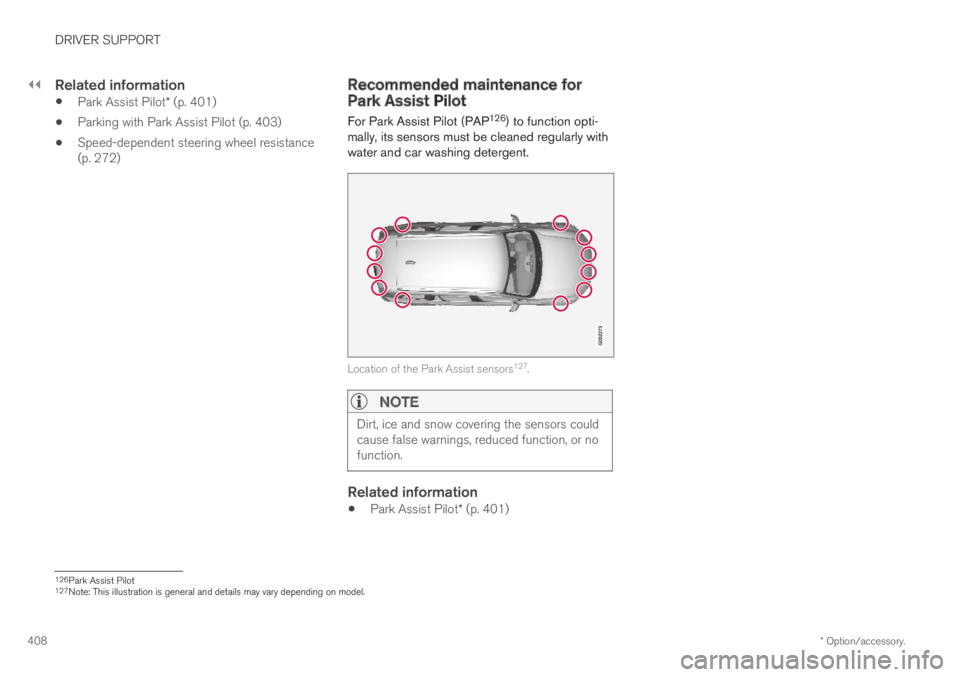
For Park Assist Pilot (PAP126) to function opti-mally, its sensors must be cleaned regularly withwater and car washing detergent.
Location of the Park Assist sensors127.
NOTE
Dirt, ice and snow covering the sensors couldcause false warnings, reduced function, or nofunction.
Related information
Park Assist Pilot* (p. 401)
126Park Assist Pilot127Note: This illustration is general and details may vary depending on model.
Page 411 of 695
DRIVER SUPPORT
* Option/accessory.409
Park Assist Pilot* messages
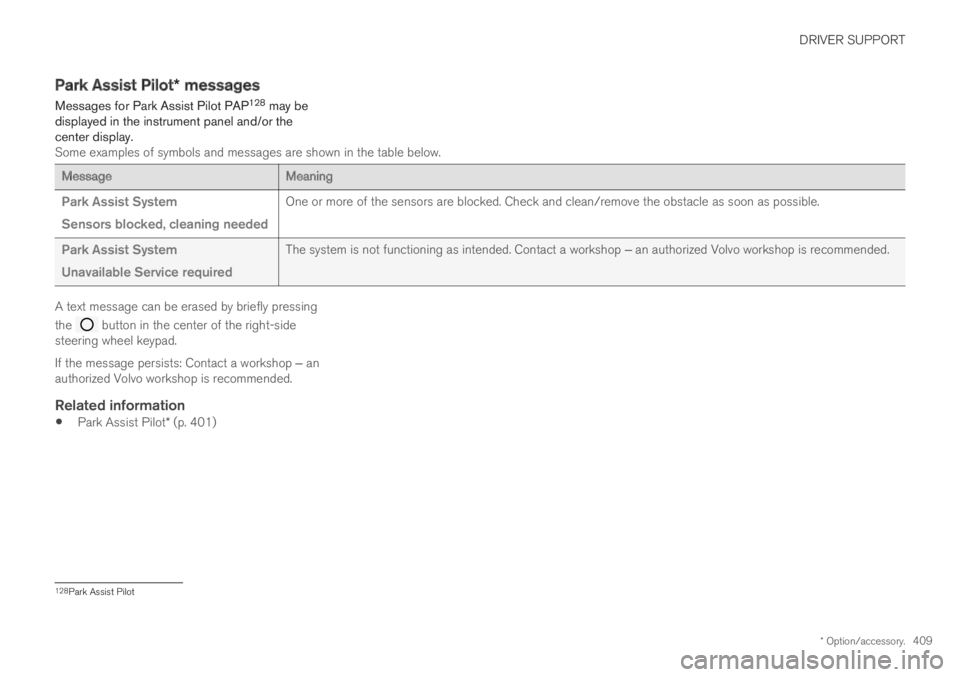
Messages for Park Assist Pilot PAP128 may bedisplayed in the instrument panel and/or thecenter display.Some examples of symbols and messages are shown in the table below.
MessageMeaning
Park Assist System
Sensors blocked, cleaning needed
One or more of the sensors are blocked. Check and clean/remove the obstacle as soon as possible.
Park Assist System
Unavailable Service required
The system is not functioning as intended. Contact a workshop ‒ an authorized Volvo workshop is recommended.
A text message can be erased by briefly pressing
the button in the center of the right-sidesteering wheel keypad.
If the message persists: Contact a workshop ‒ anauthorized Volvo workshop is recommended.
Related information
Park Assist Pilot* (p. 401)
128Park Assist Pilot
Page 414 of 695
HYBRID INFORMATION
412
General information about TwinEngine
Twin Engine vehicles are driven just like anyother vehicle, but certain functions differ from avehicle powered exclusively by gasoline. Theelectric motor powers the vehicle primarily at lowspeeds; the gasoline engine is used at higherspeeds or during more active driving.
The instrument panel displays Twin Engine-spe-cific information - charging information, selecteddrive mode, distance to discharged battery andhybrid battery charge level.
Different drive modes can be selected while driv-ing, e.g. electric power only or, if more power isneeded, a combination of electric and gasolinepower. The vehicle calculates the optimal combi-nation of driveability, driving experience, environ-mental impact and fuel economy for the selecteddrive mode.
In order to function optimally, the hybrid battery(and its electrical drive systems) and the gasolineengine (and its drive systems) must be at thecorrect operating temperature. Battery capacitycan be considerably reduced if the battery is toocold or too hot. Preconditioning prepares thevehicle's drive systems and passenger compart-ment before driving to help reduce both wear andenergy consumption. It also helps increase thehybrid battery's range.
The hybrid battery which powers the electricmotor is recharged using the charging cable. It
can also be recharged during light braking andthrough engine braking in gear position B. Thecombustion engine can also help recharge thehybrid battery.
Important
No electrical current
Keep in mind that if there is no electrical currentto the vehicle, i.e. the ignition is switched off orthe start battery is discharged, certain functionssuch as brakes, power steering, etc. will not work.
WARNING
If the vehicle does not have electrical currentand both the electric motor and the gasolineengine are switched off, the brakes cannot beused to stop the vehicle.
Towing not permitted
Never tow a Twin Engine vehicle behind anothervehicle, as this could damage the electric motor.
Exterior engine noise
WARNING
Please be aware that there is no sound fromthe engine when the vehicle is being poweredby the electric motor and it may be difficult todetect by children, pedestrians, cyclists andanimals. This is especially true at low speeds.
High-voltage electrical current
WARNING
A number of electrical components in TwinEngine Plug-in Hybrid vehicles use high-volt-age current and can be extremely dangerousif handled incorrectly. These components andany orange wiring in the vehicle may only behandled by trained and qualified Volvo servicetechnicians.
Do not touch anything that is not clearly descri-bed in this Owner's Manual.
Related information
Charging the hybrid battery (p. 413)
Hybrid gauge (p. 87)
Drive modes (p. 450)
Starting and stopping preconditioning(p. 226)
Hybrid battery (p. 629)
Factors affecting electric motor range(p. 465)