wheel VOLVO XC60 TWIN ENGINE 2019 Owners Manual
[x] Cancel search | Manufacturer: VOLVO, Model Year: 2019, Model line: XC60 TWIN ENGINE, Model: VOLVO XC60 TWIN ENGINE 2019Pages: 695, PDF Size: 14.96 MB
Page 350 of 695
DRIVER SUPPORT
348
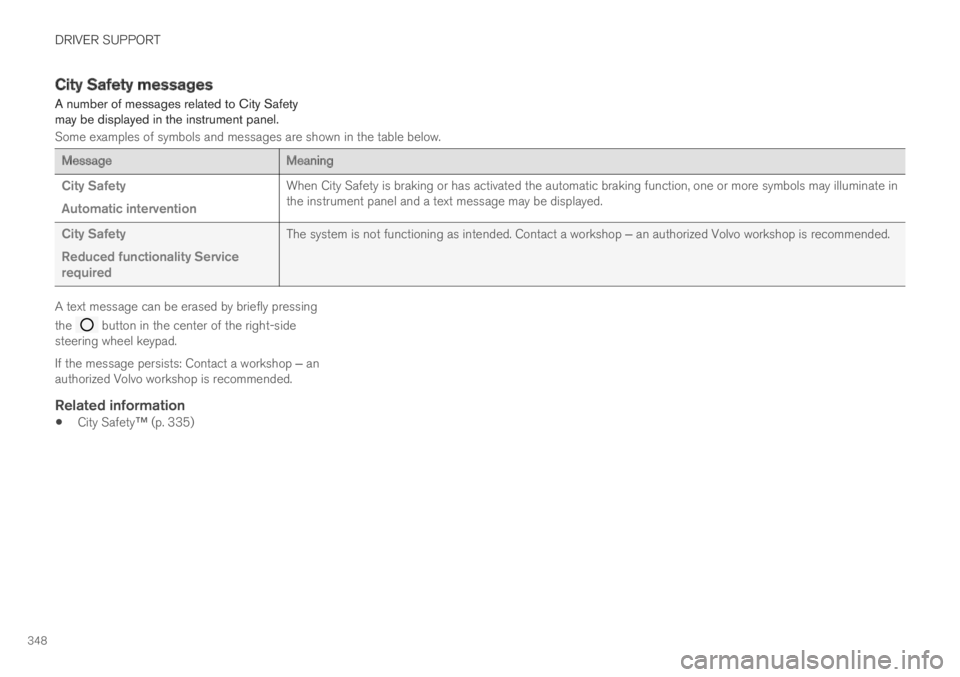
City Safety messages
A number of messages related to City Safetymay be displayed in the instrument panel.
Some examples of symbols and messages are shown in the table below.
MessageMeaning
City Safety
Automatic intervention
When City Safety is braking or has activated the automatic braking function, one or more symbols may illuminate inthe instrument panel and a text message may be displayed.
City Safety
Reduced functionality Servicerequired
The system is not functioning as intended. Contact a workshop ‒ an authorized Volvo workshop is recommended.
A text message can be erased by briefly pressing
the button in the center of the right-sidesteering wheel keypad.
If the message persists: Contact a workshop ‒ anauthorized Volvo workshop is recommended.
Related information
City Safety™ (p. 335)
Page 356 of 695
DRIVER SUPPORT
* Option/accessory.354
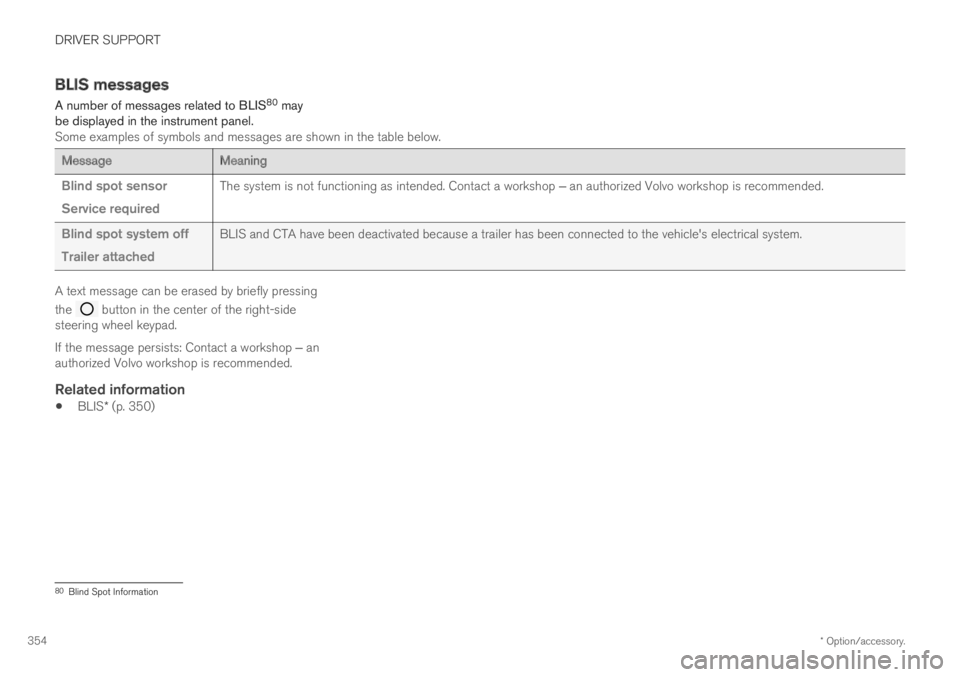
BLIS messages
A number of messages related to BLIS80 maybe displayed in the instrument panel.Some examples of symbols and messages are shown in the table below.
MessageMeaning
Blind spot sensor
Service required
The system is not functioning as intended. Contact a workshop ‒ an authorized Volvo workshop is recommended.
Blind spot system off
Trailer attached
BLIS and CTA have been deactivated because a trailer has been connected to the vehicle's electrical system.
A text message can be erased by briefly pressing
the button in the center of the right-sidesteering wheel keypad.
If the message persists: Contact a workshop ‒ anauthorized Volvo workshop is recommended.
Related information
BLIS* (p. 350)
80Blind Spot Information
Page 360 of 695
DRIVER SUPPORT
* Option/accessory.358
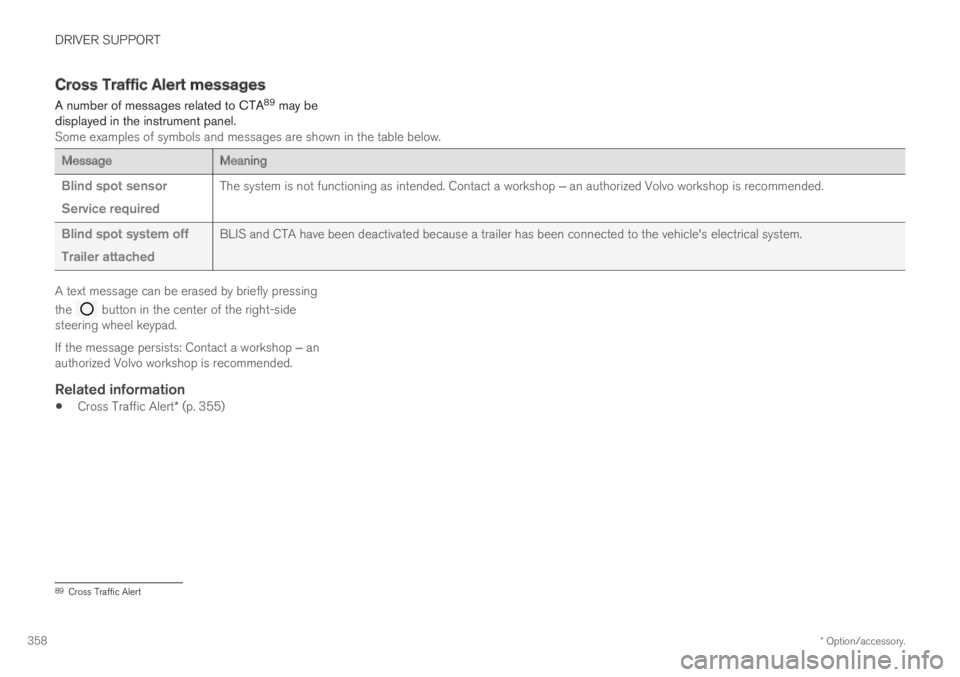
Cross Traffic Alert messages
A number of messages related to CTA89 may bedisplayed in the instrument panel.Some examples of symbols and messages are shown in the table below.
MessageMeaning
Blind spot sensor
Service required
The system is not functioning as intended. Contact a workshop ‒ an authorized Volvo workshop is recommended.
Blind spot system off
Trailer attached
BLIS and CTA have been deactivated because a trailer has been connected to the vehicle's electrical system.
A text message can be erased by briefly pressing
the button in the center of the right-sidesteering wheel keypad.
If the message persists: Contact a workshop ‒ anauthorized Volvo workshop is recommended.
Related information
Cross Traffic Alert* (p. 355)
89Cross Traffic Alert
Page 367 of 695
DRIVER SUPPORT
}}
* Option/accessory.365
NOTE
The function uses the vehicle's camera unit,which has some general limitations – see thesection "Camera unit limitations".
Related information
Road Sign Information* (p. 359)
Camera limitations (p. 332)
Driver Alert Control
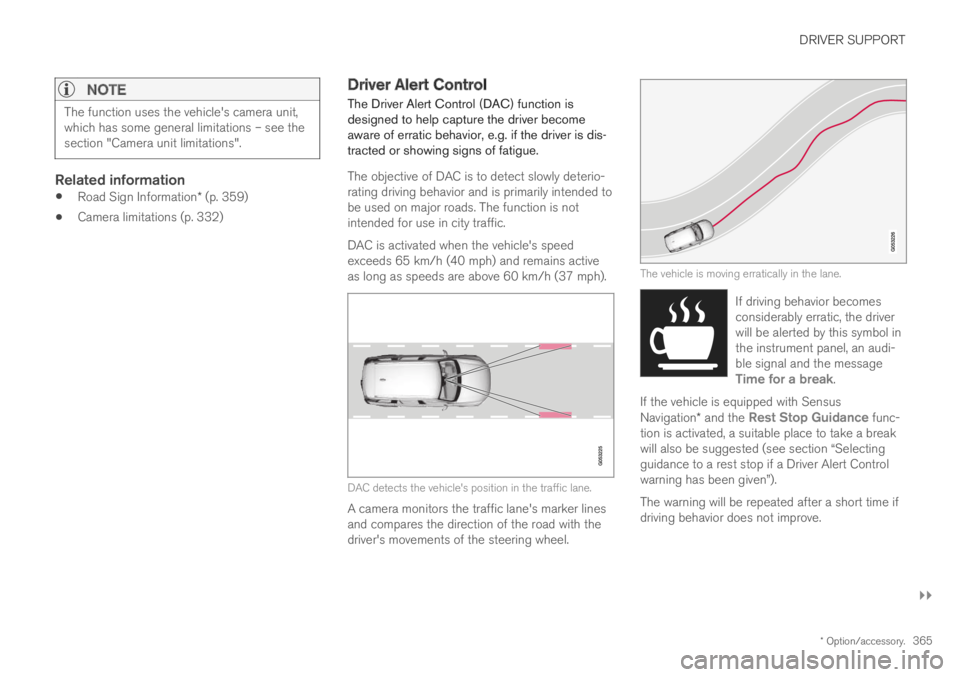
The Driver Alert Control (DAC) function isdesigned to help capture the driver becomeaware of erratic behavior, e.g. if the driver is dis-tracted or showing signs of fatigue.
The objective of DAC is to detect slowly deterio-rating driving behavior and is primarily intended tobe used on major roads. The function is notintended for use in city traffic.
DAC is activated when the vehicle's speedexceeds 65 km/h (40 mph) and remains activeas long as speeds are above 60 km/h (37 mph).
DAC detects the vehicle's position in the traffic lane.
A camera monitors the traffic lane's marker linesand compares the direction of the road with thedriver's movements of the steering wheel.
The vehicle is moving erratically in the lane.
If driving behavior becomesconsiderably erratic, the driverwill be alerted by this symbol inthe instrument panel, an audi-ble signal and the messageTime for a break.
If the vehicle is equipped with SensusNavigation* and the Rest Stop Guidance func-tion is activated, a suitable place to take a breakwill also be suggested (see section “Selectingguidance to a rest stop if a Driver Alert Controlwarning has been given”).
The warning will be repeated after a short time ifdriving behavior does not improve.
Page 369 of 695
DRIVER SUPPORT
}}
* Option/accessory.367
Selecting guidance to a rest area ifthe Driver Alert Control warning hasbeen given
The Rest Stop Guidance function can beswitched on or off.
In vehicles equipped with Sensus Navigation*, thedriver can activate a guide that can automaticallysuggest a suitable rest stop if the DAC warningis given.
To select Rest Stop Guidance:
1.Tap Settings in the center display's Topview.
2.Select My CarIntelliSafeDriver AlertControl.
3.Select/deselect Rest Stop Guidance toactivate/deactivate the function.
Related information
Driver Alert Control (p. 365)
Driver Alert Control limitations
Driver Alert Control (DAC) functionality may bereduced in certain situations.
In certain situations, the system may provide awarning even if it has not detected a change indriving behavior, e.g.:
in strong crosswinds
on grooved road surfaces.
WARNING
In certain cases, driving behavior might not beaffected despite the driver's fatigue – whenusing the Pilot Assist function – resulting inthe driver not getting a warning from DAC.
It is therefore very important to always stopand take a break at the slightest sign of fati-gue, regardless of whether the DAC functionhas issued a warning or not.
NOTE
The function uses the vehicle's camera unit,which has some general limitations – see thesection "Camera unit limitations".
Related information
Driver Alert Control (p. 365)
Camera limitations (p. 332)
Lane Keeping Aid
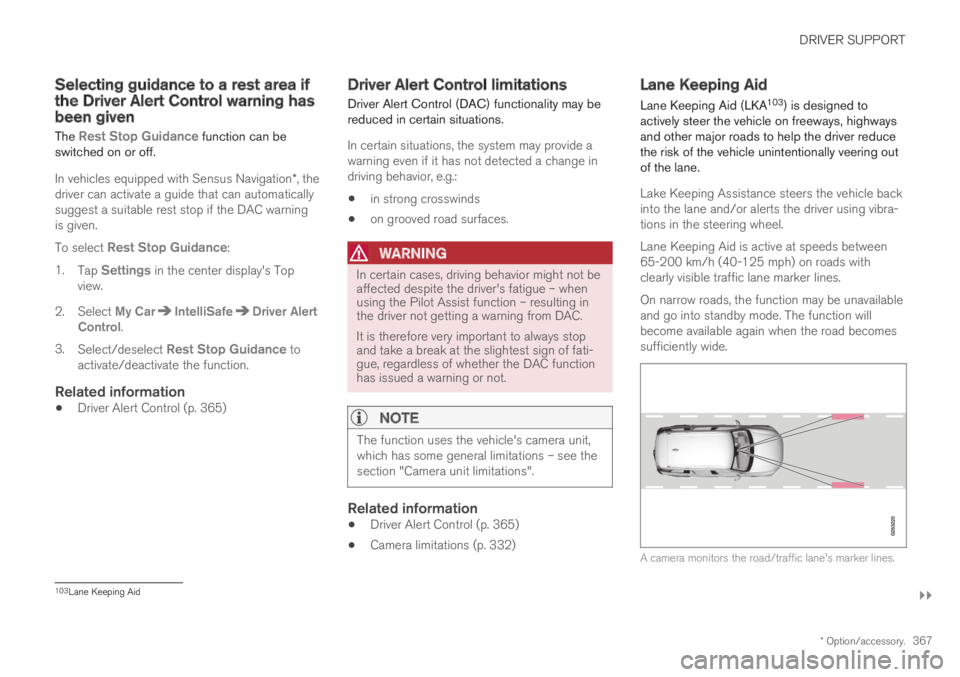
Lane Keeping Aid (LKA103) is designed toactively steer the vehicle on freeways, highwaysand other major roads to help the driver reducethe risk of the vehicle unintentionally veering outof the lane.
Lake Keeping Assistance steers the vehicle backinto the lane and/or alerts the driver using vibra-tions in the steering wheel.
Lane Keeping Aid is active at speeds between65-200 km/h (40-125 mph) on roads withclearly visible traffic lane marker lines.
On narrow roads, the function may be unavailableand go into standby mode. The function willbecome available again when the road becomessufficiently wide.
A camera monitors the road/traffic lane's marker lines.
103Lane Keeping Aid
Page 370 of 695
||
DRIVER SUPPORT
368
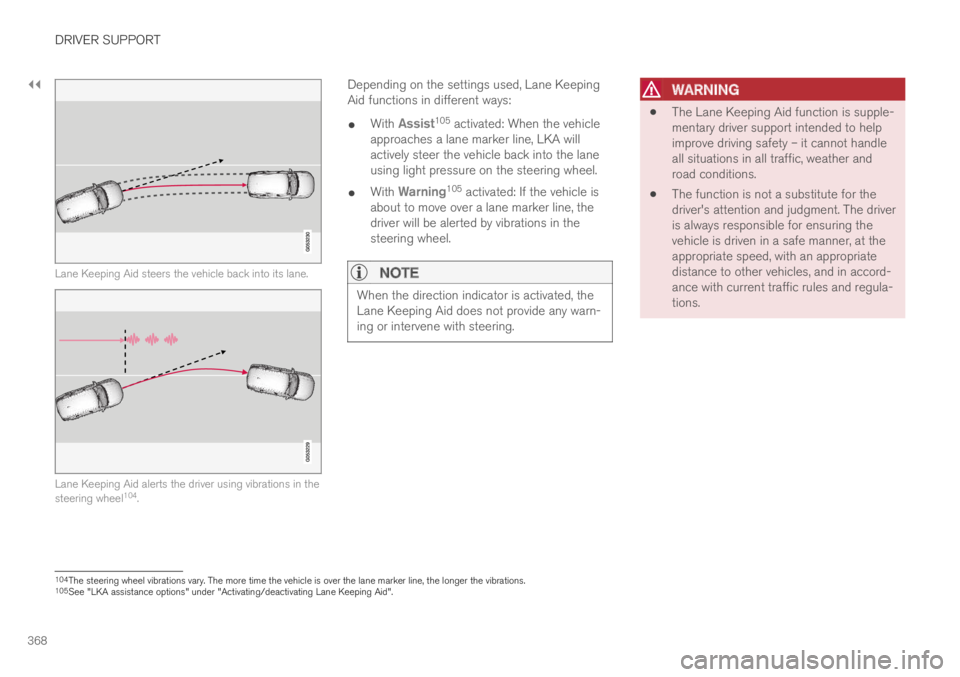
Lane Keeping Aid steers the vehicle back into its lane.
Lane Keeping Aid alerts the driver using vibrations in thesteering wheel104.
Depending on the settings used, Lane KeepingAid functions in different ways:
With Assist105 activated: When the vehicleapproaches a lane marker line, LKA willactively steer the vehicle back into the laneusing light pressure on the steering wheel.
With Warning105 activated: If the vehicle isabout to move over a lane marker line, thedriver will be alerted by vibrations in thesteering wheel.
NOTE
When the direction indicator is activated, theLane Keeping Aid does not provide any warn-ing or intervene with steering.
WARNING
The Lane Keeping Aid function is supple-mentary driver support intended to helpimprove driving safety – it cannot handleall situations in all traffic, weather androad conditions.
The function is not a substitute for thedriver's attention and judgment. The driveris always responsible for ensuring thevehicle is driven in a safe manner, at theappropriate speed, with an appropriatedistance to other vehicles, and in accord-ance with current traffic rules and regula-tions.
104The steering wheel vibrations vary. The more time the vehicle is over the lane marker line, the longer the vibrations.105See "LKA assistance options" under "Activating/deactivating Lane Keeping Aid".
Page 371 of 695
DRIVER SUPPORT
}}
369
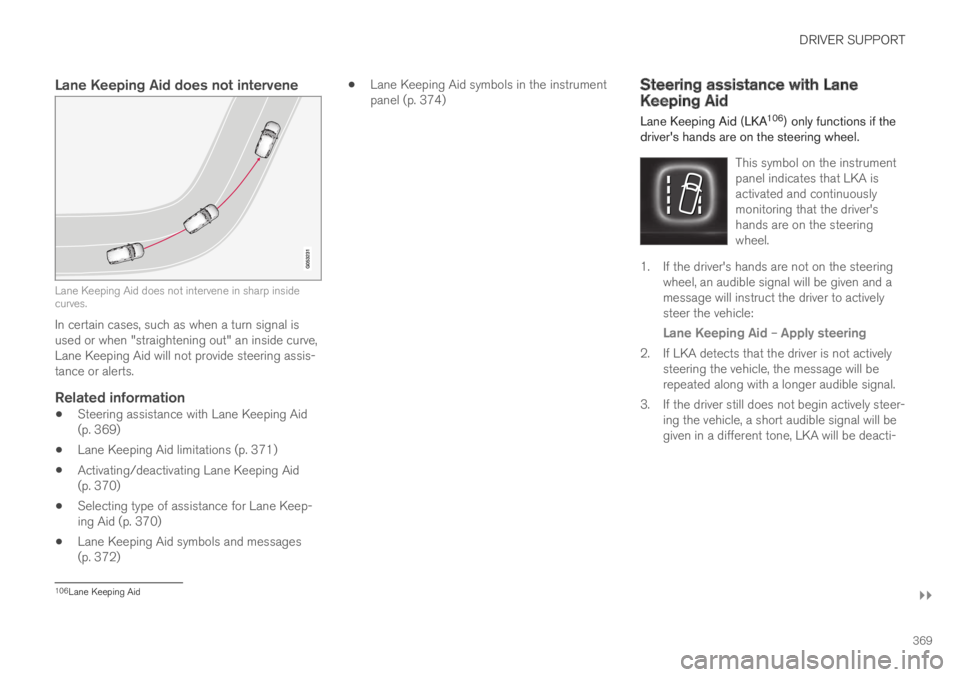
Lane Keeping Aid does not intervene
Lane Keeping Aid does not intervene in sharp insidecurves.
In certain cases, such as when a turn signal isused or when "straightening out" an inside curve,Lane Keeping Aid will not provide steering assis-tance or alerts.
Related information
Steering assistance with Lane Keeping Aid(p. 369)
Lane Keeping Aid limitations (p. 371)
Activating/deactivating Lane Keeping Aid(p. 370)
Selecting type of assistance for Lane Keep-ing Aid (p. 370)
Lane Keeping Aid symbols and messages(p. 372)
Lane Keeping Aid symbols in the instrumentpanel (p. 374)Steering assistance with LaneKeeping Aid
Lane Keeping Aid (LKA106) only functions if thedriver's hands are on the steering wheel.
This symbol on the instrumentpanel indicates that LKA isactivated and continuouslymonitoring that the driver'shands are on the steeringwheel.
1. If the driver's hands are not on the steeringwheel, an audible signal will be given and amessage will instruct the driver to activelysteer the vehicle:
Lane Keeping Aid – Apply steering
2. If LKA detects that the driver is not activelysteering the vehicle, the message will berepeated along with a longer audible signal.
3.If the driver still does not begin actively steer-ing the vehicle, a short audible signal will begiven in a different tone, LKA will be deacti-
106Lane Keeping Aid
Page 373 of 695
DRIVER SUPPORT
371
Lane Keeping Aid limitations
In certain demanding driving conditions, LaneKeeping Aid may not be able to properly assistthe driver. In these situations, it is recommendedthat the function be deactivated.
Examples of such situations include:
road work
winter driving conditions
poor road surfaces
a very sporty driving style
bad weather with reduced visibility
roads with indistinct or no lane markings
sharp edges or lines other than the lane'sside markings
when the power steering works at reducedpower, e.g. during cooling due to overheating(see section “Speed-dependent steeringforce”).
NOTE
The function uses the vehicle's camera unit,which has some general limitations – see thesection "Camera unit limitations".
Related information
Lane Keeping Aid (p. 367)
Speed-dependent steering wheel resistance(p. 272)
Camera limitations (p. 332)
Page 374 of 695
DRIVER SUPPORT
372
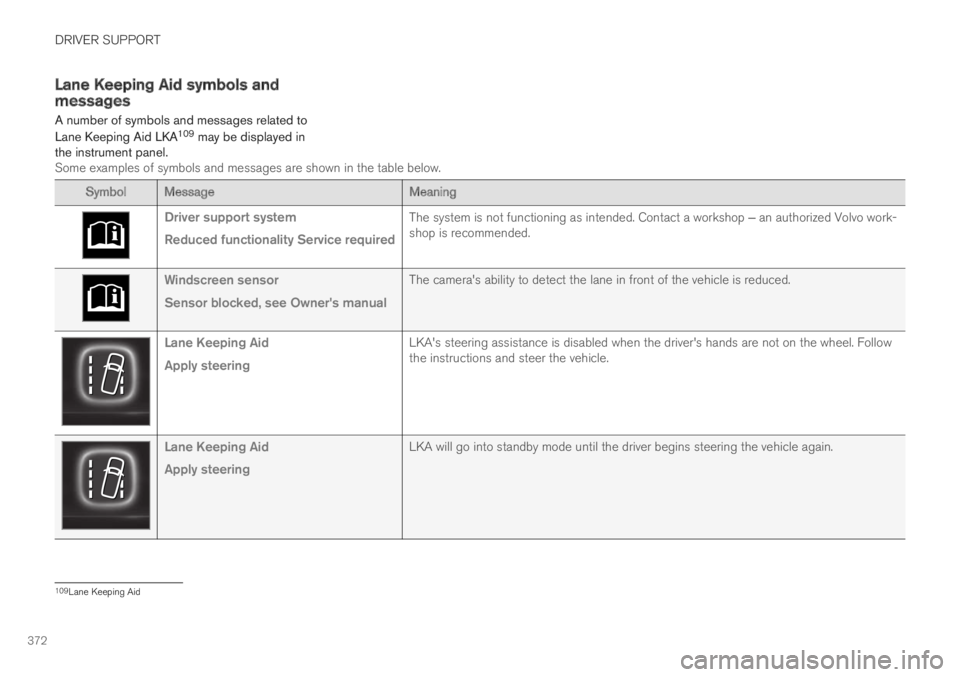
Lane Keeping Aid symbols andmessages
A number of symbols and messages related to
Lane Keeping Aid LKA109 may be displayed inthe instrument panel.Some examples of symbols and messages are shown in the table below.
SymbolMessageMeaning
Driver support system
Reduced functionality Service required
The system is not functioning as intended. Contact a workshop ‒ an authorized Volvo work-shop is recommended.
Windscreen sensor
Sensor blocked, see Owner's manual
The camera's ability to detect the lane in front of the vehicle is reduced.
Lane Keeping Aid
Apply steering
LKA's steering assistance is disabled when the driver's hands are not on the wheel. Followthe instructions and steer the vehicle.
Lane Keeping Aid
Apply steering
LKA will go into standby mode until the driver begins steering the vehicle again.
109Lane Keeping Aid
Page 375 of 695
DRIVER SUPPORT
373
A text message can be erased by briefly pressing
the button in the center of the right-sidesteering wheel keypad.
If the message persists: Contact a workshop ‒ anauthorized Volvo workshop is recommended.
Related information
Lane Keeping Aid (p. 367)