display VOLVO XC60 TWIN ENGINE 2019 Owners Manual
[x] Cancel search | Manufacturer: VOLVO, Model Year: 2019, Model line: XC60 TWIN ENGINE, Model: VOLVO XC60 TWIN ENGINE 2019Pages: 695, PDF Size: 14.96 MB
Page 295 of 695
DRIVER SUPPORT
}}}}
* Option/accessory.293
NOTE
The greater the vehicles' speed, thegreater the distance between them for aset time interval.
Only use the time intervals permitted bylocal traffic regulations.
The set time interval is also used by theAdaptive Cruise Control and Pilot Assistfunctions.
WARNING
Only use a time interval suitable for thecurrent traffic conditions.
The driver should be aware that shorttime intervals give them limited time toreact and act to any unforeseen trafficsituation.
Related information
Distance Alert* (p. 290)
Distance Alert limitations36
Distance Alert functionality may be reduced incertain situations.
WARNING
The radar sensor has a limited field ofvision. In some situations, it may detect avehicle later than expected or not detectother vehicles at all.
The radar sensor cannot cover all drivingsituations and traffic, weather and roadconditions.
The driver is responsible for maintaining asafe distance and speed and must inter-vene if the various driver support systemsdo not maintain a suitable speed or suita-ble distance to the vehicle ahead.
Maintenance of radar sensor componentsmay only be performed by a trained andqualified Volvo technician.
Strong sunlight, reflections from the roadsurface, strong lighting contrasts or usingsunglasses may make the warning light inthe windshield difficult to see. Poorweather or winding roads can affect theradar sensor's capacity to detect vehiclesahead.
A vehicle's size (e.g., a motorcycle) canalso affect the radar sensor's capacity todetect another vehicle. This may result inthe warning light illuminating at a shorter
36The Distance Alert function is only available in vehicles that can display information on the windshield with a head-up display.
Page 298 of 695
||
DRIVER SUPPORT
* Option/accessory.296
Reduces the time interval to the vehicleahead
Target vehicle indicator: ACC has detectedand is following a target vehicle using the settime interval
Symbol for time interval to the vehicle ahead
NOTE
In vehicles equipped with Adaptive CruiseControl*, it is possible to switch betweencruise control and Adaptive Cruise Control –see the heading "Switching between CC andACC".
Instrument panel
Speed indicators38.
Set speed
Speed of the vehicle ahead.
The current speed of your vehicle.
See "Adaptive Cruise Control symbols and mes-sages" for examples of different combinations ofsymbols depending on the traffic situation.
Related information
Adaptive Cruise Control and collision warning(p. 297)
Head-up display for Adaptive Cruise Controlwith collision warning (p. 297)
Activating and starting Adaptive Cruise Con-trol (p. 298)
Managing Adaptive Cruise Control speed(p. 299)
Setting Adaptive Cruise Control time inter-vals (p. 300)
Deactivating/reactivating Adaptive CruiseControl (p. 301)
Passing assistance with Adaptive CruiseControl (p. 303)
Starting passing assistance with AdaptiveCruise Control (p. 304)
Limitations of passing assistance with Adap-tive Cruise Control (p. 304)
Switching target vehicles with AdaptiveCruise Control (p. 304)
Automatic braking with Adaptive Cruise Con-trol (p. 305)
Adaptive Cruise Control limitations (p. 306)
Switching between Cruise Control and Adap-tive Cruise Control (p. 307)
Symbols and messages for Adaptive CruiseControl (p. 308)
38Note: This illustration is general and details may vary depending on model.
Page 299 of 695
DRIVER SUPPORT
}}
* Option/accessory.297
Adaptive Cruise Control andcollision warning
Adaptive Cruise Control can alert the driver if thedistance to the vehicle ahead suddenly decrea-ses to an unsafe distance.
Collision warning audible signal and symbol39.
Acoustic collision warning signal
Collision warning symbol
Camera/radar sensor distance monitoring
Adaptive Cruise Control utilizes approx. 40% ofthe vehicle's braking capacity. If a situationrequires more braking force than the AdaptiveCruise Control can provide, and if the driver doesnot apply the brakes, a warning light and audible
warning signal will be activated to alert the driverthat immediate action is required.
WARNING
Adaptive Cruise Control only issues a warningfor vehicles detected by its radar unit – thus, awarning may come after a delay or not at all.
Never wait for a warning. Apply thebrakes when necessary.
Related information
Adaptive Cruise Control* (p. 294)
Head-up display for Adaptive CruiseControl with collision warning
In vehicles equipped with a head-up display*, aflashing warning symbol will be displayed on thewindshield.
Collision warning symbol on the windshield40.
NOTE
Visual warnings on the windshield may be dif-ficult to notice in cases of strong sunlight,reflections, extreme light contrasts, or if thedriver is wearing sunglasses or is not lookingstraight ahead.
39Note: This illustration is general and details may vary depending on model.40Note: This illustration is general and details may vary depending on model.
Page 300 of 695
||
DRIVER SUPPORT
* Option/accessory.298
Related information
Adaptive Cruise Control* (p. 294)
Head-up display* (p. 142)
Activating and starting AdaptiveCruise Control
Adaptive Cruise Control (ACC41) must first beactivated and then started before it can regulatespeed and distance.
Putting Adaptive Cruise Control in
standby mode
Note: This illustration is general and details may varydepending on model.
Adaptive Cruise Control is in standby mode eachtime the engine is started. To put ACC in standbymode from active mode:
–Press ◀ (2) or ▶ (3) on the steering wheel
keypad and scroll to the (4) function.
>The symbol will appear and AdaptiveCruise Control will go into standby mode.
Starting/activating Adaptive Cruise
Control
To start ACC:
The driver's seat belt must be buckled andthe driver's door must be closed.
There must be a vehicle ahead (target vehi-cle) within a reasonable distance or yourvehicle's current speed must be at least15 km/h (9 mph).
Note: This illustration is general and details may varydepending on model.
–With the (4) function displayed, press
(1) on the steering wheel keypad.
>Adaptive Cruise Control will start and thecurrent speed will be stored, which will beshown by numbers in the center of thespeedometer.
41Adaptive Cruise Control
Page 309 of 695
DRIVER SUPPORT
* Option/accessory.307
Switching between Cruise Controland Adaptive Cruise Control
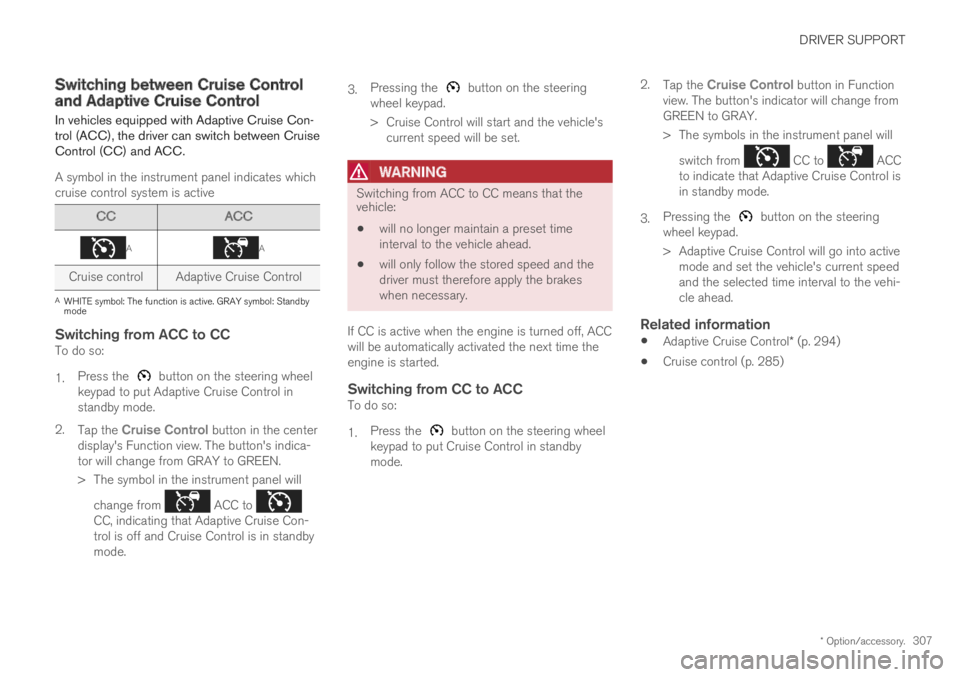
In vehicles equipped with Adaptive Cruise Con-trol (ACC), the driver can switch between CruiseControl (CC) and ACC.
A symbol in the instrument panel indicates whichcruise control system is active
CCACC
AA
Cruise controlAdaptive Cruise Control
AWHITE symbol: The function is active. GRAY symbol: Standbymode
Switching from ACC to CC
To do so:
1.Press the button on the steering wheelkeypad to put Adaptive Cruise Control instandby mode.
2.Tap the Cruise Control button in the centerdisplay's Function view. The button's indica-tor will change from GRAY to GREEN.
>The symbol in the instrument panel will
change from ACC to CC, indicating that Adaptive Cruise Con-trol is off and Cruise Control is in standbymode.
3.Pressing the button on the steeringwheel keypad.
>Cruise Control will start and the vehicle'scurrent speed will be set.
WARNING
Switching from ACC to CC means that thevehicle:
will no longer maintain a preset timeinterval to the vehicle ahead.
will only follow the stored speed and thedriver must therefore apply the brakeswhen necessary.
If CC is active when the engine is turned off, ACCwill be automatically activated the next time theengine is started.
Switching from CC to ACC
To do so:
1.Press the button on the steering wheelkeypad to put Cruise Control in standbymode.
2.Tap the Cruise Control button in Functionview. The button's indicator will change fromGREEN to GRAY.
>The symbols in the instrument panel will
switch from CC to ACCto indicate that Adaptive Cruise Control isin standby mode.
3.Pressing the button on the steeringwheel keypad.
>Adaptive Cruise Control will go into activemode and set the vehicle's current speedand the selected time interval to the vehi-cle ahead.
Related information
Adaptive Cruise Control* (p. 294)
Cruise control (p. 285)
Page 310 of 695
DRIVER SUPPORT
* Option/accessory.308
Symbols and messages forAdaptive Cruise Control
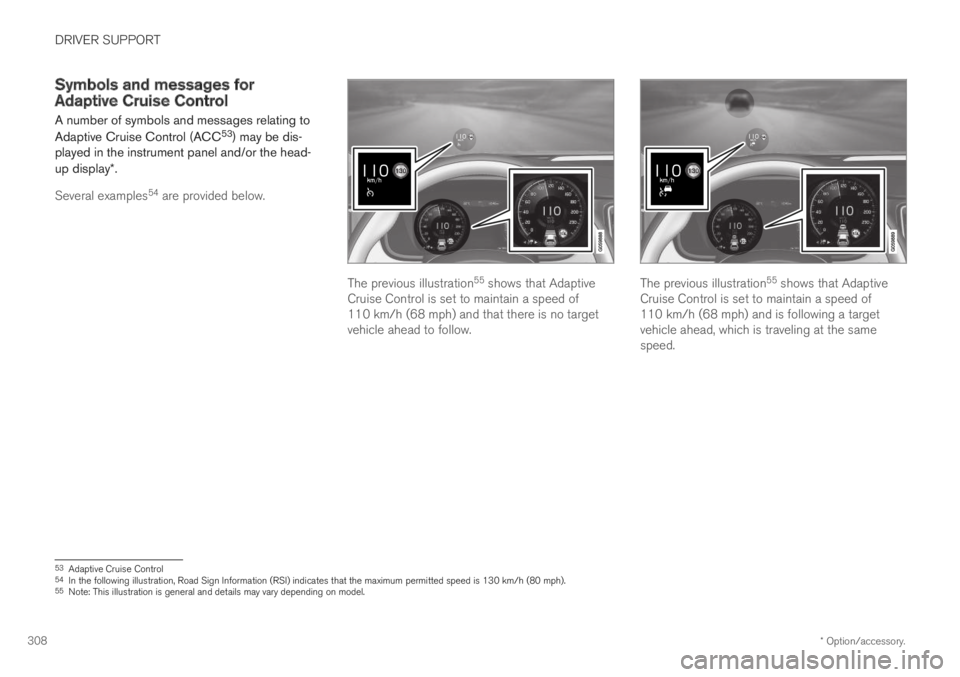
A number of symbols and messages relating to
Adaptive Cruise Control (ACC53) may be dis-played in the instrument panel and/or the head-up display*.
Several examples54 are provided below.
The previous illustration55 shows that AdaptiveCruise Control is set to maintain a speed of110 km/h (68 mph) and that there is no targetvehicle ahead to follow.
The previous illustration55 shows that AdaptiveCruise Control is set to maintain a speed of110 km/h (68 mph) and is following a targetvehicle ahead, which is traveling at the samespeed.
53Adaptive Cruise Control54In the following illustration, Road Sign Information (RSI) indicates that the maximum permitted speed is 130 km/h (80 mph).55Note: This illustration is general and details may vary depending on model.
Page 315 of 695
DRIVER SUPPORT
}}
* Option/accessory.313
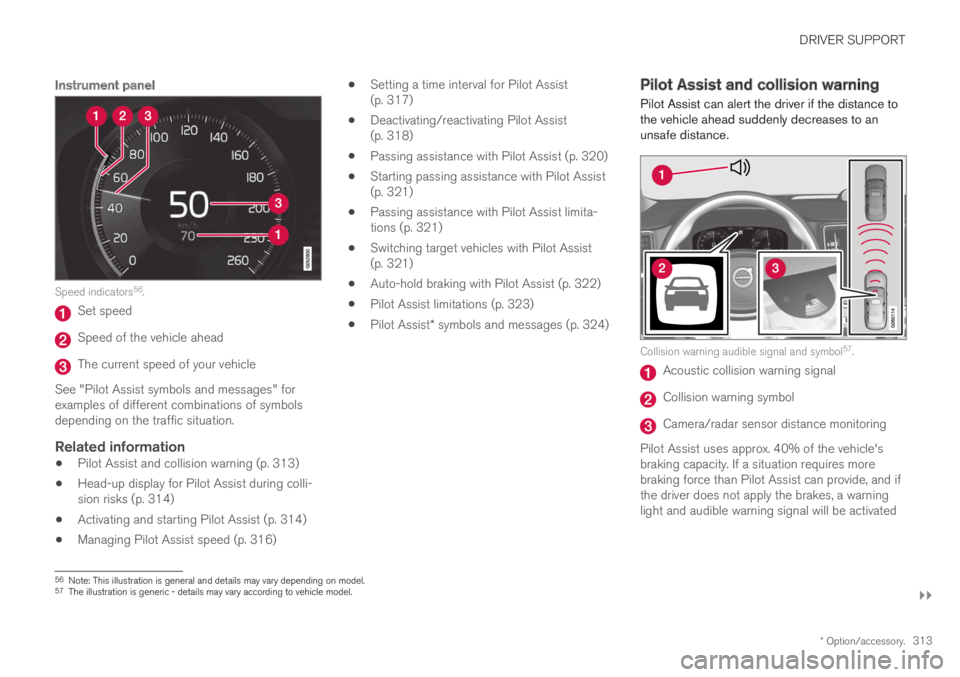
Instrument panel
Speed indicators56.
Set speed
Speed of the vehicle ahead
The current speed of your vehicle
See "Pilot Assist symbols and messages" forexamples of different combinations of symbolsdepending on the traffic situation.
Related information
Pilot Assist and collision warning (p. 313)
Head-up display for Pilot Assist during colli-sion risks (p. 314)
Activating and starting Pilot Assist (p. 314)
Managing Pilot Assist speed (p. 316)
Setting a time interval for Pilot Assist(p. 317)
Deactivating/reactivating Pilot Assist(p. 318)
Passing assistance with Pilot Assist (p. 320)
Starting passing assistance with Pilot Assist(p. 321)
Passing assistance with Pilot Assist limita-tions (p. 321)
Switching target vehicles with Pilot Assist(p. 321)
Auto-hold braking with Pilot Assist (p. 322)
Pilot Assist limitations (p. 323)
Pilot Assist* symbols and messages (p. 324)
Pilot Assist and collision warning
Pilot Assist can alert the driver if the distance tothe vehicle ahead suddenly decreases to anunsafe distance.
Collision warning audible signal and symbol57.
Acoustic collision warning signal
Collision warning symbol
Camera/radar sensor distance monitoring
Pilot Assist uses approx. 40% of the vehicle'sbraking capacity. If a situation requires morebraking force than Pilot Assist can provide, and ifthe driver does not apply the brakes, a warninglight and audible warning signal will be activated
56Note: This illustration is general and details may vary depending on model.57The illustration is generic - details may vary according to vehicle model.
Page 316 of 695
||
DRIVER SUPPORT
* Option/accessory.314
to alert the driver that immediate action isrequired.
WARNING
Pilot Assist only issues a warning for vehiclesdetected by its camera and radar unit – thus,a warning may come after a delay or not at all.
Never wait for a warning. Apply thebrakes when necessary!
Related information
Pilot Assist (p. 310)
Head-up display for Pilot Assistduring collision risks
In vehicles equipped with a head-up display*, aflashing warning symbol will be displayed on thewindshield.
Collision warning symbol on the windshield58.
NOTE
Visual warnings on the windshield may be dif-ficult to notice in cases of strong sunlight,reflections, extreme light contrasts, or if thedriver is wearing sunglasses or is not lookingstraight ahead.
Related information
Pilot Assist (p. 310)
Head-up display* (p. 142)
Activating and starting Pilot Assist
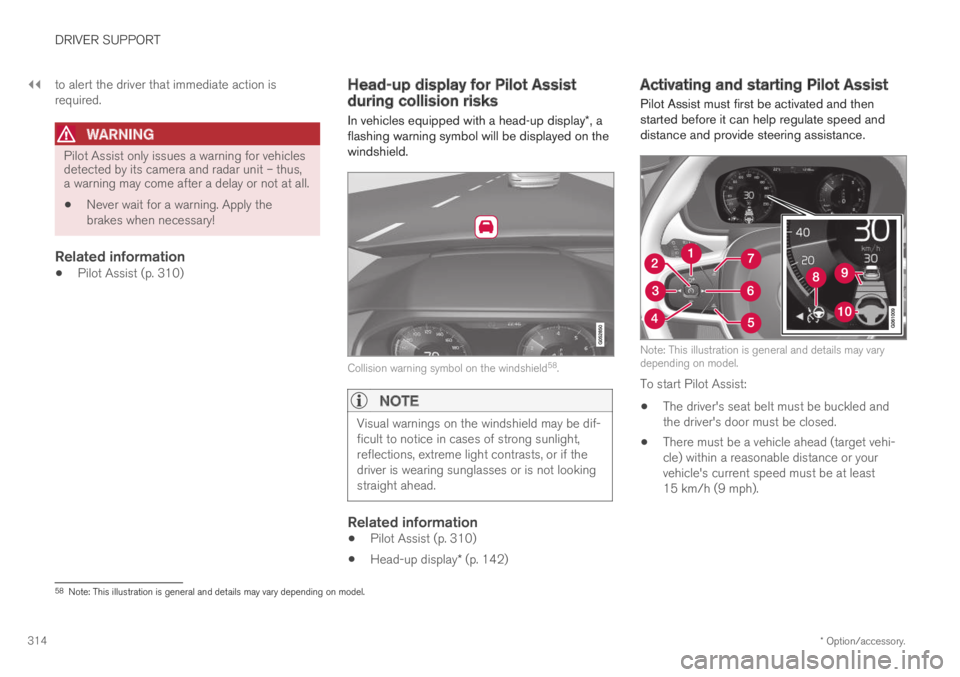
Pilot Assist must first be activated and thenstarted before it can help regulate speed anddistance and provide steering assistance.
Note: This illustration is general and details may varydepending on model.
To start Pilot Assist:
The driver's seat belt must be buckled andthe driver's door must be closed.
There must be a vehicle ahead (target vehi-cle) within a reasonable distance or yourvehicle's current speed must be at least15 km/h (9 mph).
58Note: This illustration is general and details may vary depending on model.
Page 326 of 695
||
DRIVER SUPPORT
* Option/accessory.324
Steep roads and/or heavy loads
Pilot Assist is primarily intended to be driven onflat roads. The function may not be able to main-tain the correct time interval to the vehicle aheadwhen driving down steep hills. The driver shouldbe extra attentive and prepared to apply thebrakes.
Do not use Pilot Assist if the vehicle is carry-ing a heavy load or towing a trailer.
NOTE
Pilot Assist cannot be activated if a trailer,bike carrier or similar is connected to thevehicle electrical system.
Other limitations
The Off Road drive mode cannot beselected when Pilot Assist is activated.
NOTE
The function uses the vehicle's combinedcamera and radar unit, which has certain gen-eral limitations; see sections "Camera limita-tions" and "Radar sensor limitations".
Related information
Pilot Assist (p. 310)
Speed-dependent steering wheel resistance(p. 272)
Camera limitations (p. 332)
Radar sensor limitations (p. 327)
Pilot Assist* symbols and messages
A number of symbols and messages relating toPilot Assist may be displayed in the instrumentpanel and/or the head-up display*.
Page 329 of 695
DRIVER SUPPORT
}}
327
Radar sensor limitations
The radar sensor used by several of the driversupport functions has certain limitations, whichalso affect the functions using the radar sensor.
Obstructed camera
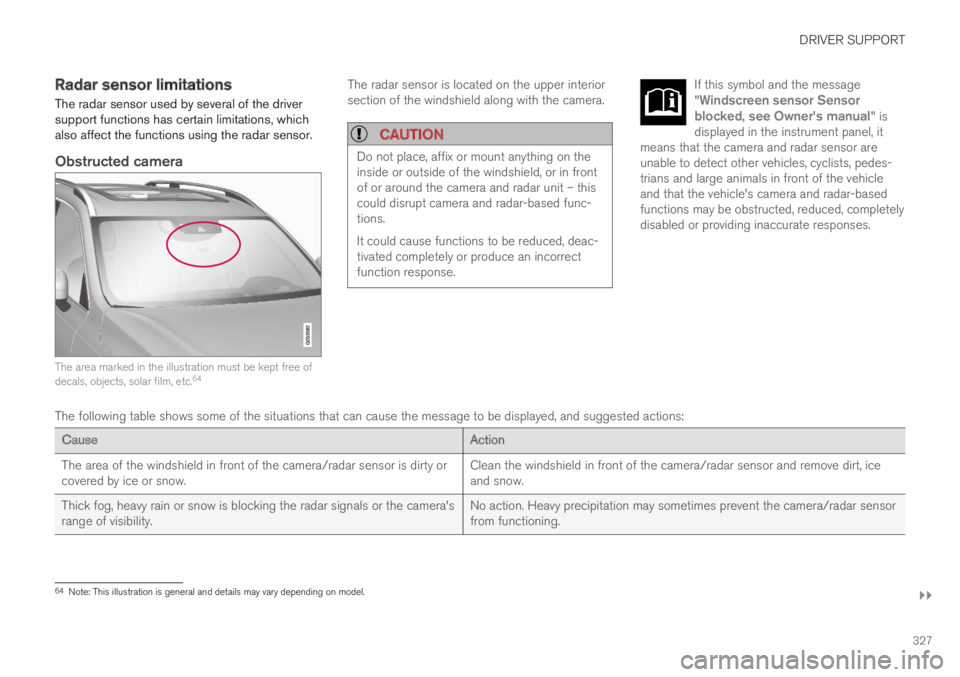
The area marked in the illustration must be kept free ofdecals, objects, solar film, etc.64
The radar sensor is located on the upper interiorsection of the windshield along with the camera.
CAUTION
Do not place, affix or mount anything on theinside or outside of the windshield, or in frontof or around the camera and radar unit – thiscould disrupt camera and radar-based func-tions.
It could cause functions to be reduced, deac-tivated completely or produce an incorrectfunction response.
If this symbol and the message"Windscreen sensor Sensorblocked, see Owner's manual" isdisplayed in the instrument panel, itmeans that the camera and radar sensor areunable to detect other vehicles, cyclists, pedes-trians and large animals in front of the vehicleand that the vehicle's camera and radar-basedfunctions may be obstructed, reduced, completelydisabled or providing inaccurate responses.
The following table shows some of the situations that can cause the message to be displayed, and suggested actions:
CauseAction
The area of the windshield in front of the camera/radar sensor is dirty orcovered by ice or snow.Clean the windshield in front of the camera/radar sensor and remove dirt, iceand snow.
Thick fog, heavy rain or snow is blocking the radar signals or the camera'srange of visibility.No action. Heavy precipitation may sometimes prevent the camera/radar sensorfrom functioning.
64Note: This illustration is general and details may vary depending on model.