ABS VOLVO XC60 TWIN ENGINE 2019 User Guide
[x] Cancel search | Manufacturer: VOLVO, Model Year: 2019, Model line: XC60 TWIN ENGINE, Model: VOLVO XC60 TWIN ENGINE 2019Pages: 695, PDF Size: 14.96 MB
Page 439 of 695
STARTING AND DRIVING
437
Brake Assist System
The brake enhancing system, Brake AssistSystem (BAS), helps increase braking force andthereby reduce braking distance.
The system monitors the driver's braking habitsand increases braking force when necessary.Braking force can be increased up to the point atwhich the ABS intervenes. The function is deacti-vated when pressure on the brake pedal isdecreased.
Related information
Brakes (p. 435)
Braking on wet roads
Prolonged driving in heavy rain without brakingmay cause braking effect to be slightly delayedthe first time the brakes are applied.
This may also occur after washing the vehicle. Itwill then be necessary to apply greater pressureto the brake pedal. You should therefore maintaina greater distance to the vehicle ahead.
Firmly apply the brakes after washing the vehicleor driving on wet roads. This helps warm up thebrake discs, enabling them to dry more quicklyand protecting them against corrosion. Considerthe current traffic situation when braking.
Related information
Brakes (p. 435)
Braking on salted roads (p. 437)
Braking on salted roads
When driving on salted roads, a layer of salt mayform on the brake discs and brake pads.
This could increase stopping distance. Maintainan extra large safety distance to the vehicleahead. Make sure to also:
Apply the brakes from time to time to helpremove salt. Make sure braking does notpose a risk to any other road users.
Gently apply the brakes when you have fin-ished driving and before driving again.
Related information
Brakes (p. 435)
Braking on wet roads (p. 437)
Page 452 of 695
STARTING AND DRIVING
* Option/accessory.450
Starting and stopping thecombustion engine in Twin Enginevehicles
An advanced control system determines the dis-tance that the vehicle can be driven on the com-bustion engine, electric motor, or both at thesame time. When driving on only the electricmotor, the vehicle may automatically start thecombustion engine due to outside circumstan-ces, e.g. low ambient temperatures. This is com-pletely normal. The combustion engine will alsoalways start when the hybrid battery is nearlyfully discharged.
Climate settings at low temperatures
At low ambient temperatures, the combustionengine will sometimes start automatically to helpachieve the desired passenger compartmenttemperature and air quality. The amount of timethe combustion engine is running can be affec-ted by:
lowering the temperature
reducing blower speed
activating Pure drive mode.
Using the electric motor in hot or cold
weather
At very low or high ambient temperatures, theelectric motor's driving range and power may bereduced and affect how often the combustionengine automatically starts.
Emission control system
To help ensure that the emission control systemfunctions optimally, the combustion engine willrun for several minutes after it is started. Theamount of time the combustion engine needs tobe used varies depending on the temperature ofthe three-way catalytic converter.
WARNING
California Proposition 65
Operating, servicing and maintaining a pas-senger vehicle can expose you to chemicalsincluding engine exhaust, carbon monoxide,phthalates, and lead, which are known to theState of California to cause cancer and birthdefects or other reproductive harm. To mini-mize exposure, avoid breathing exhaust, donot idle the engine except as necessary, serv-ice your vehicle in a well ventilated area andwear gloves or wash your hands frequentlywhen servicing your vehicle. For more infor-mation go to www.P65Warnings.ca.gov/passenger-vehicle.
Related information
Drive systems (p. 449)
Economical driving (p. 463)
Using the electric motor only (p. 465)
Drive modes (p. 450)
Drive modes
Drive modes affect the vehicle's driving charac-teristics in different ways to enhance and sim-plify the driving experience in certain types of sit-uations.
Drive modes enable easy access to the vehicle'smany functions and settings in different drivingsituations. The following systems are adapted tohelp optimize driving characteristics in each drivemode:
Steering
Engine/transmission/all-wheel drive
Brakes
Pneumatic suspension* and shock absorbers
Instrument panel
Climate control settings
Select the drive mode that is best suited to thecurrent driving conditions. Keep in mind that notall drive modes are available in all situations.
Page 459 of 695
STARTING AND DRIVING
}}
* Option/accessory.457
Leveling control* and suspension
The vehicle's leveling control system adjusts thesuspension and shock absorbers automaticallyto help provide good comfort and control whiledriving. Leveling can also be controlled manuallyto facilitate loading or getting in and out of thevehicle.
Pneumatic suspension and shock
absorbers
The system is adapted to the selected drivemode and vehicle speed. The pneumatic suspen-sion reduces the vehicle's ground clearance athigher speeds to reduce air resistance andincrease stability. The shock absorbers are nor-mally set to provide the best possible comfortand are adjusted continuously according to theroad surface and the vehicle's acceleration, brak-ing and cornering.
The instrument panel indicateswhen the suspension level isbeing adjusted.
The following apply if a door or the tailgate isopened:
If a door is opened, the level can only beadjusted upwards.
If the tailgate is open, the level can only beadjusted downwards.
Parking
When parking, make sure that there is adequatespace above and below the vehicle since groundclearance may vary depending on e.g. ambient
temperature, how the vehicle is loaded, if loadingmode is used, which drive mode is selected afterthe engine is started, etc.
The level may also be adjusted a period after thevehicle is parked. This is to compensate for anyheight changes that may occur due to tempera-ture changes in the air springs when the vehiclecools.
Transporting
When transporting the vehicle on a ferry, train ortruck, only secure (lash) the vehicle around thetires, not using any other parts of the chassis.Changes in the pneumatic suspension may occurduring transport, which could adversely affect thelashing and result in damage.
Page 468 of 695
||
STARTING AND DRIVING
466
Factors the driver cannot control
There are several outside conditions that affectrange to varying degrees:
the current traffic situation
driving short distances
topography
ambient temperature and headwinds
road conditions and road surface.
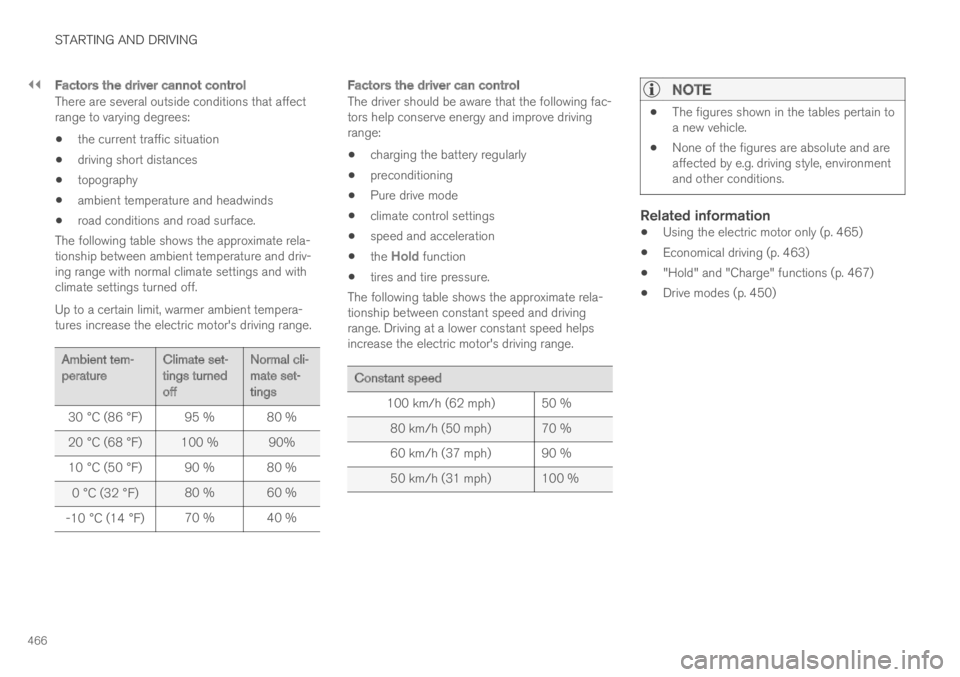
The following table shows the approximate rela-tionship between ambient temperature and driv-ing range with normal climate settings and withclimate settings turned off.
Up to a certain limit, warmer ambient tempera-tures increase the electric motor's driving range.
Ambient tem-peratureClimate set-tings turnedoff
Normal cli-mate set-tings
30 °C (86 °F)95 %80 %
20 °C (68 °F)100 % 90%
10 °C (50 °F)90 % 80 %
0 °C (32 °F)80 % 60 %
-10 °C (14 °F)70 % 40 %
Factors the driver can control
The driver should be aware that the following fac-tors help conserve energy and improve drivingrange:
charging the battery regularly
preconditioning
Pure drive mode
climate control settings
speed and acceleration
the Hold function
tires and tire pressure.
The following table shows the approximate rela-tionship between constant speed and drivingrange. Driving at a lower constant speed helpsincrease the electric motor's driving range.
Constant speed
100 km/h (62 mph)50 %
80 km/h (50 mph) 70 %
60 km/h (37 mph) 90 %
50 km/h (31 mph) 100 %
NOTE
The figures shown in the tables pertain toa new vehicle.
None of the figures are absolute and areaffected by e.g. driving style, environmentand other conditions.
Related information
Using the electric motor only (p. 465)
Economical driving (p. 463)
"Hold" and "Charge" functions (p. 467)
Drive modes (p. 450)
Page 567 of 695
WHEELS AND TIRES
}}
* Option/accessory.565
Recommended tire pressure
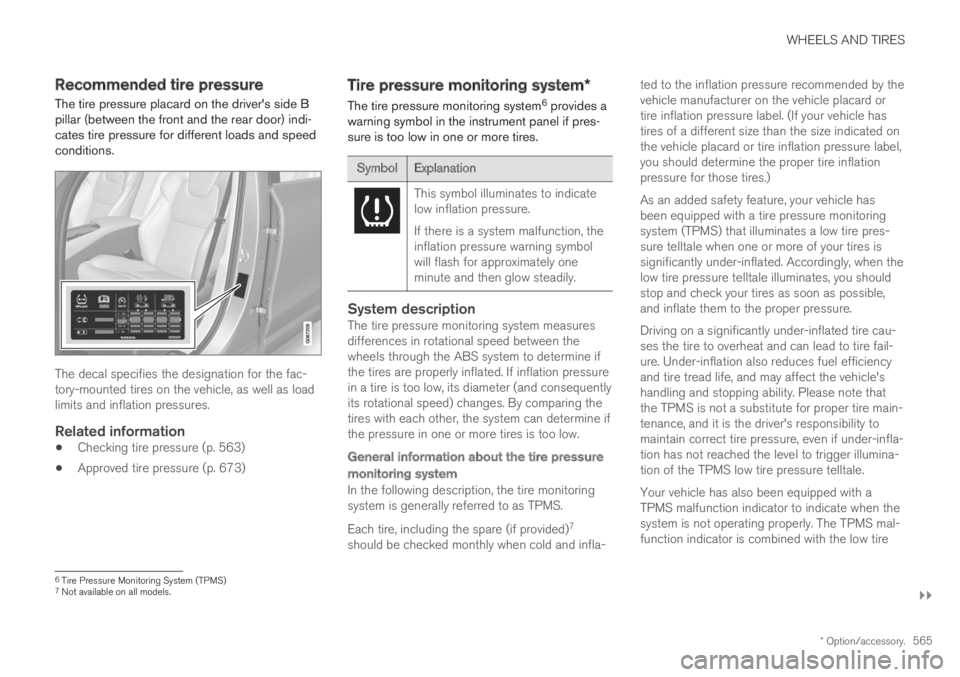
The tire pressure placard on the driver's side Bpillar (between the front and the rear door) indi-cates tire pressure for different loads and speedconditions.
The decal specifies the designation for the fac-tory-mounted tires on the vehicle, as well as loadlimits and inflation pressures.
Related information
Checking tire pressure (p. 563)
Approved tire pressure (p. 673)
Tire pressure monitoring system*
The tire pressure monitoring system6 provides awarning symbol in the instrument panel if pres-sure is too low in one or more tires.
SymbolExplanation
This symbol illuminates to indicatelow inflation pressure.
If there is a system malfunction, theinflation pressure warning symbolwill flash for approximately oneminute and then glow steadily.
System description
The tire pressure monitoring system measuresdifferences in rotational speed between thewheels through the ABS system to determine ifthe tires are properly inflated. If inflation pressurein a tire is too low, its diameter (and consequentlyits rotational speed) changes. By comparing thetires with each other, the system can determine ifthe pressure in one or more tires is too low.
General information about the tire pressure
monitoring system
In the following description, the tire monitoringsystem is generally referred to as TPMS.
Each tire, including the spare (if provided)7
should be checked monthly when cold and infla-
ted to the inflation pressure recommended by thevehicle manufacturer on the vehicle placard ortire inflation pressure label. (If your vehicle hastires of a different size than the size indicated onthe vehicle placard or tire inflation pressure label,you should determine the proper tire inflationpressure for those tires.)
As an added safety feature, your vehicle hasbeen equipped with a tire pressure monitoringsystem (TPMS) that illuminates a low tire pres-sure telltale when one or more of your tires issignificantly under-inflated. Accordingly, when thelow tire pressure telltale illuminates, you shouldstop and check your tires as soon as possible,and inflate them to the proper pressure.
Driving on a significantly under-inflated tire cau-ses the tire to overheat and can lead to tire fail-ure. Under-inflation also reduces fuel efficiencyand tire tread life, and may affect the vehicle'shandling and stopping ability. Please note thatthe TPMS is not a substitute for proper tire main-tenance, and it is the driver's responsibility tomaintain correct tire pressure, even if under-infla-tion has not reached the level to trigger illumina-tion of the TPMS low tire pressure telltale.
Your vehicle has also been equipped with aTPMS malfunction indicator to indicate when thesystem is not operating properly. The TPMS mal-function indicator is combined with the low tire
6Tire Pressure Monitoring System (TPMS)7Not available on all models.
Page 614 of 695
||
MAINTENANCE AND SERVICE
* Option/accessory.612
NOTE
Data downloading can affect other servicessuch as transfer data, e.g. web radio. If theaffect on other services is experienced asproblematic, the download can be interrupted.Alternatively, it may be appropriate to switchoff or cancel other services.
NOTE
An update can be interrupted when the igni-tion is switched off and the vehicle is left.
However, the update does not have to becompleted before the vehicle is left as theupdate is resumed the next time the vehicle isused.
Updating all system software
–Select Install all at the bottom of the list.
To avoid displaying a list, select Install all viaSystem updates.
Updating individual system software
–Select Install to choose the software youwould like to download.
Canceling software download
–Tap the checkbox in the activity indicator thatreplaced Install when the download began.
Note that only a download can be cancelled. Aninstallation cannot be cancelled once it hasbegun.
Deactivating the background search for
software update
Automatic background searching for softwareupdates is activated as the default factory setting,but the function can be deactivated.
1.Tap Settings in the center display's Topview.
2.Tap SystemDownload Center.
3.Tap to deselect Auto Software Update.
Related information
Download Center (p. 611)
Internet-connected vehicle* (p. 537)
Navigating in the center display's views(p. 115)
Vehicle status
The vehicle's general status can be displayed inthe center display along with the option to
schedule service3.
The Car Status app is startedfrom the center display's Appview and has four tabs:
3Certain markets only.
Page 627 of 695
MAINTENANCE AND SERVICE
}}
625
Start battery
The vehicle has a single-pole electrical systemthat uses the chassis and engine mount as con-ductors.
The start battery is used to start the electricalsystem and power electrical equipment in thevehicle. The hybrid battery is used to start thecombustion engine.
The start battery should only be replaced by a
workshop15.
The start battery is a 12 V AGM (Absorbed GlassMat) battery, dimensioned for regenerative charg-ing and to support the function of the vehicle'svarious systems.
The service life and performance of the start bat-tery are affected by factors such as driving style,driving conditions, climate, battery discharges,number of starts, etc.
Never disconnect the start battery while theengine is running.
Make sure the cables to the start battery arecorrectly connected and the clamps aresecurely tightened.
WARNING
Batteries generate hydrogen gas, whichis flammable and explosive.
Do not connect the jumper cable to anypart of the fuel system or to any movingparts. Avoid touching hot manifolds.
Battery fluid contains sulfuric acid. Do notallow battery fluid to contact eyes, skin,fabrics or painted surfaces.
If contact occurs, flush the affected areaimmediately with water. Obtain medicalhelp immediately if eyes are affected.
Never expose the battery to open flameor electric spark. Do not smoke near thebattery. Failure to follow the instructionsfor jump starting can lead to injury.
Connection points
WARNING
PROPOSITION 65 WARNING
Battery posts, terminals, and related accesso-ries contain lead and lead compounds, chemi-cals known to the state of California to causecancer and reproductive harm. Wash handsafter handling.
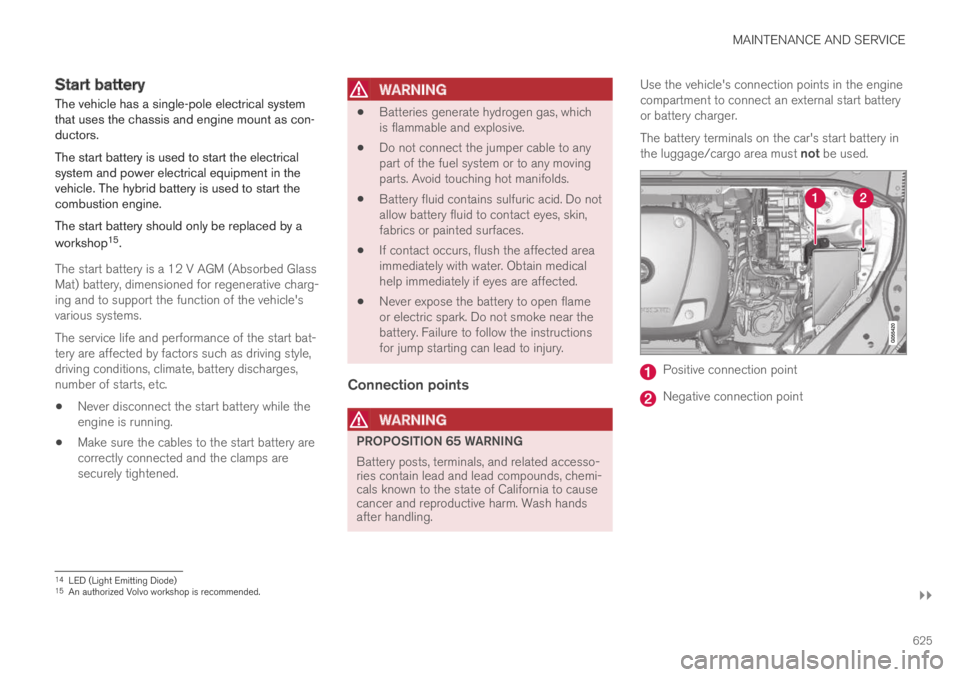
Use the vehicle's connection points in the enginecompartment to connect an external start batteryor battery charger.
The battery terminals on the car's start battery inthe luggage/cargo area must not be used.
Positive connection point
Negative connection point
14LED (Light Emitting Diode)15An authorized Volvo workshop is recommended.
Page 636 of 695
||
MAINTENANCE AND SERVICE
* Option/accessory.634
FunctionAmpere
Left-side headlight, some
models with LEDA15
Right-side headlight, some
models with LEDA15
––
Heated windshield*, left sideShunt
Heated windshield*, left side40
Headlight washers*25
Windshield washer25
––
Horn20
Alarm siren*5
Brake system control module(valves, parking brake)40
Wipers30
Rear window washer25
Heated windshield*, right side40
Parking heater*20
FunctionAmpere
Brake system control module(ABS pump)40
––
Heated windshield*, right sideShunt
Fed when ignition is on:Engine control module; trans-mission components, electricalpower steering, central electri-cal module
5
Exterior vehicle sound (certainmarkets)5
Right-side headlight7.5
Right-side headlight, some
models with LEDA15
––
––
––
Airbags5
Left-side headlight7.5
Left-side headlight, some
models with LEDA15
FunctionAmpere
Accelerator pedal sensor 5
Transmission control module;gear selector control module15
Engine control module5
––
––
––
––
Engine control module; actua-tor; throttle unit; turbo-chargervalve
20
Solenoids; valve; engine cool-ing system thermostat10
Vacuum regulators; valve 7.5
Spoiler shutter control module;radiator shutter control mod-ule
5
––
Heated oxygen sensor, front;heated oxygen sensor, rear15
Page 649 of 695
MAINTENANCE AND SERVICE
647
Cleaning the leather upholstery
1. Apply the leather cleaner to a damp spongeand squeeze it until the cleaner foams.
2. Move the sponge in circular motions to applythe foam to the stain.
3. Dampen the stain thoroughly with thesponge. Let the sponge absorb the stain anddo not rub.
4. Dry the stain using a soft towel and let theleather dry completely.
Protecting the leather upholstery
1. Apply a small amount of leather protector toa cloth and then apply the protector to theleather using light circular movements.
2. Let it dry for approximately 20 minutes.
Protecting the leather upholstery makes it betterable to withstand sunlight's harmful UV rays.
Related information
Cleaning the interior (p. 643)
Cleaning the center display (p. 643)
Cleaning fabric upholstery and ceiling liner(p. 645)
Cleaning the seat belt (p. 645)
Cleaning floor mats and inlay mats (p. 645)
Cleaning the leather steering wheel(p. 647)
Cleaning interior plastic, metal and wood sur-faces (p. 648)
Cleaning the leather steering wheel
Only use cleaning agents and car care productsrecommended by Volvo. Clean regularly andtreat stains immediately for best results. It isimportant to vacuum before using a cleaningagent.
Leather steering wheel
Leather needs to breathe. Never cover theleather steering wheel with a plastic protector.Volvo Leather Care Kit 951 0251 and LeatherSoftener 943 7429 are recommended for clean-ing the leather steering wheel. First, remove dirt,dust, etc. with a damp sponge or cloth.
CAUTION
Sharp objects such as rings could damagethe leather on the steering wheel.
If there are stains on the steering wheel:
Type 1(ink, wine, coffee, milk, sweat or blood)
–Use a soft cloth or sponge. Wipe the steeringwheel using a solution of 5% ammonia. Forblood stains, mix approximately 2 dl(1 cup) ofwater with 25 g (one ounce) of salt and wipethe stain.
Type 2(grease, oil, sauces or chocolate)
1.Same procedure as for Type 1 stains.
2. Finish by wiping the wheel with an absorbentpaper or towel.
Type 3(dry dirt or dust)
1. Remove the dirt/dust using a soft brush.
2. Same procedure as for Type 1 stains.
Related information
Cleaning the interior (p. 643)
Cleaning the center display (p. 643)
Cleaning fabric upholstery and ceiling liner(p. 645)
Cleaning the seat belt (p. 645)
Cleaning floor mats and inlay mats (p. 645)
Cleaning leather upholstery (p. 646)
Cleaning interior plastic, metal and wood sur-faces (p. 648)
Page 677 of 695
INDEX
675
1, 2, 3 ...
4WD448
A
ABS
anti-lock brakes435
AC (Air conditioning) 224
ACC - Adaptive Cruise Control 294, 297,
298, 299, 300, 301, 303, 304, 305, 306,
307, 308
Accessories and extra equipment 35
installation 36
Accessory installation warning 36, 37
Active Bending Lights 159
Adapting driving characteristics 272, 450
Adaptive Cruise Control 294, 297, 298,
299, 300, 301, 303, 304, 305, 306, 307, 308
change cruise control functionality 307
function 294
manage speed 298, 299
pass 303, 304
radar sensor 326
set time interval 300, 301
troubleshooting 306
Adjusting the steering wheel 198
Airbag52
activation/deactivation56
driver's side53
passenger side53, 56
Air bag, see Airbag52
Air conditioning224
Air conditioning, fluid
volume and grade672
Air distribution205
air vents205, 207
changing206
defrosting218
recirculation217
table showing options209
Air quality202, 204
allergy and asthma204
passenger compartment filter 205
Air recirculation217
Alarm267
deactivating268
Allergy and asthma-inducing substances 204
All Wheel Drive, AWD448
All Wheel Drive (AWD)448
All Wheel Drive (four-wheel drive) 448
Android Auto526, 528
Antenna
location256
Apple CarPlay523, 525
Approach lighting161
Apps494
Assistance at risk of collision 375, 376,
377, 378, 379, 380, 381, 382, 384
Audio and media492
Audio system
HD digital radio504
SiriusXM® Satellite radio 504, 505, 507
Auto-climate216
Auto hold442
Auto-hold brakes442
activate and deactivate442
after collision443
Automatic car wash651
Automatic high beam157
Automatic locking260
Automatic relocking240, 253
Automatic Speed Limiter 281, 283, 284, 285
Automatic transmission445
kickdown448
oil671
Trailer479
Auxiliary heater232
INDEX