roof VOLVO XC60 TWIN ENGINE 2019 User Guide
[x] Cancel search | Manufacturer: VOLVO, Model Year: 2019, Model line: XC60 TWIN ENGINE, Model: VOLVO XC60 TWIN ENGINE 2019Pages: 695, PDF Size: 14.96 MB
Page 174 of 695
WINDOWS, GLASS AND MIRRORS
* Option/accessory.172
Panoramic roof*
The panoramic roof is divided into two glasssections. The front section can be opened verti-cally at the rear edge (ventilation position) or hor-izontally (open position). The rear section cannotbe moved.
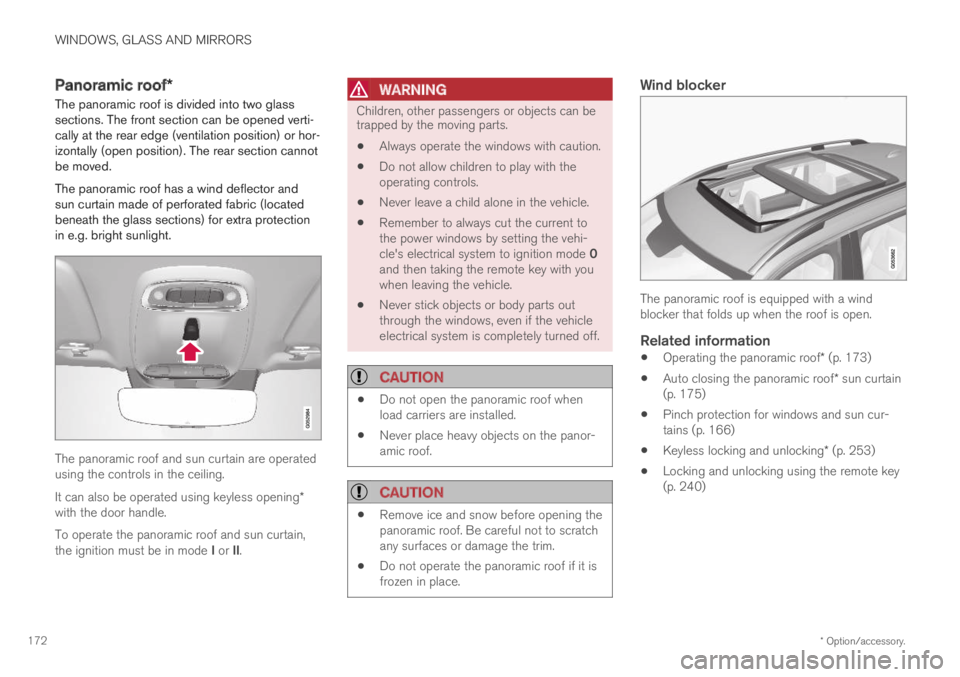
The panoramic roof has a wind deflector andsun curtain made of perforated fabric (locatedbeneath the glass sections) for extra protectionin e.g. bright sunlight.
The panoramic roof and sun curtain are operatedusing the controls in the ceiling.
It can also be operated using keyless opening*with the door handle.
To operate the panoramic roof and sun curtain,the ignition must be in mode I or II.
WARNING
Children, other passengers or objects can betrapped by the moving parts.
Always operate the windows with caution.
Do not allow children to play with theoperating controls.
Never leave a child alone in the vehicle.
Remember to always cut the current tothe power windows by setting the vehi-cle's electrical system to ignition mode 0and then taking the remote key with youwhen leaving the vehicle.
Never stick objects or body parts outthrough the windows, even if the vehicleelectrical system is completely turned off.
CAUTION
Do not open the panoramic roof whenload carriers are installed.
Never place heavy objects on the panor-amic roof.
CAUTION
Remove ice and snow before opening thepanoramic roof. Be careful not to scratchany surfaces or damage the trim.
Do not operate the panoramic roof if it isfrozen in place.
Wind blocker
The panoramic roof is equipped with a windblocker that folds up when the roof is open.
Related information
Operating the panoramic roof* (p. 173)
Auto closing the panoramic roof* sun curtain(p. 175)
Pinch protection for windows and sun cur-tains (p. 166)
Keyless locking and unlocking* (p. 253)
Locking and unlocking using the remote key(p. 240)
Page 175 of 695
WINDOWS, GLASS AND MIRRORS
}}
* Option/accessory.173
Operating the panoramic roof*
The panoramic roof and sun curtain are oper-ated using a control in the ceiling panel, andboth are equipped with pinch protection.
WARNING
Children, other passengers or objects can betrapped by the moving parts.
Always operate the windows with caution.
Do not allow children to play with theoperating controls.
Never leave a child alone in the vehicle.
Remember to always cut the current tothe power windows by setting the vehi-cle's electrical system to ignition mode 0and then taking the remote key with youwhen leaving the vehicle.
Never stick objects or body parts outthrough the windows, even if the vehicleelectrical system is completely turned off.
CAUTION
Do not open the panoramic roof whenload carriers are installed.
Never place heavy objects on the panor-amic roof.
CAUTION
Remove ice and snow before opening thepanoramic roof. Be careful not to scratchany surfaces or damage the trim.
Do not operate the panoramic roof if it isfrozen in place.
To operate the panoramic roof and sun curtain,the ignition must be in mode I or II.
It can also be operated using keyless opening*with the door handle.
WARNING
Make sure that no child or other passengercomes into contact with the windows as theyare closing with keyless closing*.
CAUTION
Check that the panoramic roof is properlyclosed when closing.
The movement of the roof will stop if the controlis released during manual operation or when the
glass has reached the comfort4 or fully open/closed position. The movement of both the pan-oramic roof and the sun curtain is also stopped ifthe control in the ceiling is operated again in the
direction opposite that of the current direction ofmovement.
The panoramic roof and sun curtain are alsoequipped with pinch protection. If there is anyproblem with the pinch protection, a rest proce-dure can be tested.
NOTE
For manual opening, the sun curtain must becompletely open before the panoramic roofcan be opened. For the reverse procedure,the panoramic roof must be completelyclosed before the sun curtain can be com-pletely closed.
4The comfort position is a position which helps keep wind and resonance sounds to a comfortably low level.
Page 176 of 695
||
WINDOWS, GLASS AND MIRRORS
* Option/accessory.174
Opening and closing ventilation
position
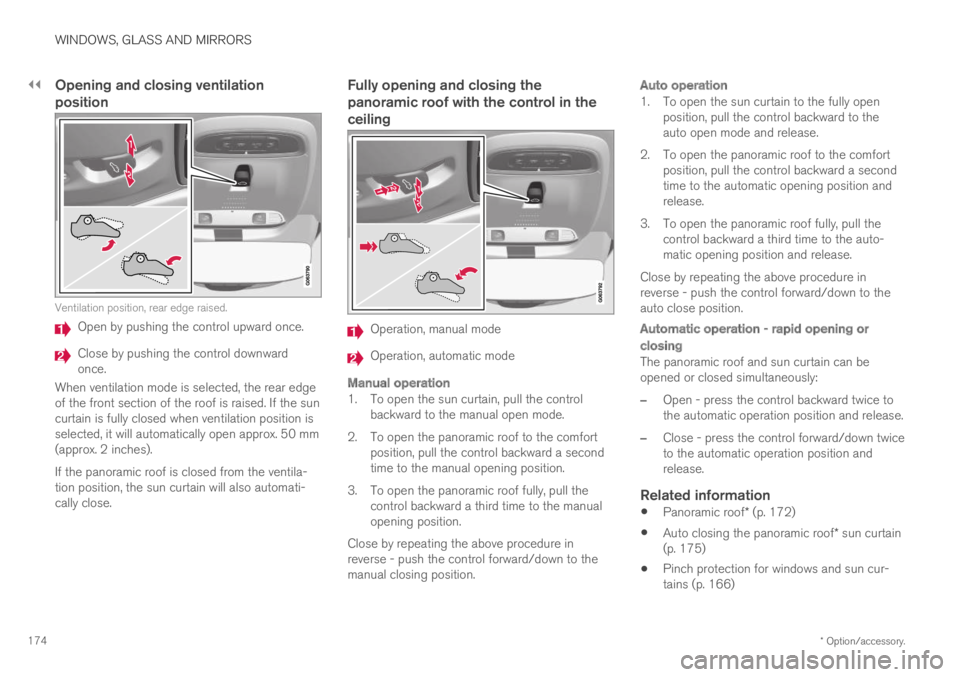
Ventilation position, rear edge raised.
Open by pushing the control upward once.
Close by pushing the control downwardonce.
When ventilation mode is selected, the rear edgeof the front section of the roof is raised. If the suncurtain is fully closed when ventilation position isselected, it will automatically open approx. 50 mm(approx. 2 inches).
If the panoramic roof is closed from the ventila-tion position, the sun curtain will also automati-cally close.
Fully opening and closing the
panoramic roof with the control in the
ceiling
Operation, manual mode
Operation, automatic mode
Manual operation
1. To open the sun curtain, pull the controlbackward to the manual open mode.
2. To open the panoramic roof to the comfortposition, pull the control backward a secondtime to the manual opening position.
3. To open the panoramic roof fully, pull thecontrol backward a third time to the manualopening position.
Close by repeating the above procedure inreverse - push the control forward/down to themanual closing position.
Auto operation
1. To open the sun curtain to the fully openposition, pull the control backward to theauto open mode and release.
2. To open the panoramic roof to the comfortposition, pull the control backward a secondtime to the automatic opening position andrelease.
3. To open the panoramic roof fully, pull thecontrol backward a third time to the auto-matic opening position and release.
Close by repeating the above procedure inreverse - push the control forward/down to theauto close position.
Automatic operation - rapid opening or
closing
The panoramic roof and sun curtain can beopened or closed simultaneously:
–Open - press the control backward twice tothe automatic operation position and release.
–Close - press the control forward/down twiceto the automatic operation position andrelease.
Related information
Panoramic roof* (p. 172)
Auto closing the panoramic roof* sun curtain(p. 175)
Pinch protection for windows and sun cur-tains (p. 166)
Page 177 of 695
WINDOWS, GLASS AND MIRRORS
* Option/accessory.175
Keyless locking and unlocking* (p. 253)
Locking and unlocking using the remote key(p. 240)
Auto closing the panoramic roof*sun curtain
With this function, the sun curtain closes auto-matically 15 minutes after the car has beenlocked if it is parked in hot weather. This is doneto lower the passenger compartment tempera-ture and protect the upholstery against beingbleached by the sun.
The function is deactivated as the default factorysetting and can be activated or deactivated usingthe center display.
1.Tap Settings in the Top view in the centerdisplay.
2.Tap My CarLocking.
Select Auto Close Sunroof Curtain toactivate/deactivate.
NOTE
The sun curtain also closes when all windowsare closed with keyless closing*.
Related information
Panoramic roof* (p. 172)
Operating the panoramic roof* (p. 173)
Pinch protection for windows and sun cur-tains (p. 166)
Keyless locking and unlocking* (p. 253)
Locking and unlocking using the remote key(p. 240)
Page 205 of 695
CLIMATE CONTROL
* Option/accessory.203
Interior Air Quality System* (p. 204)
Passenger compartment air filter (p. 205)
Clean Zone*
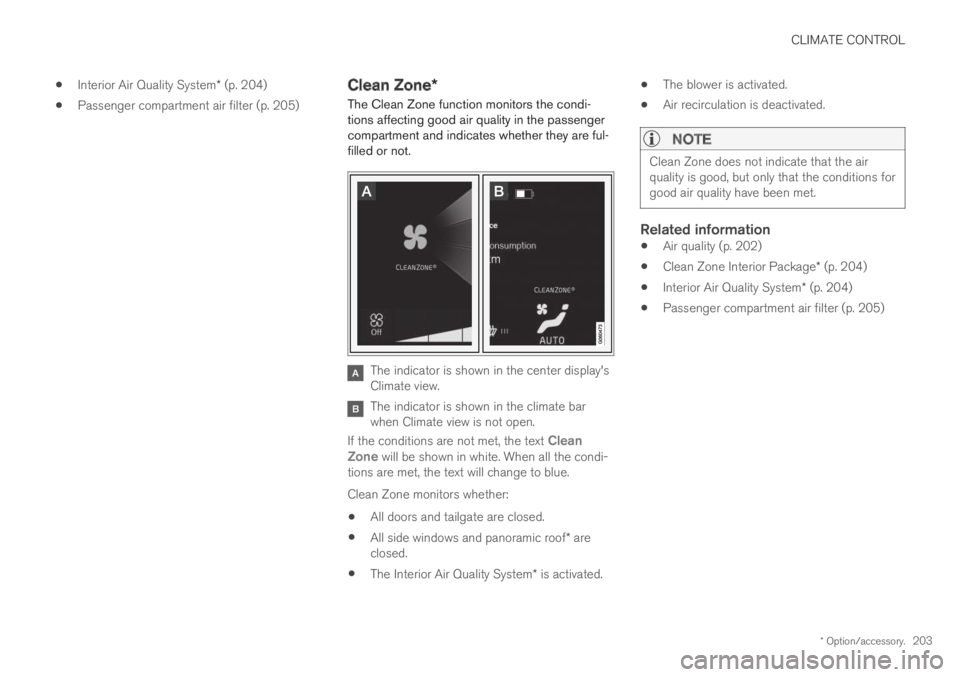
The Clean Zone function monitors the condi-tions affecting good air quality in the passengercompartment and indicates whether they are ful-filled or not.
The indicator is shown in the center display'sClimate view.
The indicator is shown in the climate barwhen Climate view is not open.
If the conditions are not met, the text CleanZone will be shown in white. When all the condi-tions are met, the text will change to blue.
Clean Zone monitors whether:
All doors and tailgate are closed.
All side windows and panoramic roof* areclosed.
The Interior Air Quality System* is activated.
The blower is activated.
Air recirculation is deactivated.
NOTE
Clean Zone does not indicate that the airquality is good, but only that the conditions forgood air quality have been met.
Related information
Air quality (p. 202)
Clean Zone Interior Package* (p. 204)
Interior Air Quality System* (p. 204)
Passenger compartment air filter (p. 205)
Page 226 of 695
CLIMATE CONTROL
* Option/accessory.224
Activating and deactivating airconditioning
The air conditioning cools and dehumidifiesincoming air as needed.
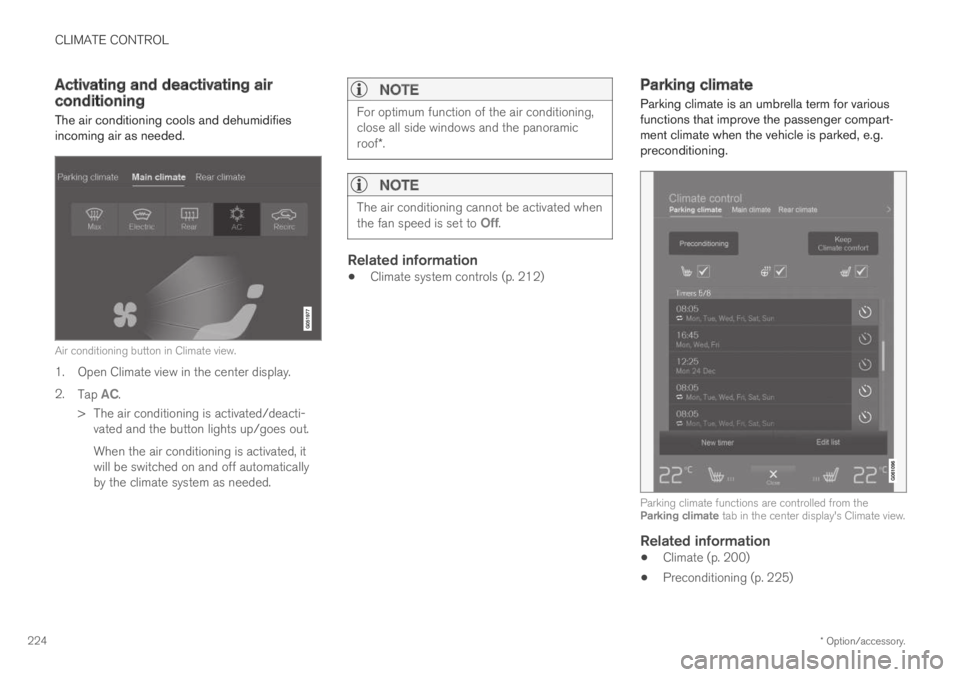
Air conditioning button in Climate view.
1. Open Climate view in the center display.
2.Tap AC.
>The air conditioning is activated/deacti-vated and the button lights up/goes out.
When the air conditioning is activated, itwill be switched on and off automaticallyby the climate system as needed.
NOTE
For optimum function of the air conditioning,close all side windows and the panoramicroof*.
NOTE
The air conditioning cannot be activated whenthe fan speed is set to Off.
Related information
Climate system controls (p. 212)
Parking climate
Parking climate is an umbrella term for variousfunctions that improve the passenger compart-ment climate when the vehicle is parked, e.g.preconditioning.
Parking climate functions are controlled from theParking climate tab in the center display's Climate view.
Related information
Climate (p. 200)
Preconditioning (p. 225)
Page 240 of 695
||
KEY, LOCKS AND ALARM
* Option/accessory.238
The keyless system for locking/unlocking thedoors and tailgate (Passive Entry*) is available asan option. This system has a range in a semicirclewith a radius of approximately 1.5 meter (5 feet)out from the driver's door and approx. 1 meter(3 feet) out from the tailgate.
With keyless start in combination with keylesslocking and unlocking, the remote key can belocated anywhere in the passenger compartmentor cargo compartment in order to start theengine.
Each remote key supplied with the vehicle can belinked to a driver profile with unique settings forthe vehicle. When a key with a specific profile isused, the vehicle settings are adjusted accordingto that profile.
Buttonless key, Key Tag
For vehicles equipped with keyless locking andunlocking*, a smaller, lighter and button-less key
(Key Tag4) is also provided. It works the sameway as the regular remote key as regard keylessstart and keyless locking and unlocking. The keyis waterproof up to a depth of approx. 10 meters(30 feet) for up to 60 minutes. It does not have adetachable key blade and its battery cannot bereplaced.
Remote key buttons
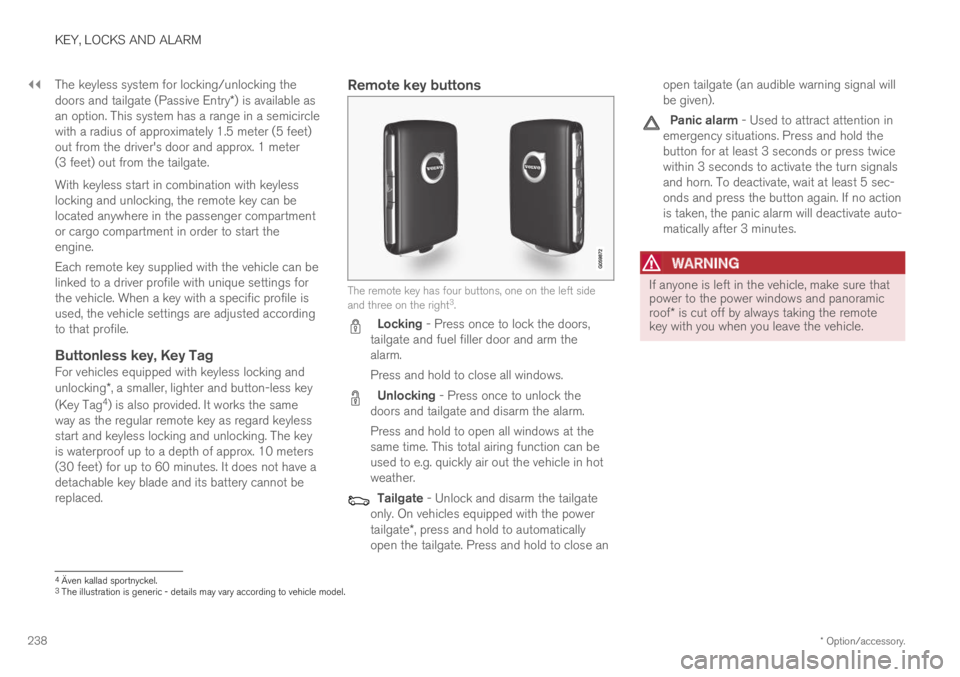
The remote key has four buttons, one on the left sideand three on the right3.
Locking - Press once to lock the doors,tailgate and fuel filler door and arm thealarm.
Press and hold to close all windows.
Unlocking - Press once to unlock thedoors and tailgate and disarm the alarm.
Press and hold to open all windows at thesame time. This total airing function can beused to e.g. quickly air out the vehicle in hotweather.
Tailgate - Unlock and disarm the tailgateonly. On vehicles equipped with the powertailgate*, press and hold to automaticallyopen the tailgate. Press and hold to close an
open tailgate (an audible warning signal willbe given).
Panic alarm - Used to attract attention inemergency situations. Press and hold thebutton for at least 3 seconds or press twicewithin 3 seconds to activate the turn signalsand horn. To deactivate, wait at least 5 sec-onds and press the button again. If no actionis taken, the panic alarm will deactivate auto-matically after 3 minutes.
WARNING
If anyone is left in the vehicle, make sure thatpower to the power windows and panoramicroof* is cut off by always taking the remotekey with you when you leave the vehicle.
4Även kallad sportnyckel.3The illustration is generic - details may vary according to vehicle model.
Page 435 of 695
STARTING AND DRIVING
* Option/accessory.433
Ignition modes
The vehicle's ignition can be put in variousmodes (levels) to make different functions availa-ble.
To enable the use of a limited number of func-tions when the engine is not running, the ignitioncan be put in one of three different levels: 0, Iand II. These levels are referred to as "ignitionmodes" in the Owner's Manual.
The following table shows which functions areavailable in each ignition mode:
ModeFunctions
0The odometer, clock and tem-
perature gauge are illuminatedA.
The power* seats can beadjusted.
The power windows can be used.
The center display is activated
and can be usedA.
The infotainment system can be
usedA.
In this mode, the functions are availa-ble for a limited time and then switchoff automatically.
IThe panoramic roof, power win-dows, 12-volt electrical socket inthe passenger compartment,Bluetooth, navigation, phone,blower and windshield wipers canbe used.
The power seats can be adjusted.
The 12-volt electrical socket* inthe cargo compartment can beused.
Electrical current will be takenfrom the battery in this ignitionmode.
ModeFunctions
IIThe headlights illuminate.
Warning/indicator lights illumi-nate for 5 seconds.
A number of other systems areactivated. However, seat and rearwindow heating can only be acti-vated when the engine is running.
This ignition mode uses a lot ofcurrent from the battery andshould be avoided whenever pos-sible!
AAlso activated when the door is opened.
Related information
Starting the vehicle (p. 430)
Adjusting the steering wheel (p. 198)
Jump starting using another battery (p. 477)
Selecting ignition mode (p. 434)
Page 466 of 695
||
STARTING AND DRIVING
* Option/accessory.464
Preconditioning
Whenever possible, precondition the vehiclebefore driving by connecting the chargingcable to an electrical outlet.
Avoid parking the vehicle somewhere wherethe interior will become too hot or too coldwhile the vehicle is parked. If possible, parkthe vehicle in a climate-controlled garage.
During a short drive after passenger com-partment preconditioning, turn off the pas-senger compartment fan or the air condition-ing in a hot climate.
If preconditioning is not possible when it iscold outside, use seat and steering wheelheating first. Avoid heating the entire pas-senger compartment to reduce the amountof current being taken from the hybrid bat-tery.
Driving
Choose the Pure drive mode to help mini-mize electric power consumption.
Maintain a steady speed and a generous fol-lowing distance to traffic ahead to minimizebraking. This drive mode has the lowestpower consumption.
Balance energy requirements using theaccelerator pedal. Use the indicator on theinstrument panel to see available electricpower and avoid starting the combustionengine unnecessarily. The electric motor is
more effective than the combustion engine,especially at low speeds.
When braking is necessary, brake gentlyusing the brake pedal. This will help rechargethe hybrid battery. A regenerative function isintegrated in the brake pedal and can beaugmented by the electric motor's brakingcapacity when the gear selector is in modeB.
Higher speeds increase energy consumption- air resistance increases with speed.
Activate the Hold function in the Functionview at high speeds when traveling fartherthan is possible using the hybrid battery'scapacity.
Whenever possible, avoid using the Chargefunction to charge the hybrid battery. Charg-ing the battery using the combustion engineincreases fuel consumption and carbon diox-ide emissions.
In a cold climate, reduce heating of the wind-shield/rear window, mirrors, seats and thesteering wheel.
Maintain the correct pressure in the tires andcheck pressure regularly.
The type of tires used could affect energyconsumption - consult a retailer for advice onsuitable tires.
Remove unnecessary items from the vehicle- the heavier the load, the higher the fuelconsumption.
Roof loads increase air resistance andincrease fuel consumption. Remove roofboxes, ski racks, etc. that are not in use.
Avoid driving with the windows open.
Do not keep the vehicle still on an upwardgradient by using the accelerator pedal. Usethe brakes instead.
Related information
Drive-E ‒ purer driving pleasure (p. 27)
Energy distribution in hybrid mode using mapdata* (p. 456)
Factors affecting electric motor range(p. 465)
Using the electric motor only (p. 465)
Hybrid gauge (p. 87)
Checking tire pressure (p. 563)
Page 506 of 695
AUDIO, MEDIA AND INTERNET
* Option/accessory.504
HD Radio™ limitations
Limitations
Main channel vs. sub-channels (FM only):The main channel is the only channel thatcan receive in hybrid mode (both digital andanalog). If a frequency has sub-channels,they are broadcast in digital mode only. Themain FM channel will be displayed as, forexample, "WRIF-FM HD1". The sub-FMchannels will be displayed as"WRIF-FMHD2", "WRIF-FM HD3", etc.
Reception coverage area: Due to currentIBOC transmitter power limitations, thereception coverage area in digital mode issomewhat more limited than the station'sanalog coverage area. Be aware that, like allradio transmission technology, terrain, time ofday, vegetation and buildings can have apositive or negative effect on radio reception.
Analog to digital/digital to analog blend-ing: Analog to digital blending will occur asthe signal strength reaches a preset thresh-old in the receiver. This will be noticeable infringe areas (areas with weak reception) andis normal.
NOTE
There may be a noticeable difference insound quality when a change from analogueto digital or digital to analogue occurs, suchas:
Volume increase or decrease
Equalizer settings, i.e., Bass/ Midrange/Treble cut or boost
Time alignment (Digital program materialin extreme cases can be as much as 8seconds behind the analogue). This willnoticeable as a "stuttering" effect.
The above items are dependant on thebroadcaster's equipment settings and donot indicate a fault in the vehicle's radioreceiver or antenna systems.
Related information
HD Radio™ (p. 501)
Activating and deactivating the HD Radio™(p. 502)
HD Radio™ sub-channels (p. 503)
SiriusXM® Satellite radio*
The SiriusXM® Satellite system broadcasts fromof a number of high elevation satellites in geo-synchronous orbit.
Listening to satellite radio
The digital signals from the satellites are line-of-sight, which means that physical obstructionssuch as bridges, tunnels, etc, may temporarilyinterfere with signal reception.
Avoid any obstructions, such as metallic objectstransported on roof racks or in a ski box, or otherantennas that may impede signals from the
SiriusXM® satellites.
Selecting SiriusXM ®
Satellite radio
mode
1. From the center display's Home view, swipefrom right to left to come to App view.
2.Tap the SiriusXM® Satellite radio icon.