brake VOLVO XC60 TWIN ENGINE 2019 Owner's Manual
[x] Cancel search | Manufacturer: VOLVO, Model Year: 2019, Model line: XC60 TWIN ENGINE, Model: VOLVO XC60 TWIN ENGINE 2019Pages: 695, PDF Size: 14.96 MB
Page 186 of 695
SEATS AND STEERING WHEEL
* Option/accessory.184
Manual front seats
The power front seats can be adjusted in a num-ber of different ways for optimal comfort andergonomics.
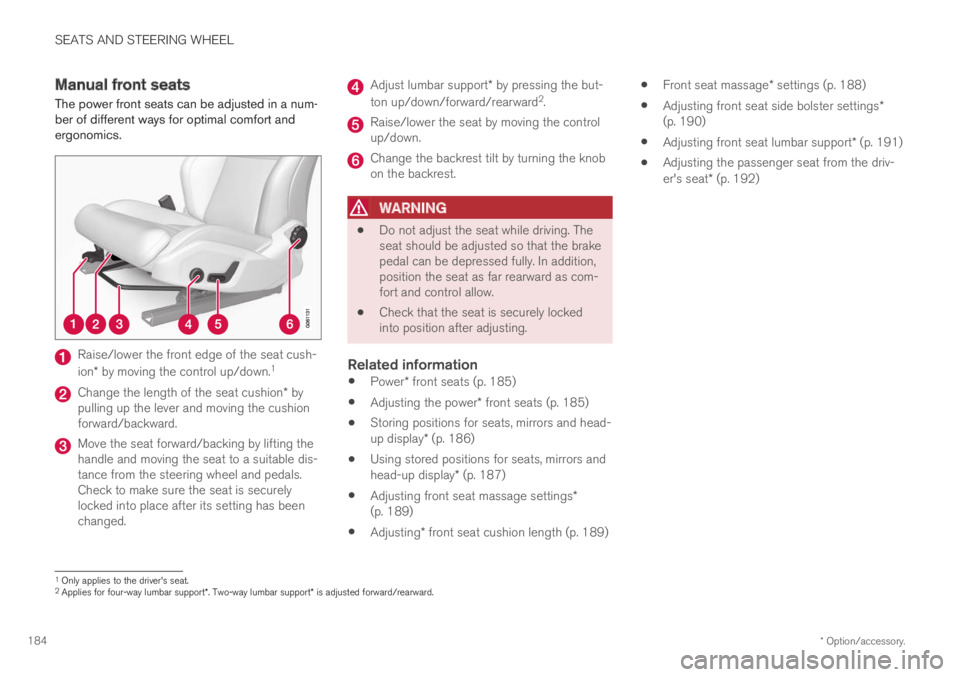
Raise/lower the front edge of the seat cush-
ion* by moving the control up/down.1
Change the length of the seat cushion* bypulling up the lever and moving the cushionforward/backward.
Move the seat forward/backing by lifting thehandle and moving the seat to a suitable dis-tance from the steering wheel and pedals.Check to make sure the seat is securelylocked into place after its setting has beenchanged.
Adjust lumbar support* by pressing the but-
ton up/down/forward/rearward2.
Raise/lower the seat by moving the controlup/down.
Change the backrest tilt by turning the knobon the backrest.
WARNING
Do not adjust the seat while driving. Theseat should be adjusted so that the brakepedal can be depressed fully. In addition,position the seat as far rearward as com-fort and control allow.
Check that the seat is securely lockedinto position after adjusting.
Related information
Power* front seats (p. 185)
Adjusting the power* front seats (p. 185)
Storing positions for seats, mirrors and head-up display* (p. 186)
Using stored positions for seats, mirrors andhead-up display* (p. 187)
Adjusting front seat massage settings*(p. 189)
Adjusting* front seat cushion length (p. 189)
Front seat massage* settings (p. 188)
Adjusting front seat side bolster settings*(p. 190)
Adjusting front seat lumbar support* (p. 191)
Adjusting the passenger seat from the driv-er's seat* (p. 192)
1Only applies to the driver's seat.2Applies for four-way lumbar support*. Two-way lumbar support* is adjusted forward/rearward.
Page 189 of 695
SEATS AND STEERING WHEEL
}}
* Option/accessory.187
Front seat massage* settings (p. 188)
Adjusting front seat side bolster settings*(p. 190)
Adjusting front seat lumbar support* (p. 191)
Adjusting the passenger seat from the driv-er's seat* (p. 192)
Adjusting the door mirrors (p. 170)
Head-up display settings* (p. 144)
Using stored positions for seats,
mirrors and head-up display*
If the positions for the power* seat, door mirrorsand head-up display* have been stored, they canbe easily activated using the memory buttons.
Using a stored position
A stored position can be used with the front dooropen or closed:
Front door open
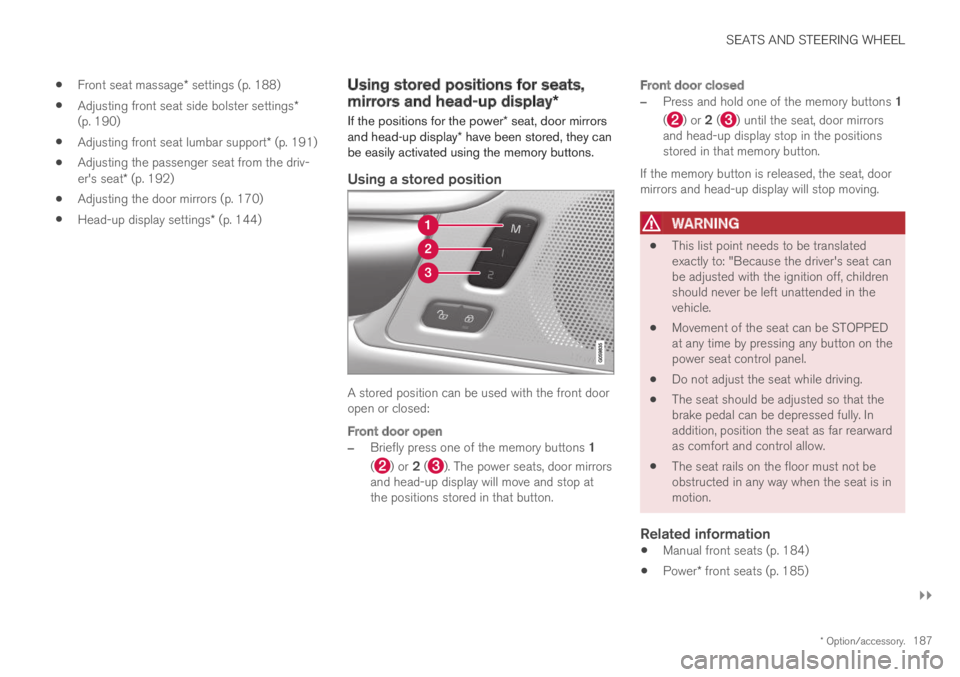
–Briefly press one of the memory buttons 1
() or 2 (). The power seats, door mirrorsand head-up display will move and stop atthe positions stored in that button.
Front door closed
–Press and hold one of the memory buttons 1
() or 2 () until the seat, door mirrorsand head-up display stop in the positionsstored in that memory button.
If the memory button is released, the seat, doormirrors and head-up display will stop moving.
WARNING
This list point needs to be translatedexactly to: "Because the driver's seat canbe adjusted with the ignition off, childrenshould never be left unattended in thevehicle.
Movement of the seat can be STOPPEDat any time by pressing any button on thepower seat control panel.
Do not adjust the seat while driving.
The seat should be adjusted so that thebrake pedal can be depressed fully. Inaddition, position the seat as far rearwardas comfort and control allow.
The seat rails on the floor must not beobstructed in any way when the seat is inmotion.
Related information
Manual front seats (p. 184)
Power* front seats (p. 185)
Page 195 of 695
SEATS AND STEERING WHEEL
}}
* Option/accessory.193
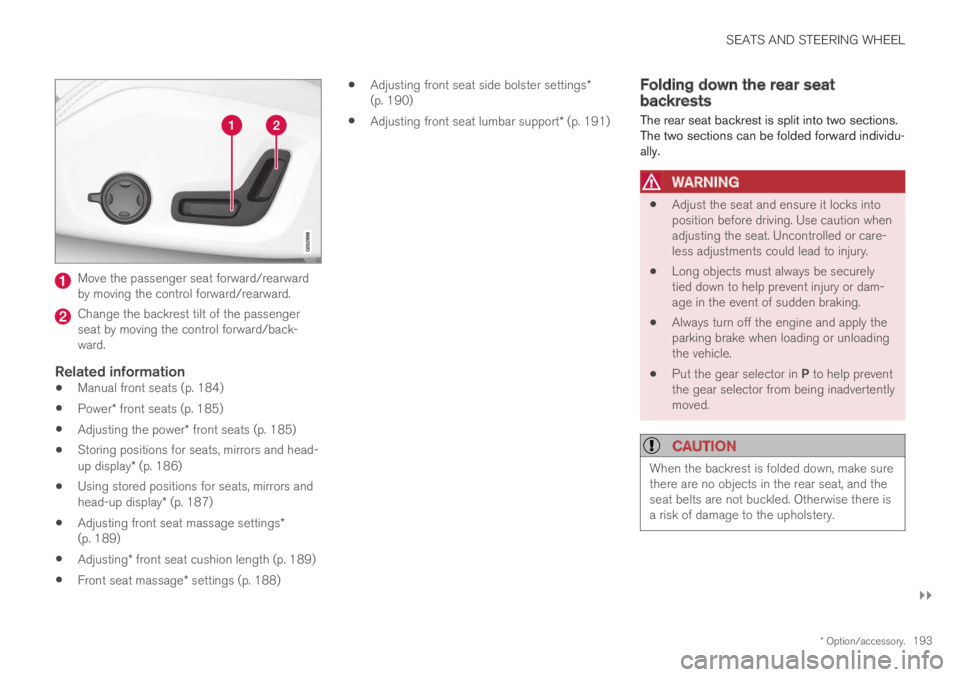
Move the passenger seat forward/rearwardby moving the control forward/rearward.
Change the backrest tilt of the passengerseat by moving the control forward/back-ward.
Related information
Manual front seats (p. 184)
Power* front seats (p. 185)
Adjusting the power* front seats (p. 185)
Storing positions for seats, mirrors and head-up display* (p. 186)
Using stored positions for seats, mirrors andhead-up display* (p. 187)
Adjusting front seat massage settings*(p. 189)
Adjusting* front seat cushion length (p. 189)
Front seat massage* settings (p. 188)
Adjusting front seat side bolster settings*(p. 190)
Adjusting front seat lumbar support* (p. 191)
Folding down the rear seatbackrests
The rear seat backrest is split into two sections.The two sections can be folded forward individu-ally.
WARNING
Adjust the seat and ensure it locks intoposition before driving. Use caution whenadjusting the seat. Uncontrolled or care-less adjustments could lead to injury.
Long objects must always be securelytied down to help prevent injury or dam-age in the event of sudden braking.
Always turn off the engine and apply theparking brake when loading or unloadingthe vehicle.
Put the gear selector in P to help preventthe gear selector from being inadvertentlymoved.
CAUTION
When the backrest is folded down, make surethere are no objects in the rear seat, and theseat belts are not buckled. Otherwise there isa risk of damage to the upholstery.
Page 274 of 695
DRIVER SUPPORT
* Option/accessory.272
Driver support systems
The vehicle is equipped with a number of driversupport systems that can provide the driver withactive or passive assistance in various situations.
The systems can, for example, help the driver:
maintain a set speed
maintain a set time interval to the vehicleahead
help prevent a collision by warning the driverand applying the brakes
park the vehicle.
Some of the systems are standard and others areoptions. This also varies from market to market.
Related information
Speed-dependent steering wheel resistance(p. 272)
Electronic Stability Control (p. 273)
Stability system Roll Stability Control(p. 273)
Speed limiter (p. 277)
Automatic Speed Limiter (p. 281)
Cruise control (p. 285)
Distance Alert* (p. 290)
Adaptive Cruise Control* (p. 294)
Pilot Assist (p. 310)
Radar sensor (p. 326)
Camera (p. 331)
City Safety™ (p. 335)
Rear Collision Warning (p. 349)
BLIS* (p. 350)
Cross Traffic Alert* (p. 355)
Road Sign Information* (p. 359)
Driver Alert Control (p. 365)
Lane Keeping Aid (p. 367)
Steering assistance at risk of collision(p. 375)
Park Assist* (p. 385)
Park Assist Camera* (p. 391)
Park Assist Pilot* (p. 401)
Speed-dependent steering wheelresistance
Speed-dependent power steering increases thesteering wheel resistance in pace with the vehi-cle's speed to give the driver an enhanced feel-ing of control and stability.
Steering may feel stiffer on highways. Whenparking and at low speeds, it will be easier tomove the steering wheel.
NOTE
In some situations, the power steering maybecome too hot and require temporary cool-ing – during such time the power steering willwork at reduced output and the steeringwheel may feel more difficult to move.
In parallel with the temporarily reduced steer-ing assistance, the driver display shows amessage as well as a STEERING WHEELsymbol.
WARNING
While the power steering is working atreduced power, the driver support functionsand systems with steering assistance are notavailable.
In such a situation, the driver display showsthe Power steering failure message, com-bined with a STEERING WHEEL symbol.
Page 275 of 695
DRIVER SUPPORT
}}
* Option/accessory.273
Changing the level of steering wheel
resistance *
To change the level of steering wheel resistance,see the description of the INDIVIDUAL optionunder "Available drive modes" in the "Drivemodes" section.
On models not equipped with drive mode con-trols and the INDIVIDUAL option, steering wheelresistance can instead be set in the center dis-play's Top view under:
SettingsMy CarDrive ModesSteering Force
Steering wheel resistance settings cannot beaccessed when turning at speeds above10 km/h (6 mph).
Related information
Drive modes (p. 450)
Pilot Assist (p. 310)
City Safety steering assistance for evasivemaneuver (p. 343)
Lane Keeping Aid (p. 367)
Steering assistance at risk of collision(p. 375)
Park Assist Pilot* (p. 401)
Stability system Roll StabilityControl
The Roll Stability Control (RSC1) system helpsminimize the risk of a rollover in the event of e.g.a sudden evasive maneuver or if the vehiclebegins to skid.
The RSC system monitors the lateral angle atwhich the vehicle is leaning and registers anychanges. Using this information, the system cal-culates the likelihood of a rollover. If there is animminent risk of a rollover, Electronic StabilityControl is activated, engine torque is reduced andbrakes are applied to one or more of the wheelsuntil the vehicle has regained stability.
WARNING
The vehicle
Page 276 of 695
||
DRIVER SUPPORT
* Option/accessory.274
WARNING
The Electronic Stability Control systemESC is supplementary driver supportintended to facilitate driving and make itsafer – it cannot handle all situations inall traffic, weather and road conditions.
ESC is not a substitute for the driver'sattention and judgment. The driver isalways responsible for ensuring the vehi-cle is driven in a safe manner, at theappropriate speed, with an appropriatedistance to other vehicles, and in accord-ance with current traffic rules and regula-tions.
Stability control 3
This function helps control the driving and brak-ing force of each individual wheel in an attemptto stabilize the vehicle.
Spin control and active yaw control
This function is active at low speeds and brakesthe wheels that are spinning to transfer additionalpower from wheels that are not spinning.
This function also helps prevent the wheels fromspinning while the vehicle is accelerating.
Engine drag control
Engine drag control (EDC4) helps prevent inad-vertent wheel lock, e.g. after downshifting orusing engine braking when driving at low speedson a slippery surface.
Inadvertent wheel lock while driving could impairthe driver's ability to steer the vehicle.
Trailer Stability Assist * 5
Trailer Stability Assist (TSA6) is designed to helpstabilize a vehicle that is towing a trailer if thevehicle and trailer have begun to sway. For moreinformation, see "Trailer Stability Assist".
NOTE
The TSA function is deactivated if ESC SportMode is activated.
Related information
Electronic Stability Control Sport mode(p. 275)
Activating/deactivating Sport mode in Elec-tronic Stability Control (p. 275)
Electronic Stability Control Sport mode limi-tations (p. 275)
Electronic Stability Control symbols and mes-sages (p. 276)
Trailer Stability Assist* (p. 481)
3
Also called traction control.
4Engine Drag Control
5
Trailer Stability Assist is included if the vehicle is equipped with a Volvo original towbar.
6Trailer Stability Assist
Page 278 of 695
DRIVER SUPPORT
276
Electronic Stability Control symbolsand messages
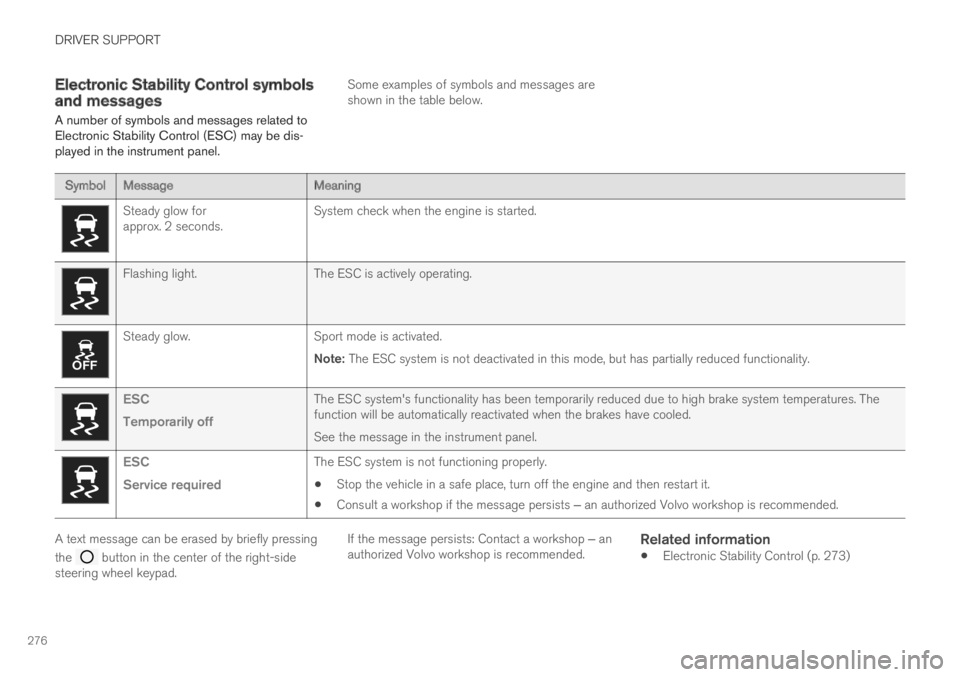
A number of symbols and messages related toElectronic Stability Control (ESC) may be dis-played in the instrument panel.
Some examples of symbols and messages areshown in the table below.
SymbolMessageMeaning
Steady glow forapprox. 2 seconds.System check when the engine is started.
Flashing light.The ESC is actively operating.
Steady glow.Sport mode is activated.
Note: The ESC system is not deactivated in this mode, but has partially reduced functionality.
ESC
Temporarily off
The ESC system's functionality has been temporarily reduced due to high brake system temperatures. Thefunction will be automatically reactivated when the brakes have cooled.
See the message in the instrument panel.
ESC
Service required
The ESC system is not functioning properly.
Stop the vehicle in a safe place, turn off the engine and then restart it.
Consult a workshop if the message persists ‒ an authorized Volvo workshop is recommended.
A text message can be erased by briefly pressing
the button in the center of the right-sidesteering wheel keypad.
If the message persists: Contact a workshop ‒ anauthorized Volvo workshop is recommended.
Related information
Electronic Stability Control (p. 273)
Page 284 of 695
||
DRIVER SUPPORT
282
WARNING
The ASL function is supplementary driversupport intended to facilitate driving andhelp make it safer – it cannot handle allsituations in all traffic, weather and roadconditions.
Even if the driver can clearly see thespeed limit sign, the speed informationfrom the Road Sign Information (RSI)function to ASL may be incorrect. In suchcases, the driver must intervene andaccelerate or brake to an appropriatespeed.
ASL is not a substitute for the driver'sattention and judgment. The driver isalways responsible for ensuring the vehi-cle is driven in a safe manner, at theappropriate speed, with an appropriatedistance to other vehicles, and in accord-ance with current traffic rules and regula-tions.
See also the heading "Road Sign Infor-mation limitations".
Is SL or ASL active?
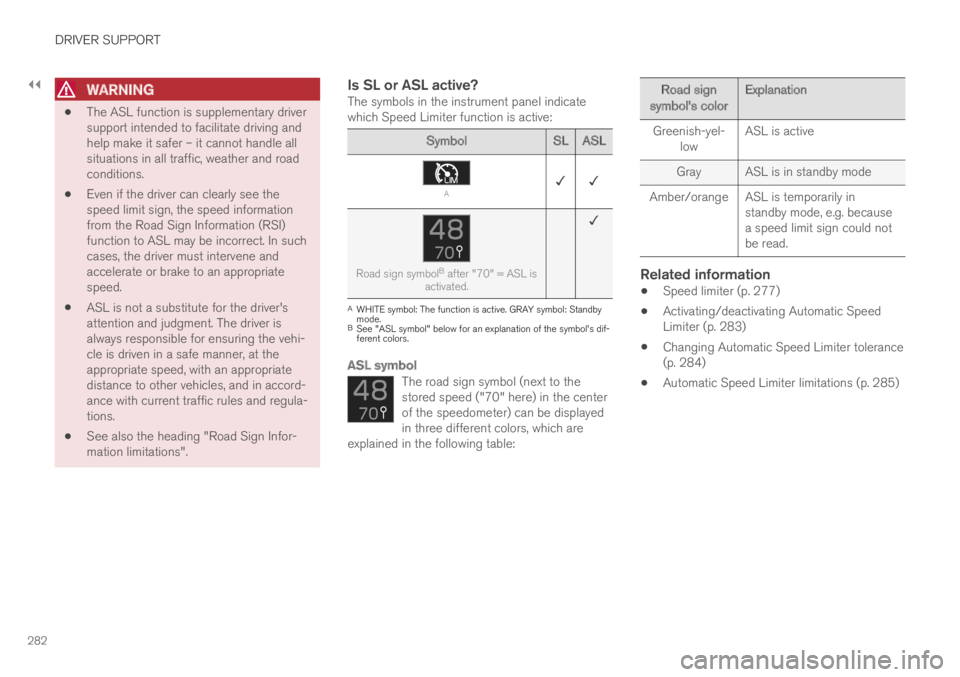
The symbols in the instrument panel indicatewhich Speed Limiter function is active:
SymbolSLASL
A✓ ✓
Road sign symbolB after "70" = ASL isactivated.
✓
AWHITE symbol: The function is active. GRAY symbol: Standbymode.BSee "ASL symbol" below for an explanation of the symbol's dif-ferent colors.
ASL symbol
The road sign symbol (next to thestored speed ("70" here) in the centerof the speedometer) can be displayedin three different colors, which areexplained in the following table:
Road signsymbol's colorExplanation
Greenish-yel-lowASL is active
GrayASL is in standby mode
Amber/orange ASL is temporarily instandby mode, e.g. becausea speed limit sign could notbe read.
Related information
Speed limiter (p. 277)
Activating/deactivating Automatic SpeedLimiter (p. 283)
Changing Automatic Speed Limiter tolerance(p. 284)
Automatic Speed Limiter limitations (p. 285)
Page 287 of 695
DRIVER SUPPORT
}}
* Option/accessory.285
Automatic Speed Limiter limitations
Automatic Speed Limiter (ASL) utilizes the
speed limit information provided by the RSI22
function, not from the speed limit signs that thevehicle passes.
If RSI22 is unable to interpret and provide ASLwith speed information, ASL will go into standbymode and switch over to SL. The driver will thenhave to actively brake to bring the vehicle downto the appropriate speed.
ASL will be reactivated when RSI22 is once againable to interpret and provide speed information toASL.
See “Road Sign Information limitations” for moreinformation.
Related information
Speed limiter (p. 277)
Automatic Speed Limiter (p. 281)
Automatic Speed Limiter limitations (p. 285)
Activating/deactivating Road Sign Informa-tion (p. 360)
Cruise control
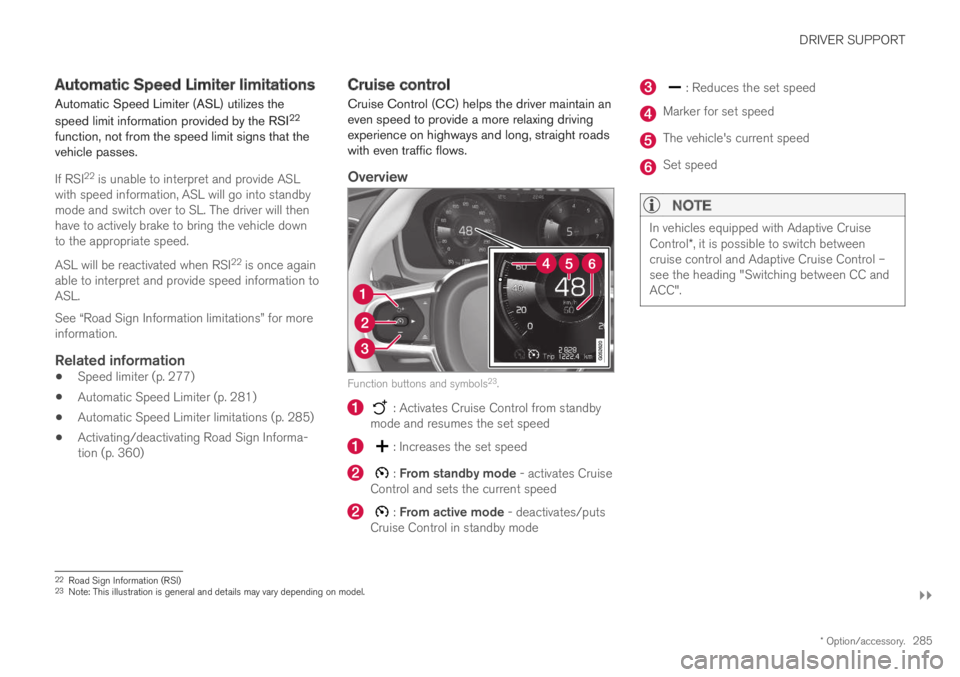
Cruise Control (CC) helps the driver maintain aneven speed to provide a more relaxing drivingexperience on highways and long, straight roadswith even traffic flows.
Overview
Function buttons and symbols23.
: Activates Cruise Control from standbymode and resumes the set speed
: Increases the set speed
: From standby mode - activates CruiseControl and sets the current speed
: From active mode - deactivates/putsCruise Control in standby mode
: Reduces the set speed
Marker for set speed
The vehicle's current speed
Set speed
NOTE
In vehicles equipped with Adaptive CruiseControl*, it is possible to switch betweencruise control and Adaptive Cruise Control –see the heading "Switching between CC andACC".
22Road Sign Information (RSI)23Note: This illustration is general and details may vary depending on model.
Page 290 of 695
||
DRIVER SUPPORT
288
For vehicles with both CC and ACC
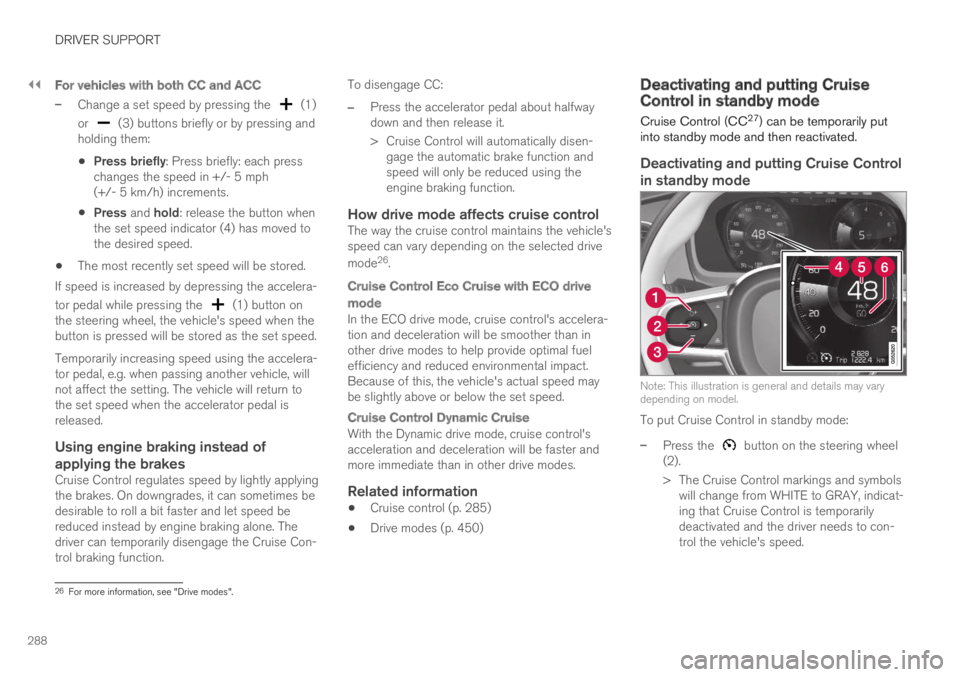
–Change a set speed by pressing the (1)
or (3) buttons briefly or by pressing andholding them:
Press briefly: Press briefly: each presschanges the speed in +/- 5 mph(+/- 5 km/h) increments.
Press and hold: release the button whenthe set speed indicator (4) has moved tothe desired speed.
The most recently set speed will be stored.
If speed is increased by depressing the accelera-
tor pedal while pressing the (1) button onthe steering wheel, the vehicle's speed when thebutton is pressed will be stored as the set speed.
Temporarily increasing speed using the accelera-tor pedal, e.g. when passing another vehicle, willnot affect the setting. The vehicle will return tothe set speed when the accelerator pedal isreleased.
Using engine braking instead of
applying the brakes
Cruise Control regulates speed by lightly applyingthe brakes. On downgrades, it can sometimes bedesirable to roll a bit faster and let speed bereduced instead by engine braking alone. Thedriver can temporarily disengage the Cruise Con-trol braking function.
To disengage CC:
–Press the accelerator pedal about halfwaydown and then release it.
>Cruise Control will automatically disen-gage the automatic brake function andspeed will only be reduced using theengine braking function.
How drive mode affects cruise control
The way the cruise control maintains the vehicle'sspeed can vary depending on the selected drive
mode26.
Cruise Control Eco Cruise with ECO drive
mode
In the ECO drive mode, cruise control's accelera-tion and deceleration will be smoother than inother drive modes to help provide optimal fuelefficiency and reduced environmental impact.Because of this, the vehicle's actual speed maybe slightly above or below the set speed.
Cruise Control Dynamic Cruise
With the Dynamic drive mode, cruise control'sacceleration and deceleration will be faster andmore immediate than in other drive modes.
Related information
Cruise control (p. 285)
Drive modes (p. 450)
Deactivating and putting CruiseControl in standby mode
Cruise Control (CC27) can be temporarily putinto standby mode and then reactivated.
Deactivating and putting Cruise Control
in standby mode
Note: This illustration is general and details may varydepending on model.
To put Cruise Control in standby mode:
–Press the button on the steering wheel(2).
>The Cruise Control markings and symbolswill change from WHITE to GRAY, indicat-ing that Cruise Control is temporarilydeactivated and the driver needs to con-trol the vehicle's speed.
26For more information, see "Drive modes".