brakes VOLVO XC60 TWIN ENGINE 2019 Owners Manual
[x] Cancel search | Manufacturer: VOLVO, Model Year: 2019, Model line: XC60 TWIN ENGINE, Model: VOLVO XC60 TWIN ENGINE 2019Pages: 695, PDF Size: 14.96 MB
Page 12 of 695
10
STARTING AND DRIVING
Starting the vehicle430
Switching off the vehicle432
Ignition modes433
Selecting ignition mode434
Brake functions434
Brakes435
Brake Assist System437
Braking on wet roads437
Braking on salted roads437
Maintenance of the brake system438
Parking brake438
Activating and deactivating the park-ing brake439
Settings for automatically activatingthe parking brake440
Parking on a hill440
Parking brake malfunction441
Auto-hold brakes442
Activating and deactivating Auto-hold at a standstill442
Hill Start Assist443
Braking assist after a collision443
Transmission444
Gear selector positions for automatictransmissions445
Using the steering wheel paddles* toshift447
Shiftlock448
The kickdown function448
All Wheel Drive (AWD)448
Drive systems449
Starting and stopping the combus-tion engine in Twin Engine vehicles450
Drive modes450
Changing drive mode455
Energy distribution in hybrid modeusing map data*456
Leveling control* and suspension457
Leveling control settings*460
Low Speed Control460
Activating and deactivating LowSpeed Control using the function button461
Hill Descent Control462
Activating and deactivating HillDescent Control using the functionbutton
463
Economical driving463
Using the electric motor only465
Factors affecting electric motor range465
"Hold" and "Charge" functions467
Preparing for a long trip468
Winter driving468
Driving through standing water469
Opening/closing the fuel filler door470
Refueling471
Fuel472
Octane rating473
Emission controls475
Overheating of engine and transmission475
Battery drain476
Jump starting using another battery477
Detachable towbar*478
Driving with a trailer479
Trailer Stability Assist*481
Checking trailer lights482
Towing using a towline483
Attaching and removing the towing eyelet484
Recovery485
HomeLink®*485
Programming HomeLink®*486
Using HomeLink®*487
Type approval for HomeLink®*488
Compass*489
Activating and deactivating the compass*489
Calibrating the compass*489
Page 31 of 695
YOUR VOLVO
29
possible collision and help the driver act in timeto prevent it. If the driver does not react to thewarning and the risk of collision is determined tobe imminent, City Safety can automatically applythe brakes.
Lane assistance (LKA) is another example of afunction that can help prevent accidents by help-ing the driver - on expressways and similar largerroads - to reduce the risk of the car accidentallyleaving its own lane.
The function Steering aid during increasedcollision risk can help the driver reduce the riskof the car leaving its lane unintentionally and/orcolliding with another vehicle or obstacle byactively steering the car back into its lane and/orswerving.
Protection
To help protect the driver and passengers, thevehicle is equipped with seat belt tensioners thatpull the seat belts taut in collisions and other crit-ical situations. The vehicle also has airbags, inflat-able curtains and the Whiplash ProtectionSystem (WHIPS), which helps prevent whiplashinjuries.
Related information
Driver support systems (p. 272)
Active high beam (p. 157)
Safety (p. 42)
Seat belts (p. 47)
Airbags (p. 52)
Whiplash Protection System (p. 46)
Page 52 of 695
||
SAFETY
* Option/accessory.50
Related information
Seat belts (p. 47)
Seat belt tensioners (p. 50)
Door and seat belt reminders (p. 51)
Seat belt tensioners
The vehicle is equipped with standard and elec-tric* seat belt tensioners that can help tensionthe seat belt in a critical situation or collision.
Standard seat belt tensioners
All seat belts are equipped with a standard seatbelt tensioner.
In a collision of sufficiently violent force, the seatbelt tensioners will tension the seat belts in orderto more effectively restrain the occupants.
Electric seat belt tensioners *
The driver's and front passenger's seat belts areequipped with electric seat belt tensioners.
The seat belt tensioners interact and can be acti-vated in conjunction with the City Safety andRear Collision Warning driver support systems. Incritical situations, such as if the vehicle brakessuddenly, begins to skid or runs off the road (e.gif the vehicle rolls into a ditch, lifts off the groundor hits an obstacle in the road), or if there is a riskof collision, the seat belts can be pulled taut bythe seat belt tensioner's electric motor.
The electric seat belt tensioner helps to positionthe occupant more effectively in the seat, whichreduces the risk of the occupant striking the inte-rior of the passenger compartment and improvesthe effect of other safety systems such as theairbags.
When a critical situation has passed, the seat beltand the electric seat belt tensioner are resetautomatically. However, they can also be resetmanually.
WARNING
Never attempt to alter or repair the seat belton your own. Volvo recommends contactingan authorized Volvo workshop.
If the seat belt has been exposed to extremeforces, e.g. in conjunction with a collision, theentire seat belt must be replaced. Even if theseat belt appears undamaged, some of itsprotective properties may have been lost. Alsoreplace the seat belt if it is worn or damaged.The new seat belt must be type approved andintended for the same seating position as thereplaced seat belt.
Related information
Seat belts (p. 47)
Buckling and unbuckling seat belts (p. 48)
Resetting the electric seat belt tensioners*(p. 51)
City Safety™ (p. 335)
Rear Collision Warning (p. 349)
Page 84 of 695
DISPLAYS AND VOICE CONTROL
* Option/accessory.82
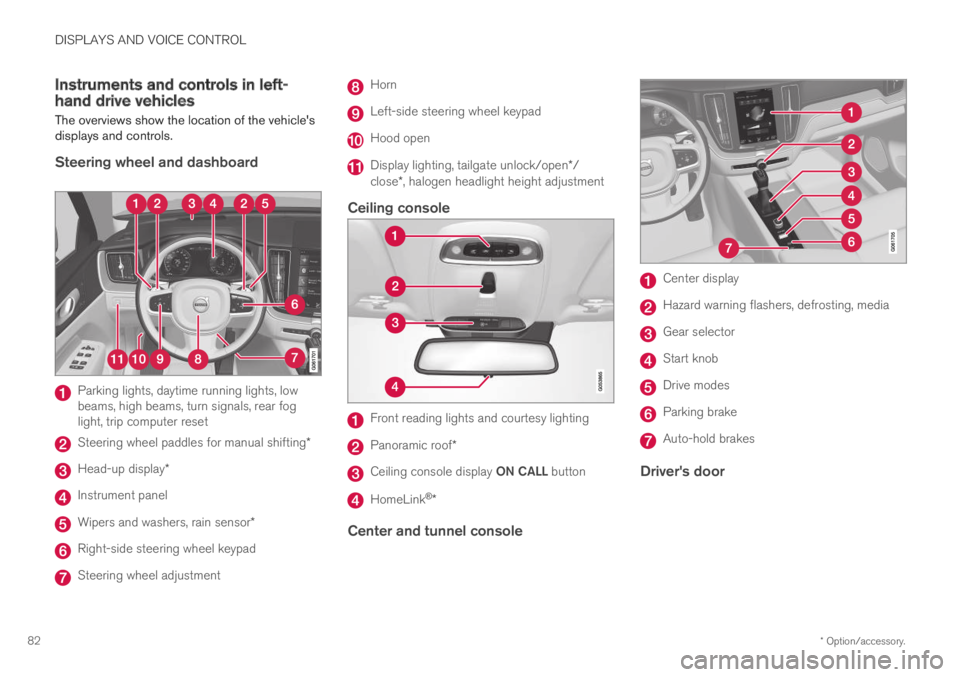
Instruments and controls in left-hand drive vehicles
The overviews show the location of the vehicle'sdisplays and controls.
Steering wheel and dashboard
Parking lights, daytime running lights, lowbeams, high beams, turn signals, rear foglight, trip computer reset
Steering wheel paddles for manual shifting*
Head-up display*
Instrument panel
Wipers and washers, rain sensor*
Right-side steering wheel keypad
Steering wheel adjustment
Horn
Left-side steering wheel keypad
Hood open
Display lighting, tailgate unlock/open*/close*, halogen headlight height adjustment
Ceiling console
Front reading lights and courtesy lighting
Panoramic roof*
Ceiling console display ON CALL button
HomeLink®*
Center and tunnel console
Center display
Hazard warning flashers, defrosting, media
Gear selector
Start knob
Drive modes
Parking brake
Auto-hold brakes
Driver's door
Page 86 of 695
DISPLAYS AND VOICE CONTROL
* Option/accessory.84
Instrument panel
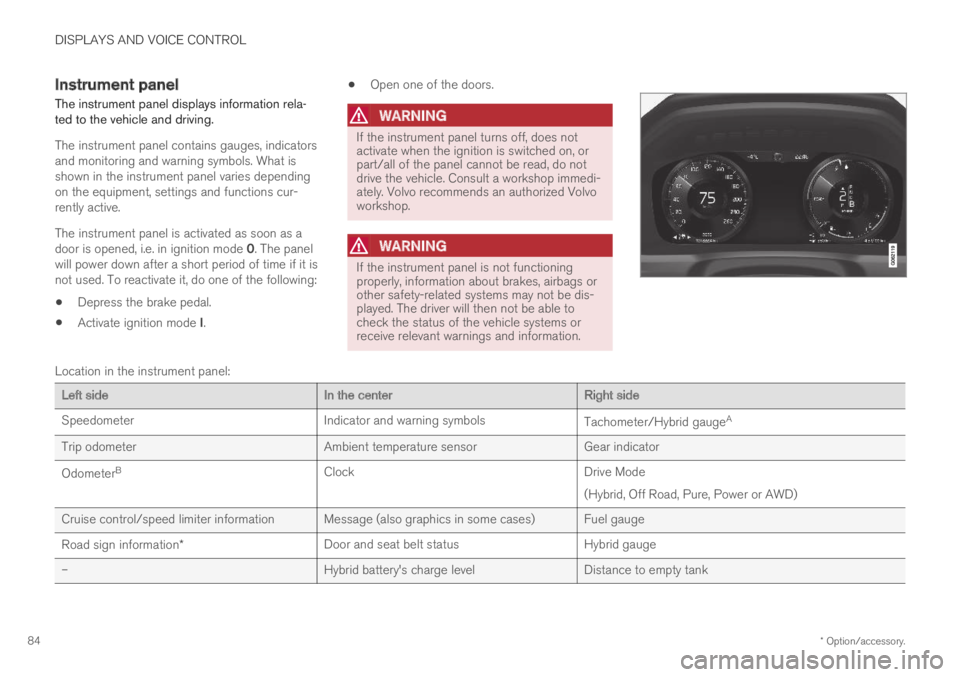
The instrument panel displays information rela-ted to the vehicle and driving.
The instrument panel contains gauges, indicatorsand monitoring and warning symbols. What isshown in the instrument panel varies dependingon the equipment, settings and functions cur-rently active.
The instrument panel is activated as soon as adoor is opened, i.e. in ignition mode 0. The panelwill power down after a short period of time if it isnot used. To reactivate it, do one of the following:
Depress the brake pedal.
Activate ignition mode I.
Open one of the doors.
WARNING
If the instrument panel turns off, does notactivate when the ignition is switched on, orpart/all of the panel cannot be read, do notdrive the vehicle. Consult a workshop immedi-ately. Volvo recommends an authorized Volvoworkshop.
WARNING
If the instrument panel is not functioningproperly, information about brakes, airbags orother safety-related systems may not be dis-played. The driver will then not be able tocheck the status of the vehicle systems orreceive relevant warnings and information.
Location in the instrument panel:
Left sideIn the centerRight side
SpeedometerIndicator and warning symbolsTachometer/Hybrid gaugeA
Trip odometerAmbient temperature sensorGear indicator
OdometerBClockDrive Mode
(Hybrid, Off Road, Pure, Power or AWD)
Cruise control/speed limiter information Message (also graphics in some cases) Fuel gauge
Road sign information*Door and seat belt statusHybrid gauge
–Hybrid battery's charge levelDistance to empty tank
Page 90 of 695

||
DISPLAYS AND VOICE CONTROL
88
For example:
The vehicle has been started, but is stationary and nopower is being requested.
The electric motor cannot supply the requested powerand the internal combustion engine will start.
The vehicle is generating current to recharge the battery,e.g. during light braking or engine braking on a down-slope.
Related information
Drive modes (p. 450)
Instrument panel (p. 84)
Brakes (p. 435)
Using the electric motor only (p. 465)
Starting and stopping the combustion enginein Twin Engine vehicles (p. 450)
Hybrid gauge
The hybrid battery gauge shows how much cur-rent is left in the hybrid battery.
The current in the hybrid battery is used to powerthe electric motor, but can also be used to heator cool the vehicle. The trip computer calculatesan approximate driving distance with the remain-ing current in the hybrid battery.
Page 97 of 695
DISPLAYS AND VOICE CONTROL
}}
95
SymbolMeaning
A
B
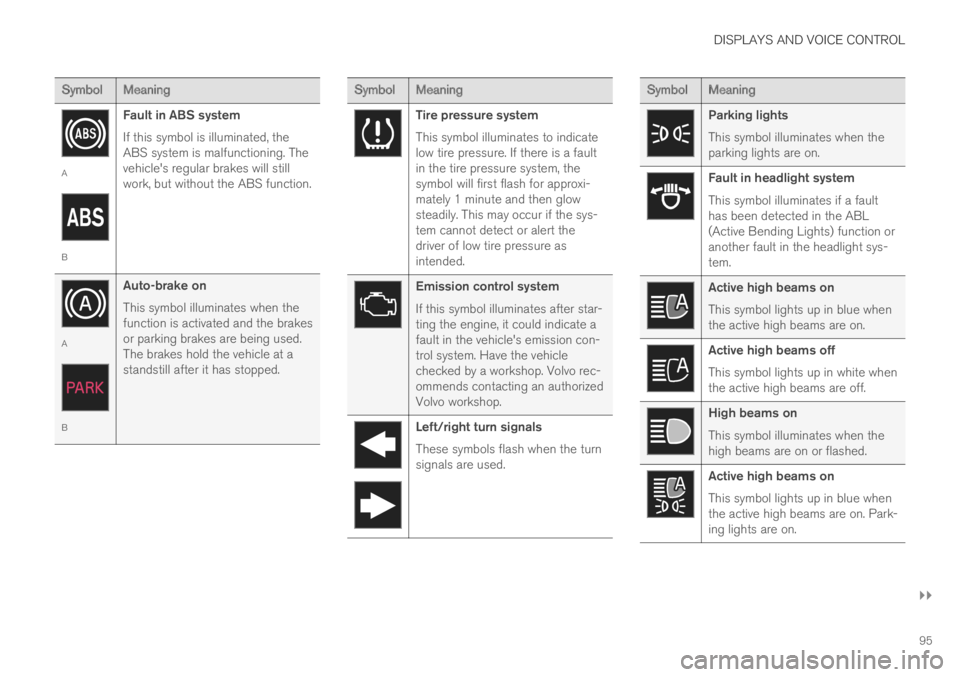
Fault in ABS system
If this symbol is illuminated, theABS system is malfunctioning. Thevehicle's regular brakes will stillwork, but without the ABS function.
A
B
Auto-brake on
This symbol illuminates when thefunction is activated and the brakesor parking brakes are being used.The brakes hold the vehicle at astandstill after it has stopped.
SymbolMeaning
Tire pressure system
This symbol illuminates to indicatelow tire pressure. If there is a faultin the tire pressure system, thesymbol will first flash for approxi-mately 1 minute and then glowsteadily. This may occur if the sys-tem cannot detect or alert thedriver of low tire pressure asintended.
Emission control system
If this symbol illuminates after star-ting the engine, it could indicate afault in the vehicle's emission con-trol system. Have the vehiclechecked by a workshop. Volvo rec-ommends contacting an authorizedVolvo workshop.
Left/right turn signals
These symbols flash when the turnsignals are used.
SymbolMeaning
Parking lights
This symbol illuminates when theparking lights are on.
Fault in headlight system
This symbol illuminates if a faulthas been detected in the ABL(Active Bending Lights) function oranother fault in the headlight sys-tem.
Active high beams on
This symbol lights up in blue whenthe active high beams are on.
Active high beams off
This symbol lights up in white whenthe active high beams are off.
High beams on
This symbol illuminates when thehigh beams are on or flashed.
Active high beams on
This symbol lights up in blue whenthe active high beams are on. Park-ing lights are on.
Page 162 of 695
||
LIGHTING
160
The rear fog light turns off automatically whenthe ignition is switched off or when the steering
wheel lever lighting ring is in position or
.
NOTE
Regulations concerning rear fog light use varyfrom country to country.
Related information
Lighting panel and controls (p. 152)
Ignition modes (p. 433)
Brake lights
The brake lights are automatically illuminatedwhen braking.
The brake lights illuminate when the brake pedalis depressed. They also illuminate when thebrakes are automatically applied by one of thedriver support systems.
Related information
Emergency brake lights (p. 160)
Brake functions (p. 434)
Emergency brake lights
The emergency brake lights are activated towarn following vehicles of hard braking.
This function causes an additional taillight oneach side of the vehicle to illuminate.
The emergency brake lights are activated in theevent of hard braking or if the ABS system isactivated and the vehicle is traveling at a highspeed.
After the driver decelerates to a low speed andthen releases the brake, the brake lights resumetheir normal brightness.
Related information
Brake lights (p. 160)
Brakes (p. 435)
Hazard warning flashers (p. 161)
Page 274 of 695
DRIVER SUPPORT
* Option/accessory.272
Driver support systems
The vehicle is equipped with a number of driversupport systems that can provide the driver withactive or passive assistance in various situations.
The systems can, for example, help the driver:
maintain a set speed
maintain a set time interval to the vehicleahead
help prevent a collision by warning the driverand applying the brakes
park the vehicle.
Some of the systems are standard and others areoptions. This also varies from market to market.
Related information
Speed-dependent steering wheel resistance(p. 272)
Electronic Stability Control (p. 273)
Stability system Roll Stability Control(p. 273)
Speed limiter (p. 277)
Automatic Speed Limiter (p. 281)
Cruise control (p. 285)
Distance Alert* (p. 290)
Adaptive Cruise Control* (p. 294)
Pilot Assist (p. 310)
Radar sensor (p. 326)
Camera (p. 331)
City Safety™ (p. 335)
Rear Collision Warning (p. 349)
BLIS* (p. 350)
Cross Traffic Alert* (p. 355)
Road Sign Information* (p. 359)
Driver Alert Control (p. 365)
Lane Keeping Aid (p. 367)
Steering assistance at risk of collision(p. 375)
Park Assist* (p. 385)
Park Assist Camera* (p. 391)
Park Assist Pilot* (p. 401)
Speed-dependent steering wheelresistance
Speed-dependent power steering increases thesteering wheel resistance in pace with the vehi-cle's speed to give the driver an enhanced feel-ing of control and stability.
Steering may feel stiffer on highways. Whenparking and at low speeds, it will be easier tomove the steering wheel.
NOTE
In some situations, the power steering maybecome too hot and require temporary cool-ing – during such time the power steering willwork at reduced output and the steeringwheel may feel more difficult to move.
In parallel with the temporarily reduced steer-ing assistance, the driver display shows amessage as well as a STEERING WHEELsymbol.
WARNING
While the power steering is working atreduced power, the driver support functionsand systems with steering assistance are notavailable.
In such a situation, the driver display showsthe Power steering failure message, com-bined with a STEERING WHEEL symbol.
Page 275 of 695
DRIVER SUPPORT
}}
* Option/accessory.273
Changing the level of steering wheel
resistance *
To change the level of steering wheel resistance,see the description of the INDIVIDUAL optionunder "Available drive modes" in the "Drivemodes" section.
On models not equipped with drive mode con-trols and the INDIVIDUAL option, steering wheelresistance can instead be set in the center dis-play's Top view under:
SettingsMy CarDrive ModesSteering Force
Steering wheel resistance settings cannot beaccessed when turning at speeds above10 km/h (6 mph).
Related information
Drive modes (p. 450)
Pilot Assist (p. 310)
City Safety steering assistance for evasivemaneuver (p. 343)
Lane Keeping Aid (p. 367)
Steering assistance at risk of collision(p. 375)
Park Assist Pilot* (p. 401)
Stability system Roll StabilityControl
The Roll Stability Control (RSC1) system helpsminimize the risk of a rollover in the event of e.g.a sudden evasive maneuver or if the vehiclebegins to skid.
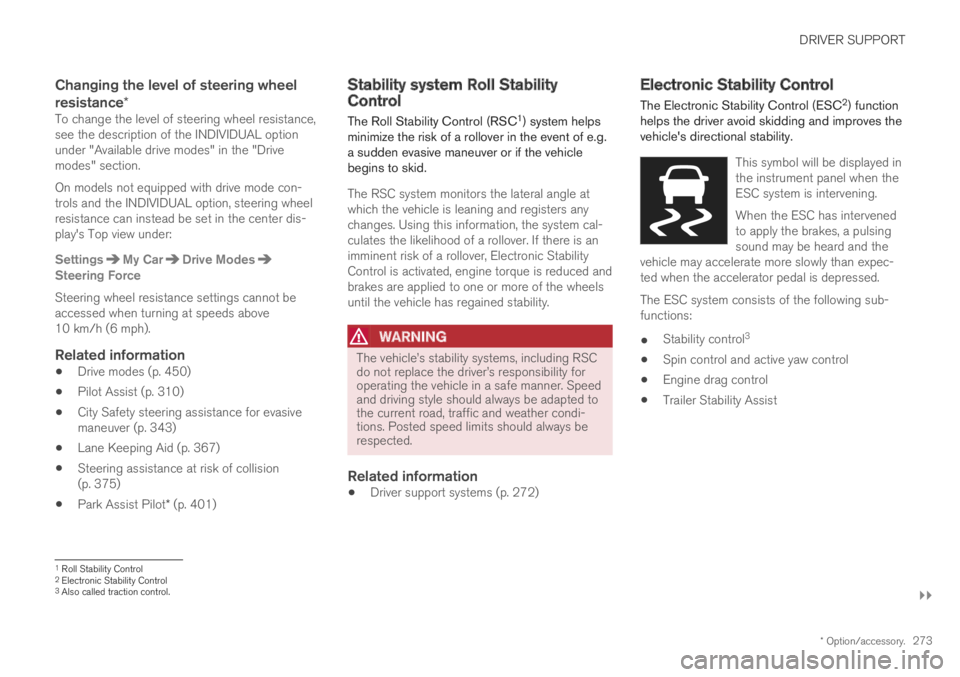
The RSC system monitors the lateral angle atwhich the vehicle is leaning and registers anychanges. Using this information, the system cal-culates the likelihood of a rollover. If there is animminent risk of a rollover, Electronic StabilityControl is activated, engine torque is reduced andbrakes are applied to one or more of the wheelsuntil the vehicle has regained stability.
WARNING
The vehicle