belt VOLVO XC60 TWIN ENGINE 2019 Service Manual
[x] Cancel search | Manufacturer: VOLVO, Model Year: 2019, Model line: XC60 TWIN ENGINE, Model: VOLVO XC60 TWIN ENGINE 2019Pages: 695, PDF Size: 14.96 MB
Page 86 of 695
DISPLAYS AND VOICE CONTROL
* Option/accessory.84
Instrument panel
The instrument panel displays information rela-ted to the vehicle and driving.
The instrument panel contains gauges, indicatorsand monitoring and warning symbols. What isshown in the instrument panel varies dependingon the equipment, settings and functions cur-rently active.
The instrument panel is activated as soon as adoor is opened, i.e. in ignition mode 0. The panelwill power down after a short period of time if it isnot used. To reactivate it, do one of the following:
Depress the brake pedal.
Activate ignition mode I.
Open one of the doors.
WARNING
If the instrument panel turns off, does notactivate when the ignition is switched on, orpart/all of the panel cannot be read, do notdrive the vehicle. Consult a workshop immedi-ately. Volvo recommends an authorized Volvoworkshop.
WARNING
If the instrument panel is not functioningproperly, information about brakes, airbags orother safety-related systems may not be dis-played. The driver will then not be able tocheck the status of the vehicle systems orreceive relevant warnings and information.
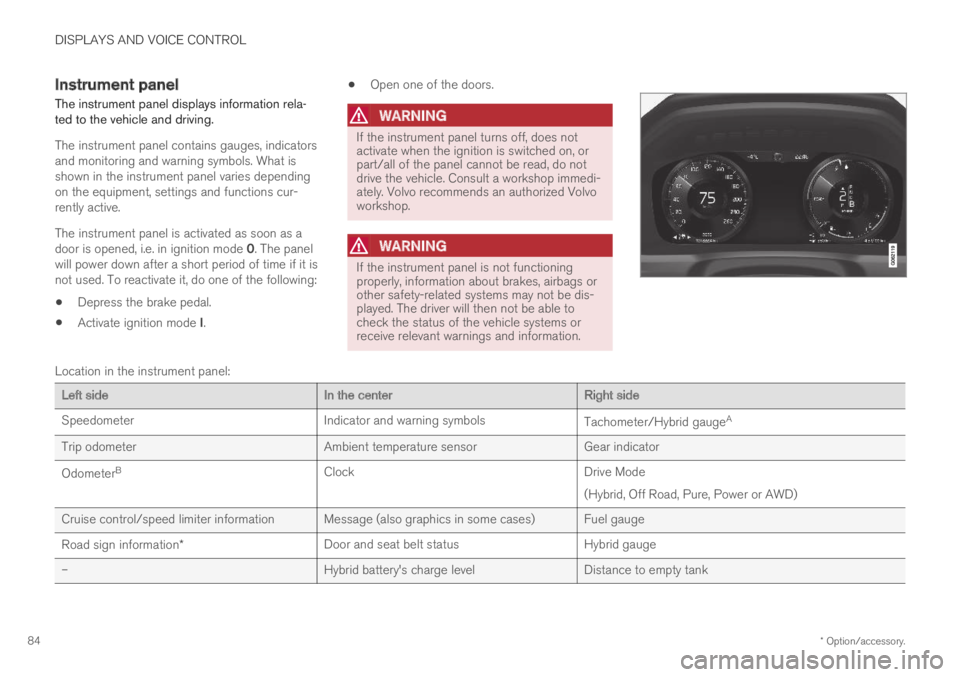
Location in the instrument panel:
Left sideIn the centerRight side
SpeedometerIndicator and warning symbolsTachometer/Hybrid gaugeA
Trip odometerAmbient temperature sensorGear indicator
OdometerBClockDrive Mode
(Hybrid, Off Road, Pure, Power or AWD)
Cruise control/speed limiter information Message (also graphics in some cases) Fuel gauge
Road sign information*Door and seat belt statusHybrid gauge
–Hybrid battery's charge levelDistance to empty tank
Page 99 of 695
DISPLAYS AND VOICE CONTROL
97
Warning symbols in the instrumentpanel
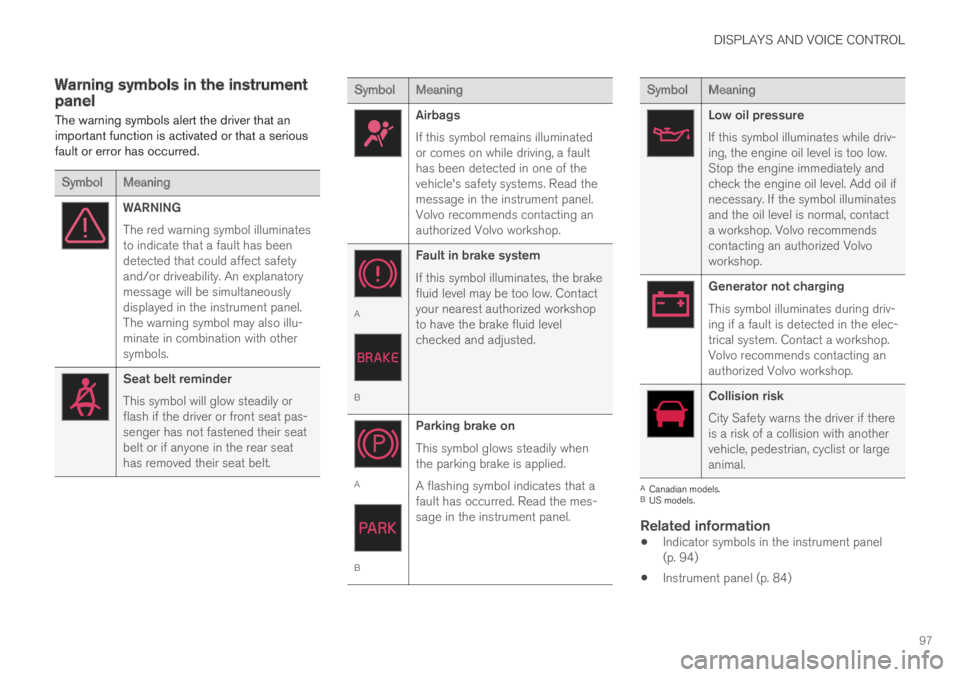
The warning symbols alert the driver that animportant function is activated or that a seriousfault or error has occurred.
SymbolMeaning
WARNING
The red warning symbol illuminatesto indicate that a fault has beendetected that could affect safetyand/or driveability. An explanatorymessage will be simultaneouslydisplayed in the instrument panel.The warning symbol may also illu-minate in combination with othersymbols.
Seat belt reminder
This symbol will glow steadily orflash if the driver or front seat pas-senger has not fastened their seatbelt or if anyone in the rear seathas removed their seat belt.
SymbolMeaning
Airbags
If this symbol remains illuminatedor comes on while driving, a faulthas been detected in one of thevehicle's safety systems. Read themessage in the instrument panel.Volvo recommends contacting anauthorized Volvo workshop.
A
B
Fault in brake system
If this symbol illuminates, the brakefluid level may be too low. Contactyour nearest authorized workshopto have the brake fluid levelchecked and adjusted.
A
B
Parking brake on
This symbol glows steadily whenthe parking brake is applied.
A flashing symbol indicates that afault has occurred. Read the mes-sage in the instrument panel.
SymbolMeaning
Low oil pressure
If this symbol illuminates while driv-ing, the engine oil level is too low.Stop the engine immediately andcheck the engine oil level. Add oil ifnecessary. If the symbol illuminatesand the oil level is normal, contacta workshop. Volvo recommendscontacting an authorized Volvoworkshop.
Generator not charging
This symbol illuminates during driv-ing if a fault is detected in the elec-trical system. Contact a workshop.Volvo recommends contacting anauthorized Volvo workshop.
Collision risk
City Safety warns the driver if thereis a risk of a collision with anothervehicle, pedestrian, cyclist or largeanimal.
ACanadian models.BUS models.
Related information
Indicator symbols in the instrument panel(p. 94)
Instrument panel (p. 84)
Page 195 of 695
SEATS AND STEERING WHEEL
}}
* Option/accessory.193
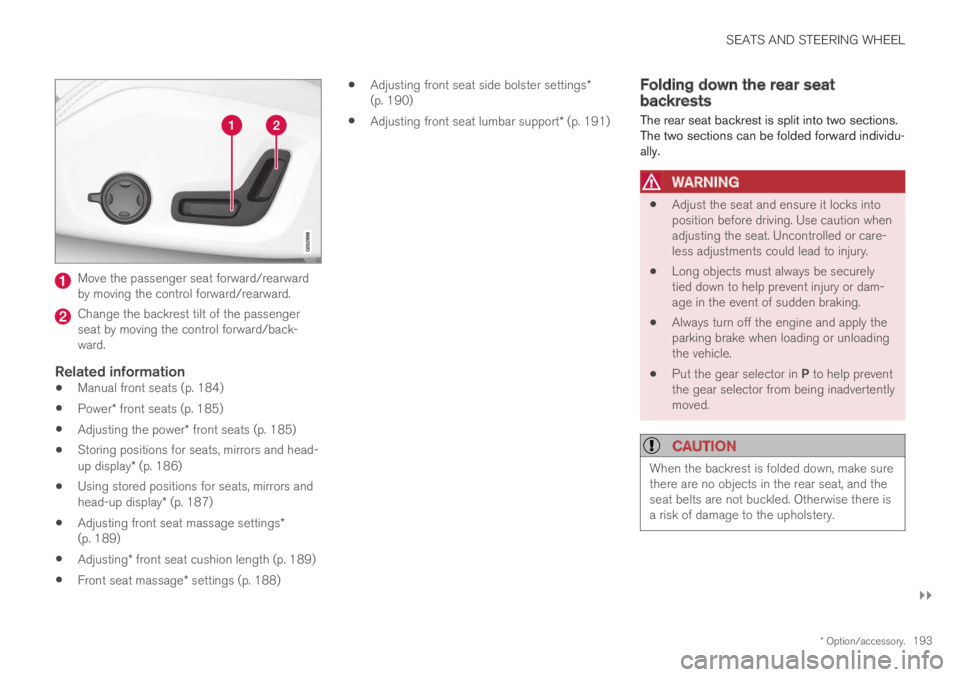
Move the passenger seat forward/rearwardby moving the control forward/rearward.
Change the backrest tilt of the passengerseat by moving the control forward/back-ward.
Related information
Manual front seats (p. 184)
Power* front seats (p. 185)
Adjusting the power* front seats (p. 185)
Storing positions for seats, mirrors and head-up display* (p. 186)
Using stored positions for seats, mirrors andhead-up display* (p. 187)
Adjusting front seat massage settings*(p. 189)
Adjusting* front seat cushion length (p. 189)
Front seat massage* settings (p. 188)
Adjusting front seat side bolster settings*(p. 190)
Adjusting front seat lumbar support* (p. 191)
Folding down the rear seatbackrests
The rear seat backrest is split into two sections.The two sections can be folded forward individu-ally.
WARNING
Adjust the seat and ensure it locks intoposition before driving. Use caution whenadjusting the seat. Uncontrolled or care-less adjustments could lead to injury.
Long objects must always be securelytied down to help prevent injury or dam-age in the event of sudden braking.
Always turn off the engine and apply theparking brake when loading or unloadingthe vehicle.
Put the gear selector in P to help preventthe gear selector from being inadvertentlymoved.
CAUTION
When the backrest is folded down, make surethere are no objects in the rear seat, and theseat belts are not buckled. Otherwise there isa risk of damage to the upholstery.
Page 300 of 695
||
DRIVER SUPPORT
* Option/accessory.298
Related information
Adaptive Cruise Control* (p. 294)
Head-up display* (p. 142)
Activating and starting AdaptiveCruise Control
Adaptive Cruise Control (ACC41) must first beactivated and then started before it can regulatespeed and distance.
Putting Adaptive Cruise Control in
standby mode
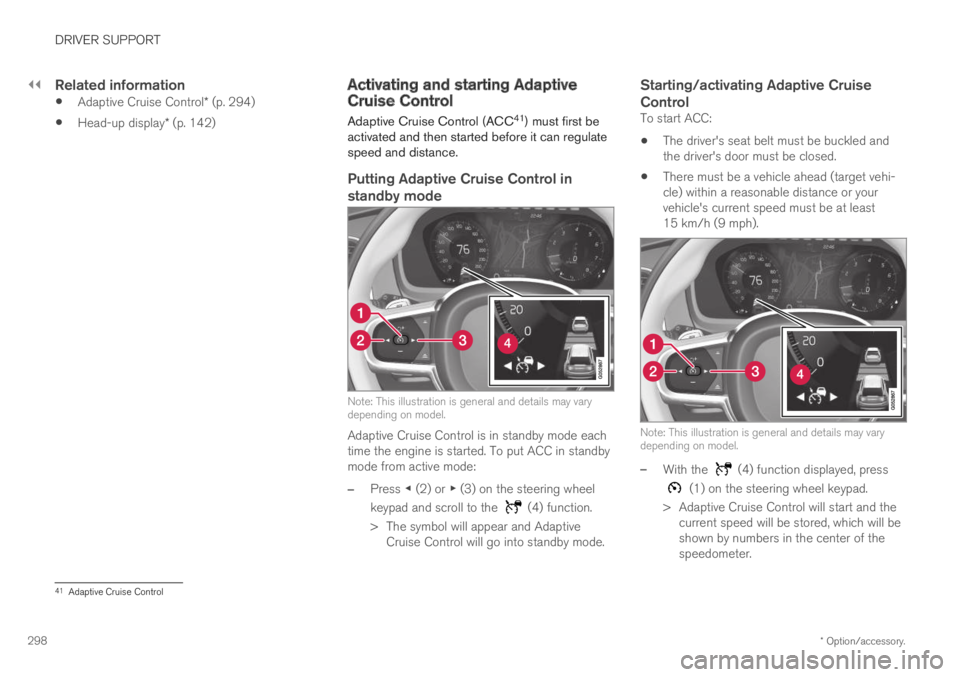
Note: This illustration is general and details may varydepending on model.
Adaptive Cruise Control is in standby mode eachtime the engine is started. To put ACC in standbymode from active mode:
–Press ◀ (2) or ▶ (3) on the steering wheel
keypad and scroll to the (4) function.
>The symbol will appear and AdaptiveCruise Control will go into standby mode.
Starting/activating Adaptive Cruise
Control
To start ACC:
The driver's seat belt must be buckled andthe driver's door must be closed.
There must be a vehicle ahead (target vehi-cle) within a reasonable distance or yourvehicle's current speed must be at least15 km/h (9 mph).
Note: This illustration is general and details may varydepending on model.
–With the (4) function displayed, press
(1) on the steering wheel keypad.
>Adaptive Cruise Control will start and thecurrent speed will be stored, which will beshown by numbers in the center of thespeedometer.
41Adaptive Cruise Control
Page 304 of 695
||
DRIVER SUPPORT
302
To temporarily deactivate Adaptive Cruise Controland put it in standby mode:
–Press the button on the steering wheel(2).
>The symbol in the instrument panelchanges color from WHITE to GRAY andthe set speed in the center of the speed-ometer will change from BEIGE to GRAY.
WARNING
If Adaptive Cruise Control is in standbymode, the driver must intervene and regu-late both speed and distance to the vehicleahead.
If the vehicle comes too close to a vehicleahead when Adaptive Cruise Control is instandby mode, the driver is instead warnedof the short distance by the Distance Alertfunction.
Standby mode due to action by the driver
Adaptive Cruise Control will be temporarily deac-tivated and put in standby mode if:
the brakes are applied
the gear selector is moved to N
the vehicle is driven faster than the setspeed for more than 1 minute
Temporarily increasing speed using the accelera-tor pedal, e.g. when passing another vehicle, willnot affect the setting. The vehicle will return tothe set speed when the accelerator pedal isreleased.
Automatic standby mode
Adaptive Cruise Control is dependent on othersystems, such as Electronic Stability Control
(ESC46). If any of these other systems stopsworking, Adaptive Cruise Control will automati-cally switch off.
WARNING
With automatic standby mode, the driver iswarned by an acoustic signal and a messageon the instrument panel.
The driver must then regulate vehiclespeed, apply the brakes if necessary, andmaintain a safe distance to other vehicles.
Adaptive Cruise Control may go into standbymode if:
your vehicle's speed goes below 5 km/h(3 mph) and ACC cannot determine if thevehicle ahead is stationary or if it is anotherobject, e.g. a speed bump.
your vehicle's speed goes under 5 km/h(3 mph) and the vehicle ahead turns so thatACC no longer has a vehicle to follow.
the driver opens the door.
the driver unbuckles the seat belt.
the engine speed (rpm) is too low/high.
one or more of the wheels lose traction.
the brake temperature is high.
the parking brake is applied.
the camera/radar sensor is covered by snowor heavy rain (the camera lens/radar wavesare blocked)
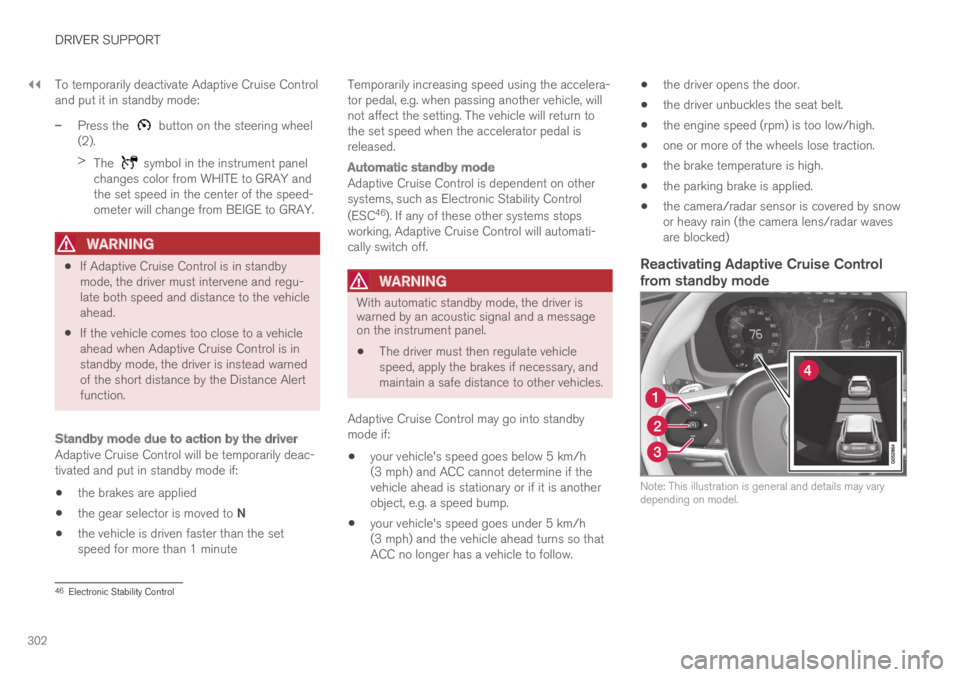
Reactivating Adaptive Cruise Control
from standby mode
Note: This illustration is general and details may varydepending on model.
46Electronic Stability Control
Page 308 of 695
||
DRIVER SUPPORT
* Option/accessory.306
This occurs if Adaptive Cruise Control is keepingthe vehicle stationary using the brakes and:
the driver opens the door or unbuckleshis/her seat belt
ACC has kept the vehicle at a standstill formore than approx. 5 minutes
the brakes overheat
the driver switches off the engine manually.
Related information
Adaptive Cruise Control* (p. 294)
Adaptive Cruise Control limitations
Adaptive Cruise Control (ACC52) may have lim-ited functionality in certain situations.
Steep roads and/or heavy loads
Adaptive Cruise Control is primarily intended tobe driven on flat roads. The function may not beable to maintain the correct time interval to thevehicle ahead when driving down steep hills. Thedriver should be extra attentive and prepared toapply the brakes.
Do not use Adaptive Cruise Control if thevehicle is carrying a heavy load or towing atrailer.
Other limitations
The Off Road drive mode cannot beselected if Adaptive Cruise Control is acti-vated.
NOTE
The function uses the vehicle's combinedcamera and radar unit, which has certain gen-eral limitations; see sections "Camera limita-tions" and "Radar sensor limitations".
Related information
Adaptive Cruise Control* (p. 294)
Camera limitations (p. 332)
Radar sensor limitations (p. 327)
52Adaptive Cruise Control
Page 316 of 695
||
DRIVER SUPPORT
* Option/accessory.314
to alert the driver that immediate action isrequired.
WARNING
Pilot Assist only issues a warning for vehiclesdetected by its camera and radar unit – thus,a warning may come after a delay or not at all.
Never wait for a warning. Apply thebrakes when necessary!
Related information
Pilot Assist (p. 310)
Head-up display for Pilot Assistduring collision risks
In vehicles equipped with a head-up display*, aflashing warning symbol will be displayed on thewindshield.
Collision warning symbol on the windshield58.
NOTE
Visual warnings on the windshield may be dif-ficult to notice in cases of strong sunlight,reflections, extreme light contrasts, or if thedriver is wearing sunglasses or is not lookingstraight ahead.
Related information
Pilot Assist (p. 310)
Head-up display* (p. 142)
Activating and starting Pilot Assist
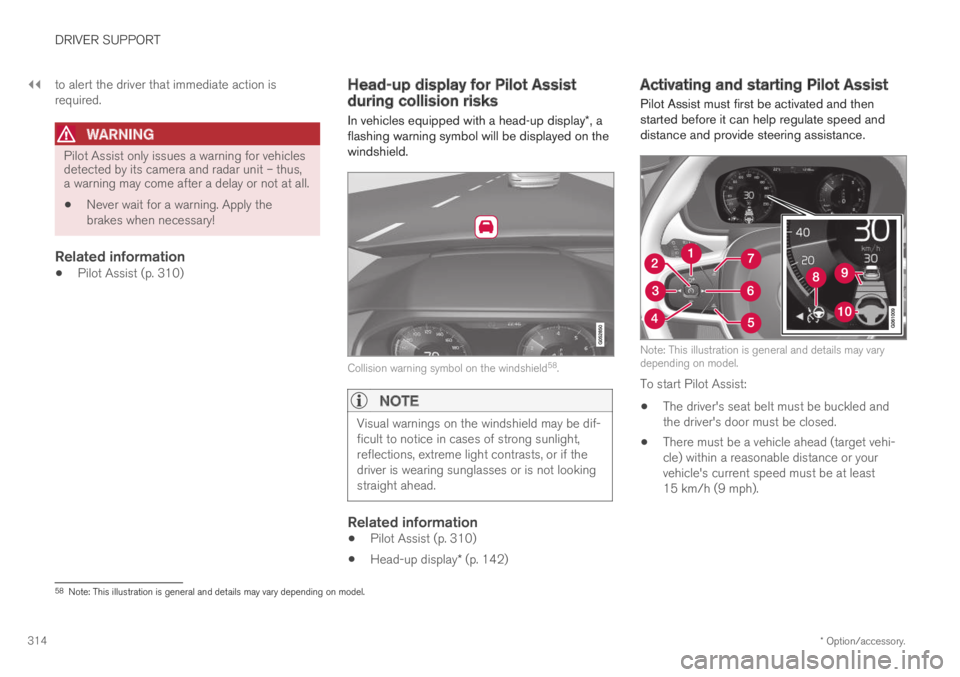
Pilot Assist must first be activated and thenstarted before it can help regulate speed anddistance and provide steering assistance.
Note: This illustration is general and details may varydepending on model.
To start Pilot Assist:
The driver's seat belt must be buckled andthe driver's door must be closed.
There must be a vehicle ahead (target vehi-cle) within a reasonable distance or yourvehicle's current speed must be at least15 km/h (9 mph).
58Note: This illustration is general and details may vary depending on model.
Page 321 of 695
DRIVER SUPPORT
}}
319
Standby mode due to action by the driver
Pilot Assist will be temporarily deactivated andput in standby mode if:
the brakes are applied.
the gear selector is moved to N
a turn signal is used for more than 1 minute.
the vehicle is driven faster than the setspeed for more than 1 minute
Temporarily increasing speed using the accelera-tor pedal, e.g. when passing another vehicle, willnot affect the setting. The vehicle will return tothe set speed when the accelerator pedal isreleased.
When the turn signals are used, Pilot Assist'ssteering assistance will be temporarily deacti-vated. When the turn signal is switched off, steer-ing assistance will be automatically reactivated ifthe traffic lane's side markings can still bedetected.
Automatic standby mode
Pilot Assist is dependent on other systems, such
as Electronic Stability Control (ESC60). If any ofthese other systems stops working, Pilot Assistwill automatically switch off.
WARNING
With automatic standby mode, the driver iswarned by an acoustic signal and a messageon the instrument panel.
The driver must then regulate vehiclespeed, apply the brakes if necessary, andmaintain a safe distance to other vehicles.
Adaptive Cruise Control may go into standbymode if, e.g.:
the driver opens the door.
the brake temperature is high.
the driver's hands are not on the steeringwheel.
the parking brake is applied.
the engine speed (rpm) is too low/high.
the driver unbuckles the seat belt.
one or more of the wheels lose traction.
the camera/radar sensor is covered by snowor heavy rain (the camera lens/radar wavesare blocked)
your vehicle's speed goes below 5 km/h(3 mph) and Pilot Assist cannot determine ifthe vehicle ahead is stationary or if it isanother object, e.g. a speed bump.
your vehicle's speed goes under 5 km/h(3 mph) and the vehicle ahead turns so thatPilot Assist no longer has a vehicle to follow.
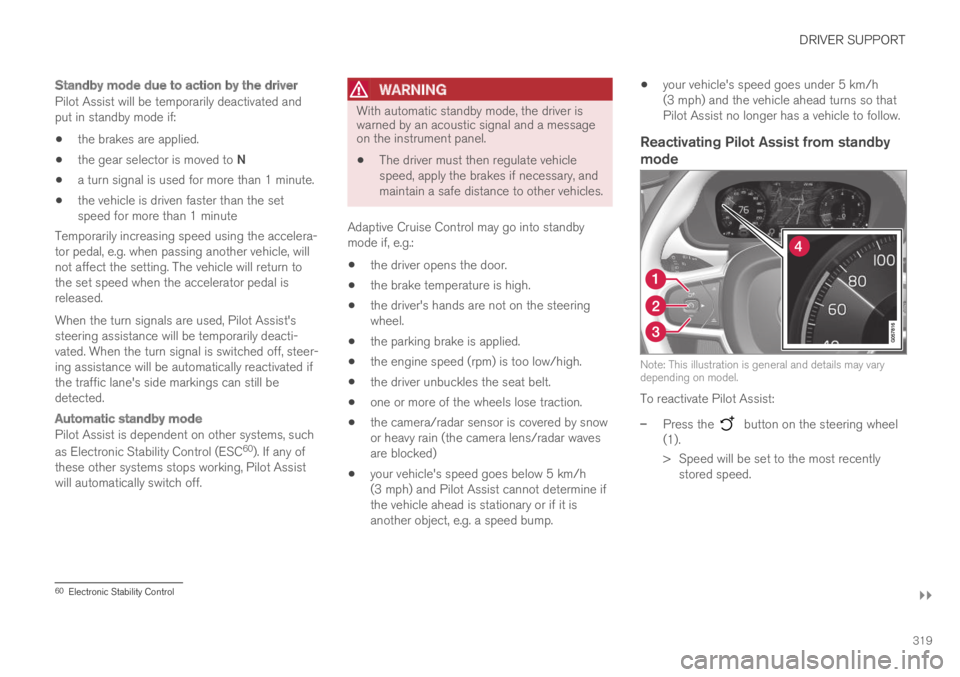
Reactivating Pilot Assist from standby
mode
Note: This illustration is general and details may varydepending on model.
To reactivate Pilot Assist:
–Press the button on the steering wheel(1).
>Speed will be set to the most recentlystored speed.
60Electronic Stability Control
Page 324 of 695
||
DRIVER SUPPORT
322
WARNING
When Pilot Assist follows another vehicle atspeeds over approx. 30 km/h (20 mph) andchanges target vehicle – from a moving vehi-cle to a stationary one – Pilot Assist willignore the stationary vehicle and insteadaccelerate to the stored speed.
The driver must then intervene and applythe brakes.
Automatic standby mode when switching
targets
Pilot Assist disengages and goes into standbymode if:
your vehicle's speed goes below 5 km/h(3 mph) and Pilot Assist cannot determine ifthe target object is a stationary vehicle oranother object, e.g. a speed bump.
your vehicle's speed goes under 5 km/h(3 mph) and the vehicle ahead turns so thatPilot Assist no longer has a vehicle to follow.
Related information
Pilot Assist (p. 310)
Auto-hold braking with Pilot Assist
Pilot Assist has a special braking function inslow traffic and at a standstill.
Braking function in slow traffic and at a
standstill
In slow-moving, stop-and-go traffic or when stop-ped at a traffic light, driving will resume automati-cally if the vehicle is stopped for less thanapprox. 3 seconds. If it takes more than 3 sec-onds for the vehicle ahead to begin moving again,Pilot Assist will go into standby mode and theAuto-hold brake function will activate.
–Pilot Assist can be reactivated by:
Pressing the button on the steeringwheel keypad.
Pressing the accelerator pedal.
>Pilot Assist will resume following the vehi-cle ahead if it begins to move withinapprox. 6 seconds.
NOTE
Pilot Assist can keep the vehicle stationaryfor no more than 5 minutes – after that timethe parking brake is applied and the functionis deactivated.
The parking brake must be released beforePilot Assist can be reactivated.
Deactivation of the Auto-hold brake function
In certain situations, Auto-hold will be deactivatedwhen the vehicle is at a standstill and Pilot Assistwill go into standby mode. This means that thebrakes will be released and the vehicle couldbegin to roll. The driver must actively apply thebrakes to keep the vehicle stationary.
This can occur if:
the driver depresses the brake pedal
the parking brake is applied
the gear selector is moved to the P, N or Rpositions
the driver puts Pilot Assist in standby mode.
Auto Activate Parking Brake
In certain situations, the parking brake will beapplied to keep the vehicle at a standstill.
This occurs if Pilot Assist is keeping the vehiclestationary using the brakes and:
the driver opens the door or unbuckleshis/her seat belt
Pilot Assist has kept the vehicle at a stand-still for more than approx. 5 minutes
the brakes overheat
the driver switches off the engine manually.
Related information
Pilot Assist (p. 310)
Page 340 of 695
||
DRIVER SUPPORT
338
2 - Brake assistance
If the risk of a collision increases after the colli-sion warning, brake support will be activated.
If the system determines that the pressure thedriver is exerting on the brake pedal is insufficientto prevent the collision, brake support willincrease pressure.
3 - Auto-brake
The automatic braking function is activated at thelast moment.
If the driver has not taken evasive action by thisstage and a collision is imminent, the automaticbraking function will be triggered. This occurswhether or not the driver is pressing the brakepedal. Full braking force will be applied to reducethe speed at impact or reduced braking effect willbe applied if this is sufficient to avoid the colli-sion.
The seat belt tensioners may be activated alongwith the automatic braking function. See "Seatbelt tensioners" for more information.
In certain situations, auto-braking may begin witha limited braking force before applying full brak-ing force.
If City Safety has prevented a collision, the vehi-cle will be kept at a standstill until the drivertakes action. If the vehicle has slowed to avoidcolliding with a slower-moving vehicle ahead, yourspeed will be reduced to that vehicle's speed.
Auto-braking can always be cancelled if thedriver presses hard on the accelerator pedal.
NOTE
When City Safety activates the brakes, thebrake lights come on.
When City Safety applies the brakes, a text mes-sage will appear in the instrument panel to notifythe driver that the function is/was activated.
WARNING
City Safety may not be used to change howthe driver operates the vehicle. The drivermust not only rely on City Safety to brake thevehicle.
Related information
City Safety™ (p. 335)
Setting a warning distance for CitySafety
City Safety is always active, but the function'swarning distance can be adjusted.
NOTE
The City Safety function cannot be deacti-vated. It is activated automatically each timethe engine/electric motor is started.
The alert distance determines the sensitivity ofthe system and regulates the distance at whichthe light, sound and brake pulsations will be acti-vated.
To select warning distance:
1.Select SettingsMy CarIntelliSafe inthe center display's Top view.
2.Under City Safety Warning, tap Late,Normal or Early to set the desired warningdistance.
If the driver feels that the Early setting is givingtoo many warnings or finds them irritating, theNormal or Late warning distance settings canbe selected instead.
If the driver feels that the warnings are too fre-quent and distracting, the warning distance canbe reduced. This will reduce the total number ofwarnings, but it will also result in City Safety pro-viding warnings at a later stage.