fuel VOLVO XC60 TWIN ENGINE 2019 Service Manual
[x] Cancel search | Manufacturer: VOLVO, Model Year: 2019, Model line: XC60 TWIN ENGINE, Model: VOLVO XC60 TWIN ENGINE 2019Pages: 695, PDF Size: 14.96 MB
Page 482 of 695
||
STARTING AND DRIVING
* Option/accessory.480
Follow applicable regulations regarding per-mitted speed and weight.
Drive slowly when towing a trailer up a longand steep incline.
The maximum trailer weights given only applyto altitudes up to 1000 meters (3280 feet)above sea level. At higher altitudes, enginepower (and thus the vehicle's climbing ability)is decreased due to the reduced air density,and the maximum trailer weight must there-fore be reduced. The weight of the vehicleand trailer must be decreased by 10% foreach additional 1000 m (3280 feet) or partthereof.
Avoid driving with a trailer on inclines of morethan 12%.
Avoid overloading and other incorrect use.
The trailer's brakes must be balanced withthe vehicle's brakes to help ensure safestops (follow applicable local regulations).
NOTE
To facilitate towing a trailer in a vehicle equip-ped with pneumatic suspension*, select: the
Suspension ControlDynamic setting inIndividual drive mode.
CAUTION
Bumper-attached trailer hitches must notbe used on Volvos, nor should safetychains be attached to the bumper.
Trailer hitches attaching to the vehiclerear axle must not be used.
Never connect a trailer's hydraulic brakesystem directly to the vehicle brake sys-tem, nor a trailer's lighting system directlyto the vehicle lighting system. Consultyour nearest authorized Volvo retailer forcorrect installation.
When towing a trailer, the trailer's safetychains or wire must be correctly fastenedto the attachment points provided in thetrailer hitch on the vehicle. The safetychain or wire must never be fastened toor wound around the towing ball.
NOTE
The optional detachable trailer hitch may notbe available in all markets or on all models.Consult your Volvo retailer.
NOTE
Extreme weather conditions, towing a trailer,driving at high altitudes and fuel quality arefactors that significantly increase a vehicle'sfuel consumption.
Trailer weights
WARNING
Please adhere to the recommendations provi-ded for trailer weight. If the recommendationsare not followed, the vehicle and trailer maybe difficult to control during evasive maneu-vers and braking.
NOTE
The specified maximum trailer weights arethose permitted by Volvo. National vehicleregulations may set additional restrictions ontrailer weight and speed. The trailer hitchesmay be certified for higher towing weightsthan the vehicle is permitted to tow.
Self-leveling suspension *
The vehicle's self-leveling system attempts tokeep the vehicle at a constant level, regardless ofload (up to the maximum permitted weight).When the vehicle is stationary, the rear end of thevehicle will be slightly lowered, which is normal.
Driving in hilly terrain or hot weather
In certain conditions, there is a risk of overheat-ing when driving with a trailer. If overheating ofthe engine and drive system is detected, a warn-ing symbol will illuminate in the instrument panelalong with a message.
Page 510 of 695
||
AUDIO, MEDIA AND INTERNET
* Option/accessory.508
Game Alerts
Tap to display a list of sports.
Tap a sport to display a list of teams and tap abox on the right side of the screen to select ateam as a favorite. An alert will then be providedwhen information about the team is being broad-cast.
Tap Confirm below the list to return to the list ofsports.
Tap Back to return to the list of settings orClose to return to the main screen.
Unsubscribed Services
If you have a SiriusXM® Satellite radio subscrip-tion, any channels not included in the subscrip-tion will be listed here. Call SiriusXM™ to sub-scribe. The phone number will be shown on thescreen. If a cell phone is paired and connected tothe vehicle, tap the phone number to make thecall.
Skipped Stations
Tap to display a list of channels that you wouldlike to skip (hide). Hide channels from the chan-nel list by tapping the boxes to the right of thescreen. Skipped (hidden) channels will not beshown in the channel list. However, a channelpreviously selected as a favorite will still be dis-played in the list of favorites, even it has beenadded to the skip list.
Skipped Categories
Tap to display a list of categories. Tap a categoryto skip (hide) it. It will not be displayed in the listof categories.
Related information
SiriusXM® Satellite radio* (p. 504)
Using SiriusXM® Satellite radio* (p. 505)
SiriusXM Travel Link®*
SiriusXM Travel Link is a feature offered by
SiriusXM® Satellite radio* that can provide infor-mation about e.g., weather forecasts, weatheralerts, service stations, sports, etc. in the vicinityof the vehicle.
Starting SiriusXM Travel Link
NOTE
SiriusXM Travel Link services are only availa-ble in vehicles equipped with the SensusNavigation system.
From the center display's App view, tap TravelLink to activate the feature. A disclaimer text willbe displayed. Tap OK to display a list of SiriusXMTravel Link services:
Alerts
Fuel
Sports
Weather
Favorites
In order to use one or more of these services, theuser has to subscribe to the ones desired.
To subscribe to a SiriusXM Travel Link service:
1.Open the center display's Top view.
2.Tap Settings.
Page 511 of 695
AUDIO, MEDIA AND INTERNET
* Option/accessory.509
3.Press SiriusXM Travel Link andSubscription Status.
>To subscribe, call the phone number listedon the screen.
Any services not subscribed will be grayed outand contain the text Service not subscribed.
When the services have been activated (subscri-bed), tap the one of your choice to start it.
The following applies for all of the SiriusXMTravel Link services:
Pressing the Back button will take you backto the previous screen
Pressing the Close button will take you tothe SiriusXM Travel Link home screen.
NOTE
If the Close button is used to return to theSiriusXM Travel Link home screen, the fol-lowing applies (the Weather service is usedhere as an example):
If you have already used the Weatherfunction, tapping Weather again in theSiriusXM Travel Link home screenbefore using any other SiriusXMTravel Link service will return you to thepoint where you left the Weather service.
If another SiriusXM Travel Link serviceis used (e.g., Fuel, Sports, etc.) beforeyou return to the Weather service, youwill be returned to the default Weatherview (in this case, Local).
The same principle applies to all of theSiriusXM Travel Link services.
Favorites
Many SiriusXM Travel Link selections can besaved for easy access as favorites by tapping the"star" icon next to the selection where applicable.
To display a list of your favorites, tap theFavorites application in the SiriusXM Travel Linkhome screen.
Related information
SiriusXM® Satellite radio* (p. 504)
SiriusXM Travel Link®* - Fuel (p. 512)
SiriusXM Travel Link®* - Sports (p. 513)
SiriusXM Travel Link®* - Weather (p. 510)
SiriusXM Travel Link®* - Notifications(p. 511)
Page 513 of 695
AUDIO, MEDIA AND INTERNET
* Option/accessory.511
Areas
Tap Areas to display a list of areas/locations instates from the SiriusXM Travel Link database.
Scroll to a state and tap to display:
Weather locations: tap arrow to the right todisplay a list of towns. Scroll to desired townand tap for detailed weather information. Youcan choose Map view, today, 5 days or Favor-ites (star)
Ski locations: tap arrow at right to displaylocal ski areas. Tap an area for detailed info.
For information about storing a location, state,town, etc. as a favorite, see the heading "Favor-ites" in the article "SiriusXM Travel Link."
Related information
SiriusXM Travel Link®* (p. 508)
SiriusXM Travel Link®* - Fuel (p. 512)
SiriusXM Travel Link®* - Sports (p. 513)
SiriusXM Travel Link®* - Notifications(p. 511)
SiriusXM Travel Link®* -Notifications
This SiriusXM Travel Link service provides notifi-cations of potential weather problems or otheremergency situations in the vicinity of the vehi-cle.
From the SiriusXM Travel Link home screen, toshow notifications:
–Tap the Alerts button to display this screen.
If any notifications are currently available, amessage will appear at the top of the screen.They can also be listed from the Settingsmenu in the center display's Top view.
If no notifications are available, No activealerts will be displayed.
Types of notifications
To select the types of notifications to be dis-played:
1.From the Alerts screen, tap the Selectalerts button at the bottom of the screen.
2.This displays the types of notifications thatcan be displayed. Tap the box to the right ofeach type of notification to select/deselect it.
3.Tap Done when you have made your selec-tions. You will return to the Alerts screen.
Information about a notification
If any notifications have been displayed on thescreen, tap one for more detailed information (i.e.,
the location of the weather problem on a mapand a description of the situation).
If a phone number is available in a notification, aCall button will be displayed. Tap this button foradditional information.
Related information
SiriusXM Travel Link®* (p. 508)
SiriusXM Travel Link®* - Fuel (p. 512)
SiriusXM Travel Link®* - Sports (p. 513)
SiriusXM Travel Link®* - Weather (p. 510)
Page 514 of 695
AUDIO, MEDIA AND INTERNET
* Option/accessory.512
SiriusXM Travel Link®* - Fuel5
This SiriusXM Travel Link service provides infor-mation and guidance to service stations near thevehicle providing the type of fuel that you prefer/require for your vehicle.
From the SiriusXM Travel Link home screen, toshow fuel information:
–Tap the Fuel button to display the main fuelscreen.
The following categories are shown:
Search (the magnifying glass icon)
Nearby
Recommended
Favorites
Brands
Tap one of the alternatives to display its screen.
NOTE
In each of the categories listed, tapping theSelect fuel type button near the bottom ofthe screen opens a sub-view where you canspecify the type of fuel preferred/required(Regular, Midrange, Premium, Diesel,Electric 120V, etc.) Tap Done to return tothe previous screen.
Search
Tap the magnifying glass icon. If the function issupported in the current context, a keyboard willappear on the screen. Enter the text of yourchoice and tap Search for detailed information ifavailable.
Nearby
Tap for a list of service stations in the vicinity ofthe vehicle, with the nearest station at the top ofthe list.
The following information will be provided whereavailable:
For vehicles using gasoline, the price infor-mation for regular gasoline (unless anothergrade/type of fuel has been selected inSelect fuel type)
For electric vehicles/hybrids, informationabout charging stations, showing the totalnumber of charging ports and the number ofports currently not in use
the distance to the station
a star icon to set the service station as afavorite
Tap the name of a service station to display moredetailed information.
For guidance to the service station, tap the Startnavigation or Add as waypoint buttons. See
the Sensus Navigation* supplement for additionalinformation about using the navigation system.
Recommended
Tap for a list of service stations near the vehicle,displayed according to the price of regular gaso-line (unless another grade/type of fuel has beenselected in Select fuel type) or of stationsoffering the greatest number of available charg-ing ports for electric vehicles/hybrids. The stationoffering the lowest price/most available chargingports will be displayed at the top of the list. Tapthe name of a service station to display moredetailed information.
Favorites
Tap for a list of service stations that have beenstored as favorites. Tap the name of a servicestation to display more detailed information.
In addition to the Select fuel type button at thebottom of the screen, tap the Edit button todelete individual stations from the list or tapDelete to clear the list. Tap Done to return tothe previous screen.
Brands
1.Tap Brands to display a list of service sta-tion brands in the area.
5This service is not available in Canada.
Page 515 of 695
AUDIO, MEDIA AND INTERNET
* Option/accessory.513
2. Tap a brand to display a list of service sta-tions affiliated with that brand (BP, Exxon,etc.).
3. Tap the name of a service station to displaymore detailed information.
In addition to the Select fuel type button at thebottom of the screen, tap the Sort button toarrange the list according to Nearest orCheapest/Recommended. Tap Done toreturn to the previous screen.
Related information
SiriusXM Travel Link®* (p. 508)
SiriusXM Travel Link®* - Notifications(p. 511)
SiriusXM Travel Link®* - Sports (p. 513)
SiriusXM Travel Link®* - Weather (p. 510)
SiriusXM Travel Link®* - Sports
This SiriusXM Travel Link service provides infor-mation about sporting events, tournaments,teams, leagues, etc.
From the SiriusXM Travel Link home screen, todisplay sports information:
–Tap the Sports button to display the mainsports screen.
A number of sports categories will be listed(Football, Baseball, Basketball, etc.)
Tap a sport to select a league in that sport (NFL,MLB, etc.) or a sport organization (PGA, LPGA,etc.).
The following is an example of the result oftapping Baseball:
1.MLB (Major League Baseball) will be dis-played.
2. Tap MLB to display the two leagues in MajorLeague Baseball (American League orNational League).
3. Tap one of the league names to display thedivisions in the league.
4. Tap one of the divisions to display:
In progress: play-by-play informationabout a match/game/tournament cur-rently in progress. Continue tapping todisplay. In the detailed view, you can alsoselect a radio station that is currentlybroadcasting an ongoing sporting event
Headlines for MLB: Tap to display briefheadline information
Scheduled: schedules for comingmatches, games, etc.
Scores: match/game results
The same principle applies to all sports.
Related information
SiriusXM Travel Link®* (p. 508)
SiriusXM Travel Link®* - Notifications(p. 511)
SiriusXM Travel Link®* - Fuel (p. 512)
SiriusXM Travel Link®* - Weather (p. 510)
Page 558 of 695
WHEELS AND TIRES
556
Tires
The function of the tires is to carry loads, providetraction on road surfaces, reduce vibrations andprotect the wheels from wear.
The tires significantly influence the vehicle's driv-ing characteristics. The type, dimensions, tirepressure and speed rating have a considerableimpact on how the vehicle performs.
Your vehicle is equipped with tires according tothe vehicle's tire information placard on the B-pil-lar (the structural member at the side of the vehi-cle, at the rear of the driver's door opening).
WARNING
A damaged tire could cause the driver to losecontrol of the vehicle.
CAUTION
Some Volvo models are equipped with anUltra High Performance tire and wheel com-bination designed to provide maximum drypavement performance with consideration forhydroplaning resistance. They may be moresusceptible to road hazard damage and,depending on driving conditions, may achievea tread life of less than 30,000 km (20,000miles). Even if this vehicle is equipped withVolvo's advanced AWD or stability system,these tires are not designed for winter driving,and should be replaced with winter tires whenweather conditions dictate.
The tires have good road holding characteristicsand offer good handling on dry and wet surfaces.It should be noted however that the tires havebeen developed to give these features on snow/ice-free surfaces.
Most models are equipped with "all-season" tires,which provide a somewhat higher degree of road-holding on slippery road surfaces than tires with-out the "all-season" rating. However, for optimalroadholding on icy or snow-covered roads, Volvorecommends snow tires on all four wheels.
When replacing tires, be sure that the new tiresare the same size designation, type (radial) andpreferably from the same manufacturer, on all
four wheels. Otherwise there is a risk of alteringthe vehicle's roadholding and handling characte-ristics.
Recommended tires
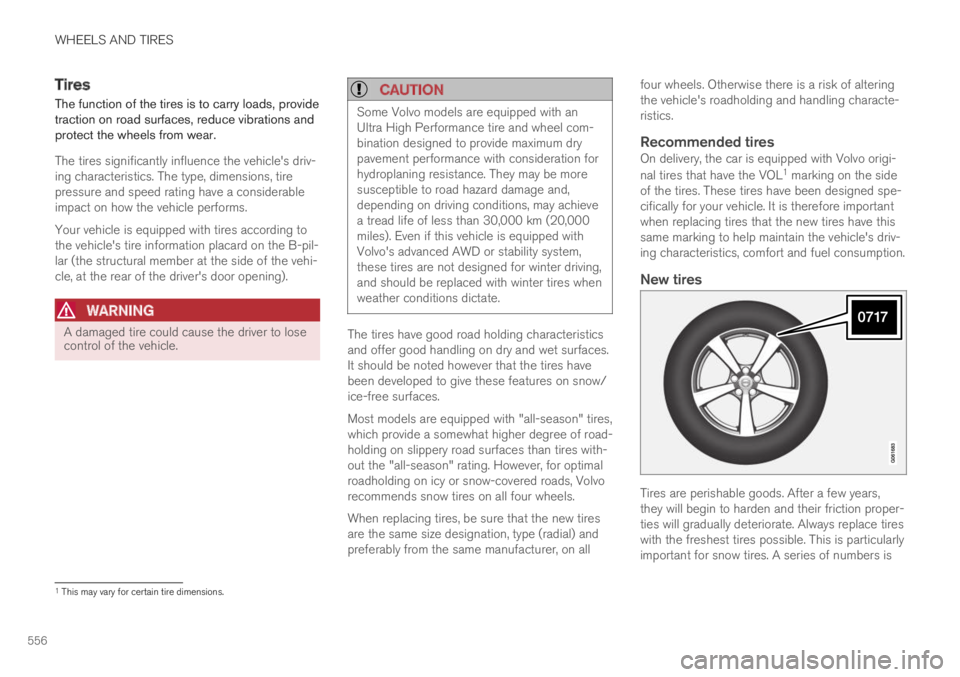
On delivery, the car is equipped with Volvo origi-
nal tires that have the VOL1 marking on the sideof the tires. These tires have been designed spe-cifically for your vehicle. It is therefore importantwhen replacing tires that the new tires have thissame marking to help maintain the vehicle's driv-ing characteristics, comfort and fuel consumption.
New tires
Tires are perishable goods. After a few years,they will begin to harden and their friction proper-ties will gradually deteriorate. Always replace tireswith the freshest tires possible. This is particularlyimportant for snow tires. A series of numbers is
1This may vary for certain tire dimensions.
Page 565 of 695
WHEELS AND TIRES
* Option/accessory.563
Checking tire pressure
Correct inflation pressure helps improve drivingstability, save fuel and increase the service life ofthe tires.
Tire pressure decreases over time, which is nor-mal. Tire pressure also varies depending on theambient temperature. Driving on under-inflatedtires could cause the vehicle to overheat and leadto damage. Tire pressure affects traveling com-fort, road noise and driving characteristics.
Check the pressure in the tires every month. Usethe recommended inflation pressure for cold tiresfor optimal tire performance and wear. Under-inflated or over-inflated tires could cause uneventread wear.
Use an air pressure gauge and check the infla-tion pressure on all the tires, including the spare
tire4, at least once a month and before long trips.Volvo strongly recommends buying a reliable airpressure gauge, as the automatic gauges provi-ded at service stations may be inaccurate.
WARNING
Under-inflation is the most commoncause of tire failure and may result insevere tire cracking, tread separation, or"blow-out," with unexpected loss of vehi-cle control and increased risk of injury.
Under-inflated tires reduce the load car-rying capacity of your vehicle.
Cold tires
Inflation pressure should be checked when thetires are cold.
The tires are considered to be cold when theyhave the same temperature as the surrounding(ambient) air.
This temperature is normally reached after thevehicle has been parked for at least 3 hours.
After driving for approximately 1.6 km (1 mile),the tires are considered to be warm. If you needto drive longer than that to inflate the tires, checkand record the inflation pressure of the tires firstand inflate accordingly when you arrive at thepump.
When the ambient temperature changes, so doesthe inflation pressure. A 10-degree temperaturedrop causes a corresponding drop in inflationpressure of 1 psi (7 kPa). Check the inflationpressure of the tires regularly and adjust to the
correct pressure, which can be found on the vehi-cle's tire information placard or certification label.
If you check inflation pressure when the tires arewarm, you should never release air. The tiresbecome warm after driving and it is normal forwarm tires to have an inflation pressure abovethe recommended pressure for cold tires. A warmtire with an inflation pressure equal to or underthe recommended pressure for cold tires couldbe significantly under-inflated.
Related information
Adjusting tire pressure (p. 564)
Recommended tire pressure (p. 565)
Tire pressure monitoring system* (p. 565)
Tires (p. 556)
4Not available in all models.
Page 567 of 695
WHEELS AND TIRES
}}
* Option/accessory.565
Recommended tire pressure
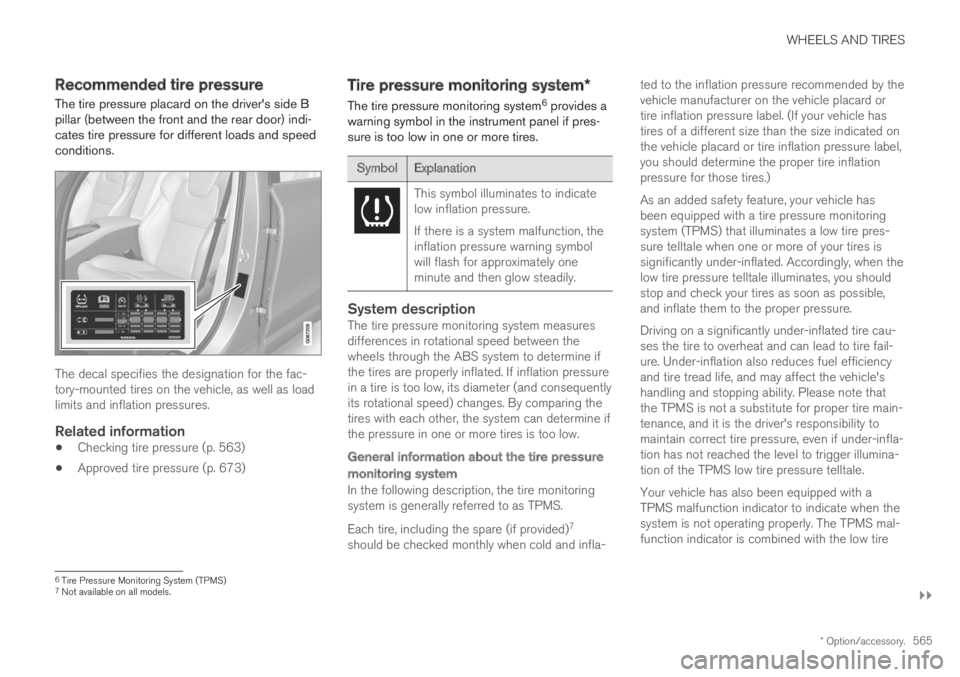
The tire pressure placard on the driver's side Bpillar (between the front and the rear door) indi-cates tire pressure for different loads and speedconditions.
The decal specifies the designation for the fac-tory-mounted tires on the vehicle, as well as loadlimits and inflation pressures.
Related information
Checking tire pressure (p. 563)
Approved tire pressure (p. 673)
Tire pressure monitoring system*
The tire pressure monitoring system6 provides awarning symbol in the instrument panel if pres-sure is too low in one or more tires.
SymbolExplanation
This symbol illuminates to indicatelow inflation pressure.
If there is a system malfunction, theinflation pressure warning symbolwill flash for approximately oneminute and then glow steadily.
System description
The tire pressure monitoring system measuresdifferences in rotational speed between thewheels through the ABS system to determine ifthe tires are properly inflated. If inflation pressurein a tire is too low, its diameter (and consequentlyits rotational speed) changes. By comparing thetires with each other, the system can determine ifthe pressure in one or more tires is too low.
General information about the tire pressure
monitoring system
In the following description, the tire monitoringsystem is generally referred to as TPMS.
Each tire, including the spare (if provided)7
should be checked monthly when cold and infla-
ted to the inflation pressure recommended by thevehicle manufacturer on the vehicle placard ortire inflation pressure label. (If your vehicle hastires of a different size than the size indicated onthe vehicle placard or tire inflation pressure label,you should determine the proper tire inflationpressure for those tires.)
As an added safety feature, your vehicle hasbeen equipped with a tire pressure monitoringsystem (TPMS) that illuminates a low tire pres-sure telltale when one or more of your tires issignificantly under-inflated. Accordingly, when thelow tire pressure telltale illuminates, you shouldstop and check your tires as soon as possible,and inflate them to the proper pressure.
Driving on a significantly under-inflated tire cau-ses the tire to overheat and can lead to tire fail-ure. Under-inflation also reduces fuel efficiencyand tire tread life, and may affect the vehicle'shandling and stopping ability. Please note thatthe TPMS is not a substitute for proper tire main-tenance, and it is the driver's responsibility tomaintain correct tire pressure, even if under-infla-tion has not reached the level to trigger illumina-tion of the TPMS low tire pressure telltale.
Your vehicle has also been equipped with aTPMS malfunction indicator to indicate when thesystem is not operating properly. The TPMS mal-function indicator is combined with the low tire
6Tire Pressure Monitoring System (TPMS)7Not available on all models.
Page 586 of 695
||
WHEELS AND TIRES
584
Related information
Recommended tire pressure (p. 565)
Using the tire sealing system (p. 579)
Tire sealing system (p. 578)
Determining the vehicle's permittedweight
Properly loading your vehicle will provide maxi-mum return of vehicle design performance.
Weight designations
Before loading your vehicle, familiarize yourselfwith the following terms for determining yourvehicle's weight ratings, with or without a trailer,from the vehicle's Federal/Canadian Motor Vehi-cle Safety Standards (FMVSS/CMVSS) label, andthe vehicle's tire information placard:
Curb weight
The weight of the vehicle including a full tank offuel and all standard equipment. It does notinclude passengers, cargo, or optional equipment.
Capacity weight
All weight added to the curb weight, includingcargo and optional equipment. When towing, tow-bar weight is also part of cargo weight.
Permissible axle weight
The maximum allowable weight that can be car-ried by a single axle (front or rear). These num-bers are shown on the Federal/Canadian MotorVehicle Safety Standards (FMVSS/CMVSS) label.The total load on each axle must never exceed itsmaximum permissible weight.
Gross vehicle weight (GVW)
The vehicle's curb weight + cargo + passengers.
Steps for Determining Correct Load
Limit
1. Locate the statement "the combined weightof occupants and cargo should never exceedXXX kg or XXX lbs." on your vehicle's plac-ard.
2. Determine the combined weight of the driverand passengers that will be riding in yourvehicle.
3. Subtract the combined weight of the driverand passengers from XXX kg or XXX lbs.
4. The resulting figure equals the availableamount of cargo and luggage load capacity.For example, if the "XXX" amount equals1400 lbs. and there will be five 150 lb. pas-sengers in your vehicle, the amount of availa-ble cargo and luggage load capacity is 650lbs. (1400 - 750 (5 × 150) = 650 lbs.)
5. Determine the combined weight of luggageand cargo being loaded on the vehicle. Thatweight may not safely exceed the availablecargo and luggage load capacity calculatedin Step 4.
6. If your vehicle will be towing a trailer, loadfrom your trailer will be transferred to yourvehicle. Consult this manual to determinehow this reduces the available cargo and lug-gage load capacity of your vehicle.