mirror VOLVO XC60 TWIN ENGINE 2019 Service Manual
[x] Cancel search | Manufacturer: VOLVO, Model Year: 2019, Model line: XC60 TWIN ENGINE, Model: VOLVO XC60 TWIN ENGINE 2019Pages: 695, PDF Size: 14.96 MB
Page 202 of 695
CLIMATE CONTROL
* Option/accessory.200
Climate
The vehicle is equipped with electronic climatecontrol. The climate system cools, heats anddehumidifies the air in the passenger compart-ment.
All of the climate system functions are controlledfrom the center display and the buttons on thecenter console.
Certain rear seat functions can also be controlledfrom the climate controls* on the rear of the tun-nel console.
Related information
Climate zones (p. 200)
Climate control sensors (p. 200)
Perceived temperature (p. 201)
Climate control system voice commands(p. 201)
Parking climate (p. 224)
Air quality (p. 202)
Air distribution (p. 205)
Climate system controls (p. 212)
Climate zones
The vehicle is divided into climate zones to makeit possible to set different temperatures for dif-ferent parts of the passenger compartment.
2-zone climate system
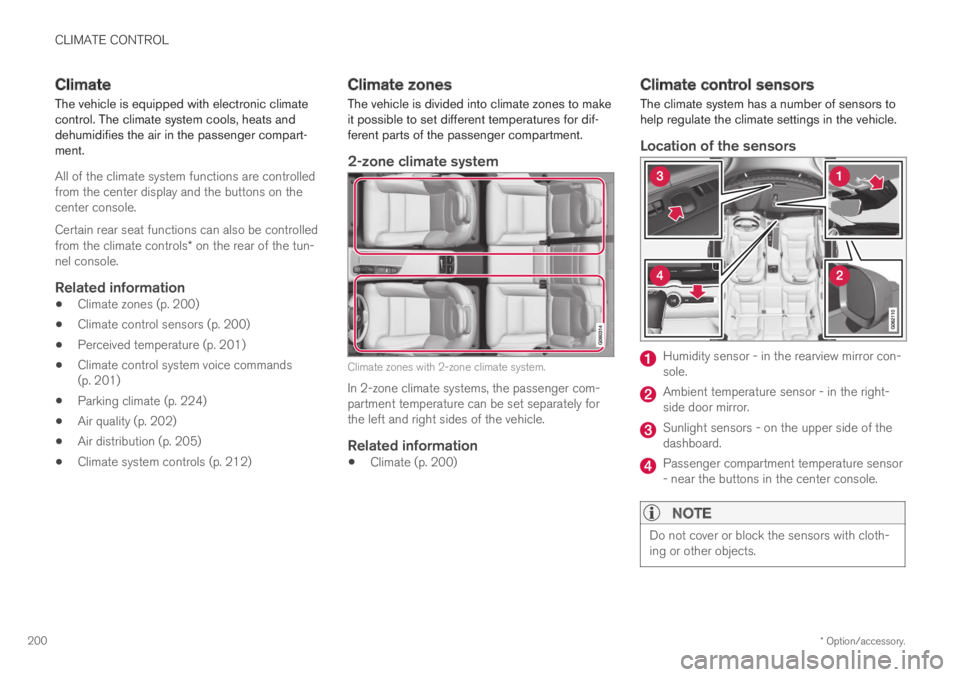
Climate zones with 2-zone climate system.
In 2-zone climate systems, the passenger com-partment temperature can be set separately forthe left and right sides of the vehicle.
Related information
Climate (p. 200)
Climate control sensors
The climate system has a number of sensors tohelp regulate the climate settings in the vehicle.
Location of the sensors
Humidity sensor - in the rearview mirror con-sole.
Ambient temperature sensor - in the right-side door mirror.
Sunlight sensors - on the upper side of thedashboard.
Passenger compartment temperature sensor- near the buttons in the center console.
NOTE
Do not cover or block the sensors with cloth-ing or other objects.
Page 204 of 695
||
CLIMATE CONTROL
* Option/accessory.202
"Turn on auto" - activates automatic climatecontrol.
"Air condition on"/"Air condition off" -activates/deactivates air conditioning.
"Recirculation on"/"Recirculation off" -activates/deactivates air recirculation.
"Turn on defroster "/"Turn off defroster"- activates/deactivates window and door mir-ror defrosting.
"Turn on max defroster"/"Turn off maxdefroster" - activates/deactivates maxdefroster.
"Turn on electric defroster"/"Turn offelectric defroster" - activates/deactivatesheated windshield*.
"Turn on rear defroster"/"Turn off reardefroster" - Activates/deactivates heatedrear window and door mirrors.
"Turn steering wheel heat on"/"Turnsteering wheel heat off" - activates/deac-tivates heated steering wheel*.
"Raise steering wheel heat"/"Lowersteering wheel heat" - raises/lowers thelevel of steering wheel heating*.
"Turn on seat heat"/"Turn off seat heat"- activates/deactivates seat heating*.
"Raise seat heat"/"Lower seat heat" -raises/lowers the level of seat heating*.
"Turn on seat ventilation"/"Turn off seatventilation" - activates/deactivates seatventilation*.
"Raise seat ventilation"/"Lower seatventilation" - raises/lowers the level of seatventilation*.
Related information
Climate (p. 200)
Voice control (p. 145)
Using voice commands (p. 146)
Voice control settings (p. 148)
Air quality
The materials used in the passenger compart-ment and air filtering system have been selectedto ensure a high level of air quality in the passen-ger compartment.
Materials used in the passenger
compartment
The materials in the passenger compartment aredesigned to be pleasant and comfortable, evenfor people with asthma or allergies.
The materials have been developed and tested tominimize dust in the passenger compartment andmake it easier to keep clean.
The mats in both the passenger compartmentand cargo compartment can be easily removedfor cleaning.
Use Volvo-recommended cleaning agents andcar care products to clean the interior.
Air filtering systems
In addition to the passenger compartment filter,the Clean Zone Interior Package* and Interior AirQuality System* also help maintain high air qual-ity in the passenger compartment.
Related information
Climate (p. 200)
Clean Zone* (p. 203)
Clean Zone Interior Package* (p. 204)
Page 214 of 695
CLIMATE CONTROL
* Option/accessory.212
Climate system controls
The climate system functions are controlled fromphysical buttons on the center console, the cen-ter display, and the climate panel on the rearside of the tunnel console*.
Physical buttons in the center console
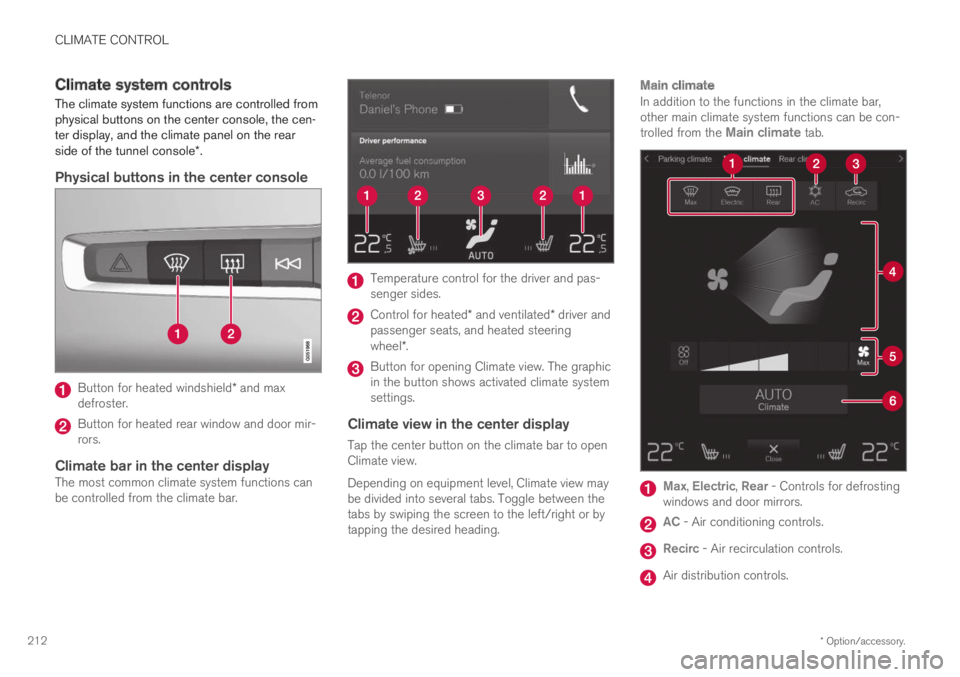
Button for heated windshield* and maxdefroster.
Button for heated rear window and door mir-rors.
Climate bar in the center display
The most common climate system functions canbe controlled from the climate bar.
Temperature control for the driver and pas-senger sides.
Control for heated* and ventilated* driver andpassenger seats, and heated steeringwheel*.
Button for opening Climate view. The graphicin the button shows activated climate systemsettings.
Climate view in the center display
Tap the center button on the climate bar to openClimate view.
Depending on equipment level, Climate view maybe divided into several tabs. Toggle between thetabs by swiping the screen to the left/right or bytapping the desired heading.
Main climate
In addition to the functions in the climate bar,other main climate system functions can be con-trolled from the Main climate tab.
Max, Electric, Rear - Controls for defrostingwindows and door mirrors.
AC - Air conditioning controls.
Recirc - Air recirculation controls.
Air distribution controls.
Page 215 of 695
CLIMATE CONTROL
}}
* Option/accessory.213
Blower control.
AUTO - Automatic climate control.
Parking climate
Parking climate functions can be controlled fromthe Parking climate tab.
Climate controls on the rear side of the
tunnel console *
If the vehicle is equipped with heated rear seats*,there are physical buttons on the rear side of thetunnel console to control this.
Related information
Climate (p. 200)
Activating and deactivating power frontseats* (p. 213)
Activating and deactivating the heated rearseats* (p. 214)
Activating and deactivating front seat ventila-tion* (p. 215)
Activating and deactivating the heated steer-ing wheel* (p. 215)
Activating auto climate control (p. 216)
Activating and deactivating recirculation(p. 217)
Activating and deactivating max defroster(p. 218)
Activating and deactivating the heated wind-shield* (p. 219)
Activating and deactivating the heated rearwindow and door mirrors (p. 221)
Setting the blower speed for the front seats(p. 222)
Synchronize temperature (p. 223)
Activating and deactivating air conditioning(p. 224)
Activating and deactivating power
front seats*
The seats can be heated for added comfort forthe driver and passengers in cold weather.
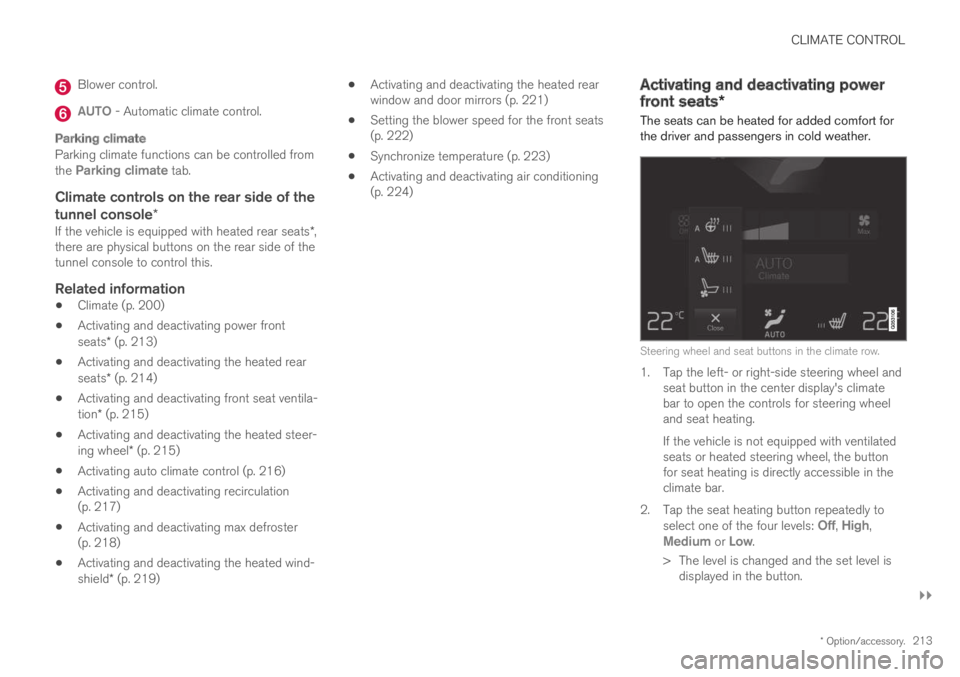
Steering wheel and seat buttons in the climate row.
1. Tap the left- or right-side steering wheel andseat button in the center display's climatebar to open the controls for steering wheeland seat heating.
If the vehicle is not equipped with ventilatedseats or heated steering wheel, the buttonfor seat heating is directly accessible in theclimate bar.
2.Tap the seat heating button repeatedly toselect one of the four levels: Off, High,Medium or Low.
>The level is changed and the set level isdisplayed in the button.
Page 222 of 695
||
CLIMATE CONTROL
* Option/accessory.220
Activating and deactivating windshield
heating from the center display
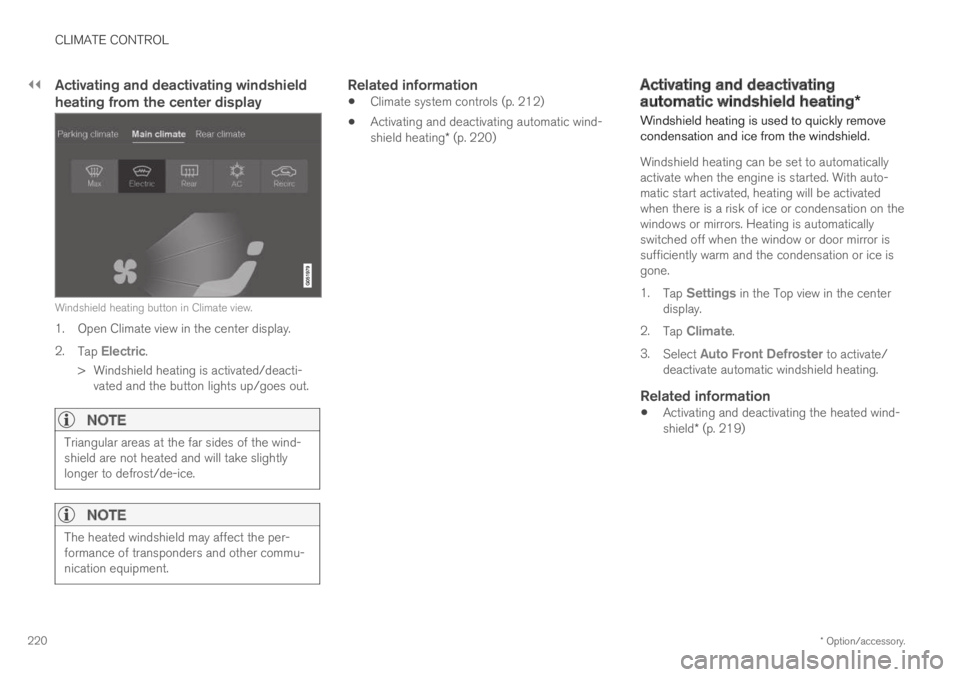
Windshield heating button in Climate view.
1. Open Climate view in the center display.
2.Tap Electric.
>Windshield heating is activated/deacti-vated and the button lights up/goes out.
NOTE
Triangular areas at the far sides of the wind-shield are not heated and will take slightlylonger to defrost/de-ice.
NOTE
The heated windshield may affect the per-formance of transponders and other commu-nication equipment.
Related information
Climate system controls (p. 212)
Activating and deactivating automatic wind-shield heating* (p. 220)
Activating and deactivating
automatic windshield heating*
Windshield heating is used to quickly removecondensation and ice from the windshield.
Windshield heating can be set to automaticallyactivate when the engine is started. With auto-matic start activated, heating will be activatedwhen there is a risk of ice or condensation on thewindows or mirrors. Heating is automaticallyswitched off when the window or door mirror issufficiently warm and the condensation or ice isgone.
1.Tap Settings in the Top view in the centerdisplay.
2.Tap Climate.
3.Select Auto Front Defroster to activate/deactivate automatic windshield heating.
Related information
Activating and deactivating the heated wind-shield* (p. 219)
Page 223 of 695
CLIMATE CONTROL
221
Activating and deactivating theheated rear window and doormirrors
The heated rear window and door mirrors areused to quickly remove condensation and icefrom the glass.
Activating and deactivating the heated
rear window and door mirrors from the
center console
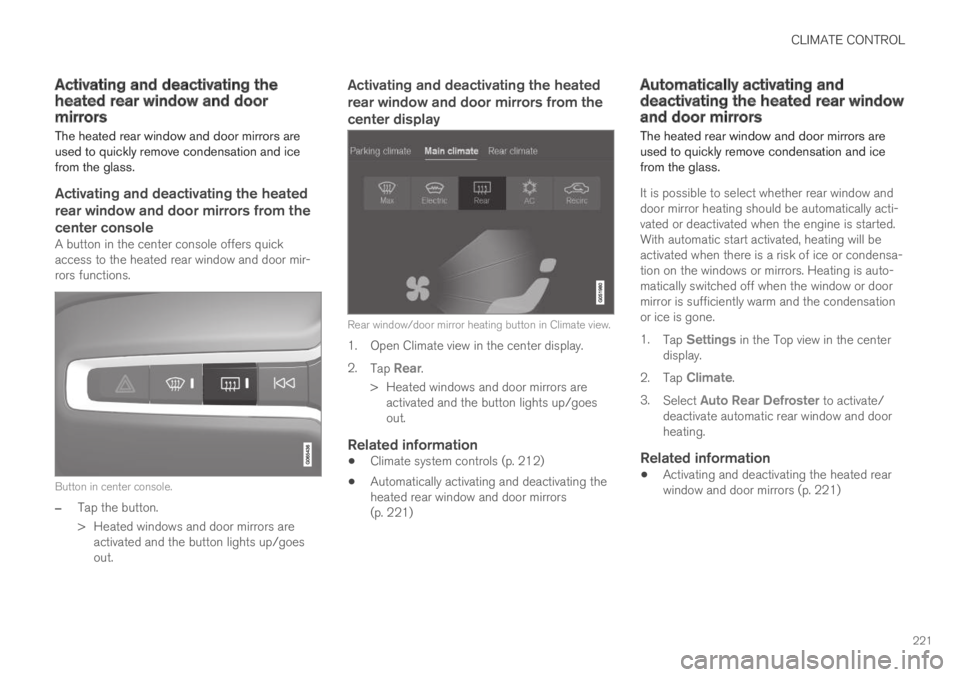
A button in the center console offers quickaccess to the heated rear window and door mir-rors functions.
Button in center console.
–Tap the button.
>Heated windows and door mirrors areactivated and the button lights up/goesout.
Activating and deactivating the heated
rear window and door mirrors from the
center display
Rear window/door mirror heating button in Climate view.
1. Open Climate view in the center display.
2.Tap Rear.
>Heated windows and door mirrors areactivated and the button lights up/goesout.
Related information
Climate system controls (p. 212)
Automatically activating and deactivating theheated rear window and door mirrors(p. 221)
Automatically activating anddeactivating the heated rear windowand door mirrors
The heated rear window and door mirrors areused to quickly remove condensation and icefrom the glass.
It is possible to select whether rear window anddoor mirror heating should be automatically acti-vated or deactivated when the engine is started.With automatic start activated, heating will beactivated when there is a risk of ice or condensa-tion on the windows or mirrors. Heating is auto-matically switched off when the window or doormirror is sufficiently warm and the condensationor ice is gone.
1.Tap Settings in the Top view in the centerdisplay.
2.Tap Climate.
3.Select Auto Rear Defroster to activate/deactivate automatic rear window and doorheating.
Related information
Activating and deactivating the heated rearwindow and door mirrors (p. 221)
Page 227 of 695

CLIMATE CONTROL
* Option/accessory.225
Climate comfort retaining function (p. 230)
Parking climate symbols and messages(p. 231)
Preconditioning
Preconditioning the vehicle before driving canhelp reduce wear and reduce energy consump-tion during a trip.
Preconditioning can be started immediately orstarted at a preset time using a timer.
The function utilizes several of the vehicle's sys-tems:
In cold weather, the parking heater heats thepassenger compartment to a comfortabletemperature.
In warm weather, air conditioning cools thepassenger compartment to a comfortabletemperature.
The electrically heated steering wheel* andseats* can be activated.
Heating for the windshield, rear window anddoor mirrors are automatically activated asneeded.
During preconditioning in a hot climate, conden-sation from the air conditions may drip under thevehicle. This is normal.
NOTE
Preconditioning is only available when the caris connected to an electrical outlet. A charg-ing post that is not always active, for examplebecause of a timer, can cause loss of functionfor preconditioning.
If the car is not connected to an electricalsocket it is still possible in a warm climate toachieve brief cooling of the passenger com-partment by direct starting preconditioning.
NOTE
During preconditioning of the passengercompartment, the vehicle works to reach acomfortable temperature and not the tem-perature set in the climate system.
Related information
Parking climate (p. 224)
Starting and stopping preconditioning(p. 226)
Preconditioning timer (p. 227)
Page 238 of 695
KEY, LOCKS AND ALARM
* Option/accessory.236
Lock indication
When the vehicle is locked or unlocked, the turnsignals will flash to indicate that the vehicle hasbeen locked or unlocked correctly.
Exterior confirmation
Locking
The turn signals will flash once and the door
mirrors will fold in1 to confirm the vehicle islocked.
Unlocking
The turn signals will flash twice and the door
mirrors will fold out1 to confirm the vehicle isunlocked.
All doors, tailgate and hood must be closed forconfirmation to be given. If only the driver's door
is closed when the vehicle is locked2, the vehiclewill be locked but the turn signals will only flashto indicate locking when all doors and the hoodand tailgate have been closed.
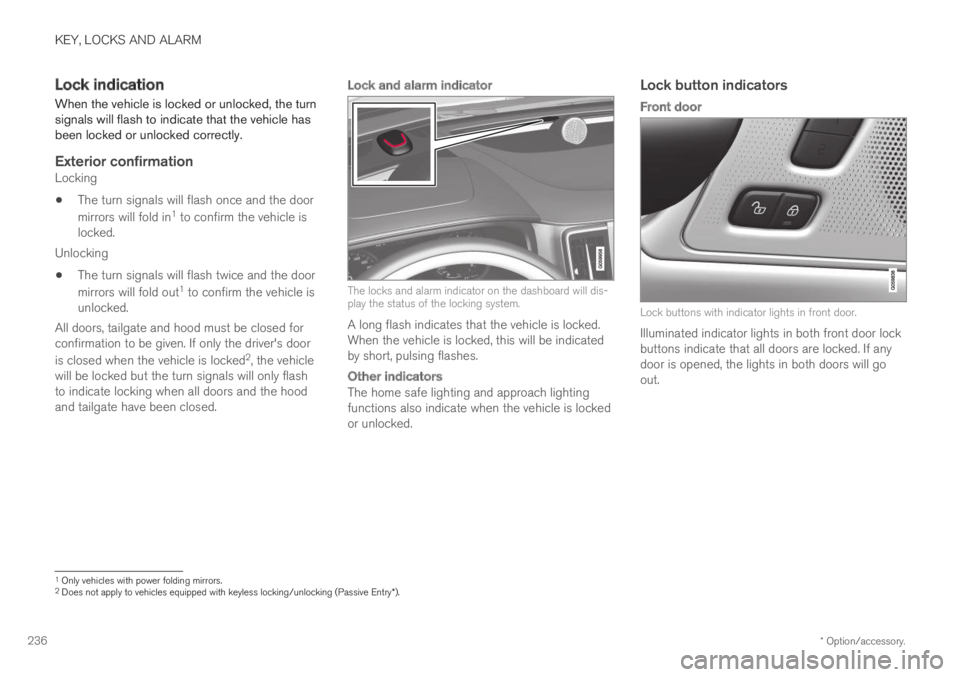
Lock and alarm indicator
The locks and alarm indicator on the dashboard will dis-play the status of the locking system.
A long flash indicates that the vehicle is locked.When the vehicle is locked, this will be indicatedby short, pulsing flashes.
Other indicators
The home safe lighting and approach lightingfunctions also indicate when the vehicle is lockedor unlocked.
Lock button indicators
Front door
Lock buttons with indicator lights in front door.
Illuminated indicator lights in both front door lockbuttons indicate that all doors are locked. If anydoor is opened, the lights in both doors will goout.
1Only vehicles with power folding mirrors.2Does not apply to vehicles equipped with keyless locking/unlocking (Passive Entry*).
Page 239 of 695
KEY, LOCKS AND ALARM
}}
* Option/accessory.237
In rear door *
Lock button with indicator light in rear door.
Illuminated indicator lights in each door indicatethat that particular door is locked. If any door isunlocked and opened, the indicator light in thatdoor will go out. The lights in the other doors willremain illuminated.
Related information
Lock confirmation settings (p. 237)
Welcome Light (p. 161)
Using home safe lighting (p. 161)
Lock confirmation settings
Settings for how the vehicle confirms lockingand unlocking can be adjusted in the center dis-play's Settings menu.
Locking response:
1.Tap Settings in the center display's Topview.
2.Tap My CarLocking.
3.Tap Visible Locking Feedback to deacti-vate the function or to select when the vehi-cle should provide a visible response: duringLock, Unlock or Both.
4.Select to receive an audible response whenlocking the vehicle by marking AudibleLocking Feedback.
Folding door mirrors* confirmation:
1.Tap Settings in the center display's Topview.
2.Tap My CarMirrors and Convenience.
3.Select Fold Mirror When Locked to acti-vate or deactivate the function.
Related information
Lock indication (p. 236)
Remote key
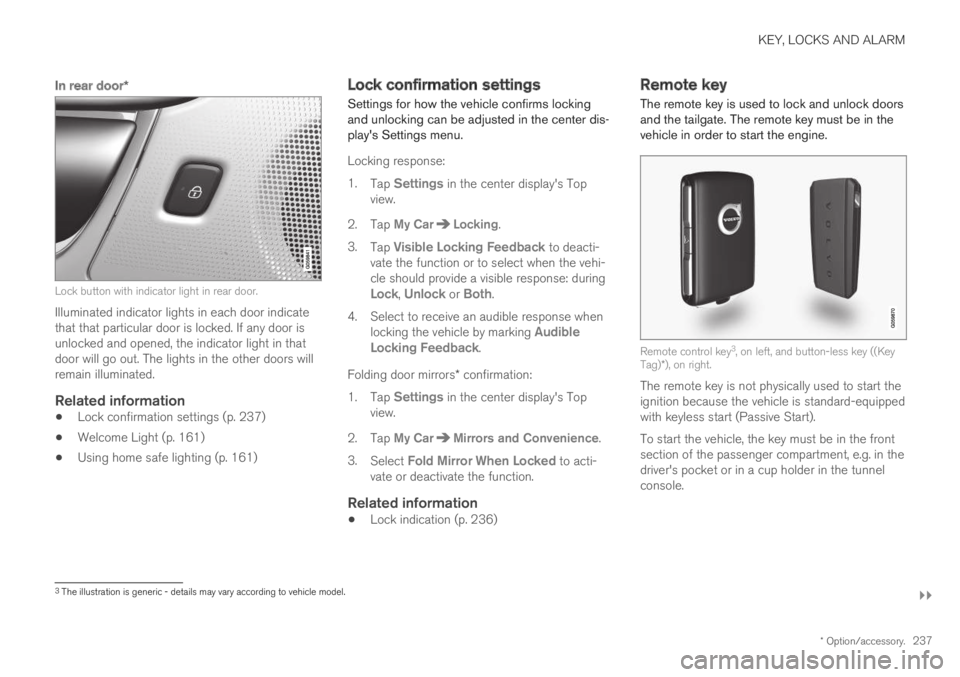
The remote key is used to lock and unlock doorsand the tailgate. The remote key must be in thevehicle in order to start the engine.
Remote control key3, on left, and button-less key ((KeyTag)*), on right.
The remote key is not physically used to start theignition because the vehicle is standard-equippedwith keyless start (Passive Start).
To start the vehicle, the key must be in the frontsection of the passenger compartment, e.g. in thedriver's pocket or in a cup holder in the tunnelconsole.
3The illustration is generic - details may vary according to vehicle model.
Page 352 of 695
DRIVER SUPPORT
* Option/accessory.350
BLIS*
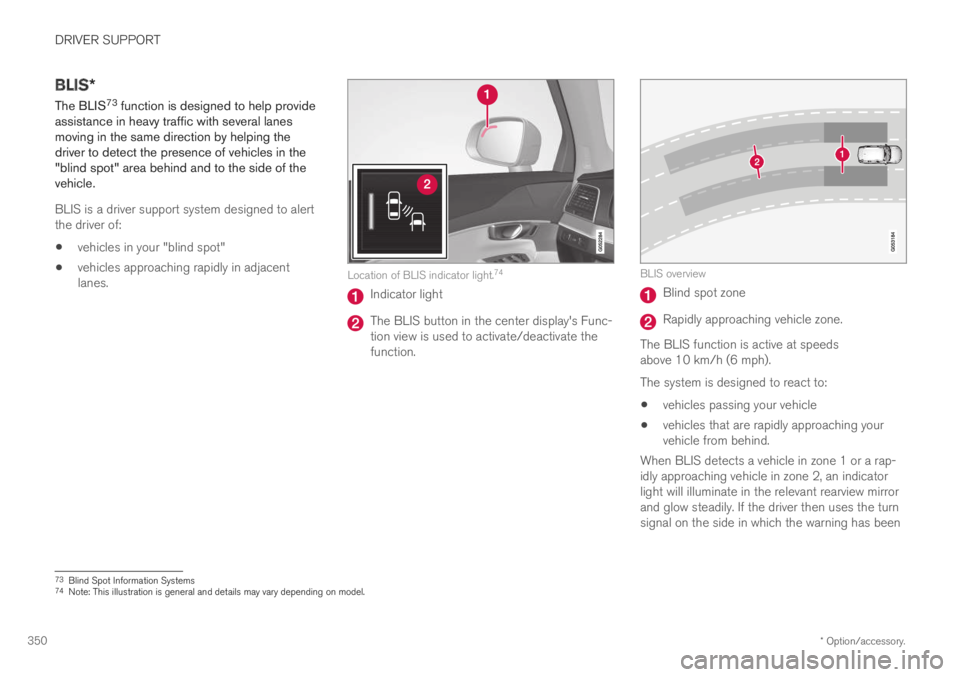
The BLIS73 function is designed to help provideassistance in heavy traffic with several lanesmoving in the same direction by helping thedriver to detect the presence of vehicles in the"blind spot" area behind and to the side of thevehicle.
BLIS is a driver support system designed to alertthe driver of:
vehicles in your "blind spot"
vehicles approaching rapidly in adjacentlanes.Location of BLIS indicator light.74
Indicator light
The BLIS button in the center display's Func-tion view is used to activate/deactivate thefunction.
BLIS overview
Blind spot zone
Rapidly approaching vehicle zone.
The BLIS function is active at speedsabove 10 km/h (6 mph).
The system is designed to react to:
vehicles passing your vehicle
vehicles that are rapidly approaching yourvehicle from behind.
When BLIS detects a vehicle in zone 1 or a rap-idly approaching vehicle in zone 2, an indicatorlight will illuminate in the relevant rearview mirrorand glow steadily. If the driver then uses the turnsignal on the side in which the warning has been
73Blind Spot Information Systems74Note: This illustration is general and details may vary depending on model.