phone VOLVO XC60 TWIN ENGINE 2019 Manual PDF
[x] Cancel search | Manufacturer: VOLVO, Model Year: 2019, Model line: XC60 TWIN ENGINE, Model: VOLVO XC60 TWIN ENGINE 2019Pages: 695, PDF Size: 14.96 MB
Page 545 of 695
AUDIO, MEDIA AND INTERNET
* Option/accessory.543
Restarting the phone
If you experience any Internet connection prob-lems, it may help to restart your phone.
Related information
Internet-connected vehicle* (p. 537)
Wi-Fi technology and security (p. 543)
Deleting Wi-Fi networks
Networks that are not needed can be deleted.
1.Tap Settings in the Top view.
2.Proceed to CommunicationWi-FiSaved networks.
3.Tap Forget to delete the network.
4.Confirm the selection.
> The vehicle will no longer connect to thedeleted network.
Deleting all networks
All networks can be deleted at once by perform-ing a factory reset. Please note that all user dataand system settings will be restored to originaldefault factory settings.
Related information
Internet-connected vehicle* (p. 537)
No or poor Internet connection (p. 542)
Resetting center display settings (p. 134)
Connecting the vehicle to the Internet via aphone (Wi-Fi) (p. 539)
Wi-Fi technology and security
Networks must meet certain criteria in order forthe vehicle to connect.
It is possible to connect to the following types ofnetworks:
Frequency - 2.4 or 5 GHz14.
Standards - 802.11 a/b/g/n.
Security type - WPA2-AES-CCMP.
The vehicle's Wi-Fi system is designed to handleWi-Fi devices inside the vehicle.
Performance may be impaired if multiple devicesare using a frequency at the same time.
Related information
Internet-connected vehicle* (p. 537)
14Selecting a frequency is not possible on all markets.
Page 548 of 695
||
AUDIO, MEDIA AND INTERNET
546
Portions of the content are copyright © ofGracenote or its providers.
Gracenote, the Gracenote logo and logotype,"Powered by Gracenote" and Gracenote MusicIDare either registered trademarks of Gracenote,Inc. in the United States and/or other countries.
Gracenote ®
End User License Agreement
This application or device contains software fromGracenote, Inc. in Emeryville, California, UnitedStates (“Gracenote”). The software from Grace-note (the “Gracenote Software”) enables thisapplication to perform disc and/or file identifica-tion and obtain music-related information, includ-ing name, artist, track, and title information(“Gracenote Data”) from online servers or embed-ded databases (collectively “Gracenote Servers”)and to perform other functions. You may useGracenote Data only by means of the intendedEnd-User functions of this application or device.
You agree that you will use Gracenote Data, theGracenote Software, and Gracenote Servers foryour own personal non-commercial use only. Youagree not to assign, copy, transfer or transmit theGracenote Software or any Gracenote Data toany third party. YOU AGREE NOT TO USE OREXPLOIT GRACENOTE DATA, THE GRACE-NOTE SOFTWARE, OR GRACENOTE SERVERS,EXCEPT AS EXPRESSLY PERMITTED HEREIN.
You agree that your non-exclusive license to usethe Gracenote Data, the Gracenote Software, andGracenote Servers will terminate if you violate
these restrictions. If your license terminates, youagree to cease any and all use of the GracenoteData, the Gracenote Software, and GracenoteServers. Gracenote reserves all rights in allGracenote Data, all Gracenote Software, and allGracenote Servers, including all ownership rights.Under no circumstances will Gracenote becomeliable for any payment to you for any informationthat you provide. You agree that Gracenote, Inc.may enforce its rights under this Agreementagainst you directly in its own name.
The Gracenote service uses a unique identifier totrack queries for statistical purposes. The pur-pose of a randomly assigned numeric identifier isto allow the Gracenote service to count querieswithout knowing anything about who you are. Formore information, see the web page for theGracenote Privacy Policy for the Gracenote serv-ice.
The Gracenote Software and each item of Grace-note Data are licensed to you “AS IS.” Gracenotemakes no representations or warranties, expressor implied, regarding the accuracy of any Grace-note Data from in the Gracenote Servers. Grace-note reserves the right to delete data from theGracenote Servers or to change data categoriesfor any cause that Gracenote deems sufficient.No warranty is made that the Gracenote Softwareor Gracenote Servers are error-free or that func-tioning of Gracenote Software or GracenoteServers will be uninterrupted. Gracenote is notobligated to provide you with new enhanced or
additional data types or categories that Grace-note may provide in the future and is free to dis-continue its services at any time.
GRACENOTE DISCLAIMS ALL WARRANTIESEXPRESS OR IMPLIED, INCLUDING, BUT NOTLIMITED TO, IMPLIED WARRANTIES OF MER-CHANTABILITY, FITNESS FOR A PARTICULARPURPOSE, TITLE, AND NON-INFRINGEMENT.GRACENOTE DOES NOT WARRANT THERESULTS THAT WILL BE OBTAINED BY YOURUSE OF THE GRACENOTE SOFTWARE ORANY GRACENOTE SERVER. IN NO CASE WILLGRACENOTE BE LIABLE FOR ANY CONSE-QUENTIAL OR INCIDENTAL DAMAGES ORFOR ANY LOST PROFITS OR LOST REVENUES.
© Gracenote, Inc. 2009
Sensus software
This software uses parts of sources from clib2and Prex Embedded Real-time OS - Source(Copyright (c) 1982, 1986, 1991, 1993, 1994),and Quercus Robusta (Copyright (c) 1990,1993), The Regents of the University ofCalifornia. All or some portions are derived frommaterial licensed to the University of California byAmerican Telephone and Telegraph Co. or UnixSystem Laboratories, Inc. and are reproducedherein with the permission of UNIX SystemLaboratories, Inc. Redistribution and use insource and binary forms, with or withoutmodification, are permitted provided that thefollowing conditions are met: Redistributions of
Page 550 of 695
||
AUDIO, MEDIA AND INTERNET
548
The website provides the Source Code "As Is"and without warranty of any kind.
By downloading Source Code, you expresslyassume all risk and liability associated withdownloading and using the Source Code andcomplying with the user agreements thataccompany each Source Code.
Please note that we cannot respond to anyinquiries regarding the source code.
camellia:1.2.0
Copyright (c) 2006, 2007
NTT (Nippon Telegraph and TelephoneCorporation). All rights reserved.
Redistribution and use in source and binaryforms, with or without modification, are permittedprovided that the following conditions are met:
1. Redistributions of source code must retainthe above copyright notice, this list ofconditions and the following disclaimer asthe first lines of this file unmodified.
2. Redistributions in binary form mustreproduce the above copyright notice, this listof conditions and the following disclaimer inthe documentation and/or other materialsprovided with the distribution.
THIS SOFTWARE IS PROVIDED BY NTT ``ASIS'' AND ANY EXPRESS OR IMPLIEDWARRANTIES, INCLUDING, BUT NOT LIMITEDTO, THE IMPLIED WARRANTIES OFMERCHANTABILITY AND FITNESS FOR A
PARTICULAR PURPOSE ARE DISCLAIMED. INNO EVENT SHALL NTT BE LIABLE FOR ANYDIRECT, INDIRECT, INCIDENTAL, SPECIAL,EXEMPLARY, OR CONSEQUENTIAL DAMAGES(INCLUDING, BUT NOT LIMITED TO,PROCUREMENT OF SUBSTITUTE GOODS ORSERVICES; LOSS OF USE, DATA, OR PROFITS;OR BUSINESS INTERRUPTION) HOWEVERCAUSED AND ON ANY THEORY OF LIABILITY,WHETHER IN CONTRACT, STRICT LIABILITY,OR TORT (INCLUDING NEGLIGENCE OROTHERWISE) ARISING IN ANY WAY OUT OFTHE USE OF THIS SOFTWARE, EVEN IFADVISED OF THE POSSIBILITY OF SUCHDAMAGE.
Unicode: 5.1.0
COPYRIGHT AND PERMISSION NOTICE
Copyright c 1991-2013 Unicode, Inc. All rightsreserved. Distributed under the Terms of Use inhttp://www.unicode.org/copyright.html.
Permission is hereby granted, free of charge, toany person obtaining a copy of the Unicode datafiles and any associated documentation (the"Data Files") or Unicode software and anyassociated documentation (the "Software") todeal in the Data Files or Software withoutrestriction, including without limitation the rightsto use, copy, modify, merge, publish, distribute,and/or sell copies of the Data Files or Software,and to permit persons to whom the Data Files orSoftware are furnished to do so, provided that (a)
the above copyright notice(s) and this permissionnotice appear with all copies of the Data Files orSoftware, (b) both the above copyright notice(s)and this permission notice appear in associateddocumentation, and (c) there is clear notice ineach modified Data File or in the Software aswell as in the documentation associated with theData File(s) or Software that the data or softwarehas been modified.
THE DATA FILES AND SOFTWARE AREPROVIDED "AS IS", WITHOUT WARRANTY OFANY KIND, EXPRESS OR IMPLIED, INCLUDINGBUT NOT LIMITED TO THE WARRANTIES OFMERCHANTABILITY, FITNESS FOR APARTICULAR PURPOSE ANDNONINFRINGEMENT OF THIRD PARTYRIGHTS. IN NO EVENT SHALL THECOPYRIGHT HOLDER OR HOLDERSINCLUDED IN THIS NOTICE BE LIABLE FORANY CLAIM, OR ANY SPECIAL INDIRECT ORCONSEQUENTIAL DAMAGES, OR ANYDAMAGES WHATSOEVER RESULTING FROMLOSS OF USE, DATA OR PROFITS, WHETHERIN AN ACTION OF CONTRACT, NEGLIGENCEOR OTHER TORTIOUS ACTION, ARISING OUTOF OR IN CONNECTION WITH THE USE ORPERFORMANCE OF THE DATA FILES ORSOFTWARE.
Except as contained in this notice, the name of acopyright holder shall not be used in advertisingor otherwise to promote the sale, use or other
Page 590 of 695
LOADING, STORAGE AND PASSENGER COMPARTMENT
* Option/accessory.588
Passenger compartment interior
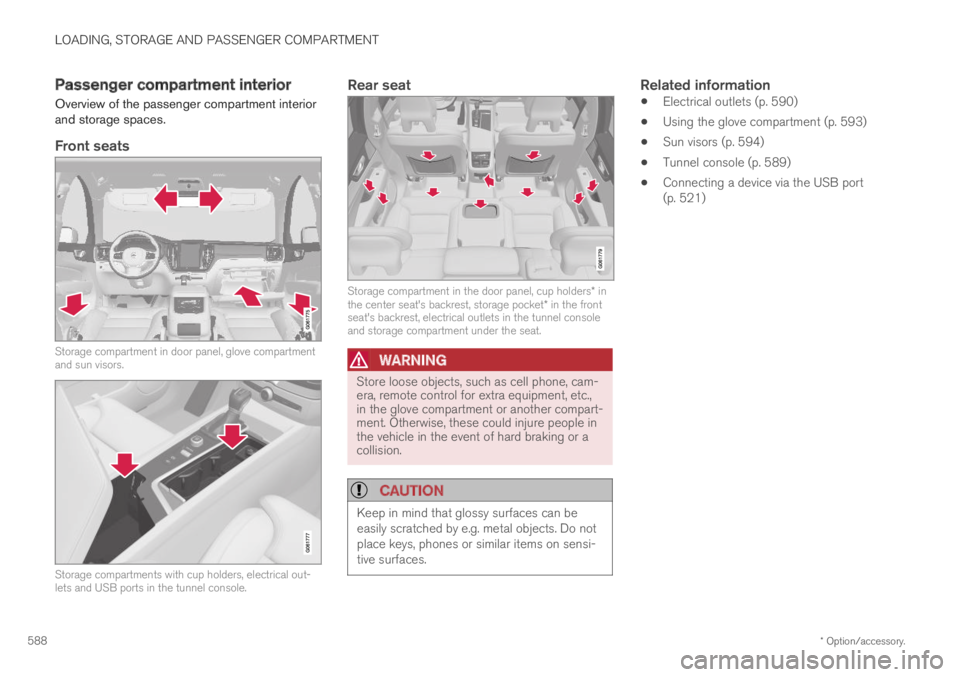
Overview of the passenger compartment interiorand storage spaces.
Front seats
Storage compartment in door panel, glove compartmentand sun visors.
Storage compartments with cup holders, electrical out-lets and USB ports in the tunnel console.
Rear seat
Storage compartment in the door panel, cup holders* inthe center seat's backrest, storage pocket* in the frontseat's backrest, electrical outlets in the tunnel consoleand storage compartment under the seat.
WARNING
Store loose objects, such as cell phone, cam-era, remote control for extra equipment, etc.,in the glove compartment or another compart-ment. Otherwise, these could injure people inthe vehicle in the event of hard braking or acollision.
CAUTION
Keep in mind that glossy surfaces can beeasily scratched by e.g. metal objects. Do notplace keys, phones or similar items on sensi-tive surfaces.
Related information
Electrical outlets (p. 590)
Using the glove compartment (p. 593)
Sun visors (p. 594)
Tunnel console (p. 589)
Connecting a device via the USB port(p. 521)
Page 591 of 695
LOADING, STORAGE AND PASSENGER COMPARTMENT
* Option/accessory.589
Tunnel console
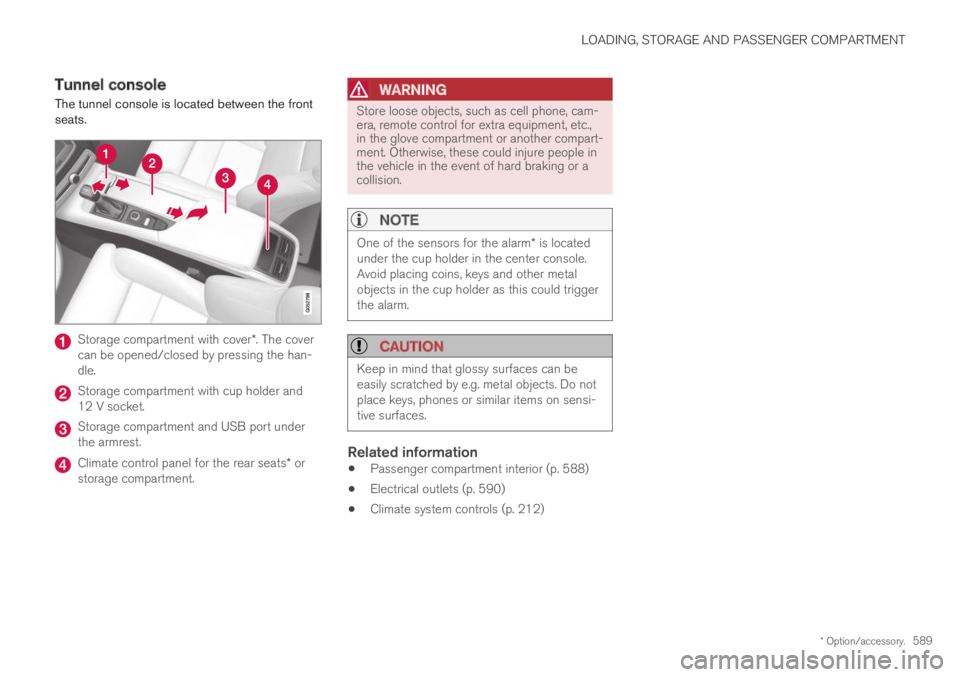
The tunnel console is located between the frontseats.
Storage compartment with cover*. The covercan be opened/closed by pressing the han-dle.
Storage compartment with cup holder and12 V socket.
Storage compartment and USB port underthe armrest.
Climate control panel for the rear seats* orstorage compartment.
WARNING
Store loose objects, such as cell phone, cam-era, remote control for extra equipment, etc.,in the glove compartment or another compart-ment. Otherwise, these could injure people inthe vehicle in the event of hard braking or acollision.
NOTE
One of the sensors for the alarm* is locatedunder the cup holder in the center console.Avoid placing coins, keys and other metalobjects in the cup holder as this could triggerthe alarm.
CAUTION
Keep in mind that glossy surfaces can beeasily scratched by e.g. metal objects. Do notplace keys, phones or similar items on sensi-tive surfaces.
Related information
Passenger compartment interior (p. 588)
Electrical outlets (p. 590)
Climate system controls (p. 212)
Page 592 of 695
LOADING, STORAGE AND PASSENGER COMPARTMENT
* Option/accessory.590
Electrical outlets
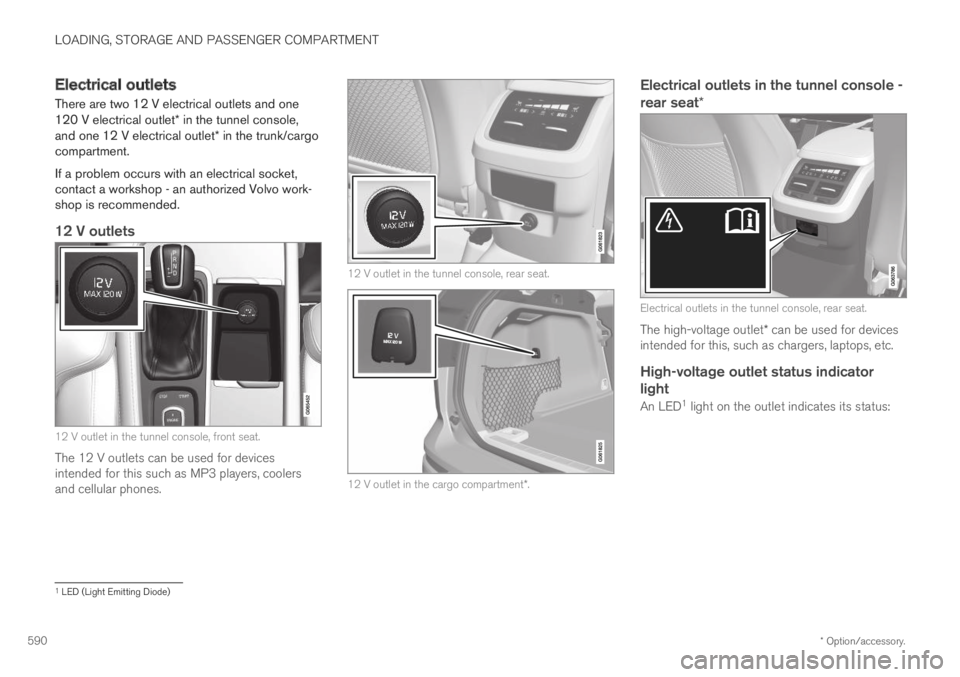
There are two 12 V electrical outlets and one120 V electrical outlet* in the tunnel console,and one 12 V electrical outlet* in the trunk/cargocompartment.
If a problem occurs with an electrical socket,contact a workshop - an authorized Volvo work-shop is recommended.
12 V outlets
12 V outlet in the tunnel console, front seat.
The 12 V outlets can be used for devicesintended for this such as MP3 players, coolersand cellular phones.
12 V outlet in the tunnel console, rear seat.
12 V outlet in the cargo compartment*.
Electrical outlets in the tunnel console -
rear seat *
Electrical outlets in the tunnel console, rear seat.
The high-voltage outlet* can be used for devicesintended for this, such as chargers, laptops, etc.
High-voltage outlet status indicator
light
An LED1 light on the outlet indicates its status:
1LED (Light Emitting Diode)
Page 594 of 695
LOADING, STORAGE AND PASSENGER COMPARTMENT
* Option/accessory.592
Using the electrical outlets
The 12 V outlet can be used for devicesintended for this such as MP3 players, coolersand cellular phones.
The high-voltage outlet* can be used for devicesintended for this, such as chargers, laptops, etc.
The ignition must be in at least mode I for theoutlets to supply current. The outlets will then beactive as long as there is sufficient charge in thestart battery.
If the engine is turned off and the vehicle islocked, the outlets will be deactivated. If theengine is turned off and the vehicle remainsunlocked, the sockets will remain active for up to7 minutes.
NOTE
Bear in mind that using the electrical outletswhen the engine is off could cause the starterbattery to have too low of a charge level,which could limit other functionality.
Accessories connected to the electrical out-lets can be activated even when the vehicleelectrical system is off or if preconditioning isused. For this reason, disconnect plugs whenthey are not in use to prevent the starter bat-tery from becoming discharged.
WARNING
Do not use accessories with large orheavy plugs – they could damage the out-let or come loose while you are driving.
Do not use accessories that could causedisruptions to e.g. the vehicle's radioreceiver or electrical system.
Position the accessory so that there is norisk of it injuring the driver or passengersin the event of heavy braking or a colli-sion.
Pay attention to connected accessoriesas they can generate heat that could burnpassengers or the interior.
Using 12 V outlets
1. Remove the stopper (tunnel console) or folddown the cover (trunk/cargo compartment)over the socket and plug in the device.
2. Unplug the device and put the stopper backin (tunnel console) or fold up the cover(trunk/cargo compartment) when the socketis not in use or left unattended.
CAUTION
The maximum power is 120 W (10 A) peroutlet.
Using high-voltage outlets
The ignition must be in at least mode I for outletsto supply current. The outlets will then be activeas long as there is sufficient charge in the startbattery.
1.Slide down the cover over the outlet and plugin the device.
>The LED2 light on the outlet will indicateits status.
2. The outlet is supplying electrical currentwhen the light is glowing steadily green.
3. Disconnect the device by pulling out the plug(do not pull on the cord).
Pull up the cover when the outlet is not inuse or is left unattended.
CAUTION
The maximum power is 150 W.
WARNING
Do not attempt to alter or repair the high-volt-age outlet on your own. Volvo recommendscontacting an authorized Volvo workshop.
2LED (Light Emitting Diode)
Page 678 of 695
INDEX
676
B
Backrest
front seat, adjusting184, 185, 188,
189, 190, 191
rear seat, folding193
Battery
Hybrid629
jump-start477
Maintenance625
start625
symbols on the battery630
warning symbols630
BLIS350, 351, 352, 353
Blower
adjusting222
air distribution206
air vents207
Bluetooth
connect520
connecting vehicle to Internet 539
phone528
settings537
Book service and repair613
Booster cushions71
Brake assist
after collision443
Brake fluid
grade671
Brake functions434
Brake light160
Brake position445
Brakes435
anti-lock brakes, ABS435
automatic when stationary442
Brake Assist System, BAS437
brake lights160
brake system434
emergency brake lights160
handbrake438
Maintenance438
on salted roads437
on wet roads437
brake system
fluid671
C
Camera sensor346
Camera unit331, 335
Capacity weight584, 667
Cargo compartment595
attachment points598
cargo net603
electrical outlet590, 592
Lighting163
Cargo compartment cover598, 600
cargo net603
Cargo net603
Car wash 648, 649, 651, 652, 653, 654
Catalytic converter475
recovery483
CD player518
Cell phone, see Phone529
Center console589
Center display
change appearance131
cleaning643
climate controls212
Function view122
keyboard126
messages140, 141
operation112, 115, 119, 124
overview109
settings132, 133
switch off and change volume 131
symbols in status bar124
views115
Central locking256
Change of owner134
Changing a wheel570
Page 679 of 695
INDEX
677
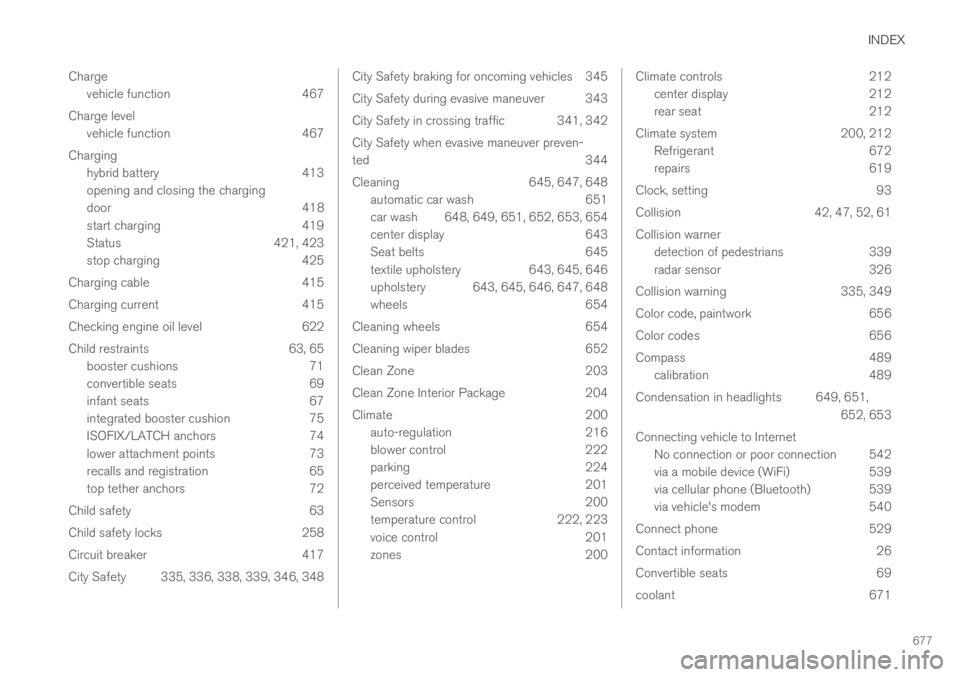
Charge
vehicle function 467
Charge level
vehicle function 467
Charging
hybrid battery 413
opening and closing the charging
door 418
start charging 419
Status 421, 423
stop charging 425
Charging cable 415
Charging current 415
Checking engine oil level 622
Child restraints 63, 65
booster cushions 71
convertible seats 69
infant seats 67
integrated booster cushion 75
ISOFIX/LATCH anchors 74
lower attachment points 73
recalls and registration 65
top tether anchors 72
Child safety 63
Child safety locks 258
Circuit breaker 417
City Safety 335, 336, 338, 339, 346, 348
City Safety braking for oncoming vehicles 345
City Safety during evasive maneuver343
City Safety in crossing traffic 341, 342
City Safety when evasive maneuver preven-
ted344
Cleaning645, 647, 648
automatic car wash651
car wash 648, 649, 651, 652, 653, 654
center display643
Seat belts645
textile upholstery643, 645, 646
upholstery 643, 645, 646, 647, 648
wheels654
Cleaning wheels654
Cleaning wiper blades652
Clean Zone203
Clean Zone Interior Package204
Climate200
auto-regulation216
blower control222
parking224
perceived temperature201
Sensors200
temperature control222, 223
voice control201
zones200
Climate controls212
center display212
rear seat212
Climate system 200, 212
Refrigerant 672
repairs 619
Clock, setting 93
Collision 42, 47, 52, 61
Collision warner
detection of pedestrians 339
radar sensor 326
Collision warning 335, 349
Color code, paintwork 656
Color codes 656
Compass 489
calibration 489
Condensation in headlights 649, 651,
652, 653
Connecting vehicle to Internet
No connection or poor connection 542
via a mobile device (WiFi) 539
via cellular phone (Bluetooth) 539
via vehicle's modem 540
Connect phone 529
Contact information 26
Convertible seats 69
coolant 671
Page 685 of 695
INDEX
683
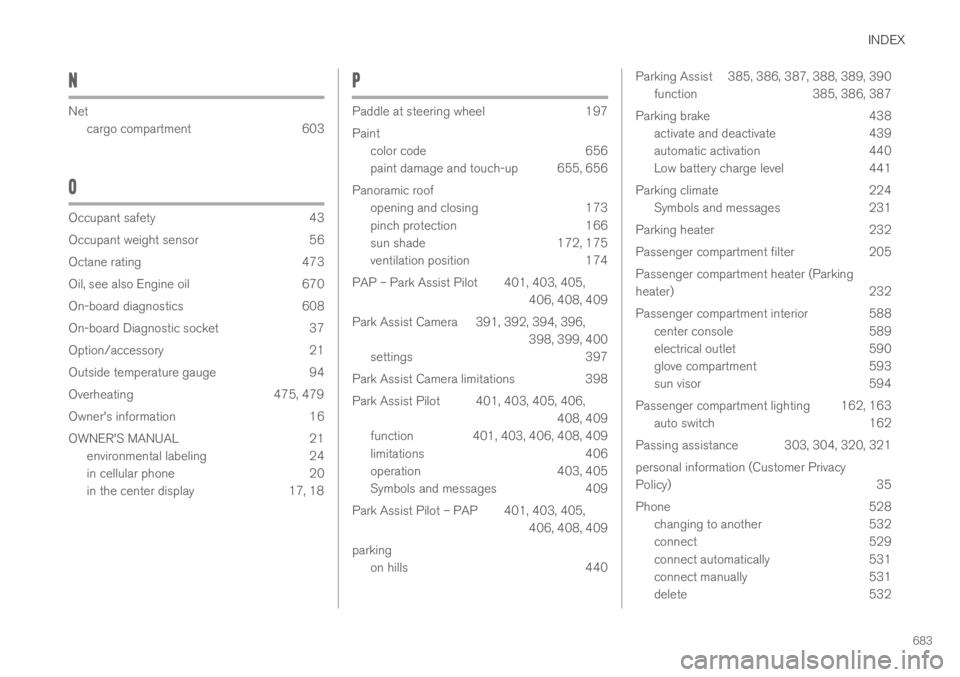
N
Net
cargo compartment603
O
Occupant safety43
Occupant weight sensor56
Octane rating473
Oil, see also Engine oil670
On-board diagnostics608
On-board Diagnostic socket37
Option/accessory21
Outside temperature gauge94
Overheating475, 479
Owner's information16
OWNER'S MANUAL21
environmental labeling24
in cellular phone20
in the center display17, 18
P
Paddle at steering wheel197
Paint
color code656
paint damage and touch-up 655, 656
Panoramic roof
opening and closing173
pinch protection166
sun shade172, 175
ventilation position174
PAP – Park Assist Pilot 401, 403, 405,
406, 408, 409
Park Assist Camera 391, 392, 394, 396,
398, 399, 400
settings397
Park Assist Camera limitations398
Park Assist Pilot 401, 403, 405, 406,
408, 409
function 401, 403, 406, 408, 409
limitations406
operation403, 405
Symbols and messages409
Park Assist Pilot – PAP 401, 403, 405,
406, 408, 409
parking
on hills440
Parking Assist 385, 386, 387, 388, 389, 390
function385, 386, 387
Parking brake438
activate and deactivate439
automatic activation440
Low battery charge level441
Parking climate224
Symbols and messages231
Parking heater232
Passenger compartment filter205
Passenger compartment heater (Parking
heater)232
Passenger compartment interior 588
center console589
electrical outlet590
glove compartment593
sun visor594
Passenger compartment lighting 162, 163
auto switch162
Passing assistance 303, 304, 320, 321
personal information (Customer Privacy
Policy)35
Phone528
changing to another532
connect529
connect automatically531
connect manually531
delete532