display VOLVO XC60 TWIN ENGINE 2019 Manual Online
[x] Cancel search | Manufacturer: VOLVO, Model Year: 2019, Model line: XC60 TWIN ENGINE, Model: VOLVO XC60 TWIN ENGINE 2019Pages: 695, PDF Size: 14.96 MB
Page 137 of 695
DISPLAYS AND VOICE CONTROL
}}
* Option/accessory.135
Table of settings in the centerdisplay
The center display's Settings menu has a num-ber of main categories and sub-categories thatcontain settings and information for many of thevehicle's features and functions.
There are seven main categories: My Car,Sound, Navigation, Media, Communication,Climate and System.
Each category, in turn, contains a number of sub-categories and possible settings. The table belowshows the first level of sub-categories. The possi-ble settings for a function or an area are descri-bed in more detail in their respective sections ofthe Owner's Manual.
Some settings are personal, which means thatthey can be saved to a Driver Profiles. Othersare global, which means that they are not linkedto a driver profile.
My Car
Sub-categories
Displays
IntelliSafe
Drive Preferences/Individual Drive Mode*
Lights and Lighting
Mirrors and Convenience
Sub-categories
Locking
Parking Brake and Suspension
Wipers
Sound
Sub-categories
Tone
Balance
System Volumes
Navigation
Sub-categories
Map
Route and Guidance
Traffic
Media
Sub-categories
AM/FM Radio
SiriusXM
SiriusXM Travel Link
Sub-categories
Gracenote®
Video
Communication
Sub-categories
Phone
Text Messages
Android Auto*
Apple CarPlay*
Bluetooth Devices
Wi-Fi
Vehicle Wi-Fi Hotspot
Vehicle Modem Internet
Volvo On Call
Volvo Service Networks
Climate
The Climate main category does not have anysub-categories.
Page 138 of 695
||
DISPLAYS AND VOICE CONTROL
* Option/accessory.136
System
Sub-categories
Driver Profile
Date and Time
System Languages and Units
Privacy and Data
Keyboard Layouts
Voice Control*
Factory Reset
System Information
Related information
Center display overview (p. 109)
Changing settings in the center display's Topview (p. 132)
Resetting center display settings (p. 134)
Driver profiles
Many of the vehicle's settings can be custom-ized to the driver's personal preferences andsaved in one or more driver profiles.
These personal settings are automatically savedin the active driver profile. Each key can be linkedto one driver profile. When the linked key is used,the vehicle is customized to the specific settingsof that driver profile.
Which settings are saved in driver
profiles?
Many of the settings made in the vehicle will beautomatically stored in the active driver profile ifthe profile is not protected. The vehicle has set-tings that can be made either personal or global.The personal settings are saved in driver profiles.
Settings that can be saved in a driver profileinclude, among other things, screens, mirrors,front seats, navigation*, audio and media system,language and voice control.
Some settings are global settings. These settingscan be changed but are not saved to a specificdriver profile. Changes to global settings affect allprofiles.
Global settings
Global settings and parameters do not changewhen driver profiles are changed. They remainthe same regardless of which driver profile is cur-rently active.
Keyboard layout is an example of a global setting.If driver profile X is used to add additional key-board languages, these languages will also beavailable for driver profile Y. The settings for key-board layout are not saved to a specific driverprofile - the settings are global.
Personal settings
If driver profile X has been used to e.g., set thebrightness for the center display, driver profile Ywill not be affected by this setting. It will only besaved to driver profile X because brightness set-ting is a personal setting.
Related information
Selecting a driver profile (p. 137)
Changing a driver profile's name (p. 137)
Linking a remote key to a driver profile(p. 138)
Protecting a driver profile (p. 138)
Resetting driver profile settings (p. 139)
Table of settings in the center display(p. 135)
Page 139 of 695
DISPLAYS AND VOICE CONTROL
137
Selecting a driver profile
When the center display starts up, the selecteddriver profile will be shown at the top of thescreen. The most recently used driver profile willbe active the next time the vehicle is unlocked. Adifferent driver profile can be selected once thevehicle has been unlocked. However, if theremote key has been linked to a driver profile,this profile will be used instead.
There are two options for switching betweendriver profiles.
Option 1:
1.Tap the name of the driver profile shown atthe top of the center display when the dis-play starts up.
> A list will appear, showing driver profilesthat can be selected.
2. Select desired driver profile.
3.Tap Confirm.
>The driver profile has now been selectedand the system will load the settingsstored in that profile.
Option 2:
1. Pull down Top view in the center display.
2.Tap Profile.
>The same list as in option 1 will be dis-played.
3. Select desired driver profile.
4.Tap Confirm.
>The driver profile has now been selectedand the system will load the settingsstored in that profile.
Related information
Driver profiles (p. 136)
Navigating in the center display's views(p. 115)
Changing a driver profile's name (p. 137)
Linking a remote key to a driver profile(p. 138)
Changing a driver profile's name
It is possible to change the names of the differ-ent driver profiles used in the vehicle.
1.Tap Settings in the Top view in the centerdisplay.
2.Tap SystemDriver Profiles.
3.Select Edit Profile.
>A menu will open in which the driver pro-file can be changed.
4.Tap the Profile Name box.
>A keyboard will be displayed and can be
used to change the name. Tap toclose the keyboard.
5.Save the name change by pressing Back orClose.
>The name has now been changed.
NOTE
Profile names may not begin with a space. If aspace is entered first, the profile name will notbe saved.
Related information
Selecting a driver profile (p. 137)
Using the center display keyboard (p. 126)
Page 140 of 695
DISPLAYS AND VOICE CONTROL
138
Protecting a driver profile
It may not always be desirable to store settingsmade in the vehicle to the active driver profile. Inthese instances, the driver profile can be protec-ted.
NOTE
Protecting a driver profile is only possiblewhen the vehicle is stationary.
To protect a driver profile:
1.Tap Settings in the Top view in the centerdisplay.
2.Tap SystemDriver Profiles.
3.Select Edit Profile.
>A menu will open in which the driver pro-file can be changed.
4.Tap Protect Profile to protect the profile.
5.Confirm your selection to protect the profileby tapping Back/Close.
>When the profile is protected, settingsmade in the vehicle will not be automati-cally stored to the profile. The changesmust instead be saved manually by tap-ping Save current settings to theprofile. If the profile is not protected, thesettings will be automatically stored to theprofile.
Related information
Driver profiles (p. 136)Linking a remote key to a driverprofile
A remote key can be linked to a driver profile.This driver profile and all of its settings will thenautomatically be selected every time the vehicleis used with that particular remote key.
The first time the remote key is used, it is notlinked to any specific driver profile. The Guestprofile is automatically activated when the ignitionis switched on.
A driver profile can also be selected manuallywithout linking it to any key. When the vehicle isunlocked, the last active driver profile will be acti-vated. If the key has ever been linked to a driverprofile, it is not necessary to manually select adriver profile when using that particular key.
Linking a remote key to a specific driver
profile
NOTE
A remote key can only be connected to adriver profile when the vehicle is stationary.
First select the profile you would like to link tothe key (if that profile is not already active). Theactive profile can then be linked to the key.
1.Tap Settings in the Top view in the centerdisplay.
Page 141 of 695
DISPLAYS AND VOICE CONTROL
139
2. Tap SystemDriver Profiles.
3. Mark the desired profile. The display willreturn to Home view. The Guest profile can-not be linked to a remote key.
4.Pull down Top view again and tap Settings
SystemDriver ProfilesEditProfile.
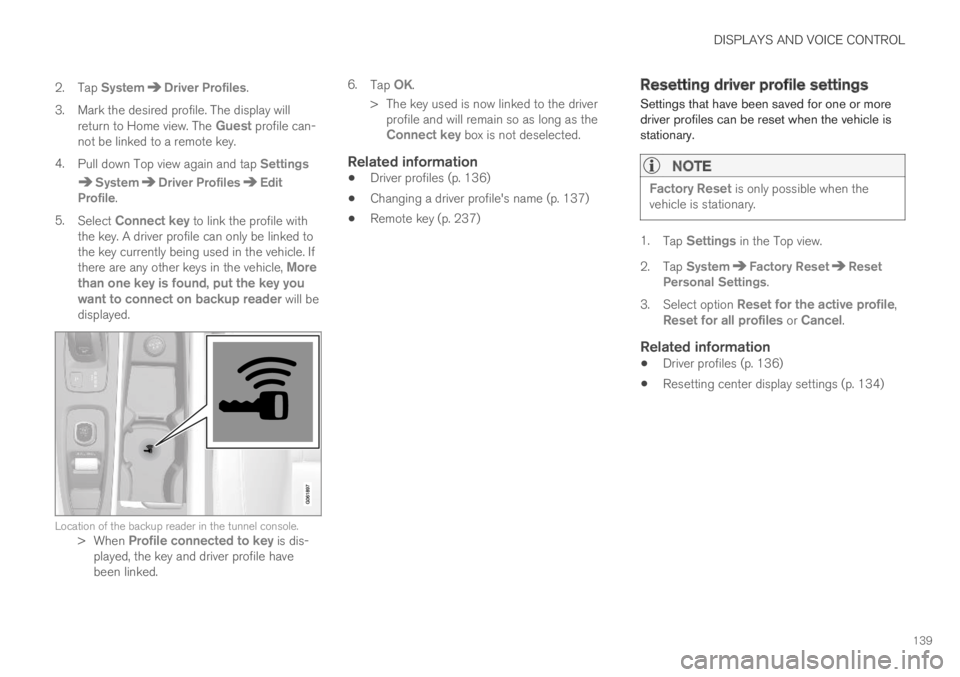
5.Select Connect key to link the profile withthe key. A driver profile can only be linked tothe key currently being used in the vehicle. Ifthere are any other keys in the vehicle, Morethan one key is found, put the key youwant to connect on backup reader will bedisplayed.
Location of the backup reader in the tunnel console.>When Profile connected to key is dis-played, the key and driver profile havebeen linked.
6.Tap OK.
>The key used is now linked to the driverprofile and will remain so as long as theConnect key box is not deselected.
Related information
Driver profiles (p. 136)
Changing a driver profile's name (p. 137)
Remote key (p. 237)
Resetting driver profile settings
Settings that have been saved for one or moredriver profiles can be reset when the vehicle isstationary.
NOTE
Factory Reset is only possible when thevehicle is stationary.
1.Tap Settings in the Top view.
2.Tap SystemFactory ResetResetPersonal Settings.
3.Select option Reset for the active profile,Reset for all profiles or Cancel.
Related information
Driver profiles (p. 136)
Resetting center display settings (p. 134)
Page 142 of 695
DISPLAYS AND VOICE CONTROL
140
Messages in the center display
The center display shows messages in certaincircumstances to inform or assist the driver.
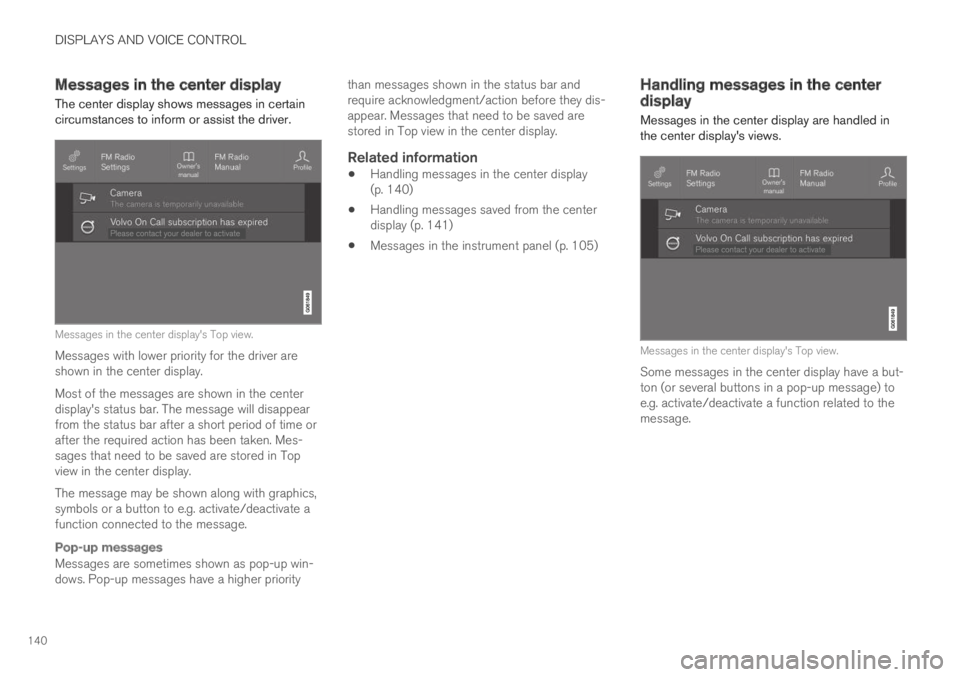
Messages in the center display's Top view.
Messages with lower priority for the driver areshown in the center display.
Most of the messages are shown in the centerdisplay's status bar. The message will disappearfrom the status bar after a short period of time orafter the required action has been taken. Mes-sages that need to be saved are stored in Topview in the center display.
The message may be shown along with graphics,symbols or a button to e.g. activate/deactivate afunction connected to the message.
Pop-up messages
Messages are sometimes shown as pop-up win-dows. Pop-up messages have a higher priority
than messages shown in the status bar andrequire acknowledgment/action before they dis-appear. Messages that need to be saved arestored in Top view in the center display.
Related information
Handling messages in the center display(p. 140)
Handling messages saved from the centerdisplay (p. 141)
Messages in the instrument panel (p. 105)
Handling messages in the centerdisplay
Messages in the center display are handled inthe center display's views.
Messages in the center display's Top view.
Some messages in the center display have a but-ton (or several buttons in a pop-up message) toe.g. activate/deactivate a function related to themessage.
Page 143 of 695
DISPLAYS AND VOICE CONTROL
141
Handling new messages
For messages with buttons:
–Tap the button to perform the action or letthe message automatically time-out after ashort period.
>The message will disappear from the sta-tus bar.
For messages without buttons:
–Close the message by tapping it or let themessage automatically time-out after a shortperiod.
>The message will disappear from the sta-tus bar.
Messages that need to be saved are stored inTop view in the center display.
Related information
Messages in the center display (p. 140)
Handling messages saved from the centerdisplay (p. 141)
Messages in the instrument panel (p. 105)
Handling messages saved from thecenter display
Messages saved from the instrument panel andcenter displays are handled in the center display.
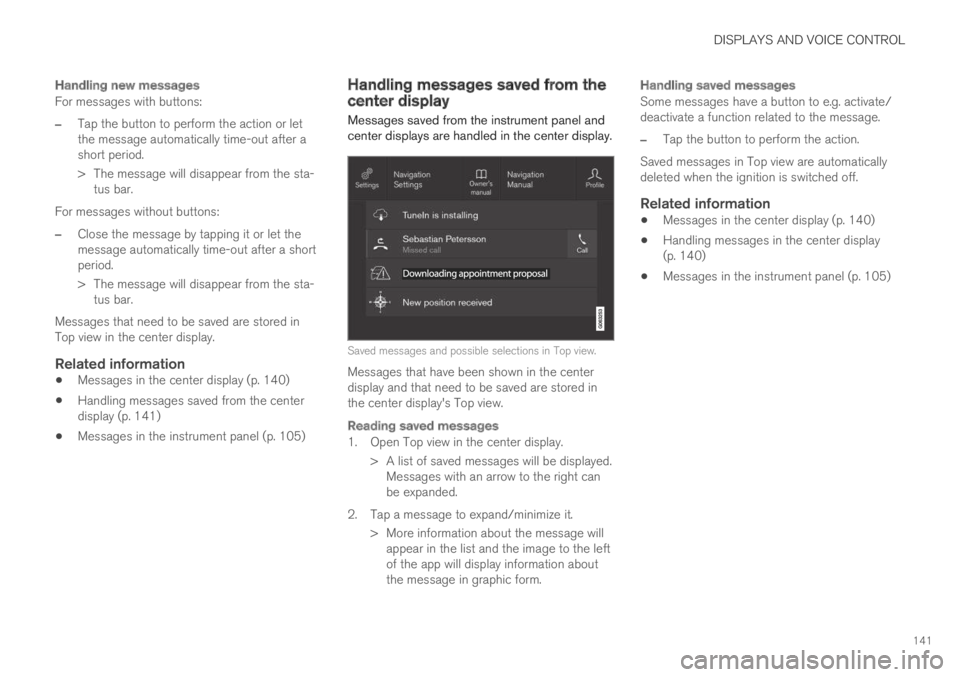
Saved messages and possible selections in Top view.
Messages that have been shown in the centerdisplay and that need to be saved are stored inthe center display's Top view.
Reading saved messages
1. Open Top view in the center display.
> A list of saved messages will be displayed.Messages with an arrow to the right canbe expanded.
2. Tap a message to expand/minimize it.
> More information about the message willappear in the list and the image to the leftof the app will display information aboutthe message in graphic form.
Handling saved messages
Some messages have a button to e.g. activate/deactivate a function related to the message.
–Tap the button to perform the action.
Saved messages in Top view are automaticallydeleted when the ignition is switched off.
Related information
Messages in the center display (p. 140)
Handling messages in the center display(p. 140)
Messages in the instrument panel (p. 105)
Page 144 of 695
DISPLAYS AND VOICE CONTROL
* Option/accessory.142
Head-up display*
The head-up display is a complement to theinstrument panel and projects information fromthe instrument panel onto the windshield. Theprojected images can only be seen from the driv-er's seat.
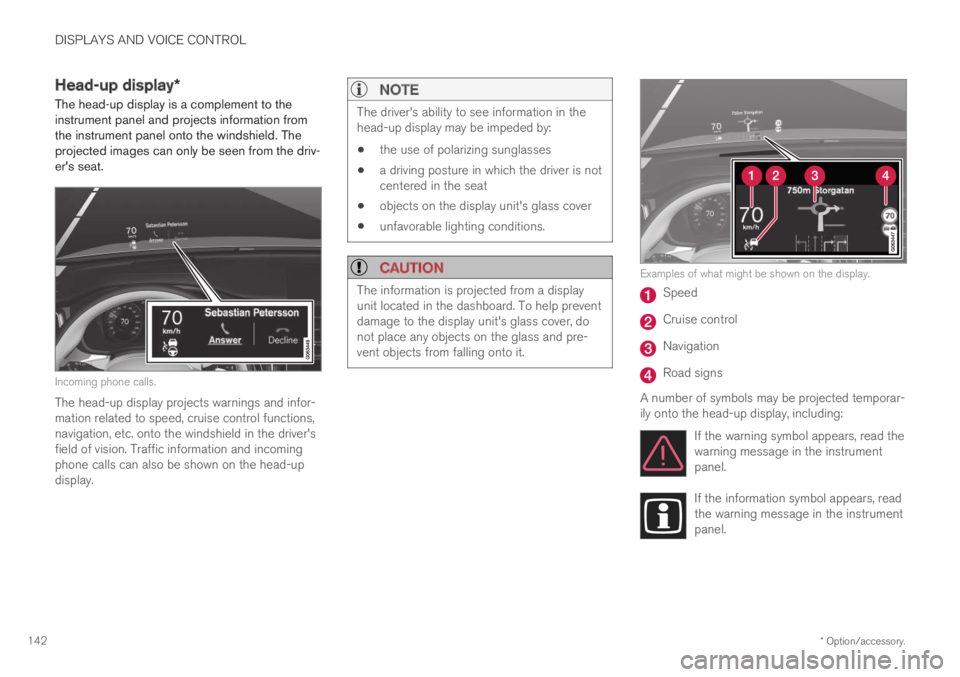
Incoming phone calls.
The head-up display projects warnings and infor-mation related to speed, cruise control functions,navigation, etc. onto the windshield in the driver'sfield of vision. Traffic information and incomingphone calls can also be shown on the head-updisplay.
NOTE
The driver's ability to see information in thehead-up display may be impeded by:
the use of polarizing sunglasses
a driving posture in which the driver is notcentered in the seat
objects on the display unit's glass cover
unfavorable lighting conditions.
CAUTION
The information is projected from a displayunit located in the dashboard. To help preventdamage to the display unit's glass cover, donot place any objects on the glass and pre-vent objects from falling onto it.
Examples of what might be shown on the display.
Speed
Cruise control
Navigation
Road signs
A number of symbols may be projected temporar-ily onto the head-up display, including:
If the warning symbol appears, read thewarning message in the instrumentpanel.
If the information symbol appears, readthe warning message in the instrumentpanel.
Page 145 of 695
DISPLAYS AND VOICE CONTROL
* Option/accessory.143
The snowflake symbol will illuminate ifthere is a risk of slippery conditions.
NOTE
People with certain types of vision problemsmay experience headaches or eye strainwhen using the head-up display.
City Safety in head-up-display
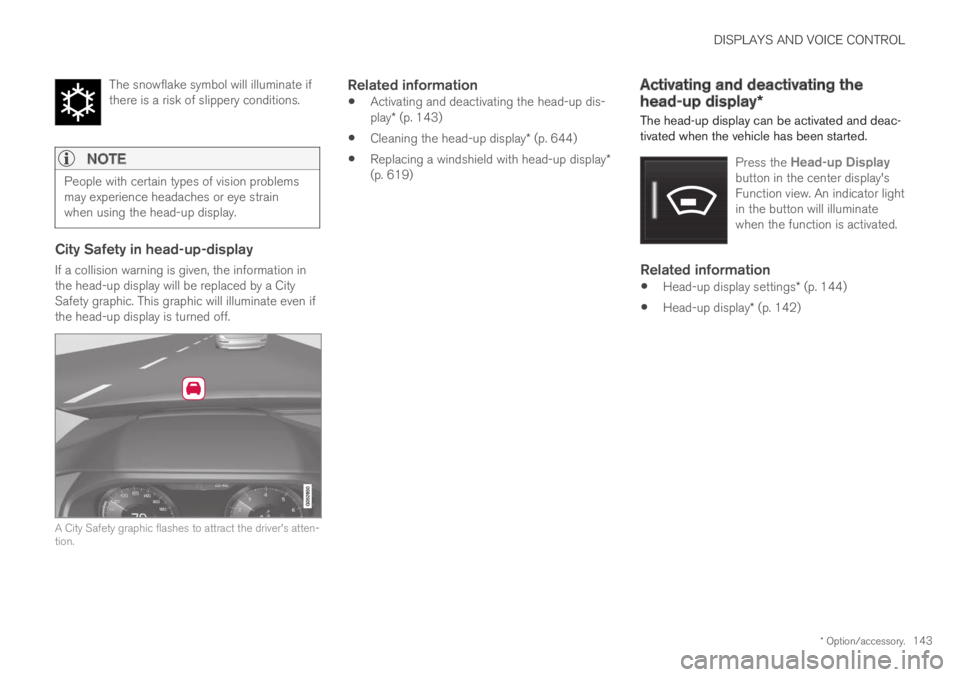
If a collision warning is given, the information inthe head-up display will be replaced by a CitySafety graphic. This graphic will illuminate even ifthe head-up display is turned off.
A City Safety graphic flashes to attract the driver's atten-tion.
Related information
Activating and deactivating the head-up dis-play* (p. 143)
Cleaning the head-up display* (p. 644)
Replacing a windshield with head-up display*(p. 619)
Activating and deactivating the
head-up display*
The head-up display can be activated and deac-tivated when the vehicle has been started.
Press the Head-up Displaybutton in the center display'sFunction view. An indicator lightin the button will illuminatewhen the function is activated.
Related information
Head-up display settings* (p. 144)
Head-up display* (p. 142)
Page 146 of 695
DISPLAYS AND VOICE CONTROL
* Option/accessory.144
Head-up display settings*
Adjusting settings for the head-up display.
Settings can be adjusted when the vehicle isstarted and a projected image is displayed on thewindshield.
Selecting display options
Select the functions to be shown in the head-updisplay.
1.Tap Settings in the center display's Topview.
2.Tap My CarDisplaysHead-UpDisplay Options.
3.Select one or more functions:
Show Navigation
Show Road Sign Information
Show Driver Support
Show Phone.
This setting is stored as a personal setting in thedriver profile.
Adjusting brightness and height
position
1.Press the Head-up Display Adjustmentsbutton in the center display's Function view.
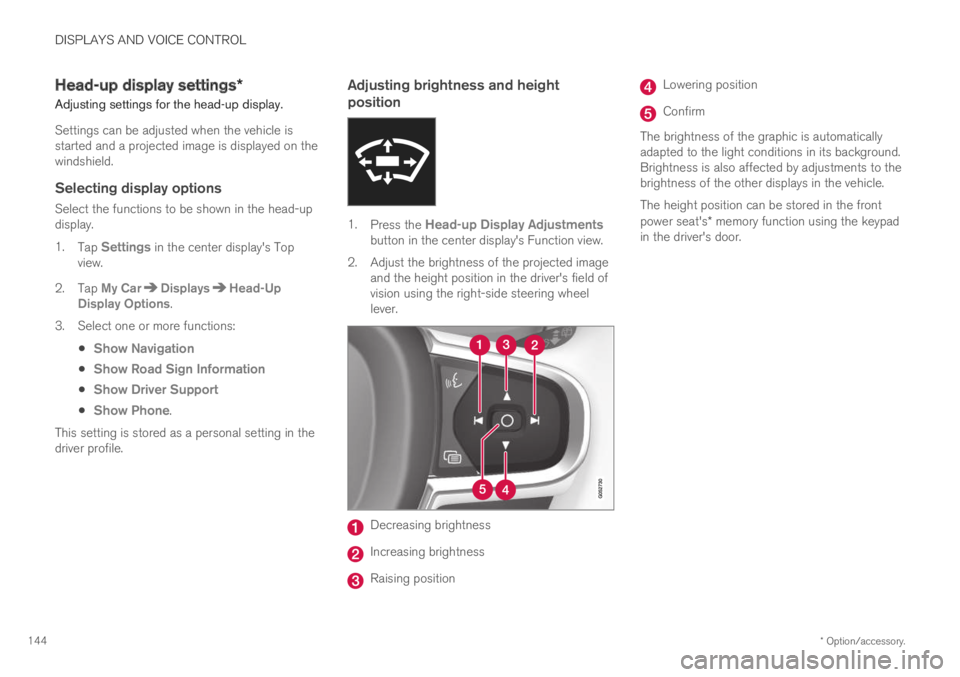
2.Adjust the brightness of the projected imageand the height position in the driver's field ofvision using the right-side steering wheellever.
Decreasing brightness
Increasing brightness
Raising position
Lowering position
Confirm
The brightness of the graphic is automaticallyadapted to the light conditions in its background.Brightness is also affected by adjustments to thebrightness of the other displays in the vehicle.
The height position can be stored in the frontpower seat's* memory function using the keypadin the driver's door.