ignition VOLVO XC60 TWIN ENGINE 2020 User Guide
[x] Cancel search | Manufacturer: VOLVO, Model Year: 2020, Model line: XC60 TWIN ENGINE, Model: VOLVO XC60 TWIN ENGINE 2020Pages: 687, PDF Size: 14.65 MB
Page 162 of 687
||
LIGHTING
160
Tunnel detection
The vehicle will detect if it enters a tunnel and shift from daytime running lights to lowbeams. Note that the left-hand steering wheel lever must be in
position for tunnel detection
to work.
Related information
Lighting control and panel (p. 156)
Ignition modes (p. 405)
Daytime running lights (p. 158)
Using high beam
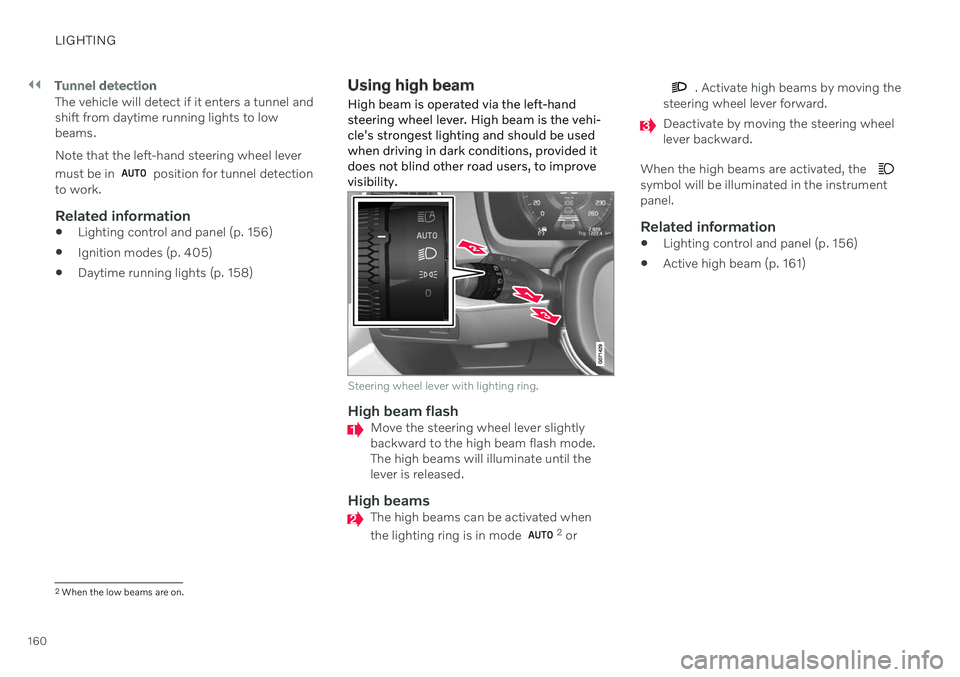
High beam is operated via the left-hand steering wheel lever. High beam is the vehi-cle's strongest lighting and should be usedwhen driving in dark conditions, provided itdoes not blind other road users, to improvevisibility.
Steering wheel lever with lighting ring.
High beam flashMove the steering wheel lever slightly backward to the high beam flash mode.The high beams will illuminate until thelever is released.
High beamsThe high beams can be activated when the lighting ring is in mode 2 or
. Activate high beams by moving the
steering wheel lever forward.
Deactivate by moving the steering wheel lever backward.
When the high beams are activated, the
symbol will be illuminated in the instrument panel.
Related information
Lighting control and panel (p. 156)
Active high beam (p. 161)
2
When the low beams are on.
Page 165 of 687
LIGHTING
163
The function is only active in weak daylight or dark conditions and only when the vehicle ismoving and the low beams are on.
Deactivating/activating the functionThe function is activated as the default factorysetting and can be activated and deactivatedin the center display's Function view:
Tap the
Active Bending
Lights button.
Related information
Adjusting light functions via the center display (p. 157)
Rear fog light
The rear fog light is considerably brighter than ordinary taillights and should only beused to help other road users see the vehiclewhen visibility is reduced by conditions suchas fog, snow, smoke or dust.
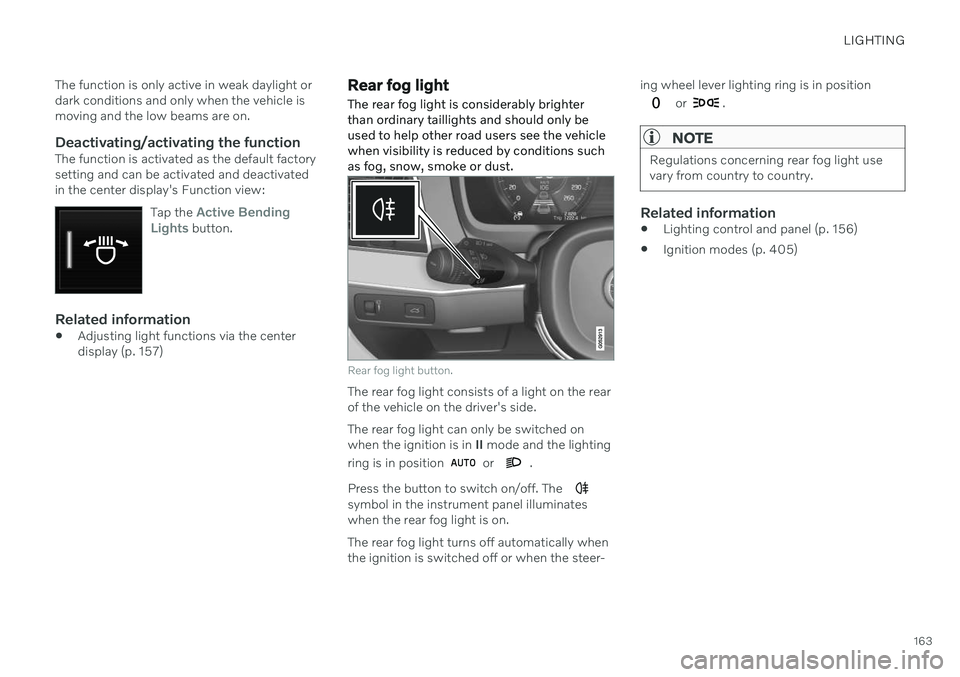
Rear fog light button.
The rear fog light consists of a light on the rear of the vehicle on the driver's side. The rear fog light can only be switched on when the ignition is in II mode and the lighting
ring is in position
or .
Press the button to switch on/off. The
symbol in the instrument panel illuminates when the rear fog light is on. The rear fog light turns off automatically when the ignition is switched off or when the steer- ing wheel lever lighting ring is in position
or .
NOTE
Regulations concerning rear fog light use vary from country to country.
Related information
Lighting control and panel (p. 156)
Ignition modes (p. 405)
Page 167 of 687

LIGHTING
}}
* Option/accessory.165
Using home safe lighting
Some of the exterior lights remain on to illu- minate the area around the vehicle. This iscalled home safe lighting.
To activate home safe lighting:
1. Switch off the ignition.
2. Push the left-side steering wheel lever toward the dashboard and release.
3. Exit the vehicle and lock the doors. > A symbol in the instrument panel illumi-nates to indicate that the function is activated and exterior lighting switcheson: Parking lights, headlights, licenseplate lighting and outer door handle lighting *.
The length of time home safe lighting remains illuminated can be set in the center display.
Related information
Adjusting light functions via the centerdisplay (p. 157)
Welcome Light (p. 165)
Welcome Light
Approach lighting is activated when the vehi- cle is unlocked and can be used to providelight as you walk toward the vehicle.
The function is activated when the remote key is used for unlocking. The parking lights, ceil-ing lights, footwell lights and trunk/cargocompartment lights are activated in daylightconditions. In weak daylight or dark condi-tions, the license plate lighting and outer door handle lighting * will also be activated, with the
light directed toward the ground. If no door is opened, the lights will remain illu- minated for approx. 2 minutes. If a door isopened while the function is activated, the interior lighting and outer door handle lighting *
will remain on for a longer period of time. This function can be activated and deactivated in the center display.
Related information
Adjusting light functions via the centerdisplay (p. 157)
Using home safe lighting (p. 165)
Remote key (p. 238)
Interior Lighting
The passenger compartment is equipped with several different types of lighting, e.g.general lighting, adjustable ambient lightingand reading lights.
All lighting in the passenger compartment can be turned on and off manually within5 minutes after:
the engine has been switched off and theignition is in mode
0.
the vehicle is unlocked but has not yetbeen started.
Front ceiling lighting
The controls in the ceiling console for the front read- ing lights and courtesy lighting.
Reading light left side
Passenger compartment lighting
Page 169 of 687

LIGHTING
* Option/accessory.167
lighting can be adjusted in the center display and also fine-tuned using the thumb wheel inthe dashboard.
Lighting in the door storage
compartments
Lighting in the door storage compartmentscomes on when the doors are opened andgoes out when the vehicle is locked. Thebrightness can be adjusted using the thumbwheel in the dashboard.
Lighting in the tunnel console's front
cup holder
The lighting in front console cup holdersswitches on when the vehicle is unlocked andoff when the vehicle is locked. The brightnesscan be adjusted using the thumb wheel in thedashboard.
Related information
Adjusting interior lighting (p. 167)
Lighting control and panel (p. 156)
Ignition modes (p. 405)
Passenger compartment interior (p. 570)
Adjusting interior lighting
Illumination in the vehicle varies depending on ignition mode. The interior lighting can beadjusted with a thumb wheel in the dash-board and certain light functions can also beadjusted via the center display.
The thumb wheel on the dashboard to the left of thesteering wheel can be usedto adjust the brightness ofthe display lighting, instru-ment lights, ambient lighting and mood lighting *.
Adjust ambient decor lighting1.
Tap Settings in the Top view in the center
display.
2. Tap
My CarLights and LightingInterior Lighting.
3. Choose from among the following set- tings:
Under
Ambient Light Intensity, selectOff, Low or High.
Under
Ambient Light Level, selectReduced or Full.
Adjusting mood lighting
*The vehicle is equipped with several LEDs that provide faint lighting in various colors. Thislighting is on when the engine is running.
Changing the brightness
1.
Tap Settings in the Top view in the center
display.
2. Tap
My CarLights and Lighting
Interior LightingInterior Mood
Lighting.
3. Under
Interior Mood Light Intensity,
select Off, Low or High.
Changing the color of the light
1. Tap Settings in the Top view in the center
display.
2. Tap
My CarLights and Lighting
Interior LightingInterior Mood
Lighting.
3. Choose
By Temperature or By Color to
change the color of the light. If
By Temperature is selected, the light
will change according to the temperature set for the passenger compartment. If
By Color is selected, the subcategoryTheme Colors can be used to make fur-
ther adjustments.
Related information
Interior Lighting (p. 165)
Adjusting light functions via the center display (p. 157)
Ignition modes (p. 405)
Page 173 of 687

WINDOWS, GLASS AND MIRRORS
* Option/accessory.171
Reset procedure for pinch protection
If you experience any problems with the elec- trical functions for the power windows, youcan try to perform a reset.
WARNING
If the starter battery is disconnected, the function for automatic opening and closingmust be reset to function correctly. A resetis required in order for the pinch protectionto work.
If the problem persists or if it affects the pan- oramic roof, contact a workshop 2
.
Resetting a power window
1. Start with the window in the closed posi-
tion.
2. Then move the control in manual mode three times upward toward the closed position.
> The system will be automatically acti-vated.
Related information
Pinch protection for windows and sun cur- tains (p. 170)
Operating the power windows (p. 172)
Power windows Every door has a control panel for the power windows. The driver's door has controls foroperating all windows and for activating thechild safety locks.
Driver's door control panel.
Electric child safety locks
* that deactivate
the controls in the rear doors to prevent the doors or windows from being openedfrom the inside.
Rear window controls.
Front window controls.
WARNING
Children, other passengers or objects can be trapped by the moving parts.
Always operate the windows with cau- tion.
Do not allow children to play with theoperating controls.
Never leave a child alone in the vehicle.
Remember to always cut the current tothe power windows by setting thevehicle's electrical system to ignitionmode
0 and then taking the remote
key with you when leaving the vehicle.
Never stick objects or body parts outthrough the windows, even if the vehi-cle electrical system is completelyturned off.
Related information
Operating the power windows (p. 172)
Pinch protection for windows and sun cur-tains (p. 170)
Reset procedure for pinch protection(p. 171)
2
An authorized Volvo workshop is recommended.
Page 174 of 687

WINDOWS, GLASS AND MIRRORS
* Option/accessory.
172
Operating the power windows
All power windows can be operated using the control panel in the driver's door. The controlpanels in the other doors can be used tooperate that particular door.
The power windows have pinch protection. If there is any problem with the pinch protection,a rest procedure can be tested.
WARNING
Children, other passengers or objects can be trapped by the moving parts.
Always operate the windows with cau- tion.
Do not allow children to play with theoperating controls.
Never leave a child alone in the vehicle.
Remember to always cut the current tothe power windows by setting thevehicle's electrical system to ignitionmode
0 and then taking the remote
key with you when leaving the vehicle.
Never stick objects or body parts outthrough the windows, even if the vehi-cle electrical system is completelyturned off.
Operating the power windows.
Operating manually. Move one of the con- trols slightly up or down. The power win-dows go up or down while the control isheld in position.
Operating with automatic controls. Move one of the controls up or down to its endposition and release it. The window movesautomatically to its fully closed/open posi-tion.
To use the power windows, the ignition mustbe in at least mode I or II. After the ignition
has been switched off, the power windowscan be operated for several minutes or until adoor is opened. Only one control can be oper-ated at a time. It can also be operated using keyless opening *
with the door handle.
WARNING
Make sure that no child or other passenger comes into contact with the windows as they are closing with keyless closing *.
NOTE
One way to reduce the pulsating wind noise heard when the rear windows areopen is to also open the front windowsslightly.
NOTE
The windows cannot be opened at speeds over approx. 180 km/h (ca112 mph), butthey can be closed. The driver is always responsible for follow- ing applicable traffic regulations.
NOTE
It may not be possible to operate the win- dows in low temperatures.
Related information
Power windows (p. 171)
Pinch protection for windows and sun cur- tains (p. 170)
Reset procedure for pinch protection(p. 171)
Page 176 of 687
WINDOWS, GLASS AND MIRRORS
* Option/accessory.
174
Adjusting the rearview mirror dimming function
Bright light entering the vehicle from behind, e.g. from the headlights of following vehicles,could reflect in the rearview mirror and doormirrors and cause a glare. Use the dimmingfunction when light from behind is distract-ing.
Auto-dimIf bright light enters the vehicle from behind, the door mirrors will automatically dim. Auto-dim is always active when the engine is run-ning, except when reverse gear is engaged.
NOTE
Adjustments to the sensitivity level will not be noticeable immediately but will insteadtake effect after a short period of time.
The sensitivity level for dimming will affect both the rearview mirror and door mirrors. To change the dimming sensitivity level:1. Tap
Settings in the Top view in the center
display.
2. Tap
My CarMirrors and Convenience.
3. Under
Rearview Mirror Auto Dimming,
select Normal, Dark or Light. The rearview mirror instead has two sensors - one pointing forward and one pointing rear-ward - which work together to identify andeliminate glare. The forward-pointing sensormonitors ambient light, while the rearward-pointing sensor monitors light from the head-lights of following vehicles. For the door mirrors to be equipped with auto- dim, the rearview mirror must also be equip-ped with auto-dim.
NOTE
If the sensors are obstructed by e.g. a parking permit, transponder, sunshade orobjects on the seats or in the cargo com-partment in a way that prevents light fromreaching the sensors, the auto-dim func-tion in the door and rearview mirrors willbe reduced.
Related information
Rearview/door mirrors (p. 173)
Adjusting the door mirrors (p. 174)
Adjusting the door mirrors
To improve visibility to the rear, the door mir- rors need to be adjusted to the driver's heightand seating position. There are several auto-matic settings that can also be connected tothe memory function buttons for the power seat *.
Controls used for door mirrors
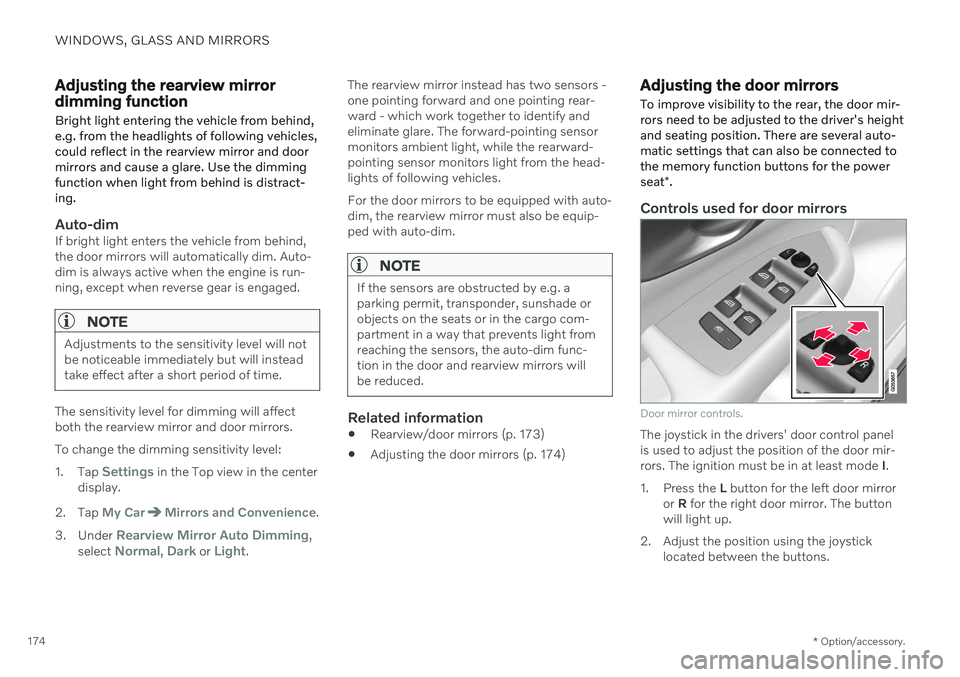
Door mirror controls.
The joystick in the drivers' door control panel is used to adjust the position of the door mir-rors. The ignition must be in at least mode I.
1. Press the L button for the left door mirror
or R for the right door mirror. The button
will light up.
2. Adjust the position using the joystick located between the buttons.
Page 178 of 687

WINDOWS, GLASS AND MIRRORS
* Option/accessory.
176
Panoramic roof *
The panoramic roof is divided into two glass sections. The front section can be openedvertically at the rear edge (ventilation posi-tion) or horizontally (open position). The rearsection cannot be moved. The panoramic roof has a wind deflector and sun curtain made of perforated fabric (locatedbeneath the glass sections) for extra protec-tion in e.g. bright sunlight.
The panoramic roof and sun curtain are oper- ated using the controls in the ceiling. To operate the panoramic roof and sun cur- tain, the ignition must be in mode I or II.
WARNING
Children, other passengers or objects can be trapped by the moving parts.
Always operate the windows with cau- tion.
Do not allow children to play with theoperating controls.
Never leave a child alone in the vehicle.
Remember to always cut the current tothe power windows by setting thevehicle's electrical system to ignitionmode
0 and then taking the remote
key with you when leaving the vehicle.
Never stick objects or body parts outthrough the windows, even if the vehi-cle electrical system is completelyturned off.
CAUTION
Do not open the panoramic roof when load carriers are installed.
Never place heavy objects on the pan-oramic roof.
CAUTION
Remove ice and snow before opening the panoramic roof. Be careful not toscratch any surfaces or damage thetrim.
Do not operate the panoramic roof if itis frozen in place.
Wind blocker
The panoramic roof is equipped with a wind blocker that folds up when the roof is open.
Related information
Operating the panoramic roof
* (p. 177)
Auto closing the panoramic roof
* sun cur-
tain (p. 179)
Pinch protection for windows and sun cur- tains (p. 170)
Page 179 of 687

WINDOWS, GLASS AND MIRRORS
}}
* Option/accessory.177
Keyless locking and unlocking
* (p. 254)
Locking and unlocking using the remote key (p. 240)
Operating the panoramic roof
*
The panoramic roof and sun curtain are oper- ated using a control in the ceiling panel, andboth are equipped with pinch protection.
WARNING
Children, other passengers or objects can be trapped by the moving parts.
Always operate the windows with cau- tion.
Do not allow children to play with theoperating controls.
Never leave a child alone in the vehicle.
Remember to always cut the current tothe power windows by setting thevehicle's electrical system to ignitionmode
0 and then taking the remote
key with you when leaving the vehicle.
Never stick objects or body parts outthrough the windows, even if the vehi-cle electrical system is completelyturned off.
CAUTION
Do not open the panoramic roof when load carriers are installed.
Never place heavy objects on the pan-oramic roof.
CAUTION
Remove ice and snow before opening the panoramic roof. Be careful not toscratch any surfaces or damage thetrim.
Do not operate the panoramic roof if itis frozen in place.
To operate the panoramic roof and sun cur- tain, the ignition must be in mode
I or II.
It can also be operated using keyless opening *
with the door handle.
WARNING
Make sure that no child or other passenger comes into contact with the windows as they are closing with keyless closing *.
Page 183 of 687
WINDOWS, GLASS AND MIRRORS
}}
181
Interval wipersMove the lever upward to put the wip- ers in interval wiping mode. Set the
number of sweeps per time unit with thethumb wheel when interval wipers areselected.
Continuous wipersMove the lever upward for the wipers to operate at normal speed.
Move the lever upward again for the wipers to operate at high speed.
CAUTION
Before activating the wipers, make sure that the wiper blades are not frozen inplace and that any snow or ice on thewindshield and rear window has beenscraped away.
CAUTION
Use plenty of washer fluid when the wipers clean the windshield. The windshield mustbe wet when the windshield wipers areworking.
Related information
Using the rain sensor (p. 181)
Using the windshield and headlight wash- ers (p. 183)
Using automatic rear window wipingwhen backing up (p. 185)
Wiper blades and washer fluid (p. 180)
Using the rain sensor's memory function(p. 182)
Using the rear window wiper/washer(p. 184)
Filling washer fluid (p. 650)
Putting the wiper blades in service posi-tion (p. 649)
Replacing windshield wiper blades(p. 648)
Changing rear window wipers (p. 647)
Using the rain sensor
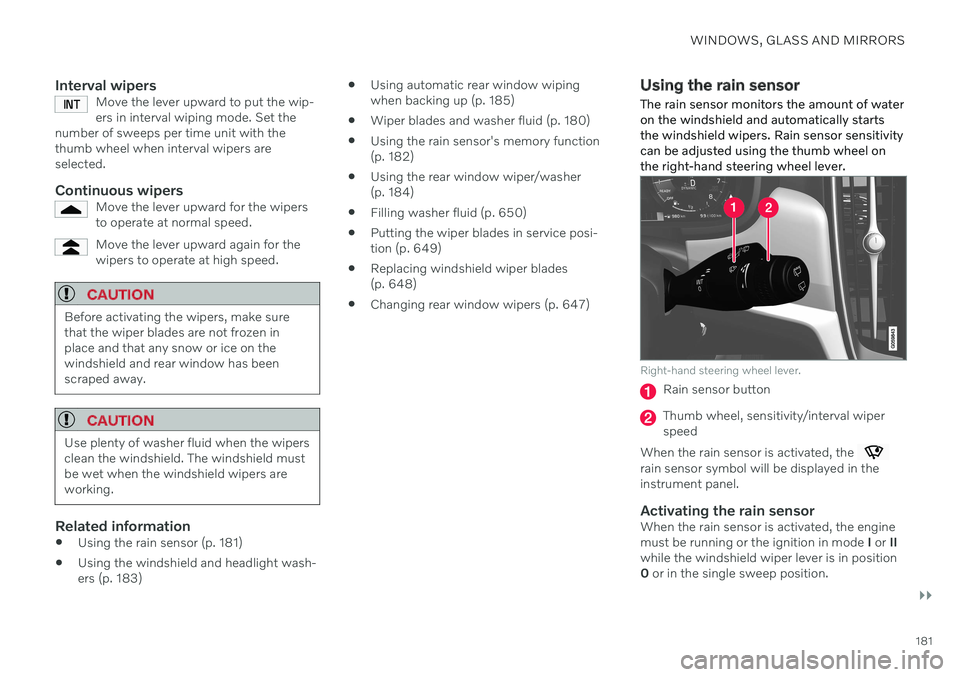
The rain sensor monitors the amount of water on the windshield and automatically startsthe windshield wipers. Rain sensor sensitivitycan be adjusted using the thumb wheel onthe right-hand steering wheel lever.
Right-hand steering wheel lever.
Rain sensor button
Thumb wheel, sensitivity/interval wiper speed
When the rain sensor is activated, the
rain sensor symbol will be displayed in the instrument panel.
Activating the rain sensorWhen the rain sensor is activated, the enginemust be running or the ignition in mode I or II
while the windshield wiper lever is in position0 or in the single sweep position.