ignition VOLVO XC60 TWIN ENGINE 2020 Owner's Manual
[x] Cancel search | Manufacturer: VOLVO, Model Year: 2020, Model line: XC60 TWIN ENGINE, Model: VOLVO XC60 TWIN ENGINE 2020Pages: 687, PDF Size: 14.65 MB
Page 184 of 687

||
WINDOWS, GLASS AND MIRRORS
182Activate the rain sensor by pressing the rain sensor button
.
Move the lever downward for an extra wiper sweep. Turn the thumb wheel upward for increased sensitivity and downward for decreased sensi-tivity. The wipers will make one extra sweepwhen the thumb wheel is turned upward.
Deactivate the rain sensorDeactivate the rain sensor by pressing the
rain sensor button or moving the lever
upward to another wiper mode. The rain sensor is automatically deactivated in ignition mode 0 or when the engine is
switched off. The rain sensor is also automatically deacti- vated when the wiper blades are put in theservice position. The rain sensor will reactivatewhen service mode is switched off.
CAUTION
The windshield wipers may start inadver- tently and be damaged in automatic carwashes. Deactivate the rain sensor whenthe engine is running or when the ignitionis in mode I or II. The symbol in the instru-
ment panel will go out.
Related information
Using the windshield and headlight wash- ers (p. 183)
Using automatic rear window wipingwhen backing up (p. 185)
Wiper blades and washer fluid (p. 180)
Using the rain sensor's memory function(p. 182)
Using the rear window wiper/washer (p. 184)
Filling washer fluid (p. 650)
Putting the wiper blades in service posi- tion (p. 649)
Replacing windshield wiper blades(p. 648)
Changing rear window wipers (p. 647)
Using the windshield wipers (p. 180)
Using the rain sensor's memory function
The rain sensor monitors the amount of water on the windshield and automatically startsthe windshield wipers.
Activating/deactivating memory function
The rain sensor's memory function can be set to activate so that the rain sensor button doesnot need to be pressed each time the engineis started: 1. Tap
Settings in the Top view in the center
display.
2. Tap
My CarWipers.
3. Select
Rain Sensor Memory to activate/
deactivate the memory function.
Related information
Using the rain sensor (p. 181)
Using the windshield and headlight wash- ers (p. 183)
Using automatic rear window wipingwhen backing up (p. 185)
Wiper blades and washer fluid (p. 180)
Using the rear window wiper/washer(p. 184)
Filling washer fluid (p. 650)
Page 194 of 687
||
SEATS AND STEERING WHEEL
* Option/accessory.
192
Front door closed
–Press and hold one of the memory buttons 1 (
) or 2 () until the seat, door mirrors
and head-up display stop in the positions stored in that memory button.
If the memory button is released, the seat,door mirrors and head-up display will stopmoving.
WARNING
This list point needs to be translated exactly to: "Because the driver's seatcan be adjusted with the ignition off,children should never be left unatten-ded in the vehicle.
Movement of the seat can be STOP-PED at any time by pressing any but-ton on the power seat control panel.
Do not adjust the seat while driving.
The seat should be adjusted so that thebrake pedal can be depressed fully. Inaddition, position the seat as far rear-ward as comfort and control allow.
The seat rails on the floor must not beobstructed in any way when the seat isin motion.
Related information
Manual front seats (p. 188)
Power
* front seats (p. 189)
Adjusting the power
* front seats (p. 189)
Storing positions for seats, mirrors and head-up display
* (p. 190)
Adjusting front seat massage settings
*
(p. 193)
Adjusting
* front seat cushion length
(p. 194)
Front seat massage
* settings (p. 192)
Adjusting front seat side bolster settings
*
(p. 195)
Adjusting front seat lumbar support
*
(p. 195)
Adjusting the passenger seat from thedriver's seat
* (p. 197)
Adjusting the door mirrors (p. 174)
Head-up display settings
* (p. 147)
Front seat massage * settings
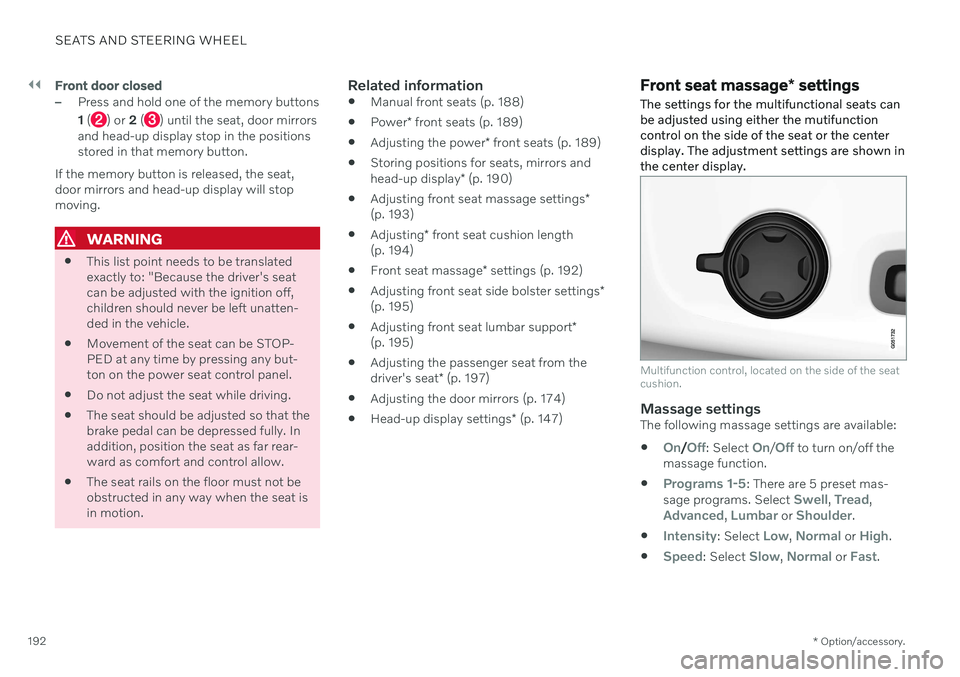
The settings for the multifunctional seats can be adjusted using either the mutifunctioncontrol on the side of the seat or the centerdisplay. The adjustment settings are shown inthe center display.
Multifunction control, located on the side of the seat cushion.
Massage settingsThe following massage settings are available:
On/Off: Select On/Off to turn on/off the
massage function.
Programs 1-5: There are 5 preset mas-
sage programs. Select Swell, Tread,Advanced, Lumbar or Shoulder.
Intensity: Select Low, Normal or High.
Speed: Select Slow, Normal or Fast.
Page 202 of 687

||
SEATS AND STEERING WHEEL
* Option/accessory.
200
To lower the restraint, push and hold the but- ton (see illustration) while carefully loweringthe head restraint.
WARNING
The center seat head restraint must be in its lowest position when the seat is notoccupied. When the center seat is occu-pied, the head restraint must be correctlyadjusted to the passenger's height, cover-ing the entire back of the head if possible.
Folding the rear seat outboard head restraints using the center display *
The outer head restraints can be folded via the center display's function view. The headrestraint can be folded down when the vehicle is in ignition mode 0.
Tap the Headrest Fold but-
ton to activate/deactivate folding.
Manually push the head restraint until it clicks into position.
WARNING
Do not lower the head restraint if there are passengers in any of the rear seats.
WARNING
The head restraint must be locked in the upright position after it has been folded up.
Folding the rear seat outboard head restraints using the handle
For vehicles with electrically folding * head
restraints, the outboard head restraints can be folded using the handle on the top of the seat (see illustration
.) Note that this method
also folds down the backrests. To fold down only the head restraints, e.g. to improve visibil- ity, use the center display * instead.
Page 235 of 687

CLIMATE CONTROL
233
HeaterThe heater has two sub-functions that help warm the passenger compartment or enginein various situations.
The heater has two sub-functions:
Parking heater - heats the passenger com- partment as needed when the parking cli-mate's preconditioning is activated.
Auxiliary heater - heats the passengercompartment and engine while driving.
The heater is a high-voltage coolant heaterand is mounted in the front right-side wheelhousing.
Battery and chargingThe heater is powered by the vehicle's hybridbattery. If the charge level in the hybrid batteryis too low, the heater will switch off automati-cally and a message will be displayed in theinstrument panel.
NOTE
Make sure that the battery has sufficient charge if the heater must be used.
Related information
Climate (p. 204)
Parking heater (p. 233)
Additional heater (p. 233)
Parking heater
The parking heater heats the passenger com- partment as needed before driving if precon-ditioning is activated.
The parking heater is one of two sub-functions of the vehicle's heater. The heater is mountedin the front right-side wheel housing. The parking heater starts automatically if the parking climate's preconditioning is activatedand the passenger compartment needs to beheated. Heater running time varies depending on fac- tors such as battery charge level, passengercompartment temperature and ambient tem-perature, but it will never run for longer than40 minutes.
Related information
Heater (p. 233)
Additional heater (p. 233)
Additional heater
The auxiliary heater helps heat the passenger compartment and engine while driving.
The auxiliary heater is one of two sub-func- tions of the vehicle's heater. The heater ismounted in the front right-side wheel housing. The auxiliary heater is started and controlled automatically when extra heat is requiredwhile the vehicle is being driven. It switches off automatically when the ignition is switched off.
Related information
Heater (p. 233)
Parking heater (p. 233)
Activating and deactivating the auxiliaryheater (p. 234)
Page 240 of 687

KEY, LOCKS AND ALARM
* Option/accessory.
238
Remote key
The remote key is used to lock and unlock doors and the tailgate. The remote key mustbe in the vehicle in order to start the engine.
Remote key 3
and button-less key (Key Tag) *.
The remote key is not physically used to start the ignition because the vehicle is standard-equipped with keyless start (Passive Start).The key only needs to be in the front section ofthe passenger compartment. For vehicles equipped with keyless locking and unlocking (Passive Entry) *, the engine can
be started with the key anywhere in the vehi- cle. A smaller, lighter and button-less key (KeyTag) is also provided. The remote keys can be linked to different driver profiles to store personal settings in thevehicle.
Remote key buttons
The remote key has four buttons, one on the left side and three on the right.
Locking - Press once to lock the doors,
tailgate and fuel filler door and arm the alarm. Press and hold to close all windows.
Unlocking - Press once to unlock the
doors and tailgate and disarm the alarm. Press and hold to open all windows at the same time. This total airing function canbe used to e.g. quickly air out the vehiclein hot weather.
Tailgate - Unlock and disarm the tailgate
only. On vehicles equipped with the power tailgate *, press and hold to automatically
open the tailgate. Press and hold to close an open tailgate (an audible warning sig- nal will be given).
Panic alarm - Used to attract attention in
emergency situations. Press and hold the button for at least 3 seconds or presstwice within 3 seconds to activate theturn signals and horn. To deactivate, waitat least 5 seconds and press the buttonagain. If no action is taken, the panic alarmwill deactivate automatically after 3minutes.
WARNING
If anyone is left in the vehicle, make sure that power to the power windows and pan- oramic roof * is cut off by always taking the
remote key with you when you leave the vehicle.
3 The illustration is generic - details may vary according to vehicle model.
Page 261 of 687
KEY, LOCKS AND ALARM
}}
* Option/accessory.259
Related information
Locking and unlocking from inside the vehicle (p. 257)
Opening and closing the power tailgate
*
(p. 261)
Activating and deactivating child safety locks The child safety locks help prevent the rear doors from being able to be opened from theinside.
The child safety locks can be either manual or electric *.
Activating and deactivating manual
child safety locks
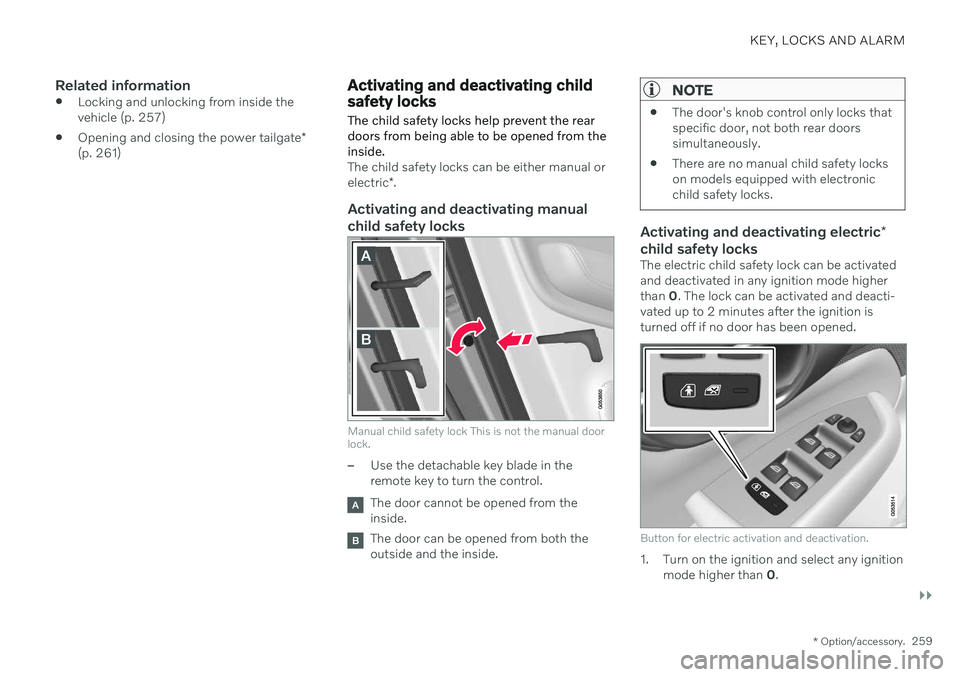
Manual child safety lock This is not the manual door lock.
–Use the detachable key blade in the remote key to turn the control.
The door cannot be opened from the inside.
The door can be opened from both the outside and the inside.
NOTE
The door's knob control only locks that specific door, not both rear doorssimultaneously.
There are no manual child safety lockson models equipped with electronicchild safety locks.
Activating and deactivating electric
*
child safety locks
The electric child safety lock can be activated and deactivated in any ignition mode higherthan 0. The lock can be activated and deacti-
vated up to 2 minutes after the ignition isturned off if no door has been opened.
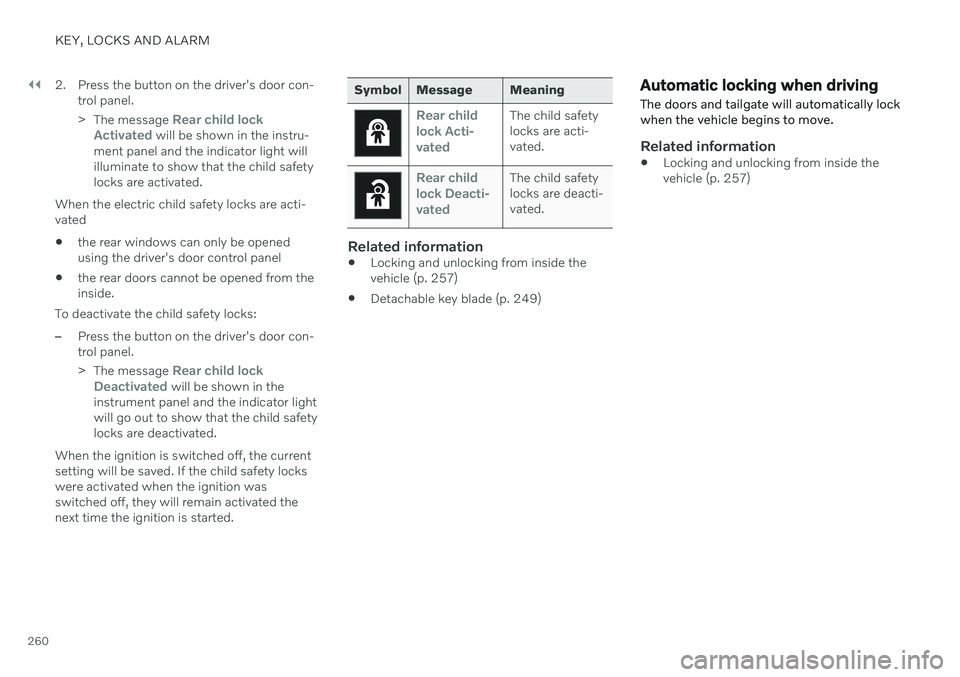
Button for electric activation and deactivation.
1. Turn on the ignition and select any ignition mode higher than 0.
Page 262 of 687
||
KEY, LOCKS AND ALARM
2602. Press the button on the driver's door con-
trol panel. >The message
Rear child lock
Activated will be shown in the instru-
ment panel and the indicator light will illuminate to show that the child safetylocks are activated.
When the electric child safety locks are acti-vated
the rear windows can only be openedusing the driver's door control panel
the rear doors cannot be opened from theinside.
To deactivate the child safety locks:
–Press the button on the driver's door con- trol panel. > The message
Rear child lock
Deactivated will be shown in the
instrument panel and the indicator light will go out to show that the child safetylocks are deactivated.
When the ignition is switched off, the currentsetting will be saved. If the child safety lockswere activated when the ignition wasswitched off, they will remain activated thenext time the ignition is started.
Symbol Message Meaning
Rear child lock Acti-
vatedThe child safety locks are acti-vated.
Rear child lock Deacti-
vatedThe child safety locks are deacti-vated.
Related information
Locking and unlocking from inside the vehicle (p. 257)
Detachable key blade (p. 249)
Automatic locking when driving
The doors and tailgate will automatically lock when the vehicle begins to move.
Related information
Locking and unlocking from inside the vehicle (p. 257)
Page 268 of 687

||
KEY, LOCKS AND ALARM
* Option/accessory.
266
Kicking motion within the sensor's activation area.
Related information
Keyless and touch-sensitive surfaces
*
(p. 253)
Opening and closing the power tailgate
*
(p. 261)
Remote key range (p. 242)
Private Locking The tailgate can be locked using the private locking function to prevent it from beingopened, e.g. when the vehicle is left at aworkshop or with a valet.
The function button for pri- vate locking is located in thecenter display's Functionview. Depending on the cur-rent status of the lock,
Private Locking Unlockedor Private Locking Lockedwill be displayed.
Related information
Activating and deactivating private locking (p. 266)
Activating and deactivating private locking
Private locking is activated using the function button in the center display and a PIN code.
NOTE
For the valet lock function to be activated the car must be in at least ignition mode I.
Two codes are used for private locking:
A security code, which is created the first time the function is used.
A PIN code, which is changed each timethe function is activated.
Entering security code before initial
use
The first time the function is used, a securitycode must be selected. This code can then beused to deactivate private locking if theselected PIN code has been forgotten or lost.The security code functions as a PUK (secur-ity) code for all PIN codes used for privatelocking. Save the security code in a safe place.
Page 270 of 687

KEY, LOCKS AND ALARM
268
Alarm The alarm emits sound and light signals if anyone without a valid remote key attemptsto break into the vehicle or interferes with thestart battery or alarm siren.
When armed, the alarm will be triggered if:
the hood, tailgate or any door is opened.
a battery cable is disconnected.
the alarm siren is disconnected.
Alarm signalsThe following occurs if the alarm is triggered:
A siren will sound for 30 seconds or until the alarm is turned off.
The hazard warning flashers will flash for5 minutes or until the alarm is turned off.
If the reason the alarm was triggered is notrectified, the alarm cycle will repeat up to 10 times 15
.
Alarm indicator
A red indicator light on the dashboard shows the status of the alarm:
Indicator off - the alarm is disarmed.
Indicator flashes once every two seconds -the alarm is armed.
The indicator flashes quickly after thealarm has been disabled for up to30 seconds or until the ignition is put in
I
mode – the alarm has been triggered.
In the event of alarm system failureIf a problem is detected in the alarmsystem, a symbol and the message
Alarm system failure Service
required will appear in the instru-
ment panel. Contact a workshop - an author- ized Volvo workshop is recommended.
NOTE
Do not attempt to repair or alter any of the components in the alarm system yourself.Any such attempt could affect the termsand conditions of your insurance policy.
Related information
Arming and disarming the alarm (p. 269)
15
Certain markets only.
Page 271 of 687

KEY, LOCKS AND ALARM
}}
* Option/accessory.269
Arming and disarming the alarm
The alarm is armed when the vehicle is locked.
Arming the alarmLock and arm the vehicle by
pressing the lock button on the remote key
.
touch the marked surface on the outside of the door handle or the rubberized pres- sure plate on the tailgate 16
.
If the vehicle is equipped with both keyless locking/unlocking * and power tailgate *, the
button
on the lower edge of the tailgate
can also be used to lock and arm the vehicle.
A red LED light on the dashboard will flash every other second when the vehicle is locked and thealarm is armed.
Disarming the alarmUnlock and disarm the vehicle alarm by
pressing the unlock button on the remote key
.
grip a door handle or lightly press the tail- gate's rubberized button 16
.
Disarming the alarm without a functioning
remote key
The vehicle can be unlocked and disarmed even if the remote key is not functioning, e.g. ifthe battery is discharged.
1. Open the driver's door using the detacha- ble key blade.
> This will trigger the alarm.
Location of the backup key reader in the cup holder.
2. Place the remote key on the key symbol inthe backup reader in the tunnel console's cup holder. 3. Turn the start knob clockwise and release.
> The alarm will be disarmed.
Turning off a triggered alarm–Press the unlock button on the remote key or put the ignition into mode I by turning
the start knob clockwise and then releas-ing it.
Automatically arming and disarming the alarm
Automatically arming the alarm helps prevent inadvertently leaving the vehicle without alarmprotection. If the vehicle is unlocked using the remote key (and the alarm is disarmed) but none of thedoors or tailgate are opened within twominutes, the alarm will be automaticallyrearmed. The vehicle will also re-lock. On some markets, the alarm will be automati- cally armed following a slight delay after thedriver's door has been opened and closedwithout being locked. To change this setting:1. Tap
Settings in the center display's Top
view.
2. Tap
My CarLocking.
3. Select
Passive Arming Deactivation to
temporarily deactivate the function.
16 Vehicles with keyless locking and unlocking *.