fuel VOLVO XC60 TWIN ENGINE 2020 Owner's Guide
[x] Cancel search | Manufacturer: VOLVO, Model Year: 2020, Model line: XC60 TWIN ENGINE, Model: VOLVO XC60 TWIN ENGINE 2020Pages: 687, PDF Size: 14.65 MB
Page 448 of 687

||
STARTING AND DRIVING
4464. Avoid overfilling the tank. Do not press the
handle on the filler nozzle again after it has initially stopped pumping.
> The fuel tank is now filled.
NOTE
An over-full tank may overflow in hot weather.
CAUTION
Avoid spilling gasoline during refueling. In addition to causing damage to the environ-ment, gasolines containing alcohol cancause damage to painted surfaces, whichmay not be covered under the New VehicleLimited Warranty.
Refueling from a fuel containerWhen filling from a fuel container, use the fun- nel provided in a foam block under the floorhatch in the cargo compartment.
1. Open the fuel filler door.
2. Insert the funnel into the fuel filler pipe'sopening. There are two flaps just inside the fuel filler pipe and the tube section ofthe funnel must push both of these flapsopen before fuel can be added.
WARNING
California Proposition 65 Operating, servicing and maintaining a pas- senger vehicle can expose you to chemi-cals including engine exhaust, carbon mon-oxide, phthalates, and lead, which areknown to the State of California to causecancer and birth defects or other reproduc-tive harm. To minimize exposure, avoidbreathing exhaust, do not idle the engineexcept as necessary, service your vehicle ina well ventilated area and wear gloves orwash your hands frequently when servicingyour vehicle. For more information go towww.P65Warnings.ca.gov/passenger-vehicle.
Related information
Opening/closing the fuel filler door (p. 444)
Fuel (p. 446)
Fuel
Volvo recommends the use of detergent gas- oline to control engine deposits.
Deposit control gasoline (gasoline with detergent additives)
Detergent gasoline is effective in keeping injectors and intake valves clean. Consistentuse of deposit control gasolines will helpensure good driveability and fuel economy. Ifyou are not sure whether the gasoline containsdeposit control additives, check with the serv-ice station operator.
NOTE
Volvo recommends not using external fuel injector cleaning systems, e.g. do not adddetergent additives to gasoline before orafter refueling.
Unleaded fuelAll Volvo vehicles have a three-way catalytic converter and must only use unleaded gaso-line. US and Canadian regulations require thatpumps delivering unleaded gasoline arelabeled "UNLEADED". Only the nozzles ofthese pumps will fit in your vehicle's fuel fillerinlet. It is unlawful to dispense leaded fuel intoa vehicle labeled "unleaded gasoline only".Leaded gasoline damages the three-way cata-lytic converter and the heated oxygen sensor
Page 449 of 687

STARTING AND DRIVING
}}
447
system. Repeated use of leaded gasoline will lessen the effectiveness of the emission con-trol system and could result in loss of emissionwarranty coverage. State and local vehicleinspection programs will make detection ofmisfueling easier, possibly resulting in emis-sion test failure for misfueled vehicles.
NOTE
Some U.S. and Canadian gasolines contain an octane enhancing additive calledmethyl-cyclopentadienyl manganese tricar-bonyl (MMT). If such fuels are used, yourEmission Control System performancemay be affected, and the Check EngineLight (malfunction indicator light) locatedon your instrument panel may light. If thisoccurs, please return your vehicle to atrained and qualified Volvo service techni-cian for service.
Gasoline containing alcohol and ethers, "Oxygenated fuels"
Some fuel suppliers sell gasoline containing "oxygenates" which are usually alcohols orethers. In some areas, state or local lawsrequire that the service pump be marked indi-cating use of alcohols or ethers. However,there are areas in which the pumps areunmarked. If you are not sure whether there isalcohol or ethers in the gasoline you buy,check with the service station operator. To
meet seasonal air quality standards, someareas require the use of "oxygenated" fuel. Volvo permits the use of the following "oxy- genated" fuels. However, the specified octaneratings must still be met.
Alcohol - Ethanol
Fuels containing up to 10% ethanol by volume may be used. Ethanol may also be referred toas Ethyl alcohol, or "Gasohol". Ethers - MTBE/ETBE: Fuels containing up to 22% MTBE/ETBE by volume may be used.
MethanolDo not use gasolines containing methanol(methyl alcohol, wood alcohol). This practicecan result in vehicle performance deteriorationand can damage critical parts in the fuel sys-tem. Such damage may not be covered underthe New Vehicle Limited Warranty.
Related information
Octane rating (p. 447)
Opening/closing the fuel filler door(p. 444)
Refueling (p. 445)
Emission controls (p. 449)
Octane rating Volvo requires premium fuel (91 octane 14
or
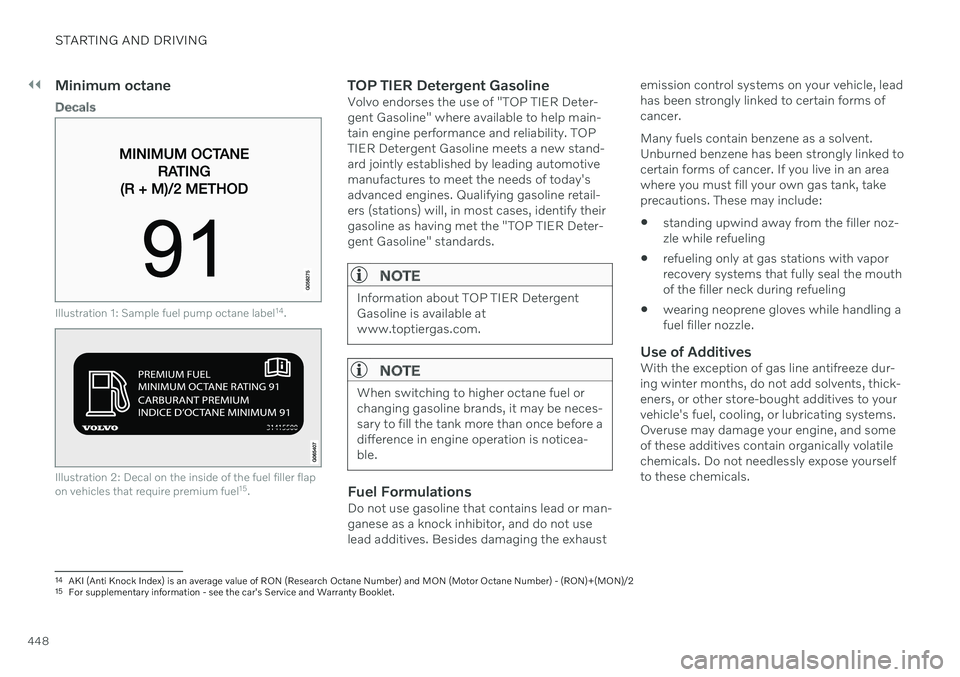
higher) for all T5, T6 and T8 engines, and rec- ommends AKI 93 for optimal performanceand fuel economy. See decal examples inillustrations 1 and 2.
Page 450 of 687
||
STARTING AND DRIVING
448
Minimum octane
Decals
Illustration 1: Sample fuel pump octane label14
.
Illustration 2: Decal on the inside of the fuel filler flap on vehicles that require premium fuel 15
.
TOP TIER Detergent GasolineVolvo endorses the use of "TOP TIER Deter- gent Gasoline" where available to help main-tain engine performance and reliability. TOPTIER Detergent Gasoline meets a new stand-ard jointly established by leading automotivemanufactures to meet the needs of today'sadvanced engines. Qualifying gasoline retail-ers (stations) will, in most cases, identify theirgasoline as having met the "TOP TIER Deter-gent Gasoline" standards.
NOTE
Information about TOP TIER Detergent Gasoline is available atwww.toptiergas.com.
NOTE
When switching to higher octane fuel or changing gasoline brands, it may be neces-sary to fill the tank more than once before adifference in engine operation is noticea-ble.
Fuel FormulationsDo not use gasoline that contains lead or man- ganese as a knock inhibitor, and do not use lead additives. Besides damaging the exhaust emission control systems on your vehicle, leadhas been strongly linked to certain forms ofcancer. Many fuels contain benzene as a solvent. Unburned benzene has been strongly linked tocertain forms of cancer. If you live in an areawhere you must fill your own gas tank, takeprecautions. These may include:
standing upwind away from the filler noz-zle while refueling
refueling only at gas stations with vaporrecovery systems that fully seal the mouthof the filler neck during refueling
wearing neoprene gloves while handling afuel filler nozzle.
Use of AdditivesWith the exception of gas line antifreeze dur-ing winter months, do not add solvents, thick-eners, or other store-bought additives to yourvehicle's fuel, cooling, or lubricating systems.Overuse may damage your engine, and someof these additives contain organically volatilechemicals. Do not needlessly expose yourselfto these chemicals.
14
AKI (Anti Knock Index) is an average value of RON (Research Octane Number) and MON (Motor Octane Number) - (RON)+(MON)/2
15 For supplementary information - see the car's Service and Warranty Booklet.
Page 451 of 687

STARTING AND DRIVING
449
WARNING
Never carry a cell phone that is switched
on while refueling your vehicle. If the
phone rings, this may cause a spark that could ignite gasoline fumes, resulting in fireand injury.
WARNING
Carbon monoxide is a poisonous, colorless, and odorless gas. It is present in all exhaustgases. If you ever smell exhaust fumesinside the vehicle, make sure the passengercompartment is ventilated, and immedi-ately return the vehicle to a trained andqualified Volvo service technician for cor-rection.
Demanding drivingIn demanding driving conditions, such as when towing a trailer or driving in hot weatheror for prolonged periods at high altitudes, itmay be a good idea to switch to a higher- octane fuel (AKI 14
91 or higher) or to switch to
another brand of gasoline in order to fully uti- lize the vehicle's engine capacity and optimizetraction.
Related information
Fuel (p. 446)
Emission controls (p. 449)
Emission controls
Three-way catalytic converter
Keep your engine properly tuned. Certain engine malfunctions, particularly involvingthe electrical, fuel or distributor ignitionsystems, may cause unusually high three-way catalytic converter temperatures. Donot continue to operate your vehicle if youdetect engine misfire, noticeable loss ofpower or other unusual operating condi-tions, such as engine overheating or back-firing. A properly tuned engine will helpavoid malfunctions that could damage thethree-way catalytic converter.
Do not park your vehicle over combustiblematerials, such as grass or leaves, whichcan come into contact with the hotexhaust system and cause such materialsto ignite under certain wind and weatherconditions.
Excessive starter cranking (in excess ofone minute), or an intermittently firing orflooded engine can cause three-way cata-lytic converter or exhaust system over-heating.
Remember that tampering or unauthor-ized modifications to the engine, theEngine Control Module, or the vehicle maybe illegal and can cause three-way cata-lytic converter or exhaust system over- heating. This includes: altering fuel injec-tion settings or components, alteringemission system components or locationor removing components, and/or repeateduse of leaded fuel.
NOTE
Unleaded fuel is required for vehicles with three-way catalytic converters.
Heated oxygen sensorsThe heated oxygen sensors monitor the oxy- gen content of the exhaust gases. Readingsare fed into a control module that continuouslymonitors engine functions and controls fuelinjection. The ratio of fuel to air into the engineis continuously adjusted for efficient combus-tion to help reduce harmful emissions.
Related information
Octane rating (p. 447)
Fuel (p. 446)
14
AKI (Anti Knock Index) is an average value of RON (Research Octane Number) and MON (Motor Octane Number) - (RON)+(MON)/2
Page 454 of 687

||
STARTING AND DRIVING
4521. Put the ignition in mode
0.
2. Make sure the auxiliary battery (the bat- tery used to jump start the discharged battery) has a voltage of 12 volts.
3. If the auxiliary battery is in another vehicle, turn off that vehicle's engine and makesure that the vehicles are not touchingeach other.
4. Clamp the red jumper cable onto the auxil- iary battery's positive (+) terminal (1).
CAUTION
Connect the jump cable carefully to pre- vent short circuits with other componentsin the engine compartment.
5. Fold back the cover over your vehicle's positive (+) jump start terminal (2).
6. Clamp the other end of the red jumper cable to your vehicle's positive (+) jump start terminal (2).
7. Clamp the black jumper cable onto the auxiliary battery's negative (-) terminal (3).
8. Clamp the other end of the black jumper cable to your vehicle's negative (-) groundpoint (4). 9. Make sure the jumper cables are securely
attached to help prevent sparks whilejump starting.
10. Start the engine of the assisting vehicle and let it run for a few minutes at a higheridling speed than normal, about1500 rpm.
11. Start your vehicle's engine. If the engine does not start, allow an additional 10minutes of charging time and then try tostart the engine again.
NOTE
When the engine is started under normal conditions, the vehicle's electrical drivemotor is prioritized – the gasoline engineremains off. This means that after the startknob has been turned clockwise, the elec-tric motor has "started" and the vehicle isready to be driven. Start of the electricmotor is indicated by the indicator lights onthe instrument panel going out and its pre-selected theme illuminating.
CAUTION
Do not touch the connections between the cable and the vehicle during the startattempt. Risk of sparking.
12. Remove the jumper cables in the reverseorder ‒ first the black cables and then the
red cables. Make sure that none of the clamps of the black jumper cables come into contactwith either vehicle's positive (+) jump startterminals or either of the red jumpercable's connected clamps.
WARNING
PROPOSITION 65 WARNING! Battery
posts, terminals, and related accessories contain lead and lead compounds, chemi-cals known to the state of California tocause cancer and reproductive harm. Washhands after handling.
WARNING
Batteries generate hydrogen gas, which is flammable and explosive.
Do not connect the jumper cable toany part of the fuel system or to anymoving parts. Avoid touching hotmanifolds.
Battery fluid contains sulfuric acid. Donot allow battery fluid to contact eyes,skin, fabrics or painted surfaces.
If contact occurs, flush the affectedarea immediately with water. Obtain
Page 460 of 687

||
STARTING AND DRIVING
* Option/accessory.
458
NOTE
Extreme weather conditions, towing a trailer, high altitude and lower fuel gradethan recommended are factors that cansignificantly increase the vehicle's fuel con-sumption.
Trailer weights
WARNING
Please adhere to the recommendations provided for trailer weight. If the recom-mendations are not followed, the vehicleand trailer may be difficult to control duringevasive maneuvers and braking.
NOTE
The specified maximum trailer weights are those permitted by Volvo. National vehicleregulations may set additional restrictionson trailer weight and speed. The trailerhitches may be certified for higher towingweights than the vehicle is permitted totow.
Self-leveling suspension *The vehicle's self-leveling system attempts to keep the vehicle at a constant level, regardlessof load (up to the maximum permitted weight).When the vehicle is stationary, the rear end of the vehicle will be slightly lowered, which isnormal.
Driving in hilly terrain or hot weatherIn certain conditions, there is a risk of over-heating when driving with a trailer. If overheat-ing of the engine and drive system is detected,a warning symbol will illuminate in the instru-ment panel and a message will appear. The automatic transmission selects the opti- mal gear for the current load and enginespeed.
Steep inclines
Do not lock the automatic transmission into a higher gear than what the engine can handle
‒
it is not always preferable to drive in highgears at low rpm.
Parking on a hill
1. Depress the brake pedal.
2. Apply the parking brake.
3. Put the gear selector in P.
4. Release the brake pedal.Put chocks behind the wheels when the vehi- cle is parked on a hill with a trailer attached.
Starting on a hill
1. Depress the brake pedal.
2. Put the gear selector in D.
3. Release the parking brake.
4. Release the brake pedal and start driving.
Related information
Trailer Stability Assist
* (p. 459)
Checking trailer lights (p. 460)
Towing capacity and tongue weight (p. 660)
Overheating of engine and transmission(p. 450)
Retractable hitch
* (p. 453)
Page 488 of 687

AUDIO, MEDIA AND INTERNET
* Option/accessory.
486
SiriusXM Travel Link ®
*
SiriusXM Travel Link is a subscription fea-
ture offered by SiriusXM ®
satellite radio * that
can provide information about e.g., weather forecasts, weather alerts, service stations,sports, etc. in the vicinity of the vehicle.
Starting SiriusXM Travel Link
NOTE
SiriusXM Travel Link services are only available in vehicles equipped with theSensus Navigation system.
From the center display's App view, tap Travel
Link to activate the feature. A disclaimer text
will be displayed. Tap OK to display a list of
SiriusXM Travel Link services:
Alerts
Fuel
Sports
Weather
Favorites
In order to use one or more of these services, the user has to subscribe to the ones desired. To subscribe to a SiriusXM Travel Link service:
1. Open the center display's Top view.2. Tap
Settings. 3.
Tap
Media.
4. Press
SiriusXM Travel Link andSubscription Status.
> To subscribe, call the phone number lis- ted on the screen.
Any services not subscribed will be grayed out and contain the text
Service not subscribed.
When the services have been activated (sub- scribed), tap the one of your choice to start it. The following applies for all of the
SiriusXM
Travel Link services:
Pressing the
Back button will take you
back to the previous screen
Pressing the
Close button will take you to
the SiriusXM Travel Link home screen.
NOTE
If the Close button is used to return to theSiriusXM Travel Link home screen, the
following applies (the Weather service is
used here as an example):
If you have already used the
Weatherfunction, tapping Weather again in theSiriusXM Travel Link home screen
before using any other SiriusXM
Travel Link service will return you to
the point where you left the Weatherservice.
If another
SiriusXM Travel Link serv-
ice is used (e.g., Fuel, Sports, etc.)
before you return to the Weather serv-
ice, you will be returned to the default
Weather view (in this case, Local).
The same principle applies to all of the
SiriusXM Travel Link services.
FavoritesMany SiriusXM Travel Link selections can be saved for easy access as favorites by tappingthe "star" icon next to the selection whereapplicable. To display a list of your stored selections, tap the
Favorites application in the SiriusXM
Travel Link home screen.
Page 489 of 687
AUDIO, MEDIA AND INTERNET
}}
* Option/accessory.487
Related information
SiriusXM ®
Satellite radio * (p. 482)
SiriusXM Travel Link ®
* - Fuel (p. 489)
SiriusXM Travel Link ®
* - Sports (p. 490)
SiriusXM Travel Link ®
* - Weather (p. 487)
SiriusXM Travel Link ®
* - Notifications
(p. 488)SiriusXM Travel Link ®
* - Weather
This SiriusXM Travel Link service provides weather-related information near the vehicle,at a local ski resort, etc.
From the SiriusXM Travel Link home screen, to display weather-related information:
–Tap the Weather button to display this
screen.
At the top of the screen, the following catego- ries will be displayed:
Search (the magnifying glass icon)
Local
Ski condition
Areas
Favorites
Tap the category of your choice.
SearchTap the magnifying glass icon. If the function is supported in the current context, a keyboardwill appear on the screen. Enter the text of your choice and tap
Search for detailed infor-
mation from the SiriusXM Travel Link data- base.
Local 4Information from the closest weather stationwill be displayed and the following alternativesare available:
Map view
Today
5 days
Map view
Tap the map to display it in full-screen mode. Tap Back to return to the original map view.
Tap
Map options to display the following
alternatives.
Weather radar
Storm attributes
Surface features
Tropical storm tracks
Winds
Tap the relevant box to the right of the option to select/deselect it. Tap Done to confirm and
return to the previous screen or Cancel.
Today
Tap to see the current temperature, or the temperature in 3/6 hours. Tap
Back to return to the Local screen orClose to return to the SiriusXM Travel Link
home screen.
4 This is the weather default unless another alternative has been selected.
Page 490 of 687
||
AUDIO, MEDIA AND INTERNET
* Option/accessory.
488
5 days
Tap to see weather information for the coming 5 days. Tap
Back to return to the Local screen orClose to return to the SiriusXM Travel Link
home screen.
Ski conditionTap to display a list of ski areas in the vicinity of the vehicle. Tap a name in the list for infor-mation such as if the ski area is open/closed,temperature, wind conditions, snow condi-tions, the number of lifts that are in operation,etc.
Weather locations
Ski location
Tap Map view to display a map and a weatherlegend. Tap
Map options to display the following
alternatives.
Weather radar
Storm attributes
Surface features
Tropical storm tracks
Winds
Tap the relevant box to the right of the option to select/deselect it. Tap Done to confirm and
return to the previous screen or Cancel.
AreasTap Areas to display a list of areas/locations in
states from the SiriusXM Travel Link database. Scroll to a state and tap to display:
Weather locations: tap arrow to the right
to display a list of towns. Scroll to desired town and tap for detailed weather infor-mation. You can choose Map view, today,5 days or Favorites (star)
Ski locations: tap arrow at right to dis-
play local ski areas. Tap an area for detailed info.
For information about storing a location, state,town, etc. as a favorite, see the heading"Favorites" in the article "SiriusXM TravelLink."
Related information
SiriusXM Travel Link ®
* (p. 486)
SiriusXM Travel Link ®
* - Fuel (p. 489)
SiriusXM Travel Link ®
* - Sports (p. 490)
SiriusXM Travel Link ®
* - Notifications
(p. 488)
SiriusXM Travel Link ®
* -
Notifications
This SiriusXM Travel Link service provides notifications of potential weather problems orother emergency situations in the vicinity ofthe vehicle.
From the SiriusXM Travel Link home screen, to show notifications:
–Tap the Alerts button to display this
screen.
If any notifications are currently available, a message will appear at the top of thescreen. They can also be listed from the
Settings menu in the center display's Top
view.
If no notifications are available,
No active
alerts will be displayed.
Types of notifications
To select the types of notifications to be dis- played: 1. From the
Alerts screen, tap the Select
alerts button at the bottom of the screen.
2. This displays the types of notifications that can be displayed. Tap the box to the right of each type of notification to select/dese-lect it.
3. Tap
Done when you have made your
selections. You will return to the Alertsscreen.
Page 491 of 687

AUDIO, MEDIA AND INTERNET
}}
* Option/accessory.489
Information about a notification
If any notifications have been displayed on the screen, tap one for more detailed information(i.e., the location of the weather problem on amap and a description of the situation). If a phone number is available in a notification, a
Call button will be displayed. Tap this button
for additional information.
Related information
SiriusXM Travel Link ®
* (p. 486)
SiriusXM Travel Link ®
* - Fuel (p. 489)
SiriusXM Travel Link ®
* - Sports (p. 490)
SiriusXM Travel Link ®
* - Weather (p. 487)
SiriusXM Travel Link ®
* - Fuel 5
This SiriusXM Travel Link service provides information and guidance to service stationsnear the vehicle providing the type of fuel thatyou prefer/require for your vehicle.
From the SiriusXM Travel Link home screen, to show fuel information:
–Tap the Fuel button to display the main
fuel screen.
The following categories are shown:
Search (the magnifying glass icon)
Nearby
Recommended
Favorites
Brands
Tap one of the alternatives to display its screen.
NOTE
In each of the categories listed, tapping theSelect fuel type button near the bottom
of the screen opens a sub-view where you can specify the type of fuel preferred/ required (
Regular, Midrange, Premium,Diesel, Electric 120V, etc.) Tap Done to
return to the previous screen.
SearchTap the magnifying glass icon. If the function is supported in the current context, a keyboardwill appear on the screen. Enter the text of your choice and tap
Search for detailed infor-
mation if available.
NearbyTap for a list of service stations in the vicinity of the vehicle, with the nearest station at thetop of the list. The following information will be provided where available:
For vehicles using gasoline, the priceinformation for regular gasoline (unlessanother grade/type of fuel has been selected in
Select fuel type)
For electric vehicles/hybrids, information about charging stations, showing the totalnumber of charging ports and the numberof ports currently not in use
The distance to the station
A star icon to set the service station as afavorite
Tap the name of a service station to displaymore detailed information. For guidance to the service station, tap the
Start navigation or Add as waypoint but-
tons. See the Sensus Navigation * supplement
5
This service is not available in Canada.