ABS VOLVO XC60 TWIN ENGINE 2020 Owners Manual
[x] Cancel search | Manufacturer: VOLVO, Model Year: 2020, Model line: XC60 TWIN ENGINE, Model: VOLVO XC60 TWIN ENGINE 2020Pages: 687, PDF Size: 14.65 MB
Page 43 of 687

YOUR VOLVO
}}
41
Volvo Structural Parts StatementVolvo is one of the leading companies for car safety.
Volvo engineers and manufactures vehicles designed to help protect vehicle occupants inthe event of a collision. Volvos are designed to absorb the impact of a collision. This energy absorption systemincluding, but not limited to, structural compo-nents such as bumper reinforcement bars,bumper energy absorbers, frames, rails, fenderaprons, A-pillars, B-pillars and body panelsmust work together to maintain cabin integrityand protect the vehicle occupants. The supplemental restraint system including but not limited to air bags, side curtain airbags, and deployment sensors work togetherwith the above components to provide propertiming for air bag deployment. Due to the above, Volvo Car USA does not support the use of aftermarket, alternative oranything other than original Volvo parts forcollision repair. Volvo Car USA also recommends using Volvo- approved replacement glass. The use of after-market glass, particularly a windshield, canhave an adverse effect on collision avoidanceand advanced lighting systems. In addition Volvo does not support the use or re-use of structural components from an exist-ing vehicle that has been previously damaged. Although these parts may appear equivalent, itis difficult to tell if the parts have been previ-ously replaced with non-OE parts or if the parthas been damaged as a result of a prior colli-sion. The quality of these used parts may alsohave been affected due to environmentalexposure.
Related information
Data recording (p. 35)
Driver distraction A driver has a responsibility to do everything possible to ensure his or her own safety andthe safety of passengers in the vehicle andothers sharing the roadway. Part of thisresponsibility is avoiding distractions, includ-ing performing activities that are not directlyrelated to controlling the vehicle in the drivingenvironment.
Your new Volvo is, or can be, equipped with feature-rich entertainment and communica-tion systems. These include hands-free cellulartelephones, navigation systems, and multipur-pose audio systems. You may also own otherportable electronic devices for your own con-venience. When used properly and safely, theyenrich the driving experience. Improperly used,any of these could cause a distraction. For all of these systems, we want to provide the following warning that reflects the strongVolvo concern for your safety. Never use thesedevices or any feature of your vehicle in a waythat distracts you from the task of drivingsafely. Distraction can lead to a serious acci-dent. In addition to this general warning, weoffer the following guidance regarding specificnew features that may be found in your vehi-cle:
Page 47 of 687
SAFETY
}}
* Option/accessory.45
Safety during pregnancy
It is important that seat belts are worn cor- rectly during pregnancy and that pregnantdrivers adjust their seating position accord-ingly.
Seat belt
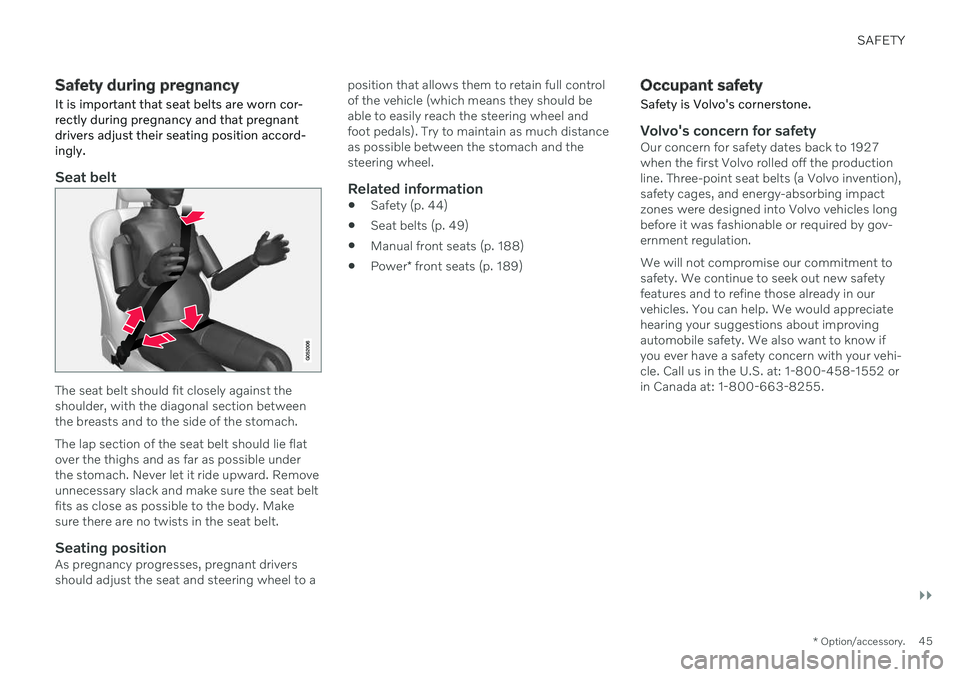
The seat belt should fit closely against the shoulder, with the diagonal section betweenthe breasts and to the side of the stomach. The lap section of the seat belt should lie flat over the thighs and as far as possible underthe stomach. Never let it ride upward. Removeunnecessary slack and make sure the seat beltfits as close as possible to the body. Makesure there are no twists in the seat belt.
Seating positionAs pregnancy progresses, pregnant driversshould adjust the seat and steering wheel to a position that allows them to retain full controlof the vehicle (which means they should beable to easily reach the steering wheel andfoot pedals). Try to maintain as much distanceas possible between the stomach and thesteering wheel.
Related information
Safety (p. 44)
Seat belts (p. 49)
Manual front seats (p. 188)
Power
* front seats (p. 189)
Occupant safety
Safety is Volvo's cornerstone.
Volvo's concern for safetyOur concern for safety dates back to 1927 when the first Volvo rolled off the productionline. Three-point seat belts (a Volvo invention),safety cages, and energy-absorbing impactzones were designed into Volvo vehicles longbefore it was fashionable or required by gov-ernment regulation. We will not compromise our commitment to safety. We continue to seek out new safetyfeatures and to refine those already in ourvehicles. You can help. We would appreciatehearing your suggestions about improvingautomobile safety. We also want to know ifyou ever have a safety concern with your vehi-cle. Call us in the U.S. at: 1-800-458-1552 orin Canada at: 1-800-663-8255.
Page 50 of 687
||
SAFETY
48
Related information
Safety (p. 44)
Reporting safety defects (p. 46)
Occupant safety (p. 45)
Whiplash Protection System The Whiplash Protection System (WHIPS) is designed to help reduce the risk of whiplash-type injuries. The system consists of energyabsorbing backrests and seat cushions aswell as specially designed head restraints inthe front seats.
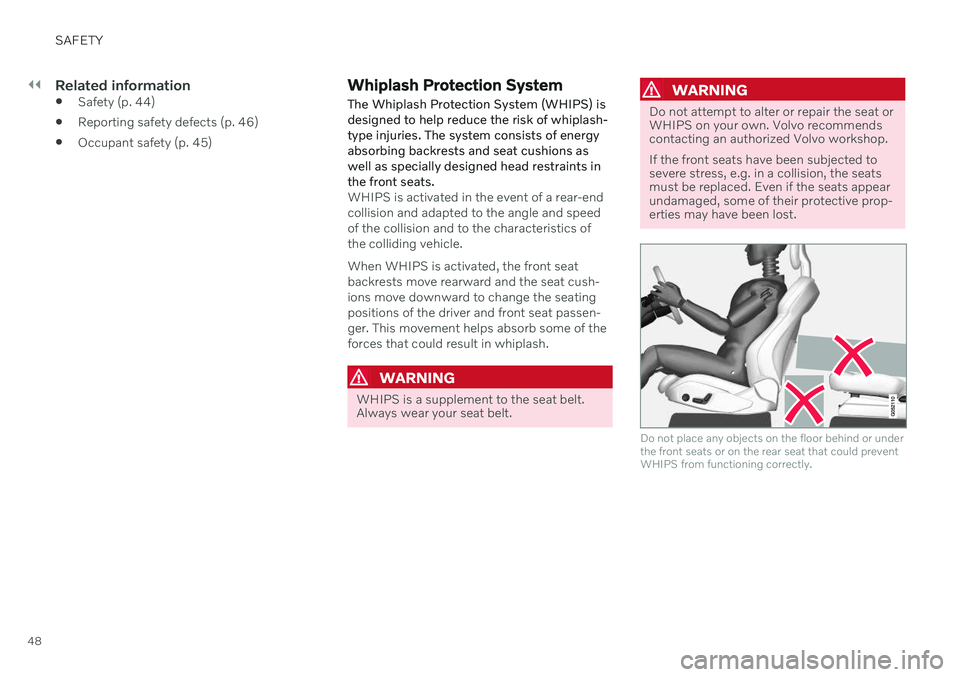
WHIPS is activated in the event of a rear-end collision and adapted to the angle and speedof the collision and to the characteristics ofthe colliding vehicle. When WHIPS is activated, the front seat backrests move rearward and the seat cush-ions move downward to change the seatingpositions of the driver and front seat passen-ger. This movement helps absorb some of theforces that could result in whiplash.
WARNING
WHIPS is a supplement to the seat belt. Always wear your seat belt.
WARNING
Do not attempt to alter or repair the seat or WHIPS on your own. Volvo recommendscontacting an authorized Volvo workshop. If the front seats have been subjected to severe stress, e.g. in a collision, the seatsmust be replaced. Even if the seats appearundamaged, some of their protective prop-erties may have been lost.
Do not place any objects on the floor behind or under the front seats or on the rear seat that could preventWHIPS from functioning correctly.
Page 67 of 687

SAFETY
}}
65
Moving the vehicle when it is in safety mode
1.If the message Normal mode The
vehicle is now in normal mode is dis-
played after attempting to start the engine, the vehicle may be moved care-fully from its present position if, for exam-ple, it is blocking traffic.
2. Do not move the vehicle farther than abso- lutely necessary.
WARNING
When the vehicle is in safety mode, it should not be towed behind another vehi-cle. It should be towed from the site on atow truck. Volvo recommends towing thevehicle directly to an authorized Volvoworkshop.
Related information
Safety mode (p. 63)
Starting the vehicle (p. 402)
Recovery (p. 462)
Child safety Children should always be seated safely when traveling in the vehicle.
General informationVolvo recommends the proper use of restraint systems for all occupants including children.Remember that, regardless of age and size, achild should always be properly restrained in avehicle. Your vehicle is also equipped with ISOFIX/ LATCH attachments, which make it more con-venient to install child seats. Some restraint systems for children are designed to be secured in the vehicle by lapbelts or the lap portion of a lap-shoulder belt.Such child restraint systems can help protectchildren in vehicles in the event of an accidentonly if they are used properly. However, chil-dren could be endangered in a crash if thechild restraints are not properly secured in thevehicle. Failure to follow the installationinstructions for your child restraint can resultin your child striking the vehicle's interior in asudden stop. Holding a child in your arms is NOT a suitable substitute for a child restraint system. In anaccident, a child held in a person's arms canbe crushed between the vehicle's interior andan unrestrained person. The child could alsobe injured by striking the interior, or by being ejected from the vehicle during a suddenmaneuver or impact. The same can also hap-pen if the infant or child rides unrestrained onthe seat. Other occupants should also beproperly restrained to help reduce the chanceof injuring or increasing the injury of a child. All states and provinces have legislation gov- erning how and where children should be car-ried in a vehicle. Find out the regulations exist-ing in your state or province. Recent accidentstatistics have shown that children are safer inrear seating positions than front seating posi-tions when properly restrained. A childrestraint system can help protect a child in avehicle. Here's what to look for when selectinga child restraint system: It should have a label certifying that it meets applicable Federal Motor Vehicle SafetyStandards (FMVSS 213) - or in Canada,CMVSS 213. Make sure the child restraint system is approved for the child's height, weight anddevelopment - the label required by the stand-ard or regulation, or instructions for infantrestraints, typically provide this information. In using any child restraint system, we urge you to carefully look over the instructions thatare provided with the restraint. Be sure youunderstand them and can use the device prop-erly and safely in this vehicle. A misused childrestraint system can result in increased inju-
Page 99 of 687
DISPLAYS AND VOICE CONTROL
}}
97
Related information
Instrument panel (p. 86)
Changing system units of measurement (p. 135)
Indicator symbols in the instrument panel
The indicator symbols alert the driver that a function has been activated, that a system isrunning, or that a fault or error may haveoccurred.
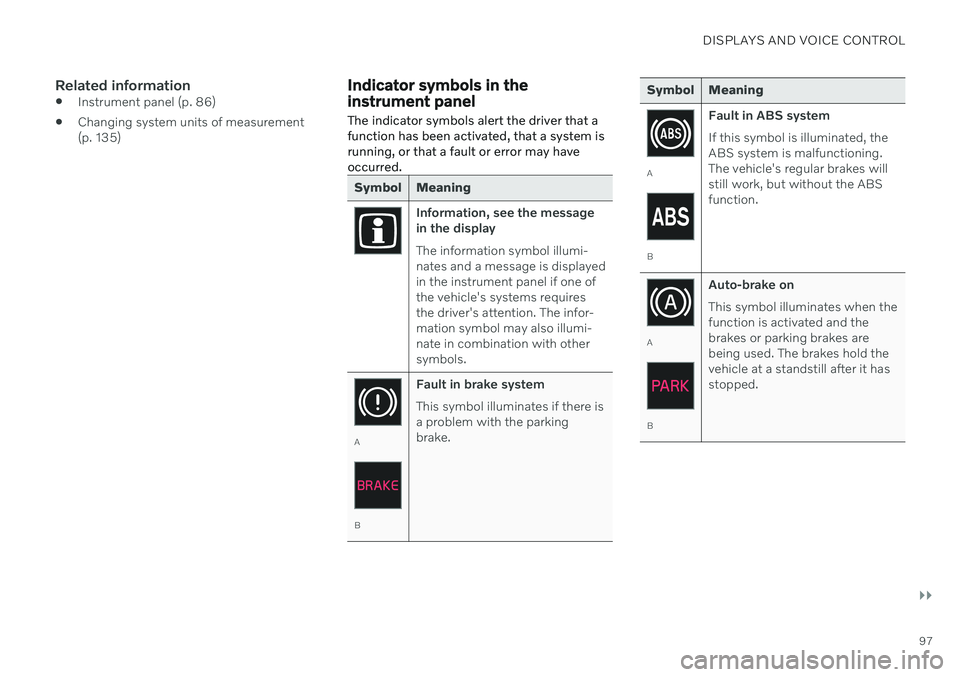
Symbol Meaning
Information, see the message in the display The information symbol illumi- nates and a message is displayedin the instrument panel if one ofthe vehicle's systems requiresthe driver's attention. The infor-mation symbol may also illumi-nate in combination with othersymbols.
A
B Fault in brake system This symbol illuminates if there is a problem with the parkingbrake.
Symbol Meaning
A
BFault in ABS system If this symbol is illuminated, the ABS system is malfunctioning.The vehicle's regular brakes willstill work, but without the ABSfunction.
A
BAuto-brake on This symbol illuminates when the function is activated and thebrakes or parking brakes arebeing used. The brakes hold thevehicle at a standstill after it hasstopped.
Page 117 of 687

DISPLAYS AND VOICE CONTROL
}}
115
Handling the center displayMany of the vehicle's functions and features can be controlled and adjusted from the cen-ter display. The center display is atouchscreen that reacts to taps and othergestures.
Using the center display's touchscreen
The touchscreen reacts differently depending on whether the user taps, drags or swipes the screen. It is possible to e.g. move between dif-ferent views, mark objects, scroll in a list andmove apps by touching the screen in variousways. An infrared light curtain just above the surface of the screen enables the screen to detectwhen a finger is directly in front of the screen.This technology makes it possible to use thescreen even while wearing gloves. Two people can interact with the screen at the same time, e.g. to adjust climate system set-tings for both the driver and passenger sides.
CAUTION
Do not use sharp objects on the screen as this could cause scratches.
The following table presents the various pro- cedures for using the screen:
Procedure Gesture Result
Tap once. Marks an object, confirms a selection or activates a function.
Double-tap. Zooms in on a digital object, such as a map.
Press and hold. Grabs hold of an object so it can be moved. Can be used to move apps or points on a map. Press and hold
your finger on the screen and drag the object to the desired position.
Tap once with two fingers.Zooms out from a digital object, such as a map.
Page 166 of 687
LIGHTING
164
Brake lights
The brake lights are automatically illuminated when braking.
The brake lights are illuminated when the brake pedal is depressed and when the brakesare automatically applied by a driver supportsystem.
Related information
Emergency brake lights (p. 164)
Brake functions (p. 407)
Driver support systems (p. 272)
Emergency brake lights
The emergency brake lights are activated to warn following vehicles of hard braking. This function causes an additional taillight on each side of the vehicle to illuminate.
The emergency brake lights are activated in the event of hard braking or if the ABS systemis activated and the vehicle is traveling at ahigh speed. After the driver decelerates to a low speed and then releases the brake, the brake lightsresume their normal brightness.
Related information
Brake lights (p. 164)
Brakes (p. 407)
Hazard warning flashers (p. 164)
Hazard warning flashers
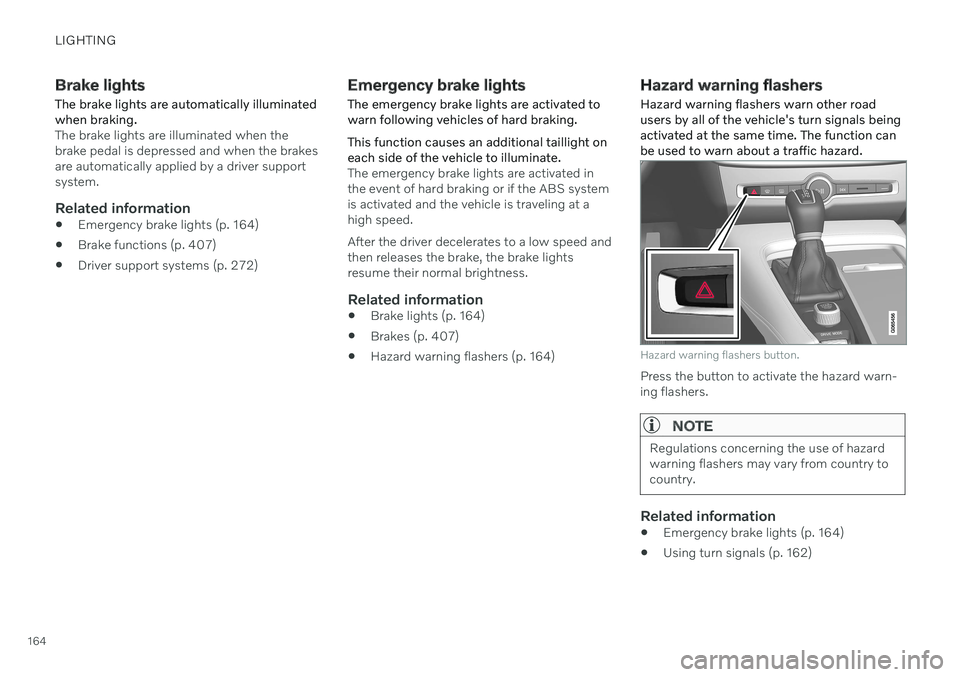
Hazard warning flashers warn other road users by all of the vehicle's turn signals beingactivated at the same time. The function canbe used to warn about a traffic hazard.
Hazard warning flashers button.
Press the button to activate the hazard warn- ing flashers.
NOTE
Regulations concerning the use of hazard warning flashers may vary from country tocountry.
Related information
Emergency brake lights (p. 164)
Using turn signals (p. 162)
Page 217 of 687

CLIMATE CONTROL
}}
* Option/accessory.215
Climate system controls
The climate system functions are controlled from physical buttons on the center console,the center display, and the climate panel on the rear side of the tunnel console *.
Physical buttons in the center console
Button for max defroster.
Button for heated rear window and door mirrors.
Climate bar in the center displayThe most common climate system functionscan be controlled from the climate bar.
Temperature controls for driver and pas- senger side.
Controls for heated * and ventilated * driver
and front passenger seat, as well as heated steering wheel *.
Button for opening Climate view. The graphic in the button shows activated cli-mate system settings.
Climate view in the center displayTap the symbol in the center of theclimate bar to open Climate view. Depending on equipment level, Cli- mate view may be divided into sev-
eral tabs. Toggle between the tabs by swipingthe screen to the left/right or by tapping thedesired heading.
Main climate
In addition to the functions in the climate bar, other main climate system functions can be controlled from the
Main climate tab.
Max, Rear – Controls for defrosting win-
dows and door mirrors.
AC - Air conditioning controls.
Recirc - Air recirculation controls.
Air distribution controls.
Page 280 of 687

||
DRIVER SUPPORT
* Option/accessory.
278
WARNING
The function is supplementary driver support intended to facilitate drivingand help make it safer – it cannot han-dle all situations in all traffic, weatherand road conditions.
The driver is advised to read all sec-tions in the Owner's Manual about thisfunction to learn of its limitations,which the driver must be aware ofbefore using the function.
Driver support functions are not a sub-stitute for the driver's attention andjudgment. The driver is always respon-sible for ensuring the vehicle is drivenin a safe manner, at the appropriatespeed, with an appropriate distance toother vehicles, and in accordance withcurrent traffic rules and regulations.
Related information
Activating or deactivating Distance Alert(p. 278)
Distance Alert limitations (p. 278)
Setting time interval to the vehicle ahead(p. 303)
Collision risk warning from driver support(p. 300)
Head-up display
* (p. 145)
Activating or deactivating Distance Alert 12
Distance Alert can be turned off. The function is only available in vehicles that can displayinformation on the windshield with a head-up display *.
Activate or deactivate the function using this button inthe center display's Functionview.
GREEN button indicator light – the func- tion is activated.
GRAY button indicator light – the functionis deactivated.
Distance Alert is automatically activated eachtime the engine is started.
Related information
Distance Alert
* (p. 277)
Distance Alert limitations (p. 278)
Distance Alert limitations 13
Distance Alert functionality may be reduced in certain situations. The function is onlyavailable in vehicles that can display informa-tion on the windshield with a head-up dis- play *.
WARNING
Detection ability may be affected by vehicle size, e.g. motorcycles, whichcan cause the warning light to come onat a shorter time interval than that setor cause the warning to be temporarilyabsent.
Very high speeds can cause the light tocome on at a shorter time interval thanthat set due to limitations in the rangeof the radar unit.
NOTE
The function uses the vehicle's camera and radar sensor, which has certain generallimitations.
Related information
Distance Alert
* (p. 277)
Camera/radar sensor limitations (p. 313)
Head-up display
* (p. 145)
Page 409 of 687

STARTING AND DRIVING
}}
407
automatically return to the original posi- tion.
Ignition mode II
– Turn the start knob
clockwise and hold it there forapprox. 5 seconds. Release the knob,which will automatically return to its origi-nal position.
Back to ignition mode 0
– To return to
ignition mode 0 from modes I and II, turn
the start knob clockwise and release it.The control will automatically return to theoriginal position.
Related information
Starting the vehicle (p. 402)
Switching off the vehicle (p. 404)
Ignition modes (p. 405)
Adjusting the steering wheel (p. 202)
Jump starting using another battery(p. 451)
Brake functions
The vehicle's brakes are used to reduce speed or prevent the vehicle from rolling.
In addition to the wheel brakes and parking brakes, the vehicle is also equipped with anumber of automatic brake assist functions.These systems provide assistance by e.g. thedriver not needing to depress the brake pedalat a traffic light, when starting up a hill orwhen driving down a hill. Depending on how the vehicle is equipped, the following brake assist functions may beincluded:
Auto-hold brake function at a standstill(Auto Hold)
Hill Start Assist (Hill Start Assist)
Braking assist after a collision
City Safety
Hill Descent Control (Hill Descent Control)
Related information
Brakes (p. 407)
Parking brake (p. 411)
Auto-hold brakes (p. 414)
Braking assist after a collision (p. 416)
Hill Start Assist (p. 416)
City Safety
™ (p. 318)
Hill Descent Control (p. 436)
Brakes
The brake pedal is used to apply the vehicle's regular brakes, which are part of the brakesystem.
The vehicle is equipped with two brake cir- cuits. If one brake circuit is damaged, thebrake pedal will go down further whendepressed. More pressure will then berequired from the driver for normal brakingeffect.
WARNING
The power brakes only work when the electric motor or combustion engine is run-ning.
If the brake pedal is used when the engine is switched off, greater pressure must be appliedto brake the vehicle. In very hilly areas or when driving with a heavy load, gear position B can be used to augment
the brakes with engine braking. Use the Off Road drive mode to increase the engine braking effect when driving on steepdowngrades at low speeds.
Anti-lock brakesThe vehicle is equipped with an Anti-lock Braking System (ABS 2
), which helps prevent
the wheels from locking and helps maintain steering control when braking. Vibrations may