phone VOLVO XC60 TWIN ENGINE 2020 Manual PDF
[x] Cancel search | Manufacturer: VOLVO, Model Year: 2020, Model line: XC60 TWIN ENGINE, Model: VOLVO XC60 TWIN ENGINE 2020Pages: 687, PDF Size: 14.65 MB
Page 528 of 687
||
AUDIO, MEDIA AND INTERNET
526Portions of the content are copyright
© of
Gracenote or its providers. Gracenote, the Gracenote logo and logotype, "Powered by Gracenote" and GracenoteMusicID are either registered trademarks ofGracenote, Inc. in the United States and/orother countries.
Gracenote ®
End User License Agreement
This application or device contains software from Gracenote, Inc. in Emeryville, California,United States (“Gracenote”). The softwarefrom Gracenote (the “Gracenote Software”)enables this application to perform disc and/orfile identification and obtain music-relatedinformation, including name, artist, track, andtitle information (“Gracenote Data”) fromonline servers or embedded databases (collec-tively “Gracenote Servers”) and to performother functions. You may use Gracenote Dataonly by means of the intended End-User func-tions of this application or device. You agree that you will use Gracenote Data, the Gracenote Software, and Gracenote Serv-ers for your own personal non-commercial useonly. You agree not to assign, copy, transfer ortransmit the Gracenote Software or anyGracenote Data to any third party. YOUAGREE NOT TO USE OR EXPLOIT GRACE-NOTE DATA, THE GRACENOTE SOFTWARE,OR GRACENOTE SERVERS, EXCEPT ASEXPRESSLY PERMITTED HEREIN. You agree that your non-exclusive license touse the Gracenote Data, the Gracenote Soft-ware, and Gracenote Servers will terminate ifyou violate these restrictions. If your licenseterminates, you agree to cease any and all useof the Gracenote Data, the Gracenote Soft-ware, and Gracenote Servers. Gracenotereserves all rights in all Gracenote Data, allGracenote Software, and all Gracenote Serv-ers, including all ownership rights. Under nocircumstances will Gracenote become liablefor any payment to you for any informationthat you provide. You agree that Gracenote,Inc. may enforce its rights under this Agree-ment against you directly in its own name. The Gracenote service uses a unique identifier to track queries for statistical purposes. Thepurpose of a randomly assigned numeric iden-tifier is to allow the Gracenote service to countqueries without knowing anything about whoyou are. For more information, see the webpage for the Gracenote Privacy Policy for theGracenote service. The Gracenote Software and each item of Gracenote Data are licensed to you “AS IS.”Gracenote makes no representations or war-ranties, express or implied, regarding theaccuracy of any Gracenote Data from in theGracenote Servers. Gracenote reserves theright to delete data from the Gracenote Serv-ers or to change data categories for any causethat Gracenote deems sufficient. No warranty is made that the Gracenote Software orGracenote Servers are error-free or that func-tioning of Gracenote Software or GracenoteServers will be uninterrupted. Gracenote is notobligated to provide you with new enhancedor additional data types or categories thatGracenote may provide in the future and isfree to discontinue its services at any time. GRACENOTE DISCLAIMS ALL WARRAN- TIES EXPRESS OR IMPLIED, INCLUDING,BUT NOT LIMITED TO, IMPLIED WARRAN-TIES OF MERCHANTABILITY, FITNESS FORA PARTICULAR PURPOSE, TITLE, ANDNON-INFRINGEMENT. GRACENOTE DOESNOT WARRANT THE RESULTS THAT WILLBE OBTAINED BY YOUR USE OF THEGRACENOTE SOFTWARE OR ANY GRACE-NOTE SERVER. IN NO CASE WILL GRACE-NOTE BE LIABLE FOR ANY CONSEQUEN-TIAL OR INCIDENTAL DAMAGES OR FORANY LOST PROFITS OR LOST REVENUES.
©
Gracenote, Inc. 2009
Sensus software
This software uses parts of sources from clib2 and Prex Embedded Real-time OS - Source (Copyright (c) 1982, 1986, 1991, 1993, 1994),and Quercus Robusta (Copyright (c) 1990, 1993), The Regents of the University ofCalifornia. All or some portions are derived from material licensed to the University ofCalifornia by American Telephone and
Page 530 of 687
||
AUDIO, MEDIA AND INTERNET
528This product contains software licensed under GNU General Public License (GPL) or GNULesser General Public License (LGPL), etc. You have the right of acquisition, modification, and distribution of the source code of theGPL/LGPL software. You may download Source Code from the following website at no charge: http://www.embedded-carmultimedia.jp/linux/oss/download/TVM_8351_013 The website provides the Source Code "As Is" and without warranty of any kind. By downloading Source Code, you expressly assume all risk and liability associated withdownloading and using the Source Code andcomplying with the user agreements thataccompany each Source Code. Please note that we cannot respond to any inquiries regarding the source code.
camellia:1.2.0Copyright (c) 2006, 2007 NTT (Nippon Telegraph and Telephone Corporation). All rights reserved. Redistribution and use in source and binary forms, with or without modification, are permitted provided that the following conditions are met:
1. Redistributions of source code must retain
the above copyright notice, this list of conditions and the following disclaimer as the first lines of this file unmodified.
2. Redistributions in binary form must reproduce the above copyright notice, thislist of conditions and the followingdisclaimer in the documentation and/orother materials provided with thedistribution.
THIS SOFTWARE IS PROVIDED BY NTT ``ASIS'' AND ANY EXPRESS OR IMPLIEDWARRANTIES, INCLUDING, BUT NOTLIMITED TO, THE IMPLIED WARRANTIESOF MERCHANTABILITY AND FITNESS FORA PARTICULAR PURPOSE AREDISCLAIMED. IN NO EVENT SHALL NTT BELIABLE FOR ANY DIRECT, INDIRECT,INCIDENTAL, SPECIAL, EXEMPLARY, ORCONSEQUENTIAL DAMAGES (INCLUDING,BUT NOT LIMITED TO, PROCUREMENT OFSUBSTITUTE GOODS OR SERVICES; LOSSOF USE, DATA, OR PROFITS; OR BUSINESSINTERRUPTION) HOWEVER CAUSED ANDON ANY THEORY OF LIABILITY, WHETHERIN CONTRACT, STRICT LIABILITY, OR TORT(INCLUDING NEGLIGENCE OROTHERWISE) ARISING IN ANY WAY OUTOF THE USE OF THIS SOFTWARE, EVEN IFADVISED OF THE POSSIBILITY OF SUCHDAMAGE.
Unicode: 5.1.0COPYRIGHT AND PERMISSION NOTICE Copyright c 1991-2013 Unicode, Inc. All rightsreserved. Distributed under the Terms of Usein http://www.unicode.org/copyright.html. Permission is hereby granted, free of charge, to any person obtaining a copy of the Unicodedata files and any associated documentation(the "Data Files") or Unicode software and anyassociated documentation (the "Software") todeal in the Data Files or Software withoutrestriction, including without limitation therights to use, copy, modify, merge, publish,distribute, and/or sell copies of the Data Filesor Software, and to permit persons to whomthe Data Files or Software are furnished to doso, provided that (a) the above copyrightnotice(s) and this permission notice appearwith all copies of the Data Files or Software,(b) both the above copyright notice(s) and thispermission notice appear in associateddocumentation, and (c) there is clear notice ineach modified Data File or in the Software aswell as in the documentation associated withthe Data File(s) or Software that the data orsoftware has been modified. THE DATA FILES AND SOFTWARE ARE PROVIDED "AS IS", WITHOUT WARRANTYOF ANY KIND, EXPRESS OR IMPLIED,INCLUDING BUT NOT LIMITED TO THEWARRANTIES OF MERCHANTABILITY,FITNESS FOR A PARTICULAR PURPOSEAND NONINFRINGEMENT OF THIRD PARTYRIGHTS. IN NO EVENT SHALL THE
Page 572 of 687
LOADING, STORAGE AND PASSENGER COMPARTMENT
* Option/accessory.
570
Passenger compartment interior
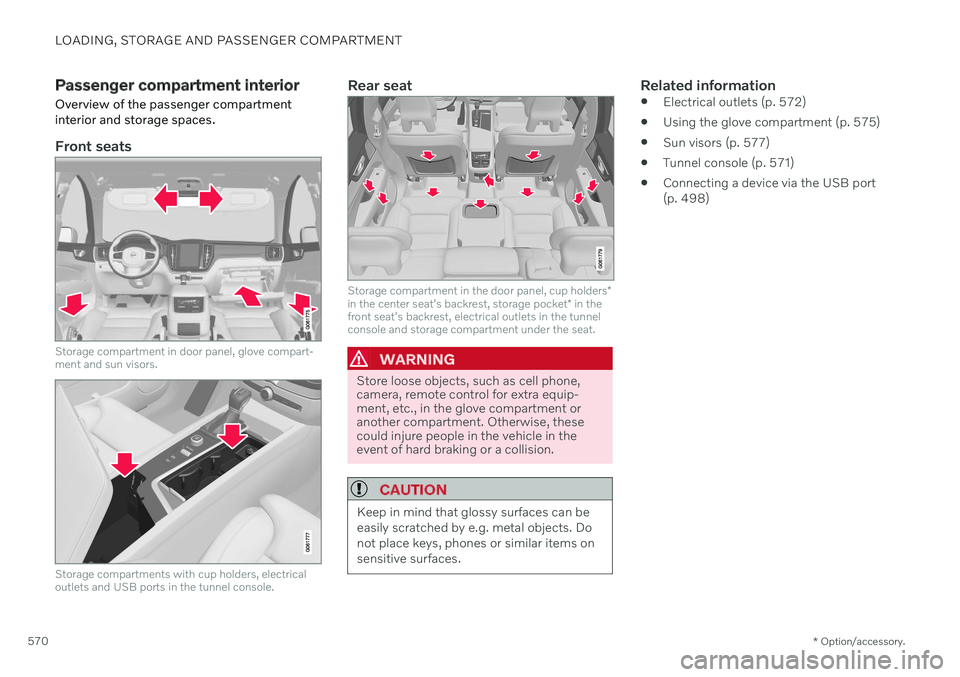
Overview of the passenger compartment interior and storage spaces.
Front seats
Storage compartment in door panel, glove compart- ment and sun visors.
Storage compartments with cup holders, electrical outlets and USB ports in the tunnel console.
Rear seat
Storage compartment in the door panel, cup holders *
in the center seat's backrest, storage pocket * in the
front seat's backrest, electrical outlets in the tunnel console and storage compartment under the seat.
WARNING
Store loose objects, such as cell phone, camera, remote control for extra equip-ment, etc., in the glove compartment oranother compartment. Otherwise, thesecould injure people in the vehicle in theevent of hard braking or a collision.
CAUTION
Keep in mind that glossy surfaces can be easily scratched by e.g. metal objects. Donot place keys, phones or similar items onsensitive surfaces.
Related information
Electrical outlets (p. 572)
Using the glove compartment (p. 575)
Sun visors (p. 577)
Tunnel console (p. 571)
Connecting a device via the USB port (p. 498)
Page 573 of 687
LOADING, STORAGE AND PASSENGER COMPARTMENT
* Option/accessory.571
Tunnel console
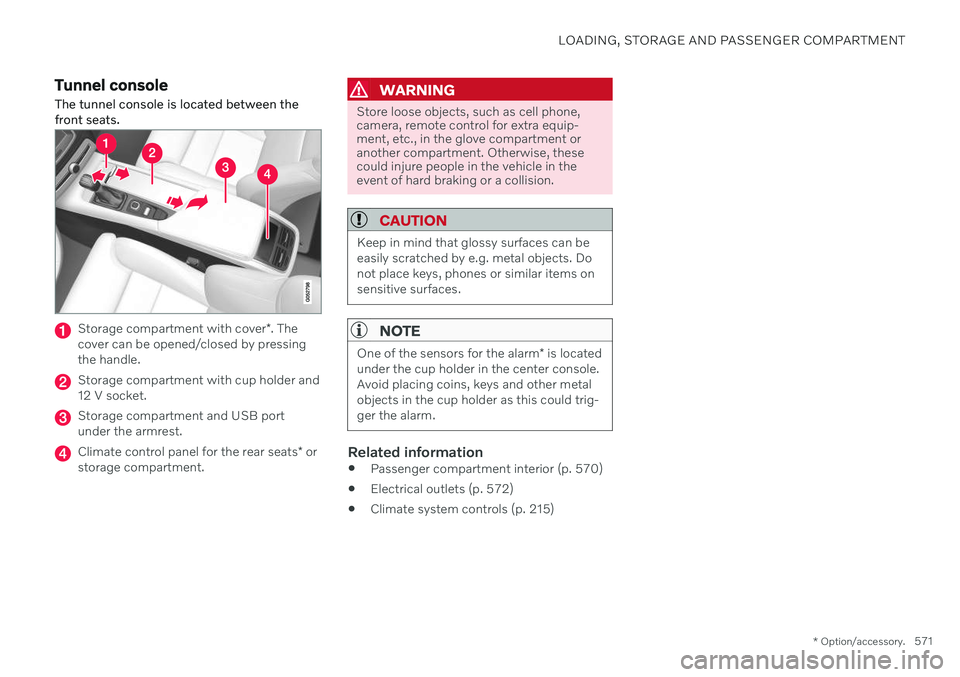
The tunnel console is located between the front seats.
Storage compartment with cover *. The
cover can be opened/closed by pressing the handle.
Storage compartment with cup holder and 12 V socket.
Storage compartment and USB port under the armrest.
Climate control panel for the rear seats * or
storage compartment.
WARNING
Store loose objects, such as cell phone, camera, remote control for extra equip-ment, etc., in the glove compartment oranother compartment. Otherwise, thesecould injure people in the vehicle in theevent of hard braking or a collision.
CAUTION
Keep in mind that glossy surfaces can be easily scratched by e.g. metal objects. Donot place keys, phones or similar items onsensitive surfaces.
NOTE
One of the sensors for the alarm * is located
under the cup holder in the center console. Avoid placing coins, keys and other metalobjects in the cup holder as this could trig-ger the alarm.
Related information
Passenger compartment interior (p. 570)
Electrical outlets (p. 572)
Climate system controls (p. 215)
Page 574 of 687

LOADING, STORAGE AND PASSENGER COMPARTMENT
* Option/accessory.
572
Electrical outlets
There are two 12 V electrical outlets and one 120 V electrical outlet * in the tunnel console,
and one 12 V electrical outlet * in the trunk/
cargo compartment. If a problem occurs with an electrical socket, contact a workshop - an authorized Volvoworkshop is recommended.
12 V outlets
12 V outlet in the tunnel console, front seat.
The 12 V outlets can be used for devices intended for this such as MP3 players, coolersand cellular phones.
12 V outlet in the tunnel console, rear seat.
12 V outlet in the cargo compartment *.
Electrical outlets in the tunnel console - rear seat *
Electrical outlets in the tunnel console, rear seat.
The high-voltage outlet * can be used for devi-
ces intended for this, such as chargers, lap- tops, etc.
High-voltage outlet status indicator
light
An LED 1
light on the outlet indicates its status:
1 LED (Light Emitting Diode)
Page 576 of 687

LOADING, STORAGE AND PASSENGER COMPARTMENT
* Option/accessory.
574
Using the electrical outlets
The 12 V outlet can be used for devices intended for this such as MP3 players, cool-ers and cellular phones. The high-voltage outlet * can be used for devi-
ces intended for this, such as chargers, lap- tops, etc.
The ignition must be in at least mode I for the
outlets to supply current. The outlets will then be active as long as there is sufficient chargein the start battery. If the engine is turned off and the vehicle is locked, the outlets will be deactivated. If theengine is turned off and the vehicle remainsunlocked, the sockets will remain active for upto 7 minutes.
NOTE
Bear in mind that using the electrical out- lets when the engine is off could cause thestarter battery to have too low of a chargelevel, which could limit other functionality. Accessories connected to the electrical outlets can be activated even when thevehicle electrical system is off or if precon-ditioning is used. For this reason, discon-nect plugs when they are not in use to pre-vent the starter battery from becoming dis-charged.
WARNING
Do not use accessories with large or heavy plugs – they could damage theoutlet or come loose while you are driv-ing.
Do not use accessories that couldcause disruptions to e.g. the vehicle'sradio receiver or electrical system.
Position the accessory so that there isno risk of it injuring the driver or pas-sengers in the event of heavy brakingor a collision.
Pay attention to connected accessoriesas they can generate heat that couldburn passengers or the interior.
Using 12 V outlets1. Remove the stopper (tunnel console) or
fold down the cover (trunk/cargo com-partment) over the socket and plug in thedevice.
2. Unplug the device and put the stopper back in (tunnel console) or fold up thecover (trunk/cargo compartment) whenthe socket is not in use or left unattended.
CAUTION
The maximum power is 120 W (10 A) per outlet.
Using high-voltage outletsThe ignition must be in at least mode I for the
outlets to supply current. The outlets will then be active as long as there is sufficient chargein the start battery. 1. Slide down the cover over the outlet and plug in the device. >
The LED 2
light on the outlet will indi-
cate its status.
2. The outlet is supplying electrical current when the light is glowing steadily green.
2LED (Light Emitting Diode)
Page 670 of 687
INDEX
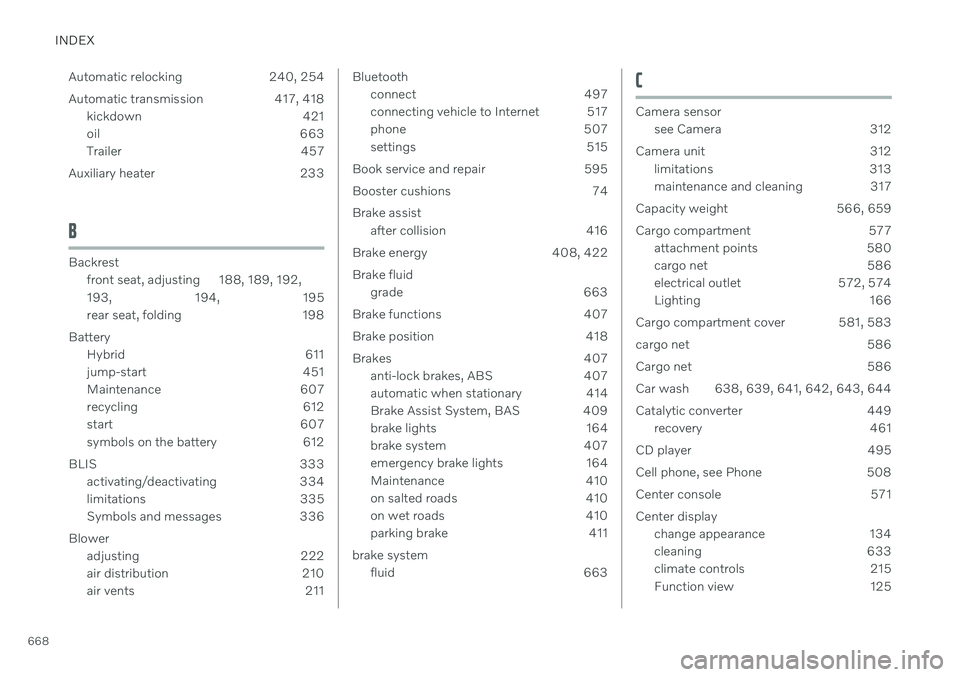
668Automatic relocking 240, 254
Automatic transmission 417, 418
kickdown 421
oil 663
Trailer 457
Auxiliary heater 233
B
Backrest front seat, adjusting 188, 189, 192, 193 , 194, 195
rear seat, folding 198
Battery Hybrid 611
jump-start 451
Maintenance 607
recycling 612
start 607
symbols on the battery 612
BLIS 333 activating/deactivating 334
limitations 335
Symbols and messages 336
Blower adjusting 222
air distribution 210
air vents 211
Bluetooth
connect 497
connecting vehicle to Internet 517
phone 507
settings 515
Book service and repair 595
Booster cushions 74Brake assist after collision 416
Brake energy 408, 422Brake fluid grade 663
Brake functions 407
Brake position 418
Brakes 407 anti-lock brakes, ABS 407
automatic when stationary 414
Brake Assist System, BAS 409
brake lights 164
brake system 407
emergency brake lights 164
Maintenance 410
on salted roads 410
on wet roads 410
parking brake 411
brake system fluid 663C
Camera sensorsee Camera 312
Camera unit 312 limitations 313
maintenance and cleaning 317
Capacity weight 566, 659
Cargo compartment 577 attachment points 580
cargo net 586
electrical outlet 572, 574
Lighting 166
Cargo compartment cover 581, 583
cargo net 586
Cargo net 586
Car wash 638, 639, 641, 642, 643, 644
Catalytic converter 449 recovery 461
CD player 495
Cell phone, see Phone 508
Center console 571Center display change appearance 134
cleaning 633
climate controls 215
Function view 125
Page 672 of 687
INDEX
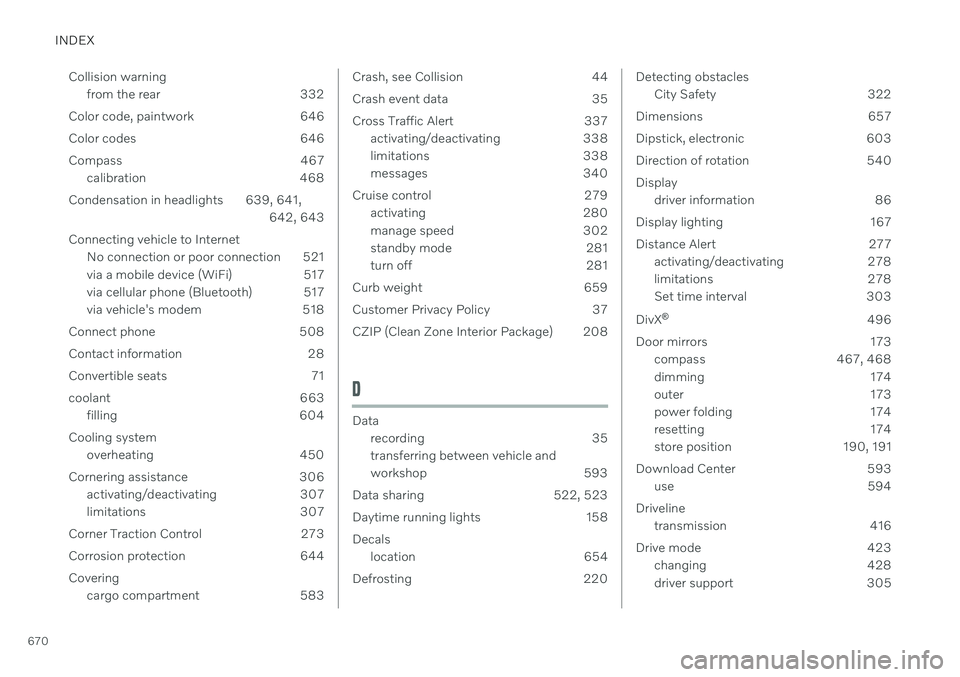
670Collision warning
from the rear 332
Color code, paintwork 646
Color codes 646
Compass 467 calibration 468
Condensation in headlights 639, 641, 642, 643
Connecting vehicle to Internet No connection or poor connection 521
via a mobile device (WiFi) 517
via cellular phone (Bluetooth) 517
via vehicle's modem 518
Connect phone 508
Contact information 28
Convertible seats 71
coolant 663 filling 604
Cooling system overheating 450
Cornering assistance 306 activating/deactivating 307
limitations 307
Corner Traction Control 273
Corrosion protection 644 Covering cargo compartment 583
Crash, see Collision 44
Crash event data 35
Cross Traffic Alert 337
activating/deactivating 338
limitations 338
messages 340
Cruise control 279 activating 280
manage speed 302
standby mode 281
turn off 281
Curb weight 659
Customer Privacy Policy 37
CZIP (Clean Zone Interior Package) 208
D
Data recording 35 transferring between vehicle and
workshop 593
Data sharing 522, 523
Daytime running lights 158 Decals location 654
Defrosting 220
Detecting obstacles City Safety 322
Dimensions 657
Dipstick, electronic 603
Direction of rotation 540Display driver information 86
Display lighting 167
Distance Alert 277 activating/deactivating 278
limitations 278
Set time interval 303
DivX ®
496
Door mirrors 173 compass 467, 468
dimming 174
outer 173
power folding 174
resetting 174
store position 190, 191
Download Center 593 use 594
Driveline transmission 416
Drive mode 423 changing 428
driver support 305
Page 677 of 687

INDEX
675
M
Maintained climate comfort 230start/stop 230
Maintenance 590 corrosion protection 644
Max. axle weight 659
Max. roof load 659
Media player 491, 492, 493 compatible file formats 499
voice control 152
Messages and symbols Adaptive Cruise Control 289
Assistance at risk of collision 360
BLIS 336
City Safety 331
Cross Traffic Alert 340
Lane Keeping Aid 352
Park Assist Camera 374
Park Assist Pilot 382
Parking Assist 365
Pilot Assist 299
stability and traction control system 276
Messages in display 109, 143 handling 110, 144
saved 111, 144
Mileage 91 electric motor 439
Misting
condensation in headlights 638, 641
Mood lighting 166 adjusting 167
N
Net
cargo compartment 586
O
Occupant safety 45
Occupant weight sensor 58
Octane rating 447
Oil, see also Engine oil 662
On-board diagnostics 590
On-board Diagnostic socket 39
Option/accessory 23
Outside temperature gauge 96
Overheating 450, 457
Owner's information 18
OWNER'S MANUAL 23environmental labeling 25
in cellular phone 22
in the center display 19, 20
P
Paddle at steering wheel 201 Paint
color code 646
paint damage and touch-up 645, 646
Panoramic roof 176 opening and closing 177
pinch protection 170
sun shade 179
ventilation position 178
Parallel parking 375
Park Assist Camera 366 activating 372
limitations 313
sensor field 371
Symbols and messages 374
trajectory lines 369
views 367
Park Assist Pilot 375 limitations 380
parallel parking 376
perpendicular parking 376
pulling out of a parking space 379
Page 678 of 687

INDEX
676Symbols and messages 382
use 377
parking on hills 413
Parking Assist 361 activating/deactivating 363
front, rear and sides 362
limitations 363
Symbols and messages 365
Parking brake 411 activating/deactivating 411
automatic activation 413
Low battery charge level 413
Parking climate 225 Symbols and messages 232
Parking heater 233
Passenger compartment filter 209 Passenger compartment heater (Parking
heater) 233
Passenger compartment interior 570 center console 571
electrical outlet 572
glove compartment 575
sun visor 577
Passenger compartment lighting 165 adjusting 167
auto switch 166
Passing assistance
Adaptive Cruise Control 308
Pilot Assist 308
starting with Pilot Assist 308
start with Adaptive Cruise Control 308
personal information (Customer Privacy
Policy) 37
Phone 507 changing to another 511
connect 508
connect automatically 510
connect manually 510
delete 511
disconnect 510
phone call 511, 514
text message 512
voice control 151
Pilot Assist 291 activating 294
auto-brake 304
disengaged steering assistance 297
limitations 297
manage speed 302
passing 308
set time interval 303
standby mode 296
switching target vehicles 301
Symbols and messages 299
turn off 295
WARNING 300pinch protection 170resetting 171
PIN code 519 Private locking 266
Polestar Engineered 430, 433
Polishing 638
Position lights 158
Power 661 electric motor 661
Power folding door mirrors 174
Power panoramic roof 176
Power save mode 451
Power seats 189
Power tailgate 261
Power windows 171, 172 pinch protection 170
Preconditioning 226 start/stop 226
timer 227
Pressure wash 642
Privacy Policy (Customer Privacy Policy) 37
Private locking 266 activating/deactivating 266
PROPOSITION 65 WARNING 451