instrument panel VOLVO XC60 TWIN ENGINE 2020 Manual Online
[x] Cancel search | Manufacturer: VOLVO, Model Year: 2020, Model line: XC60 TWIN ENGINE, Model: VOLVO XC60 TWIN ENGINE 2020Pages: 687, PDF Size: 14.65 MB
Page 346 of 687

||
DRIVER SUPPORT
* Option/accessory.
344
Speed camera warningVehicles equipped with Road Sign Information and SensusNavigation can provide infor-mation on upcoming speedcameras in the instrument panel 84
If the vehicle exceeds a detected speed limit with the Speed Limit Warning function acti-
vated, the driver is given a speed warning when the vehicle is approaching a speed cam-era if the navigation map for the vehicle's cur-rent location contains information on speedcameras.
NOTE
It is possible to receive an audible alert for speed cameras regardless of the vehicle'sspeed, whether or not the speed limit is exceeded, and even if the
Road Sign
Audio Warning function is deactivated.
Related information
Road Sign Information
* (p. 341)
Activating or deactivating warnings from Road Sign Information
* (p. 344)
Road Sign Information
* limitations
(p. 345)
Activating or deactivating warnings from Road Sign Information *
The Road Sign Information (RSI 85
) sub-func-
tion
Speed Limit Warning is optional – the
driver can choose to have the sub-function activated or deactivated.
Activating Speed Warning
1. Select SettingsMy CarIntelliSafe
Road Sign Information in the center
display's Top view.
2. Select
Speed Limit Warning.
> The function is activated and a speed limit selector is displayed.
Adjusting the Speed Warning limitThe driver can adjust the settings to be alerted at a higher speed than the posted speed limit. To adjust the Speed Warning limit:
1. Select
SettingsMy CarIntelliSafe
Road Sign Information in the center
display's Top view.
2. Select
Speed Limit Warning.
> The function is activated and a speed limit selector is displayed. 3. Tap the up/down arrows on the screen to
adjust the speed at which the Speed Warning will be given.
Please note that the setwarning limit will not be usedwhen a speed camera symbolis displayed in the instrumentpanel.
Activating audible alert for Speed Warning.
To adjust the audible alert settings:
1. Select
SettingsMy CarIntelliSafe
Road Sign Information in the center
display's Top view.
2. Select/deselect
Road Sign Audio
Warning to activate/deactivate the audi-
ble alert.
When
Road Sign Audio Warning is acti-
vated, the driver will also be alerted if the vehi- cle is approaching a one-way/"no-entry" roador entrance.
Activating Speed camera warningIf the vehicle is equipped with Sensus Navigation * and map data contains informa-
tion on speed cameras, the driver can choose
84 Information on speed cameras on the navigation map is not available for all markets/areas.
85 Road Sign Information
Page 347 of 687

DRIVER SUPPORT
* Option/accessory.345
to receive an audible alert if the vehicle is approaching a speed camera. To adjust the audible alert settings:
1. Select
SettingsMy CarIntelliSafe
Road Sign Information in the center
display's Top view.
2. Select/deselect
Speed Camera Audio
Warning to activate/deactivate the speed
camera audible alert.
Related information
Road Sign Information
* (p. 341)
Speed limit and speed camera warnings from Road Sign Information
* (p. 343)
Road Sign Information
* limitations
(p. 345)
Road Sign Information * limitations
Road Sign Information (RSI 86
) functionality
may be reduced in certain situations.
The function could have reduced functionality due to e.g.: faded road signs
signs located in a curve in the road
twisted or damaged signs
signs positioned high above the road
fully/partially obstructed or poorly posi- tioned signs
signs partially or fully covered by frost,snow and/or dirt
digital road maps 87
that are outdated,
incorrect or do not contain speed informa- tion 88
.
NOTE
In certain markets, the Road Sign Informa- tion * function is only available in combina-
tion with Sensus Navigation *.
NOTE
Certain types of bike carriers that are con- nected to the trailer socket may be inter-preted as a connected trailer by the RSIfunction. In such cases, the instrumentpanel may indicate incorrect speed infor-mation.
NOTE
The function uses the vehicle's camera and radar sensor, which has certain generallimitations.
Related information
Road Sign Information
* (p. 341)
Camera/radar sensor limitations (p. 313)
86
Road Sign Information
87 Vehicles equipped with Sensus Navigation *.
88 Map data and speed information is not available for all areas.
Page 348 of 687

DRIVER SUPPORT
* Option/accessory.
346
Driver Alert Control
The Driver Alert Control (DAC) function is designed to help alert the driver to erraticbehavior, e.g. if the driver is distracted orshowing signs of fatigue.
The objective of DAC is to detect slowly dete- riorating driving behavior and is primarilyintended to be used on major roads. The func-tion is not intended for use in city traffic. DAC is activated when the vehicle's speed exceeds 65 km/h (40 mph) and remainsactive as long as speeds are above 60 km/h(37 mph).
DAC detects the vehicle's position in the traffic lane.
A camera monitors the traffic lane's marker lines and compares the direction of the roadwith the driver's movements of the steeringwheel.
The vehicle is moving erratically in the lane.
If driving behavior becomes considerably erratic, thedriver will be alerted by thissymbol in the instrumentpanel, an audible signal and the message
Time for a
break.
If the vehicle is equipped with Sensus Navigation * and the Rest Stop Guidancefunction is activated, suggestions will also be provided for suitable places to take a break. The warning will be repeated after a short time if driving behavior does not improve.
WARNING
Driver Alert Control must not be used to extend a period of driving. The drivershould plan in breaks at regular intervalsand make sure they are well rested.
WARNING
An alarm from Driver Alert Control should be taken very seriously since a sleepy driveris often not aware of their own condition. If the alarm sounds or you feel fatigued:
Stop the vehicle safely as soon as pos- sible and rest.
Studies have shown that it is just as dan- gerous to drive while tired as it is to driveunder the influence of alcohol or otherstimulants.
Page 354 of 687

DRIVER SUPPORT
352
Lane Keeping Aid symbols and messages
A number of symbols and messages related to Lane Keeping Aid (LKA 93
) may be dis- played in the instrument panel. Several exam- ples are provided below.
Symbol Message Meaning
Driver support system Reduced functionality Service requiredThe system is not functioning as intended. Contact a workshop
A
.
Windscreen sensor Sensor blocked, see Owner's manualThe camera's ability to detect the lane in front of the vehicle is reduced.
Lane Keeping Aid Apply steeringLKA's steering assistance is disabled when the driver's hands are not on the wheel. Follow the instructions and steer the vehicle.
Lane Keeping Aid Standby until steering appliedLKA will go into standby mode until the driver begins steering the vehicle again.
A An authorized Volvo workshop is recommended.
93 Lane Keeping Aid
Page 356 of 687
DRIVER SUPPORT
354
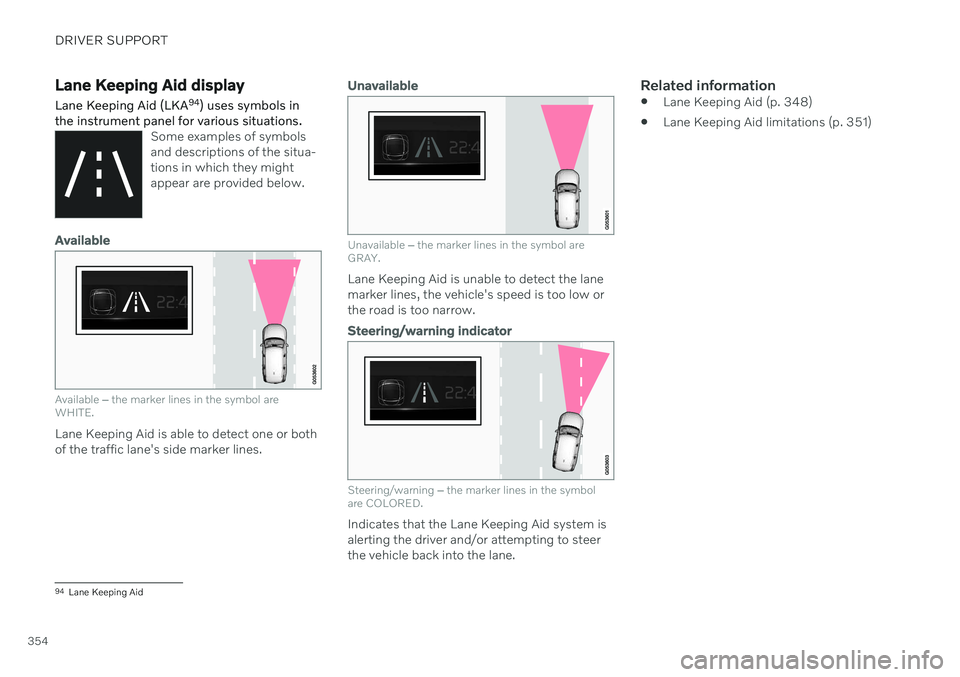
Lane Keeping Aid display Lane Keeping Aid (LKA94
) uses symbols in
the instrument panel for various situations.
Some examples of symbols and descriptions of the situa-tions in which they mightappear are provided below.
Available
Available ‒ the marker lines in the symbol are
WHITE.
Lane Keeping Aid is able to detect one or both of the traffic lane's side marker lines.
Unavailable
Unavailable ‒ the marker lines in the symbol are
GRAY.
Lane Keeping Aid is unable to detect the lane marker lines, the vehicle's speed is too low orthe road is too narrow.
Steering/warning indicator
Steering/warning ‒
the marker lines in the symbol
are COLORED.
Indicates that the Lane Keeping Aid system is alerting the driver and/or attempting to steerthe vehicle back into the lane.
Related information
Lane Keeping Aid (p. 348)
Lane Keeping Aid limitations (p. 351)
94
Lane Keeping Aid
Page 362 of 687
DRIVER SUPPORT
360
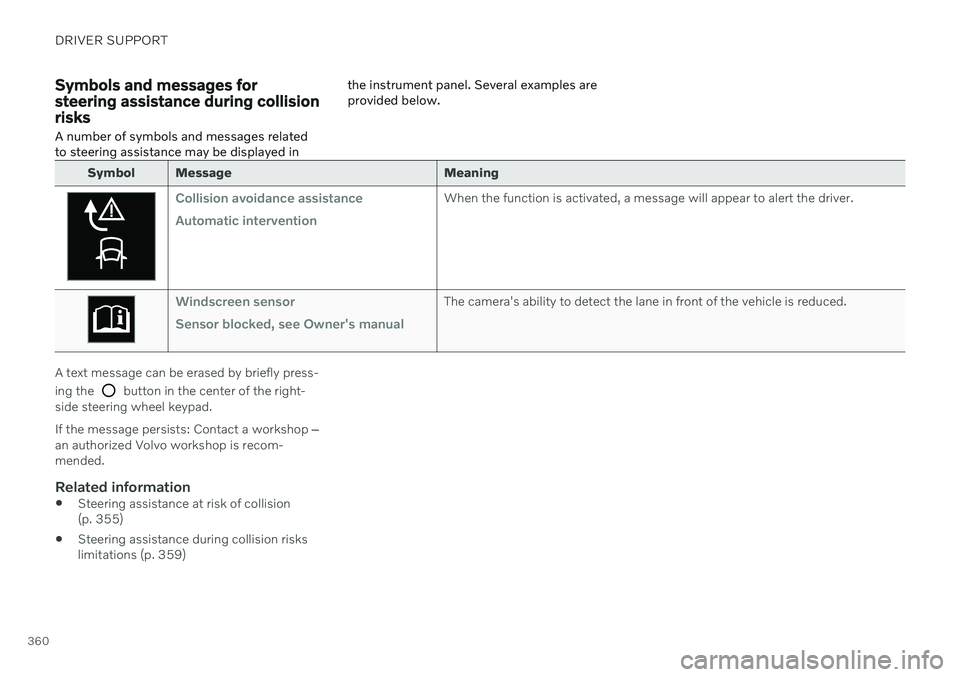
Symbols and messages for steering assistance during collisionrisks
A number of symbols and messages related to steering assistance may be displayed in the instrument panel. Several examples areprovided below.
Symbol Message
Meaning
Collision avoidance assistance Automatic interventionWhen the function is activated, a message will appear to alert the driver.
Windscreen sensor Sensor blocked, see Owner's manualThe camera's ability to detect the lane in front of the vehicle is reduced.
A text message can be erased by briefly press- ing the
button in the center of the right-
side steering wheel keypad. If the message persists: Contact a workshop ‒
an authorized Volvo workshop is recom- mended.
Related information
Steering assistance at risk of collision(p. 355)
Steering assistance during collision riskslimitations (p. 359)
Page 367 of 687

DRIVER SUPPORT
* Option/accessory.365
Park Assist symbols and messages
Symbols and messages for the Park Assist system may be displayed in the instrument panel and/or the center display. Severalexamples are provided below.
Symbol Message Meaning
The rear Park Assist sensors are
turned off and no acoustic warnings for obstacles/
objects will be provided.
Park Assist System Sensors blocked, cleaning neededOne or more of the sensors are blocked. Check and clean/remove the obstacle as soon as possible.
Park Assist System Unavailable Service requiredThe system is not functioning as intended. Contact a workshop A
.
A An authorized Volvo workshop is recommended.
A text message can be erased by briefly press- ing the
button in the center of the right-
side steering wheel keypad. If a message cannot be erased, contact a workshop A
.
Related information
Park Assist
* (p. 361)
Park Assist limitations (p. 363)
Page 376 of 687

DRIVER SUPPORT
* Option/accessory.
374
Park Assist Camera symbols and messages
Symbols and messages for the Park Assist Camera may be displayed in the instrument panel and/or the center display. Severalexamples are provided below.
Symbol Message Meaning
The rear Park Assist sensors are
turned off and no acoustic warnings or field markings for
obstacles/objects will be provided.
The camera is not functioning properly.
Park Assist System Sensors blocked, cleaning nee- dedOne or more of the sensors are blocked. Check and clean/remove the obstacle as soon as possible.
Park Assist System Unavailable Service requiredThe system is not functioning as intended. Contact a workshop A
.
A An authorized Volvo workshop is recommended.
A text message can be erased by briefly press- ing the
button in the center of the right-
side steering wheel keypad. If a message cannot be erased, contact a workshop
A
.
Related information
Park Assist Camera
* (p. 366)
Camera/radar sensor limitations (p. 313)
Page 384 of 687

DRIVER SUPPORT
* Option/accessory.
382
Park Assist Pilot * messages
Messages for Park Assist Pilot (PAP 106
) may
be displayed in the instrument panel and/or the center display. Several examples are pro- vided below.
Message Meaning
Park Assist System Sensors blocked, cleaning neededOne or more of the sensors are blocked. Check and clean/remove the obstacle as soon as possible.
Park Assist System Unavailable Service requiredThe system is not functioning as intended. Contact a workshop
A
.
A An authorized Volvo workshop is recommended.
A text message can be erased by briefly press- ing the
button in the center of the right-
side steering wheel keypad. If a message cannot be erased, contact a workshop A
.
Related information
Park Assist Pilot
* (p. 375)
Park Assist Pilot
* limitations (p. 380)
106
Park Assist Pilot
Page 386 of 687

HYBRID INFORMATION
384
General information about Twin Engine Twin Engine vehicles are driven just like any other vehicle, but certain functions differ froma vehicle powered exclusively by gasoline.The electric motor powers the vehicle primar-ily at low speeds; the gasoline engine is usedat higher speeds or during more active driv-ing.
The instrument panel displays Twin Engine- specific information - charging information,selected drive mode, distance to dischargedbattery and hybrid battery charge level. Different drive modes can be selected while driving, e.g. electric power only or, if morepower is needed, a combination of electric andgasoline power. The vehicle calculates a com-bination of driveability, driving experience,environmental impact and fuel economy forthe selected drive mode. In order to function optimally, the hybrid bat- tery (and its electrical drive systems) and thegasoline engine (and its drive systems) mustbe at the correct operating temperature. Bat-tery capacity can be considerably reduced ifthe battery is too cold or too hot. Precondi-tioning prepares the vehicle's drive systemsand passenger compartment before driving tohelp reduce both wear and energy consump-tion. It also helps increase the hybrid battery'srange.The hybrid battery which powers the electricmotor is recharged using the charging cable. Itcan also be recharged during light braking andthrough engine braking in gear position
B. The
combustion engine can also help recharge thehybrid battery.
Important
No electrical current
Keep in mind that if there is no electrical cur- rent to the vehicle, i.e. the ignition is switchedoff or the start battery is discharged, certainfunctions such as brakes, power steering, etc.will not work.
WARNING
If the vehicle does not have electrical cur- rent and both the electric motor and thegasoline engine are switched off, thebrakes cannot be used to stop the vehicle.
Towing not permitted
Never tow a Twin Engine vehicle behind another vehicle, as this could damage theelectric motor.
Exterior engine noise
Because there is no sound from the engine when only the electric motor is running, thevehicle is equipped with artificial exteriorbackground noise. This sound is intended tohelp warn children, pedestrians, cyclists, ani- mals, etc. outside the vehicle of the vehicle'sapproach.
High-voltage electrical current
WARNING
A number of electrical components in Twin Engine Plug-in Hybrid vehicles use high-voltage current and can be extremely dan-gerous if handled incorrectly. These com-ponents and any orange wiring in the vehi-cle may only be handled by trained andqualified Volvo service technicians.
Do not touch anything that is not clearly described in this Owner's Manual.
Related information
Charging the hybrid battery (p. 385)
Hybrid gauge (p. 89)
Drive modes (p. 423)
Starting and stopping preconditioning(p. 226)
Hybrid battery (p. 611)