instrument panel VOLVO XC60 TWIN ENGINE 2020 Manual PDF
[x] Cancel search | Manufacturer: VOLVO, Model Year: 2020, Model line: XC60 TWIN ENGINE, Model: VOLVO XC60 TWIN ENGINE 2020Pages: 687, PDF Size: 14.65 MB
Page 315 of 687

DRIVER SUPPORT
}}
313
Camera/radar sensor limitations The camera and radar sensor used by several of the driver support functions has certainlimitations, which also affect the functionsusing the camera and radar sensor. The drivershould be aware of the following limitations:
Camera and radar
Obstructed camera
The area marked in the illustration must be cleaned regularly and kept free of decals, objects, solar film,etc.
The camera is located on the upper interior section of the windshield along with the radarsensor. Do not place, affix or mount anything on the inside or outside of the windshield, or in frontof or around the camera and radar sensor –this could disrupt camera and radar-basedfunctions. It could cause functions to bereduced, deactivated completely or to producean incorrect function response.If this symbol and the message “
Windscreen sensor Sensor
blocked, see Owner's manual” is
displayed in the instrument panel, it
means that the camera and radar sensor are unable to detect other vehicles, cyclists,pedestrians and large animals in front of thevehicle and that the vehicle's camera andradar-based functions may be obstructed.
The following table shows some of the situa- tions that can cause the message to be dis-played, and suggested actions:
Cause Action
The area of the windshield in front of the camera/radar sensor is dirty or covered by ice or snow. Clean the windshield in front of the camera/radar sensor and remove dirt, iceand snow.
Thick fog, heavy rain or snow is blocking the radar signals or thecamera's range of visibility. No action. Heavy precipitation may sometimes prevent the camera/radar sensorfrom functioning.
Page 322 of 687
||
DRIVER SUPPORT
* Option/accessory.
320
1 - Collision warning
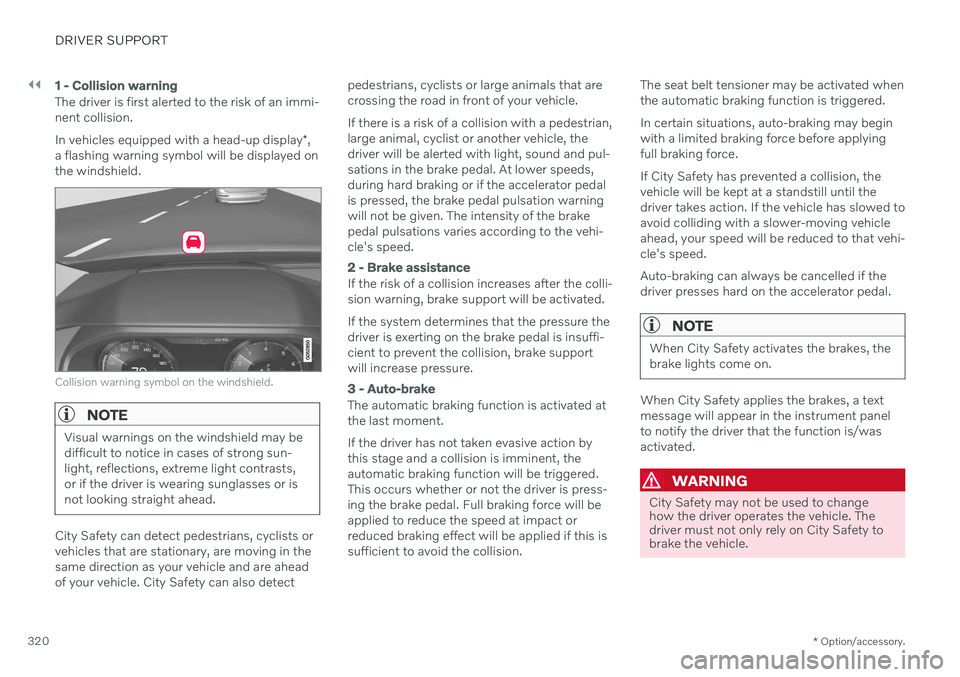
The driver is first alerted to the risk of an immi- nent collision. In vehicles equipped with a head-up display *,
a flashing warning symbol will be displayed on the windshield.
Collision warning symbol on the windshield.
NOTE
Visual warnings on the windshield may be difficult to notice in cases of strong sun-light, reflections, extreme light contrasts,or if the driver is wearing sunglasses or isnot looking straight ahead.
City Safety can detect pedestrians, cyclists or vehicles that are stationary, are moving in thesame direction as your vehicle and are aheadof your vehicle. City Safety can also detect pedestrians, cyclists or large animals that arecrossing the road in front of your vehicle. If there is a risk of a collision with a pedestrian, large animal, cyclist or another vehicle, thedriver will be alerted with light, sound and pul-sations in the brake pedal. At lower speeds,during hard braking or if the accelerator pedalis pressed, the brake pedal pulsation warningwill not be given. The intensity of the brakepedal pulsations varies according to the vehi-cle's speed.
2 - Brake assistance
If the risk of a collision increases after the colli- sion warning, brake support will be activated. If the system determines that the pressure the driver is exerting on the brake pedal is insuffi-cient to prevent the collision, brake supportwill increase pressure.
3 - Auto-brake
The automatic braking function is activated at the last moment. If the driver has not taken evasive action by this stage and a collision is imminent, theautomatic braking function will be triggered.This occurs whether or not the driver is press-ing the brake pedal. Full braking force will beapplied to reduce the speed at impact orreduced braking effect will be applied if this issufficient to avoid the collision.
The seat belt tensioner may be activated whenthe automatic braking function is triggered. In certain situations, auto-braking may begin with a limited braking force before applyingfull braking force. If City Safety has prevented a collision, the vehicle will be kept at a standstill until thedriver takes action. If the vehicle has slowed toavoid colliding with a slower-moving vehicleahead, your speed will be reduced to that vehi-cle's speed. Auto-braking can always be cancelled if the driver presses hard on the accelerator pedal.
NOTE
When City Safety activates the brakes, the brake lights come on.
When City Safety applies the brakes, a text message will appear in the instrument panelto notify the driver that the function is/wasactivated.
WARNING
City Safety may not be used to change how the driver operates the vehicle. Thedriver must not only rely on City Safety tobrake the vehicle.
Page 330 of 687

||
DRIVER SUPPORT
328
your lane must have clear side lane mark- ings
your vehicle must be positioned straight inyour lane
the oncoming vehicle must be positionedwithin your vehicle's lane markings
the oncoming vehicle's headlights mustbe on
the function can only handle “front-to-front” collisions
the function can only detect vehicles withfour wheels.
WARNING
Warnings and brake interventions due to an imminent collision with an oncomingvehicle always come very late.
Related information
City Safety
™ (p. 318)
City Safety limitations (p. 328)
City Safety limitations
City Safety 61
functionality may be reduced in
certain situations.
Surroundings
Low objects
Hanging objects, such as flags for overhang- ing loads or accessories such as auxiliarylights or front protective grids that extendbeyond the height of the hood, may limit City Safety functionality.
Slippery road conditions
The extended braking distance on slippery roads may reduce City Safety's capacity tohelp avoid a collision. In these types of situa-tions, the Anti-lock Braking System and Elec- tronic Stability Control (ESC 62
) are designed
for optimal braking power with maintained stability.
Backlighting
The visual warning signal in the windshield may be difficult to detect in bright sunlight, ifthere are reflections, or if the driver is wearingsunglasses or not looking straight ahead.
Heat
If the temperature in the passenger compart- ment is high due to e.g. bright sunlight, thevisual warning signal in the windshield may betemporarily disabled.
Camera and radar sensor's field of vision
The camera's field of vision is limited and in certain situations, it may be unable to detectpedestrians, large animals, cyclists or vehicles,or it may detect them later than expected. Vehicles that are dirty may be detected later than clean vehicles, and in dark conditions,motorcycles may be detected late or not at all. If a text message displayed in the instrument panel indicates that the camera/radar sensoris obstructed, it may be difficult for City Safetyto detect pedestrians, large animals, cyclists,vehicles or lane markings in front of the vehi-cle. City Safety functionality may therefore bereduced. Text messages may not be displayed for all sit- uations in which the windshield sensors areblocked. The driver must therefore alwayskeep the windshield in front of the camera/radar sensor clean.
CAUTION
Only a workshop may perform mainte- nance on driver support components – anauthorized Volvo workshop is recom-mended.
61 This function is not available on all markets.
62 Electronic Stability Control
Page 333 of 687
DRIVER SUPPORT
331
City Safety messages
A number of messages related to City Safety may be displayed in the instrument panel.Several examples are provided below.
Message Meaning
City Safety Automatic interventionWhen City Safety is braking or has activated the automatic braking function, one or more symbols may illuminate in the instrument panel and a text message may be displayed.
City Safety Reduced functionality Service requiredThe system is not functioning as intended. Contact a workshop A
.
A An authorized Volvo workshop is recommended.
A text message can be erased by briefly press- ing the
button in the center of the right-
side steering wheel keypad. If a message cannot be erased, contact a workshop A
.
Related information
City Safety
™ (p. 318)
Page 338 of 687

DRIVER SUPPORT
* Option/accessory.
336
BLIS messages
A number of messages related to BLIS 70
may
be displayed in the instrument panel. Several examples are provided below.
Message Meaning
Blind spot sensor Service requiredThe system is not functioning as intended. Contact a workshop A
.
Blind spot system off Trailer attachedBLIS and CTA B
have been deactivated because a trailer has been connected to the vehicle's electrical system.
A An authorized Volvo workshop is recommended.
B Cross Traffic Alert *
A text message can be erased by briefly press- ing the
button in the center of the right-
side steering wheel keypad. If a message cannot be erased, contact a workshop A
.
Related information
BLIS
* (p. 333)
Cross Traffic Alert
* (p. 337)
70
Blind Spot Information
Page 339 of 687
DRIVER SUPPORT
}}
* Option/accessory.337
Cross Traffic Alert *71
Cross Traffic Alert(CTA) is a supplementary driver support system to BLIS 72
that is
intended to help the driver detect vehicles crossing behind the vehicle while backing up. The auto-brake subfunction can help the
driver stop the car if there is a risk of collision with an unobserved vehicle.
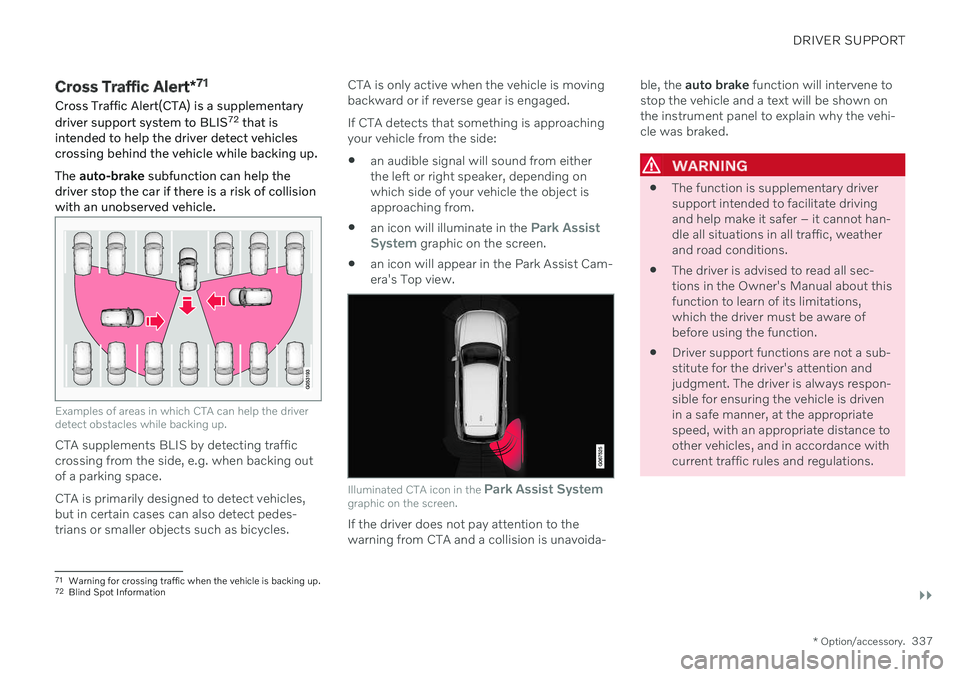
Examples of areas in which CTA can help the driver detect obstacles while backing up.
CTA supplements BLIS by detecting traffic crossing from the side, e.g. when backing outof a parking space. CTA is primarily designed to detect vehicles, but in certain cases can also detect pedes-trians or smaller objects such as bicycles. CTA is only active when the vehicle is movingbackward or if reverse gear is engaged. If CTA detects that something is approaching your vehicle from the side:
an audible signal will sound from eitherthe left or right speaker, depending onwhich side of your vehicle the object isapproaching from.
an icon will illuminate in the
Park Assist
System graphic on the screen.
an icon will appear in the Park Assist Cam- era's Top view.
Illuminated CTA icon in the
Park Assist System
graphic on the screen.
If the driver does not pay attention to the warning from CTA and a collision is unavoida- ble, the
auto brake function will intervene to
stop the vehicle and a text will be shown onthe instrument panel to explain why the vehi-cle was braked.
WARNING
The function is supplementary driver support intended to facilitate drivingand help make it safer – it cannot han-dle all situations in all traffic, weatherand road conditions.
The driver is advised to read all sec-tions in the Owner's Manual about thisfunction to learn of its limitations,which the driver must be aware ofbefore using the function.
Driver support functions are not a sub-stitute for the driver's attention andjudgment. The driver is always respon-sible for ensuring the vehicle is drivenin a safe manner, at the appropriatespeed, with an appropriate distance toother vehicles, and in accordance withcurrent traffic rules and regulations.
71
Warning for crossing traffic when the vehicle is backing up.
72 Blind Spot Information
Page 342 of 687
DRIVER SUPPORT
* Option/accessory.
340
Cross Traffic Alert *75
messages
A number of messages related to Cross Traffic Alert (CTA) may be displayed in the instrument panel. Several examples are provi-ded below.
Message Meaning
Blind spot sensor Service requiredThe system is not functioning as intended. Contact a workshop
A
.
Blind spot system off Trailer attachedBLIS B
and CTA have been deactivated because a trailer has been connected to the vehicle's electrical system.
A An authorized Volvo workshop is recommended.
B Blind Spot Information System
A text message can be erased by briefly press- ing the
button in the center of the right-
side steering wheel keypad. If a message cannot be erased, contact a workshop A
.
Related information
Cross Traffic Alert
* (p. 337)
BLIS
* (p. 333)
Cross Traffic Alert
* limitations (p. 338)
75
Warning for crossing traffic when the vehicle is backing up.
Page 343 of 687

DRIVER SUPPORT
* Option/accessory.341
Road Sign Information *
The Road Sign Information (RSI 76
) function
can help the driver observe speed-related road signs.
Examples of signs that can be detected 77
.
If the vehicle passes a speed limit sign, it will be displayed in the instrument panel and the head-up display *.
NOTE
In certain markets, the Road Sign Informa- tion * function is only available in combina-
tion with Sensus Navigation *.
WARNING
The function is supplementary driver support intended to facilitate drivingand help make it safer – it cannot han-dle all situations in all traffic, weatherand road conditions.
The driver is advised to read all sec-tions in the Owner's Manual about thisfunction to learn of its limitations,which the driver must be aware ofbefore using the function.
Driver support functions are not a sub-stitute for the driver's attention andjudgment. The driver is always respon-sible for ensuring the vehicle is drivenin a safe manner, at the appropriatespeed, with an appropriate distance toother vehicles, and in accordance withcurrent traffic rules and regulations.
Related information
Driver support systems (p. 272)
Activating or deactivating Road Sign Infor- mation
* (p. 342)
Road Sign Information
* display (p. 342)
Road Sign Information and SensusNavigation
* (p. 343)
Speed limit and speed camera warningsfrom Road Sign Information
* (p. 343)
Road Sign Information
* limitations
(p. 345)
76 Road Sign Information
77 Road signs differ according to market ‒ the illustrations shown here are just some examples.
Page 344 of 687

DRIVER SUPPORT
* Option/accessory.
342
Activating or deactivating Road Sign Information *
The Road Sign Information (RSI 78
) function is
optional – the driver can choose to have the function activated or deactivated.
Activate or deactivate the function using this button inthe center display's Functionview.
GREEN button indicator light – the func- tion is activated.
GRAY button indicator light – the functionis deactivated.
Related information
Road Sign Information
* (p. 341)
Road Sign Information
* limitations
(p. 345)
Road Sign Information * display
Road Sign Information (RSI 79
) displays road
signs in different ways depending on the sign and situation.
Example 80
of registered speed information.
When the function has registered a speed limit sign, the sign will be displayed as a sym-bol in the instrument panel and a coloredmarking will be shown in the speedometer'sspeed scale. If the vehicle is equipped with Sensus Navigation *, speed-related information will
also be retrieved from map data, which means that the instrument panel can display orchange information about speed limits even if the vehicle has not passed a speed-relatedsign.
Signs for "School" and "Children
playing"
If the warning sign 80
"School" or "Children play-ing" is included in the satel- lite navigator's map data 81
, a
symbol of this type will be displayed in the instrumentpanel.
Related information
Road Sign Information
* (p. 341)
Road Sign Information
* limitations
(p. 345)
78 RSI: Road Sign Information.
79 Road Sign Information
80 Road signs differ according to market ‒ the illustrations shown here are just examples.
81 Only vehicles with Sensus Navigation *.
Page 345 of 687

DRIVER SUPPORT
}}
* Option/accessory.343
Road Sign Information and Sensus Navigation*
If the vehicle is equipped with Sensus Navigation*, speed-related information will be
provided in the following situations:
In cases where the speed limit is given indirectly, e.g. signs for highways or othermajor roads.
If a previously detected speed sign isdeemed to be no longer valid and no newsign has been passed.
NOTE
In certain markets, the Road Sign Informa- tion
* function is only available in combina-
tion with Sensus Navigation *.
NOTE
If a downloaded third-party app is used for navigation, there is no support for speed-related information.
Related information
Road Sign Information
* (p. 341)
Speed limit and speed camera warnings from Road Sign Information *
There are sub-functions for Road Sign Infor- mation (RSI 82
) that can alert the driver if the
speed limit has been exceeded or if there are speed cameras nearby.
Example of speed camera and speed limit informa- tion in the instrument panel.
Speed Limit WarningWhen Speed Warning is acti- vated, the symbol for the cur-rent speed limit in the instru- ment panel 83
will flash tem-
porarily if that speed is excee- ded.
The driver can be alerted if the vehicle is exceeding a detected speed limit and isapproaching a speed camera.
Speed Limit Warning warns the driver if the
vehicle's speed has exceeded the applicable speed limit or the preset Speed Limiter speed.The warning will be repeated once afterabout 1 minute in that speed limit area if thedriver does not slow down. A new warning and message indicating that the speed limit has been exceeded will be pro-vided only when the vehicle has entered anew/different speed limit area.
NOTE
For an audible alert to be provided if the speed is exceeded, the Speed Limit
Warning function must be activated and
the Road Sign Audio Warning sub-func-
tion must be On. Audible alerts are provi-
ded if the vehicle's speed exceeds the speed displayed by Road Sign Informationin the instrument panel.
82 Road Sign Information
83 Road signs differ by market – the illustration shown here is just an example.