display VOLVO XC70 2003 User Guide
[x] Cancel search | Manufacturer: VOLVO, Model Year: 2003, Model line: XC70, Model: VOLVO XC70 2003Pages: 257, PDF Size: 5.33 MB
Page 138 of 257

2003 VOLVO XC70
downshift will not occur until the speed has decreased enough to allow t\
he lower gear to be used.
l If you slow down to a very low speed, the transmission will automaticall\
y shift down.
l When starting in the (MAN)ual position, 3rd gear is the highest gear t\
hat may be selected.
NOTE: Kickdown (see previous page) does not function when the transmission is in the manual shift
(geartronic) mode. The gear selector must be in the D (Drive) positi\
on.
W Winter/Wet driving mode - enhanced vehicle traction
l Mode W will function only if the gear selector is in the (D)rive posit\
ion.
l Press the button at the base of the gear selector to engage/disengage th\
is driving mode (see
illustration).
l An LED in the button will light up to indicate that W is engaged and this will also be displayed in the
instrument panel (see
page 27).
l This mode may be selected for starting/moving off on slippery roads.
pg. 94 All Wheel Drive - option
All Wheel Drive (AWD) - general information
Your Volvo can be equipped with permanent All Wheel Drive, which means t\
hat power is distributed
automatically between the front and rear wheels. Under normal driving co\
nditions, most of the engine's
power is directed to the front wheels. However, if there is any tendency\
for the front wheels to spin, an
electronically controlled coupling distributes power to the wheels that \
have the best traction.
Tire dimensions
Volvo recommends that you always drive on tires of the same brand, size,\
construction (radial), tread
file:///K|/ownersdocs/2003/2003_XC70/03xc70_06a.htm (15 of 22)12/30/20\
06 4:18:00 PM
Page 153 of 257

2003 VOLVO XC70
Cold weather precautions
If you wish to check your car before the approach of cold weather, the f\
ollowing advice is worth noting:
l Make sure that the engine coolant contains 50 percent antifreeze. Any ot\
her mixture will reduce
freeze protection. This gives protection against freezing down to -31°\
F (-35°C). See section "Coolant".
The use of "recycled" antifreeze is not approved by Volvo. Different typ\
es of antifreeze must not
be mixed.
l Volvo recommends using only genuine Volvo antifreeze in your car's radia\
tor. Your local Volvo
retailer stocks plenty of Volvo engine coolant to protect your car durin\
g cold weather.
l Try to keep the fuel tank well filled - this prevents the formation of condensation in the tank. \
In
addition, in extremely cold weather conditions it is worthwhile to add f\
uel line de-icer before refueling.
l The viscosity of the engine oil is important. Oil with low viscosity (thinner oil) improves cold-
weather starting as well as decreasing fuel consumption while the engine\
is warming up. For winter use,
5W-30 oil, particularly the synthetic type *, is recommended. Be sure to\
use good quality oil but do not
use this cold-weather oil for hard driving or in warm weather. See section "Engine oil" for more
information.
l The load placed on the battery is greater during the winter since the windshield wipers, lighting, etc\
.
are used more often. Moreover, the capacity of the battery decreases as \
the temperature drops. In very
cold weather, a poorly charged battery can freeze and be damaged. It is \
therefore advisable to check the
state of charge more frequently and spray an anti-rust oil on the batter\
y posts.
l Volvo recommends the use of snow tires on all four wheels for winter dri\
ving - see section "Wheels
and tires".
l To prevent the washer fluid reservoir from freezing, add washer solvents\
containing antifreeze (see
page 130 for the location of the washer fluid reservoir). This is important sin\
ce dirt is often splashed on
the windshield during winter driving, requiring the frequent use of the \
washers and wipers. The Volvo
Washer Solvent should be diluted as follows:
Down to 14° F (-10° C): 1 part washer solvent and 4 parts water \
Down to 5° F (-15° C): 1 part washer solvent and 3 parts water
Down to 0° F (-18° C): 1 part washer solvent and 2 parts water
Down to -18° F (-28° C): 1 part washer solvent and 1 part water \
l Use Volvo Teflon Lock Spray in the locks.
NOTE: Avoid the use of de-icing sprays as they can cause damage to the locks.
W Winter/Wet driving mode - enhanced vehicle traction
l Mode W will only function if the gear selector is in the (D)rive posit\
ion.
l Press the button at the base of the gear selector to engage/disengage th\
is driving mode (see
illustration).
l An LED in the button will light up to indicate that W is engaged and this will also be displayed in the
instrument panel (see
page 27).
l This mode may be selected for starting/moving off on slippery roads.
file:///K|/ownersdocs/2003/2003_XC70/03xc70_06b.htm (8 of 10)12/30/200\
6 4:18:00 PM
Page 170 of 257
2003 VOLVO XC70
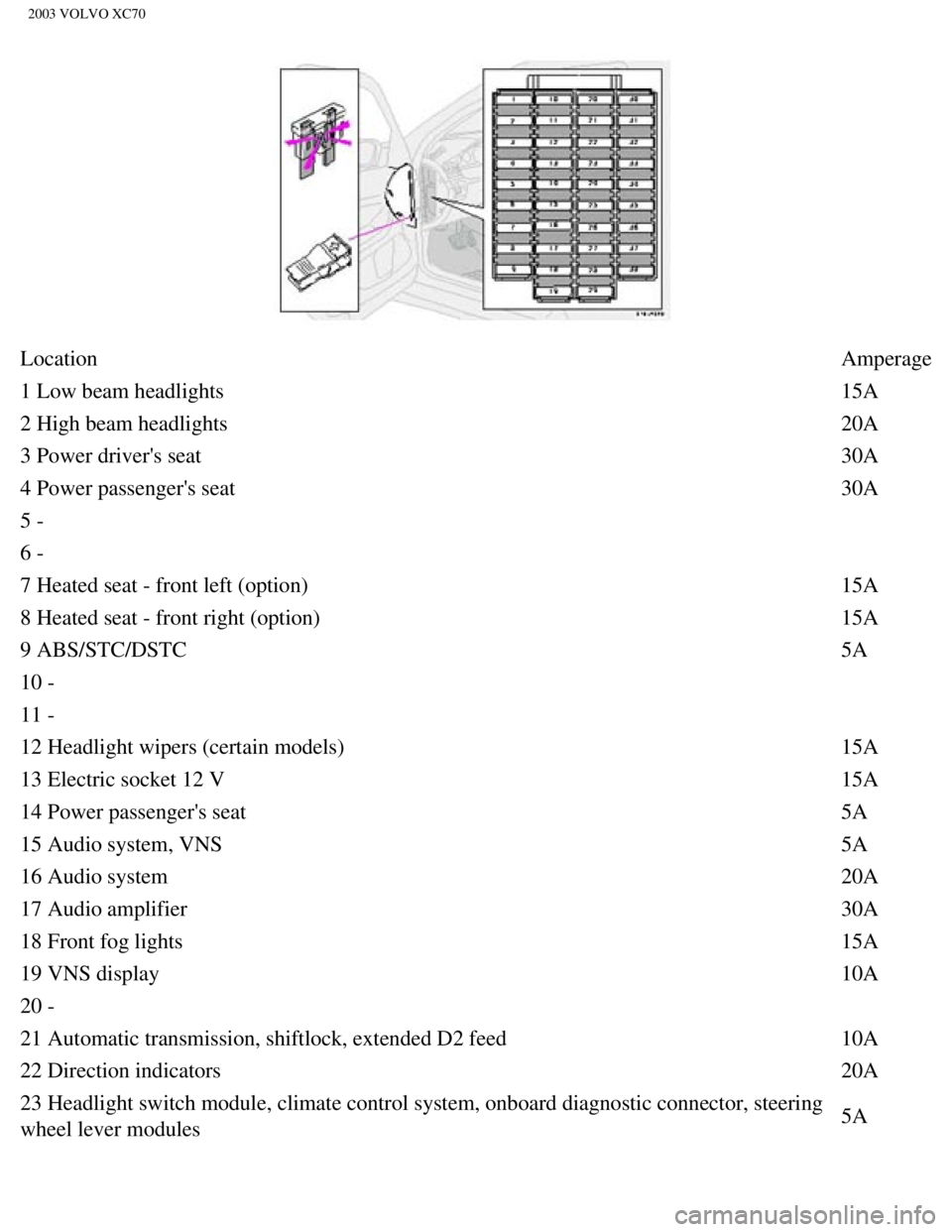
Location Amperage
1 Low beam headlights 15A
2 High beam headlights 20A
3 Power driver's seat 30A
4 Power passenger's seat 30A
5 -
6 -
7 Heated seat - front left (option) 15A
8 Heated seat - front right (option) 15A
9 ABS/STC/DSTC 5A
10 -
11 -
12 Headlight wipers (certain models) 15A
13 Electric socket 12 V 15A
14 Power passenger's seat 5A
15 Audio system, VNS 5A
16 Audio system 20A
17 Audio amplifier 30A
18 Front fog lights 15A
19 VNS display 10A
20 -
21 Automatic transmission, shiftlock, extended D2 feed 10A
22 Direction indicators 20A
23 Headlight switch module, climate control system, onboard diagnostic c\
onnector, steering
wheel lever modules 5A
file:///K|/ownersdocs/2003/2003_XC70/03xc70_08a.htm (5 of 21)12/30/200\
6 4:18:03 PM
Page 215 of 257
2003 VOLVO XC70
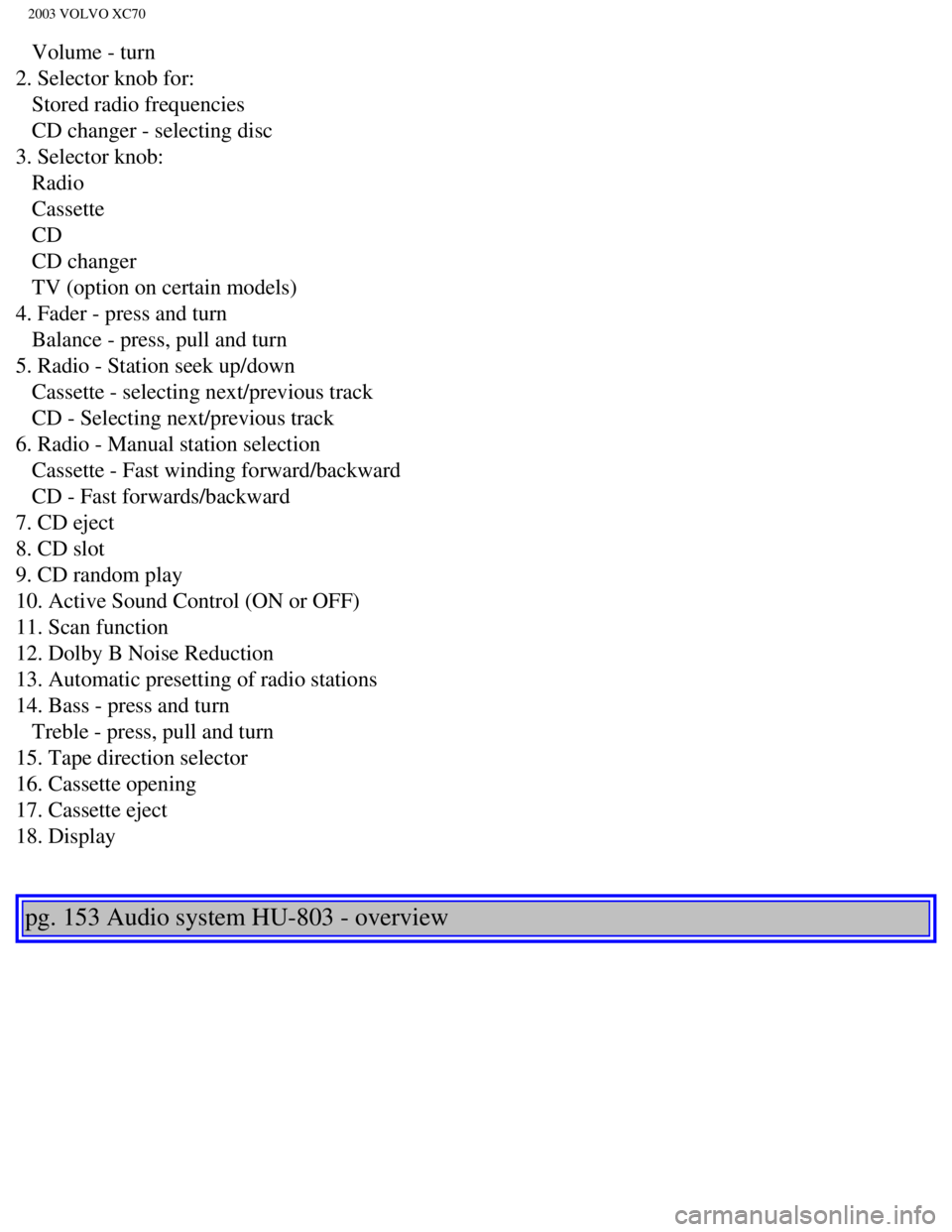
Volume - turn
2. Selector knob for:
Stored radio frequencies
CD changer - selecting disc
3. Selector knob:
Radio
Cassette
CD
CD changer
TV (option on certain models)
4. Fader - press and turn
Balance - press, pull and turn
5. Radio - Station seek up/down
Cassette - selecting next/previous track
CD - Selecting next/previous track
6. Radio - Manual station selection
Cassette - Fast winding forward/backward
CD - Fast forwards/backward
7. CD eject
8. CD slot
9. CD random play
10. Active Sound Control (ON or OFF)
11. Scan function
12. Dolby B Noise Reduction
13. Automatic presetting of radio stations
14. Bass - press and turn
Treble - press, pull and turn
15. Tape direction selector
16. Cassette opening
17. Cassette eject
18. Display
pg. 153 Audio system HU-803 - overview
file:///K|/ownersdocs/2003/2003_XC70/03xc70_10a.htm (2 of 10)12/30/200\
6 4:18:06 PM
Page 217 of 257
2003 VOLVO XC70
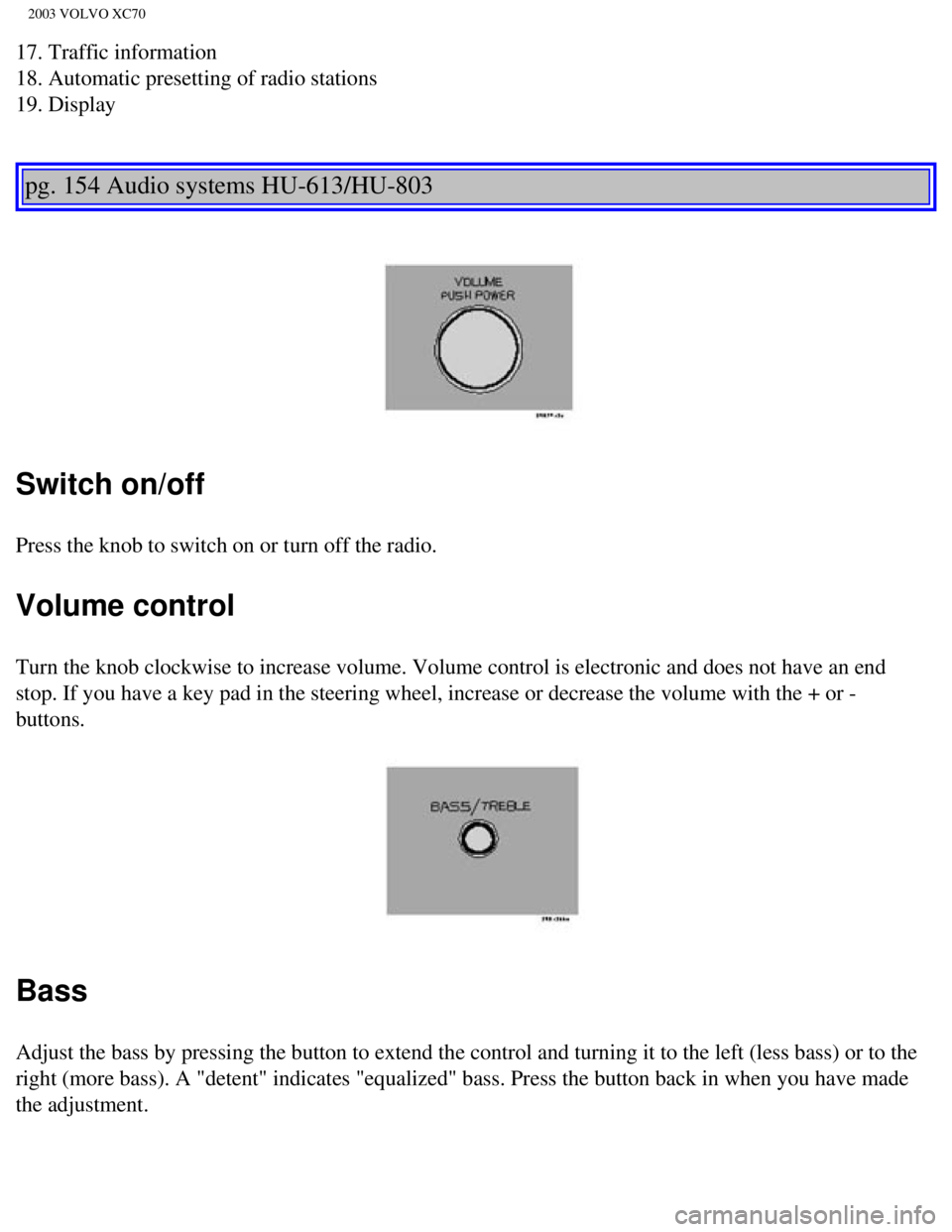
17. Traffic information
18. Automatic presetting of radio stations
19. Display
pg. 154 Audio systems HU-613/HU-803
Switch on/off
Press the knob to switch on or turn off the radio.
Volume control
Turn the knob clockwise to increase volume. Volume control is electronic\
and does not have an end
stop. If you have a key pad in the steering wheel, increase or decrease \
the volume with the + or -
buttons.
Bass
Adjust the bass by pressing the button to extend the control and turning\
it to the left (less bass) or to the
right (more bass). A "detent" indicates "equalized" bass. Press the bu\
tton back in when you have made
the adjustment.
file:///K|/ownersdocs/2003/2003_XC70/03xc70_10a.htm (4 of 10)12/30/200\
6 4:18:06 PM
Page 218 of 257
 or to the right (more treble")
2003 VOLVO XC70
Treble
Adjust the treble by pressing the button to extend the control, pulling \
it out as far as possible, and then
turning it to the left (less treble) or to the right (more treble). \
A "detent" indicates "equalized" treble.
Press the button back in when you have made the adjustment.
Band selector
Turn "SOURCE" knob to select FM or AM. The station and band are displaye\
d. You can also select
cassette deck, CD, or optional CD changer with this knob.
Active sound control (ASC)
The ASC (Active Sound Control) automatically adapts volume to vehicle \
speed. Press the ASC button
(HU-613) for several seconds to switch this function ON or OFF. This f\
unction is included in the
Advanced User Mode on the HU-803 equipped with this feature.
"ASC ON" or "ASC OFF" will be shown in the display for several seconds. \
pg. 155 Audio systems HU-613/HU-803
Fader - Balance front/rear
Adjust front/rear speaker balance by pressing the button to extend the c\
ontrol and turning it to the left
(more sound from the rear speakers) or to the right (more sound from \
the front speakers). A "detent"
file:///K|/ownersdocs/2003/2003_XC70/03xc70_10a.htm (5 of 10)12/30/200\
6 4:18:06 PM
Page 219 of 257

2003 VOLVO XC70
indicates "equalized" balance. Press the button back in when you have ma\
de the adjustment.
Balance right/left
Adjust left/right speaker balance by pressing the button to extend the c\
ontrol, pulling it out as far as
possible and then turning it to the left (more sound from the left spea\
kers) or to the right (more sound
from the right speakers). A "detent" indicates "equalized" balance. Pre\
ss the button back in when you
have made the adjustment.
A - Setting station
Press the left side of the button to select lower frequencies and the ri\
ght side for higher frequencies. Set
frequencies are displayed.
B - Station seek up/down
Press the left side (lower frequency) or right side (higher frequency\
) of the button to start the seek
function. The radio seeks the next audible station and tunes it in. Repe\
at the procedure to continue the
seek function.
Audio system controls on the steering wheel
Station seek up/down
file:///K|/ownersdocs/2003/2003_XC70/03xc70_10a.htm (6 of 10)12/30/200\
6 4:18:06 PM
Page 220 of 257
 or the SOURCE button (HU-8")
2003 VOLVO XC70
If you have a key pad in the steering wheel press the right or left arro\
w to switch between preset stations.
Scan function
Press the SCAN button (HU-613) or the SOURCE button (HU-803) to star\
t the station scan function.
When a station is found, scanning stops for several seconds, after which\
scanning will continue.
Press the SCAN or SOURCE button when a station has been found if you wou\
ld like to listen to that
station and to discontinue the scan function.
pg. 156 Audio systems HU-613/HU-803 - radio
A - Automatic station preset
This function seeks and stores up to 10 strong AM or FM stations in a se\
parate memory. This function is
especially useful in areas where you are not familiar with the radio sta\
tions.
1. Press in the "AUTO" button for at least 2 seconds. A number of strong\
signal stations (max. 10) from
the currently selected waveband are now stored automatically in the memo\
ry. An "A" and "AUTO" is
displayed. If there is no station with sufficient signal strength "NO ST\
ATION" is displayed.
2. Turn "1-20/DISC" button if you wish to change to another of the auto-\
stored stations.
Another auto-stored station is selected with each turn.
file:///K|/ownersdocs/2003/2003_XC70/03xc70_10a.htm (7 of 10)12/30/200\
6 4:18:06 PM
Page 221 of 257

2003 VOLVO XC70
Programming stations
1. Tune in the desired frequency.
2. Press the "1-20/DISC" button. Select a number by turning forwards or \
backwards. Press again to store
the selected frequency and station.
Preset
To choose a pre-set station, turn "1-20/DISC" button to the stored numbe\
r. The currently selected station
is displayed.
Radio Data System (RDS, also referred to as RBDS) -HU- 803
only
This feature, which may not work in your area, functions only with FM br\
oadcasts. The HU-803 radio in
your car is equipped with an advanced system allowing information from b\
roadcasters to be transmitted
visually, as text, together with the audio signal. This information is t\
hen decoded by the radio and made
available for several new and unique features.
The RDS or Radio Data System operates in the FM band only, and the infor\
mation transmitted is
supplied exclusively by participating broadcasters. Volvo has no control over the accuracy of the data
or information. Please refer to the following pages regarding specific d\
escriptions and operation of these
functions.
Coverage by local broadcasters may be limited at this time, but as the t\
echnology and benefits grow, you
will find the radio in your car is equipped to take advantage of this sy\
stem.
pg. 157 Audio systems HU-803 - radio
file:///K|/ownersdocs/2003/2003_XC70/03xc70_10a.htm (8 of 10)12/30/200\
6 4:18:06 PM
Page 222 of 257
 -HU- 803 only
This feature may not be apply in your area and only functions with FM br\
oadcasts. (See previous
page)
Push the \"TP\" button for traffic inform")
2003 VOLVO XC70
Traffic information (TP) -HU- 803 only
This feature may not be apply in your area and only functions with FM br\
oadcasts. (See previous
page)
Push the "TP" button for traffic information from RDS stations. "TP" is \
displayed when the function is
connected.
When the unit is in Cassette or CD mode, the FM radio function will seek\
in the background for a station
with a strong signal broadcasting traffic information. If a cassette or \
CD are playing when the radio
receives a traffic bulletin, that function is interrupted and the bullet\
in is broadcast with the volume pre-
selected for traffic information.
When the bulletin is finished the unit immediately returns to the previo\
usly set volume and continues
playing the cassette or CD.
l Traffic information can only be heard when TP is displayed.
l If only TP is displayed, this indicates that no traffic information is b\
eing received at the time.
l If you do not wish to listen to an ongoing traffic bulletin, press the "\
TP" button. The TP function will
remain active and the radio will continue to monitor traffic information\
.
l To turn the TP function off, press the TP button. TP is no longer shown in the display.
News on/off - HU-803 only
This feature may not apply in your area and only functions with FM broad\
casts. (See previous
page)
Press the "NEWS" button to activate the news function. The text NEWS is \
displayed. Press the "NEWS"
button again if you want to switch off the function.
As soon as a news broadcast begins, the news program will interrupt the \
Cassette, CD or CD changer.
If you do not wish to listen to the news program, press the "NEWS" butto\
n again. The news function
file:///K|/ownersdocs/2003/2003_XC70/03xc70_10a.htm (9 of 10)12/30/200\
6 4:18:06 PM