light VOLVO XC70 2004 Manual Online
[x] Cancel search | Manufacturer: VOLVO, Model Year: 2004, Model line: XC70, Model: VOLVO XC70 2004Pages: 241, PDF Size: 5.78 MB
Page 185 of 241

2004 VOLVO XC70
leave marks on the windshield or fail to wipe efficiently and cleanly.
To obtain maximum lifetime from a set of wiper blades, clean them with a\
stiff-bristle brush and warm,
soapy water as part of a normal car wash.
Replacement of tailgate wiper blade
Pull the wiper arm out away from the glass. Pull off the wiper blade out\
wards toward the tailgate. Press
the new wiper blade into place. Check that it is properly secured.
Headlight wiper blades (certain models)
Pull the wiper blade in the direction indicated by the arrow in the illu\
stration to remove it. Press the new
wiper blade into place. The long section of the blade should point towar\
d the grille. Check that the new
blade is properly attached to the wiper arm.
Contents | Top of Page
file:///K|/ownersdocs/2004/2004_XC70/04xc70_08b.htm (16 of 16)12/30/20\
06 4:33:06 PM
Page 195 of 241

2004 VOLVO XC70
Battery
Voltage: 12 Volt, capacity: 600 A/115 min reserve capacity.
The battery contains corrosive and poisonous acids. It is of the utmost \
importance that old batteries are
disposed of correctly. Your Volvo retailer can assist you in this matter\
.
Generator
Rated output: max. current: 140 A
Starter motor:
Output: 1.7 kW
Bulbs
Bulb US no. Power Socket
Headlights
- High beam HB360W -
- Low beam H7 55W -
Bi-Xenon headlights*
(option) 35W
D2R
Front parking lights 5W W2.1x9.5d
Front direction indicators (yellow) 21 W BAU 15d
Front fog lights H1 55 W -
- V70R H3 55 W -
Rear direction indicators (yellow) 21W BAU 15 s
Tail lights 67 5W BA 15 s
Brake lights 115621W BA 15 s
Backup lights 115621W BA 15 s
Rear fog light/rear parking lights 21/4W BA 15 s
License plate light - 5 W W 2.1x9.5d
Door step courtesy lights
Front -5W SV 8.5
Cargo area lights - 5 W SV 8.5
Glove compartment light -2 W BA 9s
Vanity mirror light(s) - 12V
1.2W -
file:///K|/ownersdocs/2004/2004_XC70/04xc70_09.htm (10 of 12)12/30/200\
6 4:33:07 PM
Page 196 of 241
 contain trace amounts of mercury. \
These bulbs should always be
disposed of by an authorized Volvo retailer")
2004 VOLVO XC70
Instrument lighting- 3 W W
2.1x9.5d
* Bi-Xenon headlight bulbs (option) contain trace amounts of mercury. \
These bulbs should always be
disposed of by an authorized Volvo retailer.
WARNING!
Bi-Xenon headlights (option) - due to the high voltage used by these h\
eadlights, these bulbs should
only be replaced by an authorized Volvo service technician.
All specifications are subject to change without prior notice.
pg. 151 On Call Roadside Assistance
Volvo On Call Roadside Assistance
Your new Volvo comes with a four-year On Call Roadside Assistance progra\
m. Additional information,
features, and benefits are described in a separate information package i\
n your glove compartment.
If you have misplaced your package, dial:
In the U.S.A.
1-800-63-VOLVO (1-800-638-6586)
In Canada:
1-800-263-0475
file:///K|/ownersdocs/2004/2004_XC70/04xc70_09.htm (11 of 12)12/30/200\
6 4:33:07 PM
Page 198 of 241
2004 VOLVO XC70
2 0 0 4
VOLVO XC70
Chapter 10 - Audio systems
pg. 153 Audio systems
HU-613 overview 154
HU-803 overview 155
Audio system
functions 156
Specifications 167
General information 168
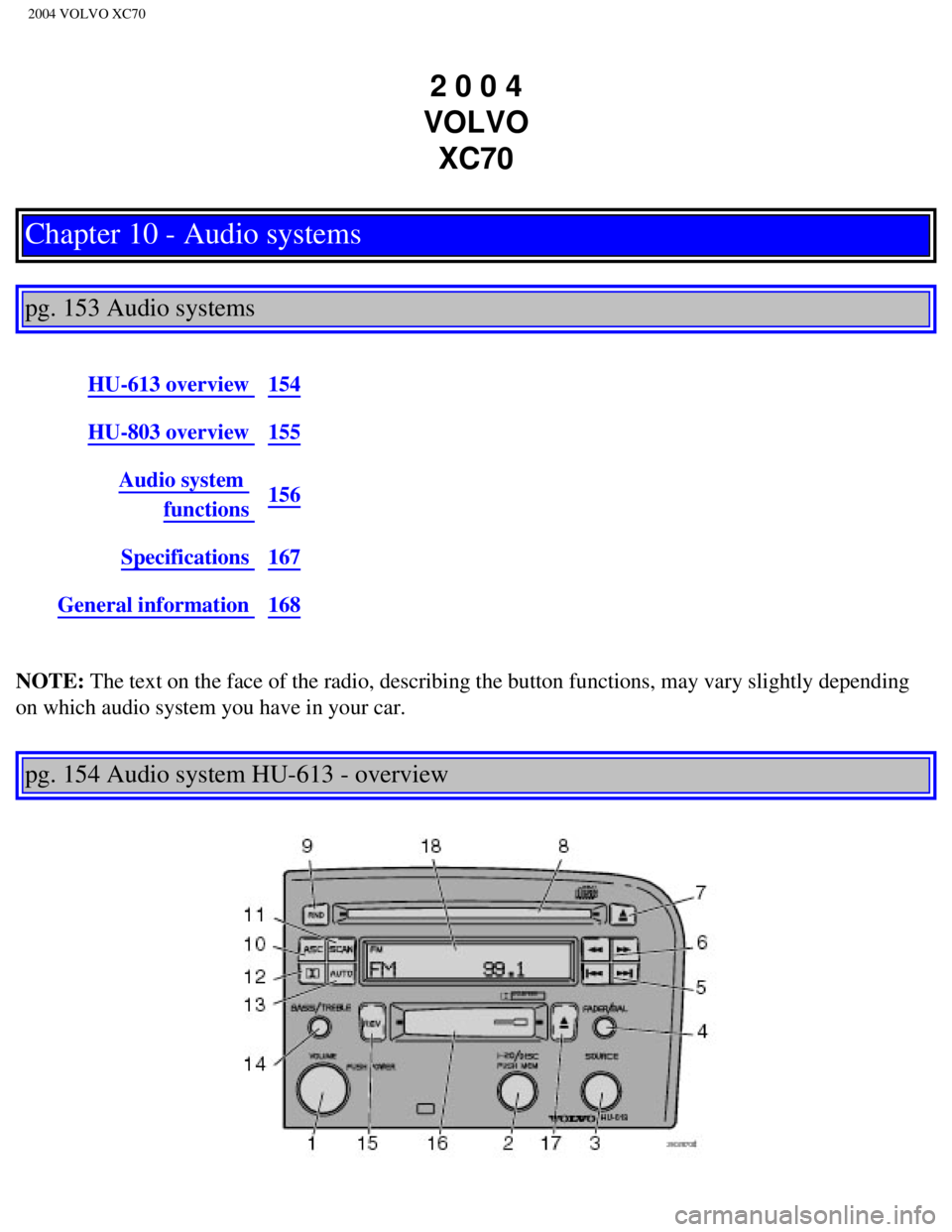
NOTE: The text on the face of the radio, describing the button functions, may\
vary slightly depending
on which audio system you have in your car.
pg. 154 Audio system HU-613 - overview
file:///K|/ownersdocs/2004/2004_XC70/04xc70_10a.htm (1 of 10)12/30/200\
6 4:33:08 PM
Page 219 of 241

2004 VOLVO XC70
Dolby noise reduction is manufactured under license from Dolby Laborator\
ies Licensing Corporation.
"Dolby", "Pro Logic" and the double-D symbol are trademarks of Dolby Lab\
oratories Licensing
Corporation. The Dolby Pro Logic Surround System is manufactured under l\
icence from Dolby
Laboratories Licensing Corporation.
CAUTION:
The optional supplementary amplifier (HU-803) may be mounted under the\
front passenger's seat. If the
floor of the car has become soaked for any reason, do not turn on the ra\
dio. This would cause damage to
the amplifier. Contact a Volvo retailer.
pg. 168 Audio systems - general information
Cassettes
l Store cassettes in their cases.
l Do not touch the tape surface with your fingers.
l Tapes should not be exposed to direct sunlight or extreme temperatures. \
l Keep tapes away from oil, grease and other contaminants.
l For optimal tape deck performance Volvo does not recommend the use of C-\
120 tapes.
l Take up slack using a pen or a pencil before inserting a cassette in the\
cassette slot.
Cassette cleaning
We recommend the use of the Volvo Cleaning Cassette available as a genui\
ne Volvo accessory. Regular
use improves sound quality, cleans vital parts and prevents tape tangle.\
Compact disc care
l Before using a new disc for the first time, remove any burrs in the cent\
er/outer edge by running the
stem of a pen or similar object around the hole/edge of the disc.
l Use high quality discs only.
l Keep the discs clean. Wipe them with a soft, clean, lint-free cloth, wor\
king from the center outwards.
If necessary, dampen the cloth with a neutral soap solution. Dry thoroug\
hly before using.
l Never use cleaning spray or antistatic liquid. Use only cleaners specifi\
cally made for CD's.
l Use discs of the correct size only (3.5" discs should never be used). \
l Do not put tape or labels on the disc itself.
l Volvo does not recommend the use of plastic outer rings on the disc.
file:///K|/ownersdocs/2004/2004_XC70/04xc70_10b.htm (12 of 13)12/30/20\
06 4:33:08 PM
Page 220 of 241

2004 VOLVO XC70
l Condensation may occur on discs/optical components of the changer in col\
d winter weather. The disc
can be dried with a clean, lint-free cloth. Optical components in the CD\
changer may, however, take up
to one hour to dry off.
l Never attempt to play a disc which is damaged in any way.
l When not in use, the discs should be stored in their covers. Avoid stori\
ng discs in excessive heat,
direct sunlight or dusty locations.
Volume control - Subwoofer
Turn the knob clockwise to increase volume. Turn the knob counterclockwi\
se to lower volume or switch
off the subwoofer.
Contents | Top of Page
file:///K|/ownersdocs/2004/2004_XC70/04xc70_10b.htm (13 of 13)12/30/20\
06 4:33:08 PM
Page 221 of 241
2004 VOLVO XC70
2 0 0 4
VOLVO XC70
HomeLink® Universal Transceiver (option)
pg. 169 HomeLink® Universal Transceiver (option)
HomeLink® Universal Transceiver
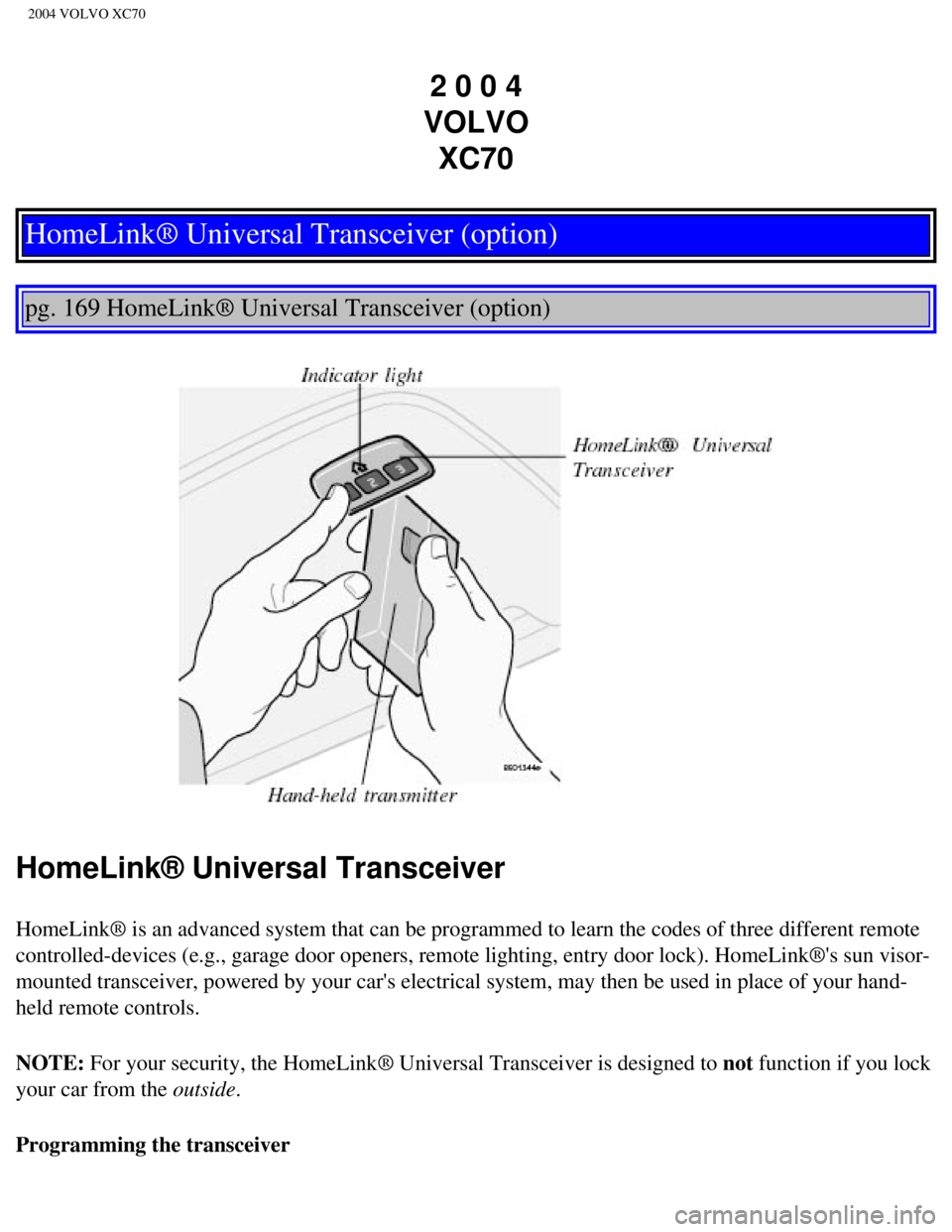
HomeLink® is an advanced system that can be programmed to learn the c\
odes of three different remote
controlled-devices (e.g., garage door openers, remote lighting, entry d\
oor lock). HomeLink®'s sun visor-
mounted transceiver, powered by your car's electrical system, may then b\
e used in place of your hand-
held remote controls.
NOTE: For your security, the HomeLink® Universal Transceiver is designed to\
not function if you lock
your car from the outside.
Programming the transceiver
file:///K|/ownersdocs/2004/2004_XC70/04xc70_11.htm (1 of 5)12/30/2006 \
4:33:09 PM
Page 222 of 241
\
before programming the
HomeLink® Universal Transceiver.
2. Begin by erasing all 3 factory default channels.")
2004 VOLVO XC70
1. The ignition switch must be turned to the "accessory" position (II)\
before programming the
HomeLink® Universal Transceiver.
2. Begin by erasing all 3 factory default channels. Hold down the two ou\
tside buttons (buttons 1 and 3 in
the illustration) on the HomeLink® Universal Transceiver for about 2\
0 seconds, until HomeLink®'s
indicator light begins to flash. Then release the buttons.
3. Hold your hand-held transmitter (garage door opener, for example) 2\
to 5 in. (5 to 12 cm) away from
the HomeLink® surface, keeping the indicator light in view. For place\
ment questions, contact
HomeLink® toll-free 1-800-355-3515 (Internet:
www.HomeLink.com).
4. Using two hands, push and hold both your hand-held transmitter's butt\
on and the transceiver button
you wish to program. The indicator light will flash first slowly, then r\
apidly. Rapid flashing tells you the
HomeLink® button has been successfully programmed. Release both butto\
ns.
5. If you are programming a rolling code-equipped device (e.g., garage \
door opener or entry door lock),
refer to "Programming rolling codes" on the next page to complete the pr\
ogramming process.
Repeat steps 3 and 4 to program the other two transceiver buttons.
If, after several attempts, you are unable to successfully train the Hom\
eLink® Universal Transceiver to
learn your hand-held transmitter's signal, contact HomeLink® toll-fre\
e 1-800-355-3515 (Internet:
www.
HomeLink.com).
WARNING!
l If you use HomeLink® to open a garage door or gate, be sure no one is\
near the gate or door while
it is in motion.
l Do not use the HomeLink® Universal Transceiver with any garage door o\
pener that lacks safety
"stop" and "reverse" features as required by federal safety standards. (\
This includes any garage door
opener model manufactured before April 1, 1982) A garage door opener th\
at cannot "detect" an
object, signalling the door to "stop" and "reverse" does not meet curren\
t federal safety standards.
Using a garage door opener without these features increases the risk of \
serious injury or death. For
more information on this matter, call toll-free 1-800-355-3515 (Interne\
t:
www.HomeLink.com).
pg. 170 HomeLink® Universal Transceiver (option)
file:///K|/ownersdocs/2004/2004_XC70/04xc70_11.htm (2 of 5)12/30/2006 \
4:33:09 PM
Page 223 of 241

2004 VOLVO XC70
NOTE - Canadian residents:
During programming, your hand-held transmitter may automatically stop tr\
ansmitting. To successfully
train HomeLink®, continue to hold the HomeLink® button. At the sam\
e time, repeatedly press and hold
your hand-held transmitter's button at two-second intervals until HomeLink® has learned your
transmitter's code. The HomeLink® indicator light will flash first sl\
owly, and then rapidly to indicate
that the button has been successfully programmed.
Determining if your garage door uses a rolling code
Determine, in one of the following ways, if your garage door uses a roll\
ing code system and is
manufactured after 1996:
l Refer to the garage door opener owner's manual for verification.
l If your hand-held transmitter appears to program the HomeLink® Univer\
sal Transceiver but the
programmed button does not activate the garage door, your garage door op\
ener may have a rolling code.
l Press the programmed HomeLink® button. If the garage door opener has \
the rolling code feature, the
HomeLink® indicator light flashes rapidly and then glows steadily aft\
er approximately 2 seconds.
To train a rolling code garage door opener, follow these instructions after programming the desired
transceiver button according to "Programming the transceiver." The help \
of a second person may make
training easier.
1. Locate the training button on the garage door opener motor head unit. The location and color of the
training button may vary. If you encounter difficulty, refer to the gara\
ge door opener owner's manual or
call toll-free 1-800-355-3515 (Internet:
www.HomeLink.com).
2. Press the "training" button on the garage door opener motor head unit\
until the "training" light comes
on.
3. Press and release the programmed HomeLink® button. Press and relea\
se the programmed
HomeLink® button a second time to complete the training process. Some garage door openers may
require you to do this procedure a third time to complete the training.
The programmed button on your HomeLink® Universal Transceiver should \
now operate your garage
door opener. The original hand-held transmitter can also be used, as des\
ired, to operate the garage door.
The remaining two HomeLink® buttons can be programmed in the same way\
. In the event of any
problems in programming the HomeLink® Universal Transceiver, call tol\
l-free 1-800-355-3515
(Internet:
www.HomeLink.com).
Operating the HomeLink® Universal Transceiver
Once programmed, the HomeLink® Universal Transceiver can be used in p\
lace of your hand-held
transmitters.
file:///K|/ownersdocs/2004/2004_XC70/04xc70_11.htm (3 of 5)12/30/2006 \
4:33:09 PM
Page 224 of 241
 or\
the engine must be running. Press
the programmed HomeLink® button to activate the garage door, driveway\
ga")
2004 VOLVO XC70
To operate, the key must be turned to the "accessory" position (II) or\
the engine must be running. Press
the programmed HomeLink® button to activate the garage door, driveway\
gate, security lighting, home
security system, etc.
Your original hand-held transmitters may, of course, be used at any time\
.
Erasing programmed buttons
Individual buttons cannot be erased. To erase all three programmed butto\
ns:
1. Turn the ignition key to the "accessory" position (II).
2. Hold down the two outside buttons on the HomeLink® Universal Trans\
ceiver for about 20 seconds,
until HomeLink®'s indicator light begins to flash.
3. Release both buttons.
The HomeLink® buttons can be reprogrammed using the procedures descri\
bed on the previous page.
(HomeLink® information continues on the next page)
pg. 171 HomeLink® Universal Transceiver (option)
Reprogramming a single HomeLink® button
1. Press and hold the desired HomeLink® button. Do not release the button until step 3 has been
completed.
2. When the indicator light begins to flash slowly (after approximately\
20 seconds), position your hand-
held transmitter 2 to 5 in. (5 to 12 cm) away from the HomeLink® su\
rface.
3. Press and hold the hand-held transmitter button. The HomeLink® ind\
icator light will flash first
slowly, then rapidly. When the indicator light flashes rapidly, release \
both buttons.
The previously programmed device has now been erased and the new device \
can be activated by
pressing the HomeLink® button that has just been programmed. This pro\
cedure will not affect any other
programmed HomeLink® buttons.
NOTE:
l Retain the original transmitter(s) for future programming procedures (\
e.g., if you purchase a new car).
file:///K|/ownersdocs/2004/2004_XC70/04xc70_11.htm (4 of 5)12/30/2006 \
4:33:09 PM