radio VOLVO XC70 2004 Owners Manual
[x] Cancel search | Manufacturer: VOLVO, Model Year: 2004, Model line: XC70, Model: VOLVO XC70 2004Pages: 241, PDF Size: 5.78 MB
Page 117 of 241

2004 VOLVO XC70
Exterior courtesy lights
Home Safe System
When you leave your car at night, you can make use of the courtesy light\
ing function:
l Remove the key from the ignition switch.
l Pull the direction indicator lever towards the steering wheel (as when \
activating the high beams).
l Exit the car and lock the doors.
The headlights, parking lights, license plate lights and the lights in t\
he sideview mirrors will now come
on and remain on for 30, 60 or 90 seconds (the time interval is at your\
discretion and can be changed by
an authorized Volvo retailer).
Approach lighting
When approaching the car at night, press the yellow button in the centra\
l locking remote control (see
illustration on
page 77). This lights up the interior courtesy light, parking lights, license \
plate lights and
the lights in the sideview mirrors.
pg. 77 Remote keyless entry system
Remote keyless entry system
Your car is equipped with two coded remote control transmitters with int\
egrated ignition keys called
Key Integrated Remote (KIR). These transmitters use a radio frequency \
that will enable you to lock/
unlock all doors and the tailgate from a distance of 10-15 feet (3-5 me\
ters).
file:///K|/ownersdocs/2004/2004_XC70/04xc70_05.htm (3 of 11)12/30/2006\
4:33:01 PM
Page 198 of 241
2004 VOLVO XC70
2 0 0 4
VOLVO XC70
Chapter 10 - Audio systems
pg. 153 Audio systems
HU-613 overview 154
HU-803 overview 155
Audio system
functions 156
Specifications 167
General information 168
NOTE: The text on the face of the radio, describing the button functions, may\
vary slightly depending
on which audio system you have in your car.
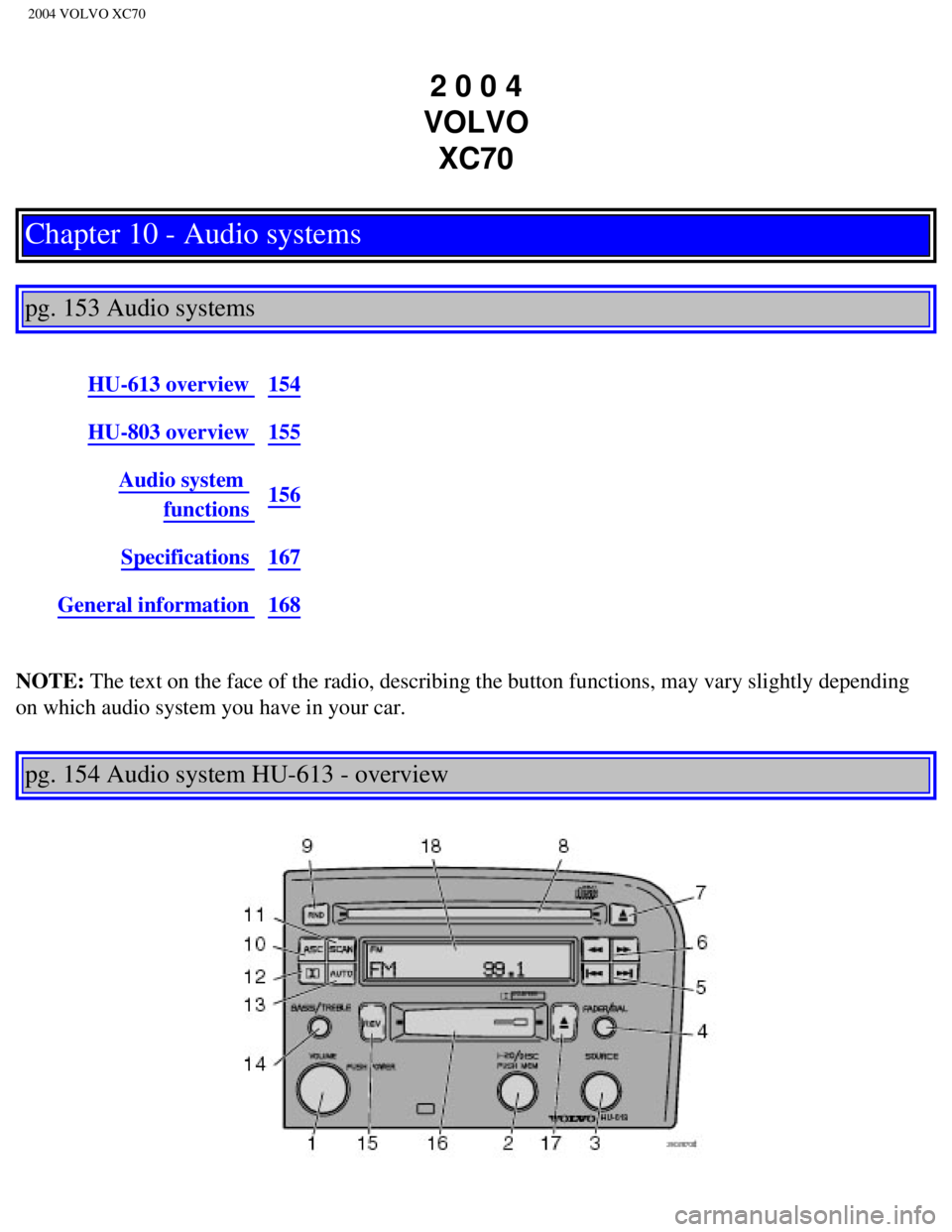
pg. 154 Audio system HU-613 - overview
file:///K|/ownersdocs/2004/2004_XC70/04xc70_10a.htm (1 of 10)12/30/200\
6 4:33:08 PM
Page 199 of 241

2004 VOLVO XC70
1. On/off - press
Volume - turn
2. Selector knob for:
Stored radio frequencies
CD changer - selecting disc
3. Selector knob:
Radio
Cassette
CD
CD changer
TV (option on certain models)
4. Fader - press and turn
Balance - press, pull and turn
5. Radio - Station seek up/down
Cassette - selecting next/previous track
CD - Selecting next/previous track
6. Radio - Manual station selection
Cassette - Fast winding forward/backward
CD - Fast forwards/backward
7. CD eject
8. CD slot
9. CD random play
10. Active Sound Control (ON or OFF)
11. Scan function
12. Dolby B Noise Reduction
13. Automatic presetting of radio stations
14. Bass - press and turn
Treble - press, pull and turn
15. Tape direction selector
16. Cassette opening
17. Cassette eject
18. Display
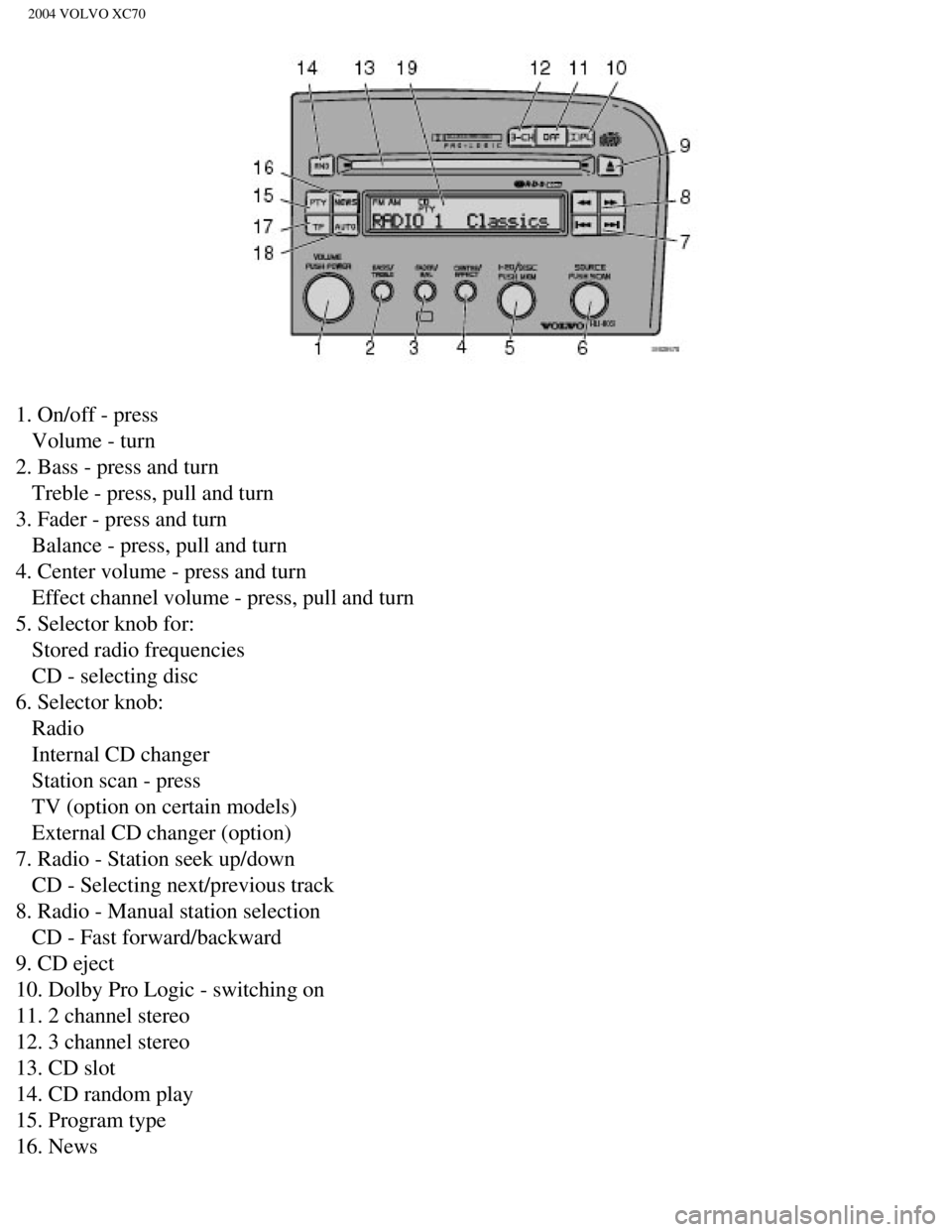
pg. 155 Audio system HU-803 - overview
file:///K|/ownersdocs/2004/2004_XC70/04xc70_10a.htm (2 of 10)12/30/200\
6 4:33:08 PM
Page 200 of 241
2004 VOLVO XC70
1. On/off - press
Volume - turn
2. Bass - press and turn
Treble - press, pull and turn
3. Fader - press and turn
Balance - press, pull and turn
4. Center volume - press and turn
Effect channel volume - press, pull and turn
5. Selector knob for:
Stored radio frequencies
CD - selecting disc
6. Selector knob:
Radio
Internal CD changer
Station scan - press
TV (option on certain models)
External CD changer (option)
7. Radio - Station seek up/down
CD - Selecting next/previous track
8. Radio - Manual station selection
CD - Fast forward/backward
9. CD eject
10. Dolby Pro Logic - switching on
11. 2 channel stereo
12. 3 channel stereo
13. CD slot
14. CD random play
15. Program type
16. News
file:///K|/ownersdocs/2004/2004_XC70/04xc70_10a.htm (3 of 10)12/30/200\
6 4:33:08 PM
Page 201 of 241

2004 VOLVO XC70
17. Traffic information
18. Automatic presetting of radio stations
19. Display
pg. 156 Audio systems HU-613/HU-803
Switch on/off
Press the knob to switch on or turn off the radio.
Volume control
Turn the knob clockwise to increase volume. Volume control is electronic\
and does not have an end
stop. If you have a key pad in the steering wheel, increase or decrease \
the volume with the + or -
buttons.
Bass
Adjust the bass by pressing the button to extend the control and turning\
it to the left (less bass) or to the
right (more bass). A "detent" indicates "equalized" bass. Press the bu\
tton back in when you have made
the adjustment.
file:///K|/ownersdocs/2004/2004_XC70/04xc70_10a.htm (4 of 10)12/30/200\
6 4:33:08 PM
Page 203 of 241

2004 VOLVO XC70
indicates "equalized" balance. Press the button back in when you have ma\
de the adjustment.
Balance right/left
Adjust left/right speaker balance by pressing the button to extend the c\
ontrol, pulling it out as far as
possible and then turning it to the left (more sound from the left spea\
kers) or to the right (more sound
from the right speakers). A "detent" indicates "equalized" balance. Pre\
ss the button back in when you
have made the adjustment.
A - Setting station
Press the left side of the button to select lower frequencies and the ri\
ght side for higher frequencies. Set
frequencies are displayed.
B - Station seek up/down
Press the left side (lower frequency) or right side (higher frequency\
) of the button to start the seek
function. The radio seeks the next audible station and tunes it in. Repe\
at the procedure to continue the
seek function.
Audio system controls on the steering wheel
Station seek up/down
file:///K|/ownersdocs/2004/2004_XC70/04xc70_10a.htm (6 of 10)12/30/200\
6 4:33:08 PM
Page 204 of 241
 or the SOURCE button (HU-8")
2004 VOLVO XC70
If you have a key pad in the steering wheel press the right or left arro\
w to switch between preset stations.
Scan function
Press the SCAN button (HU-613) or the SOURCE button (HU-803) to star\
t the station scan function.
When a station is found, scanning stops for several seconds, after which\
scanning will continue.
Press the SCAN or SOURCE button when a station has been found if you wou\
ld like to listen to that
station and to discontinue the scan function.
pg. 158 Audio systems HU-613/HU-803 - radio
A - Automatic station preset
This function seeks and stores up to 10 strong AM or FM stations in a se\
parate memory. This function is
especially useful in areas where you are not familiar with the radio sta\
tions.
1. Press in the "AUTO" button for at least 2 seconds. A number of strong\
signal stations (max. 10) from
the currently selected waveband are now stored automatically in the memo\
ry. An "A" and "AUTO" is
displayed. If there is no station with sufficient signal strength "NO ST\
ATION" is displayed.
2. Turn "1-20/DISC" button if you wish to change to another of the auto-\
stored stations.
Another auto-stored station is selected with each turn.
file:///K|/ownersdocs/2004/2004_XC70/04xc70_10a.htm (7 of 10)12/30/200\
6 4:33:08 PM
Page 205 of 241

2004 VOLVO XC70
Programming stations
1. Tune in the desired frequency.
2. Press the "1-20/DISC" button. Select a number by turning forwards or \
backwards. Press again to store
the selected frequency and station.
Preset
To choose a pre-set station, turn "1-20/DISC" button to the stored numbe\
r. The currently selected station
is displayed.
Radio Data System (RDS, also referred to as RBDS) -HU- 803
only
This feature, which may not work in your area, functions only with FM br\
oadcasts. The HU-803 radio in
your car is equipped with an advanced system allowing information from b\
roadcasters to be transmitted
visually, as text, together with the audio signal. This information is t\
hen decoded by the radio and made
available for several new and unique features.
The RDS or Radio Data System operates in the FM band only, and the infor\
mation transmitted is
supplied exclusively by participating broadcasters. Volvo has no control over the accuracy of the data
or information. Please refer to the following pages regarding specific d\
escriptions and operation of these
functions.
Coverage by local broadcasters may be limited at this time, but as the t\
echnology and benefits grow, you
will find the radio in your car is equipped to take advantage of this sy\
stem.
pg. 159 Audio systems HU-803 - radio
Traffic information (TP) -HU- 803 only
file:///K|/ownersdocs/2004/2004_XC70/04xc70_10a.htm (8 of 10)12/30/200\
6 4:33:08 PM
Page 206 of 241

Push the \"TP\" button for traffic information from RDS stations. \"TP\" is \
disp")
2004 VOLVO XC70
This feature may not be apply in your area and only functions with FM br\
oadcasts. (See previous
page)
Push the "TP" button for traffic information from RDS stations. "TP" is \
displayed when the function is
connected.
When the unit is in Cassette or CD mode, the FM radio function will seek\
in the background for a station
with a strong signal broadcasting traffic information. If a cassette or \
CD are playing when the radio
receives a traffic bulletin, that function is interrupted and the bullet\
in is broadcast with the volume pre-
selected for traffic information.
When the bulletin is finished the unit immediately returns to the previo\
usly set volume and continues
playing the cassette or CD.
l Traffic information can only be heard when is displayed.
l If only TP is displayed, this indicates that no traffic information is b\
eing received at the time.
l If you do not wish to listen to an ongoing traffic bulletin, press the "\
TP" button. The TP function will
remain active and the radio will continue to monitor traffic information\
.
l To turn the TP function off, press the TP button. TP is no longer shown in the display.
News on/off - HU-803 only
This feature may not apply in your area and only functions with FM broad\
casts. (See previous
page)
Press the "NEWS" button to activate the news function. The text NEWS is \
displayed. Press the "NEWS"
button again if you want to switch off the function.
As soon as a news broadcast begins, the news program will interrupt the \
Cassette, CD or CD changer.
If you do not wish to listen to the news program, press the "NEWS" butto\
n again. The news function
will remain active and the radio will continue to monitor news programs.\
file:///K|/ownersdocs/2004/2004_XC70/04xc70_10a.htm (9 of 10)12/30/200\
6 4:33:08 PM
Page 208 of 241
2004 VOLVO XC70
pg. 160 Audio systems HU-803 - radio
Program types (HU-803 only)
Program type Text displayed
News News
Information Inform
Sports Sports
Talk Talk
Rock Rock
Classic rock Cls_Rock
Adult hits Adlt_Hit
Soft rock Soft_Rck
Top 40 Top_40
Country Country
Oldies Oldies
Soft Soft
Nostalgia Nostalga
Jazz Jazz
Classical Classicl
Rhythm and Blues R_&_B
Soft Rhythm and
Blues Soft_R&B
Foreign language Language
Religious music Rel_Musc
Religious talk Rel_Talk
Personality Persnlty
Public Public
College College
--
--
-
Weather Weather
file:///K|/ownersdocs/2004/2004_XC70/04xc70_10b.htm (1 of 13)12/30/200\
6 4:33:08 PM