reset VOLVO XC70 2007 Owners Manual
[x] Cancel search | Manufacturer: VOLVO, Model Year: 2007, Model line: XC70, Model: VOLVO XC70 2007Pages: 283, PDF Size: 9.63 MB
Page 5 of 283

2007 Volvo XC70
coating. If this is not done, the Malfunction Indicator Light (see page 48) will illuminate.
pg. 6 Introduction
Important warnings
Accessory Installation
l We strongly recommend that Volvo owners install only genuine, Volvo-appr\
oved accessories, and that
accessory installations be performed only by the factory-trained technic\
ians at your authorized Volvo retailer.
l Genuine Volvo accessories are tested to ensure compatibility with the pe\
rformance, safety, and emission
systems in your vehicle. Additionally, your authorized Volvo retailer kn\
ows where accessories may and may not
be safely installed in your Volvo. In all cases, please consult your aut\
horized Volvo retailer before installing any
accessory in or on your vehicle.
l Accessories that have not been approved by Volvo may or may not be speci\
fically tested for compatibility with
your vehicle. Additionally, an inexperienced installer may not be famili\
ar with some of your vehicle's systems.
l Any of your vehicle's performance and safety systems could be adversely \
affected if you install accessories that
Volvo has not tested, or if you allow accessories to be installed by som\
eone unfamiliar with your vehicle.
l Damage caused by unapproved or improperly installed accessories may not \
be covered by your new vehicle
warranty. See your Warranty and Service Records Information booklet for \
more warranty information. Volvo
assumes no responsibility for death, injury, or expenses that may result\
from the installation of non-genuine
accessories.
Driver Distraction
l Driver distraction results from driver activities that are not directly \
related to controlling the vehicle in the
driving environment. Your new Volvo is, or can be, equipped with many fe\
ature-rich entertainment and
communication systems. These include hands-free cellular telephones, nav\
igation systems, and multipurpose audio
systems. You may also own other portable electronic devices for your own\
convenience. When used properly and
safely, they enrich the driving experience. Improperly used, any of thes\
e could cause a distraction.
l For all of these systems, we want to provide the following warning that \
reflects the strong Volvo concern for
your safety:
l Never use these devices or any feature of your vehicle in a way that dis\
tracts you from the task of driving safely.
Distraction can lead to a serious accident.In addition to this general w\
arning, we offer the following guidance
regarding specific newer features that may be found in your vehicle:
l Never use a hand-held cellular telephone while driving. Some jurisdictio\
ns prohibit cellular telephone use by a
driver while the vehicle is moving.
l If your vehicle is equipped with a navigation system, set and make chang\
es to your travel itinerary only with the
vehicle parked.
l Never program your audio system while the vehicle is moving. Program rad\
io presets with the vehicle parked,
and use your programmed presets to make radio use quicker and simpler.
l Never use portable computers or personal digital assistants while the ve\
hicle is moving.
A driver has a responsibility to do everything possible to ensure his or\
her own safety and the safety of passengers
in the vehicle and others sharing the roadway. Avoiding distractions is \
part of that responsibility.
pg. 7 Introduction
file:///K|/ownersdocs/2007/2007_XC70/07xc70_00.htm (5 of 6)12/30/2006 \
5:51:24 PM
Page 48 of 283
2007 Volvo XC70
33. Moonroof control 70
34. Seat belt reminder
12
35. Rearview mirror
67
36. Lock button, for all doors
114
37. Rear seat power window cut-out button
66
38. Controls, power windows
65
39. Controls, sideview mirrors
69
40. Four-C active chassis system (R-models only)
135
pg. 46 Instruments and controls
Instrument panel
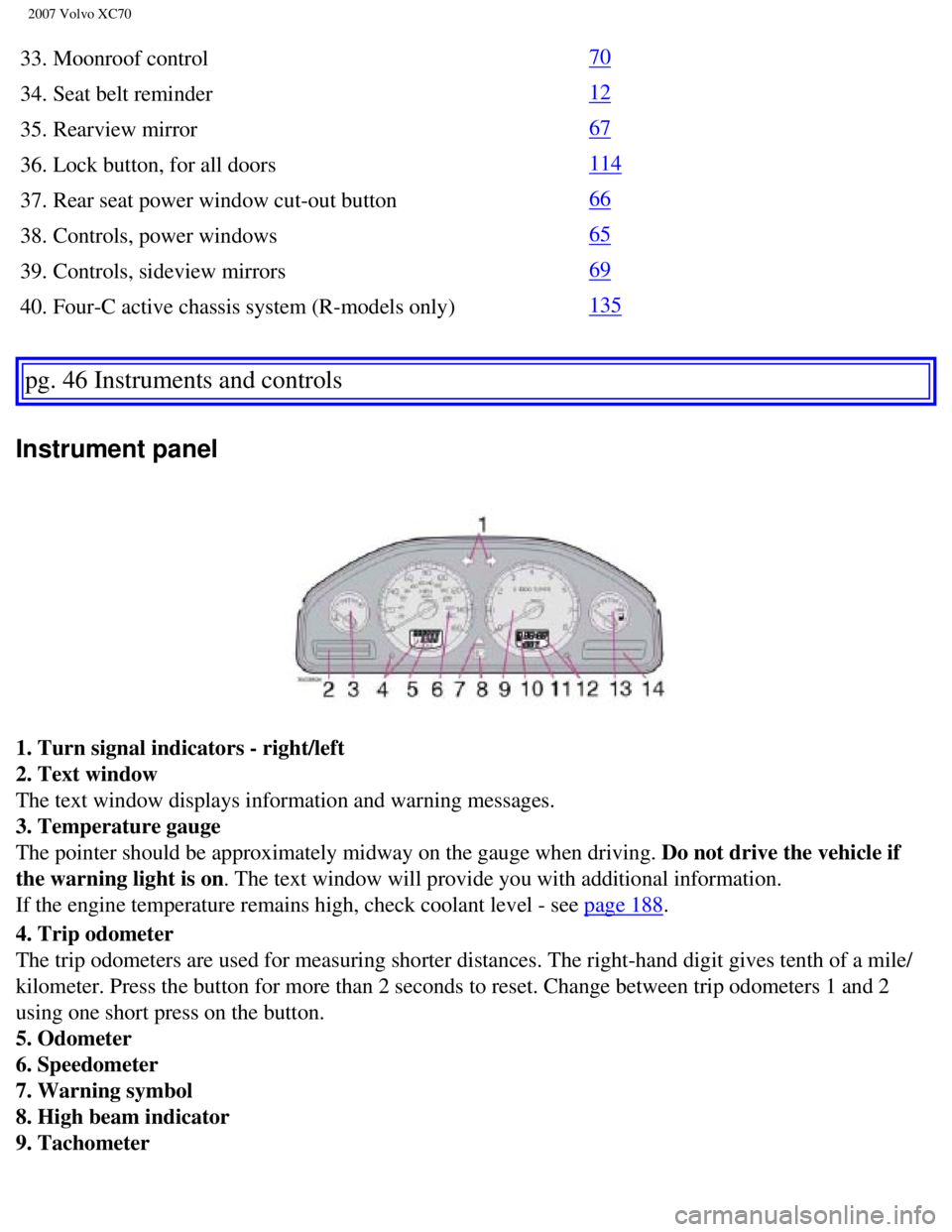
1. Turn signal indicators - right/left
2. Text window
The text window displays information and warning messages.
3. Temperature gauge
The pointer should be approximately midway on the gauge when driving. Do not drive the vehicle if
the warning light is on. The text window will provide you with additional information.
If the engine temperature remains high, check coolant level - see
page 188.
4. Trip odometer
The trip odometers are used for measuring shorter distances. The right-h\
and digit gives tenth of a mile/
kilometer. Press the button for more than 2 seconds to reset. Change bet\
ween trip odometers 1 and 2
using one short press on the button.
5. Odometer
6. Speedometer
7. Warning symbol
8. High beam indicator
9. Tachometer
file:///K|/ownersdocs/2007/2007_XC70/07xc70_02.htm (4 of 35)12/30/2006\
5:51:30 PM
Page 54 of 283
2007 Volvo XC70
TIME FOR REGULAR SERVICEThis message will be displayed at 7,500 mile (12,000 km)
intervals, after 750 hours of driving or after 12 months,
whichever occurs first, to remind the driver that the service
interval has been exceeded. The message will be displayed
for 2 minutes each time the vehicle is started until reset by
the servicing retailer.
OIL LEVEL LOW - FILL OIL
1 2Check the oil level and top up if necessary. See page 191.
OIL LEVEL LOW - STOP SAFELY
1 3Stop as soon as possible and switch off the engine, check the
oil level and top up if necessary. See
page 191.
OIL LEVEL LOW - STOP ENGINE
1 3Stop as soon as possible and switch off the engine, check the
oil level and top up if necessary. See
page 191.
OIL LEVEL LOW - SEE MANUAL
1 3Stop as soon as possible and switch off the engine, check the
oil level and top up if necessary. See
page 191.
STC/DSTC SPIN CONTROL OFF The stability system's spin control function has been turned
off. See
page 139 for details.
1. These messages apply to R-models only.
2. Yellow warning symbol, see
page 47.
3. Red warning symbol, see
page 47.
pg. 52 Instruments and controls
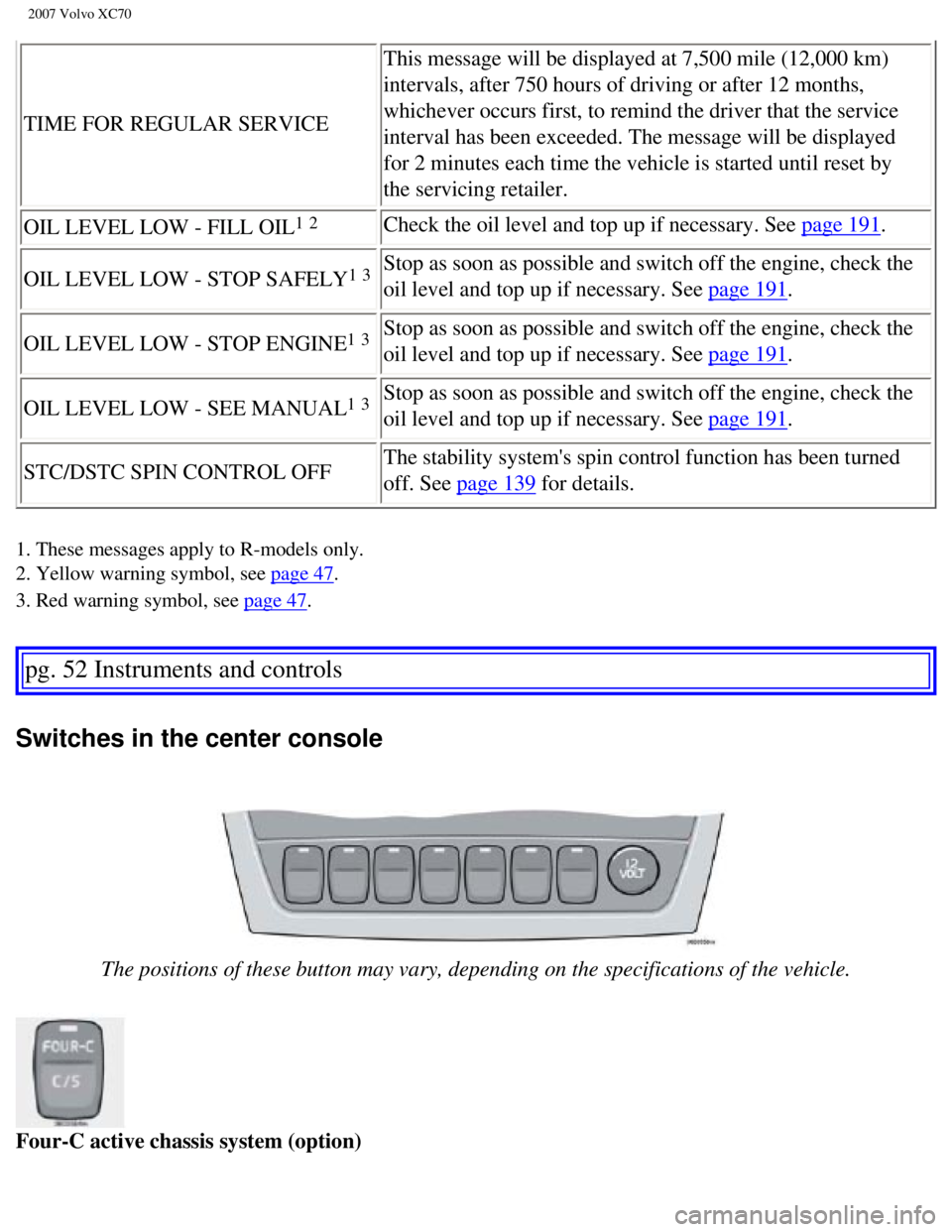
Switches in the center console
The positions of these button may vary, depending on the specifications \
of the vehicle.
Four-C active chassis system (option)
file:///K|/ownersdocs/2007/2007_XC70/07xc70_02.htm (10 of 35)12/30/200\
6 5:51:30 PM
Page 65 of 283

2007 Volvo XC70
Trip computer
The trip computer stores information gathered from several systems in yo\
ur vehicle and has four menus
that can be displayed in the text window.
l Driving distance on current fuel reserve
l Average fuel consumption
l Current fuel consumption
l Average speed
l Current speed in mph (Canadian models only)
l STC/DSTC (see page 125 for detailed information)
NOTE: Warning messages from the vehicle's monitoring systems will override th\
e trip computer
function. If a warning message is displayed in the text window while you\
are using the trip computer,
you must acknowledge the message by pressing button A. Press button A ag\
ain to return to the trip
computer function.
Trip computer controls and functions
The four
1 trip computer functions can be accessed by twisting control B one step \
at a time in either
direction. Twisting a fifth
2 time returns you to the original function. The trip computer can be res\
et
(current data will be erased from system memory) by pressing RESET (b\
utton C).
1. Driving distance on current fuel reserve
This function shows the approximate distance that can be driven on the f\
uel remaining in the tank. This
calculation is based on average fuel consumption during the last 20 mile\
s (30 km) of driving and the
amount of fuel remaining in the tank when the reading was taken. When th\
e driving distance on current
fuel reserve is less than 12 miles (20 km), "----" will be displayed i\
n the text window.
2. Average fuel consumption
This value indicates fuel consumption since the last time the trip compu\
ter was reset (by pressing
RESET, button C). When the engine is switched off, information on fuel \
consumption is stored and
remains in system memory until the RESET (button C) is pressed again.
3. Current fuel consumption
This value indicates the current fuel consumption, based on readings tak\
en once per second. When the
file:///K|/ownersdocs/2007/2007_XC70/07xc70_02.htm (21 of 35)12/30/200\
6 5:51:30 PM
Page 66 of 283
")
2007 Volvo XC70
vehicle is not moving, "----" will be displayed.
4. Average speed
This value indicates average speed since the last time the trip computer\
was reset (by pressing RESET,
button C). When the engine is switched off, information on average spee\
d is stored and remains in
system memory until the RESET (button C) is pressed again.
5. Current speed in miles per hour (Canadian models only)
This function provides the driver with an instantaneous conversion of th\
e vehicle's current speed from
km/h to mph.
NOTE: Trip computer readings may vary slightly depending on the circumference \
of the tires on the
vehicle and driving style.
1. Five functions on Canadian models.
2. A sixth time on Canadian models.
pg. 62 Instruments and controls
Cruise control
Cruise control
The cruise control panel is located on the left side of the steering whe\
el hub and may differ in
appearance, depending on the model.
Engaging cruise control
Press the CRUISE button. CRUISE will be displayed in the information win\
dow in the instrument panel.
NOTE: This does not set the vehicle's speed.
file:///K|/ownersdocs/2007/2007_XC70/07xc70_02.htm (22 of 35)12/30/200\
6 5:51:30 PM
Page 95 of 283

2007 Volvo XC70
WARNING!
l Because the driver's seat can be adjusted with the ignition off, childre\
n should never be left
unattended in the vehicle.
l Movement of the seat can be STOPPED at any time by pressing any button o\
n the power seat
control panel.
l Do not adjust the seat while driving. The seat should be adjusted so tha\
t the brake pedal can be
depressed fully. In addition, position the seat as far rearward as comfo\
rt and control allow.
l The seat rails on the floor must not be obstructed in any way when the s\
eat is in motion.
Programming the memory (option)
Three different seating and door mirror positions can be stored in the d\
river seat's memory.
The following example explains how button 1 can be programmed. Buttons 2\
and 3 can be programmed
in the same way.
To program (store) a seat position in button 1:
- Move the seat to the desired position using the seat adjustment contro\
ls (see the previous page).
- Press and hold down the MEM (memory) button.
- With the MEM button depressed, press button 1 briefly to store the sea\
t's current position.
To move the seat to the position that it was in when button 1 was progra\
mmed:
Press and hold down button 1 until the seat stops moving.
As a safety precaution, the seat will stop automatically if the button i\
s released before the seat has
reached the preset position.
pg. 88 Interior
Interior lighting
file:///K|/ownersdocs/2007/2007_XC70/07xc70_04.htm (5 of 29)12/30/2006\
5:51:33 PM
Page 156 of 283

The spin control function is designed to help prevent the drive wheels f\
rom spinning while the vehicle is
accelerating.
Under certain circumstances, such as wh")
2007 Volvo XC70
Spin control (SC)
The spin control function is designed to help prevent the drive wheels f\
rom spinning while the vehicle is
accelerating.
Under certain circumstances, such as when driving with snow chains, or d\
riving in deep snow or loose
sand, it may be advisable to temporarily switch off this function for ma\
ximum tractive force.
Temporarily switching off Spin control
V70R
Press the DSTC button on the center control panel (see
page 50) for at least a half a second. "DSTC
SPIN CONTROL OFF" will be displayed and the indicator light in the butto\
n will go out.
Other V70 models
- Turn the thumb-wheel (1) on the left-side steering wheel lever until\
the STC/DSTC menu is displayed.
- Hold down the RESET button (2) to toggle between STC/DSTC SPIN CONTR\
OL ON or OFF.
NOTE:
l The message STC/DSTC SPIN CONTROL OFF indicates that the stability syste\
m's spin control
function has temporarily been switched off.
l The stability control indicator light will illuminate and remain on until spin control has been
reactivated.
l STC/DSTC ON indicates that all system functions are active1.
l The spin control function is automatically enabled each time the engine \
is started.
1. V70R only: the indicator light in the DSTC button will illuminate to \
indicate that all stability system functions
are on.
pg. 140 Starting and driving
Stability system
file:///K|/ownersdocs/2007/2007_XC70/07xc70_06.htm (25 of 41)12/30/200\
6 5:51:38 PM
Page 260 of 283

If the vehicle is equipped with the key pad in the steering wheel press \
the right or left arrow to switch
between preset stations.
Storing statio")
2007 Volvo XC70
Steering wheel key pad (option)
If the vehicle is equipped with the key pad in the steering wheel press \
the right or left arrow to switch
between preset stations.
Storing stations
To store a selected station under one of the station setting buttons 1-6\
:
- Tune to the desired station.
- Press the button under which the station is to be stored and keep it d\
epressed. The audio system sound
will be interrupted for a few seconds and STORED will appear in the disp\
lay. The station is now stored.
A total of 30 stations can be stored; 6 stations each in AM1, AM2, FM1, \
FM2, and FM3.
file:///K|/ownersdocs/2007/2007_XC70/07xc70_11.htm (8 of 22)12/30/2006\
5:51:47 PM
Page 261 of 283

2007 Volvo XC70
Storing stations automatically
This function automatically searches for and stores up to 10 strong AM o\
r FM stations in a separate
memory. If more than ten stations are found, the ten strongest ones are \
stored. This function is especially
useful in areas in which you are not familiar with radio stations or the\
ir frequencies.
To use the AUTO function:
- Select radio mode using the AM or FM buttons, or by turning the SOURCE\
knob.
- Start the search by pressing AUTO for more than 2 seconds.
- AUTO appears in the display and a number of stations with strong signa\
ls
pg. 233 Audio
Radio functions HU-650/HU-850
(max. 10) from the selected frequency band will be stored in the auto-\
store memory. If there are no
stations with sufficient signal strength, NO STATION is displayed.
- Press the AUTO button or the arrow keys on the optional steering wheel\
controls briefly to select the
stored stations.
When the radio is in auto-store mode, AUTO is shown in the display. AUTO\
disappears when you
return to the normal radio mode.
Return to the normal radio mode by pressing the AM, FM, or EXIT button. \
To return to the Auto-store mode, press the AUTO button briefly.
pg. 234 Audio
RBDS functions HU-650/HU-850
Radio Broadcast Data System - RBDS
This feature, which may not be available in your area, functions only wi\
th FM broadcasts. The radio in
your vehicle is equipped with an advanced system allowing information fr\
om broadcasters to be
transmitted visually, as text, together with the audio signal. This info\
rmation is then decoded by the
radio and made available for several new and unique features.
The RBDS or Radio Broadcast Data System operates in the FM band only, an\
d the information
transmitted is supplied exclusively by participating broadcasters. Volvo\
has no control over the accuracy
of the data or information.
Coverage by local broadcasters may be limited at this time, but as the t\
echnology and benefits grow, you
will find the radio in your vehicle is equipped to take advantage of thi\
s system.
PI (Program Information) Seek:
When an FM station has been stored as a preset, the radio also stores RB\
DS program information if it is
file:///K|/ownersdocs/2007/2007_XC70/07xc70_11.htm (9 of 22)12/30/2006\
5:51:47 PM
Page 262 of 283

2007 Volvo XC70
available. When the preset is selected at a later time, the radio tries \
to access updated program
information. In weak signal areas, there may be a delay before the stati\
on becomes audible. During this
delay, "PI seek" will be displayed and there will be no sound.
PI seek can be interrupted by pressing EXIT.
Radio text
Certain RBDS stations broadcast program information, which can be shown \
in the display. The text will
be shown twice in the display.
To start this function:
Press the FM button for several seconds.
To deactivate this function:
Press FM briefly. Station information will be shown twice in the display\
.
Alarm
Alarms bulletins are transmitted automatically by certain RBDS stations.\
The function cannot be
deactivated.
"Alarm!" is shown in the radio display when an alarm message is sent. Th\
e function is used to warn
motorists of serious accidents, etc.
pg. 235 Audio
RBDS functions HU-650/HU-850
Program type/station format - PTY
The PTY function allows you to find stations whose programs suit your ta\
ste. Use the PTY function to
select among the different station formats shown in the list.
To select a station format:
- Select radio mode using the FM button, or by turning the SOURCE knob. \
- Turn the SOURCE knob, select PTY and press SOURCE.
- Turn the SOURCE knob, select a station format from the list and press \
SOURCE to confirm the
selected station format. The PTY (station format) of the selected stat\
ion is now shown in the display.
NOTE: Not all RBDS radio stations have PTY designations.
Station formats Format Display text
Off PTY OFF
News NEWS
Current affairs AFFAIRS
file:///K|/ownersdocs/2007/2007_XC70/07xc70_11.htm (10 of 22)12/30/200\
6 5:51:47 PM