start button VOLVO XC70 2013 Owner´s Manual
[x] Cancel search | Manufacturer: VOLVO, Model Year: 2013, Model line: XC70, Model: VOLVO XC70 2013Pages: 382, PDF Size: 6.78 MB
Page 101 of 382
03 Your driving environment
Lighting
03
99
Glove compartment lightingThe glove compartment lighting switches on/
off automatically when the lid is opened/
closed.
Overhead courtesy lightingThe passenger compartment lighting is
switched on and off automatically when button
(3) is in the neutral position.
The lighting comes on and remains on for
30 seconds if:
•the vehicle is unlocked from the outside
with the key or remote control
•the engine is switched off and the ignition
is in mode 0.
The lighting switches off when:
•the engine is started
•the vehicle is locked from the outside.
The lighting comes on and remains on for two
minutes if one of the doors is open.
The passenger compartment lighting can be
switched on and off manually within 30 minutes
after the vehicle has been unlocked.
If the lighting is switched on manually and the
vehicle is locked, the courtesy lighting will
switch off automatically after one minute.
Cargo area lightingThe cargo area lighting comes on automatically
when the tailgate is opened.
Home safe lighting
When you leave your vehicle at night, you can
make use of the home safe lighting function to
illuminate the area in front of the vehicle.
1. Remove the key from the ignition slot to put
the ignition in mode 0 (see page 83 for
information about the ignition modes).
2. Pull the turn signal lever as far as possible
towards the steering wheel and release it.
3. Exit the vehicle and lock the doors.
The headlights, parking lights, turn signals,
lights in the door mirrors, license plate lights,
and footwell lighting will illuminate and remain
on for 30
3, 60 or 90 seconds. The time interval
can be set in MY CAR under Settings
Car
settings
Light settingsHome safe light
duration. See page 189 for a description of
the menu system.
Approach lighting
Approach lighting is activated by pressing the
approach light button on the remote key (see
the illustration on page 57).
When the function has been activated, the
parking lights, indicator lights, door mirror
lights, license plate lighting, dome lighting and
door step lighting come on.
The time interval for this lighting can be set by
pressing MY CAR and going to Car settings
Light settingsApproach light
duration. See page 189 for a description of
the menu system.
3Factory setting
Page 108 of 382
03 Your driving environment
Mirrors
03
106
reverse, the mirrors will automatically return to
their original position.
This function can be activated/deactivated in
MY CAR under Settings
Car settings
Side mirror settingsIn reverse gear tilt
left mirror or
In reverse gear tilt right
mirror. See page 189 for information about
the MY CAR menu system.
Automatic retraction when lockingWhen the vehicle is locked/unlocked with the
remote key the door mirrors are automatically
retracted/extended.
The function can be activated/deactivated in
MY CAR under Settings
Car settings
Side mirror settingsRetract side mirrors
when locking. See page 189 for a description
of the menu system.
Resetting to neutralMirrors that have been moved out of position
by an external force must be electrically reset
to the neutral position for electric retracting/
extending to work.
•Retract the mirrors with the L and R but-
tons.
•Fold them out again with the L and R but-
tons.
The mirrors are now reset in neutral position.
Home safe and approach lightingThe light on the door mirrors comes on when
approach lighting or home safe lighting is
selected, see page 99.
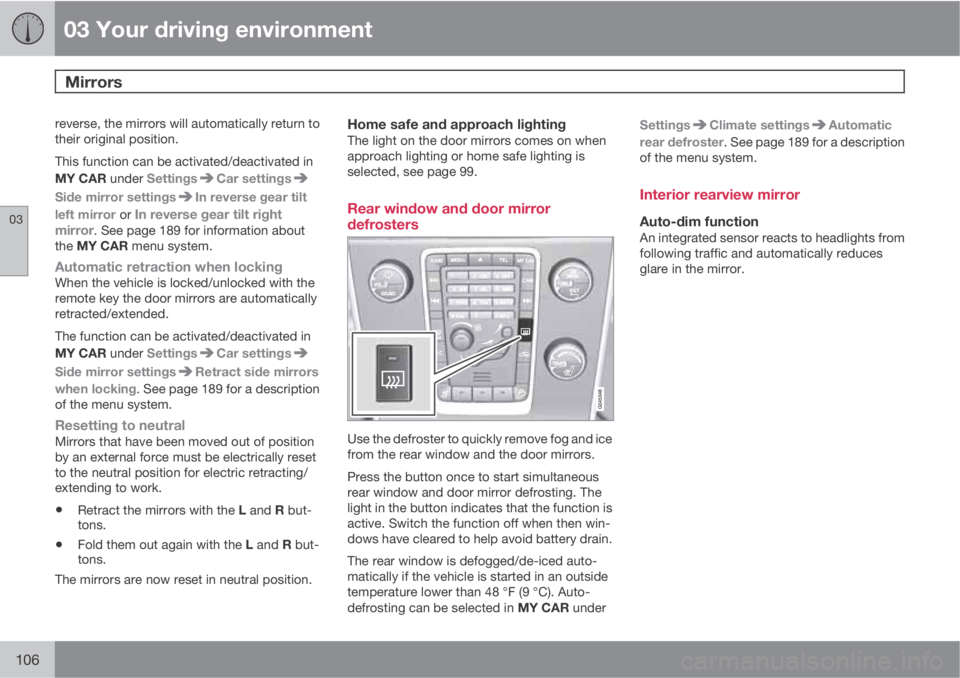
Rear window and door mirror
defrosters
Use the defroster to quickly remove fog and ice
from the rear window and the door mirrors.
Press the button once to start simultaneous
rear window and door mirror defrosting. The
light in the button indicates that the function is
active. Switch the function off when then win-
dows have cleared to help avoid battery drain.
The rear window is defogged/de-iced auto-
matically if the vehicle is started in an outside
temperature lower than 48 °F (9 °C). Auto-
defrosting can be selected in MY CAR underSettings
Climate settingsAutomatic
rear defroster. See page 189 for a description
of the menu system.
Interior rearview mirror
Auto-dim functionAn integrated sensor reacts to headlights from
following traffic and automatically reduces
glare in the mirror.
Page 109 of 382
03 Your driving environment
Compass*
03
* Option/accessory, for more information, see Introduction.107 Operation
G029737
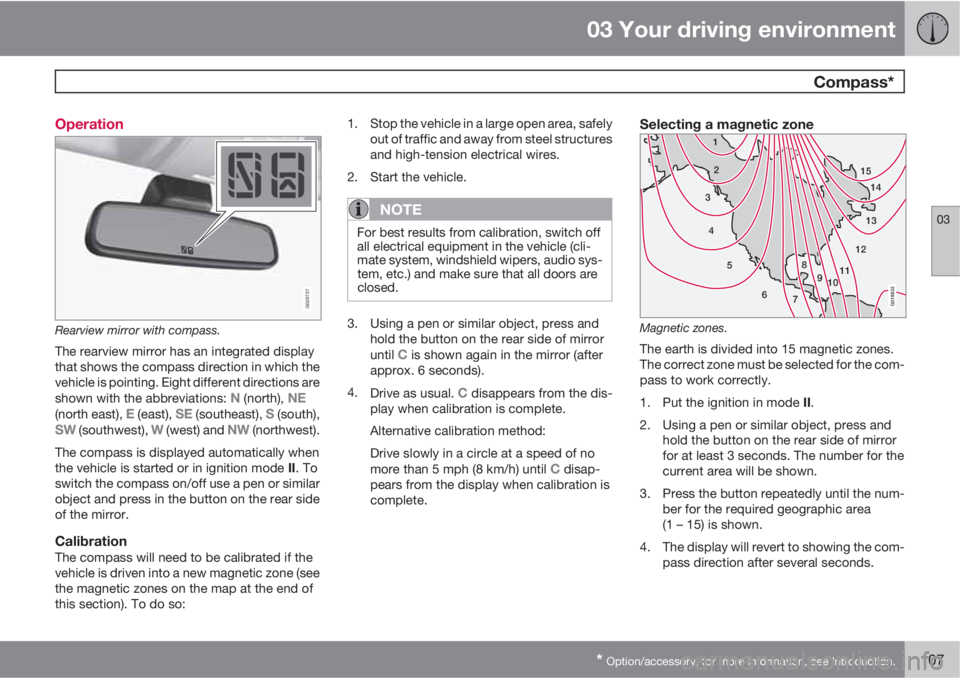
Rearview mirror with compass.
The rearview mirror has an integrated display
that shows the compass direction in which the
vehicle is pointing. Eight different directions are
shown with the abbreviations:
N (north), NE(north east), E (east), SE (southeast), S (south),SW (southwest), W (west) and NW (northwest).
The compass is displayed automatically when
the vehicle is started or in ignition mode II. To
switch the compass on/off use a pen or similar
object and press in the button on the rear side
of the mirror.
CalibrationThe compass will need to be calibrated if the
vehicle is driven into a new magnetic zone (see
the magnetic zones on the map at the end of
this section). To do so:1. Stop the vehicle in a large open area, safely
out of traffic and away from steel structures
and high-tension electrical wires.
2. Start the vehicle.
NOTE
For best results from calibration, switch off
all electrical equipment in the vehicle (cli-
mate system, windshield wipers, audio sys-
tem, etc.) and make sure that all doors are
closed.
3. Using a pen or similar object, press and
hold the button on the rear side of mirror
until
C is shown again in the mirror (after
approx. 6 seconds).
4.
Drive as usual.
C disappears from the dis-
play when calibration is complete.
Alternative calibration method:
Drive slowly in a circle at a speed of no
more than 5 mph (8 km/h) until
C disap-
pears from the display when calibration is
complete.
Selecting a magnetic zone
15
14
13
12
11
9 8
7 6 5 4 32 1
10
G018632
Magnetic zones.
The earth is divided into 15 magnetic zones.
The correct zone must be selected for the com-
pass to work correctly.
1.
Put the ignition in mode II.
2. Using a pen or similar object, press and
hold the button on the rear side of mirror
for at least 3 seconds. The number for the
current area will be shown.
3. Press the button repeatedly until the num-
ber for the required geographic area
(1 – 15) is shown.
4. The display will revert to showing the com-
pass direction after several seconds.
Page 115 of 382
03 Your driving environment
Starting the engine
03
* Option/accessory, for more information, see Introduction.113 Start
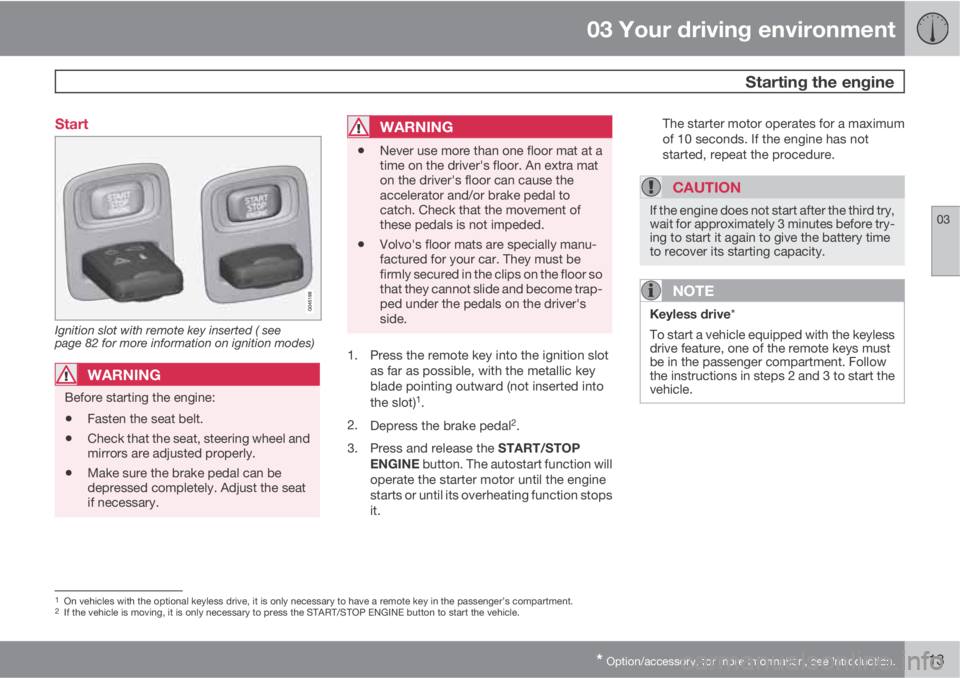
Ignition slot with remote key inserted ( see
page 82 for more information on ignition modes)
WARNING
Before starting the engine:
•Fasten the seat belt.
•Check that the seat, steering wheel and
mirrors are adjusted properly.
•Make sure the brake pedal can be
depressed completely. Adjust the seat
if necessary.
WARNING
•Never use more than one floor mat at a
time on the driver's floor. An extra mat
on the driver's floor can cause the
accelerator and/or brake pedal to
catch. Check that the movement of
these pedals is not impeded.
•Volvo's floor mats are specially manu-
factured for your car. They must be
firmly secured in the clips on the floor so
that they cannot slide and become trap-
ped under the pedals on the driver's
side.
1. Press the remote key into the ignition slot
as far as possible, with the metallic key
blade pointing outward (not inserted into
the slot)
1.
2.
Depress the brake pedal
2.
3.
Press and release the START/STOP
ENGINE button. The autostart function will
operate the starter motor until the engine
starts or until its overheating function stops
it.The starter motor operates for a maximum
of 10 seconds. If the engine has not
started, repeat the procedure.
CAUTION
If the engine does not start after the third try,
wait for approximately 3 minutes before try-
ing to start it again to give the battery time
to recover its starting capacity.
NOTE
Keyless drive*
To start a vehicle equipped with the keyless
drive feature, one of the remote keys must
be in the passenger compartment. Follow
the instructions in steps 2 and 3 to start the
vehicle.
1On vehicles with the optional keyless drive, it is only necessary to have a remote key in the passenger’s compartment.2If the vehicle is moving, it is only necessary to press the START/STOP ENGINE button to start the vehicle.
Page 117 of 382
03 Your driving environment
Starting the engine
03
* Option/accessory, for more information, see Introduction.115 Engine Remote Start (ERS)*
IntroductionERS is a feature that makes it possible to
remotely start the engine to cool or heat the
passenger compartment before driving.
The climate control system will start using the
same settings as when the engine was
switched off.
When the engine is started using ERS, it will run
for a maximum of 15 minutes before automat-
ically switching off again. After 2 ERS starts,
the engine must be started in the normal way
before ERS can be used again.
NOTE
Always adhere to applicable State, Province
and or Local laws regarding engine idling
when using ERS.
WARNING
Keep the following in mind before using ERS
•The vehicle should be in view.
•The vehicle should be unoccupied.
•The vehicle must not be parked indoors
or in an enclosed area. Exhaust fumes
are harmful to the health.
Using ERS
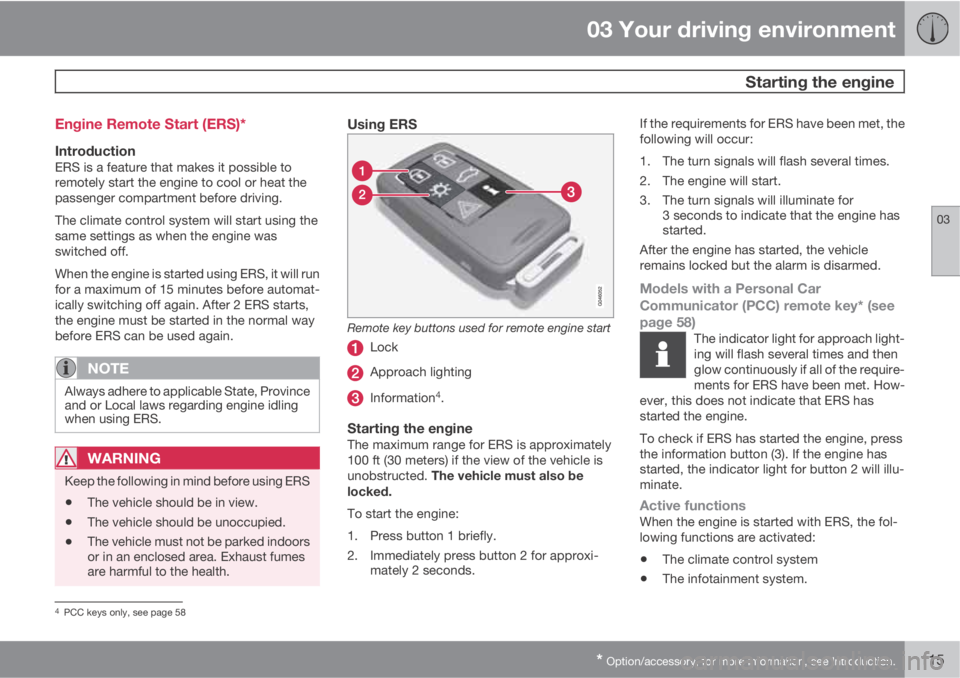
Remote key buttons used for remote engine start
Lock
Approach lighting
Information4.
Starting the engineThe maximum range for ERS is approximately
100 ft (30 meters) if the view of the vehicle is
unobstructed. The vehicle must also be
locked.
To start the engine:
1. Press button 1 briefly.
2. Immediately press button 2 for approxi-
mately 2 seconds.If the requirements for ERS have been met, the
following will occur:
1. The turn signals will flash several times.
2. The engine will start.
3. The turn signals will illuminate for
3 seconds to indicate that the engine has
started.
After the engine has started, the vehicle
remains locked but the alarm is disarmed.
Models with a Personal Car
Communicator (PCC) remote key* (see
page 58)
The indicator light for approach light-
ing will flash several times and then
glow continuously if all of the require-
ments for ERS have been met. How-
ever, this does not indicate that ERS has
started the engine.
To check if ERS has started the engine, press
the information button (3). If the engine has
started, the indicator light for button 2 will illu-
minate.
Active functionsWhen the engine is started with ERS, the fol-
lowing functions are activated:
•The climate control system
•The infotainment system.
4PCC keys only, see page 58
Page 118 of 382
03 Your driving environment
Starting the engine
03
116
Deactivated functionsWhen the engine is started with ERS, the fol-
lowing functions are deactivated:
•Headlights
•Parking lights
•License plate lights
•Windshield wipers
Switching off an engine started with ERSAny of the following will switch off the engine if
it has been started with ERS:
•Pressing the lock button (1) on the remote
key
•Unlocking the vehicle
•Opening a door
•Depressing the throttle or brake pedal
•Moving the gear selector from the P posi-
tion
•If there are less than approx. 2.5 gallons
(10 liters) of fuel in the tank
•More than 15 minutes have elapsed.
If the engine has been started with ERS and
switches off, the turn signals will illuminate for
3 seconds.
Message in the instrument panel displayIf ERS is interrupted, a text message will be
displayed in the instrument panel.
Switching off the engine
With the engine running, press the START/
STOP ENGINE button.
If the gear selector is not in the P position or if
the vehicle is moving, press the START/STOP
ENGINE button twice or press and hold it in
until the engine switches off.
Jump starting
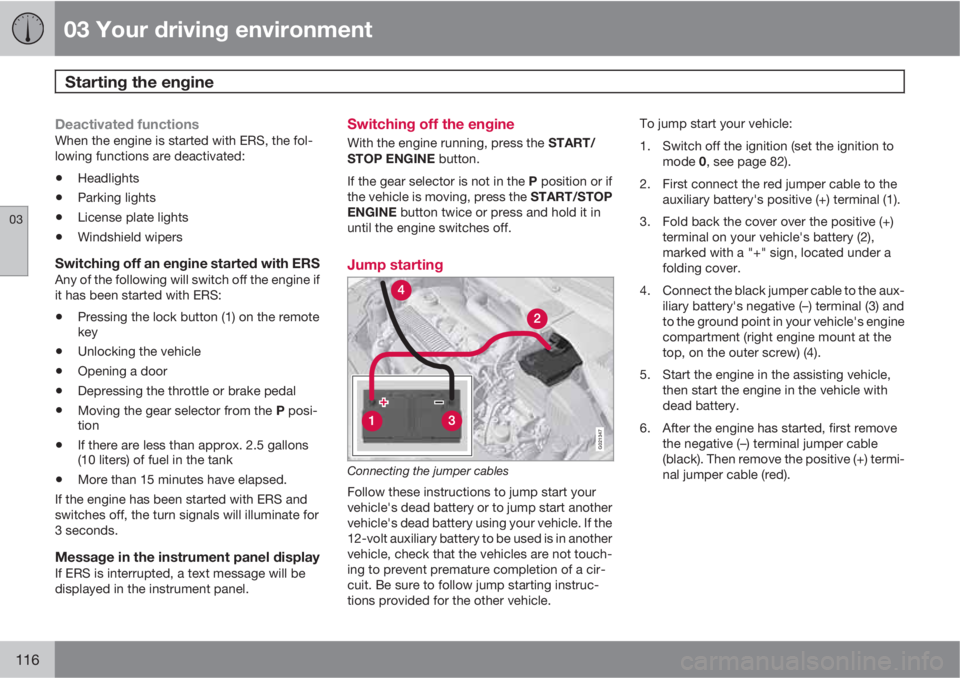
G021347
Connecting the jumper cables
Follow these instructions to jump start your
vehicle's dead battery or to jump start another
vehicle's dead battery using your vehicle. If the
12-volt auxiliary battery to be used is in another
vehicle, check that the vehicles are not touch-
ing to prevent premature completion of a cir-
cuit. Be sure to follow jump starting instruc-
tions provided for the other vehicle.To jump start your vehicle:
1. Switch off the ignition (set the ignition to
mode 0, see page 82).
2. First connect the red jumper cable to the
auxiliary battery's positive (+) terminal (1).
3. Fold back the cover over the positive (+)
terminal on your vehicle's battery (2),
marked with a "+" sign, located under a
folding cover.
4. Connect the black jumper cable to the aux-
iliary battery's negative (–) terminal (3) and
to the ground point in your vehicle's engine
compartment (right engine mount at the
top, on the outer screw) (4).
5. Start the engine in the assisting vehicle,
then start the engine in the vehicle with
dead battery.
6. After the engine has started, first remove
the negative (–) terminal jumper cable
(black). Then remove the positive (+) termi-
nal jumper cable (red).
Page 120 of 382
03 Your driving environment
Transmission
03
118
Automatic transmission
G021351
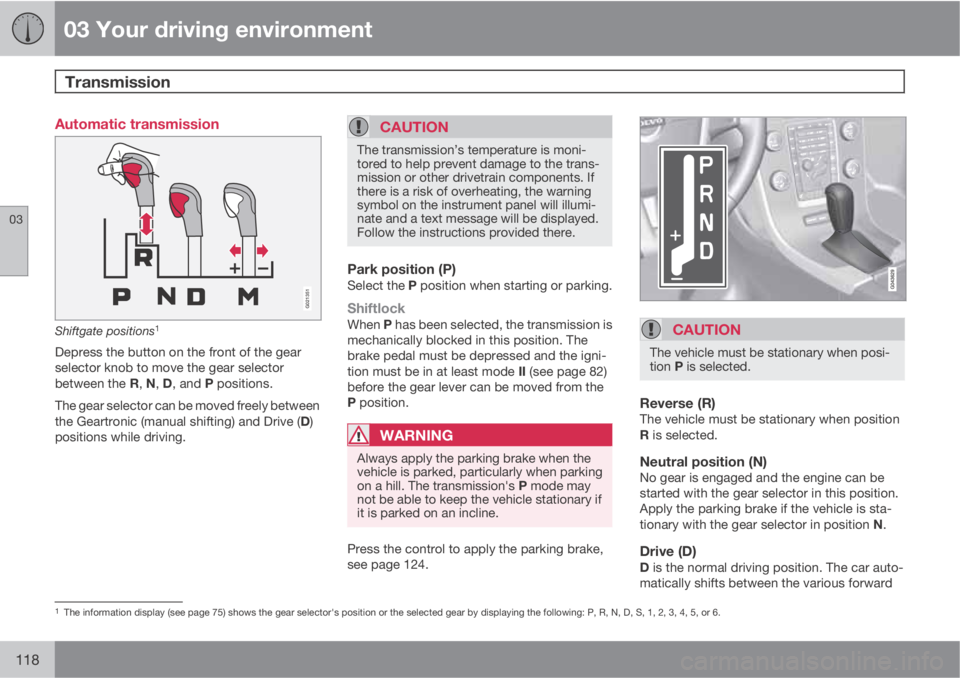
Shiftgate positions1
Depress the button on the front of the gear
selector knob to move the gear selector
between the R, N, D, and P positions.
The gear selector can be moved freely between
the Geartronic (manual shifting) and Drive (D)
positions while driving.
CAUTION
The transmission’s temperature is moni-
tored to help prevent damage to the trans-
mission or other drivetrain components. If
there is a risk of overheating, the warning
symbol on the instrument panel will illumi-
nate and a text message will be displayed.
Follow the instructions provided there.
Park position (P)Select the P position when starting or parking.
ShiftlockWhen P has been selected, the transmission is
mechanically blocked in this position. The
brake pedal must be depressed and the igni-
tion must be in at least mode II (see page 82)
before the gear lever can be moved from the
P position.
WARNING
Always apply the parking brake when the
vehicle is parked, particularly when parking
on a hill. The transmission's P mode may
not be able to keep the vehicle stationary if
it is parked on an incline.
Press the control to apply the parking brake,
see page 124.
CAUTION
The vehicle must be stationary when posi-
tion P is selected.
Reverse (R)The vehicle must be stationary when position
R is selected.
Neutral position (N)No gear is engaged and the engine can be
started with the gear selector in this position.
Apply the parking brake if the vehicle is sta-
tionary with the gear selector in position N.
Drive (D)D is the normal driving position. The car auto-
matically shifts between the various forward
1The information display (see page 75) shows the gear selector's position or the selected gear by displaying the following: P, R, N, D, S, 1, 2, 3, 4, 5, or 6.
Page 127 of 382
03 Your driving environment
Parking brake
03
125
Releasing the electric parking brake
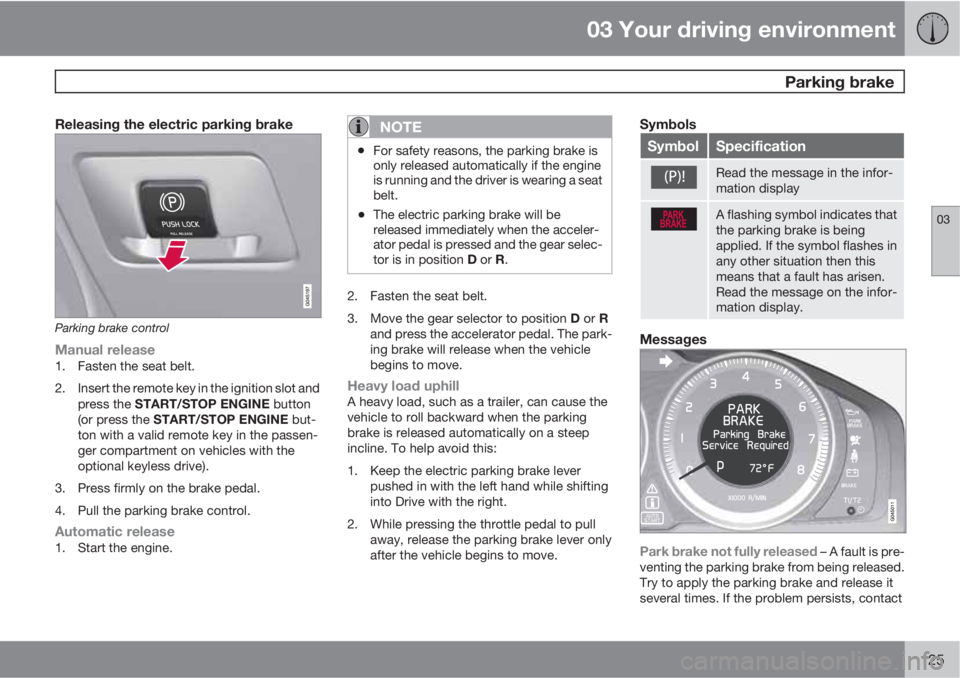
Parking brake control
Manual release1. Fasten the seat belt.
2. Insert the remote key in the ignition slot and
press the START/STOP ENGINE button
(or press the START/STOP ENGINE but-
ton with a valid remote key in the passen-
ger compartment on vehicles with the
optional keyless drive).
3. Press firmly on the brake pedal.
4. Pull the parking brake control.
Automatic release1. Start the engine.
NOTE
•For safety reasons, the parking brake is
only released automatically if the engine
is running and the driver is wearing a seat
belt.
•The electric parking brake will be
released immediately when the acceler-
ator pedal is pressed and the gear selec-
tor is in position D or R.
2. Fasten the seat belt.
3.
Move the gear selector to position D or R
and press the accelerator pedal. The park-
ing brake will release when the vehicle
begins to move.
Heavy load uphillA heavy load, such as a trailer, can cause the
vehicle to roll backward when the parking
brake is released automatically on a steep
incline. To help avoid this:
1. Keep the electric parking brake lever
pushed in with the left hand while shifting
into Drive with the right.
2. While pressing the throttle pedal to pull
away, release the parking brake lever only
after the vehicle begins to move.
Symbols
SymbolSpecification
Read the message in the infor-
mation display
A flashing symbol indicates that
the parking brake is being
applied. If the symbol flashes in
any other situation then this
means that a fault has arisen.
Read the message on the infor-
mation display.
Messages
Park brake not fully released – A fault is pre-
venting the parking brake from being released.
Try to apply the parking brake and release it
several times. If the problem persists, contact
Page 134 of 382
04 Driver support
Stability system
04
132* Option/accessory, for more information, see Introduction.
Introduction
The Dynamic Stability and Traction Control
system (DSTC) consists of a number of func-
tions designed to help reduce wheel spin,
counteract skidding, and to generally help
improve directional stability.
CAUTION
A pulsating sound will be audible when the
system is actively operating and is normal.
Traction control (TC)This function is designed to help reduce wheel
spin by transferring power from a drive wheel
that begins to lose traction to the wheel on the
opposite side of the vehicle (on the same axle).
TC is most active at low speeds.
This is one of DSTC's permanent functions and
cannot be switched off.
Active Yaw Control (AYC)This function helps maintain directional stabil-
ity, for example when cornering, by braking
one or more of the wheels if the vehicle shows
a tendency to skid or slide laterally.This is one of DSTC's permanent functions and
cannot be switched off.
Spin control (SC)The spin control function is designed to help
prevent the drive wheels from spinning while
the vehicle is accelerating.
Trailer Stability Assist – TSA*Trailer Stability Assist helps stabilize a vehicle
that is towing a trailer when the vehicle and
trailer have begun to sway. See page 286 for
more information.
This system is automatically deactivated if the
driver selects Sport mode.
Operation
Sport modeThe stability system is always activated and
cannot be switched off.
However, the driver can select Sport mode,
which offers more active driving characteris-
tics. In this mode, the engine management sys-
tem monitors movement of the accelerator
pedal and steering wheel for sportier driving byallowing more lateral movement of the rear
wheels before DSTC is activated.
Under certain circumstances, such as when
driving with snow chains, or driving in deep
snow or loose sand, it may be advisable to
temporarily use Sport mode for maximum
tractive force.
If the driver releases pressure on the acceler-
ator pedal, DSTC will also activate to help sta-
bilize the vehicle.
To switch to Sport mode:
1.
Press the My Car button in the center con-
sole control panel and select My XC70
DSTC in the menu.
2. Unselect the symbol and leave the menu
by pressing EXIT.
>
This puts DSTC in Sport mode.
Sport mode remains active until the driver
switches it off in the menu or until the engine is
switched off. DSTC will return to normal mode
when the engine is restarted.
Page 143 of 382
04 Driver support
Adaptive Cruise Control (ACC)*
04
* Option/accessory, for more information, see Introduction.141
When the symbol on the
left side of the display
changes to
, the radar sen-
sor has detected another
vehicle ahead. The distance
to a vehicle ahead is only
regulated when this symbol (
) is illumi-
nated.
Changing the set speedAfter a speed has been set, it can be increased
or decreased by using the
or buttons.
Each time one of these buttons is pressed, the
vehicle's speed changes by 5 mph
(approximately 8 km/h).
When the system is in active mode, the
but-
ton has the same function as
, but results in
a smaller increase in speed.
NOTE
•If one of the Adaptive Cruise Control
buttons is pressed for more than
approximately one minute, ACC will be
deactivated. The engine must then be
switched off and restarted to reset ACC.
•In some situations Adaptive Cruise
Control cannot be put in active mode.
Cruise control Unavailable is shown
in the display, see page 147.
Setting a time intervalThe set time interval to vehicles ahead can be
increased by pressing
and decreased by
pressing
. The current time interval is shown
briefly in the display following adjustment.
Different time intervals can be
selected and are shown in the
display as 1–5 horizontal bars.
The greater the number of
bars, the longer the time inter-
val. One bar represents a time
interval of approximately
1 second; 5 bars is approximately 3 seconds.
At low speeds, when the distance to the vehicle
ahead is short, ACC increases the time interval
slightly. In order to follow the vehicle ahead as
smoothly as possible, ACC allows the time
interval to vary considerably in certain situa-
tions.
WARNING
•Only use a time interval that is suitable
in current traffic conditions.
•A short time interval gives the driver lim-
ited reaction time if an unexpected sit-
uation occurs in traffic.
The number of bars indicating the selected
time interval are shown while the setting is
being made and for several seconds afterward.
A smaller version of the symbol is then shown
to the right in the display. The same symbol is
also displayed when Distance Alert is in active
mode, see page 149 .
Standby mode (temporary deactivation)
Press to temporarily deactivate cruise con-
trol (put it in standby mode). The set speed, for
example 55 mph, is then shown in parenthe-
ses.
The previously set speed and time interval are
resumed by pressing
.
WARNING
There may be a significant increase in speed
after the button has been pressed.
When ACC is in active mode, the vehicle’s
speed increases by approximately 1 mph
(1 km/h) each additional time
is pressed.